1
Magnet
Sweep Path
Zip-Ties
Bladed
Spoke
Magnet
Alignment
Mark
OR
OP E N
A23
OP E N
OR
A23
O PEN
A23
C LO SE
C LO SE
2
W
Bladed Spoke
Magnet
Fork Leg
CLO SE
Spoke
2
2
Wireless Speed
Transmitter
Spacer Tip
When the Ride Time (the elapsed time for Service
Timer) or the elapsed distance begins to flash, press
2 to reset to zero;
OR press 1 to reserve the digits, and advance to the
next Setup Mode.
Important:
In the Initial Setup, the elapsed time [distance] for
Service Timer doesn’t exist.
MOUNTING BRACKET & HEAD UNIT (RT255/255L/277/288/288L)
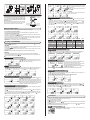
Attach Mounting Bracket & Bracket Rubber Pad to the handlebar on the
“Sensor/Transmitter side” using the Zip-Ties provide. Adjust its position
to your liking and tighten the Zip-Ties. Note: Be sure to leave enough
slack in the wire to accommodate the movement of fork and
handlebars. (See Fig. A)
Slide the Head Unit into the Mounting Bracket as shown until it clicks
into position. Remove by pressing in the two locking tabs as shown.
Secure wire with tape supplied and by winding it around cables.
WHEEL/ TIRE SIZE
Head Unit
Locking Tab
UNLOCK
Locking Tab
UNLOCK
Wired Mounting Bracket
INSTALLATION TESTS
Once installation is complete, the computer should be tested to make sure it is working properly.
To test the Speed Sensor/Transmitter installation:
Pick up the front of the bicycle and spin the front wheel. The LCD should display a speed- reading within 2-3 seconds.
To test the Cadence Sensor installation (RT277):
Advance the LCD to the CAD Mode using 1 or 2 . Turn the crank backwards or ride the bicycle a short distance. After a
few revolutions, a cadence reading should display on the LCD.
1
1
2
1
2
1
2
If there is no speed-reading or cadence reading, check the alignment and spacing between the magnet and
sensor/transmitter. Make sure that the Head Unit is completely locked into position. If these checks do not solve the
problem, talk to an Authorized Vetta’s Retailer or connect to www.vetta.com.
Important: Make sure the magnets locking screw and all Zip-Ties are properly tightened.
TIRE SIZE
700c x 38mm
700c x 35mm
700c x 32mm
700c x 30mm
700c x 28mm
700c x 25mm
700c x 23mm
SETUP & PROGRAMMING
In Setup, Button 1 is used to select or set a value and to advance to the next digit or Mode. Button 2 is used to switch
between settings and to increase values.
Initial Setup
All RT200 series computers are programmed to enter the Initial Setup Mode after new battery replacement or all clear
total reset (press 1 , 2 & 3 simultaneously for 3 seconds in any Mode).
In the Initial Setup, riders can program the Basic Settings for the computer, the content of settings are same as NOM
Setup for Basic Setting.
Important: The computer CANNOT exit the Initial Setup Mode until all the Basic Settings are finished.
CIRC
2180
2168
2155
2145
2136
2124
2105
TIRE SIZE
700c x 20mm
700c Tubular
650c x 23mm
650c x 20mm
27” x 1.25”
27” x 1.125”
26” x 2.3”
ODOMETER
CIRC
2074
2130
1990
1945
2161
2155
2135
After completed the Initial Setup, riders can change any values or correct any errors by re-entering the NOM Setup.
To enter the NOM Setup Mode press & hold 1 & 2 simultaneously when the lowest screen is in the CLK Mode. Press
3 any time to exit and advance to the previous Mode.
CIRC
2115
2095
2074
2055
2035
1985
1953
TIRE SIZE
26” x 1.0”
24” x 1.9/1.95”
20” x 1.25”
16” x 2.0”
16” x 1.95”
16” x 1.5”
CIRC
1913
1916
1618
1253
1257
1206
RT 255|255L|277|288|288L
2
1
1
RT 255|255L|277|288|288L
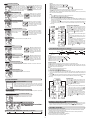
Press 2 to toggle between flashing 12 and 24 hour formats. Press
1 to select your desired format (without PM icon implies AM in 12
hour format) and advance to Time setting.
2
AUTO START
RT288|288L
When Auto Start is On: The computer exit the Sleep Mode as soon
as it receives the speed signal or any button is pressed.
When Auto Start is Off: To conserve battery run time, the computer
will only exit the Sleep Mode when any button is pressed.
Press 2 to toggle between flashing OFF or ON. Press 1 to select
and advance to next Setup Mode.
2
TIME
TIRE SIZE
26” x 2.25”
26” x 2.1”
26” x 2.0”
26” x 1.9/1.95”
26” x 1.75”
26” x 1.5”
26” x 1.25”
Press 2 to scroll the flashing digit to the desired number. Press 1 to select this number and advance to next digit. Repeat
this procedure until all five digits are selected. Press 1 to advance the next Setup Mode. (Maximum setting: 99999)
NOM Setup
12/24 CLOCK
RT 255|255L|277|288|288L
Press 2 to toggle between flashing circ (circumference) and tire (tire type). Press 1 to select the desired and advance
the settings.
If pre-set to circ (see Table of Tire Size Vs Circ), press 2 to scroll the flashing digit to the desired number. Press 1 to
select this number and advance to next digit. Repeat this procedure until all four digits are selected.
If pre-set to tire, press 2 to scroll the flashing 700c, 650c, 27in, 26in, 24in, 20in or 16in. Press 1 to select and advance
to next setting to complete the Tire Size. Again, press 2 to scroll and press 1 to finalize the Tire Size and advance to
the next Setup Mode.
RT 255|255L|277|288|288L
Press 2 to advance hour digits to correct hour (hold button for rapid advance). Press 1 to select and advance to minute
setting. Press 2 to advance minute digits to correct minute. Press 1 to select and advance to the next Setup Mode.
2
1
Note: The icon Auto in the Normal Display Modes indicates the programmable Auto Start has been chosen.
F or LAP
2
RT 255|255L|277|288|288L
Press 2 to scroll the flashing F (Freeze Frame Memory), LAP (Lap Data) and OFF (both of Freeze Frame Memory and
Lap). Press 1 to select and advance to next Setup Mode.
Note: The icon
or
in the Normal Display Modes indicates F or Lap has been chosen.
SPEED/ DISTANCE UNIT
RT 255|255L|277|288|288L
2
SERVICE TIMER
2
Press 2 to toggle between flashing M/hr and KM/hr. Press 1 to select
and advance to the next Setup Mode.
Note: Speed/Distance Unit cannot be changed if there have been ride
data on screens. If you want to change the Unit, please make sure you
had cleared all ride data before entering the NOM Setup Mode. This
restriction does not apply to the Initial Setup after the 1st time battery
installation, new battery replacement or All Clear Total Reset.
SMARTLITE
RT 255|255L|277|288|288L
2
2
2
1
1
FUNCTIONS
1
The types and number of Modes of the upper screen are same as the lower screen. Depending on users’ habits, they can
decide where to put the desired Modes either on the upper or lower screen.
Press 1 to change the Upper Screen Modes.
Press 2 to change the Lower Screen Modes.
To enter the NOM Setup Mode, press & hold 1 & 2 simultaneously for 2 seconds when the lowest screen is in the CLK Mode,
Press 3 at anytime to exit.
To reset all ride data (DST, AVG SPD, MAX SPD, RT, AVG/CAD*, MAX/CAD*) to zero, press & hold 1 and 2 simultaneously for 2
seconds when the lowest screen is in the DST Mode. (* RT277 Only)
2
1
RT 255L|288L
SmartLite will turn on the night light for 3 seconds between pre-set intervals when any button is pressed. Press 2 to toggle
between OFF and ON. When SmartLite is set to OFF, press 1 to exit the Setup Mode. When SmartLite is set to ON, press 1 to
select and advance the hour setting. Press 2 to advance the hour digits to desired hour [range of Fr (from): 1:00 PM to 11:00 PM;
range of To (to): 1:00 AM to 11:00 AM]. Press 1 to select and exit the Setup mode.
Service Timer could be programmed with a selected number of ride time (hours or days) or distance as the interval for
servicing the bicycle or any component on it, such as a front or rear shock.
The default settings “0000” means the Service Timer is turned off.
Press 2 to scroll flashing hr (hour), day or dst (distance) as the Service Timer unit. Press 1 to select the desired Service
Timer unit.
When the desired Service Timer unit has been chosen, press 2 to scroll the flashing digit to the desired number. Press
1 to select this number and advance to next digit. Repeat this procedure until all digits are selected. Press 1 to advance
the next Setup Mode. ( Maximum settings: hour / day / distance = 1999 / 999 / 9999 )
1
2
1
SPD
2
RT 255|255L|277|288|288L
Speed is shown at all times on middle display. It is accurate to 0.1 M/hr or KM/hr and the
maximum reading is 139.9 M/hr or 199.9 KM/hr.
1
2
1
2


![RT200 Japanese Manual [更新済み]](http://vs1.manualzilla.com/store/data/006597203_2-33d330c31da4a7977897f30c0d356024-150x150.png)