1
RT
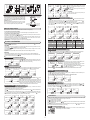
Example
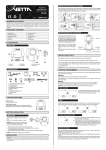
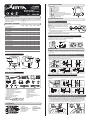
Ride Time of F2: total ride time from point 0 to point 2
Distance of F2: total distance from point 0 to point 2
AVG/MAX Speed: average or maximum speed from point
AVG/MAX Cad: average or maximum cadence from point
RT 255|255L|277|288|288L
Note: When the Ride Time
exceeds 99 hours and 59
minutes, symbol “E” appears
indicating
that
further
measurement is impossible.
RT displays actual, cumulative ride time to 100
hour. [If the time is less than 9:59:59 hours, the
display format will be h:mm:ss, eg. 0:09:59 means 9
minutes and 59 seconds. If the time is longer than
10 hours, the format will be hh:mm without seconds,
eg 11:28 means 11 hours and 28 minutes]
DST
Recording Ride Data
AVG SPD
RT 255|255L|277|288|288L
Note: When the Trip Distance
exceeds 999.9 miles [kilometers],
symbol “E” appears indicating that
further measurement is impossible.
Reading Freeze Frame Memories
Press & hold 3 for 2 seconds in the any Mode to read the
frozen ride data. The recall screens display the most recent
set first. Flashing
indicates it is in the F recall screens. The
middle digits flips between the F# & the recorded speed for
every 2 seconds. Press 2 momentarily to scroll the F ride
data screens and press 1 momentarily to scroll the F#.
Note: When the Ride Time exceeds 99
hours and 59 minutes, or the Trip Distance
exceeds 999.9 miles [kilometers], symbol
“E” appears indicating that further
measurement is impossible.
1
RT/DST
2
Note:
1. If there is no frozen screen recorded, the middle digits will
show “--”.
2. To reset the Freeze Frame Memoires to zero, press &
hold 1 & 2 simultaneously when the lowest screen is in
the DST Mode.
3. If no button is pressed for 1 minute the recall screen will
return to the previous Normal Mode automatically.
4. Press & hold 2 for 2 seconds to switch the F ride data
screen to Lap screens (if there are 2 or more than 2 sets
of frozen ride data). Flashing
indicates it is in the
LAP recall screens. Press & hold 2 again to change
back. Press 3 to exit.
1
2
CAD
1
RT277
AVG/MAX SPD
Cadence measures revolutions per minute (RPM) of the crank.
AVG CAD
RT277
RT277
LAP FUNCTION (RT255/255L/277/288/288L)
Lap 1
Start
0
RT=0:00:00
DST=0.0 Km
Note: When the Ride Time exceeds
99 hours and 59 minutes or the Trip
Distance exceeds 999.9 miles
[kilometers], symbol “E” appears
indicating that further measurement
is impossible.
Maximum Cadence is updated
once per second based on current
Cadence readings.
ODO
2
AVG CAD/MAX CAD (RT277 only)
Note: When the Ride Time exceeds
99 hours and 59 minutes or the Trip
Distance exceeds 999.9 miles
[kilometers], symbol “E” appears
indicating that further measurement
is impossible.
Average Cadence is calculated
by dividing total revolutions of
the crank by the total ride time.
MAX CAD
2
The icon
indicates the Multi Freeze Frame Memories has been chosen.
Freeze Frames can only be recorded when the wheels turn.
It will not record new memory if 3 is pressed consecutively within 5 seconds.
New set of Freeze Frame cannot be recorded when in the Recall Mode.
Up to 11 (or 16 for RT255L/288L) sets of Freeze Frame (RT/DST, AVG SPD/MAX SPD, AVG CAD/MAX CAD*) can
be stored. The computer will stop record new memory if it is more than 11/16 and the middle screen will show “F” with
any further press of the button 3 .
6. If the Ride Time is longer than 99 hours and 59 minutes or the Distance is longer than 999.9 KM or Miles, the
computer will stop recording new memory. The middle screen will show “E” with any further press of button 3 .
(* RT277 Only)
RT 255|255L|277|288|288L
Maximum Speed is accurate
to 0.1 M/hr or KM/hr.
2
1.
2.
3.
4.
5.
flip
MAX SPD
to point
to point
Note:
Note: When the Ride Time exceeds 99
hours and 59 minutes, or the Trip Distance
exceeds 999.9 miles [kilometers], symbol
“E” appears indicating that further
measurement is impossible.
Average Speed is accurate to
0.1 M/hr or KM/hr.
0
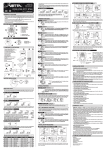
Press 3 (if it has been pre-programmed to Freeze Frame Memories) at any time in any Normal Modes to record.
When recording the Frames, the icon F will flash and the F# will display on middle screen.
After the recording, screens of RT/DST, AVG SPD / MAX SPD, AVG CAD / MAX CAD* will turn on in sequence, then flip
back to the previous Normal Display Mode.
RT 255|255L|277|288|288L
DST displays trip distance of
current ride to a maximum of 999.9
miles or kilometers. It is accurate to
0.1 Mile or KM.
0
1
Lap 2
2
Press Button 3 at 1
3
Press Button 3 at 2
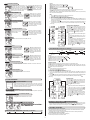
Example
Lap Time of Lap 2: total ride time between point 2 and point 3
Lap Distance of Lap 2: total distance between point 2 and point
AVG Speed: average speed between point 2 and point 3
AVG Cad: average cadence between point 2 and point 3
Split Time: total time from point 0 to point 3
...
Press Button 3 at 3
Lap 15
15
Press Button 3 at 15
3
Recording Lap Data
RT 255|255L|277|288|288L
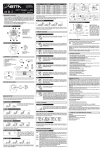
Press 3 (if it has been pre-programmed to Lap function) at any time in any Normal Modes to record.
When recording the laps, the icon
will flash and Lap # will display on middle screen (the starting point of Lap 1 will be “Str”).
After storing the data, screens of LAP TIME/AVG SPD, LAP TIME / AVG CAD*, SPLIT TIME / LAP DST will turn on in sequence,
then flip back to the previous Normal Display Mode.
The odometer displays distance to 99999 Miles or Kilometers. It is accurate to 1.0 Mile or KM.
Note:
CLK
1.
2.
3.
4.
5.
The icon LAP indicates the Lap function has been chosen.
Laps can only be recorded when the wheels turn.
It will not record a new lap if 3 is pressed consecutively within 5 seconds.
New Lap cannot be recorded when in the Recall Mode.
Up to 10 (or 15 for RT255L/288L) sets of Lap data (LAP TIME, AVG SPD, AVG CAD*, SPLIT TIME & LAP DST) can be
stored. The computer will stop record new lap if it is more than 10. The middle screen will show “F” with any further press of
the button 3 .
6. If the Lap Time or Split Time is longer than 99 hours and 59 minutes or the Lap Distance is longer than 999.9 KM or Miles,
the computer will stop recording new lap. The middle screen will show “E” with any further press of the button 3 .
(* RT277 Only)
RT 255|255L|277|288|288L
Clock is displayed in user-selected 12 or 24 hour formats.
Reading Lap Data
OTHER FEATURES
SLEEP MODE
RT 255|255L|277|288|288L
1
Computer enters Sleep Mode after 5 minutes without input from any buttons or wheel, and
displays the clock only. Computer exits Sleep Mode and returns to the screen last displayed
when any button is pressed or the wheel turns. (if the Auto Start is pre-set to OFF, RT288/288L
can only exit the Sleep Mode when any button is pressed)
2
LAP TIME /AVG SPD
1
SMARTLTE
Press & hold 3 for 2 seconds in the any Mode to read the
frozen ride data. The Lap recall screens display the most
recent set first. Flashing
indicates it is in the Lap recall
screens. Press 2 momentarily to scroll the Lap data screens
and press 1 momentarily to scroll the Lap #.
2
RT 255L|288L
SmartLite will activate the NiteLite for 3 seconds between the user-defined period when any button is pressed. (see
Section of SmartLite Setup)
SERVICE TIMER(
Blinking “
)
1
LAP TIME /AVG CAD
(RT277 only)
2
RT 255|255L|277|288|288L
” alerts riders when the Service Time is reached.
Note:
1. If there is no lap data recorded, the middle digits will show
“--”.
2. To reset the Lap data to zero, press & hold 1 & 2
simultaneously when the lowest screen is in the DST Mode.
3. If no button is pressed for 1 minute the recall screen will
return to the previous Normal Mode automatically.
4. Press & hold 2 for 2 seconds to switch the Lap screens
to F ride data screens (if there are 2 or more than 2 sets
of frozen ride data.) Flashing
indicates it is in the F
recall screens. Press & hold 2 again to change back.
Press 3 to exit.
SPLIT TIME / LAP DST
ALL CLEAR TOTAL RESET
RT 255|255L|277|288|288L
All data entered in Setup Modes, as well as ride data (including the Multi Freeze Frame Memories and Laps), can be
cleared by performing an All Clear Total Reset. To clear the computer, press 1 , 2 & 3 simultaneously for 3 seconds in
any Mode. The master screen will appear and show all segments, then automatically enter the Initial Setup Mode.
TROUBLE SHOOTING
Current speed-reading is erratic or does not appear.
Check the alignment of the bladed spoke magnet and sensor/transmitter, and the distance between the two components.
Realign the magnet and sensor/transmitter with the spacer.
OR Inspect the wiring for any breaks or kinks. Replace Mounting Bracket and sensor as needed. (RT 255/255L/277)
Incorrect data appears on screen during operation.
Accuracy of the Setup data may be a problem (wheel size setting, etc.).
Review data in System Check mode and revise as needed.
FREEZE FRAME MEMORIES (RT255/255L/277/288/288L)
0
RT=0:00:00
DST=0.0 Km
1
2
Press Button 3 and
Press Button 3 for F2
Store the Ride Data as F1
...
15
Press Button 3 for F15
16
Press Button 3 for F16
3