1
Troubleshooting - 3
Post-repair Calibration
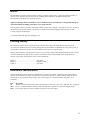
Calibration is required annually and whenever certain components are replaced. If either of the circuit
boards listed below are replaced, the supply must be re-calibrated as described in Appendix B of the User's
Guide.
a.
A1 Control Board
b.
A2 Interface Board
If the Interface board A2 is replaced, the supply must be initialized first (see "Initialization" later in this
chapter) and then be calibrated.
Inhibit Calibration Switch
If "CAL DENIED" appears on the display when calibration is attempted, or if error code 401 occurs when
calibrating over the GPIB, the internal INHIBIT CAL switch has been set. This switch setting prevents
unauthorized or inadvertent power supply calibration. You must reset this switch in order to calibrate the
supply.
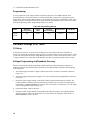
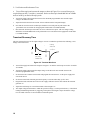
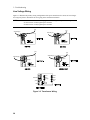
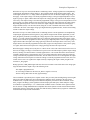
This four-section switch, S201, is located on the A2 Interface board near the GPIB connector. The switch
has 2 functions related to calibration. One is Inhibit Calibration. With this switch set the supply will not
respond to calibration commands, thus providing security against unauthorized calibration. The other
switch allows you to bypass the password in case it is forgotten.
4 3 2 1
ON
S 201
Switch 3
Switch 4
Normal
Off
Off
Clear
Password
Off
On
Inhibit
Calibration
On
Off
Calibration Password
In order to enter the calibration mode, you must use the correct password as described in Appendix B of
the Operating Manual. As shipped from the factory, the number 0 (zero) is the password. If you use an
incorrect password, "OUT OF RANGE" will appear on the display for front panel calibration (or error
code 402 occurs for GPIB calibration) and the calibration mode will not be enabled.
If you have changed the password and have forgotten it, you can set the configuration switch on A2
Interface board to bypass the password. See "Calibration Switch" paragraph above.
33