1
INSTA L LATI ON /SERVI C E MA N UA L
INSTALLATION INSTRUCTIONS
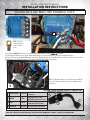
MOTOR KIT OPERATION
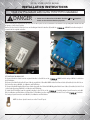
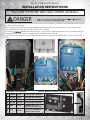
1. Insert and turn vehicle key to Run.
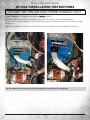
Controller Pre-Drive Test:
2. Move the SilverWolf Power Switch from OFF to RUN or HIGH depending on how much power is required.
Note: The Motor System can be turned On or Off at anytime of operation.
3. ALWAYS look around the vehicle to make sure the area is clear before operating the vehicle!
4. Move the SilverWolf Power Switch to the OFF position when the vehicle is not in use.
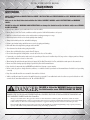
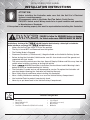
DANGER
CAUTION:
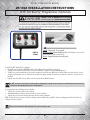
MOTOR
KIT OPERATION All 4 Wheels MUST be off the ground!
FAILURE to follow the WARNINGS below can damage
the Vehicle and/or cause SERIOUS INJURY OR DEATH!
TO READ
the OWNER’S INSTALLATION and SERVICE MANUAL and ALL WARNING
1. Insert andMAKE
turnSURE
vehicle
keyand
toUNDERSTAND
Run.
LABELS with this Motor Kit.
1.2. MoveMove
the Run/Tow Switch to the Run position.
the SilverWolf Power Switch from OFF to RUN or HIGH depending on how much power is required.
Note:Insert
The Motor System and
can be turned
On or Off atKey
anytime of operation.
2.
turn
to ON
3. ALWAYS look around the vehicle to make sure the area is clear before operating the vehicle!
3.
Move
Vehicle’s
FNR
switch to the Forward position.
4. Move the SilverWolf Power Switch to the OFF position when the vehicle is not in use.
•
•
Always proceed with caution. Keep speed low and do not drive faster than conditions permit. The terrain,
conditions and the operator’s skill will determine a safe speed. Avoid sharp turns and do not accelerate quickly
when turning; this can cause the vehicle to slide sideways or skid out of control. Abrupt maneuvers or aggressive
driving can cause a rollover even on flat open areas.
This Motor Kit will increase torque and traction; but this Does Not increase the GVWR (Gross Vehicle Weight
Rating), Cargo capacity or Towing capacity of the Vehicle. Always follow the Vehicle towing and loading
specifications.
*This Label must be placed on the Vehicle in an area that is in view of the Driver and Passenger(s).
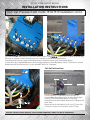
Caution: the F1 and F2 Wires could be reversed do to Vehicle Wiring and may cause the vehicle to
DANGER
move in the opposite direction as shown on the Switch.
©2014 SilverWolf Vehicles Inc. Patents Pending.
Part # PM00501
FAILURE to follow the WARNINGS below can damage
the Vehicle and/or cause SERIOUS INJURY OR DEATH!
MAKE SURE TO READ and UNDERSTAND the OWNER’S INSTALLATION and SERVICE MANUAL and ALL WARNING
LABELS with
this Motoron
Kit.
4.
Step
the Accelerator to test that the Vehicle is operating. Repeat this test with the switch in the
Reverse position.
•
•
Always proceed with caution. Keep speed low and do not drive faster than conditions permit. The terrain,
conditions and the operator’s skill will determine a safe speed. Avoid sharp turns and do not accelerate quickly
when turning; this can cause the vehicle to slide sideways or skid out of control. Abrupt maneuvers or aggressive
driving can cause a rollover even on flat open areas.
This Motor Kit will increase torque and traction; but this Does Not increase the GVWR (Gross Vehicle Weight
Rating), Cargo capacity or Towing capacity of the Vehicle. Always follow the Vehicle towing and loading
specifications.
*This Label must be placed on the Vehicle in an area that is in view of the Driver and Passenger(s).
Part # PM00501
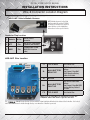
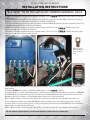
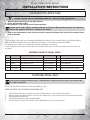
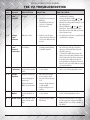
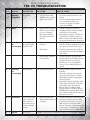
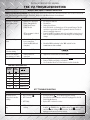
If the Rear Wheels of the vehicle are not running properly during the Pre-Drive Test see the chart below to test the Vehicle Switches.
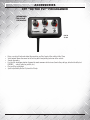
NOTE: On the OTF the LED will flash once when the Key, Forward, Reverse, or Foot Switch is activated and at 100%.
The following test procedures are to show that the Controller is getting the correct signals.
If a OTF Programmer was not purchased the Vehicles Reverse Buzzer will beep (if it is connected) and this can be used for the test
procedures.
©2014 SilverWolf Vehicles Inc. Patents Pending.
CONTROLLER INPUT SIGNAL CHECK
TEST
ACTION
RESULT
YES NO
1
Key Switch
Turn Key Switch to ON
1 Green Flash/ Beep
OK
Replace Key Switch
2
Forward
Move Switch to Forward
1 Green Flash/ Beep
OK
Replace FNR Switch
3
Reverse
Move Switch to Reverse
1 Green Flash/ Beep
OK
Replace FNR Switch
4
Foot Switch
Slowly depress the Accelerator
1 Green Flash/ Beep
OK
Replace Throttle Sensor/ or Throttle
5
100% Throttle
Continue to depress Accelerator to Floor.
1 Green Flash/ Beep
OK
Replace Throttle Sensor/ or Throttle
MOTOR KIT OPERATION
1. Insert and turn vehicle key to Run.
Controller Drive Test:
2. Move the SilverWolf Power Switch from OFF to RUN or HIGH depending on how much power is required.
Note: The Motor System can be turned On or Off at anytime of operation.
3. ALWAYS look around the vehicle to make sure the area is clear before operating the vehicle!
4. Move the SilverWolf Power Switch to the OFF position when the vehicle is not in use.
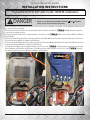
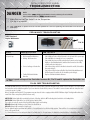
Caution: Before taking the Vehicle for the “Final Run Test” check for any loose wires or parts that could
DANGER
get caught or damaged.
FAILURE to follow the WARNINGS below can damage
the Vehicle and/or cause SERIOUS INJURY OR DEATH!
MAKE SURE TO READ and UNDERSTAND the OWNER’S INSTALLATION and SERVICE MANUAL and ALL WARNING
LABELS with this Motor Kit.
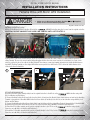
This test will show that the Controller is installed and running correctly.
•
Always proceed with caution. Keep speed low and do not drive faster than conditions permit. The terrain,
conditions and the operator’s skill will determine a safe speed. Avoid sharp turns and do not accelerate quickly
when turning; this can cause the vehicle to slide sideways or skid out of control. Abrupt maneuvers or aggressive
driving can cause a rollover even on flat open areas.
BEFORE YOU RUN THE FINAL TEST COMPLETE THE FOLLOWING STEPS:
•
This Motor Kit will increase torque and traction; but this Does Not increase the GVWR (Gross Vehicle Weight
Rating), Cargo capacity or Towing capacity of the Vehicle. Always follow the Vehicle towing and loading
specifications.
*This Label must be placed on the Vehicle in an area that is in view of the Driver and Passenger(s).
1.
Lift the Vehicle to allow the Jack Stands to be removed and the Vehicle to be lowered back to the ground.
2.Make sure the area around the Vehicle is clear; No people, children, pets, or objects that could come in contact with the Vehicle.
3.
Move the Run/Tow Switch to Run
4.
Turn the Key to Run and dis-engage the Parking Brake
5.
Drive the Vehicle to an open area. Slowly Accelerate allowing time to get use to the extra power.
©2014 SilverWolf Vehicles Inc. Patents Pending.
Part # PM00501
16