1
ADJUSTMENT PROCEDURES
Section V
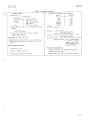
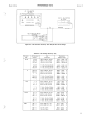
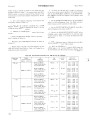
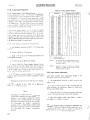
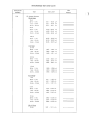
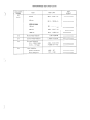
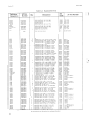
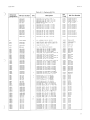
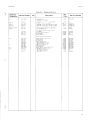
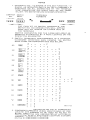
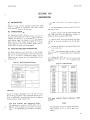
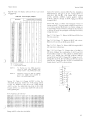
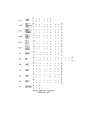
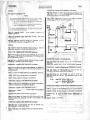
Table 5-8. Power Supply JlI11pers.
5-26. Power Supply Adjustment
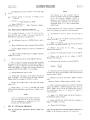
5-27. Power Supply + 10 V Reference Voltage Adjustment.
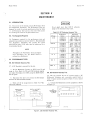
Coarse adjustment of the + 10 V reference voltage is made
by selecting the proper combination of power supply jumpers designated 1,2,4,8 and 16. Coarse adjustment is necessary whenever the + 10 V reference cannot be adjusted with
AIR89 (+ 10 V ADJ - fine adjustment) to obtain a display
of 1.0000 for a 1 V dc inpu 1. This can occur after replacement of AICRI7, AIR75 or Al U16 or because of the longterm drift of the AICR17 zener voltage.
5-28. Power supply jumpers 1, 2, 4, 8 and 16 parallel
resistors in AIR75 which are used as a regulator feedback
network. Removing a jumper decreases the + 10 V reference voltage and results in an increase in the Multimeter
display for a given input. Clockwise rotation of the + 10 V
ADJ, Al R89 (fine adjustment), also results in an increase in
the Multimeter display for a given input.
5-29. A DC Standard is required for this adjustment.
a. Set Multimeter function to DCV (
to 1 V.
Model 3465A
=-=-= V) and range
b. Connect Al R75 pin 22 to ground.
c. Apply + 1 V dc from the DC Standard between the
Vil and COM terminals.
d. Note and record the Multimeter display.
e. Refer to Table 5-8, Power Supply Jumpers. Locate
the line with La and HI reading limits that bound the
Multimeter display recorded and note the jumper combination. (If reading is ou t of range of table, check Al CR 17 for
6.95 V ± 0.25 V, AIR75 and AIUI6).
POWER SUPPLY JUMPER
READING
La
HI
16
8
4
2
1
NOTE 1
.8962
.8985
.9009
.9033
.9058
.9083
.9109
.9135
.9162
.9190
.9218
.9246
.9275
.9305
.9336
.9367
.9398
.9431
.9464
.9498
.9533
.9569
.9605
.9642
.9681
.9720
.9760
.9801
.9844
.9887
.9931
.8961
.8984
.9008
.9032
.9057
.9082
.9108
.9134
.9161
.9189
.9217
.9245
.9274
.9304
.9335
.9366
.9397
.9430
.9463
.9497
.9532
.9568
.9604
.9641
.9680
.9719
.9759
.9800
.9843
.9886
.9930
NOTE 2
0
0
0
0
0
0
0
0
0
0
0
0
0
0
0
0
1
1
1
1
1
1
1
1
1
1
1
1
1
1
1
1
0
0
0
0
0
0
0
0
1
1
1
1
1
1
1
1
0
0
0
0
0
0
0
0
1
1
1
1
1
1
1
1
0
0
0
0
1
1
1
1
0
0
0
0
1
1
1
1
0
0
0
0
1
1
1
1
0
0
0
0
1
1
1
1
0
0
1
1
0
0
1
1
0
0
1
1
0
0
1
1
0
0
1
1
0
0
1
1
0
0
1
1
0
0
1
1
0
1
0
1
0
1
0
1
0
1
0
1
0
1
0 !
1
0
1
0
1
0
1
0
1
0
1
0
1
0
1
0
1
"0"
"1"
=
=
f
Remove Jumper
Leave Jumper I n Place
NOTE 1.
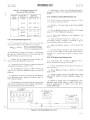
For Readings less than .8922, adjustment cannot be made. Check A1CR17 zener voltage
for 6.95 V ± 0.25 V.
NOTE 2.
Adjustment cannot be made for readings
greater than 1.0000. Check A 1CR 17 zener
voltage for 6.95 V ± 0.25 V.
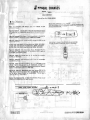
5-30. Input Amplifier Adjustments.
f. A "0" means to remove jumper; a "1" means leave
jumper in place. Introduce the jumper combination noted
in Step e.
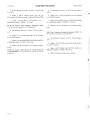
g. Remove the connection from R75 pin 22 to ground.
h. Adjust Al R89 (+ 10 V ADJ) for a Multimeter
display of + 1.0000 ± 2 counts.
NOTE
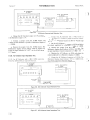
5-31. Input Amplifier Gain Adjustment (R76). A DC
Standard is required for this adjustment.
a. Set the Multimeter function to DCV (
range to 10m.
=-=-= V) and
b. Connect a short across the input terminals (Vil and
COM) and adjust the Multimeter display for 0.000 with
R25 (rear panel ZERO ADJ).
c. Remove the short from the input terminals and apply
+ 10 mV to the input terminals from the DC Standard.
If a display of + 1. 0000 cannot be attained with
A1R89 after installing the proper jumper combination, a new jumper combination must be
selected. If the + 1. 0000 display is low, install
the jumper combination from the line in Table
5-8 preceeding the jumper combination
installed. If the + 1. 0000 display is high, install
the jumper combination from the line in Table
5-8 succeeding the jumper combination
installed.
5-8
d. Adjust R76 (INPUT AMP GAIN ADJ) for a Multimeter display of + 10.000 ± 3 counts.
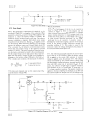
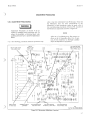
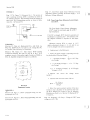
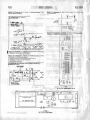
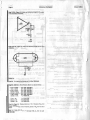
5-32. Input Amplifier Balance Adjustment (R50/R51 potentiometer). The inpu t amplifier balance adjustment must
be performed if AIQI6, AIUl or AIR75 are replaced. A
Digital Voltmeter is required for this adjustment.
(































![2649 Manuals . . . . . . . . . . . . . . . . . . . . . . . . . . C. ClarWDTD [24]](http://vs1.manualzilla.com/store/data/005876281_1-ca0a669885d1d1e5f63e9b5ff82f3016-150x150.png)