1
PS2520 Series Performance Verification
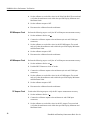
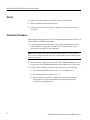
to increase the power supply output voltage until the error
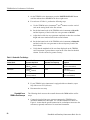
7. Press VOLTS
message “Err - 013” appears on the readouts. Verify that this event occurs
between 4.3 and 5.7 V.
8. Press SHIFT → OVP RESET.
9. Reset the output voltage to 4 V.
10. Repeat steps 6 through 9 above as necessary to determine the exact voltage.
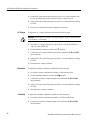
11. Press OUTPUT ON/OFF. Verify that the “OUT” indicator turns off.
Constant Voltage
Load Accuracy
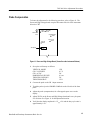
Complete the following procedures to verify constant voltage load accuracy.
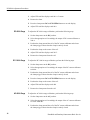
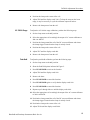
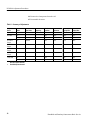
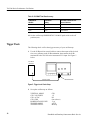
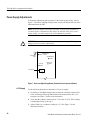
Outputs 1 and 2. Use the following steps to check the OUTPUT 1 and
OUTPUT 2 accuracy.
1. Press SHIFT → OUT 1; verify that the “1” indicator lights up on the display.
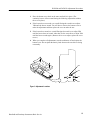
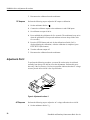
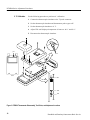
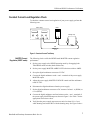
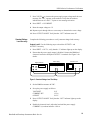
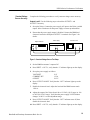
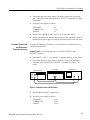
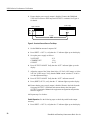
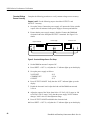
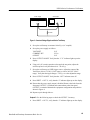
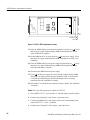
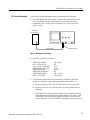
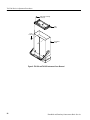
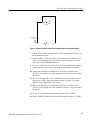
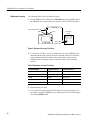
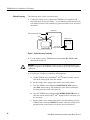
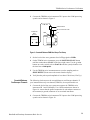
2. Ensure that the power supply output is disabled. Connect the DMM and
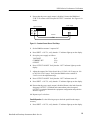
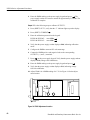
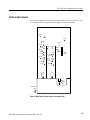
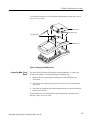
electronic load to the front panel OUTPUT 1 terminals. See Figure 2 for
details.
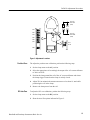
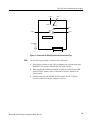
Digital multimeter
Power supply
Electronic load
– COM
+
10 A
– +
–
+
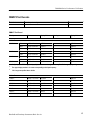
Figure 7: Constant Voltage Load Test Setup
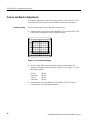
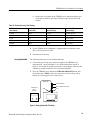
3. Set the DMM to measure 25 VDC.
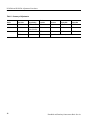
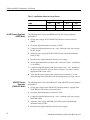
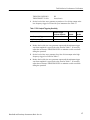
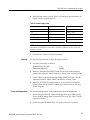
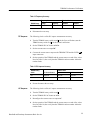
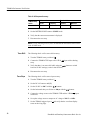
4. Set up the power supply as follows:
VOLTS SET
CURRENT SET
OVP SET
20 V
2.55 A
22 V
5. Press OUTPUT ON/OFF. Verify that the “OUT” indicator lights up on the
display.
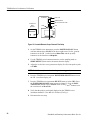
6. Enable the electronic load. Adjust the load until the power supply
CURRENT (A) readout indicates 2.500 A.
42
Handheld and Benchtop Instruments Basic Service