1
Alignment and Adjustments
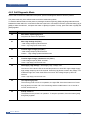
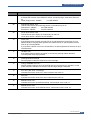
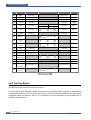
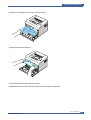
4.2.3 Cancel button
LED
Description
Printing demo page
In Ready mode, press and hold this button for about 2 seconds until
all LEDs blink slowly, and release.
Manual feeding
Press this button each time you load a sheet of paper in the
tray, when you select Manual Feed for Source from your software application.
Canceling print job
Press this button during printing. The On Line/Error LED blinks while the
print job is cleared from both the printer and the computer, and then return to
Ready mode. This may take some time depending on the size of the print job.
In Manual Feed mode, you can’t cancel the print job by pressing this button.
Toner Save mode on/off
In Ready mode, press this button to turn the Toner Save mode on or off.
Service Manual
Samsung Electronics
4-3