1
Alignment and Adjustments
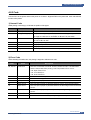
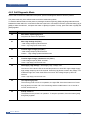
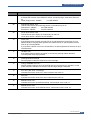
Code
Description
07
Paper Empty Sensor Test :
If activate the Actuator of the PEMPTY Sensor, the left and right of the three LEDs are
on.
Paper Empty Sensor ON/OFF
1st LED ON/OFF
08
Feed & Exit Sensor Test
Test the Feed sensor and Discharge sensor in the same way as '07'.
Feed Sensor ON/OFF
2nd LED ON/OFF
Exit Sensor ON/OFF
3rd LED ON/OFF
09
Cover Open Sensor Test
Test the Cover Open Sensor in th same way as code '07’
Cover Open Sensor ON/OFF1st LED ON/OFF
10
Fuser Test
If the [Enter] button pressed, the right LED is on and temperature of the fuser is up to
READY Mode. If the [Up] button pressed, the middle LED is on and temperature of the
fuser is up to Printing Mode.
If you press the button once more, the left LED is on and temperature of the fuser is up to
overheat Mode.
11
Hot Burn Test
If the [enter] button pressed, the printer is continuously printing without detection.
Turn the power off to stop operation.
12
Cleaning Mode Print Mode
Print the paper to clean the OPC Drum in the Cartridge.
13
THV(+) TRIGGER. ALL HV :
All high voltage output by each HV terminal and LSU and the fan is in operation. In this
mode, electronic resistance of transfer roller and high voltage is detected.
14
PTL Test : (ML-1610 : not design)
Indicates the function of the PTL, same method of the code ‘07’.
15
Fan Test :
Indicates the function of the Fan, same method of the code ‘07’.
16
Manual Pickup Test :
Indicates the function of th Manual Pickup, same method of the code ‘07’.
17
Manual Sensor Test :
Indicates the function of the Manual Sensor, same method of the code ‘07’.
Service Manual
Samsung Electronics
4-9