1
Alignment and Adjustments
4.6.2 Code
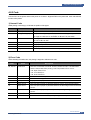
Connect DCU to the printer and turn the power on. It show 7 Segment FND on the panel and each code tells the
function of the printer.
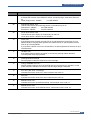
1) Normal Code
While printing or warming up, it indicate the position of the paper
Code
State
61
00~05
Warm up
Ready(kind of paper)
20, 21, 22
Print Start
30
40
50
69
Feed Sensor On
Feed Sensor off
Paper Out
Sleep Mode
Description
The printer is on, the cover is open or close.
The printer is ready, the paper is detected when the first paper is printed.
00: Legal ,01: Letter ,02: A4 ,03: EXEC ,04: B5 ,05: Folio, 06: A5/A6
The engine controller received the print order from the video controller.
20: 1st, 21: MP, 22: SCF
The paper is passing out of the Feed Sensor.
The paper has passed out of the Feed Sensor.
The paper has passed out of Exit Sensor.
The fuser power turned off to minimize the power consumption.
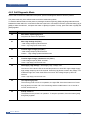
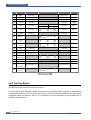
2) Error Code
When detecting the malfunction, the printing is stopped to indicate error code.
Code
State
60, 62, 68
Fuser Error
64
65
70
71
72
Cover Open
CRU Error
No Paper
Paper Jam 0
Paper Jam 1
73
Paper Jam 2
76
95
Out Bin Full
LSU Not Ready
Description
The error in the fuser occurred. There is a short circuit in the thermistor
and the thermostat while printing, Low Temperature Error occurs.
• 60: Open Fuser Error
• 62: Low Heat Error
• 68: Over Heat Error
The Printer Cover is open.
The Toner Cartridge not installed,
No paper in the paper cassette.
The front part of paper is jammed between pickup unit and Feed sensor.
The front part of paper is jammed between the Discharge sensor and Feed
sensor.
The front part of paper is jammed just after passing through the discharge
sensor.
The Out bin is filled with paper.
LSU Scanner Motor not ready or Hsync signal not output.
Service Manual
Samsung Electronics
4-7