1
Security Escort Operations Manual
Chapter 4: The Online Tools
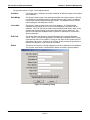
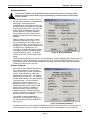
Database Find Level
This is the minimum receive level (1-255) that must be heard before the
system will automatically enter the transmitter in the Subscriber Locate dialog
(default 112). It determines the distance the subscriber’s transmitter must be
within the specified ID capture receiver (set in the System Preferences dialog)
before the system will recognize the test.
Locate Test Level
This is the minimum receive level (1-255) that must be heard before the
system will accept a test generated by a transmitter other than a guard, to be
printed with a location (default 160). It determines the distance the transmitter
must be within from a receiver before the system will recognize the test and
print the location. If the transmitter is too far away from the receiver, that
receiver’s green light will not be displayed, so the individual knows that they
must move closer to the receiver for the test to register.
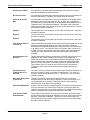
Guard Tour Level
This is the minimum receive level (1-255) that must be heard before the
system will accept a test generated by the guard’s transmitter to be entered
as a location in the guard tour report (default 192). It determines the distance
the guard’s transmitter must be within from a receiver before the system will
recognize the test and create the guard tour entry. If the guard is too far away
from the receiver, that receiver’s green light will not be displayed, so the
guard knows that they must move closer to the receiver for the test to register.
Guard Tour Minutes
This setting controls the time spacing, in minutes, for entries of the guard’s
current location in the automatically generated guard tour report. Therefore if
set to 15 minutes, an entry will be generated each 15 minutes that the guard’s
transmitter is within range of the system (default 15 minutes).
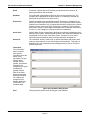
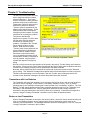
Popup Trouble Box
Contact Information
Each yellow, pop-up trouble box that is displayed on the Central Console to
advise of system problems contains specific instructions for the dispatcher.
Entries in this text box will be displayed in the pop-up trouble boxes whenever
a system problem occurs that requires attention. This information usually
includes the name and telephone number of the designated Security Escort
maintenance technicians.
System Defaults
The options contained in the " System Defaults" dialog are accessible only to Security Escort service and
maintenance personnel. These options affect the system operating parameters and are to be setup by
installing personnel. The Technical Reference Manual describes the functions accessible under this
dialog.
System Labels
The options contained in the " System Labels" dialog are accessible only to Security Escort service and
maintenance personnel. These options affect the system operating parameters and are to be setup by
installing personnel. The Technical Reference Manual describes the functions accessible under this
dialog.
© 2001 Detection Systems, Inc.
Security Escort Operations Manual
Page 29
38946C
10/01