1
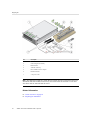
Attach Slide Rail Assemblies to the Rack
Attach Slide Rail Assemblies to the Rack
Note - The slide rail assemblies support only racks with 9.5-mm square holes and M6 round
holes. All other racks, including those racks with 7.2-mm, M5, or 10-32 mounting holes, are
not supported. Refer to the documentation for your rack for information about the size of its rail
holes.
32
1.
(Optional) If you must move the rack with the server installed, secure the slide
rail assemblies to the rack with mounting screws and cage nuts.
Insert the cage nuts prior to performing the next steps. Refer to the Rail Rackmount Kit
Overview and Information card for instructions on inserting these cage nuts. This card is
included with the rack kit.
2.
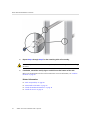
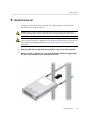
Position a slide rail assembly in your rack so that the slide rail assembly front
bracket is on the outside of the front rack post and the slide rail assembly rear
bracket is on the inside of the rear rack post.
3.
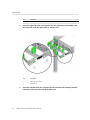
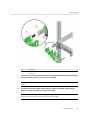
Align the slide rail assembly mounting pins with the front and rear rack post
mounting holes, and then lock the assembly into place by pushing the assembly
toward the rear of the rack until the mounting pins engage the rack.
You will hear an audible click when the mounting pins engage the rack.
SPARC T5-2 Server Installation Guide • July 2015