1
Connect the NET MGT Cable
Related Information
■
“Connect the NET MGT Cable” on page 51
“Connect a Terminal or Emulator to the SER MGT Port” on page 56
■
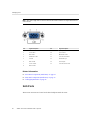
“SER MGT Port” on page 45
■
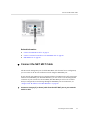
Connect the NET MGT Cable
The SP network management port is labeled NET MGT. After the initial server configuration,
you can connect to the SP over an Ethernet network using this NET MGT port.
If your network uses a DHCP server to assign IP addresses, the DHCP server will assign an IP
address to this NET MGT port. With this IP address, you can connect to the SP using an SSH
connection. If your network does not use DHCP, this NET MGT port will not be accessible
until you configure the network settings through the SER MGT port. For instructions, see
“Assign a Static IP Address to the NET MGT Port” on page 68.
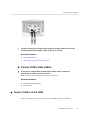
Connect a Category 5 (or better) cable from the NET MGT port to your network
switch or hub.
Connecting the Server Cables
51