1
Assign a Static IP Address to the NET MGT Port
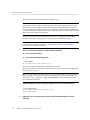
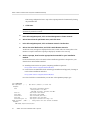
-> set /SP/network pendingipnetmask=255.255.255.0
Set 'pendingipnetmask' to '255.255.255.0'
This example uses 255.255.255.0 to set the netmask. Your network environment subnet might
require a different netmask. Use a netmask number most appropriate to your environment.
5.
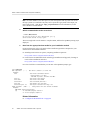
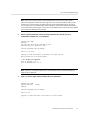
Verify that the parameters were set correctly.
This example shows parameters that have been set to convert a SP from a DHCP configuration
to a static configuration.
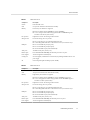
-> show /SP/network -display properties
/SP/network
Targets:
Properties:
commitpending = (Cannot show property)
dhcp_clientid = xxx.xxx.xxx.xxx
dhcp_server_ip = xxx.xxx.xxx.xxx
ipaddress = xxx.xxx.xxx.xxx
ipdiscovery = dhcp
ipgateway = xxx.xxx.xxx.xxx
ipnetmask = 255.255.255.0
macaddress = xx:xx:xx:xx:xx:xx
managementport = MGMT
outofbandmacaddress = xx:xx:xx:xx:xx:xx
pendingipaddress = service-processor-IPaddr
pendingipdiscovery = static
pendingipgateway = gateway-IPaddr
pendingipnetmask = 255.255.255.0
pendingmanagementport = MGMT
sidebandmacaddress = xx:xx:xx:xx:xx:xx
state = enabled
->
6.
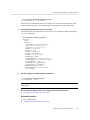
Set the changes to the SP network parameters.
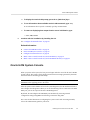
-> set /SP/network commitpending=true
Set 'commitpending' to 'true'
Note - You can type the show /SP/network command again to verify that the parameters have
been updated.
7.
Set the static IP address when you configure the Oracle Solaris OS.
See “Configure the Preinstalled OS” on page 60.
Related Information
■
■
Server Administration
“Configure the Preinstalled OS” on page 60
Powering On the Server for the First Time
69