1
Agilent E5070A/E5071A ENA Series RF Network Analyzers
Service Manual
Second Edition
FIRMWARE REVISIONS/SERIAL NUMBERS
This manual applies directly to instruments that have the serial number
JP1KJ00111 or above (for E5070A), and JP1K00238 or above (for E5071A).
For additional important information about serial numbers, see Appendix A.
Agilent Part No. E5070-90110
March 2003
Printed in Japan
Notices
The information contained in this document is subject to change without notice.
This document contains proprietary information that is protected by copyright. All rights
are reserved. No part of this document may be photocopied, reproduced, or translated into
another language without the prior written consent of the Agilent Technologies.
Agilent Technologies Japan, Ltd.
Component Test PGU-Kobe
1-3-2, Murotani, Nishi-ku, Kobe, Hyogo, 651-2241 Japan
Ó Copyright Agilent Technologies Japan, Ltd. 2002, 2003
Portions Ó Copyright 1996, Microsoft Corporation. All rights reserved.
Manual Printing History
The manual’s printing date and part number indicate its current edition. The printing date
changes when a new edition is printed. (Minor corrections and updates that are
incorporated at reprint do not cause the date to change.) The manual part number changes
when extensive technical changes are incorporated.
April 2002
Preliminary
June 2002
First Edition
March 2003
Second Edition
Safety Summary
The following general safety precautions must be observed during all phases of operation,
service, and repair of this instrument. Failure to comply with these precautions or with
specific WARNINGS elsewhere in this manual may impair the protection provided by the
equipment. In addition it violates safety standards of design, manufacture, and intended use
of the instrument.
Agilent Technologies assumes no liability for the customer’s failure to comply with these
requirements.
NOTE
E5070A/E5071A comply with INSTALLATION CATEGORY II and POLLUTION
DEGREE 2 in IEC61010-1. E5070A/E5071A are INDOOR USE product.
NOTE
LEDs in E5070A/E5071A are Class 1 in accordance with IEC60825-1.
CLASS 1 LED PRODUCT
2
•
Ground The Instrument
To avoid electric shock hazard, the instrument chassis and cabinet must be connected to
a safety earth ground by the supplied power cable with earth blade.
•
DO NOT Operate In An Explosive Atmosphere
Do not operate the instrument in the presence of flammable gasses or fumes. Operation
of any electrical instrument in such an environment constitutes a definite safety hazard.
•
Keep Away From Live Circuits
Operating personnel must not remove instrument covers. Component replacement and
internal adjustments must be made by qualified maintenance personnel. Do not replace
components with the power cable connected. Under certain conditions, dangerous
voltages may exist even with the power cable removed. To avoid injuries, always
disconnect power and discharge circuits before touching them.
•
DO NOT Service Or Adjust Alone
Do not attempt internal service or adjustment unless another person, capable of
rendering first aid and resuscitation, is present.
•
DO NOT Substitute Parts Or Modify Instrument
Because of the danger of introducing additional hazards, do not install substitute parts
or perform unauthorized modifications to the instrument. Return the instrument to a
Agilent Technologies Sales and Service Office for service and repair to ensure that
safety features are maintained.
•
Dangerous Procedure Warnings
Warnings, such as the example below, precede potentially dangerous procedures
throughout this manual. Instructions contained in the warnings must be followed.
WARNING
Dangerous voltages, capable of causing death, are presenting this instrument. Use
extreme caution when handling, testing, and adjusting this instrument.
Safety Symbol
General definitions of safety symbols used on the instrument or in manuals are listed
below.
Instruction Manual symbol: the product is marked with this symbol when it is necessary for
the user to refer to the instrument manual.
Alternating current.
Direct current.
On (Supply).
Off (Supply).
In position of push-button switch.
Out position of push-button switch.
3
Frame (or chassis) terminal. A connection to the frame (chassis) of the equipment which
normally include all exposed metal structure.
Stand-by.
WARNING
This warning sign denotes a hazard. It calls attention to a procedure, practice,
condition or the like, which, if not correctly performed or adhered to, could result in
injury or death to personnel.
CAUTION
This Caution sign denotes a hazard. It calls attention to a procedure, practice, condition or
the like, which, if not correctly performed or adhered to, could result in damage to or
destruction of part or all of the product.
NOTE
Note denotes important information. It calls attention to a procedure, practice, condition or
the like, which is essential to highlight.
Certification
Agilent Technologies certifies that this product met its published specifications at the time
of shipment from the factory. Agilent Technologies further certifies that its calibration
measurements are traceable to the United States National Institute of Standards and
Technology, to the extent allowed by the Institution’s calibration facility, or to the
calibration facilities of other International Standards Organization members.
Warranty
This Agilent Technologies instrument product is warranted against defects in material and
workmanship for a period of three years from the date of shipment, except that in the case
of certain components listed in this manual, the warranty shall be for the specified period.
During the warranty period, Agilent Technologies Company will, at its option, either repair
or replace products that prove to be defective.
For warranty service or repair, this product must be returned to a service facility designated
by Agilent Technologies. Buyer shall prepay shipping charges to Agilent Technologies and
Agilent Technologies shall pay shipping charges to return the product to Buyer. However,
Buyer shall pay all shipping charges, duties, and taxes for products returned to Agilent
Technologies from another country.
Agilent Technologies warrants that its software and firmware designated by Agilent
Technologies for use with an instrument will execute its programming instruction when
property installed on that instrument. Agilent Technologies does not warrant that the
operation of the instrument, or software, or firmware will be uninterrupted or error free.
4
Limitation of Warranty
The foregoing warranty shall not apply to defects resulting from improper or inadequate
maintenance by Buyer, Buyer-supplied software or interfacing, unauthorized modification
or misuse, operation outside the environmental specifications for the product, or improper
site preparation or maintenance.
IMPORTANT
No other warranty is expressed or implied. Agilent Technologies specifically disclaims the
implied warranties of merchantability and fitness for a particular purpose.
Exclusive Remedies
The remedies provided herein are buyer’s sole and exclusive remedies. Agilent
Technologies shall not be liable for any direct, indirect, special, incidental, or
consequential damages, whether based on contract, tort, or any other legal theory.
Assistance
Product maintenance agreements and other customer assistance agreements are available
for Agilent Technologies products.
For any assistance, contact your nearest Agilent Technologies Sales and Service Office.
Addresses are provided at the back of this manual.
Typeface Conventions
Sample (bold)
Boldface type is used when a term is defined or
emphasised.
Sample (Italic)
Italic type is used for emphasis.
key
Indicates a hardkey (key on the front panel or
external keyboard) labeled “Sample.” “key” may
be omitted.
Sample menu/button/box
Indicates a menu/button/box on the screen labeled
“Sample” which can be selected/executed by
clicking. “menu,” “button,” or “box” may be
omitted.
Sample block/toolbar
Indicates a block (group of hardkeys) or a toolbar
5
(setup toolbar) labeled “Sample.”
Sample 1 - Sample 2 - Sample 3
6
Indicates a sequential operation of Sample 1,
Sample 2, and Sample 3 (menu, button, or box).
“-” may be omitted.
Contents
1. General Information
Precautions . . . . . . . . . . . . . . . . . . . . . . . . . . . . . . . . . . . . . . . . . . . . . . . . . . . . . . . . . . . . . . . . . . . . . . . . . . 16
Software Installed . . . . . . . . . . . . . . . . . . . . . . . . . . . . . . . . . . . . . . . . . . . . . . . . . . . . . . . . . . . . . . . . . . . 16
Organization of Service Manual . . . . . . . . . . . . . . . . . . . . . . . . . . . . . . . . . . . . . . . . . . . . . . . . . . . . . . . . . . 17
Instrument Covered by This Manual . . . . . . . . . . . . . . . . . . . . . . . . . . . . . . . . . . . . . . . . . . . . . . . . . . . . . . 19
Required Equipment . . . . . . . . . . . . . . . . . . . . . . . . . . . . . . . . . . . . . . . . . . . . . . . . . . . . . . . . . . . . . . . . . . . 20
2. Performance Tests
Introduction. . . . . . . . . . . . . . . . . . . . . . . . . . . . . . . . . . . . . . . . . . . . . . . . . . . . . . . . . . . . . . . . . . . . . . . . . . 24
Test Equipment Required . . . . . . . . . . . . . . . . . . . . . . . . . . . . . . . . . . . . . . . . . . . . . . . . . . . . . . . . . . . . . 25
1. FREQUENCY ACCURACY TEST. . . . . . . . . . . . . . . . . . . . . . . . . . . . . . . . . . . . . . . . . . . . . . . . . . . . . 26
Description . . . . . . . . . . . . . . . . . . . . . . . . . . . . . . . . . . . . . . . . . . . . . . . . . . . . . . . . . . . . . . . . . . . . . . . . 26
Specification . . . . . . . . . . . . . . . . . . . . . . . . . . . . . . . . . . . . . . . . . . . . . . . . . . . . . . . . . . . . . . . . . . . . . . . 26
Test equipment . . . . . . . . . . . . . . . . . . . . . . . . . . . . . . . . . . . . . . . . . . . . . . . . . . . . . . . . . . . . . . . . . . . . . 26
Procedure. . . . . . . . . . . . . . . . . . . . . . . . . . . . . . . . . . . . . . . . . . . . . . . . . . . . . . . . . . . . . . . . . . . . . . . . . . 26
2. RF OUTPUT LEVEL ACCURACY AND FLATNESS TEST . . . . . . . . . . . . . . . . . . . . . . . . . . . . . . . . 29
Description . . . . . . . . . . . . . . . . . . . . . . . . . . . . . . . . . . . . . . . . . . . . . . . . . . . . . . . . . . . . . . . . . . . . . . . . 29
Specification . . . . . . . . . . . . . . . . . . . . . . . . . . . . . . . . . . . . . . . . . . . . . . . . . . . . . . . . . . . . . . . . . . . . . . . 29
Test equipment . . . . . . . . . . . . . . . . . . . . . . . . . . . . . . . . . . 29
Procedure. . . . . . . . . . . . . . . . . . . . . . . . . . . . . . . . . . . . . . . . . . . . . . . . . . . . . . . . . . . . . . . . . . . . . . . . . . 29
3. RF OUTPUT LEVEL LINEARITY TEST . . . . . . . . . . . . . . . . . . . . . . . . . . . . . . . . . . . . . . . . . . . . . . . 32
Description . . . . . . . . . . . . . . . . . . . . . . . . . . . . . . . . . . . . . . . . . . . . . . . . . . . . . . . . . . . . . . . . . . . . . . . . 32
Specification . . . . . . . . . . . . . . . . . . . . . . . . . . . . . . . . . . . . . . . . . . . . . . . . . . . . . . . . . . . . . . . . . . . . . . . 32
Test equipment . . . . . . . . . . . . . . . . . . . . . . . . . . . . . . . . . . 32
Procedure. . . . . . . . . . . . . . . . . . . . . . . . . . . . . . . . . . . . . . . . . . . . . . . . . . . . . . . . . . . . . . . . . . . . . . . . . . 32
4. TRACE NOISE CW TEST . . . . . . . . . . . . . . . . . . . . . . . . . . . . . . . . . . . . . . . . . . . . . . . . . . . . . . . . . . . 35
Description . . . . . . . . . . . . . . . . . . . . . . . . . . . . . . . . . . . . . . . . . . . . . . . . . . . . . . . . . . . . . . . . . . . . . . . . 35
Specification . . . . . . . . . . . . . . . . . . . . . . . . . . . . . . . . . . . . . . . . . . . . . . . . . . . . . . . . . . . . . . . . . . . . . . . 35
Test equipment . . . . . . . . . . . . . . . . . . . . . . . . . . . . . . . . . . 35
Procedure. . . . . . . . . . . . . . . . . . . . . . . . . . . . . . . . . . . . . . . . . . . . . . . . . . . . . . . . . . . . . . . . . . . . . . . . . . 35
5. CROSSTALK TEST. . . . . . . . . . . . . . . . . . . . . . . . . . . . . . . . . . . . . . . . . . . . . . . . . . . . . . . . . . . . . . . . . 41
Description . . . . . . . . . . . . . . . . . . . . . . . . . . . . . . . . . . . . . . . . . . . . . . . . . . . . . . . . . . . . . . . . . . . . . . . . 41
Specification . . . . . . . . . . . . . . . . . . . . . . . . . . . . . . . . . . . . . . . . . . . . . . . . . . . . . . . . . . . . . . . . . . . . . . . 41
Test equipment . . . . . . . . . . . . . . . . . . . . . . . . . . . . . . . . . . 41
Procedure. . . . . . . . . . . . . . . . . . . . . . . . . . . . . . . . . . . . . . . . . . . . . . . . . . . . . . . . . . . . . . . . . . . . . . . . . . 41
Crosstalk test program. . . . . . . . . . . . . . . . . . . . . . . . . . . . . . . . . . . . . . . . . . . . . . . . . . . . . . . . . . . . . . . . 48
6. SYSTEM DYNAMIC RANGE TEST . . . . . . . . . . . . . . . . . . . . . . . . . . . . . . . . . . . . . . . . . . . . . . . . . . . 51
Description . . . . . . . . . . . . . . . . . . . . . . . . . . . . . . . . . . . . . . . . . . . . . . . . . . . . . . . . . . . . . . . . . . . . . . . . 51
Specification . . . . . . . . . . . . . . . . . . . . . . . . . . . . . . . . . . . . . . . . . . . . . . . . . . . . . . . . . . . . . . . . . . . . . . . 51
Test equipment . . . . . . . . . . . . . . . . . . . . . . . . . . . . . . . . . . . . . . . . . . . . . . . . . . . . . . . . . . . . . . . . . . . . . 51
Procedure. . . . . . . . . . . . . . . . . . . . . . . . . . . . . . . . . . . . . . . . . . . . . . . . . . . . . . . . . . . . . . . . . . . . . . . . . . 52
System Dynamic Range test program . . . . . . . . . . . . . . . . . . . . . . . . . . . . . . . . . . . . . . . . . . . . . . . . . . . . 62
7. DYNAMIC ACCURACY TEST . . . . . . . . . . . . . . . . . . . . . . . . . . . . . . . . . . . . . . . . . . . . . . . . . . . . . . . 66
Description . . . . . . . . . . . . . . . . . . . . . . . . . . . . . . . . . . . . . . . . . . . . . . . . . . . . . . . . . . . . . . . . . . . . . . . . 66
Test Equipment . . . . . . . . . . . . . . . . . . . . . . . . . . . . . . . . . . . . . . . . . . . . . . . . . . . . . . . . . . . . . . . . . . . . . 66
Procedure. . . . . . . . . . . . . . . . . . . . . . . . . . . . . . . . . . . . . . . . . . . . . . . . . . . . . . . . . . . . . . . . . . . . . . . . . . 67
8. UNCORRECTED SYSTEM PERFORMANCE TEST . . . . . . . . . . . . . . . . . . . . . . . . . . . . . . . . . . . . . . 82
Description . . . . . . . . . . . . . . . . . . . . . . . . . . . . . . . . . . . . . . . . . . . . . . . . . . . . . . . . . . . . . . . . . . . . . . . . 82
Specification . . . . . . . . . . . . . . . . . . . . . . . . . . . . . . . . . . . . . . . . . . . . . . . . . . . . . . . . . . . . . . . . . . . . . . . 82
7
Contents
Test Equipment . . . . . . . . . . . . . . . . . . . . . . . . . . . . . . . . . . . . . . . . . . . . . . . . . . . . . . . . . . . . . . . . . . . . . 82
Procedure . . . . . . . . . . . . . . . . . . . . . . . . . . . . . . . . . . . . . . . . . . . . . . . . . . . . . . . . . . . . . . . . . . . . . . . . . 82
E5070A/E5071A Performance Test Calculation Sheet . . . . . . . . . . . . . . . . . . . . . . . . . . . . . . . . . . . . . . . . 99
Introduction. . . . . . . . . . . . . . . . . . . . . . . . . . . . . . . . . . . . . . . . . . . . . . . . . . . . . . . . . . . . . . . . . . . . . . . . 99
2. RF Output Level Accuracy and Flatness Test. . . . . . . . . . . . . . . . . . . . . . . . . . . . . . . . . . . . . . . . . . . . 99
3. RF Output Level Linearity Test . . . . . . . . . . . . . . . . . . . . . . . . . . . . . . . . . . . . . . . . . . . . . . . . . . . . . 100
4. Trace Noise CW Test . . . . . . . . . . . . . . . . . . . . . . . . . . . . . . . . . . . . . . . . . . . . . . . . . . . . . . . . . . . . . 102
7. Dynamic Accuracy Test . . . . . . . . . . . . . . . . . . . . . . . . . . . . . . . . . . . . . . . . . . . . . . . . . . . . . . . . . . . 103
E5070A Performance Test Record . . . . . . . . . . . . . . . . . . . . . . . . . . . . . . . . . . . . . . . . . . . . . . . . . . . . . . . 106
Frequency Accuracy Test . . . . . . . . . . . . . . . . . . . . . . . . . . . . . . . . . . . . . . . . . . . . . . . . . . . . . . . . . . . . 106
RF Output Level Accuracy and Flatness Test. . . . . . . . . . . . . . . . . . . . . . . . . . . . . . . . . . . . . . . . . . . . . 106
RF Output Level Linearity Test (@ Port1) . . . . . . . . . . . . . . . . . . . . . . . . . . . . . . . . . . . . . . . . . . . . . . . 107
Trace Noise CW Test (Magnitude) . . . . . . . . . . . . . . . . . . . . . . . . . . . . . . . . . . . . . . . . . . . . . . . . . . . . 108
Crosstalk Test . . . . . . . . . . . . . . . . . . . . . . . . . . . . . . . . . . . . . . . . . . . . . . . . . . . . . . . . . . . . . . . . . . . . . 110
System Dynamic Range Test . . . . . . . . . . . . . . . . . . . . . . . . . . . . . . . . . . . . . . . . . . . . . . . . . . . . . . . . . 110
Dynamic Accuracy Test . . . . . . . . . . . . . . . . . . . . . . . . . . . . . . . . . . . . . . . . . . . . . . . . . . . . . . . . . . . . . 112
Uncorrected System Performance Test. . . . . . . . . . . . . . . . . . . . . . . . . . . . . . . . . . . . . . . . . . . . . . . . . . 115
E5071A Performance Test Record . . . . . . . . . . . . . . . . . . . . . . . . . . . . . . . . . . . . . . . . . . . . . . . . . . . . . . . 117
Frequency Accuracy Test . . . . . . . . . . . . . . . . . . . . . . . . . . . . . . . . . . . . . . . . . . . . . . . . . . . . . . . . . . . . 117
RF Output Level Accuracy and Flatness Test. . . . . . . . . . . . . . . . . . . . . . . . . . . . . . . . . . . . . . . . . . . . . 117
RF Output Level Linearity Test (@ Port1) . . . . . . . . . . . . . . . . . . . . . . . . . . . . . . . . . . . . . . . . . . . . . . . 118
Trace Noise CW Test (Magnitude) . . . . . . . . . . . . . . . . . . . . . . . . . . . . . . . . . . . . . . . . . . . . . . . . . . . . 120
Crosstalk Test . . . . . . . . . . . . . . . . . . . . . . . . . . . . . . . . . . . . . . . . . . . . . . . . . . . . . . . . . . . . . . . . . . . . . 123
System Dynamic Range Test . . . . . . . . . . . . . . . . . . . . . . . . . . . . . . . . . . . . . . . . . . . . . . . . . . . . . . . . . 124
Dynamic Accuracy Test . . . . . . . . . . . . . . . . . . . . . . . . . . . . . . . . . . . . . . . . . . . . . . . . . . . . . . . . . . . . . 126
Uncorrected System Performance Test. . . . . . . . . . . . . . . . . . . . . . . . . . . . . . . . . . . . . . . . . . . . . . . . . . 130
3. Adjustment
Safety Considerations. . . . . . . . . . . . . . . . . . . . . . . . . . . . . . . . . . . . . . . . . . . . . . . . . . . . . . . . . . . . . . . . .
Warm-up for Adjustment . . . . . . . . . . . . . . . . . . . . . . . . . . . . . . . . . . . . . . . . . . . . . . . . . . . . . . . . . . . . . .
Required Equipment. . . . . . . . . . . . . . . . . . . . . . . . . . . . . . . . . . . . . . . . . . . . . . . . . . . . . . . . . . . . . . . . . .
Required Adjustment after Replacing Assembly . . . . . . . . . . . . . . . . . . . . . . . . . . . . . . . . . . . . . . . . . . . .
Writing ID . . . . . . . . . . . . . . . . . . . . . . . . . . . . . . . . . . . . . . . . . . . . . . . . . . . . . . . . . . . . . . . . . . . . . . . .
Frequency Reference Adjustment. . . . . . . . . . . . . . . . . . . . . . . . . . . . . . . . . . . . . . . . . . . . . . . . . . . . . .
Oven Reference Adjustment. . . . . . . . . . . . . . . . . . . . . . . . . . . . . . . . . . . . . . . . . . . . . . . . . . . . . . . . . .
IF Range Gain/Phase Adjustment. . . . . . . . . . . . . . . . . . . . . . . . . . . . . . . . . . . . . . . . . . . . . . . . . . . . . .
Source Power Adjustment . . . . . . . . . . . . . . . . . . . . . . . . . . . . . . . . . . . . . . . . . . . . . . . . . . . . . . . . . . .
Test Ports Characteristics Adjustment . . . . . . . . . . . . . . . . . . . . . . . . . . . . . . . . . . . . . . . . . . . . . . . . . .
134
134
134
135
135
135
136
136
136
137
4. Troubleshooting
Introduction . . . . . . . . . . . . . . . . . . . . . . . . . . . . . . . . . . . . . . . . . . . . . . . . . . . . . . . . . . . . . . . . . . . . . . . .
How to exit from the E5070A/E5071A Measurement View . . . . . . . . . . . . . . . . . . . . . . . . . . . . . . . . . . .
To Troubleshoot the Instrument . . . . . . . . . . . . . . . . . . . . . . . . . . . . . . . . . . . . . . . . . . . . . . . . . . . . . . . . .
Primary Trouble Isolation . . . . . . . . . . . . . . . . . . . . . . . . . . . . . . . . . . . . . . . . . . . . . . . . . . . . . . . . . . . .
No Display troubleshooting . . . . . . . . . . . . . . . . . . . . . . . . . . . . . . . . . . . . . . . . . . . . . . . . . . . . . . . . . . . .
Booting Process Troubleshooting. . . . . . . . . . . . . . . . . . . . . . . . . . . . . . . . . . . . . . . . . . . . . . . . . . . . . . . .
Troubleshooting Using Internal Test . . . . . . . . . . . . . . . . . . . . . . . . . . . . . . . . . . . . . . . . . . . . . . . . . . . . .
Power On Self Test . . . . . . . . . . . . . . . . . . . . . . . . . . . . . . . . . . . . . . . . . . . . . . . . . . . . . . . . . . . . . . . . .
140
141
142
142
144
147
156
156
8
Contents
PLL unlock . . . . . . . . . . . . . . . . . . . . . . . . . . . . . . . . . . . . . . . . . . . . . . . . . . . . . . . . . . . . . . . . . . . . . . . 156
External reference signal phase unlock (Opt. 1E5). . . . . . . . . . . . . . . . . . . . . . . . . . . . . . . . . . . . . . . . . 156
To Execute the Internal Test . . . . . . . . . . . . . . . . . . . . . . . . . . . . . . . . . . . . . . . . . . . . . . . . . . . . . . . . . . 157
Internal Test Failure Troubleshooting . . . . . . . . . . . . . . . . . . . . . . . . . . . . . . . . . . . . . . . . . . . . . . . . . . . 160
Function Specific Troubleshooting. . . . . . . . . . . . . . . . . . . . . . . . . . . . . . . . . . . . . . . . . . . . . . . . . . . . . . . 165
To Check the Device Driver . . . . . . . . . . . . . . . . . . . . . . . . . . . . . . . . . . . . . . . . . . . . . . . . . . . . . . . . . . 166
To Check the Front Panel . . . . . . . . . . . . . . . . . . . . . . . . . . . . . . . . . . . . . . . . . . . . . . . . . . . . . . . . . . . . 167
To Check the Touch Panel (Option 016 only). . . . . . . . . . . . . . . . . . . . . . . . . . . . . . . . . . . . . . . . . . . . . 168
To Check the LCD. . . . . . . . . . . . . . . . . . . . . . . . . . . . . . . . . . . . . . . . . . . . . . . . . . . . . . . . . . . . . . . . . . 169
To Check the External Keyboard . . . . . . . . . . . . . . . . . . . . . . . . . . . . . . . . . . . . . . . . . . . . . . . . . . . . . . 169
To Check the Mouse . . . . . . . . . . . . . . . . . . . . . . . . . . . . . . . . . . . . . . . . . . . . . . . . . . . . . . . . . . . . . . . . 169
To Check the FDD. . . . . . . . . . . . . . . . . . . . . . . . . . . . . . . . . . . . . . . . . . . . . . . . . . . . . . . . . . . . . . . . . . 170
To Check the Video output . . . . . . . . . . . . . . . . . . . . . . . . . . . . . . . . . . . . . . . . . . . . . . . . . . . . . . . . . . . 170
To Check the External Trigger Input. . . . . . . . . . . . . . . . . . . . . . . . . . . . . . . . . . . . . . . . . . . . . . . . . . . . 170
To Check the LAN . . . . . . . . . . . . . . . . . . . . . . . . . . . . . . . . . . . . . . . . . . . . . . . . . . . . . . . . . . . . . . . . . 171
To Check the Printer Parallel Port. . . . . . . . . . . . . . . . . . . . . . . . . . . . . . . . . . . . . . . . . . . . . . . . . . . . . . 175
To Check the GPIB . . . . . . . . . . . . . . . . . . . . . . . . . . . . . . . . . . . . . . . . . . . . . . . . . . . . . . . . . . . . . . . . . 176
Troubleshooting Using External Test . . . . . . . . . . . . . . . . . . . . . . . . . . . . . . . . . . . . . . . . . . . . . . . . . . . . . 177
Contents of the external test . . . . . . . . . . . . . . . . . . . . . . . . . . . . . . . . . . . . . . . . . . . . . . . . . . . . . . . . . . 177
Test equipment required for external test . . . . . . . . . . . . . . . . . . . . . . . . . . . . . . . . . . . . . . . . . . . . . . . . 178
To Execute the External Test rev. A.01.01 (or earlier) . . . . . . . . . . . . . . . . . . . . . . . . . . . . . . . . . . . . . . 178
[2] Tch IF Ranging tests . . . . . . . . . . . . . . . . . . . . . . . . . . . . . . . . . . . . . . . . . . . . . . . . . . . . . . . . . . . . . 182
To Execute the External Test rev. A.03.00 . . . . . . . . . . . . . . . . . . . . . . . . . . . . . . . . . . . . . . . . . . . . . . . 194
External Test Failure Troubleshooting . . . . . . . . . . . . . . . . . . . . . . . . . . . . . . . . . . . . . . . . . . . . . . . . . . 208
Performance test failure troubleshooting . . . . . . . . . . . . . . . . . . . . . . . . . . . . . . . . . . . . . . . . . . . . . . . . . . 214
Recommended adjustment for performance test failure . . . . . . . . . . . . . . . . . . . . . . . . . . . . . . . . . . . . . 214
Performance test failure troubleshooting . . . . . . . . . . . . . . . . . . . . . . . . . . . . . . . . . . . . . . . . . . . . . . . . 214
To configure the A20 Digital Motherboard and BIOS . . . . . . . . . . . . . . . . . . . . . . . . . . . . . . . . . . . . . . . . 216
To Identify the Motherboard Installed . . . . . . . . . . . . . . . . . . . . . . . . . . . . . . . . . . . . . . . . . . . . . . . . . . 216
Configure the Motherboard. . . . . . . . . . . . . . . . . . . . . . . . . . . . . . . . . . . . . . . . . . . . . . . . . . . . . . . . . . . 216
Testing DRAM on the Motherboard . . . . . . . . . . . . . . . . . . . . . . . . . . . . . . . . . . . . . . . . . . . . . . . . . . . . 218
To Confirm or Set the BIOS Options . . . . . . . . . . . . . . . . . . . . . . . . . . . . . . . . . . . . . . . . . . . . . . . . . . . 218
5. Replaceable Parts
Ordering Information . . . . . . . . . . . . . . . . . . . . . . . . . . . . . . . . . . . . . . . . . . . . . . . . . . . . . . . . . . . . . . . . . 234
Direct Mail Order System . . . . . . . . . . . . . . . . . . . . . . . . . . . . . . . . . . . . . . . . . . . . . . . . . . . . . . . . . . . . 234
Exchange Assemblies . . . . . . . . . . . . . . . . . . . . . . . . . . . . . . . . . . . . . . . . . . . . . . . . . . . . . . . . . . . . . . . . . 234
Replaceable Parts List. . . . . . . . . . . . . . . . . . . . . . . . . . . . . . . . . . . . . . . . . . . . . . . . . . . . . . . . . . . . . . . . . 235
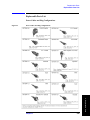
Power Cables and Plug Configurations. . . . . . . . . . . . . . . . . . . . . . . . . . . . . . . . . . . . . . . . . . . . . . . . . . 235
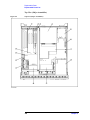
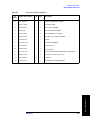
Top View (Major Assemblies) . . . . . . . . . . . . . . . . . . . . . . . . . . . . . . . . . . . . . . . . . . . . . . . . . . . . . . . . 236
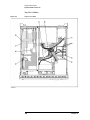
Top View (Cables). . . . . . . . . . . . . . . . . . . . . . . . . . . . . . . . . . . . . . . . . . . . . . . . . . . . . . . . . . . . . . . . . . 238
Top View (Miscellaneous Parts) . . . . . . . . . . . . . . . . . . . . . . . . . . . . . . . . . . . . . . . . . . . . . . . . . . . . . . . 240
Top View (Under Power Supply) . . . . . . . . . . . . . . . . . . . . . . . . . . . . . . . . . . . . . . . . . . . . . . . . . . . . . . 242
Top View (Motherboard and Other Parts). . . . . . . . . . . . . . . . . . . . . . . . . . . . . . . . . . . . . . . . . . . . . . . . 244
Front View (Analog) . . . . . . . . . . . . . . . . . . . . . . . . . . . . . . . . . . . . . . . . . . . . . . . . . . . . . . . . . . . . . . . 246
Front View (Miscellaneous Parts) . . . . . . . . . . . . . . . . . . . . . . . . . . . . . . . . . . . . . . . . . . . . . . . . . . . . . . 247
Front View (Semirigid Cables) (Opt. 213) . . . . . . . . . . . . . . . . . . . . . . . . . . . . . . . . . . . . . . . . . . . . . . . 248
Front View (Semirigid Cables) (Opt. 214) . . . . . . . . . . . . . . . . . . . . . . . . . . . . . . . . . . . . . . . . . . . . . . . 249
Front View (Semirigid Cables) (Opt. 313) . . . . . . . . . . . . . . . . . . . . . . . . . . . . . . . . . . . . . . . . . . . . . . . 250
9
Contents
Front View (Semirigid Cables) (Opt. 314) . . . . . . . . . . . . . . . . . . . . . . . . . . . . . . . . . . . . . . . . . . . . . . .
Front View (Semirigid Cables) (Opt. 413) . . . . . . . . . . . . . . . . . . . . . . . . . . . . . . . . . . . . . . . . . . . . . . .
Front View (Semirigid Cables) (Opt. 414) . . . . . . . . . . . . . . . . . . . . . . . . . . . . . . . . . . . . . . . . . . . . . . .
Front Panel . . . . . . . . . . . . . . . . . . . . . . . . . . . . . . . . . . . . . . . . . . . . . . . . . . . . . . . . . . . . . . . . . . . . . . .
Rear View . . . . . . . . . . . . . . . . . . . . . . . . . . . . . . . . . . . . . . . . . . . . . . . . . . . . . . . . . . . . . . . . . . . . . . . .
Side View . . . . . . . . . . . . . . . . . . . . . . . . . . . . . . . . . . . . . . . . . . . . . . . . . . . . . . . . . . . . . . . . . . . . . . . .
Cover Assembly . . . . . . . . . . . . . . . . . . . . . . . . . . . . . . . . . . . . . . . . . . . . . . . . . . . . . . . . . . . . . . . . . . .
A28 FDD Assembly . . . . . . . . . . . . . . . . . . . . . . . . . . . . . . . . . . . . . . . . . . . . . . . . . . . . . . . . . . . . . . . .
A27 Mass Storage Disk Drive Assembly . . . . . . . . . . . . . . . . . . . . . . . . . . . . . . . . . . . . . . . . . . . . . . . .
A8 RF Switch Assembly. . . . . . . . . . . . . . . . . . . . . . . . . . . . . . . . . . . . . . . . . . . . . . . . . . . . . . . . . . . . .
A7 Source Step Attenuator Assembly (Opt. 214, 314, 414). . . . . . . . . . . . . . . . . . . . . . . . . . . . . . . . . .
A2 Receiver Board Assembly. . . . . . . . . . . . . . . . . . . . . . . . . . . . . . . . . . . . . . . . . . . . . . . . . . . . . . . . .
Receiver Module Assembly (Opt. 31x, 41x) . . . . . . . . . . . . . . . . . . . . . . . . . . . . . . . . . . . . . . . . . . . . .
Analog Mother Board Assembly . . . . . . . . . . . . . . . . . . . . . . . . . . . . . . . . . . . . . . . . . . . . . . . . . . . . . .
Chassis Assembly . . . . . . . . . . . . . . . . . . . . . . . . . . . . . . . . . . . . . . . . . . . . . . . . . . . . . . . . . . . . . . . . . .
Keyboard Assembly . . . . . . . . . . . . . . . . . . . . . . . . . . . . . . . . . . . . . . . . . . . . . . . . . . . . . . . . . . . . . . . .
LCD and Inverter Assembly . . . . . . . . . . . . . . . . . . . . . . . . . . . . . . . . . . . . . . . . . . . . . . . . . . . . . . . . . .
Standby Switch Assembly . . . . . . . . . . . . . . . . . . . . . . . . . . . . . . . . . . . . . . . . . . . . . . . . . . . . . . . . . . .
Cover Assembly . . . . . . . . . . . . . . . . . . . . . . . . . . . . . . . . . . . . . . . . . . . . . . . . . . . . . . . . . . . . . . . . . . .
Cover Assembly . . . . . . . . . . . . . . . . . . . . . . . . . . . . . . . . . . . . . . . . . . . . . . . . . . . . . . . . . . . . . . . . . . .
Label on Rear Face . . . . . . . . . . . . . . . . . . . . . . . . . . . . . . . . . . . . . . . . . . . . . . . . . . . . . . . . . . . . . . . . .
Other Parts . . . . . . . . . . . . . . . . . . . . . . . . . . . . . . . . . . . . . . . . . . . . . . . . . . . . . . . . . . . . . . . . . . . . . . .
252
254
256
258
260
261
262
263
264
266
267
268
269
270
271
272
273
274
275
276
277
278
6. Replacement Procedure
Replacing an Assembly . . . . . . . . . . . . . . . . . . . . . . . . . . . . . . . . . . . . . . . . . . . . . . . . . . . . . . . . . . . . . . .
Required Tools . . . . . . . . . . . . . . . . . . . . . . . . . . . . . . . . . . . . . . . . . . . . . . . . . . . . . . . . . . . . . . . . . . . . . .
Outer Cover Removal. . . . . . . . . . . . . . . . . . . . . . . . . . . . . . . . . . . . . . . . . . . . . . . . . . . . . . . . . . . . . . . . .
Tools Required . . . . . . . . . . . . . . . . . . . . . . . . . . . . . . . . . . . . . . . . . . . . . . . . . . . . . . . . . . . . . . . . . . . .
Procedure . . . . . . . . . . . . . . . . . . . . . . . . . . . . . . . . . . . . . . . . . . . . . . . . . . . . . . . . . . . . . . . . . . . . . . . .
Front Panel Removal . . . . . . . . . . . . . . . . . . . . . . . . . . . . . . . . . . . . . . . . . . . . . . . . . . . . . . . . . . . . . . . . .
Tools required . . . . . . . . . . . . . . . . . . . . . . . . . . . . . . . . . . . . . . . . . . . . . . . . . . . . . . . . . . . . . . . . . . . . .
Procedure . . . . . . . . . . . . . . . . . . . . . . . . . . . . . . . . . . . . . . . . . . . . . . . . . . . . . . . . . . . . . . . . . . . . . . . .
A27 Mass Storage Disk Drive Replacement . . . . . . . . . . . . . . . . . . . . . . . . . . . . . . . . . . . . . . . . . . . . . . .
Tools Required . . . . . . . . . . . . . . . . . . . . . . . . . . . . . . . . . . . . . . . . . . . . . . . . . . . . . . . . . . . . . . . . . . . .
Removal Procedure. . . . . . . . . . . . . . . . . . . . . . . . . . . . . . . . . . . . . . . . . . . . . . . . . . . . . . . . . . . . . . . . .
Replacement Procedure . . . . . . . . . . . . . . . . . . . . . . . . . . . . . . . . . . . . . . . . . . . . . . . . . . . . . . . . . . . . .
Restore Backup Files onto the New Mass Storage Disk Drive . . . . . . . . . . . . . . . . . . . . . . . . . . . . . . .
Calibration of the Touch Screen . . . . . . . . . . . . . . . . . . . . . . . . . . . . . . . . . . . . . . . . . . . . . . . . . . . . . . .
A28 FDD (Floppy Disk Drive) Removal . . . . . . . . . . . . . . . . . . . . . . . . . . . . . . . . . . . . . . . . . . . . . . . . . .
Tools Required . . . . . . . . . . . . . . . . . . . . . . . . . . . . . . . . . . . . . . . . . . . . . . . . . . . . . . . . . . . . . . . . . . . .
Procedure . . . . . . . . . . . . . . . . . . . . . . . . . . . . . . . . . . . . . . . . . . . . . . . . . . . . . . . . . . . . . . . . . . . . . . . .
A23 Handler I/O Board Removal. . . . . . . . . . . . . . . . . . . . . . . . . . . . . . . . . . . . . . . . . . . . . . . . . . . . . . . .
Tools Required . . . . . . . . . . . . . . . . . . . . . . . . . . . . . . . . . . . . . . . . . . . . . . . . . . . . . . . . . . . . . . . . . . . .
Procedure . . . . . . . . . . . . . . . . . . . . . . . . . . . . . . . . . . . . . . . . . . . . . . . . . . . . . . . . . . . . . . . . . . . . . . . .
A50 ATX Power Supply Assembly Removal . . . . . . . . . . . . . . . . . . . . . . . . . . . . . . . . . . . . . . . . . . . . . .
Tools Required . . . . . . . . . . . . . . . . . . . . . . . . . . . . . . . . . . . . . . . . . . . . . . . . . . . . . . . . . . . . . . . . . . . .
Procedure . . . . . . . . . . . . . . . . . . . . . . . . . . . . . . . . . . . . . . . . . . . . . . . . . . . . . . . . . . . . . . . . . . . . . . . .
CPU Removal. . . . . . . . . . . . . . . . . . . . . . . . . . . . . . . . . . . . . . . . . . . . . . . . . . . . . . . . . . . . . . . . . . . . . . .
Tools Required . . . . . . . . . . . . . . . . . . . . . . . . . . . . . . . . . . . . . . . . . . . . . . . . . . . . . . . . . . . . . . . . . . . .
280
281
282
282
282
284
284
284
285
285
285
285
285
286
288
288
288
289
289
289
290
290
290
292
292
10
Contents
Procedure. . . . . . . . . . . . . . . . . . . . . . . . . . . . . . . . . . . . . . . . . . . . . . . . . . . . . . . . . . . . . . . . . . . . . . . . . 292
DIMM Module Removal . . . . . . . . . . . . . . . . . . . . . . . . . . . . . . . . . . . . . . . . . . . . . . . . . . . . . . . . . . . . . . 294
Tools Required . . . . . . . . . . . . . . . . . . . . . . . . . . . . . . . . . . . . . . . . . . . . . . . . . . . . . . . . . . . . . . . . . . . . 294
Procedure. . . . . . . . . . . . . . . . . . . . . . . . . . . . . . . . . . . . . . . . . . . . . . . . . . . . . . . . . . . . . . . . . . . . . . . . . 294
A20 Digital Motherboard Replacement . . . . . . . . . . . . . . . . . . . . . . . . . . . . . . . . . . . . . . . . . . . . . . . . . . . 295
Tools Required . . . . . . . . . . . . . . . . . . . . . . . . . . . . . . . . . . . . . . . . . . . . . . . . . . . . . . . . . . . . . . . . . . . . 295
Removal Procedure . . . . . . . . . . . . . . . . . . . . . . . . . . . . . . . . . . . . . . . . . . . . . . . . . . . . . . . . . . . . . . . . . 295
Replacement Procedure. . . . . . . . . . . . . . . . . . . . . . . . . . . . . . . . . . . . . . . . . . . . . . . . . . . . . . . . . . . . . . 296
A1 Source Board Removal . . . . . . . . . . . . . . . . . . . . . . . . . . . . . . . . . . . . . . . . . . . . . . . . . . . . . . . . . . . . . 297
Tools Required . . . . . . . . . . . . . . . . . . . . . . . . . . . . . . . . . . . . . . . . . . . . . . . . . . . . . . . . . . . . . . . . . . . . 297
Removal Procedure . . . . . . . . . . . . . . . . . . . . . . . . . . . . . . . . . . . . . . . . . . . . . . . . . . . . . . . . . . . . . . . . . 297
A2 Receiver Board Removal . . . . . . . . . . . . . . . . . . . . . . . . . . . . . . . . . . . . . . . . . . . . . . . . . . . . . . . . . . . 299
Tools Required . . . . . . . . . . . . . . . . . . . . . . . . . . . . . . . . . . . . . . . . . . . . . . . . . . . . . . . . . . . . . . . . . . . . 299
Removal Procedure . . . . . . . . . . . . . . . . . . . . . . . . . . . . . . . . . . . . . . . . . . . . . . . . . . . . . . . . . . . . . . . . . 299
Module Disassemble Procedure . . . . . . . . . . . . . . . . . . . . . . . . . . . . . . . . . . . . . . . . . . . . . . . . . . . . . . . 300
Board Disassemble Procedure. . . . . . . . . . . . . . . . . . . . . . . . . . . . . . . . . . . . . . . . . . . . . . . . . . . . . . . . . 301
B1 Fan & A6 Switch Control Board Removal . . . . . . . . . . . . . . . . . . . . . . . . . . . . . . . . . . . . . . . . . . . . . . 302
Tools Required . . . . . . . . . . . . . . . . . . . . . . . . . . . . . . . . . . . . . . . . . . . . . . . . . . . . . . . . . . . . . . . . . . . . 302
Procedure. . . . . . . . . . . . . . . . . . . . . . . . . . . . . . . . . . . . . . . . . . . . . . . . . . . . . . . . . . . . . . . . . . . . . . . . . 302
B1 Fan Removal . . . . . . . . . . . . . . . . . . . . . . . . . . . . . . . . . . . . . . . . . . . . . . . . . . . . . . . . . . . . . . . . . . . . . 303
Tools Required . . . . . . . . . . . . . . . . . . . . . . . . . . . . . . . . . . . . . . . . . . . . . . . . . . . . . . . . . . . . . . . . . . . . 303
Procedure. . . . . . . . . . . . . . . . . . . . . . . . . . . . . . . . . . . . . . . . . . . . . . . . . . . . . . . . . . . . . . . . . . . . . . . . . 303
A5 Crystal Oven Board (Opt.1E5) Removal . . . . . . . . . . . . . . . . . . . . . . . . . . . . . . . . . . . . . . . . . . . . . . . 304
Tools Required . . . . . . . . . . . . . . . . . . . . . . . . . . . . . . . . . . . . . . . . . . . . . . . . . . . . . . . . . . . . . . . . . . . . 304
Procedure. . . . . . . . . . . . . . . . . . . . . . . . . . . . . . . . . . . . . . . . . . . . . . . . . . . . . . . . . . . . . . . . . . . . . . . . . 304
A8 RF Switch Replacement . . . . . . . . . . . . . . . . . . . . . . . . . . . . . . . . . . . . . . . . . . . . . . . . . . . . . . . . . . . . 305
Tools Required . . . . . . . . . . . . . . . . . . . . . . . . . . . . . . . . . . . . . . . . . . . . . . . . . . . . . . . . . . . . . . . . . . . . 305
A8 RF Switch (source board side) . . . . . . . . . . . . . . . . . . . . . . . . . . . . . . . . . . . . . . . . . . . . . . . . . . . . . 305
A8 RF Switch (receiver board side) . . . . . . . . . . . . . . . . . . . . . . . . . . . . . . . . . . . . . . . . . . . . . . . . . . . . 306
A7 Source Step Attenuator Removal (Option 214, 314 and 414) . . . . . . . . . . . . . . . . . . . . . . . . . . . . . . . 308
Tools Required . . . . . . . . . . . . . . . . . . . . . . . . . . . . . . . . . . . . . . . . . . . . . . . . . . . . . . . . . . . . . . . . . . . . 308
Procedure. . . . . . . . . . . . . . . . . . . . . . . . . . . . . . . . . . . . . . . . . . . . . . . . . . . . . . . . . . . . . . . . . . . . . . . . . 308
A10 Analog Motherboard Removal . . . . . . . . . . . . . . . . . . . . . . . . . . . . . . . . . . . . . . . . . . . . . . . . . . . . . . 310
Tools Required . . . . . . . . . . . . . . . . . . . . . . . . . . . . . . . . . . . . . . . . . . . . . . . . . . . . . . . . . . . . . . . . . . . . 310
Procedure. . . . . . . . . . . . . . . . . . . . . . . . . . . . . . . . . . . . . . . . . . . . . . . . . . . . . . . . . . . . . . . . . . . . . . . . . 310
A21 Analog Interface Board Removal . . . . . . . . . . . . . . . . . . . . . . . . . . . . . . . . . . . . . . . . . . . . . . . . . . . . 311
Tools Required . . . . . . . . . . . . . . . . . . . . . . . . . . . . . . . . . . . . . . . . . . . . . . . . . . . . . . . . . . . . . . . . . . . . 311
Procedure. . . . . . . . . . . . . . . . . . . . . . . . . . . . . . . . . . . . . . . . . . . . . . . . . . . . . . . . . . . . . . . . . . . . . . . . . 311
A26 LCD Interface Card Removal . . . . . . . . . . . . . . . . . . . . . . . . . . . . . . . . . . . . . . . . . . . . . . . . . . . . . . . 312
Tools Required . . . . . . . . . . . . . . . . . . . . . . . . . . . . . . . . . . . . . . . . . . . . . . . . . . . . . . . . . . . . . . . . . . . . 312
Procedure. . . . . . . . . . . . . . . . . . . . . . . . . . . . . . . . . . . . . . . . . . . . . . . . . . . . . . . . . . . . . . . . . . . . . . . . . 312
A24 GPIB Card Replacement. . . . . . . . . . . . . . . . . . . . . . . . . . . . . . . . . . . . . . . . . . . . . . . . . . . . . . . . . . . 314
Tools Required . . . . . . . . . . . . . . . . . . . . . . . . . . . . . . . . . . . . . . . . . . . . . . . . . . . . . . . . . . . . . . . . . . . . 314
Removal Procedure . . . . . . . . . . . . . . . . . . . . . . . . . . . . . . . . . . . . . . . . . . . . . . . . . . . . . . . . . . . . . . . . . 314
Replacement Procedure. . . . . . . . . . . . . . . . . . . . . . . . . . . . . . . . . . . . . . . . . . . . . . . . . . . . . . . . . . . . . . 314
A22 Front Panel Keyboard Removal . . . . . . . . . . . . . . . . . . . . . . . . . . . . . . . . . . . . . . . . . . . . . . . . . . . . . 316
Tools Required . . . . . . . . . . . . . . . . . . . . . . . . . . . . . . . . . . . . . . . . . . . . . . . . . . . . . . . . . . . . . . . . . . . . 316
Procedure. . . . . . . . . . . . . . . . . . . . . . . . . . . . . . . . . . . . . . . . . . . . . . . . . . . . . . . . . . . . . . . . . . . . . . . . . 316
A52 Inverter Board Removal . . . . . . . . . . . . . . . . . . . . . . . . . . . . . . . . . . . . . . . . . . . . . . . . . . . . . . . . . . . 318
11
Contents
Tools Required . . . . . . . . . . . . . . . . . . . . . . . . . . . . . . . . . . . . . . . . . . . . . . . . . . . . . . . . . . . . . . . . . . . .
Procedure . . . . . . . . . . . . . . . . . . . . . . . . . . . . . . . . . . . . . . . . . . . . . . . . . . . . . . . . . . . . . . . . . . . . . . . .
A51 LCD Display Removal . . . . . . . . . . . . . . . . . . . . . . . . . . . . . . . . . . . . . . . . . . . . . . . . . . . . . . . . . . . .
Tools Required . . . . . . . . . . . . . . . . . . . . . . . . . . . . . . . . . . . . . . . . . . . . . . . . . . . . . . . . . . . . . . . . . . . .
Procedure . . . . . . . . . . . . . . . . . . . . . . . . . . . . . . . . . . . . . . . . . . . . . . . . . . . . . . . . . . . . . . . . . . . . . . . .
Calibration of the Touch Screen . . . . . . . . . . . . . . . . . . . . . . . . . . . . . . . . . . . . . . . . . . . . . . . . . . . . . . .
LCD Backlight Removal . . . . . . . . . . . . . . . . . . . . . . . . . . . . . . . . . . . . . . . . . . . . . . . . . . . . . . . . . . . . . .
Tools Required . . . . . . . . . . . . . . . . . . . . . . . . . . . . . . . . . . . . . . . . . . . . . . . . . . . . . . . . . . . . . . . . . . . .
Removal Procedure. . . . . . . . . . . . . . . . . . . . . . . . . . . . . . . . . . . . . . . . . . . . . . . . . . . . . . . . . . . . . . . . .
N Connector Removal . . . . . . . . . . . . . . . . . . . . . . . . . . . . . . . . . . . . . . . . . . . . . . . . . . . . . . . . . . . . . . . .
Tools Required . . . . . . . . . . . . . . . . . . . . . . . . . . . . . . . . . . . . . . . . . . . . . . . . . . . . . . . . . . . . . . . . . . . .
Removal Procedure. . . . . . . . . . . . . . . . . . . . . . . . . . . . . . . . . . . . . . . . . . . . . . . . . . . . . . . . . . . . . . . . .
318
318
320
320
320
321
322
322
322
323
323
323
7. Post-Repair Procedures
Post-Repair Procedures . . . . . . . . . . . . . . . . . . . . . . . . . . . . . . . . . . . . . . . . . . . . . . . . . . . . . . . . . . . . . . . 326
A. Manual Changes
Manual Changes . . . . . . . . . . . . . . . . . . . . . . . . . . . . . . . . . . . . . . . . . . . . . . . . . . . . . . . . . . . . . . . . . . . . .
Change 1. . . . . . . . . . . . . . . . . . . . . . . . . . . . . . . . . . . . . . . . . . . . . . . . . . . . . . . . . . . . . . . . . . . . . . . . . . .
“Top View (Major Assemblies)” on page 236 . . . . . . . . . . . . . . . . . . . . . . . . . . . . . . . . . . . . . . . . . . . .
“Top View (Miscellaneous Parts)” on page 240 . . . . . . . . . . . . . . . . . . . . . . . . . . . . . . . . . . . . . . . . . . .
Rear View . . . . . . . . . . . . . . . . . . . . . . . . . . . . . . . . . . . . . . . . . . . . . . . . . . . . . . . . . . . . . . . . . . . . . . . .
Table 6-1 on page 281. . . . . . . . . . . . . . . . . . . . . . . . . . . . . . . . . . . . . . . . . . . . . . . . . . . . . . . . . . . . . . .
Outer Cover Removal . . . . . . . . . . . . . . . . . . . . . . . . . . . . . . . . . . . . . . . . . . . . . . . . . . . . . . . . . . . . . . .
“A50 ATX Power Supply Assembly Removal” on page 290. . . . . . . . . . . . . . . . . . . . . . . . . . . . . . . . .
“A20 Digital Motherboard Replacement” on page 295 . . . . . . . . . . . . . . . . . . . . . . . . . . . . . . . . . . . . .
330
331
331
333
335
336
337
339
340
B. System Recovery
System Recovery for the E5070A/E5071A . . . . . . . . . . . . . . . . . . . . . . . . . . . . . . . . . . . . . . . . . . . . . . . . 344
Operating Steps. . . . . . . . . . . . . . . . . . . . . . . . . . . . . . . . . . . . . . . . . . . . . . . . . . . . . . . . . . . . . . . . . . . . 344
C. Firmware Update
Firmware Update . . . . . . . . . . . . . . . . . . . . . . . . . . . . . . . . . . . . . . . . . . . . . . . . . . . . . . . . . . . . . . . . . . . .
Required Equipment . . . . . . . . . . . . . . . . . . . . . . . . . . . . . . . . . . . . . . . . . . . . . . . . . . . . . . . . . . . . . . . .
How to make E5070A/E5071A Firmware Installation Disk . . . . . . . . . . . . . . . . . . . . . . . . . . . . . . . . .
How to update the E5070A/E5071A firmware. . . . . . . . . . . . . . . . . . . . . . . . . . . . . . . . . . . . . . . . . . . .
348
348
348
349
D. Computer Virus Check
Computer Virus Check . . . . . . . . . . . . . . . . . . . . . . . . . . . . . . . . . . . . . . . . . . . . . . . . . . . . . . . . . . . . . . . . 354
Required equipment . . . . . . . . . . . . . . . . . . . . . . . . . . . . . . . . . . . . . . . . . . . . . . . . . . . . . . . . . . . . . . . . 354
How to check the drive C and D of E5070A/E5071A . . . . . . . . . . . . . . . . . . . . . . . . . . . . . . . . . . . . . . 354
E. Power Requirement
Preparation for Power Supply . . . . . . . . . . . . . . . . . . . . . . . . . . . . . . . . . . . . . . . . . . . . . . . . . . . . . . . . . .
Power Requirements . . . . . . . . . . . . . . . . . . . . . . . . . . . . . . . . . . . . . . . . . . . . . . . . . . . . . . . . . . . . . . . .
Power Cable . . . . . . . . . . . . . . . . . . . . . . . . . . . . . . . . . . . . . . . . . . . . . . . . . . . . . . . . . . . . . . . . . . . . . .
Turning the Power ON and OFF . . . . . . . . . . . . . . . . . . . . . . . . . . . . . . . . . . . . . . . . . . . . . . . . . . . . . . . .
12
364
364
364
366
Contents
Turning the power ON . . . . . . . . . . . . . . . . . . . . . . . . . . . . . . . . . . . . . . . . . . . . . . . . . . . . . . . . . . . . . . 366
Turning the power OFF. . . . . . . . . . . . . . . . . . . . . . . . . . . . . . . . . . . . . . . . . . . . . . . . . . . . . . . . . . . . . . 366
F. Messages
Error Messages . . . . . . . . . . . . . . . . . . . . . . . . . . . . . . . . . . . . . . . . . . . . . . . . . . . . . . . . . . . . . . . . . . . . . . 369
A . . . . . . . . . . . . . . . . . . . . . . . . . . . . . . . . . . . . . . . . . . . . . . . . . . . . . . . . . . . . . . . . . . . . . . . . . . . . . . . 369
B . . . . . . . . . . . . . . . . . . . . . . . . . . . . . . . . . . . . . . . . . . . . . . . . . . . . . . . . . . . . . . . . . . . . . . . . . . . . . . . 369
C . . . . . . . . . . . . . . . . . . . . . . . . . . . . . . . . . . . . . . . . . . . . . . . . . . . . . . . . . . . . . . . . . . . . . . . . . . . . . . . 369
D . . . . . . . . . . . . . . . . . . . . . . . . . . . . . . . . . . . . . . . . . . . . . . . . . . . . . . . . . . . . . . . . . . . . . . . . . . . . . . . 370
E . . . . . . . . . . . . . . . . . . . . . . . . . . . . . . . . . . . . . . . . . . . . . . . . . . . . . . . . . . . . . . . . . . . . . . . . . . . . . . . 370
F. . . . . . . . . . . . . . . . . . . . . . . . . . . . . . . . . . . . . . . . . . . . . . . . . . . . . . . . . . . . . . . . . . . . . . . . . . . . . . . . 371
G . . . . . . . . . . . . . . . . . . . . . . . . . . . . . . . . . . . . . . . . . . . . . . . . . . . . . . . . . . . . . . . . . . . . . . . . . . . . . . . 372
H . . . . . . . . . . . . . . . . . . . . . . . . . . . . . . . . . . . . . . . . . . . . . . . . . . . . . . . . . . . . . . . . . . . . . . . . . . . . . . . 372
I . . . . . . . . . . . . . . . . . . . . . . . . . . . . . . . . . . . . . . . . . . . . . . . . . . . . . . . . . . . . . . . . . . . . . . . . . . . . . . . . 372
L . . . . . . . . . . . . . . . . . . . . . . . . . . . . . . . . . . . . . . . . . . . . . . . . . . . . . . . . . . . . . . . . . . . . . . . . . . . . . . . 373
M . . . . . . . . . . . . . . . . . . . . . . . . . . . . . . . . . . . . . . . . . . . . . . . . . . . . . . . . . . . . . . . . . . . . . . . . . . . . . . . 373
N . . . . . . . . . . . . . . . . . . . . . . . . . . . . . . . . . . . . . . . . . . . . . . . . . . . . . . . . . . . . . . . . . . . . . . . . . . . . . . . 373
O . . . . . . . . . . . . . . . . . . . . . . . . . . . . . . . . . . . . . . . . . . . . . . . . . . . . . . . . . . . . . . . . . . . . . . . . . . . . . . . 374
P. . . . . . . . . . . . . . . . . . . . . . . . . . . . . . . . . . . . . . . . . . . . . . . . . . . . . . . . . . . . . . . . . . . . . . . . . . . . . . . . 374
Q . . . . . . . . . . . . . . . . . . . . . . . . . . . . . . . . . . . . . . . . . . . . . . . . . . . . . . . . . . . . . . . . . . . . . . . . . . . . . . . 375
R . . . . . . . . . . . . . . . . . . . . . . . . . . . . . . . . . . . . . . . . . . . . . . . . . . . . . . . . . . . . . . . . . . . . . . . . . . . . . . . 376
S. . . . . . . . . . . . . . . . . . . . . . . . . . . . . . . . . . . . . . . . . . . . . . . . . . . . . . . . . . . . . . . . . . . . . . . . . . . . . . . . 376
T . . . . . . . . . . . . . . . . . . . . . . . . . . . . . . . . . . . . . . . . . . . . . . . . . . . . . . . . . . . . . . . . . . . . . . . . . . . . . . . 377
U . . . . . . . . . . . . . . . . . . . . . . . . . . . . . . . . . . . . . . . . . . . . . . . . . . . . . . . . . . . . . . . . . . . . . . . . . . . . . . . 378
V . . . . . . . . . . . . . . . . . . . . . . . . . . . . . . . . . . . . . . . . . . . . . . . . . . . . . . . . . . . . . . . . . . . . . . . . . . . . . . . 378
Warning Message . . . . . . . . . . . . . . . . . . . . . . . . . . . . . . . . . . . . . . . . . . . . . . . . . . . . . . . . . . . . . . . . . . 379
Messages indicating the internal status of the equipment. . . . . . . . . . . . . . . . . . . . . . . . . . . . . . . . . . . . . . 380
Messages indicating measurement failure. . . . . . . . . . . . . . . . . . . . . . . . . . . . . . . . . . . . . . . . . . . . . . . . 380
Messages indicating the results (or current status) of processing . . . . . . . . . . . . . . . . . . . . . . . . . . . . . . 381
13
Contents
14
1. General Information
1
General Information
The Service Manual is a guide to servicing the E5070A/E5071A ENA Series Network
Analyzer. The manual contains information requisite to do performance tests, adjustments,
troubleshooting, and repairs.
15
General Information
Precautions
Precautions
This section describes cautions that must be observed in operating the E5070A/E5071A.
Software Installed
The Windows operating system installed in this machine is customized for more effective
operation, and has different functions that are not part of the Windows operating system for
ordinary PCs (personal computers).
Therefore, do not attempt to use the system in ways other than those described in this
manual or to install Windows-based software (including anti-virus software) for ordinary
PCs as doing so may cause malfunctions.
Also note the followings.
•
Do not update the Windows operating system installed in this machine to the Windows
operating system for ordinary PCs. Doing so will cause malfunctions.
•
Do not attempt to update VBA (Visual Basic for Applications) software installed in this
machine to its equivalent developed for ordinary PCs. Doing so will cause
malfunctions.
•
Do not allow any computer virus to infect the system. This machine has no virus check
function nor anti-virus software installed.
Agilent Technologies will not be held liable for any failure or damage arising from
negligence regarding these prohibitions and warnings.
NOTE
If the pre-installed software is damaged somehow, resulting in errant behavior by the
machine, perform a system recovery. For further details of system recovery, refer to
Appendix B.
16
Chapter 1
Organization of Service Manual
Tabs are used to divide the major chapter and appendix of this manual. The contents of
each chapter and appendix in this manual is as follows;
Chapter 1 , “General Information,”
The Service Manual is a guide to servicing the E5070A/E5071A ENA Series
Network Analyzer. The manual contains information requisite to do performance
tests, adjustments, troubleshooting, and repairs.
Chapter 2 , “Performance Tests,”
This chapter provides information on how to verify the E5070A/E5071A
performance.
Chapter 3 , “Adjustment,”
This chapter provides the adjustment information for the E5070A/E5071A ENA
Series Network Analyzer to ensure that the it is within its specifications. The
adjustment must be performed Agilent’s qualified service personnel. If you need the
adjustment for your E5070A/E5071A, it should be sent to the nearest Agilent
Technologies service office.
Chapter 4 , “Troubleshooting,”
This chapter provides procedure to isolate a faulty assembly in the E5070A/E5071A
Network Analyzer
Chapter 5 , “Replaceable Parts,”
This chapter contains information for ordering replacement parts for the
E5070A/E5071A ENA Series RF Network Analyzers.
Chapter 6 , “Replacement Procedure,”
This chapter provides procedure for removing and replacing the major assemblies in
the E5070A/E5071A ENA Series Network Analyzer.
Chapter 7 , “Post-Repair Procedures,”
This chapter lists the procedures required to verify the E5070A/E5071A operation
after an assembly is replaced with a new one.
Appendix A , “Manual Changes,”
This appendix contains the information required to adapt this manual to versions or
configurations of the E5070A/E5071A manufactured earlier than the current printing
date of this manual. The information in this manual applies directly to
E5070A/E5071A units with the serial number that is printed on the title page of this
manual.
Appendix B , “System Recovery,”
This appendix describes how to recover the operating system (Windows 98) when
the operating system has damage.
Chapter 1
17
1. General Information
General Information
Organization of Service Manual
General Information
Organization of Service Manual
Appendix C , “Firmware Update,”
This appendix describes how to update the E5070A/E5071A firmware. When you
want to update the E5070A/E5071A firmware, refer to this appendix.
Appendix D , “Computer Virus Check,”
This appendix describes an example of how to check the system of E5070A/E5071A
for computer viruses using computer viruses check software.
Appendix E , “Power Requirement,”
Chapter F , “Messages,”
The E5070A/5071A can display error messages as well as messages that indicate the
internal operating status of the equipment. This appendix explains what these
messages mean by listing them in alphabetical order.
18
Chapter 1
Instrument Covered by This Manual
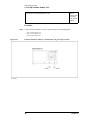
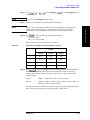
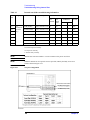
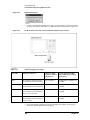
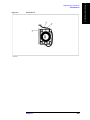
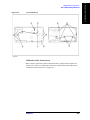
Agilent Technologies uses a two-part, ten-character serial number label (See Figure 1-1)
attached to the instrument's rear panel. The first five characters are the serial prefix and the
last five digits are the suffix.
Figure 1-1
Serial Number Label Example
An instrument manufactured after the printing date of this manual may have serial number
prefix that is not listed on the title page. This unlisted serial number prefix indicates the
instrument is different from those described in this manual. The manual for this new
instrument may be accompanied by a yellow Manual Changes supplement or have a
different manual part number. This sheet contains “change information” that explains how
to adapt the manual to the newer instrument.
In addition to change information, the supplement may contain information for correcting
errors (Errata) in the manual. To keep this manual as current and accurate as possible,
Agilent Technologies recommends that you periodically request the latest Manual Changes
supplement. The supplement for this manual is identified by this manual's printing data and
is available from Agilent Technologies. If the serial prefix or number of an instrument is
lower than that on the title page of this manual, see Appendix A, Manual Changes. For
information concerning, a serial number prefix that is not listed on the title page or in the
Manual change supplement, contact the nearest Agilent Technologies office.
Chapter 1
19
1. General Information
General Information
Instrument Covered by This Manual
General Information
Required Equipment
Required Equipment
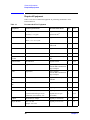
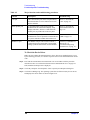
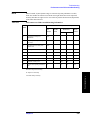
Table 1-1 lists the recommended equipment for performing maintenance on the
E5070A/E5071A.
Table 1-1
Recommended Test Equipment
Equipment
Critical specifications
Recommended Model
Qty.
Use*1
Frequency Counter
Frequency: 50 MHz to 3 GHz
1
P,A
Accuracy: < 2.5 ppm
Agilent 53181A with
Opt.010 & 030*2
Frequency: 10 MHz, Time Base
Agilent 5071A
1
A
Frequency Standard
Error: £ ± 1´ 10–10/year
Power Meter
No Substitute
Agilent E4419A/B or
E4418A/B
1
P,A
Power Sensor
No Substitute
Agilent 8482A
1
P,A
Power Sensor
No Substitute
Agilent E4412A
1
P,A
Dynamic Accuracy
Test Kit
No substitute
Agilent Z5623A with Opt.
H01
1
P
Calibration Kit
No Substitute
Agilent 85032F
1
P,A,T
Short
Type-N(m)
part of Agilent
85032F/54D/33E/50D with
Type-N adapter
4
P,T
Load
Type-N(m)
part of Agilent
85032F/54D/33E/50D with
Type-N adapter
2
P
Fixed attenuator (6
dB)
50 W, N(m)-N(f), VSWR £ 1.015
Agilent 8491A w/Opt.006
and H60
1
P,A
Fixed attenuator (10
dB)
50 W, N(m)-N(f)
Agilent 8491A/B/C
1
T
Handler I/O Test Kit
No substitute
Agilent p/n E5070-65001
1
T
Cable
BNC(m)-BNC(m) Cable, 61 cm
Agilent p/n 8120-1839
1
P,A
Coaxial cable with Type-N (m)
connectors, 61 cm (24 in), 2 ea.
Agilent N6314A (p/n
8120-8862)
1
P,A,T
Adapter
N(m)-BNC(f) Adapter
Agilent p/n 1250-0780
1
P,A
Torque Wrench
Size: 3/4 inch
Agilent p/n 8710-1766
1
P,A
Torque: 136 N-cm
20
Chapter 1
Table 1-1
Recommended Test Equipment
Equipment
Critical specifications
Personal Computer
with GPIB board
Windows 95, 98, NT4 or 2000,
VEE5.0 or 6.0
Recommended Model
Qty.
Use*1
1
P,A
*1.P: Performance Tests, A: Adjustment, T: Troubleshooting
*2.Opt.050 and Opt.124 can be substituted for Opt.030. In this case, a N(m)-BNC(f) adapter is necessary.
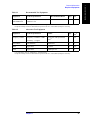
Table 1-2
Alternative Test Equipment
Equipment
Critical specifications
Model
Qty.
Use*1
Frequency Counter
Frequency: 50 MHz to 3 GHz
1
P,A
Accuracy: < 2.5 ppm
53131/2A with Opt.010 and
030*2
Power Meter
No Substitute
E4418A/B
1
P
Short
Type-N(m)
11512A
4
P,T
Load
Type-N(m)
909F Opt. 012
4
P
*1.P: Performance Tests, A: Adjustment, T: Troubleshooting
*2.Opt.050 and Opt.124 can be substituted for Opt.030. In this case, a N(m)-BNC(f) adapter is necessary.
Chapter 1
21
1. General Information
General Information
Required Equipment
General Information
Required Equipment
22
Chapter 1
2. Performance Test
2
Performance Tests
This chapter provides information on how to verify the E5070A/E5071A performance.
23
Performance Tests
Introduction
Introduction
This literature provides the performance test procedures for the Agilent E5070A/E5071A
RF Network Analyzers. The performance test names are listed in Table 2-1. The test
procedures are described sequentially in the following pages.
The test name indicates the tested performance and to which performance group the tested
performance belongs.
Each procedure consists of the following parts:
NOTE
Description:
describes the test procedure
Specification:
describes the performance verified in the test.
Test Equipment:
describes test equipment required in the test.
Procedure:
describes test procedure step by step.
Allow the analyzer to warp up for at least 30 minutes before you execute any of the
performance tests.
Perform all performance tests in an ambient temperature of 23 ± 5 °C
NOTE
The performance tests should be performed periodically. The recommended test interval is
12 months.
The test interval depends on maintenance of use and the environmental conditions under
which the instrument is used. You may find that the interval could be shortened or
lengthened; however, such a decision should be based on substantial quantitative data.
NOTE
Before performing any tests, make extra copies of the calculation sheet and the
performance test record pertaining to the test procedure. These are required in the test
procedure. For explanation of how to use these records, see the calculation sheet and
performance test record at the end of this literature.
NOTE
All the test procedures are described without using the optional touch screen LCD features
(option 016) of the E5070A/E5071A. For the option 016 instruments, the touch screen
operating procedures corresponding to the described procedures may be used.
Table 2-1
The E5070A/E5071A performance test procedure
Para.
Title
1
Frequency accuracy test
2
RF output level accuracy and flatness test
3
RF output level linearity test
4
Trace noise CW test
5
Crosstalk test
6
System dynamic range test
24
Chapter 2
Performance Tests
Introduction
Table 2-1
The E5070A/E5071A performance test procedure
Para.
Title
7
Dynamic accuracy test
8
Uncorrected system performance test
The required equipment for the performance test is listed on Table 1-1and Table 1-2. Use
only calibrated equipment when doing the performance test.
Chapter 2
25
2. Performance Test
Test Equipment Required
Performance Tests
1. FREQUENCY ACCURACY TEST
1. FREQUENCY ACCURACY TEST
Description
This test checks the frequency accuracy of the E5070A/E5071A test port output signal.
The frequency accuracy is checked at 50 MHz and 3 GHz with a frequency counter. Since
the E5070A/E5071A employs a PLL frequency synthesizer for the signal source, the
frequency accuracy test at these two frequency points can verify the accuracy for the entire
frequency range.
Specification
@23 ± 5 °C, referenced to 23 °C
Frequency accuracy
£ ± 5 ppm @ 300 kHz to 3 GHz (E5070A)
£ ± 5 ppm @ 300 kHz to 8.5 GHz (E5071A)
@23 ± 5 °C, referenced to 23 °C
High stability time-base accuracy
(option 1E5)
£ ± 1 ppm @ 300 kHz to 3 GHz (E5070A)
£ ± 1 ppm @ 300 kHz to 8.5 GHz (E5071A)
Test equipment
Frequency Counter
Agilent 53181A with Opt. 010 and 030
BNC cable, 61 cm
PN 8120-1839
N(m)-BNC(f) adapter
PN 1250-0780
Procedure
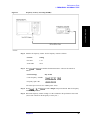
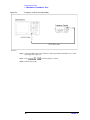
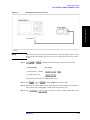
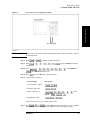
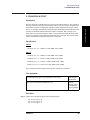
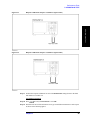
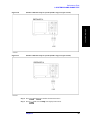
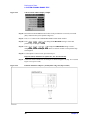
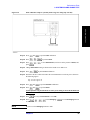
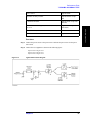
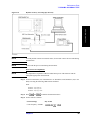
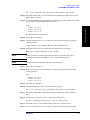
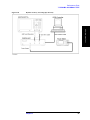
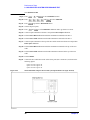
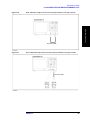
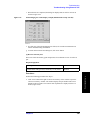
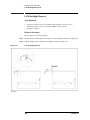
Step 1. Connect the test equipment as shown in Figure 2-1. For testing the E5070A/E5071A
equipped with option 1E5, connect a BNC cable between the Ref In connector and the Ref
Oven (10 MHz) connector on the E5070A/E5071A rear panel.
NOTE
For testing without option 1E5, disconnect the above BNC cable.
NOTE
Figure 2-1 shows the test setup for the E5070A/E5071A with 4-port option (Opt. 413/414).
For 2-port and 3-port options (Opt. 213/214/313/314), connect the frequency counter input
cable to Port 1 as well.
26
Chapter 2
Performance Tests
1. FREQUENCY ACCURACY TEST
Figure 2-1
Frequency accuracy test setup (50 MHz)
2. Performance Test
Step 2. Initialize the frequency counter. Set the frequency counter as follows:
Controls
Setting
Gate time
1 sec
50 W/1 MW
50 W
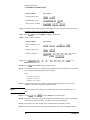
Step 3. Press
follows:
and
to initialize the E5070A/E5071A. Then set the controls as
Control settings
Key strokes
Center frequency: 50 MHz
-
-
Frequency span: 0 Hz
-
-
-
The source power now is set to 0 dBm (preset value).
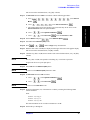
Step 4. Press
and
counter reading to settle.
to make a Single sweep measurement. Wait for frequency
Step 5. Record the frequency counter reading to a 1 Hz resolution in the performance test record
("Test result" column for the Frequency accuracy test.)
Chapter 2
27
Performance Tests
1. FREQUENCY ACCURACY TEST
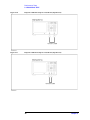
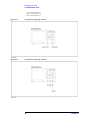
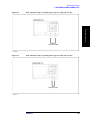
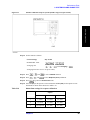
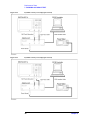
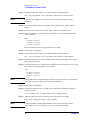
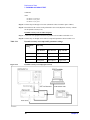
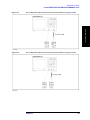
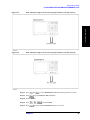
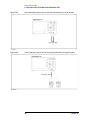
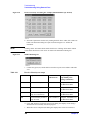
Figure 2-2
Frequency accuracy test setup (3GHz)
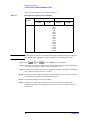
Step 6. Connect the BNC cable to the frequency counter input channel measurable for a 3 GHz
input signal. See Figure 2-2.
Step 7. Press
-
-
to set the frequency to 3 GHz.
Step 8. Perform Step 4 and 5.
28
Chapter 2
Performance Tests
2. RF OUTPUT LEVEL ACCURACY AND FLATNESS TEST
2. RF OUTPUT LEVEL ACCURACY AND FLATNESS
TEST
Description
Specification
Level accuracy
£ ± 0.65 dBm @ 23 ± 5 °C, 50 MHz, 0 dBm
Flatness
E5070A
£ ± 1 dBm @ 23 ± 5 °C, 10 MHz to 3 GHz, 0 dBm, relative to 50 MHz
E5071A
£ ± 1 dBm @ 23 ± 5 °C, 10 MHz to 8.5 GHz, 0 dBm, relative to 50 MHz
NOTE
The level accuracy and flatness specifications apply to Port 1 only. The levels for other
ports are given as supplemental performance characteristic.
Test equipment
Power meter
Agilent E4419A/B
Power sensor
Agilent E4412A
Procedure
Step 1. Connect the power sensor to the power meter. Calibrate the power meter for the power
sensor used.
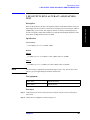
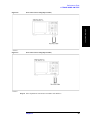
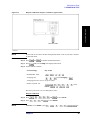
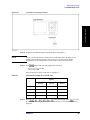
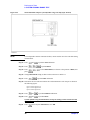
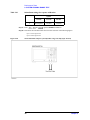
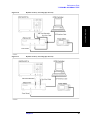
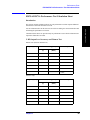
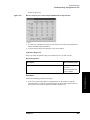
Step 2. Connect the test equipment as shown in Figure 2-3.
Chapter 2
29
2. Performance Test
This test checks the level accuracy and frequency flatness of the E5070A/E5071A test port
output signal. The level accuracy is checked for an output power level setting of 0 dBm at
50 MHz using a power meter. The frequency flatness is tested by measuring the power
level at 12 frequency points from 10 MHz to 8.5 GHz and calculating the differences of the
power meter readings from the level at 50 MHz.
Performance Tests
2. RF OUTPUT LEVEL ACCURACY AND FLATNESS TEST
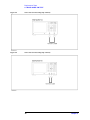
Figure 2-3
RF output level accuracy and flatness test setup.
NOTE
Figure 2-3 shows the test setup for the E5070A/E5071A with 4-port option (Opt. 413/414).
For 2-port and 3-port options (Opt. 213/214/313/314), connect the power sensor to Port 1
as well.
Step 3. Press
follows:
and
to initialize the E5070A/E5071A. Then set the controls as
Control settings
Key strokes
Center frequency: 50 MHz
-
-
Frequency span: 0 Hz
-
-
-
The source power now is set to 0 dBm (preset value).
Step 4. Press
-
and
to make a Single sweep measurement.
Step 5. RF output level accuracy test
a. Wait for power meter reading to settle.
b. Record the power meter reading in the performance test record ("Test result" column
for the level accuracy test).
Step 6. RF output level flatness test
a. Record the power meter reading (same as that in Step 5-b) in the calculation sheet
("Power meter reading [Ref]" column for the level flatness test).
b. Press
to change the E5070A/E5071A center frequency to 10
MHz, which is the first one of the frequency flatness test frequencies listed in Table
30
Chapter 2
Performance Tests
2. RF OUTPUT LEVEL ACCURACY AND FLATNESS TEST
2-2.
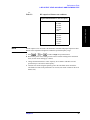
Table 2-2
RF output level flatness test conditions
Agilent E5070A/E5071A Center Frequency
10 MHz
550 MHz
1.05 GHz
1.55 GHz
2.05 GHz
3 GHz
E5071A only
4.25 GHz
5.05 GHz
6.05 GHz
7.05 GHz
8.05 GHz
8.5 GHz
2. Performance Test
NOTE
E5070A/E5071A
The RF output level is measured at the minimum, maximum and proper frequencies other
than the source adjustment frequencies within the specified frequency range.
c. Press
-
and
to make a Single sweep measurement.
d. Wait for the power meter reading to settle. Then record the reading in the calculation
sheet ("Power meter reading [a]" column).
e. Change the E5070A/E5071A center frequency in accordance with Table 2-2 and
perform Step 6-c and 6-d for each frequency.
f. Calculate test results using the equation given in the calculation sheet. Record the
calculated test results in the performance test record ("Test result" column for the level
flatness test).
Chapter 2
31
Performance Tests
3. RF OUTPUT LEVEL LINEARITY TEST
3. RF OUTPUT LEVEL LINEARITY TEST
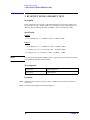
Description
This test checks the level accuracy of the E5070A/E5071A test port output signal across
the specified level range. The RF output level is measured for power level settings of -15
dBm to 0 dBm in 1 dB step increments at 10MHz, 3 GHz, 4.25 GHz and 8.5 GHz.
Specification
E5070A
£ ± 0.75 dBm @ 23 ± 5 °C, 10 MHz to 3 GHz, - 15 dBm to 0 dBm
E5071A
£ ± 0.75 dBm @ 23 ± 5 °C, 10 MHz to 4.2 GHz, - 15 dBm to 0 dBm
£ ± 1.5 dBm @ 23 ± 5 °C, 4.2 GHz to 8.5 GHz, - 10 dBm to 0 dBm
£ ± 3 dBm @ 23 ± 5 °C, 4.2 GHz to 8.5 GHz, - 15 dBm to - 10 dBm
NOTE
The level linearity specification applies to Port 1 only. The levels for other ports are given
as supplemental performance characteristic.
Test equipment
Power meter
Agilent E4419A/B
Power sensor
Agilent E4412A
Procedure
Step 1. Connect the power sensor to the power meter. Calibrate the power meter for the power
sensor used.
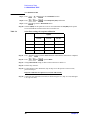
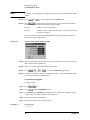
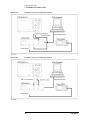
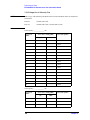
Step 2. Connect the test equipment as shown in Figure 2-4.
32
Chapter 2
Performance Tests
3. RF OUTPUT LEVEL LINEARITY TEST
RF output level linearity test setup
NOTE
Figure 2-4 shows the test setup for the E5070A/E5071A with 4-port option (Opt. 413/414).
For 2-port and 3-port options (Opt. 213/214/313/314), connect the power sensor to Port 1
as well.
2. Performance Test
Figure 2-4
Step 3. Press
follows:
and
to initialize the E5070A/E5071A. Then set the controls as
Control settings
Key strokes
Center frequency: 10 MHz
-
-
Frequency span: 0 Hz
-
-
-
The source power now is set to 0 dBm (preset value).
Step 4. Press
-
and
to make a Single sweep measurement.
Step 5. Wait for power meter reading to settle. Record the power meter reading in the calculation
sheet ("Power meter reading [Ref]" column for the level linearity test).
Step 6. Press
Chapter 2
-
-
-
to set the power level to -1 dBm, which is the second
33
Performance Tests
3. RF OUTPUT LEVEL LINEARITY TEST
value of the level linearity test levels listed in Table 2-3.
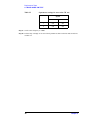
Table 2-3
RF output level linearity test conditions
Test
frequency
E5070A/E5071A
10 MHz
Power level
NOTE
3 GHz
E5071A only
4.25 GHz
8.5 GHz
0 dBm (reference level)
-1 dBm
-2 dBm
-3 dBm
-4 dBm
-5 dBm
-6 dBm
-7 dBm
-8 dBm
-9 dBm
-10 dBm
-11 dBm
-12 dBm
-13 dBm
-14 dBm
-15 dBm
The RF output level linearity is tested at the minimum, maximum and proper frequencies
other than the source adjustment frequencies within the specified frequency range.
Step 7. Press
-
and
to make a Single sweep measurement.
Step 8. Wait for the power meter reading to settle. Then record the reading in the calculation sheet
("Power meter reading [a]" column for the level linearity test).
Step 9. Change the E5070A/E5071A power level setting in accordance with Table 2-3 and perform
Step 7 and 8 for each power level to -15 dBm.
Step 10. Set the power level to 0 dBm and change the E5070A/E5071A center frequency to the next
level-linearity test frequency in accordance with Table 2-3.
Step 11. Perform Step 4 through 10 for each frequency.
Step 12. Calculate test results using the equation given in the calculation sheet. Record the
calculated test results in the performance test record ("Test result" column for the level
linearity test).
34
Chapter 2
Performance Tests
4. TRACE NOISE CW TEST
4. TRACE NOISE CW TEST
Description
Specification
E5070A
£ 1 mdB rms @ 23 ± 5 °C, 3 MHz to 3 GHz, IFBW 3 kHz, 0 dBm, through
E5071A
£ 1 mdB rms @ 23 ± 5 °C, 3 MHz to 4.2 GHz, IFBW 3 kHz, 0 dBm, through
£ 3 mdB rms @ 23 ± 5 °C, 4.2 GHz to 7.5 GHz, IFBW 3 kHz, 0 dBm, through
£ 5 mdB rms @ 23 ± 5 °C, 7.5 GHz to 8.5 GHz, IFBW 3 kHz, 0 dBm, through
Test equipment
Coaxial cable with Type-N (m) connectors, 61 cm (24 in)
N6314A(p/n
8120-8862)
Procedure
Step 1. Connect test equipment (N-N cable) as shown the following figures:
Opt. 213/214: Figure 2-5
Opt. 313/314: Figure 2-6
Opt. 413/414: Figure 2-7
Chapter 2
35
2. Performance Test
This test checks the trace noise level for each test port of the E5070A/E5071A. The trace
noise level is quantified by performing a "through" measurement 32 times at 3 MHz, 1.3
GHz, 2.1 GHz, 3 GHz, 4.25 GHz, 7.5 GHz and 8.5 GHz, with a cable connected between
two test ports. Standard deviation of the measured values at each frequency is calculated
and, then translated into a noise level expressed in dB rms.
Performance Tests
4. TRACE NOISE CW TEST
Figure 2-5
Trace noise CW test setup (Opt. 213/214)
Figure 2-6
Trace noise CW test setup (Opt. 313/314)
36
Chapter 2
Performance Tests
4. TRACE NOISE CW TEST
Trace noise CW test setup (Opt. 413/414)
NOTE
Do not touch or move the N-N cable during measurements. To do so will cause a variance
in measured values.
2. Performance Test
Figure 2-7
Step 2. Press
and
to initialize the E5070A/E5071A.
Step 3. Press
format menu.
Step 4. Press
-
-
-
-
-
-
-
to select Lin Mag from display
-
-
(select Statistics) -
-
and set Statistics function to on.
Step 5. Press
and select S21 from S-parameter menu.
Step 6. Set the controls as follows:
Control settings
Key strokes
Center frequency: 3 MHz
-
-
Frequency span: 0 Hz
-
-
Number of points: 32
-
-
Points ) -
IF Bandwidth: 3 kHz
-
-
-
-
-
-
(select
-
-
The source power now is set to 0 dBm (preset value).
Step 7. Press
and
to make a Single sweep measurement. A "s.dev" (standard
deviation) value will be displayed in the upper left corner of the graphic display.
Chapter 2
37
Performance Tests
4. TRACE NOISE CW TEST
Step 8. Record the s.dev value in the calculation sheet ("s.dev [mU]" column for the trace noise
CW test).
Step 9. Calculate the dB value of the trace noise level using the following equation and record the
calculated value in the calculation sheet ("Trace noise level [dB rms]" column).
Trace noise level = 20 log (1 + s.dev ´ 10-6)
Step 10. Change the E5070A/E5071A center frequency in accordance with Table 2-4 and perform
Step 7 through 9 for each frequency.
Table 2-4
Trace noise CW test frequencies
Center frequency setting
NOTE
E5070A/E5071A
1.3 GHz
2.1 GHz
3 GHz
E5071A only
4.25 GHz
7.5 GHz
8.5 GHz
The CW trace noise level is tested at the minimum and maximum frequencies of the
specified frequency range, the frequencies where an internal frequency divider works
(between 1.3 GHz and 2.1 GHz) and, the frequency where the signal source frequency
band is switched (4.25 GHz).
Step 11. Record the calculated values of the trace noise level in the performance test record ("Test
result [dB rms]" column for the trace noise CW test).
Step 12. Press
Step 13. Press
and select S12 from S-parameter menu.
-
-
to set the frequency to 3 MHz.
Step 14. Perform Step 7 through 11 for the S12 measurement.
Options 313, 314, 413 and 414 only
NOTE
Perform Step 15 through 18 for the option 313, 314, 413 and 414 instruments only.
Step 15. Connect the test equipment (N-N cable) as shown in Figure 2-8 (Opt. 313/314) and Figure
2-9 (Opt. 413/414).
38
Chapter 2
Performance Tests
4. TRACE NOISE CW TEST
Trace noise CW test setup (Opt. 313/314)
Figure 2-9
Trace noise CW test setup (Opt. 413/414)
2. Performance Test
Figure 2-8
Step 16. Select S-parameter from menu in accordance with Table 2-5.
Chapter 2
39
Performance Tests
4. TRACE NOISE CW TEST
Table 2-5
S-parameter settings for trace noise CW test
Option
313/314
413/414
1
S23
S43
2
S32
S34
Step 17. Set the center frequency to 3 MHz.
Step 18. Perform Step 7 through 11 for each of the S-parameters shown in the first and second rows
in Table 2-5.
40
Chapter 2
Performance Tests
5. CROSSTALK TEST
5. CROSSTALK TEST
Description
Specification
E5070A
-120 dB @ 23 ± 5 °C, 3 MHz to 3 GHz, IFBW 10 Hz, 0 dBm
E5071A
-120 dB @ 23 ± 5 °C, 3 MHz to 3 GHz, IFBW 10 Hz, 0 dBm
-110 dB @ 23 ± 5 °C, 3 GHz to 6 GHz, IFBW 10 Hz, 0 dBm
-100 dB @ 23 ± 5 °C, 6 GHz to 7.5 GHz, IFBW 10 Hz, 0 dBm
-90 dB @ 23 ± 5 °C, 7.5 GHz to 8.5 GHz, IFBW 10 Hz, 0 dBm
The crosstalk specification applies when response calibration is performed.
Test equipment
Coaxial cable with Type-N (m) connectors, 61 cm (24 in)
N6314A(p/n
8120-8862)
Type-N(m) coaxial Short termination (4 ea.)
part of
85032F/54D/3
3E/50D with
Type-N adapter
Procedure
Step 1. Connect the N-N cable as shown in the following figures:
Opt. 213/214: Figure 2-10
Opt. 313/314: Figure 2-11
Opt. 413/414: Figure 2-12
Chapter 2
41
2. Performance Test
This test checks the crosstalks between test ports of the E5070A/E5071A. The crosstalk is
tested by performing "through" measurements with two test ports connected together and,
short-ended "isolation" measurements with the test ports terminated with N-type "Short"
devices. A "through" calibration is performed to have the through measurement data as the
reference to which the isolation measurement data is compared. With a setting of 101
sweep points for a specified frequency range, a swept measurement with the short-ended
test ports is repeated 16 times and the measurement data is averaged. The worst crosstalk
value is determined from the peak value of the average data.
Performance Tests
5. CROSSTALK TEST
Figure 2-10
Response calibration setup for crosstalk test (Opt.213/214)
Figure 2-11
Response calibration setup for crosstalk test (Opt.313/314)
42
Chapter 2
Performance Tests
5. CROSSTALK TEST
Response calibration setup for crosstalk test (Opt.413/414)
NOTE
Do not touch or move the N-N cable during measurements. To do so will cause a variance
in measured values.
2. Performance Test
Figure 2-12
Step 2. Press
and
to initialize the E5070A/E5071A.
Step 3. Press
and select Lin Mag from display format menu.
Step 4. Set the controls as follows:
Control settings
Key strokes
IF Bandwidth: 10 Hz
-
Averaging: ON
-
-
-
-
-
(select Averaging) -
Averaging factor now is set to 16 (preset value).
Number of points: 101
-
-
Points) -
-
-
-
-
-
(select
The source power now is set to 0 dBm (preset value).
Response calibration
Step 5. Press
Step 6. Press
NOTE
-
-
and
If Cal Kit is set to 85032F*, press
Chapter 2
-
and
to select Cal Kit.
to select 85032F.
,
,
-
-
-
-
to
43
Performance Tests
5. CROSSTALK TEST
select Restore Cal Kit.
Step 7. Press
-
Step 8. Press
-
Step 9. Press
and
and
to select Calibrate function.
to select Response (Thru) calibration.
to go down to Select Ports menu.
Step 10. Select 2-1 (S21) for the option 213/214/313/314 instruments and 3-2 (S32) for the option
413/414 instruments as shown in the first row in Table 2-6.
Table 2-6
Select Ports settings for response calibration
Option
213/214
313/314
413/414
1
2-1(S21)
2-1(S21)
3-2 (S32)
2
1-2 (S12)
1-2 (S12)
2-3 (S23)
3
Not required
3-2 (S32)
4-1 (S41)
4
Not required
2-3 (S23)
1-4 (S14)
Step 11. Press
and
Step 12. Press
-
to perform Thru calibration. Wait until the calibration is completed.
and
to perform Done.
Step 13. Change Select Ports setting as shown in the second row in Table 2-6.
Step 14. Perform Step 11and 12.
Step 15. For the option 213/214 instruments, skip to Step 18. For the option 313/314/413/414,
proceed to Step 16.
Response calibration for options 313, 314, 413 and 414 only
Step 16. Connect the test equipment (N-N cable) as shown in Figure 2-13 (Opt. 313/314) and Figure
2-14 (Opt. 413/414).
44
Chapter 2
Performance Tests
5. CROSSTALK TEST
Response calibration setup for crosstalk test (Opt.313/314)
Figure 2-14
Response calibration setup for crosstalk test (Opt.413/414)
2. Performance Test
Figure 2-13
Step 17. Perform the response calibration for each of the Select Ports settings shown in the third
and fourth rows in Table 2-6.
Crosstalk measurement
Step 18. Press
and verify that Correction is set to ON.
Step 19. Disconnect the N-N cable and connect an N-type coaxial Short termination to each test port
as shown in the following figures:
Chapter 2
45
Performance Tests
5. CROSSTALK TEST
Opt. 213/214: Figure 2-15
Opt. 313/314: Figure 2-16
Opt. 413/414: Figure 2-17
Figure 2-15
Crosstalk test setup (Opt. 213/214)
Figure 2-16
Crosstalk test setup (Opt. 313/314)
46
Chapter 2
Performance Tests
5. CROSSTALK TEST
Figure 2-17
Crosstalk test setup (Opt. 413/414)
2. Performance Test
Step 20. Program or download the VBA test program shown in Program 2-1.
NOTE
Also set a UserForm window to enable the test result output data to be displayed. An
example of the UserForm window is shown in Figure 2-18. Refer to the Agilent
E5070A/E5071A VBA Programmer's Guide for the UserForm setup procedure.
Step 21. Press
and select the following S-parameter from menu:
Option 213/214/313/314: S21
Option 413/414: S32
These parameters are shown in the first row in Table 2-7.
Table 2-7
S-parameter settings for crosstalk tests.
Option
213/214
313/314
413/414
1
S21
S21
S32
2
S12
S12
S23
3
Not required
S32
S41
4
Not required
S23
S14
Step 22. Press
(select Averaging Restart)
to restart
the swept measurements. Wait until a trace for the average of 16 swept measurements is
displayed.
Chapter 2
47
Performance Tests
5. CROSSTALK TEST
NOTE
The number of averaging times is displayed in the status bar of the measurement channel
window.
Step 23. Press
to set the trigger operation to Hold mode.
and
Step 24. Press
to execute the test program. This test program searches the maximum
point of the trace for each of the following frequency ranges.
E5070A:
3 MHz to 3 GHz (one range only)
E5071A:
3 MHZ to 3 GHz, 3 GHz to 6 GHz, 6 GHz to 7.5 GHz and 7.5 GHz to
8.5 GHz (four ranges)
The test results are represented in dB and displayed in the VBA UserForm window as
shown in the display example below.
Figure 2-18
VBA UserForm window display example
Step 25. Read the maximum value(s) and record them in the performance test record ("Test result
[dB]" column for the crosstalk test).
Step 26. Press Exit button on the CROSSTALK TEST window.
Step 27. Press
-
-
-
to select the Continuous trigger mode.
Step 28. Change the S-parameter setting in accordance with Table 2-7 (the second through fourth
rows) and perform Step 22 through Step 27.
Crosstalk test program
Coding procedure:
Step 1. Press
Step 2. Press
key.
to activate VBA Editor function.
Step 3. Click Insert and select Module from pull-down menu. VBA Project - Module1 [Code]
window screen for coding a program will be displayed.
Step 4. Input the test program shown below.
Step 5. Save the test program with a proper file name.
Program 2-1
Test Program:
Sub Main()
48
Chapter 2
Performance Tests
5. CROSSTALK TEST
Dim Ver As String
Dim MaxValA As Variant
Dim MaxValB As Variant, MaxValC As Variant, MaxValD As Variant,
MaxValE As Variant
Ver = Name
2. Performance Test
If Ver = "E5070A" Then
SCPI.CALCulate(1).PARameter(1).SELect
SCPI.CALCulate(1).SELected.FUNCtion.TYPE = "MAX"
SCPI.CALCulate(1).SELected.FUNCtion.DOMain.STARt = 3000000#
SCPI.CALCulate(1).SELected.FUNCtion.DOMain.STOP = 3000000000#
SCPI.CALCulate(1).SELected.FUNCtion.DOMain.STATe = True
SCPI.CALCulate(1).SELected.FUNCtion.EXECute
MaxValA = SCPI.CALCulate(1).SELected.FUNCtion.DATA
frmCrossTalk1.txtVal.Text = CSng(20 * Log10(MaxValA(0)))
frmCrossTalk1.Show
ElseIf Ver = "E5071A" Then
SCPI.CALCulate(1).PARameter(1).SELect
SCPI.CALCulate(1).SELected.FUNCtion.TYPE = "MAX"
SCPI.CALCulate(1).SELected.FUNCtion.DOMain.STARt = 3000000#
SCPI.CALCulate(1).SELected.FUNCtion.DOMain.STOP = 3000000000#
SCPI.CALCulate(1).SELected.FUNCtion.DOMain.STATe = True
SCPI.CALCulate(1).SELected.FUNCtion.EXECute
MaxValB = SCPI.CALCulate(1).SELected.FUNCtion.DATA
SCPI.CALCulate(1).SELected.FUNCtion.DOMain.STARt = 3000000000#
SCPI.CALCulate(1).SELected.FUNCtion.DOMain.STOP = 6000000000#
SCPI.CALCulate(1).SELected.FUNCtion.DOMain.STATe = True
SCPI.CALCulate(1).SELected.FUNCtion.EXECute
MaxValC = SCPI.CALCulate(1).SELected.FUNCtion.DATA
SCPI.CALCulate(1).SELected.FUNCtion.DOMain.STARt = 6000000000#
SCPI.CALCulate(1).SELected.FUNCtion.DOMain.STOP = 7500000000#
SCPI.CALCulate(1).SELected.FUNCtion.DOMain.STATe = True
Chapter 2
49
Performance Tests
5. CROSSTALK TEST
SCPI.CALCulate(1).SELected.FUNCtion.EXECute
MaxValD = SCPI.CALCulate(1).SELected.FUNCtion.DATA
SCPI.CALCulate(1).SELected.FUNCtion.DOMain.STARt = 7500000000#
SCPI.CALCulate(1).SELected.FUNCtion.DOMain.STOP = 8500000000#
SCPI.CALCulate(1).SELected.FUNCtion.DOMain.STATe = True
SCPI.CALCulate(1).SELected.FUNCtion.EXECute
MaxValE = SCPI.CALCulate(1).SELected.FUNCtion.DATA
frmCrossTalk2.txtVal1.Text = CSng(20 * Log10(MaxValB(0)))
frmCrossTalk2.txtVal2.Text = CSng(20 * Log10(MaxValC(0)))
frmCrossTalk2.txtVal3.Text = CSng(20 * Log10(MaxValD(0)))
frmCrossTalk2.txtVal4.Text = CSng(20 * Log10(MaxValE(0)))
frmCrossTalk2.Show
End If
End Sub
Function Log10(X)
Log10 = Log(X) / Log(10)
End Function
50
Chapter 2
Performance Tests
6. SYSTEM DYNAMIC RANGE TEST
6. SYSTEM DYNAMIC RANGE TEST
Description
Specification
E5070A
95 dB @ 23 ± 5 °C, 3 MHz to 1.5 GHz, IFBW 3 kHz
97 dB @ 23 ± 5 °C, 1.5 GHz to 3 GHz, IFBW 3 kHz
120 dB @ 23 ± 5 °C, 3 MHz to 1.5 GHz, IFBW 10 Hz
122 dB @ 23 ± 5 °C, 1.5 GHz to 3 GHz, IFBW 10 Hz
E5071A
95 dB @ 23 ± 5 °C, 3 MHz to 1.5 GHz, IFBW 3 kHz
97 dB @ 23 ± 5 °C, 1.5 GHz to 4 GHz, IFBW 3 kHz
95 dB @ 23 ± 5 °C, 4 GHz to 6 GHz, IFBW 3 kHz
92 dB @ 23 ± 5 °C, 6 GHz to 7.5 GHz, IFBW 3 kHz
85 dB @ 23 ± 5 °C, 7.5 GHz to 8.5 GHz, IFBW 3 kHz
120 dB @ 23 ± 5 °C, 3 MHz to 1.5 GHz, IFBW 10 Hz
122 dB @ 23 ± 5 °C, 1.5 GHz to 4 GHz, IFBW 10 Hz
120 dB @ 23 ± 5 °C, 4 GHz to 6 GHz, IFBW 10 Hz
117 dB@ 23 ± 5 °C, 6 GHz to 7.5 GHz, IFBW 10 Hz
110 dB @ 23 ± 5 °C, 7.5 GHz to 8.5 GHz, IFBW 10 Hz
NOTE
The specification applies when the response and isolation calibration is performed and
averaging factor is 16.
Test equipment
Coaxial cable with Type-N (m) connectors, 61 cm (24 in)
Chapter 2
N6314A(p/n
8120-8862)
51
2. Performance Test
This test checks the system dynamic range for the receiver ports of the E5070A/E5071A.
The system dynamic range is tested by performing an "Isolation" measurement 16 times
with 101 sweep points for specified frequency ranges (after the response and isolation
calibrations are performed) and calculating the RMS deviation value from the 16
measurement data for each sweep frequency point. The maximum RMS deviation value in
each frequency range is extracted to determine the system dynamic range performance.
Performance Tests
6. SYSTEM DYNAMIC RANGE TEST
Type-N(m) 50 W Load termination (2 ea.)
part of
85032F/54D
/33E/50D
with Type-N
adapter
Procedure
Step 1. Connect a load termination to each test port as shown in the following figures:
Opt. 213/214: Figure 2-19
Opt. 313/314: Figure 2-20
Opt. 413/414: Figure 2-21
Figure 2-19
Isolation calibration setup for system dynamic range test (Opt. 213/214)
52
Chapter 2
Performance Tests
6. SYSTEM DYNAMIC RANGE TEST
Isolation calibration setup for system dynamic range test (Opt. 313/314)
Figure 2-21
Isolation calibration setup for system dynamic range test (Opt. 413/414)
2. Performance Test
Figure 2-20
Step 2. Press
and
Step 3. Press
and select Lin Mag from display format menu.
Chapter 2
to initialize the E5070A/E5071A.
53
Performance Tests
6. SYSTEM DYNAMIC RANGE TEST
Step 4. Set the controls as follows:
Control settings
Key strokes
IF Bandwidth: 10 Hz
-
Averaging: ON
-
-
-
-
-
(select Averaging) -
Averaging factor now is set to 16 (preset value).
Number of points: 101
-
-
Points) -
-
-
-
-
-
-
(select
The source power now is set to 0 dBm (preset value).
Response (Thru) calibration
Step 5. Press
-
Step 6. Press
NOTE
-
-
-
-
and
-
Step 8. Press
-
Step 9. Press
and
and
to select Cal Kit.
to select 85032F.
If Cal Kit is set to 85032F*, press
select Restore Cal Kit.
Step 7. Press
and
,
,
-
-
-
-
to
to select Calibrate function.
to select Response (Thru) calibration.
to go down to Select Ports menu.
Step 10. Select 2-1 (21) for the option 213/214 instruments and 3-2 (S32) for the option
313/314413/414 instruments as shown in the first row in Table 2-8.
Table 2-8
Select Ports settings for response calibration
Option
Step 11. Press
213/214
313/314
413/414
1
2-1(S21)
3-2 (S32)
3-2 (S32)
2
1-2 (S12)
2-3 (S23)
2-3 (S23)
3
Not required
2-1 (S21)
4-1 (S41)
4
Not required
1-2 (S12)
1-4 (S14)
-
and
to perform Isolation calibration.
Step 12. Disconnect the load and connect the N-N cable as shown in the following figures.
Opt. 213/214: Figure 2-22
Opt. 313/314: Figure 2-23
Opt. 413/414: Figure 2-24
54
Chapter 2
Performance Tests
6. SYSTEM DYNAMIC RANGE TEST
Thru calibration setup for system dynamic range test setup (Opt. 213/214)
Figure 2-23
Thru calibration setup for system dynamic range test setup (Opt. 313/314)
2. Performance Test
Figure 2-22
Chapter 2
55
Performance Tests
6. SYSTEM DYNAMIC RANGE TEST
Figure 2-24
Thru calibration setup for system dynamic range test setup (Opt. 413/414)
NOTE
To avoid possible variance in measured values, do not touch or move the N-N cable during
measurements.
Step 13. Press
and
Step 14. Press
-
-
Step 15. Press
-
-
press
to perform Thru calibration.
to perform Done.
to select Select Ports (in reference to the position of Done) and
.
Step 16. Change Select Ports setting as shown in the second row in Table 2-8.
Step 17. Press
-
to perform Thru calibration.
Step 18. Disconnect the N-N cable and connect the Load termination to each test port as shown in
the following figures.
Opt. 213/214: Figure 2-19
Opt. 313/314: Figure 2-20
Opt. 413/414: Figure 2-21
Step 19. Press
and
to perform Isolation calibration.
Step 20. Press
and
to perform Done.
System dynamic rang measurement for select ports setting as shown in the first and
second row in Table 2-8
Step 21. Press
56
and verify that Correction is set to ON.
Chapter 2
Performance Tests
6. SYSTEM DYNAMIC RANGE TEST
Step 22. Press
to OFF.
NOTE
-
-
-
(select Averaging) -
to set the Averaging function
Be sure to set the Avaraging function to OFF.
Step 23. Program or download the test program shown in Program 2-2.
NOTE
Step 24. Press
2. Performance Test
Also set a UserForm window to enable the test result output data to be displayed. An
example of the UserForm window is shown in Figure 2-25. Refer to the Agilent
E5070A/E5071A VBA Programmer's Guide for the UserForm setup procedure.
and select the following S-parameter from menu:
Option 213/214: S21
Option 313/314/413/414: S32
These parameters are shown in the first row in Table 2-9.
Table 2-9
S-parameter settings for system dynamic range test
Option
213/214
313/314
413/414
1
S21
S32
S32
2
S12
S23
S23
3
Not required
S21
S41
4
Not required
S12
S14
Step 25. Press
to run the test program. This test program repeats a swept measurement 16
times, calculates the RMS deviation from the 16 measurement values at each sweep
frequency point, and extracts the maximum deviation value for each of the following
frequency ranges:
E5070A:
3 MHz to 1.5 GHz and 1.5 GHz to 3 GHz (2 ranges)
E5071A:
3 MHz to 1.5 GHz, 1.5 GHz to 4 GHz, 4 GHz to 6 GHz, 6 GHz to 7.5
GHz and 7.5 GHz to 8 GHz (5 ranges)
The maximum deviation value in each frequency range is represented in dB and displayed
in the VBA UserForm window as shown in the display example below.
Chapter 2
57
Performance Tests
6. SYSTEM DYNAMIC RANGE TEST
Figure 2-25
VBA UserForm window display example
Step 26. Record the maximum RMS deviation values in the performance test record ("Test result
[dB]" column for the system dynamic range test).
Step 27. Press Exit button on the SYSTEM DYNAMIC RANG TEST window.
Step 28. Press
perform Step 25 through 27.
to change the IF Bandwidth setting to 3 kHz and
Step 29. Press
to change the IF Bandwidth setting to 10 Hz ,
change the S-parameter setting as shown in the second row in Table 2-9 and perform Step
25 through 28.
Step 30. For the option 313/314/413/414, proceed to Step 31.
Response (Thru) calibration for options 313, 314, 413 and 414 only
Step 31. Connect the Load termination to each test port as shown in Figure 2-26 (Opt. 313/314) and
Figure 2-27 (Opt. 413/414).
Figure 2-26
Isolation calibration setup for system dynamic range test (Opt. 313/314)
58
Chapter 2
Performance Tests
6. SYSTEM DYNAMIC RANGE TEST
Figure 2-27
Isolation calibration setup for system dynamic range test (Opt. 413/414)
2. Performance Test
Step 32. Set the controls as follows:
Control settings
Key strokes
IF Bandwidth: 10 Hz
-
Averaging: ON
-
-
-
-
(select Averaging) -
Averaging factor now is set to 16 (preset value).
Step 33. Press
-
Step 34. Press
-
and
and
to select Calibrate function.
to select Response (Thru) calibration.
to go down to Select Ports menu.
Step 35. Press
Step 36. Select 2-1 (21) for the option 313/314 instruments and 4-1 (S41) for the option 413/414
instruments as shown in the third row in Table 2-10.
Table 2-10
Select Ports settings for response calibration
Option
213/214
313/314
413/414
1
2-1(S21)
3-2 (S32)
3-2 (S32)
2
1-2 (S12)
2-3 (S23)
2-3 (S23)
3
Not required
2-1 (S21)
4-1 (S41)
Chapter 2
59
Performance Tests
6. SYSTEM DYNAMIC RANGE TEST
Table 2-10
Select Ports settings for response calibration
Option
4
Step 37. Press
-
213/214
313/314
413/414
Not required
1-2 (S12)
1-4 (S14)
and
to perform Isolation calibration.
Step 38. Disconnect the load and connect the N-N cable as shown in the following figures.
Opt. 313/314: Figure 2-28
Opt. 413/414: Figure 2-29
Figure 2-28
Thru calibration setup for system dynamic range test setup (Opt. 313/314)
60
Chapter 2
Performance Tests
6. SYSTEM DYNAMIC RANGE TEST
Figure 2-29
Thru calibration setup for system dynamic range test setup (Opt. 413/414)
2. Performance Test
to perform Thru calibration.
Step 39. Press
and
Step 40. Press
-
-
Step 41. Press
-
-
press
to perform Done.
to select Select Ports (in reference to the position of Done) and
.
Step 42. Change Select Ports setting as shown in the fourth row in Table 2-10.
Step 43. Press
-
to perform Thru calibration.
Step 44. Disconnect the N-N cable and connect the Load termination to each test port as shown in
the following figures.
Opt. 313/314: Figure 2-26
Opt. 413/414: Figure 2-27
Step 45. Press
and
to perform Isolation calibration.
Step 46. Press
and
to perform Done.
System dynamic rang measurement for select ports setting as shown in the third and
fourth row in Table 2-10
NOTE
Step 47. Press
and verify that Correction is set to ON.
Step 48. Press
to OFF.
-
-
-
(select Averaging) -
to set the Averaging function
Be sure to set the Avaraging function to OFF.
Chapter 2
61
Performance Tests
6. SYSTEM DYNAMIC RANGE TEST
Step 49. Press
and select the following S-parameter from menu:
Option 313/314: S21
Option 413/414: S41
These parameters are shown in the third row in Table 2-11.
Table 2-11
S-parameter settings for system dynamic range test
Option
Step 50. Press
Figure 2-30
213/214
313/314
413/414
1
S21
S32
S32
2
S12
S23
S23
3
Not required
S21
S41
4
Not required
S12
S14
to run the test program.
VBA UserForm window display example
Step 51. Record the maximum RMS deviation values in the performance test record ("Test result
[dB]" column for the system dynamic range test).
Step 52. Press Exit button on the SYSTEM DYNAMIC RANGE TEST window.
Step 53. Press
perform Step 50 through 52.
to change the IF Bandwidth setting to 3 kHz and
Step 54. Press
to change the IF Bandwidth setting to 10 Hz ,
change the S-parameter setting as shown in the fourth row in Table 2-11and perform Step
50 through 53.
System Dynamic Range test program
Coding procedure:
Step 1. Press
Step 2. Press
key.
to activate VBA Editor function.
Step 3. Click Insert and select Module from pull-down menu. VBA Project - Module1 [Code]
62
Chapter 2
Performance Tests
6. SYSTEM DYNAMIC RANGE TEST
window screen for coding a program will be displayed.
Step 4. Input the test program shown below.
Step 5. Save the test program with a proper file name.
Program 2-2
Test program:
Sub Main()
Dim I As Integer, J As Integer, K As Integer, Dmy As Long
Dim Ver As String
Dim MaxValA As Variant, MaxValB As Variant
Dim MaxValC As Variant, MaxValD As Variant, MaxValE As Variant,
MaxValF As Variant, MaxValG As Variant
SCPI.TRIGger.SEQuence.Source = "BUS"
SCPI.INITiate(1).CONTinuous = True
For I = 0 To 15
SCPI.TRIGger.SEQuence.SINGle
Dmy = SCPI.IEEE4882.OPC
SCPI.CALCulate(1).PARameter(1).SELect
Val(I) = SCPI.CALCulate(1).SELected.DATA.FDATa
Next I
For J = 0 To 201
X(J) = Val(0)(J) ^ 2
Next J
For J = 0 To 201
For I = 1 To 15
X(J) = X(J) + Val(I)(J) ^ 2
Next I
Y(J) = Sqr(X(J) / 16)
Next J
Rms = CVar(Y)
SCPI.CALCulate(1).SELected.DATA.FDATa = Rms
Chapter 2
63
2. Performance Test
Dim Val(15) As Variant, X(201) As Double, Y(201) As Double, Rms As
Variant
Performance Tests
6. SYSTEM DYNAMIC RANGE TEST
SCPI.TRIGger.SEQuence.SINGle
Dmy = SCPI.IEEE4882.OPC
Ver = Name
If Ver = "E5070A" Then
SCPI.CALCulate(1).PARameter(1).SELect
SCPI.CALCulate(1).SELected.Function.TYPE = "MAX"
SCPI.CALCulate(1).SELected.Function.DOMain.STARt = 3000000#
SCPI.CALCulate(1).SELected.Function.DOMain.STOP = 1500000000#
SCPI.CALCulate(1).SELected.Function.DOMain.STATe = True
SCPI.CALCulate(1).SELected.Function.EXECute
MaxValA = SCPI.CALCulate(1).SELected.Function.DATA
SCPI.CALCulate(1).SELected.Function.DOMain.STARt = 1500000000#
SCPI.CALCulate(1).SELected.Function.DOMain.STOP = 3000000000#
SCPI.CALCulate(1).SELected.Function.DOMain.STATe = True
SCPI.CALCulate(1).SELected.Function.EXECute
MaxValB = SCPI.CALCulate(1).SELected.Function.DATA
frmDynamicRange1.txtVal1.Text = CSng(20 * Log10(MaxValA(0)))
frmDynamicRange1.txtVal2.Text = CSng(20 * Log10(MaxValB(0)))
frmDynamicRange1.Show
ElseIf Ver = "E5071A" Then
SCPI.CALCulate(1).PARameter(1).SELect
SCPI.CALCulate(1).SELected.Function.TYPE = "MAX"
SCPI.CALCulate(1).SELected.Function.DOMain.STARt = 3000000#
SCPI.CALCulate(1).SELected.Function.DOMain.STOP = 1500000000#
SCPI.CALCulate(1).SELected.Function.DOMain.STATe = True
SCPI.CALCulate(1).SELected.Function.EXECute
MaxValC = SCPI.CALCulate(1).SELected.Function.DATA
SCPI.CALCulate(1).SELected.Function.DOMain.STARt = 1500000000#
SCPI.CALCulate(1).SELected.Function.DOMain.STOP = 4000000000#
SCPI.CALCulate(1).SELected.Function.DOMain.STATe = True
SCPI.CALCulate(1).SELected.Function.EXECute
MaxValD = SCPI.CALCulate(1).SELected.Function.DATA
64
Chapter 2
Performance Tests
6. SYSTEM DYNAMIC RANGE TEST
SCPI.CALCulate(1).SELected.Function.DOMain.STARt = 4000000000#
SCPI.CALCulate(1).SELected.Function.DOMain.STOP = 6000000000#
SCPI.CALCulate(1).SELected.Function.DOMain.STATe = True
SCPI.CALCulate(1).SELected.Function.EXECute
MaxValE = SCPI.CALCulate(1).SELected.Function.DATA
SCPI.CALCulate(1).SELected.Function.DOMain.STOP = 7500000000#
SCPI.CALCulate(1).SELected.Function.DOMain.STATe = True
SCPI.CALCulate(1).SELected.Function.EXECute
MaxValF = SCPI.CALCulate(1).SELected.Function.DATA
SCPI.CALCulate(1).SELected.Function.DOMain.STARt = 7500000000#
SCPI.CALCulate(1).SELected.Function.DOMain.STOP = 8500000000#
SCPI.CALCulate(1).SELected.Function.DOMain.STATe = True
SCPI.CALCulate(1).SELected.Function.EXECute
MaxValG = SCPI.CALCulate(1).SELected.Function.DATA
frmDynamicRange2.txtVal1.Text = CSng(20 * Log10(MaxValC(0)))
frmDynamicRange2.txtVal2.Text = CSng(20 * Log10(MaxValD(0)))
frmDynamicRange2.txtVal3.Text = CSng(20 * Log10(MaxValE(0)))
frmDynamicRange2.txtVal4.Text = CSng(20 * Log10(MaxValF(0)))
frmDynamicRange2.txtVal5.Text = CSng(20 * Log10(MaxValG(0)))
frmDynamicRange2.Show
End If
End Sub
Function Log10(X)
Log10 = Log(X) / Log(10)
End Function
Chapter 2
65
2. Performance Test
SCPI.CALCulate(1).SELected.Function.DOMain.STARt = 6000000000#
Performance Tests
7. DYNAMIC ACCURACY TEST
7. DYNAMIC ACCURACY TEST
Description
This test checks the dynamic accuracy of the E5070A/E5071A. The dynamic accuracy is
tested at 1.195 GHz for each receiver port using the Agilent Z5623A (with option H01)
Dynamic Accuracy Test Kit. A block diagram of the Z5623A is shown in Figure 2-31. The
1.195 GHz source signal of the E5070A/E5071A goes through the Z5623A's first
attenuator variable from 0 dB to 11 dB in 1 dB steps and second attenuator variable up to
100 dB in 10 dB steps and is measured with the receiver port. The test procedure checks
the measured receiver-input power for each 5 dB increment in the range from 0 dBm to 110
dBm. The ratios of the measured receiver-input powers to the reference input level of -20
dBm are calculated and compared to the attenuation values of the Z5623A. The 1.195 GHz
signal flow is split with a power splitter present between the two attenuators in the Z5623A
and measured with an external power meter to calibrate the attenuated power level.
NOTE
Since the dynamic accuracy does not have frequency dependence, this test is performed at
1.195 GHz only.
Table 2-12
Dynamic accuracy specification: @ 23° ± 5°C
Input level
(dBm)
Dynamic
accuracy
(dB)
Input level
(dBm)
Dynamic
accuracy
(dB)
0
0.207
-60
0.091
-5
0.075
-65
0.106
-10
0.042
-70
0.125
-15
0.031
-75
0.151
-20
0.024
-80
0.189
-25
0.030
-85
0.248
-30
0.035
-90
0.346
-35
0.040
-95
0.509
-40
0.045
-100
0.785
-45
0.056
-105
1.248
-50
0.067
-110
2.008
-55
0.078
Test Equipment
Power meter
66
Agilent E4419A/B
Chapter 2
Performance Tests
7. DYNAMIC ACCURACY TEST
Power sensor
Agilent 8482A
Dynamic Accuracy Test Kit
Agilent Z5623A w/Opt.
H01
6 dB fixed attenuator
Agilent 8491A w/Opt. 006
and H60
Coaxial cable with N-type (m) connectors, 61 cm (24
in), 2 ea.
Agilent N6314A (p/n
8120-8862)
2. Performance Test
GPIB controller (or PC with GPIB Interface Card)
GPIB Interconnection Cable
Agilent 10833A/B
Procedure
Step 1. Connect the power sensor to the power meter. Calibrate the power meter for the power
sensor used.
Step 2. Connect the test equipment as shown in the following figures:
Option 213/214: Figure 2-32
Option 313/314: Figure 2-33
Option 413/414: Figure 2-34
Figure 2-31
Agilent Z5623A block diagram
Chapter 2
67
Performance Tests
7. DYNAMIC ACCURACY TEST
Figure 2-32
Dynamic accuracy test setup (Opt. 213/214)
Figure 2-33
Dynamic accuracy test setup (Opt. 313/314)
68
Chapter 2
Performance Tests
7. DYNAMIC ACCURACY TEST
Dynamic accuracy test setup (Opt. 413/414)
NOTE
To avoid possible variance in measured values, do not touch or move the N-N cable during
measurements.
NOTE
Do not touch the power sensor during measurements.
2. Performance Test
Figure 2-34
Power meter zero adjustment
NOTE
This adjustment is required to subtract residual noise power of the Z5623A from the
subsequent signal power measurements.
Step 3. Set the first attenuator (A1) of the Z5623A to 11 dB and the second attenuator (A2) to 110
dB by executing the following GPIB control command:
GPIB:
OUTPUT 712; "amp_in"
OUTPUT 712; "at_a=11"
OUTPUT 712; "at_b=110"
Step 4. Press
and
to initialize the E5070A/E5071A.
Step 5. Set the controls as follows:
Control settings
Center frequency: 50 MHz
Chapter 2
Key strokes
-
-
-
69
Performance Tests
7. DYNAMIC ACCURACY TEST
Control settings
Key strokes
Frequency span: 0 Hz
-
IF Bandwidth: 10 Hz
-
-
-
Source power: -15 dBm
-
-
-
-
-
-
Step 6. Wait for the power meter reading to settle and perform zero adjustment of the power meter.
Dynamic accuracy tests at -20 dBm to -110dBm
Step 7. Press
and select Log Mag from display format menu.
Step 8. Set the controls as follows:
Control settings
Key strokes
Center frequency: 1.195
GHz
-
-
Frequency span: 0 Hz
-
-
Number of points: 15
-
-
-
Points ) -
Step 9. Press
-
-
-
-
-
-
-
-
-
-
-
-
(select
-
-
to set
Statistics function to ON.
Step 10. Press
and select S21 from S-parameter menu.
Step 11. Set the first attenuator (A1) of the Z5623A to 0 dB and the second attenuator (A2) to 20 dB
by executing the following GPIB control command:
GPIB:
OUTPUT 712; "amp_in"
OUTPUT 712; "at_a=0"
OUTPUT 712; "at_b=20"
Step 12. Adjust the source power for 0 dBm on the power meter display. Wait for power meter
reading to settle when verifying the adjustment result.
NOTE
Since the source power resolution is 0.05 dB, adjust for the nearest possible value to 0
dBm.
Step 13. Press
-
-
to make a Single sweep measurement.
Step 14. Record the value of the source power setting in the calculation sheet ("Power setting [dB]"
column for the dynamic accuracy test). The record starts from DA20 row.
Step 15. Record the power meter reading in the calculation sheet ("Pm [dB]" column).
Step 16. Read the mean value of the S21 displayed in the upper left corner of the graphic display
70
Chapter 2
Performance Tests
7. DYNAMIC ACCURACY TEST
and record it in the calculation sheet ("Sxy [dB]" column)
Step 17. Set Port Char function to OFF in accordance with the following procedure:
a. Press
-
Menu),
-
-
-
-
-
-
-
(select Service
.
b. Press
-
-
-
-
(select Service Functions),
.
d. Press -
-
(select System Calibration),
e.
-
(select Port Char),
Press -
Step 18. Perform Return and press
-
2. Performance Test
c. The E5070A/E5071A will once prompt you a password entry for the access to the
Service Functions. Enter the password: kid
.
to set the Port Char to OFF.
(select Measure (SVC)),
.
Step 19. Select R from the Measure (SVC) menu.
Step 20. Press
-
-
to make a Single sweep measurement.
Step 21. Read the mean value of the R(S21) displayed in the upper left corner of the graphic display
and record it in the calculation sheet ("R [dB]" column).
Step 22. Calculate Sxy (dB) + R (dB) and record the result in the calculation sheet ("Sxy ´ R [dB]"
column).
NOTE
The Sxy (dB) + R (dB) corresponds to calculating Sxy ´ R in linear expression.
It represents the receiver port input power.
Step 23. Select OFF from the Measure (SVC) menu.
NOTE
Be sure to set the Measure (SVC) function to OFF.
Step 24. Set Port Char function to ON as follows:
a.
NOTE
Press -
-
(select System Calibration),
b. Press -
-
(select Port Char),
.
.
Be sure to set the Port Char to ON.
Step 25. Set the first attenuator (A1) of the Z5623A to 5 dB by executing the following GPIB
control command:
GPIB:
OUTPUT 712; "amp_in"
OUTPUT 712; "at_a=5"
OUTPUT 712; "at_b=20"
The total attenuation for the A1 and A2 attenuators is 25 dB.
Step 26. Perform Step 13 through 24.
Chapter 2
71
Performance Tests
7. DYNAMIC ACCURACY TEST
Step 27. Calculate the dynamic accuracy for -25 dBm using the following equation:
D.A. = (Sxy ´ R@ DA25) - (Sxy ´ R @ DA20) - (Pm @ DA25) + (Pm @ DA20)
NOTE
The records for -20 dBm are used as the reference values in the dynamic accuracy
calculation.
Step 28. Record the calculated value in the calculation sheet ("Running D.A. [dB]" column for
DA25).
Step 29. Record the same value in the "True D.A. [dB]" column in the calculation sheet.
Step 30. Set the first attenuator (A1) of the Z5623A to 10 dB by executing the following GPIB
control command:
GPIB:
OUTPUT 712; "amp_in"
OUTPUT 712; "at_a=10"
OUTPUT 712; "at_b=20"
The total attenuation for the A1 and A2 attenuators is 30 dB.
Step 31. Perform Step 13 through 24.
Step 32. Calculate the dynamic accuracy for -30 dBm using the following equation:
D.A. = (Sxy ´ R @ DA30) - (Sxy ´ R @ DA20) - (Pm @ DA30) + (Pm @ DA20)
Step 33. Record the calculated value in the calculation sheet ("Running D.A. [dB]" and "True D.A.
[dB]" columns for DA30).
Step 34. Set the first attenuator (A1) of the Z5623A to 0 dB and the second attenuator (A2) to 30 dB
by executing the following GPIB control command:
GPIB:
OUTPUT 712; "amp_in"
OUTPUT 712; "at_a=0"
OUTPUT 712; "at_b=30"
NOTE
This attenuator state is named DA30a. The following steps 35 through 37 are performed to
equalize the receiver port input levels for the DA30 and DA30a.
Step 35. Perform Step 13 through 24.
Step 36. Calculate the difference in Sxy ´ R [dB] values for the DA30 and DA30a by using the
following equation:
D (Sxy ´ R [dB]) = (Sxy ´ R [dB] @ DA30a) - (Sxy ´ R [dB] @ DA30)
Step 37. Adjust the source power for the following value on the power meter display.
Target value = (Pm [db] @ DA30a) - D (Sxy ´ R [dB])
NOTE
It will be possible to promptly approximate the source power to the target value by
decreasing the source power setting by D (Sxy ´ R) from that for the DA30.
72
Chapter 2
Performance Tests
7. DYNAMIC ACCURACY TEST
NOTE
After this adjustment is performed, the state is named DA30b.
Step 38. Perform Step 13 through 24.
Step 39. Set the first attenuator (A1) of the Z5623A to 5 dB by executing the following GPIB
control command:
GPIB:
2. Performance Test
OUTPUT 712; "amp_in"
OUTPUT 712; "at_a=5"
OUTPUT 712; "at_b=30"
Step 40. Perform Step 13 through 24.
Step 41. Calculate the dynamic accuracy for -35 dBm using the following equation:
D.A. = (Sxy ´ R @ DA35) - (Sxy ´ R @ DA30b) - (Pm @ DA35) + (Pm @ DA30b)
Step 42. Record the calculated D.A. in the calculation sheet ("Running D.A. [dB]" column for
DA35).
Step 43. Calculate the true dynamic accuracy using the following equation:
True D.A. = (Running D.A. [dB] @ DA35) + (True D.A. [dB] @ DA30)
NOTE
When the A2 decade attenuator setting is increased from X dB to X+10 dB, calculate the
True D.A. value as follows:
True D.A. (X+10) = Running D.A. (X+10) + True D.A. (X)
Where
True D.A. (X+10): True D.A. value when A2=X+10 dB,
Running D.A. (X+10): Running D.A. value when A2=X+10 dB
True D.A. (X): True D.A. value when A1=10 dB and A2=X dB
Step 44. Record the true D.A. in the calculation sheet ("True D.A." column for DA35).
Step 45. Set the first attenuator (A1) of the Z5623A to 10 dB by executing the following GPIB
control command:
GPIB:
OUTPUT 712; "amp_in"
OUTPUT 712; "at_a=10"
OUTPUT 712; "at_b=30"
Step 46. Perform Step 13 through 24.
Step 47. Calculate the dynamic accuracy for -40 dBm using the following equation:
D.A. = (Sxy ´ R @ DA40) - (Sxy ´ R @ DA30b) - (Pm @ DA40) + (Pm @ DA30b)
Step 48. Record the calculated D.A. in the calculation sheet ("Running D.A. [dB]" column for
DA40).
Step 49. Calculate the true dynamic accuracy using the following equation:
Chapter 2
73
Performance Tests
7. DYNAMIC ACCURACY TEST
True D.A. = (Running D.A. [dB] @ DA40) + (True D.A. [dB] @ DA30)
Step 50. Record the true D.A. in the calculation sheet ("True D.A." column for DA40).
Step 51. Subsequently perform Step 34 through 50 for the attenuator settings of 45 dB to 110 dB
(DA40a to DA110) shown in Table 2-13.
Table 2-13
Z5623A attenuator settings
A1 setting
[dB]
A2 setting
[dB]
GPIB command
DA20
0
20
OUTPUT 712; "amp_in"
OUTPUT 712; "at_a=0"
OUTPUT 712; "at_b=0"
DA25
5
20
OUTPUT 712; "amp_in"
OUTPUT 712; "at_a=5"
OUTPUT 712; "at_b=20"
DA30
10
20
OUTPUT 712; "amp_in"
OUTPUT 712; "at_a=10"
OUTPUT 712; "at_b=20"
DA30a
0
30
OUTPUT 712; "amp_in"
OUTPUT 712; "at_a=0"
OUTPUT 712; "at_b=30"
DA35
5
30
OUTPUT 712; "amp_in"
OUTPUT 712; "at_a=5"
OUTPUT 712; "at_b=30"
DA40
10
30
OUTPUT 712; "amp_in"
OUTPUT 712; "at_a=10"
OUTPUT 712; "at_b=30"
DA40a
0
40
OUTPUT 712; "amp_in"
OUTPUT 712; "at_a=0"
OUTPUT 712; "at_b=40"
DA45
5
40
OUTPUT 712; "amp_in"
OUTPUT 712; "at_a=5"
OUTPUT 712; "at_b=40"
DA50
10
40
OUTPUT 712; "amp_in"
OUTPUT 712; "at_a=10"
OUTPUT 712; "at_b=40"
DA50a
0
50
OUTPUT 712; "amp_in"
OUTPUT 712; "at_a=0"
OUTPUT 712; "at_b=50"
DA55
5
50
OUTPUT 712; "amp_in"
OUTPUT 712; "at_a=5"
OUTPUT 712; "at_b=50"
DA60
10
50
OUTPUT 712; "amp_in"
OUTPUT 712; "at_a=10"
OUTPUT 712; "at_b=50"
74
Chapter 2
Performance Tests
7. DYNAMIC ACCURACY TEST
Table 2-13
Z5623A attenuator settings
A2 setting
[dB]
GPIB command
DA60a
0
60
OUTPUT 712; "amp_in"
OUTPUT 712; "at_a=0"
OUTPUT 712; "at_b=60"
DA65
5
60
OUTPUT 712; "amp_in"
OUTPUT 712; "at_a=5"
OUTPUT 712; "at_b=60"
DA70
10
60
OUTPUT 712; "amp_in"
OUTPUT 712; "at_a=10"
OUTPUT 712; "at_b=60"
DA70a
0
70
OUTPUT 712; "amp_in"
OUTPUT 712; "at_a=0"
OUTPUT 712; "at_b=70"
DA75
5
70
OUTPUT 712; "amp_in"
OUTPUT 712; "at_a=50"
OUTPUT 712; "at_b=70"
DA80
10
70
OUTPUT 712; "amp_in"
OUTPUT 712; "at_a=10"
OUTPUT 712; "at_b=70"
DA80a
0
80
OUTPUT 712; "amp_in"
OUTPUT 712; "at_a=0"
OUTPUT 712; "at_b=80"
DA85
5
80
OUTPUT 712; "amp_in"
OUTPUT 712; "at_a=5"
OUTPUT 712; "at_b=80"
DA90
10
80
OUTPUT 712; "amp_in"
OUTPUT 712; "at_a=10"
OUTPUT 712; "at_b=80"
DA90a
0
90
OUTPUT 712; "amp_in"
OUTPUT 712; "at_a=0"
OUTPUT 712; "at_b=90"
DA95
5
90
OUTPUT 712; "amp_in"
OUTPUT 712; "at_a=5"
OUTPUT 712; "at_b=90"
DA100
10
90
OUTPUT 712; "amp_in"
OUTPUT 712; "at_a=10"
OUTPUT 712; "at_b=90"
DA100a
0
100
OUTPUT 712; "amp_in"
OUTPUT 712; "at_a=0"
OUTPUT 712; "at_b=100"
DA105
5
100
OUTPUT 712; "amp_in"
OUTPUT 712; "at_a=5"
OUTPUT 712; "at_b=100"
Chapter 2
2. Performance Test
A1 setting
[dB]
75
Performance Tests
7. DYNAMIC ACCURACY TEST
Table 2-13
Z5623A attenuator settings
DA110
A1 setting
[dB]
A2 setting
[dB]
GPIB command
10
100
OUTPUT 712; "amp_in"
OUTPUT 712; "at_a=10"
OUTPUT 712; "at_b=100"
Dynamic accuracy tests at -20 dBm to 0 dBm
Step 52. Set the first attenuator (A1) of the Z5623A to 10 dB and the second attenuator (A2) to 10
dB by executing the following GPIB control command:
GPIB:
OUTPUT 712; "amp_in"
OUTPUT 712; "at_a=10"
OUTPUT 712; "at_b=10"
Step 53. Adjust the source power for -10 dBm on the power meter display. Wait for power meter
reading to settle when verifying the adjustment result.
NOTE
Since the source power resolution is 0.05 dB, adjust for the nearest possible value to 0
dBm.
Step 54. Perform Step 13 through 24.
Step 55. Set the first attenuator (A1) of the Z5623A to 5 dB by executing the following GPIB
control command:
GPIB:
OUTPUT 712; "amp_in"
OUTPUT 712; "at_a=5"
OUTPUT 712; "at_b=10"
Step 56. Perform Step 13 through 24.
Step 57. Calculate the dynamic accuracy for -15 dBm using the following equation:
D.A. = (Sxy ´ R @ DA15) - (Sxy ´ R @ DA20) - (Pm @ DA15) + (Pm @ DA20)
Step 58. Record the calculated D.A. in the calculation sheet ("Running D.A. [dB]" and "True D.A.
[dB]" columns for DA15).
Step 59. Set the first attenuator (A1) of the Z5623A to 0 dB by executing the following GPIB
control command:
GPIB:
OUTPUT 712; "amp_in"
OUTPUT 712; "at_a=0"
OUTPUT 712; "at_b=10"
Step 60. Perform Step 13 through 24.
Step 61. Calculate the dynamic accuracy for -10 dBm using the following equation:
76
Chapter 2
Performance Tests
7. DYNAMIC ACCURACY TEST
D.A. = (Sxy ´ R @ DA10) - (Sxy ´ R @ DA20) - (Pm @ DA10) + (Pm @ DA20)
Step 62. Record the calculated D.A. in the calculation sheet ("Running D.A. [dB]" and "True D.A.
[dB]" columns for DA10).
Step 63. Set the first attenuator (A1) of the Z5623A to 10 dB and the second attenuator (A2) to 0 dB
by executing the following GPIB control command:
GPIB:
2. Performance Test
OUTPUT 712; "amp_in"
OUTPUT 712; "at_a=10"
OUTPUT 712; "at_b=0"
This attenuator state is named DA10a.
Step 64. Perform Step 13 through 24.
Step 65. Calculate the difference in Sxy ´ R [dB] values for the DA10 and DA10a by using the
following equation:
D (Sxy ´ R [dB]) = (Sxy ´ R [dB] @ DA10a) - (Sxy ´ R [dB] @ DA10)
Step 66. Adjust the source power for the following value on the power meter display.
Target value = (Pm [db] @ DA10a) - D (Sxy ´ R [dB])
NOTE
It will be possible to promptly approximate the source power to the target value by
decreasing the source power setting by D (Sxy ´ R) from that for the DA10.
NOTE
After this adjustment is performed, the state is named DA10b.
Step 67. Perform Step 13 through 24.
Step 68. Set the first attenuator (A1) of the Z5623A to 5 dB by executing the following GPIB
control command:
GPIB:
OUTPUT 712; "amp_in"
OUTPUT 712; "at_a=5"
OUTPUT 712; "at_b=0"
Step 69. Perform Step 13 through 24.
Step 70. Calculate the dynamic accuracy using the following equation:
D.A. = (Sxy ´ R @ DA5) - (Sxy ´ R @ DA10b) - (Pm @ DA5) + (Pm @ DA10b)
Step 71. Record the calculated D.A. in the calculation sheet ("Running D.A. [dB]" column for
DA5).
Step 72. Calculate the true dynamic accuracy using the following equation:
True D.A. = (Running D.A. [dB] @ DA5) + (True D.A. [dB] @ DA10)
Step 73. Record the true D.A. in the calculation sheet ("True D.A." column for DA5).
Step 74. Set the first attenuator (A1) of the Z5623A to 0 dB by executing the following GPIB
Chapter 2
77
Performance Tests
7. DYNAMIC ACCURACY TEST
command:
GPIB:
OUTPUT 712; "amp_in"
OUTPUT 712; "at_a=0"
OUTPUT 712; "at_b=0"
Step 75. Perform Step 69 through 73 for DA0. (Obtain the values for DA0 in place of DA5.)
Step 76. Record the true D.A values in the performance test record ("Dynamic accuracy" column
for the dynamic accuracy test).
Dynamic accuracy tests for other test ports
Step 77. Connect the test equipment and select S-parameter in accordance with Table 2-14.
Step 78. Perform Step 11 through 76 for each test setup and S-parameter shown in Table 2-14.
Table 2-14
Dynamic accuracy test setups and S-parameter settings
S-Parameter
setting
Figure 2-35
Test setup
Opt. 213/214
Opt. 313/314
Opt. 413/414
S12
Figure 2-35
Figure 2-36
Figure 2-38
S31
Not required
Figure 2-37
Figure 2-39
S41
Not required
Not required
Figure 2-40
Dynamic accuracy test setup (Opt. 213/214)
78
Chapter 2
Performance Tests
7. DYNAMIC ACCURACY TEST
Dynamic accuracy test setup (Opt. 313/314)
Figure 2-37
Dynamic accuracy test setup (Opt. 313/314)
2. Performance Test
Figure 2-36
Chapter 2
79
Performance Tests
7. DYNAMIC ACCURACY TEST
Figure 2-38
Dynamic accuracy test setup (Opt. 413/414)
Figure 2-39
Dynamic accuracy test setup (Opt. 413/414)
80
Chapter 2
Performance Tests
7. DYNAMIC ACCURACY TEST
Figure 2-40
Dynamic accuracy test setup (Opt. 413/414)
2. Performance Test
Chapter 2
81
Performance Tests
8. UNCORRECTED SYSTEM PERFORMANCE TEST
8. UNCORRECTED SYSTEM PERFORMANCE TEST
Description
This test checks the directivity, source match and load match, which are the key
S-parameter measurement hardware characteristics. These characteristics are tested using
the Agilent 85032F Calibration Kit at 3MHz, 10 MHz, as well as 50 MHz increments from
50 MHz to 3 GHz (up to 8.5 GHz for the E5071A). After a full two-port (SOLT)
calibration is performed for each test port, VBA test programs are executed to output the
directivity, source match and load match data to the display.
NOTE
The VBA test programs for the Uncorrected System Performance Test are not available in
the current version of the E5070A/E5071A test procedure. The test procedure is made
effective when the test programs become available.
Specification
Table 2-15
Directivity, source match and load match specification
Frequency
Directivity
Source match
Load match
E5070A/E5071A
3 MHz to 3 GHz
10 dB
15 dB
17 dB
E5071A only
3 GHz to 6 GHz
6 dB
10 dB
12 dB
6 GHz to 8.5 GHz
4 dB
10 dB
12 dB
Test Equipment
Calibration Kit
Agilent 85032F
Coaxial cable with N-type (m) connectors, 61 cm (24 in)
Agilent N6314A (p/n
8120-8862)
Procedure
Step 1. Connect the N-N cable as shown in the following figure:
Option 213/214: Figure 2-41.
Option 313/314: Figure 2-42.
Option 413/414: Figure 2-43.
For the connection of the Open, Short and Load terminations, obey the instruction in the
following procedure.
82
Chapter 2
Performance Tests
8. UNCORRECTED SYSTEM PERFORMANCE TEST
O/S/L calibration setup for uncorrected system performance test (Opt. 213/214)
Figure 2-42
O/S/L calibration setup for uncorrected system performance test (Opt. 313/314)
2. Performance Test
Figure 2-41
Chapter 2
83
Performance Tests
8. UNCORRECTED SYSTEM PERFORMANCE TEST
Figure 2-43
O/S/L calibration setup for uncorrected system performance test (Opt. 413/414)
NOTE
To avoid possible variance in measured values, do not touch or move the N-N cable during
measurements.
Step 2. Press
and
to initialize the E5070A/E5071A.
Step 3. Set System Correction function to OFF in accordance with the following procedure:
a. Press
-
-
-
-
-
(select Service Menu),
.
-
-
-
-
-
-
b. Confirm that the System Correction is OFF. If it is ON, proceed to the next c and d.
c.
Press
(select System Correction “ON”),
.
d. The message box is displayed. Then press OK button. The System Correction function
will be changed to OFF.
Step 4. Press
and select Log Mag from display format menu.
Step 5. Set the test frequencies using the Segment Table as follows:
a. Press
-
(select Edit
.
Segment Table) The first "Start" frequency entry box in the Segment Sweep table will be focused.
b. Press
focused.
to enter 3 MHz as the start frequency. "Stop" frequency will be
c. Press
to enter 10 MHz as the stop frequency. "Points" will be
automatically set to 2.
d. Press
84
-
-
to focus on the "Start" frequency of the second segment.
Chapter 2
Performance Tests
8. UNCORRECTED SYSTEM PERFORMANCE TEST
e. Press
-
-
to enter 50 MHz. The "Stop" frequency will be focused.
f. For the E5070A, proceed to the next Step g. For the E5071A, skip to Step i.
E5070A
g. Press
-
h. Press
-
to enter 3 GHz as the stop frequency. "Points" will be focused.
-
to set the number of sweep points to 60. Then, proceed to step 5.
The sweep frequency points for the second segment will be aligned in 50 MHz increments
from 50 MHz to 3 GHz.
NOTE
See Table 2-16 for the entire Segment Table setting for the E5070A
Table 2-16
E5070A Segment Table setting
Start
Stop
Points
1
3 MHz
10 MHz
2
3
50 MHz
3 GHz
60
E5071A
i. Press
focused.
-
-
j. Press
-
-
-
to enter 8.5 GHz as the stop frequency. "Points" will be
to set the number of sweep points to 170.
NOTE
The sweep frequency points for the second segment will be aligned in 50 MHz increments
from 50 MHz to 8.5 GHz.
NOTE
See Table 2-17 for the entire Segment Table setting for the E5071A
Table 2-17
E5071A Segment Table setting
Start
Stop
Points
1
3 MHz
10 MHz
2
3
50 MHz
8.5 GHz
170
Step 6. Press
to set the Sweep type to Segment.
-
-
(select Sweep Type) -
-
Full 2-port calibration
Step 7. Press
Step 8. Press
NOTE
-
-
and
If Cal Kit is set to 85032F*, press
Chapter 2
-
and
to select Cal Kit.
to select 85032F.
,
,
-
-
-
-
to
85
2. Performance Test
NOTE
Performance Tests
8. UNCORRECTED SYSTEM PERFORMANCE TEST
select Restore Cal Kit.
Step 9. Press
Step 10. Press
Step 11. Press
-
and
-
to select Calibrate function.
-
and
to select 2-Port Cal.
to go down to Select Ports menu.
Step 12. Select 1-2 (preset ports).
Step 13. Press
and
to select Reflection calibration and to go down to its menu.
Step 14. Connect Open termination to the Port 1 and perform Port 1 Open calibration.
Step 15. Perform Port 1 Short calibration with Short termination connected to the Port 1.
Step 16. Perform Port 1 Load calibration with Load termination Connected to the Port 1.
Step 17. Connect Open termination to the tip of the N-N cable connected to the Port 2 and perform
Port 2 open calibration.
Step 18. Perform Port 2 Short calibration with Short termination connected to the tip of the N-N
cable.
Step 19. Perform Port 2 Load calibration with Load termination connected to the tip of the N-N
cable.
Step 20. Perform Return.
Step 21. Connect the N-N cable between the selected test ports (Port 1 and Port 2) as shown in the
following figures:
Option 213/214: Figure 2-44.
Option 313/314: Figure 2-45.
Option 413/414: Figure 2-46.
Figure 2-44
Thru calibration setup for uncorrected system performance test (Opt. 213/214)
86
Chapter 2
Performance Tests
8. UNCORRECTED SYSTEM PERFORMANCE TEST
Thru calibration setup for uncorrected system performance test (Opt. 313/314)
Figure 2-46
Thru calibration setup for uncorrected system performance test (Opt. 413/414)
2. Performance Test
Figure 2-45
Step 22. Press
to select Transmission calibration and to go down to its menu.
and
Step 23. Press
to perform Port 1-2 Thru calibration.
Step 24. Perform Return.
Step 25. Press
-
Step 26. Press
Chapter 2
-
to Perform Done.
and verify that the Correction function is set to ON.
87
Performance Tests
8. UNCORRECTED SYSTEM PERFORMANCE TEST
Directivity, source match and load match test
Step 27. Press
NOTE
- Load Project. Open “uncorrected_system_test.vba”.
The program “uncorrected_system_test.vba” can be downloaded from Agilent
Technologies web site to a floppy disk using you computer’s FDD.
Step 28. Press
to run the test program. This test program displays the values of the
directivity, source match and load match at each sweep frequency point, and extracts the
maximum value for each of the following frequency ranges:
E5070A:
3 MHz to 3 GHz (1 range)
E5071A:
3 MHz to 3 GHz, 3 GHz to 6 GHz, 6 GHz to 8.5 GHz (3 ranges)
The maximum value in each frequency range is represented in dB and displayed in the
VBA UserForm window as shown in the display example below.
Directivity test for port 1
a. Set Parameter, Response Port and Stimulus Port as shown in Figure 2-47.
Figure 2-47
Directivity test window
b. Press OK button. The maximum value in each frequency range is displayed as shown in
Figure 2-48 or Figure 2-49.
Figure 2-48
Directivity for E5070A
88
Chapter 2
Performance Tests
8. UNCORRECTED SYSTEM PERFORMANCE TEST
Figure 2-49
Directivity for E5071A
Source match test for port 1
d. Set Parameter, Response Port and Stimulus Port as shown in Figure 2-50.
Figure 2-50
Source match test window
e. Press OK button. The maximum value in each frequency range is displayed as shown in
Figure 2-51 or Figure 2-52.
Figure 2-51
Source match for E5070A
Figure 2-52
Source match for E5071A
f. Record the displayed values in the performance test record (“Test results [dB]” column
in “Port 1” table for the uncorrected system performance test).
Chapter 2
89
2. Performance Test
c. Record the displayed values in the performance test record (“Test results [dB]” column
in “Port 1” table for the uncorrected system performance test).
Performance Tests
8. UNCORRECTED SYSTEM PERFORMANCE TEST
Load match test for port 1
g. Set Parameter, Response Port and Stimulus Port as shown in Figure 2-53.
Figure 2-53
Load match test window
h. Press OK button. The maximum value in each frequency range is displayed as shown in
Figure 2-54 or Figure 2-55.
Figure 2-54
Load match for E5070A
Figure 2-55
Load match for E5071A
i. Record the displayed values in the performance test record (“Test results [dB]” column
in “Port 1” table for the uncorrected system performance test).
Test procedure for other test setups
Step 29. Connect the N-N cable as shown in the following figures:
Option 213/214: Figure 2-56.
Option 313/314: Figure 2-57.
Option 413/414: Figure 2-58.
NOTE
The test setups and Select Ports settings for each option configuration are described in
Table 2-18.
90
Chapter 2
Performance Tests
8. UNCORRECTED SYSTEM PERFORMANCE TEST
O/S/L calibration setup for uncorrected system performance test (Opt. 213/214)
Figure 2-57
O/S/L calibration setup for uncorrected system performance test (Opt. 313/314)
2. Performance Test
Figure 2-56
Chapter 2
91
Performance Tests
8. UNCORRECTED SYSTEM PERFORMANCE TEST
Figure 2-58
O/S/L calibration setup for uncorrected system performance test (Opt. 413/414)
Step 30. Perform the full 2-port calibration (Step 9 through 26) in accordance with Table 2-18.
Step 31. Perform Step 28 and 29. Record the directivity, source match and load match values in the
performance test record ("Port 2" table).
Options 313, 314, 413 and 414 only
NOTE
Perform Step 32 and 33 for the option 313, 314, 413 and 414 instruments only.
Step 32. Perform the full 2-port calibration (Step 6 through 26) in accordance with Table 2-18.
Step 33. Perform Step 28 and 29. Record the directivity, source match and load match values in the
performance test record ("Port 1" through "Port 3" tables for Option 313/314 and "Port 1"
through "Port 4" tables for Option 413/414).
92
Chapter 2
Performance Tests
8. UNCORRECTED SYSTEM PERFORMANCE TEST
Table 2-18
Test setup, Select Ports settings and calibration sequence
Select
Ports
Test setup
(Figure)
Calibration
Termination and cable connection
for calibration
213/214
1-2
Figure 2-41
Port 1 Open
"Open" to Port 1
Port 1 Short
"Short" to Port 1
Port 1 Load
"Load" to Port 1
Port 2 Open
"Open" to the tip of N-N cable
Port 2 Short
"Short" to the tip of N-N cable
Port 2 Load
"Load" to the tip of N-N cable
Thru
N-N cable between Port 1 and Port 2
Figure 2-44
2. Performance Test
Option
Perform Step 28 and 29.
Response/Stimulus Port of Directivity/Source match/Load match test are as follows;
Response Port: 1, Stimulus Port : 2
Record the test results in the performance test record ("port 1").
1-2
Figure 2-56
Figure 2-44
Port 1 Open
"Open" to the tip of N-N cable
Port 1 Short
"Short" to the tip of N-N cable
Port 1 Load
"Load" to the tip of N-N cable
Port 2 Open
"Open" to Port 2
Port 2 Short
"Short" to Port 2
Port 2 Load
"Load" to Port 2
Thru
N-N cable between Port 1 and Port 2
Perform Step 28 and 29.
Response/Stimulus Port of Directivity/Source match/Load match test are as follows;
Response Port: 2, Stimulus Port : 1
Record the test results in the performance test record ("port 2").
Chapter 2
93
Performance Tests
8. UNCORRECTED SYSTEM PERFORMANCE TEST
Table 2-18
Test setup, Select Ports settings and calibration sequence
Option
Select
Ports
Test setup
(Figure)
Calibration
Termination and cable connection
for calibration
313/314
1-2
Figure 2-42
Port 1 Open/Short/Load and
Port 2 Open/Short/Load
Same as Opt. 213/214 (N-N cable
connected to Port 2)
Refer to Step 9 through 26 for the
details.
Figure 2-45
Thru
N-N cable between Port 1 and Port 2
Perform Step 28 and 29.
Response/Stimulus Port of Directivity/Source match/Load match test are as follows;
Response Port: 1, Stimulus Port : 2
Record the test results in the performance test record ("port 1").
1-2
Figure 2-57
Port 1 Open/Short/Load and
Port 2 Open/Short/Load
Same as Opt. 213/214 (N-N cable
connected to Port 1)
Figure 2-45
Thru
N-N cable between Port 1 and Port 2
Perform Step 28 and 29.
Response/Stimulus Port of Directivity/Source match/Load match test are as follows;
Response Port: 2, Stimulus Port : 1
Record the test results in the performance test record ("port 2").
1-3
Figure 2-59
Figure 2-60
Port 1 Open
"Open" to the tip of N-N cable
Port 1 Short
"Short" to the tip of N-N cable
Port 1 Load
"Load" to the tip of N-N cable
Port 3 Open
"Open" to Port 3
Port 3 Short
"Short" to Port 3
Port 3 Load
"Load" to Port 3
Thru
N-N cable between Port 1 and Port 3
Perform Step 28 and 29.
Response/Stimulus Port of Directivity/Source match/Load match test are as follows;
Response Port: 3, Stimulus Port : 1
Record the test results in the performance test record ("port 3").
94
Chapter 2
Performance Tests
8. UNCORRECTED SYSTEM PERFORMANCE TEST
Table 2-18
Test setup, Select Ports settings and calibration sequence
Option
Select
Ports
Test setup
(Figure)
Calibration
Termination and cable connection
for calibration
413/414
1-2
Figure 2-43
Port 1 Open/Short/Load and
Port 2 Open/Short/Load
Same as Opt. 213/214 (N-N cable
connected to Port 2)
Refer to Step 9 through 26 for the
details.
Thru
2. Performance Test
Figure 2-46
N-N cable between Port 1 and Port 2
Perform Step 28 and 29.
Response/Stimulus Port of Directivity/Source match/Load match test are as follows;
Response Port: 1, Stimulus Port : 2
Record the test results in the performance test record ("port 1").
1-2
Figure 2-58
Port 1 Open/Short/Load and
Port 2 Open/Short/Load
Same as Opt. 213/214 (N-N cable
connected to Port 1)
Figure 2-46
Thru
N-N cable between Port 1 and Port 2
Perform Step 28 and 29.
Response/Stimulus Port of Directivity/Source match/Load match test are as follows;
Response Port: 2, Stimulus Port : 1
Record the test results in the performance test record ("port 2").
3-4
Figure 2-61
Figure 2-62
Port 3 Open
"Open" to Port 3
Port 3 Short
"Short" to Port 3
Port 3 Load
"Load" to Port 3
Port 4 Open
"Open" to the tip of N-N cable
Port 4 Short
"Short" to the tip of N-N cable
Port 4 Load
"Load" to the tip of N-N cable
Thru
N-N cable between Port 3 and Port 4
Perform Step 28 and 29.
Response/Stimulus Port of Directivity/Source match/Load match test are as follows;
Response Port: 3, Stimulus Port : 4
Record the test results in the performance test record ("port 3").
Chapter 2
95
Performance Tests
8. UNCORRECTED SYSTEM PERFORMANCE TEST
Table 2-18
Option
Test setup, Select Ports settings and calibration sequence
Select
Ports
Test setup
(Figure)
Calibration
Termination and cable connection
for calibration
3-4
Figure 2-63
Port 3 Open
"Open" to the tip of N-N cable
Port 3 Short
"Short" to the tip of N-N cable
Port 3 Load
"Load" to the tip of N-N cable
Port 4 Open
"Open" to Port 4
Port 4 Short
"Short" to Port 4
Port 4 Load
"Load" to Port 4
Thru
N-N cable between Port 3 and Port 4
Figure 2-62
Perform Step 28 and 29. Record the test results in the performance test record ("port 4")
Response/Stimulus Port of Directivity/Source match/Load match test are as follows;
Response Port: 4, Stimulus Port : 3
Record the test results in the performance test record ("port 4").
Figure 2-59
O/S/L calibration setup for uncorrected system performance test (Opt. 313/314)
96
Chapter 2
Performance Tests
8. UNCORRECTED SYSTEM PERFORMANCE TEST
Thru calibration setup for uncorrected system performance test (Opt. 313/314)
Figure 2-61
O/S/L calibration setup for uncorrected system performance test (Opt. 413/414)
2. Performance Test
Figure 2-60
Chapter 2
97
Performance Tests
8. UNCORRECTED SYSTEM PERFORMANCE TEST
Figure 2-62
Thru calibration setup for uncorrected system performance test (Opt. 413/414)
Figure 2-63
O/S/L calibration setup for uncorrected system performance test (Opt. 413/414)
98
Chapter 2
Performance Tests
E5070A/E5071A Performance Test Calculation Sheet
E5070A/E5071A Performance Test Calculation Sheet
Introduction
This section contains calculation sheets for each performance test that requires additional
calculations to determine the final test result.
Calculation sheet entries are provided only for performance tests in which calculations are
required to obtain the test results.
2. RF Output Level Accuracy and Flatness Test
Flatness Test (E5070A and E5071A)
Frequency [Hz]
Power meter reading [dBm]
[a]
50 M
Test result equation
[REF]
——————
10 M
——————
a - REF
550 M
——————
a - REF
1.05 G
——————
a - REF
1.55 G
——————
a - REF
2.05 G
——————
a - REF
3.00 G
——————
a - REF
(E5071A only)
Frequency [Hz]
Power meter reading [dBm]
[a]
Test result equation
[REF]
4.25 G
——————
a - REF
5.05 G
——————
a - REF
6.05 G
——————
a - REF
7.05 G
——————
a - REF
8.05 G
——————
a - REF
8.5 G
——————
a - REF
Chapter 2
99
2. Performance Test
Use the calculation sheet in this section as an aid for recording raw measurement data and
calculating the performance test results.
Performance Tests
E5070A/E5071A Performance Test Calculation Sheet
3. RF Output Level Linearity Test
NOTE
Make a copy of the following calculation sheet for each combination of the test frequencies
listed below:
E5070A:
10 MHz and 3 GHz
E5071A:
10 MHz and 3 GHz, 4.25 GHz and 8.5 GHz
CW frequency: ______________ Hz
Power level
[dBm]
Power meter reading [dBm]
[a]
0
Test result equation
REF
——————
-1
——————
a-REF
-2
——————
a-REF
-3
——————
a-REF
-4
——————
a-REF
-5
——————
a-REF
-6
——————
a-REF
-7
——————
a-REF
-8
——————
a-REF
-9
——————
a-REF
-10
——————
a-REF
-11
——————
a-REF
-12
——————
a-REF
-13
——————
a-REF
-14
——————
a-REF
-15
——————
a-REF
CW frequency: ______________ Hz
Power level
[dBm]
Power meter reading [dBm]
[a]
0
Test result equation
REF
——————
-1
——————
a-REF
-2
——————
a-REF
100
Chapter 2
Performance Tests
E5070A/E5071A Performance Test Calculation Sheet
Power level
[dBm]
Power meter reading [dBm]
[a]
Test result equation
REF
——————
a-REF
-4
——————
a-REF
-5
——————
a-REF
-6
——————
a-REF
-7
——————
a-REF
-8
——————
a-REF
-9
——————
a-REF
-10
——————
a-REF
-11
——————
a-REF
-12
——————
a-REF
-13
——————
a-REF
-14
——————
a-REF
-15
——————
a-REF
Chapter 2
2. Performance Test
-3
101
Performance Tests
E5070A/E5071A Performance Test Calculation Sheet
4. Trace Noise CW Test
NOTE
Make a copy of the following calculation sheet for each combination of the S-parameters
Listed below:
Option 212/213:
S21and S12
Option 313/314:
S21and S12, S23 and S32
Option 413/414:
S21and S12, S43 and S34
(One calculation sheet can cover 2 parameters.)
S-parameter: ________ (E5070A and E5071A)
CW frequency [Hz]
s.dev [mU]
Trace noise level [dB rms]
Test result equation
3 MHz
1.3 GHz
Trace noise level =
20 log (1 + s.dev ´ 10-3)
2.1 GHz
3 GHz
(E5071A only)
CW frequency [Hz]
s.dev [mU]
Trace noise level [dB rms]
Test result equation
4.25 GHz
Trace noise level =
20 log (1 + s.dev ´ 10-3)
7.5 GHz
8.5 GHz
S-parameter: ________ (E5070A and E5071A)
CW frequency [Hz]
s.dev [mU]
Trace noise level [dB rms]
Test result equation
3 MHz
1.3 GHz
Trace noise level =
20 log (1 + s.dev ´ 10-3)
2.1 GHz
3 GHz
(E5071A only)
CW frequency [Hz]
s.dev [mU]
Trace noise level [dB rms]
Test result equation
4.25 GHz
7.5 GHz
Trace noise level =
20 log (1 + s.dev ´ 10-3)
8.5 GHz
102
Chapter 2
Performance Tests
E5070A/E5071A Performance Test Calculation Sheet
7. Dynamic Accuracy Test
Make a copy of the following calculation sheet for each of the S-parameters listed below:
Option 213 and 214: S21 and S12
Option 313 and 314: S21, S12 and S31
Option 413 and 414: S21, S12, S31 and S41
NOTE
2. Performance Test
A dynamic accuracy calculation example is shown at the end of the calculation sheets.
S-Parameter: _____________ (-20 dBm to -110 dBm)
Name
A1
A2
DA20
0
20
DA25
5
20
Power
setting
[dB]
Pm [dB]
Sxy [dB] @
Port Char ON
R [dB]@ Port
Char OFF
Sxy ´ R
[dB]
Running
D.A.
True
D.A.
REF
REF
———
———
———
———
———
———
(Sxy ´ R @ DA25) - (Sxy ´ R @ DA20) - (Pm @ DA25) + (Pm @ DA20) ®
DA30
10
20
(Sxy ´ R @ DA30) - (Sxy ´ R @ DA20) - (Pm @ DA30) + (Pm @ DA20) ®
DA30a
0
30
Adjust source power for (Pm [db] @ DA30a) - (Sxy ´ R [dB] @ DA30a) + (Sxy ´ R [dB] @ DA30)
DA30b
0
30
DA35
5
30
REF30
REF30
———
———
———
———
———
———
———
———
(Sxy ´ R @ DA35) - (Sxy ´ R @ DA30b) - (Pm @ DA35) + (Pm @ DA30b) ®
True D.A. = (Running D.A. [dB] @ DA35) + (True D.A. [dB] @ DA30)
DA40
10
30
(Sxy ´ R @ DA40) - (Sxy ´ R @ DA30b) - (Pm @ DA40) + (Pm @ DA30b) ®
True D.A. = (Running D.A. [dB] @ DA40) + (True D.A. [dB] @ DA30)
DA40a
0
40
Adjust source power for (Pm [db] @ DA40a) - (Sxy ´ R [dB] @ DA40a) + (Sxy ´ R [dB] @ DA40)
DA40b
0
40
DA45
5
40
REF40
REF40
———
———
———
———
(Sxy ´ R @ DA45) - (Sxy ´ R @ DA40b) - (Pm @ DA45) + (Pm @ DA40b) ®
True D.A. = (Running D.A. [dB] @ DA45) + (True D.A. [dB] @ DA40)
DA50
10
40
(Sxy ´ R @ DA50) - (Sxy ´ R @ DA40b) - (Pm @ DA50) + (Pm @ DA40b) ®
True D.A. = (Running D.A. [dB] @ DA50) + (True D.A. [dB] @ DA40)
Chapter 2
103
Performance Tests
E5070A/E5071A Performance Test Calculation Sheet
Name
A1
A2
DA50a
0
50
Power
setting
[dB]
Pm [dB]
Sxy [dB] @
Port Char ON
R [dB]@ Port
Char OFF
Sxy ´ R
[dB]
Running
D.A.
———
True
D.A.
———
Adjust source power for (Pm [db] @ DA50a) - (Sxy ´ R [dB] @ DA50a) + (Sxy ´ R [dB] @ DA50)
DA50b
0
50
DA55
5
50
REF50
REF50
———
———
———
———
———
———
(Sxy ´ R @ DA55) - (Sxy ´ R @ DA50b) - (Pm @ DA55) + (Pm @ DA50b) ®
True D.A. = (Running D.A. [dB] @ DA55) + (True D.A. [dB] @ DA50)
DA60
10
50
(Sxy ´ R @ DA60) - (Sxy ´ R @ DA50b) - (Pm @ DA60) + (Pm @ DA50b) ®
True D.A. = (Running D.A. [dB] @ DA60) + (True D.A. [dB] @ DA50)
DA60a
0
60
Adjust source power for (Pm [db] @ DA60a) - (Sxy ´ R [dB] @ DA60a) + (Sxy ´ R [dB] @ DA60)
DA60b
0
60
DA65
5
60
REF60
REF60
———
———
———
———
———
———
(Sxy ´ R @ DA65) - (Sxy ´ R @ DA60b) - (Pm @ DA65) + (Pm @ DA60b) ®
True D.A. = (Running D.A. [dB] @ DA65) + (True D.A. [dB] @ DA60)
DA70
10
60
(Sxy ´ R @ DA70) - (Sxy ´ R @ DA60b) - (Pm @ DA70) + (Pm @ DA60b) ®
True D.A. = (Running D.A. [dB] @ DA70) + (True D.A. [dB] @ DA60)
DA70a
0
70
Adjust source power for (Pm [db] @ DA70a) - (Sxy ´ R [dB] @ DA70a) + (Sxy ´ R [dB] @ DA70)
DA70b
0
70
DA75
5
70
REF70
REF70
———
———
———
———
———
———
(Sxy ´ R @ DA75) - (Sxy ´ R @ DA70b) - (Pm @ DA75) + (Pm @ DA70b) ®
True D.A. = (Running D.A. [dB] @ DA75) + (True D.A. [dB] @ DA70)
DA80
10
70
(Sxy ´ R @ DA80) - (Sxy ´ R @ DA70b) - (Pm @ DA80) + (Pm @ DA70b) ®
True D.A. = (Running D.A. [dB] @ DA80) + (True D.A. [dB] @ DA70)
DA80a
0
80
Adjust source power for (Pm [db] @ DA80a) - (Sxy ´ R [dB] @ DA80a) + (Sxy ´ R [dB] @ DA80)
DA80b
0
80
DA85
5
80
REF80
REF80
———
———
———
———
(Sxy ´ R @ DA85) - (Sxy ´ R @ DA80b) - (Pm @ DA85) + (Pm @ DA80b) ®
True D.A. = (Running D.A. [dB] @ DA85) + (True D.A. [dB] @ DA80)
DA90
10
80
104
Chapter 2
Performance Tests
E5070A/E5071A Performance Test Calculation Sheet
Name
A1
A2
Power
setting
[dB]
Pm [dB]
Sxy [dB] @
Port Char ON
R [dB]@ Port
Char OFF
Sxy ´ R
[dB]
Running
D.A.
True
D.A.
(Sxy ´ R @ DA90) - (Sxy ´ R @ DA80b) - (Pm @ DA90) + (Pm @ DA80b) ®
True D.A. = (Running D.A. [dB] @ DA90) + (True D.A. [dB] @ DA80)
DA90a
0
———
90
———
Adjust source power for (Pm [db] @ DA90a) - (Sxy ´ R [dB] @ DA90a) + (Sxy ´ R [dB] @ DA90)
0
90
DA95
5
90
REF90
REF90
———
———
———
———
———
———
(Sxy ´ R @ DA95) - (Sxy ´ R @ DA90b) - (Pm @ DA95) + (Pm @ DA90b) ®
True D.A. = (Running D.A. [dB] @ DA95) + (True D.A. [dB] @ DA90)
DA100
10
90
(Sxy ´ R @ DA100) - (Sxy ´ R @ DA90b) - (Pm @ DA100) + (Pm @ DA90b) True
D.A. = (Running D.A. [dB] @ DA100) + (True D.A. [dB] @ DA90)
DA100a
0
100
Adjust source power for (Pm [db] @ DA100a) - (Sxy ´ R [dB] @ DA100a) + (Sxy ´ R [dB] @ DA100)
DA100b
0
100
REF100
REF100
DA105
5
100
———
———
———
———
(Sxy ´ R @ DA105) - (Sxy ´ R @ DA100b) - (Pm @ DA105) + (Pm @ DA100b)®
True D.A. = (Running D.A. [dB] @ DA105) + (True D.A. [dB] @ DA100)
DA110
10
100
(Sxy ´ R @ DA110) - (Sxy ´ R @ DA100b)- (Pm @ DA110) + (Pm @ DA100b)®
True D.A. = (Running D.A. [dB] @ DA110) + (True D.A. [dB] @ DA100)
DA20
10
10
DA15
5
10
REF10
REF10
———
———
———
———
———
———
(Sxy ´ R @ DA15) - (Sxy ´ R @ DA20) - (Pm @ DA15) + (Pm @ DA20)
DA10
0
10
(Sxy ´ R @ DA10) - (Sxy ´ R @ DA20) - (Pm @ DA10) + (Pm @ DA20) ®
DA10a
10
0
Adjust source power for (Pm [db] @ DA10a) - (Sxy ´ R [dB] @ DA10a) + (Sxy ´ R [dB] @ DA10)
DA10b
10
0
DA5
5
0
REF0
REF0
———
———
———
———
(Sxy ´ R @ DA5) - (Sxy ´ R @ DA10b) - (Pm @ DA5) + (Pm @ DA10b) ®
True D.A. = (Running D.A. [dB] @ DA5) + (True D.A. [dB] @ DA10)
DA0
0
0
(Sxy ´ R @ DA0) - (Sxy ´ R @ DA10b) - (Pm @ DA0) + (Pm @ DA10b) ®
True D.A. = (Running D.A. [dB] @ DA0) + (True D.A. [dB] @ DA10)
Chapter 2
105
2. Performance Test
DA90b
Performance Tests
E5070A Performance Test Record
E5070A Performance Test Record
Agilent Technologies E5070A RF Network Analyzer
Serial Number:
Option:
°C
Test Date:
% R.H.
Tested by:
Temperature:
Humidity:
Frequency Accuracy Test
Without Option 1E5
Frequency [Hz]
Test limit [Hz]
50 M
± 250
3G
± 15 k
Test result
[Hz]
Measurement
uncertainty [Hz]
± 11
k
± 0.64 k
With Option 1E5
Frequency [Hz]
Test limit [Hz]
50 M
± 50
3G
± 3.00 k
Test result
[Hz]
Measurement
uncertainty [Hz]
± 11
k
± 0.64 k
RF Output Level Accuracy and Flatness Test
Level Accuracy Test (@ Port 1)
Power level
[dBm]
Frequency
[Hz]
0
Test limit
[dB]
Test result
[dB]
Measurement
uncertainty [dB]
± 0.65
50 M
± 0.13
Level Flatness Test (@ Port 1) (at 0dBm, relative to 50 MHz reference)
Frequency [Hz]
106
Test limit [dB]
Test result
[dB]
Measurement
uncertainty [dB]
10 M
± 1.0
± 0.30
550 M
± 1.0
± 0.14
1.05 G
± 1.0
± 0.14
1.55 G
± 1.0
± 0.14
Chapter 2
Performance Tests
E5070A Performance Test Record
Frequency [Hz]
Test limit [dB]
Test result
[dB]
Measurement
uncertainty [dB]
2.05 G
± 1.0
± 0.16
3.00 G
± 1.0
± 0.16
RF Output Level Linearity Test (@ Port1)
Power level [dBm]
Test limit [dB]
Test result [dB]
Measurement
uncertainty [dB]
-1
± 0.75
± 0.17
-2
± 0.75
± 0.17
-3
± 0.75
± 0.17
-4
± 0.75
± 0.17
-5
± 0.75
± 0.17
-6
± 0.75
± 0.17
-7
± 0.75
± 0.17
-8
± 0.75
± 0.17
-9
± 0.75
± 0.17
-10
± 0.75
± 0.17
-11
± 0.75
± 0.17
-12
± 0.75
± 0.17
-13
± 0.75
± 0.17
-14
± 0.75
± 0.17
-15
± 0.75
± 0.17
CW Frequency: 3 GHz (relative to 0 dBm reference)
Power level [dBm]
Test limit [dB]
Test result [dB]
Measurement
uncertainty [dB]
-1
± 0.75
± 0.17
-2
± 0.75
± 0.17
-3
± 0.75
± 0.17
-4
± 0.75
± 0.17
-5
± 0.75
± 0.17
Chapter 2
107
2. Performance Test
CW Frequency: 10 MHz (relative to 0 dBm reference)
Performance Tests
E5070A Performance Test Record
Power level [dBm]
Test limit [dB]
Test result [dB]
Measurement
uncertainty [dB]
-6
± 0.75
± 0.17
-7
± 0.75
± 0.17
-8
± 0.75
± 0.17
-9
± 0.75
± 0.17
-10
± 0.75
± 0.17
-11
± 0.75
± 0.17
-12
± 0.75
± 0.17
-13
± 0.75
± 0.17
-14
± 0.75
± 0.17
-15
± 0.75
± 0.17
Trace Noise CW Test (Magnitude)
Direction: S21
CW frequency
[Hz]
IF bandwidth
[Hz]
Test limit [dB rms]
3M
3k
< 0.001
1.3 G
3k
< 0.001
2.1 G
3k
< 0.001
3G
3k
< 0.001
Test result [dB rms]
Direction: S12
CW frequency
[Hz]
108
IF bandwidth
[Hz]
Test limit [dB rms]
3M
3k
< 0.001
1.3 G
3k
< 0.001
2.1 G
3k
< 0.001
3G
3k
< 0.001
Test result [dB rms]
Chapter 2
Performance Tests
E5070A Performance Test Record
Direction: S23 (Option 313 and 314 only)
CW frequency
[Hz]
IF bandwidth
[Hz]
Test limit [dB rms]
3k
< 0.001
1.3 G
3k
< 0.001
2.1 G
3k
< 0.001
3G
3k
< 0.001
Direction: S32 (Option 313 and 314 only)
CW frequency
[Hz]
IF bandwidth
[Hz]
Test limit [dB rms]
3M
3k
< 0.001
1.3 G
3k
< 0.001
2.1 G
3k
< 0.001
3G
3k
< 0.001
Test result [dB rms]
Direction: S43 (Option 413 and 414 only)
CW frequency
[Hz]
IF bandwidth
[Hz]
Test limit [dB rms]
3M
3k
< 0.001
1.3 G
3k
< 0.001
2.1 G
3k
< 0.001
3G
3k
< 0.001
Test result [dB rms]
Direction: S34 (Option 413 and 414 only)
CW frequency
[Hz]
IF bandwidth
[Hz]
Test limit [dB rms]
3M
3k
< 0.001
1.3 G
3k
< 0.001
2.1 G
3k
< 0.001
3G
3k
< 0.001
Chapter 2
Test result [dB rms]
109
2. Performance Test
3M
Test result [dB rms]
Performance Tests
E5070A Performance Test Record
Crosstalk Test
Direction: S21 (Options 213, 214, 313 and 314 only)
Frequency range [Hz]
IF bandwidth [Hz]
Test limit [dB]
3M-3G
10
< -120
Test result [dB]
Direction: S12 (Options 213, 214, 313 and 314 only)
Frequency range [Hz]
IF bandwidth [Hz]
Test limit [dB]
3M-3G
10
< -120
Test result [dB]
Direction: S32 (Options 313, 314, 413 and 414 only)
Frequency range [Hz]
IF bandwidth [Hz]
Test limit [dB]
3M-3G
10
< -120
Test result [dB]
Direction: S23 (Options 313, 314, 413 and 414 only)
Frequency range [Hz]
IF bandwidth [Hz]
Test limit [dB]
3M-3G
10
< -120
Test result [dB]
Direction: S41 (Options 413 and 414 only)
Frequency range [Hz]
IF bandwidth [Hz]
Test limit [dB]
3M-3G
10
< -120
Test result [dB]
Direction: S14 (Options 413 and 414 only)
Frequency range [Hz]
IF bandwidth [Hz]
Test limit [dB]
3M-3G
10
< -120
Test result [dB]
System Dynamic Range Test
Direction: S21 (Options 213, 214, 313 and 314 only)
Frequency range [Hz]
IF bandwidth [Hz]
Test limit [dB]
3 M - 1.5 G
10
< -120
1.5 G - 3 G
10
< -122
3 M - 1.5 G
3k
< -95
1.5 G - 3 G
3k
< -97
110
Test result [dB]
Chapter 2
Performance Tests
E5070A Performance Test Record
Direction: S12 (Options 213, 214, 313 and 314 only)
IF bandwidth [Hz]
Test limit [dB]
3 M - 1.5 G
10
< -120
1.5 G - 3 G
10
< -122
3 M - 1.5 G
3k
< -95
1.5 G - 3 G
3k
< -97
Test result [dB]
2. Performance Test
Frequency range [Hz]
Direction: S32 (Options 313, 314, 413, 414 only)
Frequency range [Hz]
IF bandwidth [Hz]
Test limit [dB]
3 M - 1.5 G
10
< -120
1.5 G - 3 G
10
< -122
3 M - 1.5 G
3k
< -95
1.5 G - 3 G
3k
< -97
Test result [dB]
Direction: S23 (Options 313, 314, 413 and 414 only)
Frequency range [Hz]
IF bandwidth [Hz]
Test limit [dB]
3 M - 1.5 G
10
< -120
1.5 G - 3 G
10
< -122
3 M - 1.5 G
3k
< -95
1.5 G - 3 G
3k
< -97
Test result [dB]
Direction: S41 (Options 413 and 414 only)
Frequency range [Hz]
IF bandwidth [Hz]
Test limit [dB]
3 M - 1.5 G
10
< -120
1.5 G - 3 G
10
< -122
3 M - 1.5 G
3k
< -95
1.5 G - 3 G
3k
< -97
Test result [dB]
Direction: S14 (Options 413 and 414 only)
Frequency range [Hz]
IF bandwidth [Hz]
Test limit [dB]
3 M - 1.5 G
10
< -120
1.5 G - 3 G
10
< -122
3 M - 1.5 G
3k
< -95
Chapter 2
Test result [dB]
111
Performance Tests
E5070A Performance Test Record
Frequency range [Hz]
IF bandwidth [Hz]
Test limit [dB]
1.5 G - 3 G
3k
< -97
Test result [dB]
Dynamic Accuracy Test
@ Reference power level: -20 dBm
Direction: S21
Power level [dBm]
112
Test limit [dB]
Test result [dB]
Measurement
uncertainty [dB]
0
± 0.207
± 0.015
-5
± 0.075
± 0.015
-10
± 0.042
± 0.012
-15
± 0.031
± 0.012
-25
± 0.030
± 0.0087
-30
± 0.035
± 0.0087
-35
± 0.040
± 0.012
-40
± 0.045
± 0.012
-45
± 0.056
± 0.015
-50
± 0.067
± 0.015
-55
± 0.078
± 0.017
-60
± 0.091
± 0.017
-65
± 0.106
± 0.019
-70
± 0.125
± 0.019
-75
± 0.151
± 0.021
-80
± 0.189
± 0.021
-85
± 0.248
± 0.023
-90
± 0.346
± 0.023
-95
± 0.509
± 0.024
-100
± 0.785
± 0.024
-105
± 1.248
± 0.026
-110
± 2.008
± 0.026
Chapter 2
Performance Tests
E5070A Performance Test Record
Direction: S12
Power level [dBm]
Test limit [dB]
Test result [dB]
Measurement
uncertainty [dB]
± 0.207
± 0.015
-5
± 0.075
± 0.015
-10
± 0.042
± 0.012
-15
± 0.031
± 0.012
-25
± 0.030
± 0.0087
-30
± 0.035
± 0.0087
-35
± 0.040
± 0.012
-40
± 0.045
± 0.012
-45
± 0.056
± 0.015
-50
± 0.067
± 0.015
-55
± 0.078
± 0.017
-60
± 0.091
± 0.017
-65
± 0.106
± 0.019
-70
± 0.125
± 0.019
-75
± 0.151
± 0.021
-80
± 0.189
± 0.021
-85
± 0.248
± 0.023
-90
± 0.346
± 0.023
-95
± 0.509
± 0.024
-100
± 0.785
± 0.024
-105
± 1.248
± 0.026
-110
± 2.008
± 0.026
2. Performance Test
0
Direction: S31 (Options 313, 314, 413 and 414 only)
Power level [dBm]
Test limit [dB]
Test result [dB]
Measurement
uncertainty [dB]
0
± 0.207
± 0.015
-5
± 0.075
± 0.015
-10
± 0.042
± 0.012
-15
± 0.031
± 0.012
Chapter 2
113
Performance Tests
E5070A Performance Test Record
Power level [dBm]
Test limit [dB]
Test result [dB]
Measurement
uncertainty [dB]
-25
± 0.030
± 0.0087
-30
± 0.035
± 0.0087
-35
± 0.040
± 0.012
-40
± 0.045
± 0.012
-45
± 0.056
± 0.015
-50
± 0.067
± 0.015
-55
± 0.078
± 0.017
-60
± 0.091
± 0.017
-65
± 0.106
± 0.019
-70
± 0.125
± 0.019
-75
± 0.151
± 0.021
-80
± 0.189
± 0.021
-85
± 0.248
± 0.023
-90
± 0.346
± 0.023
-95
± 0.509
± 0.024
-100
± 0.785
± 0.024
-105
± 1.248
± 0.026
-110
± 2.008
± 0.026
Direction: S41 (Options 413 and 414 only)
Power level [dBm]
114
Test limit [dB]
Test result [dB]
Measurement
uncertainty [dB]
0
± 0.207
± 0.015
-5
± 0.075
± 0.015
-10
± 0.042
± 0.012
-15
± 0.031
± 0.012
-25
± 0.030
± 0.0087
-30
± 0.035
± 0.0087
-35
± 0.040
± 0.012
-40
± 0.045
± 0.012
Chapter 2
Performance Tests
E5070A Performance Test Record
Power level [dBm]
Test limit [dB]
Test result [dB]
Measurement
uncertainty [dB]
± 0.056
± 0.015
-50
± 0.067
± 0.015
-55
± 0.078
± 0.017
-60
± 0.091
± 0.017
-65
± 0.106
± 0.019
-70
± 0.125
± 0.019
-75
± 0.151
± 0.021
-80
± 0.189
± 0.021
-85
± 0.248
± 0.023
-90
± 0.346
± 0.023
-95
± 0.509
± 0.024
-100
± 0.785
± 0.024
-105
± 1.248
± 0.026
-110
± 2.008
± 0.026
2. Performance Test
-45
Uncorrected System Performance Test
Port 1
System
performance
Frequency range [Hz]
Test limit [dB]
Directivity
3M-3G
< -10
Source match
3M-3G
< -15
Load match
3M-3G
< -17
Test result [dB]
Port 2
System
performance
Frequency range [Hz]
Test limit [dB]
Directivity
3M-3G
< -10
Source match
3M-3G
< -15
Load match
3M-3G
< -17
Chapter 2
Test result [dB]
115
Performance Tests
E5070A Performance Test Record
Port 3 (Options 313, 314, 413 and 414 only)
System
performance
Frequency range [Hz]
Test limit [dB]
Directivity
3M-3G
< -10
Source match
3M-3G
< -15
Load match
3M-3G
< -17
Test result [dB]
Port 4 (Options 413 and 414 only)
System
performance
Frequency range [Hz]
Test limit [dB]
Directivity
3M-3G
< -10
Source match
3M-3G
< -15
Load match
3M-3G
< -17
116
Test result [dB]
Chapter 2
Performance Tests
E5071A Performance Test Record
E5071A Performance Test Record
Agilent Technologies E5071A RF Network Analyzer
Serial Number:
Option:
Test Date:
Humidity:
% R.H.
Tested by:
Frequency Accuracy Test
Without Option 1E5
Frequency [Hz]
Test limit [Hz]
50 M
± 250
3G
± 15 k
Test result
[Hz]
Measurement
uncertainty [Hz]
± 11
k
± 0.64 k
With Option 1E5
Frequency [Hz]
Test limit [Hz]
50 M
± 50
3G
± 3.00 k
Test result
[Hz]
Measurement
uncertainty [Hz]
± 11
k
± 0.64 k
RF Output Level Accuracy and Flatness Test
Level Accuracy Test (@ Port 1)
Power level
[dBm]
Frequency
[Hz]
0
Test limit
[dB]
Test result
[dB]
Measurement
uncertainty [dB]
± 0.65
50 M
± 0.13
Level Flatness Test (@ Port 1) (at 0dBm, relative to 50 MHz reference)
Frequency [Hz]
Test limit [dB]
Test result
[dB]
Measurement
uncertainty [dB]
10 M
± 1.0
± 0.30
550 M
± 1.0
± 0.14
1.05 G
± 1.0
± 0.14
1.55 G
± 1.0
± 0.14
Chapter 2
117
2. Performance Test
°C
Temperature:
Performance Tests
E5071A Performance Test Record
Frequency [Hz]
Test limit [dB]
Test result
[dB]
Measurement
uncertainty [dB]
2.05 G
± 1.0
± 0.16
3.00 G
± 1.0
± 0.16
4.25 G
± 1.0
± 0.21
5.05 G
± 1.0
± 0.21
6.05 G
± 1.0
± 0.26
7.05 G
± 1.0
± 0.26
8.05 G
± 1.0
± 0.26
8.50 G
± 1.0
± 0.26
RF Output Level Linearity Test (@ Port1)
CW Frequency: 10 MHz (relative to 0 dBm reference)
Power level [dBm]
118
Test limit [dB]
Test result [dB]
Measurement
uncertainty [dB]
-1
± 0.75
± 0.17
-2
± 0.75
± 0.17
-3
± 0.75
± 0.17
-4
± 0.75
± 0.17
-5
± 0.75
± 0.17
-6
± 0.75
± 0.17
-7
± 0.75
± 0.17
-8
± 0.75
± 0.17
-9
± 0.75
± 0.17
-10
± 0.75
± 0.17
-11
± 0.75
± 0.17
-12
± 0.75
± 0.17
-13
± 0.75
± 0.17
-14
± 0.75
± 0.17
-15
± 0.75
± 0.17
Chapter 2
Performance Tests
E5071A Performance Test Record
CW Frequency: 3 GHz (relative to 0 dBm reference)
Power level [dBm]
Test limit [dB]
Test result [dB]
Measurement
uncertainty [dB]
± 0.75
± 0.17
-2
± 0.75
± 0.17
-3
± 0.75
± 0.17
-4
± 0.75
± 0.17
-5
± 0.75
± 0.17
-6
± 0.75
± 0.17
-7
± 0.75
± 0.17
-8
± 0.75
± 0.17
-9
± 0.75
± 0.17
-10
± 0.75
± 0.17
-11
± 0.75
± 0.17
-12
± 0.75
± 0.17
-13
± 0.75
± 0.17
-14
± 0.75
± 0.17
-15
± 0.75
± 0.17
2. Performance Test
-1
CW Frequency: 4.25 GHz (relative to 0 dBm reference)
Power level [dBm]
Test limit [dB]
Test result [dB]
Measurement
uncertainty [dB]
-1
± 1.5
± 0.17
-2
± 1.5
± 0.17
-3
± 1.5
± 0.17
-4
± 1.5
± 0.17
-5
± 1.5
± 0.17
-6
± 1.5
± 0.17
-7
± 1.5
± 0.17
-8
± 1.5
± 0.17
-9
± 1.5
± 0.17
-10
± 1.5
± 0.17
-11
± 3.0
± 0.17
Chapter 2
119
Performance Tests
E5071A Performance Test Record
Power level [dBm]
Test limit [dB]
Test result [dB]
Measurement
uncertainty [dB]
-12
± 3.0
± 0.17
-13
± 3.0
± 0.17
-14
± 3.0
± 0.17
-15
± 3.0
± 0.17
CW Frequency: 8.5 GHz (relative to 0 dBm reference)
Power level [dBm]
Test limit [dB]
Test result [dB]
Measurement
uncertainty [dB]
-1
± 1.5
± 0.17
-2
± 1.5
± 0.17
-3
± 1.5
± 0.17
-4
± 1.5
± 0.17
-5
± 1.5
± 0.17
-6
± 1.5
± 0.17
-7
± 1.5
± 0.17
-8
± 1.5
± 0.17
-9
± 1.5
± 0.17
-10
± 1.5
± 0.17
-11
± 3.0
± 0.17
-12
± 3.0
± 0.17
-13
± 3.0
± 0.17
-14
± 3.0
± 0.17
-15
± 3.0
± 0.17
Trace Noise CW Test (Magnitude)
Direction: S21
CW frequency
[Hz]
120
IF bandwidth
[Hz]
Test limit [dB rms]
3M
3k
< 0.001
1.3 G
3k
< 0.001
2.1 G
3k
< 0.001
Test result [dB rms]
Chapter 2
Performance Tests
E5071A Performance Test Record
CW frequency
[Hz]
IF bandwidth
[Hz]
Test limit [dB rms]
3G
3k
< 0.001
4.25 G
3k
< 0.003
7.5 G
3k
< 0.003
8.5 G
3k
< 0.005
Test result [dB rms]
CW frequency
[Hz]
IF bandwidth
[Hz]
Test limit [dB rms]
3M
3k
< 0.001
1.3 G
3k
< 0.001
2.1 G
3k
< 0.001
3G
3k
< 0.001
4.25 G
3k
< 0.003
7.5 G
3k
< 0.003
8.5 G
3k
< 0.005
Test result [dB rms]
Direction: S23 (Option 313 and 314 only)
CW frequency
[Hz]
IF bandwidth
[Hz]
Test limit [dB rms]
3M
3k
< 0.001
1.3 G
3k
< 0.001
2.1 G
3k
< 0.001
3G
3k
< 0.001
4.25 G
3k
< 0.003
7.5 G
3k
< 0.003
8.5 G
3k
< 0.005
Test result [dB rms]
Direction: S32 (Option 313 and 314 only)
CW frequency
[Hz]
IF bandwidth
[Hz]
Test limit [dB rms]
3M
3k
< 0.001
1.3 G
3k
< 0.001
Chapter 2
Test result [dB rms]
121
2. Performance Test
Direction: S12
Performance Tests
E5071A Performance Test Record
CW frequency
[Hz]
IF bandwidth
[Hz]
Test limit [dB rms]
2.1 G
3k
< 0.001
3G
3k
< 0.001
4.25 G
3k
< 0.003
7.5 G
3k
< 0.003
8.5 G
3k
< 0.005
Test result [dB rms]
Direction: S43 (Option 413 and 414 only)
CW frequency
[Hz]
IF bandwidth
[Hz]
Test limit [dB rms]
3M
3k
< 0.001
1.3 G
3k
< 0.001
2.1 G
3k
< 0.001
3G
3k
< 0.001
4.25 G
3k
< 0.003
7.5 G
3k
< 0.003
8.5 G
3k
< 0.005
Test result [dB rms]
Direction: S34 (Option 413 and 414 only)
CW frequency
[Hz]
122
IF bandwidth
[Hz]
Test limit [dB rms]
3M
3k
< 0.001
1.3 G
3k
< 0.001
2.1 G
3k
< 0.001
3G
3k
< 0.001
4.25 G
3k
< 0.003
7.5 G
3k
< 0.003
8.5 G
3k
< 0.005
Test result [dB rms]
Chapter 2
Performance Tests
E5071A Performance Test Record
Crosstalk Test
Direction: S21 (Options 213, 214, 313 and 314 only)
IF bandwidth [Hz]
Test limit [dB]
3M-3G
10
< -120
3G-6G
10
< -110
6 G - 7.5 G
10
< -100
7.5 G - 8.5 G
10
< -90
Test result [dB]
Direction: S12 (Options 213, 214, 313 and 314 only)
Frequency range [Hz]
IF bandwidth [Hz]
Test limit [dB]
3M-3G
10
< -120
3G-6G
10
< -110
6 G - 7.5 G
10
< -100
7.5 G - 8.5 G
10
< -90
Test result [dB]
Direction: S32 (Options 313, 314, 413 and 414 only)
Frequency range [Hz]
IF bandwidth [Hz]
Test limit [dB]
3M-3G
10
< -120
3G-6G
10
< -110
6 G - 7.5 G
10
< -100
7.5 G - 8.5 G
10
< -90
Test result [dB]
Direction: S23 (Options 313, 314, 413 and 414 only)
Frequency range [Hz]
IF bandwidth [Hz]
Test limit [dB]
3M-3G
10
< -120
3G-6G
10
< -110
6 G - 7.5 G
10
< -100
7.5 G - 8.5 G
10
< -90
Test result [dB]
Direction: S41 (Options 413 and 414 only)
Frequency range [Hz]
IF bandwidth [Hz]
Test limit [dB]
3M-3G
10
< -120
3G-6G
10
< -110
Chapter 2
Test result [dB]
123
2. Performance Test
Frequency range [Hz]
Performance Tests
E5071A Performance Test Record
Frequency range [Hz]
IF bandwidth [Hz]
Test limit [dB]
6 G - 7.5 G
10
< -100
7.5 G - 8.5 G
10
< -90
Test result [dB]
Direction: S14 (Options 413 and 414 only)
Frequency range [Hz]
IF bandwidth [Hz]
Test limit [dB]
3M-3G
10
< -120
3G-6G
10
< -110
6 G - 7.5 G
10
< -100
7.5 G - 8.5 G
10
< -90
Test result [dB]
System Dynamic Range Test
Direction: S21 (Options 213, 214, 313 and 314 only)
Frequency range [Hz]
IF bandwidth [Hz]
Test limit [dB]
3 M - 1.5 G
10
< -120
1.5 G - 4 G
10
< -122
4G-6G
10
< -120
6 G - 7.5 G
10
< -117
7.5 G - 8.5 G
10
< -110
3 M - 1.5 G
3k
< -95
1.5 G - 4 G
3k
< -97
4G-6G
3k
< -95
6 G - 7.5 G
3k
< -92
7.5 G - 8.5 G
3k
< -85
Test result [dB]
Direction: S12 (Options 213, 214, 313 and 314 only)
Frequency range [Hz]
IF bandwidth [Hz]
Test limit [dB]
3 M - 1.5 G
10
< -120
1.5 G - 4 G
10
< -122
4G-6G
10
< -120
6 G - 7.5 G
10
< -117
7.5 G - 8.5 G
10
< -110
124
Test result [dB]
Chapter 2
Performance Tests
E5071A Performance Test Record
IF bandwidth [Hz]
Test limit [dB]
3 M - 1.5 G
3k
< -95
1.5 G - 4 G
3k
< -97
4G-6G
3k
< -95
6 G - 7.5 G
3k
< -92
7.5 G - 8.5 G
3k
< -85
Test result [dB]
2. Performance Test
Frequency range [Hz]
Direction: S32 (Options 313, 314, 413, 414 only)
Frequency range [Hz]
IF bandwidth [Hz]
Test limit [dB]
3 M - 1.5 G
10
< -120
1.5 G - 4 G
10
< -122
4G-6G
10
< -120
6 G - 7.5 G
10
< -117
7.5 G - 8.5 G
10
< -110
3 M - 1.5 G
3k
< -95
1.5 G - 4 G
3k
< -97
4G-6G
3k
< -95
6 G - 7.5 G
3k
< -92
7.5 G - 8.5 G
3k
< -85
Test result [dB]
Direction: S23 (Options 313, 314, 413 and 414 only)
Frequency range [Hz]
IF bandwidth [Hz]
Test limit [dB]
3 M - 1.5 G
10
< -120
1.5 G - 4 G
10
< -122
4G-6G
10
< -120
6 G - 7.5 G
10
< -117
7.5 G - 8.5 G
10
< -110
3 M - 1.5 G
3k
< -95
1.5 G - 4 G
3k
< -97
4G-6G
3k
< -95
6 G - 7.5 G
3k
< -92
7.5 G - 8.5 G
3k
< -85
Chapter 2
Test result [dB]
125
Performance Tests
E5071A Performance Test Record
Direction: S41 (Options 413 and 414 only)
Frequency range [Hz]
IF bandwidth [Hz]
Test limit [dB]
3 M - 1.5 G
10
< -120
1.5 G - 4 G
10
< -122
4G-6G
10
< -120
6 G - 7.5 G
10
< -117
7.5 G - 8.5 G
10
< -110
3 M - 1.5 G
3k
< -95
1.5 G - 4 G
3k
< -97
4G-6G
3k
< -95
6 G - 7.5 G
3k
< -92
7.5 G - 8.5 G
3k
< -85
Test result [dB]
Direction: S14 (Options 413 and 414 only)
Frequency range [Hz]
IF bandwidth [Hz]
Test limit [dB]
3 M - 1.5 G
10
< -120
1.5 G - 4 G
10
< -122
4G-6G
10
< -120
6 G - 7.5 G
10
< -117
7.5 G - 8.5 G
10
< -110
3 M - 1.5 G
3k
< -95
1.5 G - 4 G
3k
< -97
4G-6G
3k
< -95
6 G - 7.5 G
3k
< -92
7.5 G - 8.5 G
3k
< -85
Test result [dB]
Dynamic Accuracy Test
@ Reference power level: -20 dBm
Direction: S21
Power level [dBm]
0
126
Test limit [dB]
± 0.207
Test result [dB]
Measurement
uncertainty [dB]
± 0.015
Chapter 2
Performance Tests
E5071A Performance Test Record
Power level [dBm]
Test limit [dB]
Test result [dB]
Measurement
uncertainty [dB]
± 0.075
± 0.015
-10
± 0.042
± 0.012
-15
± 0.031
± 0.012
-25
± 0.030
± 0.0087
-30
± 0.035
± 0.0087
-35
± 0.040
± 0.012
-40
± 0.045
± 0.012
-45
± 0.056
± 0.015
-50
± 0.067
± 0.015
-55
± 0.078
± 0.017
-60
± 0.091
± 0.017
-65
± 0.106
± 0.019
-70
± 0.125
± 0.019
-75
± 0.151
± 0.021
-80
± 0.189
± 0.021
-85
± 0.248
± 0.023
-90
± 0.346
± 0.023
-95
± 0.509
± 0.024
-100
± 0.785
± 0.024
-105
± 1.248
± 0.026
-110
± 2.008
± 0.026
2. Performance Test
-5
Direction: S12
Power level [dBm]
Test limit [dB]
Test result [dB]
Measurement
uncertainty [dB]
0
± 0.207
± 0.015
-5
± 0.075
± 0.015
-10
± 0.042
± 0.012
-15
± 0.031
± 0.012
-25
± 0.030
± 0.0087
Chapter 2
127
Performance Tests
E5071A Performance Test Record
Power level [dBm]
Test limit [dB]
Test result [dB]
Measurement
uncertainty [dB]
-30
± 0.035
± 0.0087
-35
± 0.040
± 0.012
-40
± 0.045
± 0.012
-45
± 0.056
± 0.015
-50
± 0.067
± 0.015
-55
± 0.078
± 0.017
-60
± 0.091
± 0.017
-65
± 0.106
± 0.019
-70
± 0.125
± 0.019
-75
± 0.151
± 0.021
-80
± 0.189
± 0.021
-85
± 0.248
± 0.023
-90
± 0.346
± 0.023
-95
± 0.509
± 0.024
-100
± 0.785
± 0.024
-105
± 1.248
± 0.026
-110
± 2.008
± 0.026
Direction: S31 (Options 313, 314, 413 and 414 only)
Power level [dBm]
128
Test limit [dB]
Test result [dB]
Measurement
uncertainty [dB]
0
± 0.207
± 0.015
-5
± 0.075
± 0.015
-10
± 0.042
± 0.012
-15
± 0.031
± 0.012
-25
± 0.030
± 0.0087
-30
± 0.035
± 0.0087
-35
± 0.040
± 0.012
-40
± 0.045
± 0.012
-45
± 0.056
± 0.015
Chapter 2
Performance Tests
E5071A Performance Test Record
Power level [dBm]
Test limit [dB]
Test result [dB]
Measurement
uncertainty [dB]
± 0.067
± 0.015
-55
± 0.078
± 0.017
-60
± 0.091
± 0.017
-65
± 0.106
± 0.019
-70
± 0.125
± 0.019
-75
± 0.151
± 0.021
-80
± 0.189
± 0.021
-85
± 0.248
± 0.023
-90
± 0.346
± 0.023
-95
± 0.509
± 0.024
-100
± 0.785
± 0.024
-105
± 1.248
± 0.026
-110
± 2.008
± 0.026
2. Performance Test
-50
Direction: S41 (Options 413 and 414 only)
Power level [dBm]
Test limit [dB]
Test result [dB]
Measurement
uncertainty [dB]
0
± 0.207
± 0.015
-5
± 0.075
± 0.015
-10
± 0.042
± 0.012
-15
± 0.031
± 0.012
-25
± 0.030
± 0.0087
-30
± 0.035
± 0.0087
-35
± 0.040
± 0.012
-40
± 0.045
± 0.012
-45
± 0.056
± 0.015
-50
± 0.067
± 0.015
-55
± 0.078
± 0.017
-60
± 0.091
± 0.017
-65
± 0.106
± 0.019
Chapter 2
129
Performance Tests
E5071A Performance Test Record
Power level [dBm]
Test limit [dB]
Test result [dB]
Measurement
uncertainty [dB]
-70
± 0.125
± 0.019
-75
± 0.151
± 0.021
-80
± 0.189
± 0.021
-85
± 0.248
± 0.023
-90
± 0.346
± 0.023
-95
± 0.509
± 0.024
-100
± 0.785
± 0.024
-105
± 1.248
± 0.026
-110
± 2.008
± 0.026
Uncorrected System Performance Test
Port 1
System
performance
Frequency range [Hz]
Test limit [dB]
Directivity
3M-3G
< -10
Directivity
3G-6G
< -6
Directivity
6 G - 8.5 G
< -4
Source match
3M-3G
< -15
Source match
3G-6G
< -10
Source match
6 G - 8.5 G
< -10
Load match
3M-3G
< -17
Load match
3G-6G
< -12
Load match
6 G - 8.5 G
< -12
Test result [dB]
Port 2
System
performance
Frequency range [Hz]
Test limit [dB]
Directivity
3M-3G
< -10
Directivity
3G-6G
< -6
Directivity
6 G - 8.5 G
< -4
3M-3G
< -15
Source match
130
Test result [dB]
Chapter 2
Performance Tests
E5071A Performance Test Record
Frequency range [Hz]
Test limit [dB]
Source match
3G-6G
< -10
Source match
6 G - 8.5 G
< -10
Load match
3M-3G
< -17
Load match
3G-6G
< -12
Load match
6 G - 8.5 G
< -12
Test result [dB]
Port 3 (Options 313, 314, 413 and 414 only)
System
performance
Frequency range [Hz]
Test limit [dB]
Directivity
3M-3G
< -10
Directivity
3G-6G
< -6
Directivity
6 G - 8.5 G
< -4
Source match
3M-3G
< -15
Source match
3G-6G
< -10
Source match
6 G - 8.5 G
< -10
Load match
3M-3G
< -17
Load match
3G-6G
< -12
Load match
6 G - 8.5 G
< -12
Test result [dB]
Port 4 (Options 413 and 414 only)
System
performance
Frequency range [Hz]
Test limit [dB]
Directivity
3M-3G
< -10
Directivity
3G-6G
< -6
Directivity
6 G - 8.5 G
< -4
Source match
3M-3G
< -15
Source match
3G-6G
< -10
Source match
6 G - 8.5 G
< -10
Load match
3M-3G
< -17
Load match
3G-6G
< -12
Load match
6 G - 8.5 G
< -12
Chapter 2
Test result [dB]
131
2. Performance Test
System
performance
Performance Tests
E5071A Performance Test Record
132
Chapter 2
1. Chapter Title
2. Chapter Title
3. Adjustment
4. Chapter Title
3
Adjustment
133
5. Chapter Title
This chapter provides the adjustment information for the E5070A/E5071A ENA Series
Network Analyzer to ensure that the it is within its specifications. The adjustment must be
performed Agilent’s qualified service personnel. If you need the adjustment for your
E5070A/E5071A, it should be sent to the nearest Agilent Technologies service office.
Adjustment
Safety Considerations
Safety Considerations
This manual contains NOTEs, CAUTIONs, and WARNINGs that must be followed to
ensure the safety of the operator and to keep the instrument in a safe and serviceable
condition. The adjustment must be performed by Agilent’s qualified service personnel.
WARNING
Any interruption of the protective ground conductor (inside or outside the
equipment) or disconnection of the protective ground terminal can make the
instrument dangerous. Intentional interruption of the protective ground system for
any reason is prohibited.
Warm-up for Adjustment
Warm-up the E5070A/E5071A for at least 30 minute before performing any of the
following Adjustment procedures to ensure proper results and correct instrument
operation.
Required Equipment
Table 1-1 on page 20 lists the equipment required to perform the Adjustment procedures
described in this chapter. Use only calibrated test equipment when adjusting the
E5070A/E5071A.
134
Chapter 3
Required Adjustment after Replacing Assembly
1. Chapter Title
Adjustment
Required Adjustment after Replacing Assembly
After replacing the following assembly, the adjustment items described in Table 3-1 must
be required. The adjustment must be performed Agilent’s qualified service personnel. If
you need the adjustment for your E5070A/E5071A, it should be sent to the nearest Agilent
Technologies service office.
Required Adjustment Item after Replacing Assembly
Receiver (RF) Board
Ö
Receiver (IF) Board
RF Switch
Test Ports Characteristics Adjustment
Ö
Ö
Ö
Ö
Ö
Ö
Ö
Ö
Ö
Ö
3. Adjustment
Ö
Source Board
Source Power Adjustment
IF Range Gain/Phase Adjustment
Oven Reference Adjustment (Opt. 1E5)
Writing ID
Adjustment Item
2. Chapter Title
Replaced Assembly
Frequency Reference Adjustment
Table 3-1
Ö
Crystal Oven (Opt. 1E5)
Attenuator (Opt.214, 314 and 414)
Hard Disk Drive
4. Chapter Title
Analog Interface Board
Ö
Writing ID
This item writes the serial number and the option structure into the E5070A/E5071A.
Required equipment for the writing ID
None
Frequency Reference Adjustment
Chapter 3
135
5. Chapter Title
The purpose of this procedure is to adjust the 10 MHz frequency reference on the source
board.
Adjustment
Required Adjustment after Replacing Assembly
Required equipment for frequency reference adjustment
Description
Recommended Model
Frequency Counter
Agilent 53181A Opt. 010
Frequency Standard
Agilent 5071A
BNC(m)-BNC(m) Cable, 61 cm
Agilent p/n 8120-1839
Oven Reference Adjustment
The purpose of this procedure is to adjust the frequency of the crystal oven on the crystal
oven assembly.
Required equipment for the oven reference adjustment
Description
Recommended Model
Frequency Counter
Agilent 53181A Opt. 010
Frequency Standard
Agilent 5071A
BNC(m)-BNC(m) Cable, 61 cm
Agilent p/n 8120-1839
IF Range Gain/Phase Adjustment
The purpose of this procedure is to adjust difference of the gain and phase between
neighbor IF ranges.
Required equipment for the F rang gain/phase adjustment
Description
Recommended Model
6 dB Attenuator
Agilent 8491A w/Opt. 006 and
H60
N(m)-N(m) Cable, 61 cm
Agilent N6314A ( p/n
8120-8862)
Source Power Adjustment
The purpose of this procedure is to adjust the output level from the source board.
136
Chapter 3
Required equipment for the source power adjustment
Description
Recommended Model
Power Meter
Agilent E4419A/B
Power Sensor
Agilent E4412A
Power Sensor
Agilent 8482A
2. Chapter Title
Test Ports Characteristics Adjustment
The purpose of this procedure is to adjust source match, directivity and tracking.
Required equipment for the test port characteristics adjustment
Description
Recommended Model
Calibration Kit
Agilent 85052F
N(m)-N(m) Cable
Agilent N6314A (p/n
8120-8862)
1. Chapter Title
Adjustment
Required Adjustment after Replacing Assembly
3. Adjustment
4. Chapter Title
5. Chapter Title
Chapter 3
137
Adjustment
Required Adjustment after Replacing Assembly
138
Chapter 3
4. Troubleshooting
4
Troubleshooting
This chapter provides procedure to isolate a faulty assembly in the E5070A/E5071A
Network Analyzer
139
Troubleshooting
Introduction
Introduction
WARNING
These servicing instructions are for use by qualified personnel only. To avoid possible
electrical shock, do not perform any servicing unless you are qualified to do so.
WARNING
The opening of covers or removal of parts is likely to expose dangerous voltages.
Disconnect the instrument from its power supply beforehand.
CAUTION
Many of the assemblies in the instrument are very susceptible to damage from ESD
(electrostatic discharge). Perform the following procedures only at a static-safe workstation
and wear a grounding strap.
CAUTION
DO NOT operate without following instructions. Programs or files in the instrument may
be broken.
140
Chapter 4
Troubleshooting
How to exit from the E5070A/E5071A Measurement View
How to exit from the E5070A/E5071A Measurement View
You need to exit from the E5070A/E5071A Measurement View to perform some
troubleshooting. The following is the procedure to exit from the E5070A/E5071A
Measurement View.
Step 1. Connect the mouse and external keyboard to the connectors on the E5070A/E5071A rear
panel.
Step 2. Turn the instrument on.
Step 3. Press
key.
Step 4. Click Service Menu and Restart Menu. Password dialog box opens as shown in Figure
4-1.
Figure 4-1
Password dialog box
Step 5. Enter the password e507xa in the Password box and then click "OK" button.
Step 6. Click Restart as Service in Restart Menu. "E5070" dialog box opens and prompts you to
make sure that you are going to restart the instrument (in windows desktop mode).
Step 7. Click "OK" button and wait for about 40 seconds to exit the Measurement View. Then
windows desktop screen appears with 4 icons (My Computer, Recycle Bin, Network
Neighborhood, and Restart as Instr.)
If you wish to return to the Measurement View, double-click "Restart as Instr" icon. Then
click "OK" button in "Restart as Instr" dialog box .
NOTE
If you need to shut down the E5070A/E5071A and again turn on, perform in accordance
with the following procedure.
a. To get "Start" menu bar displayed, move the pointer to the bottom of the screen with
mouse.
b. Click "Start" and "Shut Down..." in the pull up menu. "Shut Down Windows" dialog
box opens.
c. Click "Shut down" button in the dialog box.
d. Click "OK" button in the dialog box.
Chapter 4
141
4. Troubleshooting
NOTE
Troubleshooting
To Troubleshoot the Instrument
To Troubleshoot the Instrument
This section describes basic procedural flow of troubleshooting when servicing the
E5070A/E5071A. The primary procedural tool in this section is the flowchart. The
flowchart contains entire troubleshooting path from a failure symptom to the isolation of
faulty assembly, and will direct you to the completion of repair in an ordinary manner
through the possible failure symptoms. Reference letters (Yes/No) on the flowcharts point
to procedural steps that briefly explain the troubleshooting method to be performed next.
Primary Trouble Isolation
The primary trouble isolation procedure can be performed without disassembling the
E5070A/E5071A. Figure 4-2 shows the trouble isolation flow chart.
Step 1. Turn the instrument power on
About a few minutes after the E5070A/E5071A is turned on, the measurement view is
displayed on the screen. The display on the screen should be similar to Figure 4-13,
“Measurement view,” on page 155.
Step 2. Check the display
•
If no display appears on the LCD after the E5070A/E5071A is turned on, go to “No
Display troubleshooting” on page 144.
•
If the E5070A/E5071A stops in booting process despite something being displayed on
the LCD, go to “Booting Process Troubleshooting” on page 147.
•
The power-on self test is performed once automatically after the E5070A/E5071A
measurement view is displayed. If the power-on self test fails, go to “Troubleshooting
Using Internal Test” on page 156.
Step 3. Check the basic function
If the front-panel/keyboard/mouse controls, LCD display, data storage, remote interface or
another function (except for measurement part) does not work correctly, go to “Function
Specific Troubleshooting” on page 165.
Step 4. Check the measurement function
If the instrument fails performance tests, go to “Performance test failure troubleshooting”
on page 214.
If the measurement function does not work correctly, perform the internal test and external
test provided in the E5070A/E5071A's service function. When the internal test fails, go to
“Internal Test Failure Troubleshooting” on page 160. When the external test fails, go to
“External Test Failure Troubleshooting” on page 208.
NOTE
The internal test includes some unique measurement function tests in addition to the tests
that are common to the power-on self test. Thus, it is necessary to perform the internal test
even if the power-on self test passed.
142
Chapter 4
Troubleshooting
To Troubleshoot the Instrument
Figure 4-2
Primary trouble isolation flowchart
4. Troubleshooting
Chapter 4
143
Troubleshooting
No Display troubleshooting
No Display troubleshooting
If the E5070A/E5071A displays nothing despite it is powered from proper ac power line,
isolate the failure in accordance with the procedure shown in Figure 4-3.
Connect the keyboard to the E5070A/E5071A rear panel connector, turn the power on and
start trouble isolation. The methods of trouble isolation are described in the procedural step
1 to 5.
Figure 4-3
No display trouble isolation procedure
144
Chapter 4
Troubleshooting
No Display troubleshooting
Step 1. Check fan operation and DC monitor LED
If the rear panel fan (blower) doesn't run, a failure in A50 ATX power supply is assumed.
Remove the E5070A/E5071A outer cover and check if the following LEDs light:
NOTE
•
+3.3V and +5V dc monitor LEDs on A21 analog interface board
•
2-digits seven-segment LEDs on A20 digital motherboard that normally display "00"
To check all the outputs of the A50, measure the dc voltages at the output lead connectors
with a DMM. The dc output voltages and lead color information is provided in the module
cover label of the A50.
Step 2. Check system fans inside.
If the system fans on the chassis inside the E5070A/E5071A don't run, problem seems in
the A21 analog interface board or the flat cable between the A21 and the A22 front panel
keyboard. In this case, remove the E5070A/E5071A outer cover and make sure whether the
fans run or not.
If a beep and a power shutdown occur immediately after power on, there is a possibility
that either of the fans doesn’t run. There are three system fans, which are independently
controlled by A6 RF switch/temperature controller board. These fans initially run fast after
the power is turned on, and usually stop after a while. One or some of them restart running
when the instrument warms up. The power shutdown occurs the moment the system fan
stops by any anomaly. In this case, check the A6 board and the fan that doesn't run.
If the power shutdown occurs without a beep, the problem seems in the A21 or the A20
board.
NOTE
Before replacing the board, check if jumper settings on the A20 are correct as described in
“Configure the Motherboard” on page 216.
Step 3. Check LED of "Num Lock" key
Figure 4-4
LED of the Num Lock key
If 2-digits seven-segment LED display (POST DISPLAY) on the A20 board indicates a
number other than "00", a failure in the A20 board is suspected.
Make sure the followings before replacing the A20 board.
Chapter 4
145
4. Troubleshooting
Press "Num Lock" key on the keyboard. If the LED in the key doesn't light as shown in
Figure 4-4, a problem seems in the A20 digital motherboard.
Troubleshooting
No Display troubleshooting
NOTE
•
Whether all the connections to the A20 are normal or not. Check if there is any
disconnection or connection working loose.
•
Whether the jumper settings on the A20 are correct or not as described in “Configure
the Motherboard” on page 216.
•
Whether BIOS options are correct or not as described in “To Confirm or Set the BIOS
Options” on page 218.
The LED display cannot surely indicate whether the A20 board is normal or faulty. ("00"
may be displayed despite the A20 is faulty.)
Step 4. Checking with the external monitor
Connect an external VGA monitor to the VIDEO output on the E5070A/E5071A rear
panel.
NOTE
•
If something is displayed on the external monitor, the problem is present around the
LCD. Also check the A21 and A22 because the ON/OFF setting of the LCD backlight
is controlled by the A21 through the A22 front interface board.
•
If nothing is displayed even on the external monitor, the problem seems in the A20
digital motherboard or A26 LCD interface card.
Check if the A26 board is securely connected to the A20 board.
Step 5. Checking flat cable
Check a flat cable between the A26 and A31 LCD connector.
Step 6. Check around the backlight
Check A52 inverter board and a cable between the A52 and A26. Also check the cables
between the A51 LCD and A52. If the cables are normal, check the A51 LCD.
146
Chapter 4
Troubleshooting
Booting Process Troubleshooting
Booting Process Troubleshooting
Figure 4-5 represents the booting process flow in the E5070A/E5071A. If the
E5070A/E5071A stops in the booting process, troubleshoot using the following
step-by-step procedure.
4. Troubleshooting
Chapter 4
147
Troubleshooting
Booting Process Troubleshooting
Figure 4-5
Booting process flowchart
Step 1. Video BIOS booting
Video BIOS title screen shown in Figure 4-6 is displayed first, when the E5070A/E5071A
148
Chapter 4
Troubleshooting
Booting Process Troubleshooting
is turned on. If this screen doesn't appear (nothing appears), go to “No Display
troubleshooting” on page 144.
Figure 4-6
Video BIOS title screen
Step 2. BIOS logo and RAM counting
BIOS logo screen as shown in Figure 4-7 describes the BIOS name, model number of the
digital motherboard, CPU type, RAM size on the digital motherboard and type of the mass
storage.
If the message is displayed, you can assume that the A20 digital motherboard is
functioning correctly.
NOTE
If you want to run the BIOS setup utility, push Delete key as soon as the message of "Hit
DEL if you want to run SETUP" is displayed during RAM counting. The BIOS setup
utility allows you to perform the followings.
•
Setting the system date and time
•
Changing the first boot device (if you want to boot from a floppy disk, it is necessary to
change it.)
•
Confirming the BIOS options
For details of the BIOS options specified for the E5070A/E5071A, refer to “To Confirm or
Set the BIOS Options” on page 218.
Chapter 4
149
4. Troubleshooting
If the message stops during RAM counting, a problem in the A20 board is suspected.
Troubleshooting
Booting Process Troubleshooting
Figure 4-7
BIOS logo and RAM counting screen
Step 3. System configuration
The BIOS checks the E5070A/E5071A configuration and displays the results as shown in
Figure 4-8. Two PCI boards, A21 and A26 can be confirmed as follows:
•
PCI Slot 3: “VGA” is A26 LCD interface card.
•
PCI Slot 4: "Bridge Device, IRQ5" is A21 analog interface board.
If the BIOS couldn't detect the above boards due to a hardware problem or incomplete PCI
slot connection, nothing is displayed there. Additionally, the BIOS cannot check the
operation of the above boards. In this case, check first whether a PCI slot connection has a
problem (poor contact) or not.
A24 GPIB card cannot be confirmed because it is on the ISA slot.
150
Chapter 4
Troubleshooting
Booting Process Troubleshooting
Figure 4-8
System configuration page
Step 4. Searching for boot record
A message of " Searching for Boot Record from IDE-0..OK" shown in Figure 4-8 is
displayed after the system configuration check is performed. At this moment, the
E5070A/E5071A starts booting from A27 mass storage (IDE-0) without problem.
However, if the E5070A/E5071A cannot boot from the A27, a message of "Boot Failure" is
displayed as shown in Figure 4-9. In this case, the E5070A/E5071A may have a problem
around the A27.
4. Troubleshooting
Chapter 4
151
Troubleshooting
Booting Process Troubleshooting
Figure 4-9
Message of Boot Failure
Check whether the A27 has a problem or is not using BIOS setup utility as shown in Figure
4-10. For details of how to run the BIOS setup utility, refer to “Run the BIOS setup utility”
on page 219.
Move the cursor to "Auto-Detect Hard Disks" using
and
keys on the keyboard and
press Enter key at the BIOS setup utility main menu. When the mass storage is detected,
the disk size, cyln and so on are displayed as shown in Figure 4-10.
Figure 4-10
Auto-Detect Hard Disk page
If the mass storage is not detected, "Not installed" is displayed in the Pri Master status
report. The A27 mass storage is connected to the IDE connector on the A20 digital
motherboard via A30 3.5"-2.5" adapter and a flat cable. Check the flat cable first. If it has
no problem, replace the A27 mass storage.
152
Chapter 4
Troubleshooting
Booting Process Troubleshooting
Step 5. Agilent logo screen
Agilent Technologies logo screen is displayed as shown in Figure 4-11. Since the logo file
is in the A27 mass storage, if the logo is displayed, it is assumed that the A27 works.
Subsequently, a message of "Push [R] key to enter recovery mode [R, N]?" is displayed for
a moment and the Agilent logo screen recovers. While the logo screen is displayed,
Windows operating system is starting up.
Agilent logo screen
NOTE
If the E5070A/E5071A was turned off without shutdown process, Microsoft Scandisk runs
after the message of "Push [R] key to enter recovery mode [R, N]?" is displayed. If a
serious problem is found in the scandisk, reinstall the operating system. For details of the
operating system installation, refer to Appendix B, “System Recovery,” on page 343. If the
operating system still doesn't boot up properly after reinstallation, replace the A27.
If you encounter the following problems, try to reinstall the operating system before
replacing the A27.
NOTE
•
"xxx file is missing" is displayed on DOS screen.
•
The Agilent logo screen is not displayed after "Searching for Boot Record from
IDE-0..OK" is displayed.
•
Windows always boots up with Safe Mode.
The operating system automatically checks the device drivers, which are necessary to use
the E5070A/E5071A functions and are installed in the system before the E5070A/E5071A
is shipped from Agilent factory. If the operating system doesn't detect them, a message box
is displayed. In this case, install the device driver.
Chapter 4
153
4. Troubleshooting
Figure 4-11
Troubleshooting
Booting Process Troubleshooting
Step 6. Revision and option information
The firmware revision and hardware option information along with copyright declaration is
displayed as shown in Figure 4-12. The E5070A/E5071A firmware quickly starts up just
before this display appears. While the revision and option information is displayed, the
applications of various devices in the system are initialized.
Figure 4-12
Firmware revision and option information
If the display whited out, entirely blued or appeared with a dialog box, a mass storage
problem is suspected. Try to perform the mass storage recovery procedure.
NOTE
If a message of "Will Shut Down in Five Seconds" is displayed in place of "Initializing.."
and the shutdown occurs, the A21 board fails in starting up. The following message may be
displayed before the shutdown occurs:
"Fatal Error: Failed to Initialize DSP Driver":
or "Fatal Error: Failed to Initialize DSP":
This message indicates that the A21 board doesn't work or is not properly connected to the
A20. When the firmware is revision 1.0 or 1.1, the problem may possibly be in the A1
source board.
"Fatal Error: Failed to Update DSP Code":
If this happened, the A21 board failed in writing DSP program into flash ROM when the
firmware was installed first or updated to the newest version. A problem in the A21 or A20
is suspected.
Step 7. Measurement view
The measurement view as shown in Figure 4-13 is displayed after the system initialization
is completed without problem.
154
Chapter 4
Troubleshooting
Booting Process Troubleshooting
Figure 4-13
Measurement view
Step 8. Power-on self test
The power-on self test is executed once automatically before the measurement starts.
While the power-on self test is in progress, "Power on test" is displayed at the left in the
instrument status bar. If the power-on test fails, an error message is displayed there. For
more details, refer to “Troubleshooting Using Internal Test” on page 156.
4. Troubleshooting
Chapter 4
155
Troubleshooting
Troubleshooting Using Internal Test
Troubleshooting Using Internal Test
The Agilent E5070A/E5071A has an internal test function to diagnose the analog
measurement section and internal dc power supply voltages. The internal test makes it
possible to isolate a faulty board assembly without need of external test equipment. The
following paragraphs describe the procedure to perform the internal test.
NOTE
NOTE
There are two types of the internal test dialog box (test menu). This section describes the
procedure for each internal test dialog box.
•
Procedure where the internal test revision A.01.02 (or earlier) has been installed.
•
Procedure where the internal test revision A.03.00 (or later) has been installed.
There are cases where the internal test is ineffective (insufficient) for trouble isolation
because the test objects are limited to the circuit blocks and functions that can be tested
with nothing connected to the test ports. In such cases, refer to external test to perform the
diagnosis for the range uncovered with the internal test.
Power On Self Test
Power-on self-test always takes place once after the E5070A/E5071A is turned on. When a
failure is detected, a message of the "Power on self test failed" is displayed. The content of
the power-on self-test is the same as a portion of the internal test program and includes the
dc power supply voltage, source PLL synthesizer and level controller (ALC) tests. When
the self-test failed, perform the internal test to break down into the individual tests and
narrow down failure possibilities.
NOTE
The following procedure can be used to restart the power-on self test as required.
a. Press
key.
b. Click Service Menu and, then, Test Menu in the softkeys.
c. Click Power On Test to restart the test. Wait until the power-on test ends.
d. The test result (OK or Failed) is displayed in the Power On Test key.
PLL unlock
When a PLL of the frequency synthesizers is unlocked, not the "Power on self test failed"
but "Phase lock loop unlocked" message is displayed. If it occurs, A1 Source board may be
faulty. (There is also a low possibility that A17 ADC part of A2 Receiver board is faulty).
External reference signal phase unlock (Opt. 1E5)
If the "ExtRef" in the instrument status bar is displayed in gray, not turning blue, in using
the high stability time base (Opt. 1E5), A5 Crystal Oven board or the interconnection cable
between rear panel Ref Oven and Ref In connectors may be faulty. Also check whether the
"Ready" in the instrument status bar is displayed in blue (the warm-up in the instrument is
completed). If it is in gray, wait until the "Ready" turns blue.
156
Chapter 4
Troubleshooting
Troubleshooting Using Internal Test
To Execute the Internal Test
To isolate faulty board assembly in analog section, execute the internal test in accordance
with the following procedure. The test procedure needs to be performed using a mouse in
addition to the front panel keys.
NOTE
To perform the internal test properly, the following conditions must be met:
1. Environmental temperature: 23°C ± 5°C
2. Warm-up status indicator in the instrument status bar exhibits "Ready" in blue.
NOTE
Do not operate front panel keys, keyboard and mouse during the internal test. Changing the
instrument settings while the internal test is in progress will cause incorrect test results.
Step 1. Connect a mouse to the rear panel connector
Step 2. Press
key.
Step 3. Press
keys (or click Load Project) to select Load Project
function."Open" dialog box will be displayed as shown in Figure 4-14.
Figure 4-14
Open dialog box
4. Troubleshooting
Step 4. Select "User [D]" (preset state) from menu in the "Lock in:" box.
Step 5. Double-click "Agilent" folder to open it and to access its menu.
Step 6. Double-click "Service" folder to open it.
Step 7. Click "Internal Test. VBA" program file to select it from program menu.
Step 8. Click "Open" button to download the internal test program.
Step 9. Press
-
-
-
(or click Select Macro) to select Select Macro function.
Step 10. Press
(or click Module1 main) to open the Module1 main program file. "Internal
Test" dialog box will appear as shown in Figure 4-15. The dialog box shows the menu of
test groups to choose from.
Chapter 4
157
Troubleshooting
Troubleshooting Using Internal Test
Figure 4-15
Internal Test dialog box (rev. A01.02 or earlier)
Figure 4-16
Internal Test dialog box (rev. A03.00 or later)
Step 11. All the test groups are preset to take effect. If it is necessary to perform a specific test group
or some test groups only, check in (click) the check boxes for the desired test group(s) and
clear the other check boxes.
NOTE
Clicking "Select None" button clears all the check boxes. Clicking "Detail" button displays
the names of individual tests included in each test group. Click "Exit" to return to the
Internal Test dialog box.
Step 12. Click "Test" or “Start Test” button to run the internal test program. The dialog box displays
"Now testing ..." while the internal test is in progress.
Step 13. When the internal test is completed, the dialog box displays Pass or Fail for each test group
as an example shown in Figure 4-17.
158
Chapter 4
Troubleshooting
Troubleshooting Using Internal Test
Figure 4-17
Internal test result display example (rev. A.01.02 or earlier)
Figure 4-18
Internal test result display example (rev. A.03.00 or later)
If any of the test groups failed, click "Detail" button of that test group to look into the
breakdown of the test results. Figure 4-19 shows a breakdown test result example.
4. Troubleshooting
Figure 4-19
Breakdown test result display example (rev. A.01.02 or earlier)
Chapter 4
159
Troubleshooting
Troubleshooting Using Internal Test
Figure 4-20
Breakdown test result display example (rev. A.03.00 or later)
Step 14. To exit the internal test, click "Exit" button.
NOTE
Clicking "Select None" button clears all the check boxes, but it does not clear the test
results. To initialize the internal test rev. A.01.02 (or earlier), click "Clear" button. (Test
results will change to "Not Done".)
Internal Test Failure Troubleshooting
Table 4-1 represents the contents of the internal tests and the relationships of failed tests to
probable faulty board assemblies. If the instrument fails the internal test, replace the faulty
board assembly as shown in Table 4-1.
Table 4-1
Test
No.
Test group
Internal tests failure troubleshooting information
First failed test
Test point / objective
Probable faulty board assembly
A1
Source
1
A2 Receiver
A14
DC bus on A2 (master)
###
Analog +10V/-9V
+10V and-9V on A2
###
3
Analog +4V/-4V
+4V and -4V on A2
###
4
Analog +5V
+5V for analog on A2
###
5
Digital +5V
+5V for digital on A2
###
6
Digital +3.3V
+3.3V on A2
###
7
TEMPA
Thermometer A
##
###
8
TEMPB
Thermometer B
##
###
160
A7 Att
A17
Analog GND
2
A2 Master
DC
A6
Sw/T
cont
Chapter 4
Troubleshooting
Troubleshooting Using Internal Test
Table 4-1
Test
No.
Test group
Internal tests failure troubleshooting information
First failed test
Test point / objective
Probable faulty board assembly
A1
Source
9
A2 Receiver
A14
###
Analog +10V/-9V
+10V and-9V on A2
###
Analog +4V/-4V
+4V and -4V on A2
###
12
Analog +5V
+5V for analog on A2
###
13
Digital +5V
+5V for digital on A2
###
14
Digital +3.3V
+3.3V on A2
###
15
TEMPA
Thermometer A on A2
##
###
16
TEMPB
Thermometer B on A2
##
###
Analog GND
DC bus on A6
###
#
18
Analog +11V
+11V on A6
###
#
19
AP5V
+5V on A6
###
#
20
FAN1
Blower control 1 on A6
###
#
21
FAN2
Blower control 2 on A6
###
#
22
FAN3
Blower control 3 on A6
###
#
RVT
DC bus on A1
###
#
VTEMP
Thermometer on A1
###
#
FVT(2.80000GHz)
Fixed synthesizer on A1
###
#
26
FVT(2.84375GHz)
Fixed synthesizer on A1
###
#
27
SVT(2.11GHz)
Source swept synthe on
A1
###
#
28
LVT(2.11GHz)
Local swept synthe on
A1
###
#
29
SVT(4.25GHz)
Source swept synthe on
A1
###
#
30
LVT(4.25GHz)
Local swept synthe on
A1
###
#
17
23
A6 DC
A1 DC
24
25
A1 PLL
Chapter 4
4. Troubleshooting
DC bus on A2 (slave)
11
A7 Att
A17
Analog GND
10
A2 Slave
DC(Opt.
313/314/41
3/414 only)
A6
Sw/T
cont
161
Troubleshooting
Troubleshooting Using Internal Test
Table 4-1
Test
No.
Test group
Internal tests failure troubleshooting information
First failed test
Test point / objective
Probable faulty board assembly
A1
Source
31
A1 ALC
A6
Sw/T
cont
A2 Receiver
A14
A17
SAV(DAC100)
Source level control on
A1
###
#
32
SAV(DAC2000)
Source level control on
A1
###
#
33
SOP(f=300k)
Source ALC on A1
###
#
34
LOP(f=300k)
Local ALC on A1
###
#
35
SOP(f=1.3G)
Source ALC on A1
###
#
36
LOP(f=1.3G)
Local ALC on A1
###
#
37
SOP(f=1.31G)
Source ALC on A1
###
#
38
LOP(f=1.31G)
Local ALC on A1
###
#
39
SOP(f=2.1G)
Source ALC on A1
###
#
40
LOP(f=2.1G)
Local ALC on A1
###
#
41
SOP(f=2.11G)
Source ALC on A1
###
#
42
LOP(f=2.11G)
Local ALC on A1
###
#
43
SOP(f=4.25G)
Source ALC on A1
###
#
44
LOP(f=4.25G)
Local ALC on A1
###
#
162
A7 Att
Chapter 4
Troubleshooting
Troubleshooting Using Internal Test
Table 4-1
Test
No.
Test group
Internal tests failure troubleshooting information
First failed test
Test point / objective
Probable faulty board assembly
A1
Source
45
Power Gain
(A1 and
A2)
A6
Sw/T
cont
A2 Receiver
A14
A17
Source power and Ref
channel receiver gain
for Port 1
##
##
##
46
S11(3GHz)
Source power and Ref
channel receiver gain
for Port 1
##
##
##
47
S11(6GHz)
Source power and Ref
channel receiver gain
for Port 1 (E5071A)
##
##
##
48
S22(50MHz)
Source power and Ref
channel receiver gain
for Port 2
##
##
##
49
S22(3GHz)
Source power and Ref
channel receiver gain
for Port 2
##
##
##
50
S22(6GHz)
Source power and Ref
channel receiver gain
for Port 2 (E5071A)
##
##
##
51
S33(50MHz)
Source power and Ref
channel receiver gain
for Port 3
(Opt.313/314/413/414)
##
##
##
52
S33(3GHz)
Source power and Ref
channel receiver gain
for port 3
(Opt.313/314/413/414)
##
##
##
53
S33(6GHz)
Source power and Ref
channel receiver gain
for Port 3 (E5071A
Opt.313/314/413/44)
##
##
##
54
S44(50MHz)
Source power and Ref
channel receiver gain
for Port 4
(Opt.413/414)
##
##
##
55
S44(3GHz)
Source power and Ref
channel receiver gain
for Port 4
(Opt.413/414)
##
##
##
56
S44(6GHz)
Source power and Ref
channel receiver gain
for Port 4 (E5071A
Opt.413/414)
##
##
##
Chapter 4
4. Troubleshooting
S11(50MHz)
A7 Att
163
Troubleshooting
Troubleshooting Using Internal Test
Table 4-1
Test
No.
Test group
Internal tests failure troubleshooting information
First failed test
Test point / objective
Probable faulty board assembly
A1
Source
57
A2 Receiver
A14
A7 Att
A17
R(5dB)-R(0dB)
Source attenuator on A7
#
##
###
R(10dB)-R(0dB)
Source attenuator on A7
#
##
###
R(15dB)-R(0dB)
Source attenuator on A7
#
##
###
60
R(20dB)-R(0dB)
Source attenuator on A7
#
##
###
61
R(25dB)-R(0dB)
Source attenuator on A7
#
##
###
62
R(30dB)-R(0dB)
Source attenuator on A7
#
##
###
63
R(35dB)-R(0dB)
Source attenuator on A7
#
##
###
58
59
ATT
(A7)(Opt.21
4/314/414
only)
A6
Sw/T
cont
###: Most suspicious assembly
##: Suspicious assembly
#: Possible faulty assembly
NOTE
Internal tests from item number 1 to 44 are common to the power on self test.
NOTE
When the internal test for a specific receiver port fails, identify the faulty A2 receiver
board as shown in Figure 4-21.
Figure 4-21
Test port configuration
164
Chapter 4
Troubleshooting
Function Specific Troubleshooting
Function Specific Troubleshooting
If the E5070A/E5071A exhibits a failure symptom that is related to a specific function or
control such as a front panel key control, display, data storage, remote control interface,
printer interface, external trigger, external keyboard or mouse, isolate the trouble using the
Function Specific Troubleshooting procedures described below. The major functions of the
E5070A/E5071A and the troubleshooting procedure for each function are shown in Table
4-2.
Table 4-2
Major functions and troubleshooting procedures
Description
Troubleshooting
Front panel keys
All the E5070A/E5071A functions except for
VBA and service functions can be set and
controlled via the front panel keys.
Refer to “To Check the Front
Panel” on page 167.
Touch panel
The E5070A/E5071A equipped with option 016
has a touch screen display that allows all the
functions in the menu bars, setup windows and
dialog boxes to be set by a touch to the screen
panel.
Refer to “To Check the
Touch Panel (Option 016
only)” on page 168.
LCD display
Almost all the information including the
measurement value, setup state, result data
processing, menu bar, softkey label and others are
indicated on the 10.4-inch color LCD display.
Refer to “To Check the
LCD” on page 169.
External keyboard
The external keyboard can be used for the entry of
numerical and character data when it is connected
to the keyboard interface connector (PS-2) on the
rear panel.
Refer to “To Check the
External Keyboard” on
page 169.
Mouse
The mouse can be used to move the pointer on the
LCD display, select a function and change a
setting, when it is connected to the mouse interface
connector (PS-2) on the rear panel.
Refer to “To Check the
Mouse” on page 169.
Floppy disk drive
The 3.5-inch floppy disk drive on the front panel is
used to save the E5070A/E5071A setup state and
measurement data in a 3.5-inch, 1.4 MB floppy
disk in MS-DOS compatible format.
Refer to “To Check the
FDD” on page 170.
Video output
An external color monitor can be used to display
the same information as the E5070A/E5071A
LCD display, when it is connected to the Video
output connector (24-pin D-Sub) on the rear panel.
Refer to “To Check the
Video output” on page 170.
External trigger input
The external trigger input terminal (BNC) on the
rear panel allows an external trigger source to be
used for measurement trigger.
Refer to “To Check the
External Trigger Input” on
page 170.
Chapter 4
165
4. Troubleshooting
Function
Troubleshooting
Function Specific Troubleshooting
Table 4-2
Major functions and troubleshooting procedures
Function
Description
Troubleshooting
LAN port
The LAN interface port on the rear panel allows
the E5070A/E5071A to be connected to 10/100
Base-T Ethernet.
Refer to “To Check the
LAN” on page 171.
Printer parallel port
A specified printer can be used to print the
E5070A/E5071A measurement display, setup
display and others, when it is connected to the
Printer port (36-pin D-Sub) on the rear panel.
Refer to “To Check the
Printer Parallel Port” on
page 175.
GPIB interface
The GPIB compatibility allows the
E5070A/E5071A to be operated as a talker/listener
or system controller on IEEE 488 interface bus.
Refer to “To Check the
GPIB” on page 176.
Handler I/O port
The Handler I/O port can be used to transfer a
comparator decision output data to and perform
timing synchronization with an external handler.
Perform “[13] Handler I/O
Board tests” in
“Troubleshooting Using
External Test” on page 177 .
To Check the Device Driver
Make sure first whether the E5070A/E5071A device drivers are installed properly or not
by the following procedure, if a function of specific device in the E5070A/E5071A doesn't
work.
Step 1. Exit from the E5070A/E5071A measurement view in accordance with the procedure
described in “How to exit from the E5070A/E5071A Measurement View” on page 141.
Then, Windows desktop screen is displayed.
Step 2. Click "My Computer" and "Properties" icons to open System Properties dialog box.
Step 3. Click Device Manager tag. The operating system detects all the necessary device drivers
and displays the device names as shown in Figure 4-22.
166
Chapter 4
Troubleshooting
Function Specific Troubleshooting
Figure 4-22
System Properties - Device Manager window
If the operating system cannot detect a necessary device driver, the device driver is marked
with "X" as shown in Figure 4-23. This figure shows the example of the icon with "X"
displayed when the PCI adapter (Intel(R) GD82559ER) is not detected.
Figure 4-23
Example of no device driver file in the system
4. Troubleshooting
To Check the Front Panel
Procedure
Randomly press the front panel keys and rotate the knob to verify that they work normally.
Step 1. Press
Chapter 4
key.
167
Troubleshooting
Function Specific Troubleshooting
Step 2. Click Service Menu and, then, Test Menu in the softkeys.
Step 3. Click Front Panel in the test menu. This opens "Front Panel Test" dialog box as shown in
Figure 4-24.
Figure 4-24
Front Panel Test dialog box
Step 4. Randomly press the front panel keys. The key code along with the name of the pressed key
are displayed in the dialog box as shown in Figure 4-25. Turn the rotary knob clockwise or
counterclockwise. The dialog box indicates the direction of the turned knob and a count of
RPG output.
Figure 4-25
Key code and key name display example
Step 5. To exit the front panel test, press
key three times.
•
If multiple keys fail to work, a problem in A22 front interface board or A21 analog
interface board is suspected. Also check the flat cable between the A21 and A22.
•
If only a specific key doesn't work, check first if the key is subsided in the panel.
•
If the rotary knob doesn't work, check the A22 board involving the RPG.
To Check the Touch Panel (Option 016 only)
Procedure
By touching the LCD display panel, select or change the setting of a function in the softkey
menu and, then, perform the same operation with hardkeys.
•
If the touch panel doesn't work correctly whereas the hardkeys function normally, a
failure seems in the touch screen controller assembly (5183-4184) or touch-panel LCD
assembly (E5070-60102). (The touch panel is not replaceable independently of the
LCD.)
•
Check the cable between the touch screen controller and the serial interface connector
on the A20 digital motherboard.
•
If no problem is found in the above checks, a failure in the A20 digital motherboard is
suspected.
168
Chapter 4
Troubleshooting
Function Specific Troubleshooting
To Check the LCD
Procedure
Step 1. Press
key.
Step 2. Click Service Menu and, then, Test Menu in the softkeys menu.
Step 3. Click Display in the test menu. The whole of the LCD screen turns Red, Green, Blue,
White and Black in every 2 seconds and returns to the measurement view. If the color test
screen doesn't appear correctly, perform step 4.
Step 4. Connect an external VGA monitor to the VIDEO output port on the E5070A/E5071A rear
panel.
•
If the monitor screen view is the same as the LCD display, the problem seems in the
A26 LCD interface card. Check first if the A26 board is securely connected to the A20
board.
•
If only the LCD display has a problem, check a flat cable between the A26 and A31
LCD connector.
•
If the LCD is not illuminated with backlight, check A52 inverter board and the cable
between the A52 and A26. Also check the cables between the A51 LCD and A52.
•
If the cables are normal, check the A51 LCD.
To Check the External Keyboard
Procedure
Step 1. Connect the external keyboard to the E5070A/E5071A rear panel connector.
Step 2. Turn the instrument on.
Step 3. Press
key.
To Check the Mouse
Procedure
Step 1. Connect the mouse to the E5070A/E5071A rear panel connector.
Step 2. Turn the instrument on.
Step 3. Move the mouse and verify that the mouse pointer moves smoothly. If it doesn't move
smoothly, check first whether a foreign substance (dust, lint, etc.) is in the track ball hole of
the mouse or not.
Step 4. Verify that the mouse buttons work normally. If any button doesn't work or the mouse
pointer doesn't move, a failure in the mouse or the A20 digital motherboard is suspected.
Chapter 4
169
4. Troubleshooting
Step 4. Press
and
keys on the external keyboard, and verify that the cursor on the menu
bar moves up and down. If it doesn't work, the external keyboard or the A20 digital
motherboard may be faulty.
Troubleshooting
Function Specific Troubleshooting
To Check the FDD
Procedure
Step 1. Connect the external keyboard to the E5070A/E5071A rear panel connector.
Step 2. Turn the instrument on.
Step 3. Insert a 1.44 MB floppy disk, formatted in DOS format, into the FDD slot.
key, and click Save State in the menu bar.
Step 4. Press
Step 5. Click File Dialog... to open the "Save As" dialog box.
Step 6. Select 3 1/2 Floppy [A:] from "Save in" pull-down menu.
Step 7. Enter e5070a in the file name box from the keyboard.
Step 8. Click "Save" button.
key, and click Recall State in the menu bar.
Step 9. Press
Step 10. Click File Dialog... to open the "Open" dialog box.
Step 11. Select 3 1/2 Floppy [A:] from "Look in" pull-down menu.
Step 12. Select e5070a file from the file menu or enter e5070a in the file name box.
Step 13. Click "Open" button.
If the file save or recall operation fails, a failure in the A28 FDD or the flat cable between
the A28 and A20 digital motherboard is suspected.
To Check the Video output
Procedure
Step 1. Connect an external VGA color monitor to the Video output port on the E5070A/E5071A
rear panel.
Step 2. Turn the external monitor on.
Step 3. Verify that the monitor screen view is the same as the display on the LCD. If the monitor
screen view is abnormal, a failure seems in the A26 LCD interface card.
To Check the External Trigger Input
Procedure
Step 1. Press
key to initialize the E5070A/E5071A.
Step 2. Press
key.
Step 3. Click Trigger Source and, then, External in the menu bar to set the trigger mode to
"External".
Step 4. Connect a BNC Short or 50 W termination to the Ext Trig connector on the rear panel and
170
Chapter 4
Troubleshooting
Function Specific Troubleshooting
disconnect it. Thereby a measurement trigger should be generated and a measurement
result (trace) should be refreshed.
Step 5. If no trigger occurs, a failure in the A21 analog interface board is suspected.
To Check the LAN
Procedure
Step 1. Connect a LAN cable between the LAN port on the rear panel and an external computer
(PC).
NOTE
Use a crossed LAN cable to enable the peer-to-peer communication between the
E5070A/E5071A and the PC. If the E5070A/E5071A needs to be connected to the PC via a
multi port Hub, use a straight LAN cable.
Step 2. Press
key.
Step 3. Click - Misc Setup (for firmware rev 2.0 and above) - Network Setup and Network
Device DISABLE in the softkey menu to change the Network Device setting to
"ENABLE". (It doesn't actually change to "Enable" from "Disable" unless the instrument is
restarted.)
A dialog box shown in Figure 4-26 will appear to confirm whether you restart the
instrument or not.
Figure 4-26
Network device setting change dialog box
Step 5. Press
key and click Misc Setup - Network Setup. Confirm that the Network
Device setting has been changed to Network Device ENABLE.
Step 6. Set up the IP address/subnet mask of the E5070A/E5071A as follows.
a. Click Network Configuration. This opens the "Network" dialog box as shown in
Figure 4-27.
Chapter 4
171
4. Troubleshooting
Step 4. Click "OK" button to restart the instrument. Wait until the E5070A/E5071A is shut down
and resumes the measurement view.
Troubleshooting
Function Specific Troubleshooting
Figure 4-27
Network dialog box
b. Click "TCP/IP icon in the "Configuration" tab to select it.
c. Click the "Properties" button. This opens the "TCP/IP Properties" dialog box as shown
in Figure 4-28.
Figure 4-28
TCP/IP Properties dialog box (IP Address tab)
d. If the IP Address and the Subnet Mask are already assigned, go to step 8. If they are not
assigned yet, enter them as follows:
IP Address 192.168.0.1
Subnet Mask 255.255.0.0
To enter a specific IP Address and Subnet Mask, click "Specify an IP address" option
button to select it. Input your IP address in the "IP Address" box and your subnet mask
in the Subnet Mask box (overwrite the initial values).
172
Chapter 4
Troubleshooting
Function Specific Troubleshooting
NOTE
The modified network configuration will not take effect until you shut down once and
restart the E5070A/E5071A.
Step 7. Shut down the E5070A/E5071A as follows.
a. Click "OK" button to close the "TCP/IP Properties" dialog box.
b. Click "OK" button to close the "Network" dialog box. This opens the "System Settings
Change" dialog box as shown in Figure 4-29.
Figure 4-29
System Settings Change dialog box
c. Click "Yes" button to shut down and restart the E5070A/E5071A.
NOTE
If you mistakenly clicked "No" button, restart the E5070A/E5071A as follows.
1. Click "Start" and "Shut down..." in the Windows menu bar.
2. Click the "Restart" button in the "Shut Down Windows" dialog box to select it.
3. Click "OK" button.
Step 8. Set up the IP address/subnet mask of the external PC as follows.
a. Double-click “My Computer” icon on Windows desktop of the external PC. And
double-click Control Panel. The Control Panel window will appear.
b. In the Control Panel window, double-click Network. The Network dialog box will
appear. In the Configuration tab, select TCP/IP (display it in revers video) and press
the Properties button.
d. If the Obtain an IP address automatically has been selected, select the Speccify an IP
address. Enter the IP address xxx.xxx.xxx.y and subnet mask xxx.xxx.xxx.xxx as
shown in Figure 4-30. The letters x represent the IP address and subnet mask of the
E5070A/E5071A. The letter y is different from the IP address of the E5070A/E5071A.
Press the OK button.
Chapter 4
173
4. Troubleshooting
c. The dialog box appears. If Specify an IP address has been selected, record the IP
address and subnet mask.
Troubleshooting
Function Specific Troubleshooting
Figure 4-30
Network Dialog Box (“IP Address” Tab)
Step 9. By restarting the E5070A/E5071A, the LAN settings take effect. Verify the
E5070A/E5071A LAN settings and response to a command from the external computer as
follows:
a. On the external computer, click "Start" button in the Windows Start menu bar using a
mouse.
b. Click "Programs" and "MS-DOS Prompt" (or "Command Prompt") to open the DOS
(Command) Prompt window.
c. Type a ping command followed by the E5070A/E5071A IP address as "ping
xxx.xxx.xxx.xxx" (where, xxx.xxx.xxx.xxx is the IP address such as 192.168.0.1
assigned in step 6-d.) Press
key on the keyboard.
d. The external computer displays a message of ping command response from the
E5070A/E5071A. Figure 4-31 shows an example of normal result that indicates the IP
address, packet size, and a response time counted by the computer. The ping command
is repeated 4 times.
Figure 4-31
Example of normal ping command test result
174
Chapter 4
Troubleshooting
Function Specific Troubleshooting
If the E5070A/E5071A doesn't return the response, the external computer displays a
message of "Request timed out" as shown in Figure 4-32. In this case, a failure in the
A20 digital motherboard is suspected.
Figure 4-32
Example of no response for ping command
To Check the Printer Parallel Port
Test equipment
It is recommended that the following compatible printers be used.
Manufacturer
Recommended printer (as of February
2002)
Hewlett Packard
DeskJet 930C series
DeskJet 948C series
Printer cable: Parallel cable
4. Troubleshooting
Procedure
Step 1. Connect the printer cable between the printer and the E5070A/E5071A printer parallel
port. Turn the printer on.
Step 2. Press
key to initialize the E5070A/E5071A.
Step 3. Press
key.
Step 4. Click Printer Setup in the softkey menu.
Step 5. Depending on the printer used, select either "hp deskjet 930c" or "hp deskjet 948c" from
the pull down menu of the Name box. Then, click "OK" button.
Step 6. Click Print in the softkey menu. Confirm the printout of the display image.
Step 7. If the printer fails to work, the problem seems in the A20 digital motherboard, printer
driver or connection of the printer cable.
Chapter 4
175
Troubleshooting
Function Specific Troubleshooting
To Check the GPIB
Procedure
Perform the E5070A/E5071A performance test program. If the controller cannot detect the
E5070A/E5071A, the problem seems in the A24 GPIB card or the connection of the GPIB
cable.
176
Chapter 4
Troubleshooting
Troubleshooting Using External Test
Troubleshooting Using External Test
External test is the diagnostic test function to supplement the internal test. To enable a
diagnosis for the analog measurement blocks uncovered with the internal test, the external
test is performed using a coaxial cable, a fixed attenuator, coaxial terminations, a
calibration kit and a handler I/O test kit. The following paragraphs describe the procedure
to perform the external test.
NOTE
There are two types of the external test dialog box (test menu). This section describes the
procedure for each external test dialog box.
•
Procedure where the external test revision A.01.01 (or earlier) has been installed.
•
Procedure where the internal test revision A.03.00 has been installed.
Contents of the external test
The external test rev. A.01.01(or earlier) contains 13 test groups shown in Table 4-3, the
external test rev. A.03.00 contains 7 test groups shown in Table 4-4. Each test group can be
performed independently and verifies one of various operating characteristics of the analog
measurement section.
Table 4-3
Chapter 4
1
Tch Power Gain
2
Tch IF Ranging
3
Receiver Linearity
4
Dynamic Range
5
Trace Noise (Port1)
6
Trace Noise (Port2)
7
Trace Noise (Port3)
8
Trace Noise (Port4)
9
Error Term (Port1)
10
Error Term (Port2)
11
Error Term (Port3)
12
Error Term (Port4)
13
Handler I/O Board
4. Troubleshooting
Table 4-4
External test group menu (rev. A.01.01 or earlier)
External test group menu (rev. A.03.00)
1
Tch Power Gain
2
IF Ranging
177
Troubleshooting
Troubleshooting Using External Test
Table 4-4
External test group menu (rev. A.03.00)
3
Receiver Linearity
4
Dynamic Range
5
Trace Noise
6
Error Term
7
Handler I/O Board
Test equipment required for external test
Table 4-5 shows the equipment required for performing the external test.
Table 4-5
NOTE
Required equipment
Required test equipment
Qty
Recommended model
Coaxial cable with N type (m) connectors, 61 cm (24 in)
1
N6314A
Fixed attenuator, 10 dB, N(m) - N(f)
1
8491A/B/C
Calibration kit
1
85032F
N-type coaxial Short termination
3
part of
85032F/85054D or
part of
85033E/85050D with
Type-N adapter
Handler I/O test kit
1
E5070-65001
Required quantity of Short termination is 3 in addition to one included in the calibration
kit.
To Execute the External Test rev. A.01.01 (or earlier)
To isolate faulty board assembly in analog section, execute the external test rev. A.01.01
(or earlier) in accordance with the following procedure. The test procedure needs to be
performed using a mouse in addition to the front panel keys.
NOTE
To perform the external test properly, the following conditions must be met:
1. Environmental temperature: 23°C ± 5°C
2. Warm-up status indicator in the instrument status bar exhibits "Ready" in blue.
NOTE
Do not operate front panel keys, keyboard and mouse during the external test. Changing
the instrument settings while the external test is in progress will cause incorrect test results.
Step 1. Connect a mouse to the rear panel connector
178
Chapter 4
Troubleshooting
Troubleshooting Using External Test
Step 2. Press
key.
Step 3. Press
keys (or click Load Project) to select Load Project function.
"Open" dialog box will be displayed as shown in Figure 4-33.
Figure 4-33
Open dialog box
Step 4. Select "User [D]" (preset state) from menu in the "Lock in:" box.
Step 5. Double-click "Agilent" folder to open it and to access its menu.
Step 6. Double-click "Service" folder to open it.
Step 7. Click "External Test. VBA" program file to select it from program menu.
Step 8. Click "Open" button to download the external test program.
Step 9. Press
-
-
-
(or click Select Macro) to select Select Macro function.
Step 10. Press
(or click Module1 main) to open the Module1 main program file. "External
Test" dialog box will be displayed as shown in Figure 4-34. This dialog box shows Test
List box, which prompts you to select a desired test group from a menu.
Figure 4-34
External test dialog box
Chapter 4
179
4. Troubleshooting
Step 11. Click J button of the Test List box to view the pull down menu of external test groups. See
Figure 4-35. Scroll the menu and find the name of the desired test group. (A complete
menu of the external test groups is shown in Table 4-3.)
Troubleshooting
Troubleshooting Using External Test
Figure 4-35
Pull down menu of external test groups
Step 12. To perform the individual tests in each test group, refer to the procedure described below.
Step 13. To end the external test, click "Exit" button in the dialog box.
[1] Tch Power Gain tests
These tests check the source output power along with the test channel receiver gain for
each test port.
Required equipment:
Description
Recommended model
Coaxial cable with N type (m) connectors, 61 cm (24 in)
N6314A
Procedure:
Perform the following procedure after step 11.
a. When J button is clicked, "Tch Power Gain" is selected first (and displayed in blue). If
not, click "Tch Power Gain" in the pull down menu.
b. Click "Test" button in the dialog box to open the "Tch Power Gain" tests dialog box.
The dialog box displays the names of 12 independent tests included in the Tch Power
Gain tests as shown in Figure 4-36.
Figure 4-36
Tch Power Gain tests dialog box example (E5071A Opt. 413/414)
c. Click the small "Test" button associated with each test. "THRU 1&2" (or "THRU 1&3"
or "THRU 1&4") dialog box opens as shown in Figure 4-37.
180
Chapter 4
Troubleshooting
Troubleshooting Using External Test
Figure 4-37
THRU 1&2 dialog box
d. Connect an N-type (m) coaxial cable to the test ports in accordance with Table 4-6.
Table 4-6
Tch Power Gain tests setups
Test name
Objective of the test
Connect an N
cable between
Center/Span freq and
IFBW settings
(Automatic)
S12(50MHz)
Source power for port 2
and test channel
receiver gain for port 1
Port 1 and Port2
50 MHz/0 Hz, 10 kHz BW
S12(3GHz)
3 GHz/0 Hz, 10 kHz BW
S12(6GHz) (E5071A)
S21(50MHz)
S21(3GHz)
6GHz/0Hz, 10 kHz BW
Source power for port 1
and test channel
receiver gain for port 2
Port 1 and Port 2
3 GHz/0 Hz, 10 kHz BW
S21(6GHz) (E5071A)
S31(50MHz)
S31(3GHz)
S31(6GHz) (E5071A)
(Opt. 313/314/413/414)
S41(50MHz)
Source power for port 1
and test channel
receiver gain for port 4
(Opt. 413/414)
S41(6GHz) (E5071A)
Port 1 and Port 3
50 MHz/0 Hz, 10 kHz BW
3 GHz/0 Hz, 10 kHz BW
6GHz/0Hz, 10 kHz BW
Port 1 and Port 4
50 MHz/0 Hz, 10 kHz BW
3 GHz/0 Hz, 10 kHz BW
6GHz/0Hz, 10 kHz BW
RF output power is 0 dBm and Nop is 101 for all the tests shown in the table.
e. Click "OK" button to run the test program. The dialog box displays "Now testing..."
while the Tch Power Gain tests are in progress.
f. When the tests are completed, the dialog box displays Pass or Fail for each test as
shown in Figure 4-38.
Chapter 4
181
4. Troubleshooting
NOTE
6GHz/0Hz, 10 kHz BW
Source power for port 1
and test channel
receiver gain for port 3
S41(3GHz)
50 MHz/0 Hz, 10 kHz BW
Troubleshooting
Troubleshooting Using External Test
Figure 4-38
Power Gain test results display example (E5071A Opt. 413/414)
g. If at least one of the Tch Power Gain tests failed, refer to Table 4-20 External Test
Failure Troubleshooting Information.
h. To return to the External Test dialog box, click "Exit" button.
[2] Tch IF Ranging tests
These tests check the IF signal level ranging operation of test channel receiver for each test
port.
Required equipment:
Description
Recommended model
Fixed attenuator, 10 dB, N(m) - N(f)
8491A/B/C
Coaxial cable with N type (m) connectors, 61 cm (24 in)
N6314A
Procedure:
Perform the following procedure after step 11.
a. Click "Tch IF Ranging" in the pull down menu of the Test List box.
b. Click "Test" button in the dialog box to open the "IF Ranging" tests dialog box. The
dialog box displays 4 independent tests included in the IF Ranging tests, as shown in
Figure 4-39.
182
Chapter 4
Troubleshooting
Troubleshooting Using External Test
Figure 4-39
IF Ranging tests dialog box example (E5070A/E5071A Opt. 413/414)
c. Click the "Test" button associated with each test. "10dB 1&2" (or "10dB 1&3" or
"10dB 1&4") dialog box opens as shown in Figure 4-40.
Figure 4-40
10dB 1&2 dialog box
d. Connect a 10 dB fixed attenuator and an N-type (m) coaxial cable in series between the
test ports in accordance with Table 4-7. Make the connection as shown in Figure 4-41.
4. Troubleshooting
Chapter 4
183
Troubleshooting
Troubleshooting Using External Test
Figure 4-41
Table 4-7
10 dB attenuator and cable connection (E5070A/E5071A Opt. 413/414)
Tch Power Gain tests setups
Test name
Objective of the test
Connect a 10 dB
attenuator and an N
cable between
Center/Span freq, IFBW,
Nop and RF power settings
(Automatic)
S12 (T1, Mag)
S12 (T1, Phase)
S21 (R1, Mag)
S21 (R1, Phase)
IF signal level ranging operation
of test channel receiver for Port 1
Port 1 and Port 2
50 MHz/0 Hz, 1 kHz BW, 101,
-15 dBm
S21 (T2, Mag)
S21 (T2, Phase)
S12 (R2, Mag)
S12 (R2, Phase)
IF signal level ranging operation
of test channel receiver for Port 2
Port 1 and Port 2
50 MHz/0 Hz, 1 kHz BW, 101,
-15 dBm
S31 (T3, Mag)
S31 (T3, Phase)
S13 (R3, Mag)
S13 (R3, Phase)
IF signal level ranging operation
of test channel receiver for Port 3
(Opt. 313/314/413/414)
Port 1 and Port 3
50 MHz/0 Hz, 1 kHz BW, 101,
-15 dBm
S41 (T4, Mag)
S41 (T4, Phase)
S14 (R4, Mag)
S14 (R4, Phase)
IF signal level ranging operation
of test channel receiver for Port 4
(Opt. 413/414)
Port 1 and Port 4
50 MHz/0 Hz, 1 kHz BW, 101,
-15 dBm
e. Click "OK" button to run the test program. The dialog box displays "Now testing..."
while the Tch IF Ranging tests are in progress.
f. When the tests are completed, the dialog box displays Pass or Fail for each test as
shown in Figure 4-42.
184
Chapter 4
Troubleshooting
Troubleshooting Using External Test
Figure 4-42
Tch IF Ranging test results display example (E5070A/E5071A Opt. 413/414)
g. If at least one of the Tch IF Ranging tests failed, refer to Table 4-20 External Test
Failure Troubleshooting Information.
h. To return to the External Test dialog box, click "Exit" button.
[3] Receiver Linearity tests
These tests check the linearity (gain compression) of test channel receiver for each test
port.
Required equipment:
Description
Recommended model
Coaxial cable with N type (m) connectors, 61 cm (24 in)
N6314A
Procedure:
Perform the following procedure after step 11.
b. Click "Test" button in the dialog box to open the "Receiver Linearity" tests dialog box.
The dialog box displays 4 independent tests included in the Receiver Linearity tests, as
shown in Figure 4-43.
Figure 4-43
Receiver Linearity tests dialog box example (E5070A/E5071A Opt. 413/414)
c. Click the "Test" button associated with each test. "THRU 1&2" (or THRU 1&3" or
Chapter 4
185
4. Troubleshooting
a. Click "Receiver Linearity" in the pull down menu of the Test List box.
Troubleshooting
Troubleshooting Using External Test
"THRU 1&4") dialog box opens as shown in Figure 4-44.
Figure 4-44
THRU 1&2 dialog box
d. Connect an N-type (m) coaxial cable between the test ports in accordance with Table
4-8.
Table 4-8
Receiver Linearity test setups
Test name
Objective of the test
Connect an N
cable between
Sweep freq span, IFBW,
Nop and RF power
settings (Automatic)
S12 ( Mag)
S12 (Phase)
Receiver linearity for Port 1
Port 1 and Port 2
Full span, 10 kHz BW, 201,
-10 dBm and 0 dBm
S21 (Mag)
S21 (Phase)
Receiver linearity for Port 2
Port 1 and Port 2
Full span, 10 kHz BW, 201,
-10 dBm and 0 dBm
S31 (Mag)
S31 (Phase)
Receiver linearity for Port 3
(Opt. 313/314/413/414)
Port 1 and Port 3
Full span, 10 kHz BW, 201,
-10 dBm and 0 dBm
S41 (Mag)
S41 (Phase)
Receiver linearity for Port 4
(Opt. 413/414)
Port 1 and Port 4
Full span, 10 kHz BW, 201,
-10 dBm and 0 dBm
e. Click "OK" button to run the test program. The dialog box displays "Now testing..."
while the Receiver Linearity tests are in progress.
f. When the tests are completed, the dialog box displays Pass or Fail for each test as
shown in Figure 4-45.
Figure 4-45
Receiver Linearity test results example (E5070A/E5071A Opt. 413/414)
g. If at least one of the Receiver Linearity tests failed, refer to Table 4-20 External Test
Failure Troubleshooting Information.
h. To return to the External Test dialog box, click "Exit" button.
[4] Dynamic Range tests
These tests check the dynamic range of test channel receiver for each test port.
186
Chapter 4
Troubleshooting
Troubleshooting Using External Test
Required equipment:
Description
Recommended model
N-type coaxial Short termination (4 ea.)
part of 85032F/85054D
or part of
85033E/85050D with
Type-N adapter
Procedure:
Perform the following procedure after step 11.
a. Click "Dynamic Range" in the pull down menu of the Test List box.
b. Click "Test" button in the dialog box to open the "Dynamic Range" tests dialog box.
The dialog box displays a matrix of S-parameter settings and test frequency ranges as
shown in Figure 4-46. The Dynamic Range tests are performed sequentially for all the
test ports (receiver channels).
Figure 4-46
Dynamic Range tests dialog box example (E5071A Opt. 413/414)
c. Click "Test" button in the dialog box. Then "SHORT (all ports)" dialog box opens as
shown in Figure 4-47.
Figure 4-47
SHORT (all ports) dialog box
4. Troubleshooting
d. Connect N-type Short terminations to all the test ports.
Chapter 4
187
Troubleshooting
Troubleshooting Using External Test
NOTE
For more information on the Dynamic Range tests setup, see Table 4-9.
Table 4-9
Dynamic Range tests setup
Test parameter
Connect Short
terminations to
Sweep freq span, IFBW, Nop and
RF power settings (Automatic)
S12
S13 (Opt. 313/314/413/414)
S14 (Opt. 413/414)
S21
S23 (Opt. 313/314/413/414)
S31 (Opt. 313/314/413/414)
S32 (Opt. 313/314/413/414)
S34 (Opt. 413/414)
S41 (Opt. 413/414)
S43 (Opt. 413/414)
All the test ports
3 MHz to 3 GHz (E5070A),
3 MHz to 8.5 GHz (E5071A),
3 kHz BW,101, 0 dBm
e. Click "OK" button to run the test program. The dialog box displays "Now testing..."
while the Dynamic Range tests are in progress.
f. When the tests are completed, the dialog box displays Pass or Fail for each test as
shown in Figure 4-48.
Figure 4-48
Dynamic Range test results example (E5071A Opt. 413/414)
g. If at least one of the Dynamic Range tests failed, refer to Table 4-20 External Test
Failure Troubleshooting Information.
h. To return to the External Test dialog box, click "Exit" button.
[5] Trace Noise (port 1) tests
These tests check the trace noise levels for Port 1.
Required equipment:
Description
Recommended model
N-type coaxial Short termination
part of 85032F/85054D
or part of
85033E/85050D with
Type-N adapter
188
Chapter 4
Troubleshooting
Troubleshooting Using External Test
Procedure:
Perform the following procedure after step 11.
a. Click "Trace Noise (Port 1)" in the pull down menu of the Test List box.
b. Click "Test" button in the dialog box to open the "Trace Noise (port 1)" tests dialog
box. The dialog box displays the selected S-parameter and test frequencies as shown in
Figure 4-49.
Figure 4-49
Trace Noise (port 1) tests dialog box example (E5071A)
c. Click "Test" button in the dialog box. Then "SHORT (port 1)" dialog box opens as
shown in Figure 4-50.
Figure 4-50
SHORT (port 1) dialog box
d. Connect an N-type Short termination to Port 1.
For more information on the Trace Noise (port 1) tests setup, see Table 4-10.
Table 4-10
Trace Noise (port 1) tests setup
Test parameter
Connect Short
termination to
Test frequency points, IFBW, Nop and RF
power settings (Automatic)
S11 (Mag./Phase)
Port 1
3 MHz, 1.3 GHz, 1.31 GHz, 2.1 GHz and 2.11
GHz (5070A),
3 MHz, 1.3 GHz, 1.31 GHz, 2.1 GHz, 2.11
GHz, 4.25 GHz, 4.26 GHz, 7.5 GHz and 8.5
GHz (E5070A),
3 kHz BW, 101,0 dBm
e. Click "OK" button to run the test program. The dialog box displays "Now testing..."
while the Trace Noise (port 1) tests are in progress.
f. When the tests are completed, the dialog box displays Pass or Fail for each test as
shown in Figure 4-51.
Chapter 4
189
4. Troubleshooting
NOTE
Troubleshooting
Troubleshooting Using External Test
Figure 4-51
Trace Noise (port 1) test results example (E5071A)
g. If at least one of the Trace Noise (port 1) tests failed, refer to Table 4-20 External Test
Failure Troubleshooting Information.
h. To return to the External Test dialog box, click "Exit" button.
[6] Trace Noise (port 2) tests
[7] Trace Noise (port 3) tests
[8] Trace Noise (port 4) tests
These tests check the trace noise levels for Port 2, Port 3 and Port 4.
NOTE
Trace Noise (port 3) tests apply to Option 313/314/413/414 instruments only.
Trace Noise (port 4) tests apply to Option 413/414 instruments only.
Required equipment:
Same as the Trace Noise (port 1) tests.
Procedure:
Perform the same test procedure as the Trace Noise (port 1) tests. The port number of the
dialog boxes and the test port where the Short termination is connected change as shown in
Table 4-11.
Table 4-11
Trace Noise tests setups and procedures
Test item
Port number of
dialog boxes
Connect Short termination to
Trace Noise (port 2)
port 2
Port 2
Trace Noise (port 3)
port 3
Port 3
Trace Noise (port 4)
port 4
Port 4
[9] Error Term (port 1) tests
These tests check the reflection tracking, directivity and source match for Port 1.
190
Chapter 4
Troubleshooting
Troubleshooting Using External Test
Required equipment:
Description
Recommended model
Calibration kit (N-type Open, Short and 50W Load
terminations)
85032F
Procedure:
Perform the following procedure after step 11.
a. Click "Error Term (port 1)" in the pull down menu of the Test List box.
b. Click "Test" button in the dialog box to open the "Error Term (port 1)" tests dialog box.
The dialog box displays some test frequency ranges, where the source match,
directivity and reflection tracking are tested, as shown in Figure 4-52.
Figure 4-52
Error Term (port 1) tests dialog box example (E5071A)
c. Click "Test" button to run the test program. The dialog box displays "Now testing..."
for a few seconds. Then "OPEN (port 1)" dialog box opens as shown in Figure 4-53.
Figure 4-53
OPEN (port 1) dialog box
d. Connect an N-type Open termination to Port 1.
For more information on Error Term (port 1) tests setup, see Table 4-12.
Table 4-12
Error Term (port 1) tests setup
4. Troubleshooting
NOTE
Test parameter
Connect
Sweep freq span, IFBW, Nop and RF
power settings, System correction
(Automatic)
Source match
Open to Port 1
Directivity
Short to Port 1
Full span, 100 Hz BW, 201, 0 dBm, System
correction OFF
Reflection tracking
Load to Port 1
e. Click "OK" button to continue the test. The "Error Term (port 1)" dialog box displays
"Now calibrating..." for a few seconds. Wait until "SHORT (port 1)" dialog box opens.
Chapter 4
191
Troubleshooting
Troubleshooting Using External Test
f. Connect an N-type Short termination to Port 1.
g. Click "OK" button to continue the test and wait until "LOAD (port 1)" dialog box
opens.
h. Connect a 50 W Load termination to Port 1.
i. Click "OK" button to continue the test and wait for a few seconds.
j. When the tests are completed, the "Error Term (port 1)" dialog box displays Pass or
Fail for each test as shown in Figure 4-54.
Figure 4-54
Error Term (port 1) test results example (E5071A)
k. If at least one of the Error Term (port 1) tests failed, refer to Table 4-20 External Test
Failure Troubleshooting Information.
l. To return to the External Test dialog box, click "Exit" button.
[10] Error Term (port 2) tests
[11] Error Term (port 3) tests
[12] Error Term (port 4) tests
These tests check the reflection tracking, directivity and source match for Port 2, Port 3 and
Port 4.
NOTE
Error Term (port 3) tests apply to Option 313/314/413/414 instruments only.
Error Term (port 4) tests apply to Option 413/414 instruments only.
Required equipment:
Same as the Error Term (port 1) tests.
Procedure:
Perform the same test procedure as the Error Term (port 1) tests. The port number of the
dialog boxes and the test port where the Open, Short and Load terminations are connected
change as shown in Table 4-13.
Table 4-13
Error Term tests setups and procedures
Test item
Port number of dialog boxes
Connect Open, Short and
Load terminations to
Error Term (port 2)
port 2
Port 2
Error Term (port 3)
port 3
Port 3
Error Term (port 4)
port 4
Port 4
192
Chapter 4
Troubleshooting
Troubleshooting Using External Test
[13] Handler I/O Board tests
These tests check the function of Handler I/O board for interfacing with an external
component handler. The tests are performed using a handler I/O test kit as a substitute for
the handler.
Required equipment:
Description
Recommended model
Handler I/O test kit
E5070-65001
Procedure:
Perform the following procedure after step 11.
a. Click "Handler I/O Board" in the pull down menu of the Test List box.
b. Click "Test" button in the dialog box. Then "Handler I/O Board" tests dialog box opens
as shown in Figure 4-55.
Figure 4-55
Handler I/O Board tests dialog box
c. Click the "Test" button in the dialog box. A message of "Connect Handler I/O Test Kit"
will be displayed.
d. Connect the handler I/O test kit to the Handler I/O connector on the rear panel.
e. Click "OK" button. The dialog box displays "Now testing..." while the Handler I/O
Board test is in progress.
f. When the tests are completed, the dialog box displays Pass or Fail of test result as
shown in Figure 4-56.
Handler I/O Board test result example
4. Troubleshooting
Figure 4-56
g. If the Handler I/O Board test failed, refer to Table 4-20 External Test Failure
Troubleshooting Information.
h. To return to the External Test dialog box, click "Exit" button.
NOTE
To end the external test, click "Exit" button in the "External Test" dialog box.
Chapter 4
193
Troubleshooting
Troubleshooting Using External Test
To Execute the External Test rev. A.03.00
To isolate faulty board assembly in analog section, execute the external test rev. A.03.00 in
accordance with the following procedure. The test procedure needs to be performed using a
mouse in addition to the front panel keys.
NOTE
To perform the external test properly, the following conditions must be met:
1. Environmental temperature: 23°C ± 5°C
2. Warm-up status indicator in the instrument status bar exhibits "Ready" in blue.
NOTE
Do not operate front panel keys, keyboard and mouse during the external test. Changing
the instrument settings while the external test is in progress will cause incorrect test results.
Step 1. Connect a mouse to the rear panel connector
Step 2. Press
key.
Step 3. Press
keys (or click Load Project) to select Load Project function.
"Open" dialog box will be displayed as shown in Figure 4-57.
Figure 4-57
Open dialog box
Step 4. Select "User [D]" (preset state) from menu in the "Lock in:" box.
Step 5. Double-click "Agilent" folder to open it and to access its menu.
Step 6. Double-click "Service" folder to open it.
Step 7. Click "External Test. VBA" program file to select it from program menu.
Step 8. Click "Open" button to download the external test program.
Step 9. Press
-
-
-
(or click Select Macro) to select Select Macro function.
Step 10. Press
(or click Module1 main) to open the Module1 main program file. "External
Test" window will be displayed as shown in Figure 4-58. This window shows the test items
and their results.
194
Chapter 4
Troubleshooting
Troubleshooting Using External Test
Figure 4-58
External Test Window
Step 11. To perform the individual tests in each test group, refer to the procedure described below.
Step 12. To end the external test, click "Exit" button in the dialog box.
[1] Tch Power Gain tests
These tests check the source output power along with the test channel receiver gain for
each test port.
Required equipment:
Description
Recommended model
Coaxial cable with N type (m) connectors, 61 cm (24 in)
N6314A
Procedure:
Perform the following procedure after Step 11.
Figure 4-59
Tch Power Gain tests dialog box example (E5071A Opt. 413/414)
b. Select the S parameter for the test by clicking the check boxes. Click the "Start Test"
button.The instruction dialog box opens as shown in Figure 4-60. Follow the
instruction.
Chapter 4
195
4. Troubleshooting
a. Click "Test" button in the right of “Tch Power Gain” in the window to open the "Tch
Power Gain" window. The window displays the S parameters and frequencies as the
test points. Their results are displayed in the matrix.(Figure 4-59)
Troubleshooting
Troubleshooting Using External Test
NOTE
Figure 4-60
Clicking “Select All” button checks all the check box. Clicking "Select None" button
clears all the check boxes. Click "Exit" to return to the External Test dialog box
THRU 1&2 dialog box
c. Connect an type-N (m) coaxial cable to the test ports in accordance with Table 4-14.
Table 4-14
Tch Power Gain tests setups
Test name
Objective of the test
Connect an N
cable between
Freq and IFBW settings
(Automatic)
S12
Source power for port 2
and test channel
receiver gain for port 1
Port 1 and Port2
50 MHz/3 GHz/6GHz, 10
kHz BW
S21
Source power for port 1
and test channel
receiver gain for port 2
Port 1 and Port 2
50 MHz/3 GHz/6GHz, 10
kHz BW
S31
Source power for port 1
and test channel
receiver gain for port 3
Port 1 and Port 3
50 MHz/3 GHz/6GHz, 10
kHz BW
Port 1 and Port 4
50 MHz/3 GHz/6GHz, 10
kHz BW
(Opt. 313/314/413/414)
S41
NOTE
Source power for port 1
and test channel
receiver gain for port 4
(Opt. 413/414)
RF output power is 0 dBm and Nop is 101 for all the tests shown in the table.
d. Click "OK" button to run the test program. The dialog box displays "Now testing..."
while the Tch Power Gain tests are in progress.
e. When the tests are completed, the dialog box displays Pass or Fail for each test as
shown in Figure 4-61.
196
Chapter 4
Troubleshooting
Troubleshooting Using External Test
Figure 4-61
Power Gain test results display example (E5071A Opt. 413/414)
f. If at least one of the Tch Power Gain tests failed, refer to Table 4-20 External Test
Failure Troubleshooting Information.
g. To return to the External Test dialog box, click "Exit" button.
[2] Tch IF Ranging tests
These tests check the IF signal level ranging operation of test channel receiver for each test
port.
Required equipment:
Figure 4-62
Description
Recommended model
Fixed attenuator, 10 dB, N(m) - N(f)
8491A/B/C
IF Ranging tests dialog box example (E5070A/E5071A Opt. 413/414)
4. Troubleshooting
b. Select the port numbers for the test by clicking the check boxes. Then, click “Start
Test“ button. The instruction dialog box opens as shown in Figure 4-63. Follow the
instruction.
NOTE
Clicking “Select All” button checks all the check boxes. Clicking "Select None" button
clears all the check boxes. Click "Exit" to return to the External Test dialog box
Chapter 4
197
Troubleshooting
Troubleshooting Using External Test
Figure 4-63
10dB 1&2 dialog box
c. Connect a 10 dB fixed attenuator and an type-N (m) coaxial cable in series between the
test ports in accordance with Table 4-15. Make the connection as shown in Figure 4-64.
Figure 4-64
Table 4-15
10 dB attenuator and cable connection (E5070A/E5071A Opt. 413/414)
Tch IF Ranging tests setups
Test name
Objective of the test
Connect a 10 dB
attenuator and an N
cable between
Center/Span freq, IFBW,
Nop and RF power settings
(Automatic)
Port 1
IF signal level ranging operation
of test channel receiver for Port 1
Port 1 and Port 2
50 MHz/0 Hz, 1 kHz BW, 101,
-15 dBm
Port 2
IF signal level ranging operation
of test channel receiver for Port 2
Port 1 and Port 2
50 MHz/0 Hz, 1 kHz BW, 101,
-15 dBm
Port 3
IF signal level ranging operation
of test channel receiver for Port 3
(Opt. 313/314/413/414)
Port 1 and Port 3
50 MHz/0 Hz, 1 kHz BW, 101,
-15 dBm
Port 4
IF signal level ranging operation
of test channel receiver for Port 4
(Opt. 413/414)
Port 1 and Port 4
50 MHz/0 Hz, 1 kHz BW, 101,
-15 dBm
d. Click "OK" button to run the test program. The dialog box displays "Now testing..."
while the Tch IF Ranging tests are in progress.
198
Chapter 4
Troubleshooting
Troubleshooting Using External Test
e. When the tests are completed, the dialog box displays Pass or Fail for each test as
shown in Figure 4-65.
Figure 4-65
Tch IF Ranging test results display example (E5070A/E5071A Opt. 413/414)
f. If at least one of the Tch IF Ranging tests failed, refer to Table 4-20 External Test
Failure Troubleshooting Information.
g. To return to the External Test dialog box, click "Exit" button.
[3] Receiver Linearity tests
These tests check the linearity (gain compression) of test channel receiver for each test
port.
Required equipment:
Description
Recommended model
Coaxial cable with type-N (m) connectors, 61 cm (24 in)
N6314A
Procedure:
4. Troubleshooting
Perform the following procedure after Step 11.
a. Click "Test" button in the right of “Receiver Linearity” in the window to open the
"Receiver Linearity" window. The window displays the port number and receiver
channel as the test points. The result for each S parameter is displayed as the 4´2
matrix.(Figure 4-66).
Chapter 4
199
Troubleshooting
Troubleshooting Using External Test
Figure 4-66
Receiver Linearity tests dialog box example (E5070A/E5071A Opt. 413/414)
b. Select the S parameters for the test by clicking the check boxes. Then, click “Start Test“
button. The instruction dialog box opens as shown in Figure 4-67. Follow the
instruction.
NOTE
Clicking “Select All” button checks all the check boxes. Clicking "Select None" button
clears all the check boxes. Click "Exit" to return to the External Test dialog box
Figure 4-67
THRU 1&2 dialog box
c. Connect an type-N (m) coaxial cable between the test ports in accordance with Table
4-16.
Table 4-16
Receiver Linearity test setups
Test name
Objective of the test
Connect an N
cable between
Sweep freq span, IFBW,
Nop and RF power
settings (Automatic)
S12
Receiver linearity for Port 1
Port 1 and Port 2
Full span, 10 kHz BW, 201,
-10 dBm and 0 dBm
S21
Receiver linearity for Port 2
Port 1 and Port 2
Full span, 10 kHz BW, 201,
-10 dBm and 0 dBm
S31
Receiver linearity for Port 3
(Opt. 313/314/413/414)
Port 1 and Port 3
Full span, 10 kHz BW, 201,
-10 dBm and 0 dBm
S41
Receiver linearity for Port 4
(Opt. 413/414)
Port 1 and Port 4
Full span, 10 kHz BW, 201,
-10 dBm and 0 dBm
d. Click "OK" button to run the test program. The dialog box displays "Now testing..."
while the Receiver Linearity tests are in progress.
e. When the tests are completed, the dialog box displays Pass or Fail for each test as
200
Chapter 4
Troubleshooting
Troubleshooting Using External Test
shown in Figure 4-68.
Figure 4-68
Receiver Linearity test results example (E5070A/E5071A Opt. 413/414)
f. If at least one of the Receiver Linearity tests failed, refer to Table 4-20 External Test
Failure Troubleshooting Information.
g. To return to the External Test dialog box, click "Exit" button.
[4] Dynamic Range tests
These tests check the dynamic range of test channel receiver for each test port.
Required equipment:
Description
Recommended model
Type-N coaxial Short termination (4 ea.)
part of 85032F/85054D
or part of
85033E/85050D with
Type-N adapter
Perform the following procedure after Step 11.
a. Click "Test" button in the right of “Dynamic Range” in the window to open the
"Dynamic Range" window. The window displays the S parameters and frequency as
the test points. The results are displayed as matrix.(Figure 4-69).
Chapter 4
201
4. Troubleshooting
Procedure:
Troubleshooting
Troubleshooting Using External Test
Figure 4-69
Dynamic Range tests dialog box example (E5071B Opt. 413/414)
b. Select the S parameters for the test by clicking the check boxes. Then, click “Start Test“
button. The instruction dialog box opens as shown in Figure 4-70. Follow the
instruction.
NOTE
Figure 4-70
Clicking “Select All” button checks all the check boxes. Clicking "Select None" button
clears all the check boxes. Click "Exit" to return to the External Test dialog box
SHORT (all ports) dialog box
c. Connect type-N Short terminations to all the test ports.
NOTE
For more information on the Dynamic Range tests setup, see Table 4-17.
Table 4-17
Dynamic Range tests setup
Test parameter
Connect Short
terminations to
Sweep freq span, IFBW, Nop and
RF power settings (Automatic)
S12
S13 (Opt. 313/314/413/414)
S14 (Opt. 413/414)
S21
S23 (Opt. 313/314/413/414)
S31 (Opt. 313/314/413/414)
S32 (Opt. 313/314/413/414)
S34 (Opt. 413/414)
S41 (Opt. 413/414)
S43 (Opt. 413/414)
All the test ports
3 MHz to 3 GHz (E5070A),
202
3 MHz to 8.5 GHz (E5071A),
3 kHz BW, 101, 0 dBm
Chapter 4
Troubleshooting
Troubleshooting Using External Test
d. Click "OK" button to run the test program. The dialog box displays "Now testing..."
while the Dynamic Range tests are in progress.
e. When the tests are completed, the dialog box displays Pass or Fail for each test as
shown in Figure 4-71.
Figure 4-71
Dynamic Range test results example (E5071A Opt. 413/414)
f. If at least one of the Dynamic Range tests failed, refer to Table 4-20 External Test
Failure Troubleshooting Information.
g. To return to the External Test dialog box, click "Exit" button.
[5] Trace Noise tests
These tests check the trace noise levels for the selected test ports.
Required equipment:
Recommended model
Type-N coaxial Short termination. (4 ea)
part of 85032F/85054D
or part of
85033E/85050D with
Type-N adapter
Procedure:
Perform the following procedure after Step 11.
a. Click "Test" button in the right of “Trace Noise” in the window to open the "Trace
Noise" window. The window displays the S parameters and frequencies as the test
points. The result for each S parameter is displayed as the 9´2 matrix.(Figure 4-72).
Chapter 4
203
4. Troubleshooting
Description
Troubleshooting
Troubleshooting Using External Test
Figure 4-72
Trace Noise tests dialog box example (E5071A)
b. Select the S parameter for the test by clicking the check boxes. Then, click “Start Test“
button. The instruction dialog box opens as shown in Figure 4-73. Follow the
instruction.
NOTE
Figure 4-73
Clicking “Select All” button checks all the check boxes. Clicking "Select None" button
clears all the check boxes. Click "Exit" to return to the External Test dialog box
SHORT (all ports) dialog box
c. Connect an type-N Short termination to all the test ports.
NOTE
For more information on the Trace Noise tests setup, see Table 4-18.
Table 4-18
Trace Noise tests setup
Test parameter
Connect Short
termination to
Test frequency points, IFBW, Nop, RF
power settings and Sweep delay(Automatic)
S11
All test ports
3 MHz, 1.3 GHz, 1.31 GHz, 2.1 GHz and 2.11
GHz (E5070A),
S22
S33
S44
3 MHz, 1.3 GHz, 1.31 GHz, 2.1 GHz, 2.11
GHz, 4.25 GHz, 4.26 GHz, 7.5 GHz and 8.5
GHz (E5071A),
3 kHz BW, 101, 0 dBm, 100 ms
d. Click "OK" button to run the test program. The dialog box displays "Now testing..."
while the Trace Noise (port 1) tests are in progress.
e. When the tests are completed, the dialog box displays Pass or Fail for each test as
shown in Figure 4-74.
204
Chapter 4
Troubleshooting
Troubleshooting Using External Test
Figure 4-74
Trace Noise test results example (E5071A)
f. If at least one of the Trace Noise tests failed, refer to Table 4-20 External Test Failure
Troubleshooting Information.
g. To return to the External Test dialog box, click "Exit" button.
[6] Error Term tests
These tests check the reflection tracking, directivity and source match for all test ports.
Required equipment:
Description
Recommended model
Calibration kit (type-N Open, Short and 50W Load
terminations)
85032F
Procedure:
Perform the following procedure after Step 11.
Chapter 4
205
4. Troubleshooting
a. Click "Test" button in the right of “Error Term” in the window to open the "Error Term"
window. The window displays the port number and frequencies as the test points. The
result for each test port is displayed as the 4´3 matrix.(Figure 4-75).
Troubleshooting
Troubleshooting Using External Test
Figure 4-75
Error Term (port 1) tests dialog box example (E5071A)
b. Select the test ports for the test by clicking the check boxes. Then, click “Start Test“
button. The instruction dialog box opens as shown in Figure 4-76. Follow the
instruction.
NOTE
Figure 4-76
Clicking “Select All” button checks all the check boxes. Clicking "Select None" button
clears all the check boxes. Click "Exit" to return to the External Test dialog box
OPEN (port 1) dialog box
c. Connect an type-N Open termination to the specified port.
NOTE
For more information on Error Term tests setup, see Table 4-19.
Table 4-19
Error Term tests setup
Test parameter
Connect
Sweep freq span, IFBW, Nop and RF
power settings, System correction
(Automatic)
Source match
Open
Directivity
Short
Full span, 1 kHz BW, 201, -5 dBm , System
correction OFF
Reflection tracking
Load
d. Click "OK" button to continue the test. The "Error Term" dialog box displays "Now
calibrating..." for a few seconds. Wait until "SHORT" dialog box opens.
e. Connect an type-N Short termination to the specified test port.
f. Click "OK" button to continue the test and wait until "LOAD" dialog box opens.
206
Chapter 4
Troubleshooting
Troubleshooting Using External Test
g. Connect a 50 W Load termination to the specified test port.
h. Click "OK" button to continue the test and wait for a few seconds.
i. Repeat step form c to h for all of the selected test ports.
j. When the tests are completed, the "Error Term" dialog box displays Pass or Fail for
each test as shown in Figure 4-77.
Figure 4-77
Error Term test results example (E5071A)
k. If at least one of the Error Term tests failed, refer to Table 4-20 External Test Failure
Troubleshooting Information.
l. To return to the External Test dialog box, click "Exit" button.
[7] Handler I/O Board tests
These tests check the function of Handler I/O board for interfacing with an external
component handler. The tests are performed using a handler I/O test kit as a substitute for
the handler.
Description
Recommended model
Handler I/O test kit
E5070-65001
Procedure:
Perform the following procedure after Step 11.
a. Click "Handler I/O Board" in the pull down menu of the Test List box.
b. Click "Test" button in the dialog box. Then "Handler I/O Board" tests dialog box opens
as shown in Figure 4-78.
Chapter 4
207
4. Troubleshooting
Required equipment:
Troubleshooting
Troubleshooting Using External Test
Figure 4-78
Handler I/O Board tests dialog box
c. Click the "Test" button in the dialog box. A message of "Connect Handler I/O Test Kit"
will be displayed.
d. Connect the handler I/O test kit to the Handler I/O connector on the rear panel.
e. Click "OK" button. The dialog box displays "Now testing..." while the Handler I/O
Board test is in progress.
f. When the tests are completed, the dialog box displays Pass or Fail of test result as
shown in Figure 4-79.
Figure 4-79
Handler I/O Board test result example
g. If the Handler I/O Board test failed, refer to Table 4-20 External Test Failure
Troubleshooting Information.
h. To return to the External Test dialog box, click "Exit" button.
NOTE
To end the external test, click "Exit" button in the "External Test" dialog box.
External Test Failure Troubleshooting
Table 4-20 represents the contents of the external tests, test objectives and the relationships
of failed tests to probable faulty board assemblies. If the instrument fails an external test,
208
Chapter 4
Troubleshooting
Troubleshooting Using External Test
replace the faulty board assembly as shown in Table 4-20.
Table 4-20
Test
No.
Test group
External test failure troubleshooting information
First failed
test
Test objective
Probable faulty board assembly
A1
Source
1
Power Gain
(A1 and A2)
A6 Sw/T
cont
A2 Receiver
A14
A17
S12(50MHz)
Source power
for Port 2 and
receiver gain for
Port 1
##
##
##
2
S12(3GHz)
Source power
for Port 2 and
receiver gain for
Port 1
##
##
##
3
S12(6GHz)
Source power
for Port 2 and
receiver gain for
Port 1 (E5071A)
##
##
##
4
S21(50MHz)
Source power
for Port 1 and
receiver gain for
Port 2
##
##
##
5
S21(3GHz)
Source power
for Port 1 and
receiver gain for
Port 2
##
##
##
6
S21 (6GHz)
Source power
for Port 1 and
receiver gain for
Port 2 (E5071A)
##
##
##
A23
Hnd
4. Troubleshooting
Chapter 4
209
Troubleshooting
Troubleshooting Using External Test
Table 4-20
Test
No.
Test group
External test failure troubleshooting information
First failed
test
Test objective
Probable faulty board assembly
A1
Source
A6 Sw/T
cont
A2 Receiver
A14
A17
7
S31(50MHz)
Source power
for Port 1 and
receiver gain for
Port 3 (Opt.
313/314/413/41
4)
##
##
##
8
S31(3GHz)
Source power
for Port 1 and
receiver gain for
Port 3 (Opt.
313/314/413/41
4)
##
##
##
9
S31(6GHz)
Source power
for Port 1 and
receiver gain for
Port 3 (E5071A
Opt.
313/314/413/41
4)
##
##
##
10
S41(50MHz)
Source power
for Port 1 and
receiver gain for
port 4 (Opt.
413/414)
##
##
##
11
S41(3GHz)
Source power
for Port 1 and
receiver gain for
port 4 (Opt.
413/414)
##
##
##
12
S41(6GHz)
Source power
for Port 1 and
receiver gain for
Port 4 (E5071A
Opt. 413/414)
##
##
##
210
A23
Hnd
Chapter 4
Troubleshooting
Troubleshooting Using External Test
Table 4-20
Test
No.
Test group
External test failure troubleshooting information
First failed
test
Test objective
Probable faulty board assembly
A1
Source
13
A2 Receiver
A14
A17
IF signal level
ranging
operation of
receiver for Port
1
#
#
###
14
S21(T2, Mag)
S21(T2, Phase)
S12(R2, Mag)
S12(R2, Phase)
IF signal level
ranging
operation of
receiver for Port
2
#
#
###
15
S31(T3, Mag)
S31(T3, Phase)
S13(R3, Mag)
S13(R3, Phase)
IF signal level
ranging
operation of
receiver for Port
3 (Opt.
313/314/413/41
4)
#
#
###
16
S41(T4, Mag)
S41(T4, Phase)
S14(R4, Mag)
S14(R4, Phase)
IF signal level
ranging
operation of
receiver for Port
4 (Opt. 413/414)
#
#
###
S12(Mag.)
S12(Phase)
Receiver gain
linearity for Port
1
#
###
#
18
S21(Mag.)
S21(Phase)
Receiver gain
linearity for Port
2
#
###
#
19
S31(Mag.)
S31(Phase)
Receiver gain
linearity for Port
3 (Opt.
313/314/413/41
4)
#
###
#
20
S41(Mag.)
S41(Phase)
Receiver gain
linearity for Port
4 (Opt. 413/414)
#
###
#
S12, S13,
S14,S21,
S23,S31, S32,
S34 (Opt.
313/314/413/41
4),S41, S43
(Opt. 413/414)
Dynamic range
for all test ports
##
##
#
21
Receiver
Linearity
Dynamic
Range
Chapter 4
A23
Hnd
4. Troubleshooting
S12(T1, Mag)
S12(T1, Phase)
S21(R1, Mag)
S21(R1, Phase)
17
Tch IF
Ranging(A2)
A6 Sw/T
cont
211
Troubleshooting
Troubleshooting Using External Test
Table 4-20
Test
No.
Test group
External test failure troubleshooting information
First failed
test
Test objective
Probable faulty board assembly
A1
Source
A6 Sw/T
cont
A2 Receiver
A14
A17
22
Trace Noise
(port 1)
S11(Mag./Phas
e)
Trace noise for
Port 1
###
##
##
23
Trace Noise
(port 2)
S22(Mag./Phas
e)
Trace noise for
Port 2
###
##
##
24
Trace Noise
(port 3)
S33(Mag./Phas
e)
Trace noise for
Port 3
(Opt.
313/314/413/41
4)
###
##
##
25
Trace Noise
(port 4)
S44(Mag./Phas
e)
Trace noise for
Port 4
(Opt. 413/414)
###
##
##
26
Error Term
(port 1)
-
Source match,
directivity and
reflection
tracking for Port
1
#
###
27
Error Term
(port 2)
-
Source match,
directivity and
reflection
tracking for Port
2
#
###
28
Error Term
(port 3)
-
Source match,
directivity and
reflection
tracking for Port
3
(Opt.
313/314/413/41
4)
#
###
29
Error Term
(port 4)
-
Source match,
directivity and
reflection
tracking for Port
4
(Opt. 413/414)
#
###
30
Handler I/O
Board
-
Handler
interface I/O
signals
A23
Hnd
###
###: Most suspicious assembly
##: Suspicious assembly
212
Chapter 4
Troubleshooting
Troubleshooting Using External Test
#: Possible faulty assembly
NOTE
When the external test for a specific receiver port fails, identify the faulty A2 receiver
board as shown in Figure 4-80.
Figure 4-80
Test port configuration
4. Troubleshooting
Chapter 4
213
Troubleshooting
Performance test failure troubleshooting
Performance test failure troubleshooting
This section describes the adjustment and troubleshooting procedures used when the
E5070A/E5071A fails the performance tests. If the performance of the instrument is
critical for the test limits and seems to be adjustable, perform first the adjustment(s) related
to the failed test. When the test result is distant from the tolerance of the test or the
performance is not adjustable, isolate the faulty assembly in accordance with the
"Performance tests failure troubleshooting procedure".
Recommended adjustment for performance test failure
Table 4-21 shows the recommended adjustments when the performance test fails. Select
the adjustment program corresponding to the recommended adjustment and perform the
adjustment.
NOTE
There are no adjustment related to the crosstalk, system dynamic range and uncorrected
system performance.
Table 4-21
Recommended adjustment for performance test failure
Test
Num.
First failed test
Recommended adjustment
X'tal oven
(A5)
Source (A1)
Receiver
RF (A14)
Receiver IF
(A17)
Ö
1
Frequency accuracy test (Standard)
1A
Frequency accuracy test (Opt. 1E5
only)
2
RF output level accuracy and flatness
test
Ö
3
RF output level linearity test
Ö
4
Trace noise CW test
5
Crosstalk test
6
System dynamic range test
7
Dynamic accuracy test
8
Uncorrected system performance test
Ö
Ö
Ö
Performance test failure troubleshooting
Table 4-22 represents the relationships between the failed test and probable faulty
assembly. If the performance test failure cannot be removed by a proper adjustment,
replace the assembly shown in this table.
Note that this table lists some typical cases. There are possibilities that other assembly may
be faulty. To troubleshoot in further details, perform the internal test and external test
procedures
214
Chapter 4
Troubleshooting
Performance test failure troubleshooting
NOTE
When Crosstalk, System dynamic range or Uncorrected system performance test fails,
check first whether the connections of the RF semi-rigid cables between the suspicious
assembly and others are tight or loose. Also check for possible disconnection (impairment)
of the cables and connectors.
Table 4-22
Performance test failure troubleshooting information
Test
Num
First failed test
Probable faulty board assembly
A1
Source
A5 Xtl
Oven
A2 Receiver
A14
A17
A8 Src
Switch
1
Frequency accuracy test
(Standard)
###
1A
Frequency accuracy test (Opt.
1E5 only)
##
2
RF output level accuracy and
flatness test
###
3
RF output level linearity test
###
4
Trace noise CW test
###
##
##
5
Crosstalk test
#
##
#
###
6
System dynamic range test
##
##
#
###
7
Dynamic accuracy test
###
##
8
Uncorrected system performance
test
##
#
#
###
###
###: Most suspicious assembly
##: Suspicious assembly
Chapter 4
4. Troubleshooting
#: Possible faulty assembly
215
Troubleshooting
To configure the A20 Digital Motherboard and BIOS
To configure the A20 Digital Motherboard and BIOS
When you replace the A20 digital motherboard, you need to confirm the jumper settings
for the specific CPU installed. The jumper settings information is provided in “Configure
the Motherboard” on page 216.
You also need to confirm the BIOS options using the BIOS setup utility procedure. Since
the BIOS detects the A27 mass storage and displays the profile of the disk drive, it is a
useful tool to verify whether the A27 has a problem or not. The BIOS setup procedure is
described in “To Confirm or Set the BIOS Options” on page 218.
To Identify the Motherboard Installed
The A20 digital motherboard of the E5070A/E5071A is equipped with Intel PentiumÒ III 700 MHz or 850 MHz processor. During the RAM counting after power on, the "PentiumÒ
III, 700 MHz" or "PentiumÒ III, 850 MHz" is displayed as shown in Figure 4-7.
Configure the Motherboard
There are several jumpers on the A20 digital motherboard that must be configured to the
correct settings for the PentiumÒ III - 700 MHz or 850 MHz processor. Confirm the
jumper settings and set the jumpers correctly as shown in Figure 4-81.
216
Chapter 4
Troubleshooting
To configure the A20 Digital Motherboard and BIOS
A20 digital motherboard jumpers location and settings
NOTE
If the following jumper settings are not correct, they cause particular problems as described
below. Be sure to set these jumpers to the correct positions.
4. Troubleshooting
Figure 4-81
JP4: Power-on failure.
JP5: Some setup data in memory may be lost.
P11: Digital-processing speed changes due to improper BUS clock setting.
Chapter 4
217
Troubleshooting
To configure the A20 Digital Motherboard and BIOS
JP12: LAN (Ethernet) interface is disabled.
Testing DRAM on the Motherboard
When the A20 digital motherboard is replaced with a new one, it is recommended to
perform the DRAM test before proceeding to the BIOS setup utility procedure. Confirm
the DRAM count in accordance with the following procedure.
Step 1. Connect the external keyboard and mouse to the E5070A/E5071A rear panel connectors.
Step 2. Turn the instrument on. Wait until the E5070A/E5071A boots up. Do not press any key
until the E5070A/E5071A measurement view appears.
Step 3. Press
key on the front panel.
Step 4. Click Explore... in the softkey menu.
Step 5. Click "Control Panel" icon in the "My Computer" configuration menu.
Step 6. Scroll the function viewer to find "System" icon and double-click "System". This opens
"System Properties" window as shown in Figure 4-82.
Figure 4-82
System Properties window
Step 7. Verify that "384.0MB RAM" is displayed in the Computer profile as shown in Figure 4-82.
If it is not correct, the A20 board is faulty.
Step 8. Click "OK" button to close the window.
Step 9. Turn the E5070A/E5071A off before proceeding to the next "To Confirm or Set the BIOS
Options".
To Confirm or Set the BIOS Options
BIOS is the PC's built-in program describing the standard procedure of basic inputs and
outputs for the system hardware. BIOS involves the system BIOS, start-up program and
218
Chapter 4
Troubleshooting
To configure the A20 Digital Motherboard and BIOS
BIOS setup utility. The E5070A/E5071A starts up first with the BIOS when the power is
turned on. Use the following procedure to confirm or set the BIOS options, known as the
BIOS setup utility.
Run the BIOS setup utility
Use the external keyboard to select and set various options in the BIOS setup utility. Do not
operate the E5070A/E5071A front panel until you exit the BIOS option setup procedure.
Procedure
Step 1. Connect the external keyboard to the E5070A/E5071A rear panel connector.
Step 2. Turn the instrument on.
Step 3. Press
key as soon as the message of "Hit DEL if you want to run SETUP" is displayed.
Wait a few seconds until a message of "Enter CURRENT Password:" appears.
Step 4. Press
key (The LED in the key lights.)
Step 5. Enter password "e507xa" and press
displayed as shown in Figure 4-83.
Figure 4-83
. Then BIOS setup utility main menu is
BIOS setup utility main menu
Step 7. Select a desired window using
use
NOTE
and
keys or
key. To perform an operation,
key.
If you want to quit the BIOS option setting and exit the BIOS setup utility without saving
Chapter 4
219
4. Troubleshooting
Step 6. The BIOS setup utility has 11 selectable windows. Brief descriptions and reference pages
for these windows are provided in Table 4-23. The details of the BIOS option settings in
each window are described on the page listed in the table.
Troubleshooting
To configure the A20 Digital Motherboard and BIOS
changes in the setup, select "Exit Without Saving" and press
Table 4-23
NOTE
.
BIOS setup utility windows and references
Window name
Contents of setup utility
Ref. page
Standard CMOS Setup
The default settings of all the Standard
CMOS Setup options. The procedure to set
date or time is also described.
on
page 221
Advanced CMOS
Setup
The default settings of all the advanced
CMOS Setup options
on
page 222
Advanced Chipset
Setting
The default settings of all the Advanced
Chipset Setting options
on
page 224
Power Management
Setup
The default settings of all the Power
Management Setup options
on
page 226
PCI/Plug and Play
Setup
The default settings of all the PCI/Plug and
Play Setup options
on
page 227
Peripheral Setup
The default settings of all the Peripheral
Setup options
on
page 229
Auto-Detect Hard
Drive
The methods to verify whether or not the
system detected the mass storage and
configured correctly the mass storage drive
parameters.
on
page 231
Change User Password
None (This option is unnecessary for the
E5070A/E5071A.)
Change Supervisor
Password
The method to assign a password (This
option is used only when the password has
not been set in the E5070A/E5071A.)
on
page 231
Auto Configuration
with Optimal Settings
The procedure to initialize BIOS option
settings (This option is used only when the
A20 digital motherboard is replaced with a
new one.)
on
page 221
Auto Configuration
with Fail Safe Settings
None (This option is unnecessary for the
E5070A/E5071A.)
Save Settings and Exit
The procedure to save the option settings and
exit from BIOS setup utility.
on
page 232
Exit Without Saving
The procedure to exit from BIOS setup utility
without saving the option settings.
on
page 232
The "Change Language Setting" window (displayed in gray characters) is invalid and
cannot be selected.
220
Chapter 4
Troubleshooting
To configure the A20 Digital Motherboard and BIOS
Auto Configuration with Optimal Settings
NOTE
Perform the following procedure only when the A20 digital motherboard is replaced. Jump
to "Standard CMOS Setup" when you check whether the BIOS options are correctly set or
not.
Auto configuration dialog box is displayed by choosing "Auto Configuration with Optimal
Settings" using
and
keys and by pressing
key at the BIOS Setup Utility
main menu. The dialog box prompts you to select Y (Yes) or N (No) about "Load high
performance settings (Y/N) ?" as shown in Figure 4-84. Press
and
to load the
high performance settings. As a result, all the BIOS options are automatically configured to
the optimal settings for the E5070A/E5071A.
Figure 4-84
High performance setting dialog box
Standard CMOS Setup
Standard CMOS Setup options are displayed by choosing "Standard CMOS Setup" using
select it using
and
keys, and change the setting by pressing
If you want to exit from this page and return to main menu, press
Chapter 4
and
keys.
key.
221
4. Troubleshooting
and
keys and by pressing
key at the BIOS Setup Utility main menu. The
current setup states are displayed as shown in Figure 4-85. If date or time is incorrect,
Troubleshooting
To configure the A20 Digital Motherboard and BIOS
Figure 4-85
Standard CMOS Setup window
Advanced CMOS Setup
Advanced CMOS Setup options are displayed by choosing "Advanced CMOS Setup"
using
and
keys and by pressing
key at the BIOS Setup Utility main menu.
Then the window as shown in Figure 4-86 appears. Compare the actual BIOS option
settings with the default settings shown in Table 4-24. If there is any difference, select it
Figure 4-86
using
and
keys, and change the option setting by pressing
it becomes the same as the default setting.
and
If you want to exit from this page and return to main menu, press
key.
keys so that
Advanced CMOS Setup window
Table 4-24
Quick Boot
Enabled
Pri Master ARMD Emulated as
Auto
222
Chapter 4
Troubleshooting
To configure the A20 Digital Motherboard and BIOS
Table 4-24
Auto
Sec Master ARMD Emulated as
Auto
Sec Slave ARMD Emulated as
Auto
1st Boot Devices
1st IDE-HDD
2nd Boot Devices
Disabled
3rd Boot Devices
Disabled
4th Boot Devices
Disabled
Try Other Boot Devices
No
Initial Display Mode
BIOS
Floppy Access Control
Read-Write
Hard Disk Access Control
Read-Write
S.M.A.R.T. for Hard Disks
Disabled
Boot Up Num-Lock
On
Floppy Drive Swap
Disabled
Floppy Drive Seek
Disabled
PS/2 Mouse Support
Enabled
Typematic Rate
Fast
System Keybord
Absent
Primary Display
VGA/EGA
Password Check
Setup
Boot To OS/2
No
Wait For 'F1' If Error
Enabled
Hit 'Del' Message Display
Enabled
Internal Cache
WriteBack
System BIOS Cacheable
Enabled
C000,16k shadow
Enabled
C400,16k shadow
Enabled
C800,16k shadow
Disabled
CC00,16k shadow
Disabled
D000,16k shadow
Disabled
D400,16k shadow
Disabled
Chapter 4
4. Troubleshooting
Pri Slave ARMD Emulated as
223
Troubleshooting
To configure the A20 Digital Motherboard and BIOS
Table 4-24
D800,16k shadow
Disabled
DC00,16k shadow
Disabled
Advanced Chipset Setup
Advanced Chipset Setup options are displayed by choosing "Advanced Chipset Setup"
using
and
keys and by pressing
key at the BIOS Setup Utility main menu.
Then the window as shown in Figure 4-87 appears. Compare the actual BIOS option
settings with the default settings shown in Table 4-25. If there is any difference, select it
Figure 4-87
using
and
keys, and change the option setting by pressing
it becomes the same as the default setting.
and
If you want to exit from this page and return to main menu, press
key.
keys so that
Advanced Chipset Setup window
Table 4-25
USB Function
Enabled
USB KB/Mouse Legacy Support
Auto
Port 64/60 Emulation
Disabled
SERR#
Disabled
PERR#
Disabled
WSC# Handshake
Enabled
USWC Write Post
Enabled
BX/GX Master Latency Timer (Clks)
64
Multi-Trans Timer (Clks)
32
PCI1 to PCI0 Access
Disabled
224
Chapter 4
Troubleshooting
To configure the A20 Digital Motherboard and BIOS
Table 4-25
Disabled
PCI0 Agent To Aperture Access
N/A
Memory Autosizing Support
Auto
DRAM Integrity Mode
N/A
DRAM Refresh Rate
15.6 us
Memory Hole
Disabled
SDRAM CAS# Latency
Auto
SDRAM RAS# to CAS# delay
Auto
SDRAM RAS# Precharge
Auto
SDRAM Precharge Control
Miss
Power Down SDRAM
Disabled
ACPI Control Register
Disabled
Gated Clock
Enabled
Graphics Aperture Size
64MB
Search for MDA Resources
Yes
AGP Read Sync
Disabled
AGP Snoopable Write
Enabled
AGP Mlti-Trans Timer (AGP Clks)
32
AGP Low-Priority Timer (AGP Clks)
16
AGP SERR
Disabled
AGP Parity Error Response
Disabled
8bit I/O Recovery Time
Disabled
16bit I/O Recovery Time
Disabled
PIIX4 SERR#
Disabled
USB Passive Release
Enabled
PIIX4 Passive Release
Enabled
PIIX4 Delayed Transaction
Enabled
TypeF DMA Buffer Control1
Disabled
TypeF DMA Buffer Control2
Disabled
DMA-0 Type
Normal ISA
DMA-1 Type
Normal ISA
Chapter 4
4. Troubleshooting
Aperture Access Global Enable
225
Troubleshooting
To configure the A20 Digital Motherboard and BIOS
Table 4-25
DMA-2 Type
Normal ISA
DMA-3 Type
Normal ISA
DMA-5 Type
Normal ISA
DMA-6 Type
Normal ISA
DMA-7 Type
Normal ISA
Memory Buffer Strength
Strong
Manufacture Setting
Mode 0
Power Management Setup
Power Management Setup options are displayed by choosing "Power Management Setup"
using
and
keys and by pressing
key at the BIOS Setup Utility main menu.
Then the window as shown in Figure 4-88 appears. Compare the actual BIOS option
settings with the default settings shown in Table 4-26. If there is any difference, select it
Figure 4-88
using
and
keys, and change the option setting by pressing
it becomes the same as the default setting.
and
If you want to exit from this page and return to main menu, press
key.
keys so that
Power Management Setup window
Table 4-26
Power Management Mode
APM
Power Management/APM
Enabled
Power Button Function
On/Off
Green PC monitor Power State
Off
Video Power Down Mode
Disabled
226
Chapter 4
Troubleshooting
To configure the A20 Digital Motherboard and BIOS
Table 4-26
Hard Disk Power Down Mode
Disabled
Hard Disk Time Out (Minute)
Disabled
Power Saving Type
Sleep
Standby/Suspend Timer Unit
4 min
Standby Time Out
Disabled
Suspend Time Out
Disabled
Slow Clock Ratio
50-62.5%
Display Activity
Ignore
Device 6 (Serial port 1)
Ignore
Device 7 (Serial port 2)
Ignore
Device 8 (Parallel port)
Ignore
Device 5 (Floppy Disk)
Ignore
Device 0 (Primary master IDE)
Ignore
Device 1 (Primary slave IDE)
Ignore
Device 2 (Secondary master IDE)
Ignore
Device 3 (Secondary slave IDE)
Ignore
LAN Wake-Up
Disabled
PCI/Plug and Play Setup
PCI/Plug and Play Setup options are displayed by choosing "PCI/Plug and Play Setup"
using
and
keys, and change the option setting by pressing
it becomes the same as the default setting.
and
If you want to exit from this page and return to main menu, press
key.
Chapter 4
keys so that
227
4. Troubleshooting
using
and
keys and by pressing
key at the BIOS Setup Utility main menu.
Then the window as shown in Figure 4-89 appears. Compare the actual BIOS option
settings with the default settings shown in Table 4-27. If there is any difference, select it
Troubleshooting
To configure the A20 Digital Motherboard and BIOS
Figure 4-89
PCI/Plug and Play Setup window
Table 4-27
Plag and Play Aware O/S
Yes
PCI Latency Timer (PCI Clocks)
64
PCI VGA Palette Snoop
Disabled
Allocate IRQ to PCI VGA
No
PCI IDE BusMaster
Disabled
OffBoard PCI IDE Card
Auto
OffBoard PCI IDE Primary IRQ
Disabled
OffBoard PCI IDE Secondary IRQ
Disabled
PCI Slot1 IRQ Priority
Auto
PCI Slot2 IRQ Priority
Auto
PCI Slot3 IRQ Priority
Auto
PCI Slot4 IRQ Priority
Auto
DMA Channel 0
PnP
DMA Channel 1
PnP
DMA Channel 3
PnP
DMA Channel 5
PnP
DMA Channel 6
PnP
DMA Channel 7
PnP
IRQ3
PCI/PnP
IRQ4
PCI/PnP
228
Chapter 4
Troubleshooting
To configure the A20 Digital Motherboard and BIOS
Table 4-27
IRQ5
PCI/PnP
IRQ7
PCI/PnP
IRQ9
ISA/EISA
IRQ10
PCI/PnP
IRQ11
PCI/PnP
IRQ12
ISA/EISA
IRQ14
PCI/PnP
IRQ15
PCI/PnP
Reserved Memory Size
Disabled
Reserved Memory Address
C8000
PCI Device Search Order
First-Last
Default Primary Video
AGP
Peripheral Setup
Peripheral Setup options are displayed by choosing "Peripheral Setup" using
and
keys and by pressing
key at the BIOS Setup Utility main menu. Then the window as
shown in Figure 4-90 appears. Compare the actual BIOS option settings with the default
settings shown in Table 4-28. If there is any difference, select it using
and change the option setting by pressing
the default setting.
and
and
keys,
keys so that it becomes the same as
If you want to exit from this page and return to main menu, press
key.
4. Troubleshooting
Chapter 4
229
Troubleshooting
To configure the A20 Digital Motherboard and BIOS
Figure 4-90
Peripheral Setup window
Table 4-28
OnBoard FDC
Auto
OnBoard Serial Port1
Auto
OnBoard Serial Port2
Auto
Serial Port2 Mode
Normal
IR Transmission Mode
N/A
Receiver Polarity
N/A
Transmitter Polarity
N/A
OnBoard Parallel Port
Auto
Parallel Port Mode
Normal
EPP Version
N/A
Parallel Port IRQ
Auto
Parallel Port DMA Channel
N/A
CPU Current Temperature
(a temperature displays)
CPU Overheat Warning Temperature
N/A
H/W monitor IN0(CPU)
(a voltage displays)
H/W monitor IN2(+3.3V)
(a voltage displays)
H/W monitor IN3(+5V)
(a voltage displays)
H/W monitor IN4(+12V)
(a voltage displays)
H/W monitor IN5(-12V)
(a voltage displays)
H/W monitor IN6(-5V)
(a voltage displays)
230
Chapter 4
Troubleshooting
To configure the A20 Digital Motherboard and BIOS
Table 4-28
CPU Fan
(a number of revolutions displays)
Secondary Fan
N/A
OnBoard IDE
Both
Auto-Detect Hard Disks
Auto-Detect Hard Disks options are displayed by choosing "Auto-Detect Hard Disks"
using
and
keys and by pressing
key at the BIOS Setup Utility main menu.
Compare the actual BIOS option settings with the default settings shown in Figure 4-91
(The display is similar to Standard CMOS Setup window).
The profile of the A27 mass storage (hard disk) connected to the primary channel IDE of
the A20 digital motherboard is indicated in the Pri Master drive data. When a problem
seems around the mass storage, verify whether or not the E5070A/E5071A system detects
the mass storage correctly using this BIOS option.
If you want to exit from this page and return to main menu, press
Figure 4-91
key.
Auto-Detect Hard Disks window
A password needs to be entered to execute the BIOS setup utility. If a password has not
been assigned in the E5070A/E5071A, set the password using this BIOS setup utility as
follows.
a. Select "Change Supervisor Password" using
Utility main menu and press
and
keys at the BIOS Setup
key.
b. Enter the password of "e507xa". Never set another password.
c. Press
key.
d. If a message of "New supervisor password installed. Press any key to continue" is
Chapter 4
231
4. Troubleshooting
Change Supervisor Password
Troubleshooting
To configure the A20 Digital Motherboard and BIOS
displayed, press
key.
Save Settings and Exit
When you want to change and save a BIOS option, Select "Save Settings and Exit" using
and
keys at the BIOS Setup Utility main menu and press
key. Then, a
message of "Save current settings and exit (Y/N)?" is displayed. Press
keys.
and
The BIOS setup utility is closed after the current settings are saved.
Exit Without Saving
If you cancel the changes in the BIOS option settings, select "Exit Without Saving" using
and
keys at the BIOS Setup Utility main menu and press
message of "Quit without saving (Y/N)?" is displayed. Press
key. Then, a
and
keys.
The BIOS setup utility is closed without saving the current settings.
232
Chapter 4
5
Replaceable Parts
233
5. Replaceable Parts
This chapter contains information for ordering replacement parts for the E5070A/E5071A
ENA Series RF Network Analyzers.
Replaceable Parts
Ordering Information
Ordering Information
To order part listed in the replaceable part lists, quote the Agilent part number (with a
check digit), indicate the quantity required, and address the order to the nearest Agilent
office. The check digit will ensure accurate and timely processing of the order.
To order a part not listed in the replaceable part table, include the instrument model
number, the description and function of the part, and the quantity of parts required. Address
the order to the nearest Agilent office.
Direct Mail Order System
Within the USA, Agilent can supply parts through a direct mail order system. There are
several advantages to this system:
•
Direct ordering and shipping from the Agilent Parts Center in Mountain View,
California.
•
No maximum or minimum on any mail order (there is a minimum order amount for
parts ordered through a local Agilent office when the orders require billing and
invoicing)
•
Prepaid transportation (there is a small handling charge for each order).
•
No invoices.
In order for Agilent to provide these advantages, please send a check or money order with
each order.
Mail order forms and specific ordering information are available through your local
Agilent sales office. Addresses and telephone numbers are located in a separate document
shipped with the manuals.
Exchange Assemblies
Under the rebuilt-exchange assembly program, certain factory-repaired and tested
assemblies are available on a trade-in basis. These assemblies are offered al lower cost than
a new assembly, but meet all factory specifications required of a new assembly.
The defective assembly must be returned for credit under the terms of the rebuilt-exchange
assembly program. Any spare assembly stock desired should be ordered using the new
assembly part number.
234
Chapter 5
Replaceable Parts
Replaceable Parts List
Replaceable Parts List
Power Cables and Plug Configurations
Figure 5-1
Power Cables and Plug Configurations
5. Replaceable Parts
Chapter 5
235
Replaceable Parts
Replaceable Parts List
Top View (Major Assemblies)
Figure 5-2
Top View (Major Assemblies)
236
Chapter 5
Replaceable Parts
Replaceable Parts List
Table 5-1
Ref.
Desig.
Top View (Major Assemblies)
Agilent Part Number
C/D
Qty.
Description
1
54810-66525
1
1
A26 LCD INTERFACE CARD
2
82341C #002
8
1
A24 GPIB CARD
3
E5070-66521
5
1
A21 Interface BOARD
4
0950-3961
3
1
A50 ATX POWER SUPPLY
5
E5070-66523
7
1
A23 HANDLER I/O BOARD
6
E5070-66586
2
1
A6 SWITCH CONTROL BOARD
7
E5070-01251
2
1
PLATE
8
See Table 5-18
-
1
A28 FDD ASSEMBLY
9
E5070-61001
6
1
B1 FAN ASSY
10
E5070-61002
7
1
B1 FAN ASSY
11
See Table 5-19
-
1
A27 MASS STORAGE DISK DRIVE ASSEMBLY
12
E4991-66505
7
1
A5 CRYSTAL OVEN (Opt. 1E5)
13
E5070-60031
0
1
CHASSIS
14
E5070-61030
1
1
A20 DIGITAL MOTHERBOARD
5. Replaceable Parts
Chapter 5
237
Replaceable Parts
Replaceable Parts List
Top View (Cables)
Figure 5-3
Top View (Cables)
238
Chapter 5
Replaceable Parts
Replaceable Parts List
Table 5-2
Ref.
Desig.
Top View (Cables)
Agilent Part Number
C/D
Qty.
Description
1
E5070-61625
0
1
FLAT CABLE ASSY
2
E5070-61694
3
3
WIRE ASSY
3
E5070-61691
0
1
FLAT CABLE ASSY (Opt. x14)
4
E5070-61630
7
1
FLAT CABLE (Opt. 016)
5
E5070-61693
2
1
WIRE ASSY (Opt. 1E5)
6
See Table 5-31
-
1
CABLE ASSY
7
E5070-61692
1
1
RF CABLE ASSY (Opt. 1E5)
1400-1334
6
1
CLAMP CABLE
8
E5070-61691
0
1
FLAT CABLE ASSY
9
1400-0584
6
1
MOUNT CABLE TIE
10
1400-0886
7
1
CLAMP CABLE
5. Replaceable Parts
Chapter 5
239
Replaceable Parts
Replaceable Parts List
Top View (Miscellaneous Parts)
Figure 5-4
Top View (Miscellaneous Parts)
240
Chapter 5
Replaceable Parts
Replaceable Parts List
Table 5-3
Ref.
Desig.
Top View (Miscellaneous Parts)
Agilent Part Number
C/D
Qty.
Description
1
0515-0372
2
5
SCREW-MACH M3.0 x 8 PN T10
2
0515-1946
8
2
SCREW-MACH M3.0 x 6 FL T10
3
0515-1946
8
3
SCREW-MACH M3.0 x 6 FL T10
4
0515-0430
3
3
SCREW-MACH M3.0 x 6 PN T10
5
0515-1382
6
4
SCREW-MACH M3.5 x 6 FL T15
6
0515-0372
2
4
SCREW-MACH M3.0 x 8 PN T10
7
0515-1946
8
3
SCREW-MACH M3.0 x 6 FL T10 (Opt. 1E5)
8
0515-2216
7
4
SCREW-MACH M4.0 x 40 PN T20
9
0515-0964
8
4
SCREW-MACH M3.0 x 6 FL T10
10
E5070-24012
1
2
STAND OFF
0515-0430
5
2
SCREW-MACH M3.0 x 6 PN T10
2190-0584
0
2
WASHER
11
E5070-01219
2
1
ANGLE
12
0515-1946
8
2
SCREW-MACH M3.0 x 6 FL T10
5. Replaceable Parts
Chapter 5
241
Replaceable Parts
Replaceable Parts List
Top View (Under Power Supply)
Figure 5-5
Top View (Under Power Supply)
242
Chapter 5
Replaceable Parts
Replaceable Parts List
Table 5-4
Ref.
Desig.
Top View (Under Power Supply)
Agilent Part Number
C/D
Qty.
Description
1
E5070-61621
6
1
FLAT CBL ASSY
2
E5070-61629
4
1
FLAT CBL ASSY
3
E5070-61623
8
1
FLAT CBL ASSY
4
E5070-61624
9
1
FLAT CBL ASSY
5. Replaceable Parts
Chapter 5
243
Replaceable Parts
Replaceable Parts List
Top View (Motherboard and Other Parts)
Figure 5-6
Top View (Motherboard and Other Parts)
244
Chapter 5
Replaceable Parts
Replaceable Parts List
Table 5-5
Ref.
Desig.
Top View (Motherboard and Other Parts)
Agilent Part Number
C/D
Qty.
Description
1
0515-0430
3
5
SCREW-MACH M3.0 x 6 PN T10
2
E5070-61696
5
1
USB CABLE
E5070-01217
0
1
BRACKET USB
2200-0141
8
2
SCREW-MACH M4 x 40 PN
3
E5070-01208
9
1
COVER REAR I/O
4
E5070-61626
1
1
WIRE ASSY
5
3160-4126
2
1
FAN-TRAX
1821-8660
0
1
IC 80526 (Pentium 3, 850 MHz)
6
E5070-61695
4
1
WIRE ASSY
7
1818-8150
3
3
SYNC-DIMM 16MX64
1400-3207
6
3
CABLE TIE
8
E5070-61697
6
1
USB CABLE
9
1400-0249
0
1
CABLE TIE
10
0515-2216
7
1
SCREW-MACH M4.0 x 40 PN T20
11
04287-61001
8
1
FAN ASSY
E5070-01216
9
1
BRACKET FAN
5. Replaceable Parts
Chapter 5
245
Replaceable Parts
Replaceable Parts List
Front View (Analog)
Figure 5-7
Front View (Analog)
Table 5-6
Front View (Analog)
Ref.
Desig.
C/D
Qty.
E5071-66551
2
1
A1 SOURCE BOARD
E5071-69551
8
1
A1 SOURCE BOARD (Exchange)
2
See Table 5-23
-
1
A2 RECEIVER BOARD
3
See Table 5-23
-
1
A2 RECEIVER BOARD (Opt. 31x, 41x)
4
See Table 5-21
-
1
A8 RF SWITCH ASSEMBLY
5
5087-7137
7
1
A8 SWITCH RF SPDT (Opt. 31x, 41x)
6
See Table 5-22
-
1
STEP ATTENUATOR ASSEMBLY (Opt. 214, 314, 414)
1
Agilent Part Number
246
Description
Chapter 5
Replaceable Parts
Replaceable Parts List
Front View (Miscellaneous Parts)
Figure 5-8
Front View (Miscellaneous Parts)
Table 5-7
Front View (Miscellaneous Parts)
Ref.
Desig.
Agilent Part Number
C/D
Qty.
Description
1
0515-1410
1
2
SCREW-MACH M3.0 x 20 PN T10
2
0515-0372
2
4
SCREW-MACH M3.0 x 8 PN T10
3
0515-0372
2
2
SCREW-MACH M3.0 x 8 PN T10
4
0515-0372
2
2
SCREW-MACH M3.0 x 8 PN T10 (Opt. 31x, 41x)
5
0515-0372
2
2
SCREW-MACH M3.0 x 8 PN T10
6
E5070-01212
5
1
PLATE
5. Replaceable Parts
Chapter 5
247
Replaceable Parts
Replaceable Parts List
Front View (Semirigid Cables) (Opt. 213)
Figure 5-9
Front View (Semirigid Cables) (Opt. 213)
Table 5-8
Front View (Semirigid Cables) (Opt. 213)
Ref.
Desig.
Agilent Part Number
C/D
Qty.
Description
1
E5070-61645
4
1
RF CABLE ASSY SRGD
2
E5070-61603
4
1
RF CABLE ASSY SRGD
3
E5070-61606
7
1
RF CABLE ASSY SRGD
4
E5070-61605
6
1
RF CABLE ASSY SRGD
5
E5070-61604
5
1
RF CABLE ASSY SRGD
6
E5070-61602
3
1
RF CABLE ASSY SRGD
7
0955-0208
5
1
U-WAVE ATTN 4DB
8
E5070-61601
2
1
RF CABLE ASSY SRGD
9
1810-0118
1
2
TERMINATION-COAX
248
Chapter 5
Replaceable Parts
Replaceable Parts List
Front View (Semirigid Cables) (Opt. 214)
Figure 5-10
Front View (Semirigid Cables) (Opt. 214)
Table 5-9
Front View (Semirigid Cables) (Opt. 214)
Ref.
Desig.
Agilent Part Number
C/D
Qty.
Description
1
E5070-61645
4
1
RF CABLE ASSY SRGD
2
E5070-61603
4
1
RF CABLE ASSY SRGD
3
E5070-61606
7
1
RF CABLE ASSY SRGD
4
E5070-61605
6
1
RF CABLE ASSY SRGD
5
E5070-61604
5
1
RF CABLE ASSY SRGD
6
E5070-61608
9
1
RF CABLE ASSY SRGD
7
0955-0208
5
1
U-WAVE ATTN 4DB
8
E5070-61607
8
1
RF CABLE ASSY SRGD
9
1810-0118
1
2
TERMINATION-COAX
5. Replaceable Parts
Chapter 5
249
Replaceable Parts
Replaceable Parts List
Front View (Semirigid Cables) (Opt. 313)
Figure 5-11
Front View (Semirigid Cables) (Opt. 313)
250
Chapter 5
Replaceable Parts
Replaceable Parts List
Table 5-10
Ref.
Desig.
Front View (Semirigid Cables) (Opt. 313)
Agilent Part Number
C/D
Qty.
Description
1
E5070-61643
2
1
RF CABLE ASSY SRGD
2
E5070-61645
4
1
RF CABLE ASSY SRGD
3
E5070-61644
3
1
RF CABLE ASSY SRGD
4
E5070-61648
7
1
RF CABLE ASSY SRGD
5
E5070-61632
9
1
RF CABLE ASSY SRGD
6
E5070-61646
5
1
RF CABLE ASSY SRGD
7
E5070-61631
8
1
RF CABLE ASSY SRGD
8
E5070-61651
2
1
RF CABLE ASSY SRGD
9
E5070-61650
1
1
RF CABLE ASSY SRGD
10
E5070-61649
8
1
RF CABLE ASSY SRGD
11
E5070-61642
1
1
RF CABLE ASSY SRGD
12
0955-0301
9
1
U-WAVE ATTN 2DB
13
E5070-61641
0
1
RF CABLE ASSY SRGD
14
1810-0188
1
4
TERMINATION-COAX
5. Replaceable Parts
Chapter 5
251
Replaceable Parts
Replaceable Parts List
Front View (Semirigid Cables) (Opt. 314)
Figure 5-12
Front View (Semirigid Cables) (Opt. 314)
252
Chapter 5
Replaceable Parts
Replaceable Parts List
Table 5-11
Ref.
Desig.
Front View (Semirigid Cables) (Opt. 314)
Agilent Part Number
C/D
Qty.
Description
1
E5070-61643
2
1
RF CABLE ASSY SRGD
2
E5070-61645
4
1
RF CABLE ASSY SRGD
3
E5070-61644
3
1
RF CABLE ASSY SRGD
4
E5070-61648
7
1
RF CABLE ASSY SRGD
5
E5070-61632
9
1
RF CABLE ASSY SRGD
6
E5070-61646
5
1
RF CABLE ASSY SRGD
7
E5070-61631
8
1
RF CABLE ASSY SRGD
8
E5070-61651
2
1
RF CABLE ASSY SRGD
9
E5070-61650
1
1
RF CABLE ASSY SRGD
10
E5070-61649
8
1
RF CABLE ASSY SRGD
11
0955-0301
9
1
U-WAVE ATTN 2DB
12
E5070-61607
8
1
RF CABLE ASSY SRGD
13
E5070-61656
7
1
RF CABLE ASSY SRGD
14
1810-0188
1
2
TERMINATION-COAX
5. Replaceable Parts
Chapter 5
253
Replaceable Parts
Replaceable Parts List
Front View (Semirigid Cables) (Opt. 413)
Figure 5-13
Front View (Semirigid Cables) (Opt. 413)
254
Chapter 5
Replaceable Parts
Replaceable Parts List
Table 5-12
Ref.
Desig.
Front View (Semirigid Cables) (Opt. 413)
Agilent Part Number
C/D
Qty.
Description
1
E5070-61643
2
1
RF CABLE ASSY SRGD
2
E5070-61645
4
1
RF CABLE ASSY SRGD
3
E5070-61644
3
1
RF CABLE ASSY SRGD
4
E5070-61648
7
1
RF CABLE ASSY SRGD
5
E5070-61632
9
1
RF CABLE ASSY SRGD
6
E5070-61654
5
1
RF CABLE ASSY SRGD
7
E5070-61647
8
1
RF CABLE ASSY SRGD
8
E5070-61646
5
1
RF CABLE ASSY SRGD
9
E5070-61631
8
1
RF CABLE ASSY SRGD
10
E5070-61651
2
1
RF CABLE ASSY SRGD
11
E5070-61650
1
1
RF CABLE ASSY SRGD
12
E5070-61649
8
1
RF CABLE ASSY SRGD
13
E5070-61642
1
1
RF CABLE ASSY SRGD
14
0955-0301
9
1
U-WAVE ATTN 2DB
15
E5070-61641
0
1
RF CABLE ASSY SRGD
16
1810-0118
1
1
TERMINATION-COAX
5. Replaceable Parts
Chapter 5
255
Replaceable Parts
Replaceable Parts List
Front View (Semirigid Cables) (Opt. 414)
Figure 5-14
Front View (Semirigid Cables) (Opt. 414)
256
Chapter 5
Replaceable Parts
Replaceable Parts List
Table 5-13
Ref.
Desig.
Front View (Semirigid Cables) (Opt. 414)
Agilent Part Number
C/D
Qty.
Description
1
E5070-61643
2
1
RF CABLE ASSY SRGD
2
E5070-61645
4
1
RF CABLE ASSY SRGD
3
E5070-61644
3
1
RF CABLE ASSY SRGD
4
E5070-61648
7
1
RF CABLE ASSY SRGD
5
E5070-61632
9
1
RF CABLE ASSY SRGD
6
E5070-61654
5
1
RF CABLE ASSY SRGD
7
E5070-61647
6
1
RF CABLE ASSY SRGD
8
E5070-61646
5
1
RF CABLE ASSY SRGD
9
E5070-61631
8
1
RF CABLE ASSY SRGD
10
E5070-61651
2
1
RF CABLE ASSY SRGD
11
E5070-61650
1
1
RF CABLE ASSY SRGD
12
E5070-61649
8
1
RF CABLE ASSY SRGD
13
0955-0301
9
1
U-WAVE ATTN 2DB
14
E5070-61607
8
1
RF CABLE ASSY SRGD
15
E5070-61656
7
1
RF CABLE ASSY SRGD
16
1810-0118
1
1
TERMINATION-COAX
5. Replaceable Parts
Chapter 5
257
Replaceable Parts
Replaceable Parts List
Front Panel
Figure 5-15
Front Panel
258
Chapter 5
Replaceable Parts
Replaceable Parts List
Table 5-14
Ref.
Desig.
Front Panel
Agilent Part Number
C/D
Qty.
Description
1
E5070-66522
6
1
A22 FRONT PANEL KEYBOARD
2
E5070-25101
1
1
KEYPAD RUBBER
3
E5070-01231
8
1
ANGLE-N-CONN
4
86290-60005
7
1
CONN TP N ASSY
2190-0104
0
1
WSHR-LK INTL T
2950-0132
6
1
NUT-HEX-DUB-CHAM
5
E5070-00202
1
1
PANEL SUB
6
E5070-00201
0
1
PANEL FRONT (E5070A Opt. 21x)
E5070-00203
2
1
PANEL FRONT (E5070A Opt. 31x)
E5070-00204
3
1
PANEL FRONT (E5070A Opt. 41x)
E5071-00201
0
1
PANEL FRONT (E5071A Opt. 21x)
E5071-00203
2
1
PANEL FRONT (E5071A Opt. 31x)
E5071-00204
3
1
PANEL FRONT (E5071A Opt. 41x)
7
5182-7594
2
1
KNOB
8
E5070-66532
8
1
USB Adapter
0515-0430
2
3
SCREW-MACH M3.0 x 6 PN T10
9
See Table 5-29
-
1
STANDBY SWITCH ASSEMBLY
10
E5070-60101
5
1
LCD-FILTER ASSY (Standard)
E5070-60102
5
1
LCD-TPANEL ASSY (Opt. 016)
2090-0888
5
1
BACKLIGHT (included in LCD ASSY)
0950-4091
2
1
A52 INVERTER LS700
0515-1974
2
2
SCREW-MACH M2.5 x 4 PN T8
12
E5070-01211
4
1
BRACKET INVERTER
13
E5070-00601
4
1
COVER SHIELD
14
5041-0564
4
1
KEY CAP
11
5. Replaceable Parts
Chapter 5
259
Replaceable Parts
Replaceable Parts List
Rear View
Figure 5-16
Rear View
Table 5-15
Rear View
Ref.
Desig.
Agilent Part Number
C/D
Qty.
Description
1
0515-0372
2
2
SCREW-MACH M3.0 x 8 PN T10
2
0515-1402
2
1
SCREW-MACH M3.5 x 8 PN T15
3
1250-0252
6
1
BNC CONNECTOR (Opt. 1E5)
2950-0035
8
1
NUT-HEX-DBL-CHAM (Opt. 1E5)
2190-0102
8
1
WSHR-LK INTL T (Opt. 1E5)
6960-0041
1
1
PLUG HOLE
2950-0054
1
2
NUT-HEX-DBL-CHAM
2190-0054
9
2
WSHR-LK INTL T
5
0515-1402
5
6
SCREW-MACH M3.5 x 8 PN T15
6
E5070-04004
9
1
COVER CONNECTOR
7
2200-0155
4
2
SCREW- MACH 4-40
4
260
Chapter 5
Replaceable Parts
Replaceable Parts List
Side View
Figure 5-17
Side View
Table 5-16
Side View
Ref.
Desig.
Agilent Part Number
C/D
Qty.
Description
1
E5070-60032
1
1
COVER ASSY
2
08720-00081
0
2
STRAP HANDLE
3
5041-9187
5
2
STRAP HANDL REAR
0515-2049
8
2
SCREW-MACH M5.0 x 16 FL T20
E5100-40002
0
4
STANDOFF
0515-1402
5
4
SCREW-MACH M3.5 x 8 PN T15
5041-9167
1
4
FOOT FL
1460-1345
5
2
WIREFORM
6
5041-9173
9
2
SIDE TRIM 221.5
7
5041-9186
4
2
STRAP HANDLE FRT
0515-2049
8
2
SCREW-MACH M5.0 x 16 FL T20
4
5
5. Replaceable Parts
Chapter 5
261
Replaceable Parts
Replaceable Parts List
Cover Assembly
Figure 5-18
Cover Assembly
Table 5-17
Cover Assembly
Ref.
Desig.
Agilent Part Number
C/D
Qty.
Description
1
E5070-60032
5
1
COVER ASSY
2
0515-1382
6
4
SCREW-MACH M3.5 x 6 FL T15
3
0515-0430
3
4
SCREW-MACH M3.0 x 6 PN T10
262
Chapter 5
Replaceable Parts
Replaceable Parts List
A28 FDD Assembly
Figure 5-19
A28 FDD Assembly
Table 5-18
A28 FDD Assembly
Ref.
Desig.
Agilent Part Number
C/D
Qty.
Description
1
E5070-01203
4
1
HOLDER FDD
2
0950-3334
4
1
A28 FDD 3.5
3
E5070-04005
0
1
COVER FDD
4
0515-2146
2
4
SCREW-MACH M3.0 x 4 FL T10
5
0515-2146
2
2
SCREW-MACH M3.0 x 4 FL T10
5. Replaceable Parts
Chapter 5
263
Replaceable Parts
Replaceable Parts List
A27 Mass Storage Disk Drive Assembly
Figure 5-20
A27 Mass Storage Disk Drive Assembly
Table 5-19
A27 Mass Storage Disk Drive Assembly
Ref.
Desig.
Agilent Part Number
C/D
Qty.
Description
1
E5070-65030
9
1
A27 MASS STRAGE DISK DRIVE (HDD)
2
E5070-01205
6
1
HOLDER HDD
3
E5070-66530
6
1
DISK DR
4
0515-0372
2
2
SCREW-MACH M3.0 x 8 PN T10
264
Chapter 5
Replaceable Parts
Replaceable Parts List
Figure 5-21
A27 Mass Storage Disk Drive Mount Assembly
Table 5-20
A27 Mass Storage Disk Drive Mount Assembly
Ref.
Desig.
Agilent Part Number
C/D
Qty.
Description
1
1410-1580
5
1
BUSHING
2
E5070-24011
0
4
SPACER
3
0515-0665
6
4
SCREW-MACH M3.0 x 14 PN T10
4
E5070-01206
7
1
BRACKET HDD
5
0515-0374
4
4
SCREW-MACH M3.0 x 10 PN T10
5. Replaceable Parts
Chapter 5
265
Replaceable Parts
Replaceable Parts List
A8 RF Switch Assembly
Figure 5-22
A8 RF Switch Assembly
Table 5-21
A8 RF Switch Assembly
Ref.
Desig.
Agilent Part Number
C/D
Qty.
Description
1
5087-7137
7
1
SWITCH RF SPDT (Opt. 21x, 31x, 41x)
2
0515-1410
1
2
SCREW-MACH M3.0 x 20 PN T10 (Opt. 21x, 31x, 41x)
3
5087-7137
7
1
SWITCH RF SPDT (Opt. 31x, 41x)
4
0515-1410
1
2
SCREW-MACH M3.0 x 20 PN T10 (Opt. 31x, 41x)
5
E5070-01209
0
1
PLATE SWITCH
266
Chapter 5
Replaceable Parts
Replaceable Parts List
A7 Source Step Attenuator Assembly (Opt. 214, 314, 414)
Figure 5-23
A7 Source Step Attenuator Assembly (Opt. 214, 314, 414)
Table 5-22
A7 Source Step Attenuator Assembly (Opt. 214, 314, 414)
Ref.
Desig.
Agilent Part Number
C/D
Qty.
Description
1
33321-60059
8
1
A7 Source Step Attenuator
2
E5070-01213
6
1
PLATE
3
0515-0372
2
2
SCREW-MACH M3.0 x 8 PN T10
5. Replaceable Parts
Chapter 5
267
Replaceable Parts
Replaceable Parts List
A2 Receiver Board Assembly
Figure 5-24
A2 Receiver Board Assembly
Table 5-23
A2 Receiver Board Assembly
Ref.
Desig.
C/D
Qty.
E5071-61014
2
1
A14 RECEVER- RF BOARD (Opt. 21x)
E5071-69014
8
1
A14 RECEVER- RF BOARD (Exchange)
2
0515-1403
2
3
SCREW-MACH M4.0 x 6 FN T15 (Opt. 21x)
3
E5071-66517
0
1
A17 RECEIVER-IF BOARD (Opt. 21x)
4
0515-1403
2
4
SCREW-MACH M4.0 x 6 FN T15 (Opt. 21x)
1
E5071-61014
2
2
A14 RECEIVER-RF BOARD (Opt. 31x, 41x)
E5071-69014
8
1
A14 RECEVER- RF BOARD (Exchange)
2
0515-1403
2
6
SCREW-MACH M4.0 x 6 FN T15 (Opt. 31x, 41x)
3
E5071-66517
0
2
A17 RECIEVER-IF BOARD (Opt. 31x, 41x)
4
0515-1403
2
8
SCREW-MACH M4.0 x 6 FN T15 (Opt. 31x, 41x)
1
Agilent Part Number
268
Description
Chapter 5
Replaceable Parts
Replaceable Parts List
Receiver Module Assembly (Opt. 31x, 41x)
Figure 5-25
Receiver Module Assembly (Opt. 31x, 41x)
Table 5-24
Receiver Module Assembly (Opt. 31x, 41x)
Ref.
Desig.
Agilent Part Number
C/D
Qty.
Description
1
E5070-20031
6
2
BLOCK
2
0515-1864
9
8
SCREW-MACH M3.0 x 22 FL T10
3
E5070-25031
6
4
SHEET TERMAL
5. Replaceable Parts
Chapter 5
269
Replaceable Parts
Replaceable Parts List
Analog Mother Board Assembly
Figure 5-26
Analog Mother Board Assembly
Table 5-25
Analog Mother Board Assembly
Ref.
Desig.
Agilent Part Number
C/D
Qty.
Description
1
E5070-66510
2
1
ANALOG MOTHER BOARD
2
0515-0372
2
9
SCREW-MACH M3.0 x 8 PN T10
270
Chapter 5
Replaceable Parts
Replaceable Parts List
Chassis Assembly
Figure 5-27
Chassis Assembly
Table 5-26
Chassis Assembly
Ref.
Desig.
Agilent Part Number
C/D
Qty.
Description
1
E5070-60031
0
1
CHASSIS
2
5022-1190
4
1
FRONT FRAME
3
0515-2113
3
6
SCREW-MACH M4.0 x 8 PN T20
4
8160-0641
3
1
GASKET (125 cm)
5. Replaceable Parts
Chapter 5
271
Replaceable Parts
Replaceable Parts List
Keyboard Assembly
Figure 5-28
Keyboard Assembly
Table 5-27
Ref.
Desig.
1
Agilent Part Number
0515-0430
272
C/D
Qty.
5
8
Description
SCREW-MACH M3.0 x 6 PN T10
Chapter 5
Replaceable Parts
Replaceable Parts List
LCD and Inverter Assembly
Figure 5-29
LCD and Inverter Assembly
Table 5-28
LCD and Inverter Assembly
Ref.
Desig.
Agilent Part Number
C/D
Qty.
Description
1
0515-1402
5
4
SCREW-MACH M3.0 x 8 PN T15
2
E5070-61627
2
1
WIRE ASSY
5. Replaceable Parts
Chapter 5
273
Replaceable Parts
Replaceable Parts List
Standby Switch Assembly
Figure 5-30
Standby Switch Assembly
Table 5-29
Standby Switch Assembly
Ref.
Desig.
Agilent Part Number
C/D
Qty.
Description
1
E5070-61901
5
1
WIRE ASSY W/STANDBY SWITCH
2
0515-2028
9
2
SCREW-MACH M2.5 x 6 FL T8
274
Chapter 5
Replaceable Parts
Replaceable Parts List
Cover Assembly
Figure 5-31
Cover Assembly
Table 5-30
Cover Assembly
Ref.
Desig.
Agilent Part Number
C/D
Qty.
Description
1
E5070-61657
8
1
FLAT CBL ASSY (Opt. 016)
2
0515-0374
4
2
SCREW-MACH M3.0 x 10 PN T10 (Opt. 016)
3
5183-4184
2
1
CNTR TOUCH PANEL (Opt. 016)
4
0515-0430
2
2
SCREW-MACH M3.0 x 6 PN T10 (Opt. 016)
5
1400-3156
4
2
SADDLE EDGE (Opt. 016)
6
E5070-00601
4
1
COVER
7
0515-0430
2
4
SCREW-MACH M3.0 x 6 PN T10
5. Replaceable Parts
Chapter 5
275
Replaceable Parts
Replaceable Parts List
Cover Assembly
Figure 5-32
Cover Assembly
Table 5-31
Cover Assembly
Ref.
Desig.
Agilent Part Number
C/D
Qty.
Description
1
E5070-61628
3
1
WIRE ASSY
2
1400-1334
6
2
CLAMP-CABLE
3
E5070-66531
7
1
LCD ADAPTER
4
1400-0611
0
1
CLAMP-CABLE
5
1400-0611
0
1
CLAMP-CABLE
6
E5070-61622
7
1
FLAT CABLE ASSY
276
Chapter 5
Replaceable Parts
Replaceable Parts List
Label on Rear Face
Figure 5-33
Label on Rear Face
Table 5-32
Label on Rear Face
Ref.
Desig.
1
2
C/D
Qty.
E5070-87102
2
1
LABEL (E5070A)
E5071-87101
2
1
LABEL (E5071A)
5185-3713
5
1
LABEL (OPTION 213)
5185-3714
6
1
LABEL (OPTION 214)
5185-3715
7
1
LABEL (OPTION 313)
5185-3716
8
1
LABEL (OPTION 314)
5185-3717
9
1
LABEL (OPTION 413)
5185-3718
0
1
LABEL (OPTION 414)
5185-3720
4
1
LABEL (OPTION 016)
5185-3722
6
1
LABEL (OPTION 1E5)
5080-3939
5
1
LABEL (OPTION 010)
E5070-87103
3
1
LABEL (NOTE for Switch)
Chapter 5
Description
5. Replaceable Parts
3
Agilent Part Number
277
Replaceable Parts
Replaceable Parts List
Other Parts
Table 5-33
Other Parts
Agilent Part Number
C/D
Qty.
E5070-900x0*1
6
1
USER’S GUIDE
E5070-900x1*1
7
1
INSTALLATION AND QUICK START GUIDE
E5070-900x2*1
8
1
PROGRAMMER’S GUIDE
E5070-900x3*1
9
1
VBA PROGRAMMER’S GUIDE
1
SERVICE MANUAL*2
E5070-901x0*1
Description
E5070-9050x*1
1
1
CD-ROM (DOCUMENTATION)
1150-7846
6
1
MOUSE
1150-7970
7
1
KEYBOARD
*1. The number indicated by “x” in the part number of each manual, sample program disk, or CD-ROM, 0 for the first
edition, is incremented by 1 each time a revision is made. The latest edition comes with the product.
*2.Opt. 0BW only
278
Chapter 5
6. Replacement Procedure
6
Replacement Procedure
This chapter provides procedure for removing and replacing the major assemblies in
the E5070A/E5071A ENA Series Network Analyzer.
279
Replacement Procedure
Replacing an Assembly
Replacing an Assembly
The following steps show the sequence to replace an assembly in a E5070A/E5071A RF
Network Analyzer.
1. Identify the faulty group. Refer to Chapter 4, “Troubleshooting.”
2. Order a replacement assembly. Refer to Chapter 5, “Replaceable Parts.”
3. Replace the faulty assembly and determine what adjustments are necessary. Refer to
This chapter and Chapter 7, “Post-Repair Procedures.”
4. Perform the necessary adjustments. Refer to Chapter 3, “Adjustment.”
5. Perform the necessary performance tests. Refer to Chapter 2, “Performance Tests.”
WARNING
These servicing instructions are for use by qualified personnel only. To avoid
electrical shock, do not perform any servicing unless you are qualified to do so.
WARNING
The opening of covers or removal of parts is likely to expose dangerous voltages.
Disconnect the instrument from its power supply.
CAUTION
Many of the assemblies in this instrument are very susceptible to damage from
ESD(electrostatic discharge). Perform the following procedures only at a static-safe
workstation and wear a grounding strap.
280
Chapter 6
Required Tools
The following tools are required for repair of E5070A/E5071A.
Table 6-1
Assembly
Required Tools
Pozidriv
TORX screwdriver
screwdriver
pt size #2*1
T8
T10
flat edge
cutting
screwdriver plier
Ö
Ö
Ö
Ö
Front Panel
Ö
Ö
Ö
Ö
Mass Storage
Ö
Ö
Ö
Ö
Ö
FDD
Ö
Ö
Ö
Handler I/O
Ö
Ö
Ö
Ö
Power Supply
Ö
Ö
Ö
Ö
CPU
Ö
Ö
Ö
Ö
Ö
DIMM
Ö
Ö
Ö
Digital Mother
Board
Ö
Ö
Ö
Ö
Source Board
Ö
Ö
Ö
Ö
Receiver Board
Ö
Ö
Ö
Ö
Ö
Ö
Ö
Ö
Ö
Ö
Ö
Fan
Ö
Ö
Ö
Ö
Reference
Oven
Ö
Ö
Ö
Ö
Switch
Ö
Ö
Ö
Ö
Ö
Ö
Ö
Ö
Ö
Ö
Analog
Motherboard
Ö
Ö
Ö
Ö
Analog
Interface Board
Ö
Ö
Ö
Ö
Display Board
Ö
Ö
Ö
Ö
Ö
Ö
Ö
Ö
Ö
Ö
Ö
Ö
Fan & Switch
Control Board
Attenuator
open
torque
wrench
1.5 mm 9/16 in. 5/8 in. 5/16 in.
T15*2 T20*2
Outer Cover
Ö
Ö
Ö
Ö
Ö
GPIB Board
Ö
Ö
Ö
Front Keyboard
Ö
Ö
Ö
Ö
Ö
Inverter
Ö
Ö
Ö
Ö
Ö
LCD
Ö
Ö
Ö
Ö
Ö
LCD Backlight
Ö
Ö
Ö
Ö
Ö
N connector
Ö
Ö
Ö
Ö
Ö
Ö
soldering hex key open wrench
iron
Ö
Ö
Ö
*1.where Pozidriv screws are in use
*2.where TORX screws are in use
Chapter 6
281
6. Replacement Procedure
Replacement Procedure
Required Tools
Replacement Procedure
Outer Cover Removal
Outer Cover Removal
Tools Required
•
•
Pozidriv screwdriver, pt size #2 (medium) (where Pozidriv screws are in use)
TORX screwdriver, T10, (T15, T20 where TORX screws are in use)
Procedure
Refer to Figure 6-1 for this procedure.
Step 1. Disconnect the power cable from the E5070A/E5071A.
Step 2. Put a plastic cover (p/n 5959-8096, item 1) on the front panel of the analyzer and place the
analyzer on flat table with its front panel down.
Step 3. Remove the four Pozidriv or TORX T20 screws (item 2) fastening the side strap handles.
Step 4. Remove the four Pozidriv or TORX T15 screws ( item 3) fastening the four rear foot
Step 5. Remove the six Pozidriv or TORX T15 screws (item 4) fastening the cover from the rear
side.
Step 6. Remove the four TORX T10 screws (item 6 ) from the bottom.
Step 7. Remove the four bottom feet (item 7).
Step 8. Slide up the outer cover and remove it carefully.
282
Chapter 6
Figure 6-1
Outer Cover Removal
Chapter 6
283
6. Replacement Procedure
Replacement Procedure
Outer Cover Removal
Replacement Procedure
Front Panel Removal
Front Panel Removal
Tools required
•
•
•
Pozidriv screwdriver, pt size #2 (medium) (where Pozidriv screws are in use)
TORX screwdriver, T15 (where TORX screws are in use)
flat edge screwdriver
Procedure
Refer to Figure 6-2 for this procedure.
Step 1. Remove the top trim (item 1)using a flat edge driver.
Step 2. Remove the eight Pozidriv or TORX T15 screws (item 2) fastening front panel.
Step 3. Gradually push the front panel assembly towards the outside.
Step 4. Release the mylar cable (item 3) from the cable clamp (clamp 4).
Step 5. Disconnect the three cables (item 5, 6 and 7) from the front panel.
NOTE
Keep the mylar cable connected.
Figure 6-2
Front Panel Removal
284
Chapter 6
A27 Mass Storage Disk Drive Replacement
Tools Required
•
•
Pozidriv screwdriver, pt size #2 (medium) (where Pozidriv screws are in use)
TORX screwdriver, T10, (T15, T20 where TORX screws are in use)
Removal Procedure
Refer to Figure 6-3 for this procedure.
Step 1. Remove the outer cover as described in “Outer Cover Removal” on page 282.
Step 2. Remove the four TORX T10 screws (item 1) fastening the A27 mass storage disk drive.
Step 3. Lift the mass storage disk drive.
Figure 6-3
A27 Mass Storage Disk Drive Removal
Replacement Procedure
Step 1. Reverse the order of the removal procedure.
Restore Backup Files onto the New Mass Storage Disk Drive
The Backup files is stored in the flash ROM on the analog interface board. The file must be
Chapter 6
285
6. Replacement Procedure
Replacement Procedure
A27 Mass Storage Disk Drive Replacement
Replacement Procedure
A27 Mass Storage Disk Drive Replacement
restored in the new mass storage disk drive with the adjustment program. For detail of the
adjustment program, refer to Chapter 3, “Adjustment,” on page 133.
Step 1. Run the adjustment program.
Step 2. Input the GPIB address of the E5070A/E5071A.
Step 3. Input the serial number of the E5070A/E5071A.
Step 4. Choose Spot Adjustment.
Step 5. Choose HDD.
Calibration of the Touch Screen
When you have replaced the HDD on a E5070A/E5071A equipped with an Option 016
touch screen, you have to calibrate the touch screen. Follow the procedure described below
to calibrate the touch screen.
Step 1. Press
.
Step 2. Press Service Menu.
Step 3. Press Test Menu.
Step 4. Press Adjust Touch Screen.
The touch screen calibration screen (Figure 6-4) appears.
Figure 6-4
Touch Panel Calibration Screen
Step 5. Touch the x mark on the upper left with your finger. The mark x appears also on the lower
left, upper right, and lower right. Touch the x marks in that order with your finger.
Touching the four locations described above with your finger automatically concludes the
touch screen calibration.
286
Chapter 6
NOTE
With no operation on the touch screen calibration screen for a preset time, it automatically
closes and the previous measurement screen reappears.
Chapter 6
287
6. Replacement Procedure
Replacement Procedure
A27 Mass Storage Disk Drive Replacement
Replacement Procedure
A28 FDD (Floppy Disk Drive) Removal
A28 FDD (Floppy Disk Drive) Removal
Tools Required
•
•
Pozidriv screwdriver, pt size #2 (medium) (where Pozidriv screws are in use)
TORX screwdriver, T10, (T15, T20 where TORX screws are in use)
Procedure
Refer to Figure 6-5 for this procedure.
Step 1. Remove the outer cover as described in “Outer Cover Removal” on page 282.
Step 2. Disconnect the cable (item 1) connected from the power supply.
Step 3. Remove three TORX T10 screws (item 2).
Step 4. Slide the A28 FDD assembly backward.
CAUTION
Slide the assembly slowly to prevent tension from cables
Step 5. Disconnect the flat cable (item 3) from the FDD.
Step 6. Remove the four TORX T10 screws (item 4) fastening the FDD to the mount.
Step 7. Remove the two TORX T10 screws (item 5) fastening the plate.
Figure 6-5
A28 FDD Removal
288
Chapter 6
A23 Handler I/O Board Removal
Tools Required
•
•
Pozidriv screwdriver, pt size #2 (medium) (where Pozidriv screws are in use)
TORX screwdriver, T10, (T15, T20 where TORX screws are in use)
Procedure
Refer to Figure 6-6 for this procedure.
Step 1. Remove the outer cover as described in “Outer Cover Removal” on page 282.
Step 2. Disconnect the flat cable (item 1)from the A23 handler I/O board.
Step 3. Remove the two TORX T10 screws (item 2) fastening the A23 handler I/O board.
Step 4. Slide the A23 handler I/O board toward backward.
Figure 6-6
A23 Handler I/O Board Removal
Chapter 6
289
6. Replacement Procedure
Replacement Procedure
A23 Handler I/O Board Removal
Replacement Procedure
A50 ATX Power Supply Assembly Removal
A50 ATX Power Supply Assembly Removal
Tools Required
•
•
•
Pozidriv screwdriver, pt size #2 (medium) (where Pozidriv screws are in use)
TORX screwdriver, T10, (T15, T20 where TORX screws are in use)
cutting plier or scissors
Procedure
Refer to Figure 6-7 for this procedure.
Step 1. Remove the outer cover as described in “Outer Cover Removal” on page 282.
Step 2. Remove the handler I/O board as described in “A23 Handler I/O Board Removal” on
page 289.
Step 3. Disconnect two flat cables (item 1and 2) from the analog mother board.
Step 4. Disconnect the power supply cables (item 3, 4 and 5).
Step 5. Release all cables clamped on the power supply holder.
Step 6. Remove the two TORX T10 screws (item 6) fastening the power supply holder.
Step 7. Remove the two TORX T10 (item 7) from the rear panel.
Step 8. Lift the A50 ATX power supply assembly toward front side with the mount.
Step 9. Cut the cable tie (item 8) if you replace the power supply.
CAUTION
Don’t forget to clamp cables after replacement.
290
Chapter 6
Figure 6-7
A50 ATX Power Supply Assembly Removal
Chapter 6
291
6. Replacement Procedure
Replacement Procedure
A50 ATX Power Supply Assembly Removal
Replacement Procedure
CPU Removal
CPU Removal
There is a CPU on the A20 digital motherboard.
Tools Required
•
•
•
Pozidriv screwdriver, pt size #2 (medium) (where Pozidriv screws are in use)
TORX screwdriver, T10, (T15, T20 where TORX screws are in use)
Flat edge screwdriver
Procedure
NOTE
Always handle the CPU by the edges, never touch the pins.
Refer to Figure 6-8 for this procedure.
Step 1. Remove the outer cover as described in “Outer Cover Removal” on page 282
Step 2. Remove the A50 ATX power supply as described in “A50 ATX Power Supply Assembly
Removal” on page 290
Step 3. Disconnect the CPU fan cable (item 1) from the A20 digital motherboard.
Step 4. Keep pushing the heatsink clip (item 2), then release it from the CPU socket tabs using the
flat edge screwdriver.
Step 5. Pull the CPU socket release lever (item 3) laterally away from the CPU socket to disengage
the level from the locking tab. Then rotate the lever upward to release the CPU from the
CPU socket.
Step 6. Lift the CPU out of the socket.
Step 7. To replace the CPU, reverse the CPU removal procedure. Install the CPU so that all pins on
the CPU aligns with the holes of the PGA370 socket.
292
Chapter 6
Figure 6-8
CPU Removal
Chapter 6
293
6. Replacement Procedure
Replacement Procedure
CPU Removal
Replacement Procedure
DIMM Module Removal
DIMM Module Removal
There are two DIMM128MB memory module on the A20 digital motherboard.
Tools Required
•
•
Pozidriv screwdriver, pt size #2 (medium) (where Pozidriv screws are in use)
TORX screwdriver, T10, (T15, T20 where TORX screws are in use)
Procedure
Step 1. Remove the outer cover as described in “Outer Cover Removal” on page 282.
Step 2. Remove the A50 ATX power supply as described in “A50 ATX Power Supply Assembly
Removal” on page 290.
Step 3. There are three DIMM sockets on the A20 digital mother board. A DIMM memory
modules is installed at each socket.
Step 4. Unlatch the two clips and remove the DIMM memory.
Step 5. To replace the DIMM memory, reverse the above procedure. Install the DIMM memory in
the socket and latch the clips.
294
Chapter 6
A20 Digital Motherboard Replacement
Tools Required
•
•
•
•
•
Pozidriv screwdriver, pt size #2 (medium) (where Pozidriv screws are in use)
TORX screwdriver, T10, (T15, T20 where TORX screws are in use)
Flat edge screwdriver
Cutting plier or scissors
Soldering iron
Removal Procedure
Refer to Figure 6-9 for this procedure.
Step 1. Remove the mouse, the external keyboard and the parallel printer cable if they are
connected to the rear panel.
Step 2. Remove the outer cover as described in “Outer Cover Removal” on page 282
Step 3. Remove the following assemblies.
•
•
•
•
•
A23 Handler I/O board (refer to “A23 Handler I/O Board Removal” on page 289.)
A21 Analog Interface board (refer to “A21 Analog Interface Board Removal” on
page 311.)
A24 GPIB board (refer to “A24 GPIB Card Replacement” on page 314.)
A26 LCD Interface Card (refer to “A26 LCD Interface Card Removal” on page 312.)
A50 ATX Power Supply (refer to “A50 ATX Power Supply Assembly Removal” on
page 290.)
Step 4. Disconnect the following cables.
•
•
•
•
Connected from the A28 FDD (item 1).
Connected from the mass storage disk assembly (item 2)
Connected from the A21 Analog Interface Board (item 3).
Connected to the A32 USB connector (item 4 and 5)
Step 5. Remove two screws fastening the plate (item 6).
Step 6. Remove two screws fastening the cover (item 7), then remove the cover.
Step 7. Disconnect the cable from the connector on the rear panel if the option 016 is installed.
Step 8. Remove seven screws (item 8) fastening the digital motherboard.
Step 9. Lift the digital motherboard.
Chapter 6
295
6. Replacement Procedure
Replacement Procedure
A20 Digital Motherboard Replacement
Replacement Procedure
A20 Digital Motherboard Replacement
Figure 6-9
A20 Digital Motherboard Removal
Replacement Procedure
Refer to Figure 6-9 for this procedure.
Step 1. Remove the CPU and CPU fan as described in “CPU Removal” on page 292.
Step 2. Remove the DIMM modules as described in “DIMM Module Removal” on page 294.
Step 3. Disassemble the guide plate (item 9) from rear side of the mother board.
Step 4. Cut the cable tie (item 10) holding the USB cable to the digital motherboard.
Step 5. Unsolder the USB cables.
Step 6. Solder the USB cables to the new board.
Step 7. Hold the USB cable to the new board by a cable tie.
Step 8. Remove a screw (item 11) from a serial connector.
Step 9. Place the guide plate to the rear side of the new board.
Step 10. Install the new board by the reverse procedure of removal.
296
Chapter 6
A1 Source Board Removal
Tools Required
•
•
•
•
•
Pozidriv screwdriver, pt size #2 (medium) (where Pozidriv screws are in use)
TORX screwdriver, T10, (T15, T20 where TORX screws are in use)
Flat edge screwdriver
Open-end wrench, 5/8 inch
Open-end torque wrench, 5/16 inch (set to 10 in-lb) (for reconnecting SMA connector)
Removal Procedure
Refer to Figure 6-10 for this procedure.
Step 1. Remove the front panel as described in “Front Panel Removal” on page 284.
Step 2. Remove the two 5/8 inch nuts (item 1) fastening the BNC connector on the rear panel when
the source is removed.
Step 3. Disconnect the all semi-rigid cables and the termination connected to the boards referring
to the figures as shown in Table 6-2.
NOTE
The label on the semi-rigid cable show the last two digits of the part number.
Table 6-2
Reference Figure
Option
Figure
213
Figure 5-9 on page 248
214
Figure 5-10 on page 249
313
Figure 5-11 on page 250
314
Figure 5-12 on page 252
413
Figure 5-13 on page 254
414
Figure 5-14 on page 256
Step 4. Remove the two TORX T10 screws fastening the extractor. (item 2)
Step 5. Slide the A1 source board using the extractor.
NOTE
Fasten the semi rigid cable using a torque wrench for replacement.
Chapter 6
297
6. Replacement Procedure
Replacement Procedure
A1 Source Board Removal
Replacement Procedure
A1 Source Board Removal
Figure 6-10
A1 Source Board Removal
298
Chapter 6
A2 Receiver Board Removal
Tools Required
•
•
•
•
•
Pozidriv screwdriver, pt size #2 (medium) (where Pozidriv screws are in use)
TORX screwdriver, T10, (T15, T20 where TORX screws are in use)
Flat edge screwdriver
Open-end torque wrench, 9/16 inch
Open-end torque wrench, 5/16 inch (set to 10 in-lb) (for reconnecting SMA connector)
Removal Procedure
Refer to Figure 6-11 for this procedure.
Step 1. Remove the front panel as described in “Front Panel Removal” on page 284.
Step 2. Remove the three Pozidriv screws fastening the N-connectors mount from the outside.
Step 3. Disconnect the semi-rigid cables and the termination from the receiver module as shown in
Table 6-3.
NOTE
The label on the semi-rigid cable show the last two digits of the part number.
Table 6-3
Reference Figure
Option
Figure
213
Figure 5-9 on page 248
214
Figure 5-10 on page 249
313
Figure 5-11 on page 250
314
Figure 5-12 on page 252
413
Figure 5-13 on page 254
414
Figure 5-14 on page 256
Step 4. Remove the all TORX T10 screws fastening the extractor . (item 1)
Step 5. Slide the receiver module using the extractor.
NOTE
Slide the two board at once if two A2 receiver boards are slotted.
NOTE
Fasten the semi rigid cable using a torque wrench for replacement.
Chapter 6
299
6. Replacement Procedure
Replacement Procedure
A2 Receiver Board Removal
Replacement Procedure
A2 Receiver Board Removal
Figure 6-11
A2 Receiver Removal
Module Disassemble Procedure
Skip this procedure if the option 213 or 214 is installed.
Refer to Figure 6-12 for this procedure.
Step 1. Remove the eight TORX T10 screws (item 1) fastening the A2 receiver boards.
Step 2. Separate the two A2 receiver boards.
300
Chapter 6
Figure 6-12
Receiver Disassemble
Board Disassemble Procedure
Refer to Figure 6-12 for this procedure.
Step 1. Remove the three TORX T15 screws (item 1) fastening the A14 Receiver-RF board (item
2) and the A17 Receiver-IF board (item 3).
Step 2. Separate the two boards.
Chapter 6
301
6. Replacement Procedure
Replacement Procedure
A2 Receiver Board Removal
Replacement Procedure
B1 Fan & A6 Switch Control Board Removal
B1 Fan & A6 Switch Control Board Removal
Tools Required
•
•
Pozidriv screwdriver, pt size #2 (medium) (where Pozidriv screws are in use)
TORX screwdriver, T10, (T15, T20 where TORX screws are in use)
Procedure
Refer to Figure 6-13 for this procedure.
Step 1. Remove the outer cover as described in “Outer Cover Removal” on page 282.
Step 2. Mark the switch cables to show where each cable is connected. (refer to Figure 6-13)
Step 3. Disconnect the all cables from the board.
Step 4. Remove three screws (item 3 in Figure 6-13) fastening the board from the side.
Step 5. Remove the board.
NOTE
Connect as Figure 6-13 if you forgot marking in step 2. To confirm which switch each
cable is connected to, remove the front panel as described in “Front Panel Removal” on
page 284
Figure 6-13
B1 Fan & A6 Switch Control Board Removal
302
Chapter 6
B1 Fan Removal
Tools Required
•
•
Pozidriv screwdriver, pt size #2 (medium) (where Pozidriv screws are in use)
TORX screwdriver, T10 and T20, (T15 where TORX screws are in use)
Procedure
Step 1. Remove the outer cover as described in “Outer Cover Removal” on page 282.
Step 2. Remove the power supply as described in “A50 ATX Power Supply Assembly Removal”
on page 290.
Step 3. Disconnect the fan cable from the fan & switch control board.
Step 4. Remove parts and cables which may block operation.
Step 5. Remove the four screws fastening the fan.
NOTE
The center fan is fastened by the pozidriv screws. The other fans are fastened by the TORX
T20 screws.
Fasten the fan in the direction as shown in Figure 6-14
Figure 6-14
The direction of the fan
Chapter 6
303
6. Replacement Procedure
Replacement Procedure
B1 Fan Removal
Replacement Procedure
A5 Crystal Oven Board (Opt.1E5) Removal
A5 Crystal Oven Board (Opt.1E5) Removal
Tools Required
•
•
Pozidriv screwdriver, pt size #2 (medium) (where Pozidriv screws are in use)
TORX screwdriver, T10, (T15, T20 where TORX screws are in use)
Procedure
Refer to Figure 6-15 for this procedure.
Step 1. Remove the outer cover as described in “Outer Cover Removal” on page 282.
Step 2. Remove the two cables (item 1 and 2) connected to the A5 crystal oven board.
Step 3. Remove three TORX T10 screws (item 3) fastening the A5 crystal oven board from the
outside.
Figure 6-15
A5 Crystal Oven Board Removal
304
Chapter 6
A8 RF Switch Replacement
Tools Required
•
•
•
•
Pozidriv screwdriver, pt size #2 (medium) (where Pozidriv screws are in use)
TORX screwdriver, T10, (T15, T20 where TORX screws are in use)
Flat edge screwdriver
Open-end torque wrench, 5/16 inch (set to 10 in-lb) (for reconnecting SMA connector)
A8 RF Switch (source board side)
Removal Procedure
Refer to Figure 6-16 for this procedure.
Step 1. Remove the front panel as described in “Front Panel Removal” on page 284.
Step 2. Remove the three TORX T10 screws (item 1) fastening the fan plate.
Step 3. Disconnect the all semi-rigid cables from the switch on the left side. (refer to the figure as
shown in Table 6-4)
NOTE
The label on the semi-rigid cable show the last two digits of the part number.
Table 6-4
Reference Figure
Option
Figure
213
Figure 5-9 on page 248
214
Figure 5-10 on page 249
313
Figure 5-11 on page 250
314
Figure 5-12 on page 252
413
Figure 5-13 on page 254
414
Figure 5-14 on page 256
Step 4. Disconnect the switch cable from the switch.
Step 5. Remove the two TORX T10 screws fastening the switch. (item 2)
Chapter 6
305
6. Replacement Procedure
Replacement Procedure
A8 RF Switch Replacement
Replacement Procedure
A8 RF Switch Replacement
Figure 6-16
A8 RF Switch (source board side) Replacement
Replacement Procedure
Step 1. Replace the switch by inverse procedure of removal.
NOTE
Fasten the semi-rigid cable using a torque wrench for replacement.
A8 RF Switch (receiver board side)
Removal Procedure
Refer to Figure 6-17 for this procedure.
Step 1. Remove the outer cover as described in “Outer Cover Removal” on page 282.
Step 2. Remove the front panel as described in “Front Panel Removal” on page 284.
Step 3. Disconnect the all semi-rigid cables from the switch on the left side. (refer to the figure as
shown in Table 6-4 on page 305)
NOTE
The label on the semi-rigid cable show the last two digits of the part number.
Step 4. Release the switch cable from the cable clamp (item 1).
Step 5. Remove the two screws fastening the switch holder.(item 2 )
Step 6. Disconnect the switch cables from the switches.
306
Chapter 6
Step 7. Remove the screws fastening the switches.
Figure 6-17
A8 RF Switch (receiver board side) Replacement
Replacement Procedure
Step 1. Fasten the switch as shown in Figure 6-17.
Step 2. Replace the switches by inverse procedure of removal.
NOTE
Confirm the switch cable is connected as shown in Figure 6-13 on page 302
Fasten the semi rigid cable using a torque wrench for replacement.
Chapter 6
307
6. Replacement Procedure
Replacement Procedure
A8 RF Switch Replacement
Replacement Procedure
A7 Source Step Attenuator Removal (Option 214, 314 and 414)
A7 Source Step Attenuator Removal (Option 214, 314 and
414)
Tools Required
•
•
•
•
•
Pozidriv screwdriver, pt size #2 (medium) (where Pozidriv screws are in use)
TORX screwdriver, T10, (T15, T20 where TORX screws are in use)
Flat edge screwdriver
Open-end wrench, 5/16
Open-end torque wrench, 5/16 inch (set to 10 in-lb) (for reconnecting SMA connector)
Procedure
Refer to Figure 6-18 for this procedure.
Step 1. Remove the outer cover as described in “Outer Cover Removal” on page 282.
Step 2. Remove the front panel as described in “Front Panel Removal” on page 284.
Step 3. Disconnect the semi-rigid cables (item 1 and 2) from the A7 source step attenuator.
NOTE
The label on the semi-rigid cable show the last two digits of the part number.
Step 4. Disconnect the flat cable from the attenuator.
Step 5. Remove the two screws fastening (item 3) the A7 source step attenuator holder from the
front side.
Step 6. Remove the two screws fastening the A7 source step attenuator to the holder.
NOTE
Fasten the semi rigid cable using a torque wrench for replacement.
308
Chapter 6
Figure 6-18
A7 Source Step Attenuator Removal
Chapter 6
309
6. Replacement Procedure
Replacement Procedure
A7 Source Step Attenuator Removal (Option 214, 314 and 414)
Replacement Procedure
A10 Analog Motherboard Removal
A10 Analog Motherboard Removal
Tools Required
•
•
•
•
•
Pozidriv screwdriver, pt size #2 (medium) (where Pozidriv screws are in use)
TORX screwdriver, T10 , (T15, T20 where TORX screws are in use)
Flat edge screwdriver
Open-end wrench, 5/16 inch and 5/8 inch
Open-end torque wrench, 5/16 inch (set to 10 in-lb) (for reconnecting SMA connector)
Procedure
Step 1. Remove the outer cover as described in “Outer Cover Removal” on page 282.
Step 2. Remove the front frame as described in “Front Panel Removal” on page 284
Step 3. Remove the source board as described in “A1 Source Board Removal” on page 297.
Step 4. Remove the receiver board as described in “A2 Receiver Board Removal” on page 299.
Step 5. Remove the receiver board as described in “A50 ATX Power Supply Assembly Removal”
on page 290
Step 6. Disconnect the cables connected to the A10 analog motherboard.
Step 7. Remove the nine TORX T10 screws fastening the A10 analog mother board.
310
Chapter 6
A21 Analog Interface Board Removal
Tools Required
•
•
Pozidriv screwdriver, pt size #2 (medium) (where Pozidriv screws are in use)
TORX screwdriver, T10, (T15, T20 where TORX screws are in use)
Procedure
Refer to Figure 6-19 for this procedure.
Step 1. Remove the outer cover as described in “Outer Cover Removal” on page 282.
Step 2. Disconnect the cables (item 1, 2 and 3) from the A21 Analog Interface board.
Step 3. Remove a TORX T10 screw (item 4) fastening the board to the rear panel.
Step 4. Lift the A21 Analog Interface Board.
Figure 6-19
A21 Analog Interface Board Removal
Chapter 6
311
6. Replacement Procedure
Replacement Procedure
A21 Analog Interface Board Removal
Replacement Procedure
A26 LCD Interface Card Removal
A26 LCD Interface Card Removal
Tools Required
•
•
•
Pozidriv screwdriver, pt size #2 (medium) (where Pozidriv screws are in use)
TORX screwdriver, T10, (T15, T20 where TORX screws are in use)
flat edge screwdriver
Procedure
Refer to Figure 6-21 for this procedure.
Step 1. Remove the outer cover as described in “Outer Cover Removal” on page 282.
Step 2. Disconnect the mylar cables (item 1) from the display board.
Step 3. Remove the TORX T10 screw (item 2) fastening the card to the rear panel.
Step 4. Lift the A26 LCD Interface Card.
NOTE
Use the following procedure when you handle the mylar ribbon cable. The mylar cable and
their connector are very fragile. To replace to a new mylar cable is recommended when you
are instructed to disconnect and connect the mylar cable frequently.
To disconnect the cable:
Step 1. Pry up the retainer slightly at either end of the connector as shown in Figure 6-20, using a
small flat edge screwdriver.
Figure 6-20
pry up the retainer
Step 2. Pull the mylar ribbon cable out of the connector.
312
Chapter 6
Figure 6-21
A26 LCD Interface Card Removal
Chapter 6
313
6. Replacement Procedure
Replacement Procedure
A26 LCD Interface Card Removal
Replacement Procedure
A24 GPIB Card Replacement
A24 GPIB Card Replacement
Tools Required
•
•
Pozidriv screwdriver, pt size #2 (medium) (where Pozidriv screws are in use)
TORX screwdriver, T10, (T15, T20 where TORX screws are in use)
Removal Procedure
Refer to Figure 6-22 for this procedure.
Step 1. Remove the outer cover as described in “Outer Cover Removal” on page 282.
Step 2. Remove the TORX T10 screw (item 1) fastening the card to the rear panel.
Step 3. Lift the A24 GPIB Card.
CAUTION
Be careful not to injure the digital mother board and the cable connected the display board
to the front assembly.
Figure 6-22
A24 GPIB Card Removal
Replacement Procedure
Step 1. Confirm that the bit switch on the new A24 GPIB card is set as shown in Figure 6-23.
314
Chapter 6
Step 2. Replace the new A24 GPIB card by inverse procedure of removal.
Figure 6-23
Assignment of the Bit switches on the A24 GPIB card
Chapter 6
315
6. Replacement Procedure
Replacement Procedure
A24 GPIB Card Replacement
Replacement Procedure
A22 Front Panel Keyboard Removal
A22 Front Panel Keyboard Removal
Tools Required
•
•
•
•
Pozidriv screwdriver, pt size #2 (medium) (where Pozidriv screws are in use)
TORX screwdriver, T10, (T15, T20 where TORX screws are in use)
Flat edge screwdriver
Hex key, 1.5 mm
Procedure
Refer to Figure 6-24 for this procedure.
Step 1. Remove the front panel as described in“Front Panel Removal” on page 284.
Step 2. Release the clamped cables from the clamp (item 1) on the cover.
Step 3. Disconnect the cables (item 2 and 3) from the touch screen controller if the option 016 is
installed.
Step 4. Remove the four TORX T10 screws (item 4) fastening the cover to the front panel.
Step 5. Disconnect the two cables (item 5 and 6) connected through the cover.
NOTE
The item 6 is not connected in the E5070A/E5071A without the option 016.
Step 6. Disconnect the two cables (item 7 and 8) from the front keyboard.
Step 7. Remove the knob from the front panel with a 1.5 mm hex key.
Step 8. Remove the two TORX T10 screws (item 9) fastening the inverter assembly.
Step 9. Remove the six screws (item 10) fastening the A22 front panel keyboard.
Step 10. Separate the keyboard into the board and the rubber key.
NOTE
Insert the whole jut of the rubber key into the hole on the board as shown in Figure 6-24
when replacing the A22 front panel keyboard.
316
Chapter 6
Figure 6-24
A22 Front Panel Keyboard Removal
Chapter 6
317
6. Replacement Procedure
Replacement Procedure
A22 Front Panel Keyboard Removal
Replacement Procedure
A52 Inverter Board Removal
A52 Inverter Board Removal
Tools Required
•
•
•
Pozidriv screwdriver, pt size #2 (medium) (where Pozidriv screws are in use)
TORX screwdriver, T8 and T10, (T15, T20 where TORX screws are in use)
Flat edge screwdriver
Procedure
Refer to Figure 6-25 for this procedure.
Step 1. Remove the front panel as described in“Front Panel Removal” on page 284.
Step 2. Release the clamped cables from the clamp (item 1) on the cover.
Step 3. Disconnect the cables (item 2 and 3) from the touch screen controller if the option 016 is
installed.
Step 4. Remove the four TORX T10 screws (item 4) fastening the cover to the front panel.
Step 5. Disconnect the two cables (item 5 and 6) connected through the cover.
NOTE
The item 6 is not connected in the E5070A/E5071A without the option 016.
Step 6. Disconnect the two cables (item 7 and 8) from the inverter.
Step 7. Remove the two TORX T10 screws (item 9) fastening the inverter assembly.
Step 8. Remove the two TORX T8 screws (item 10) fastening the inverter to the holder.
318
Chapter 6
Figure 6-25
A52 Inverter Board Removal
Chapter 6
319
6. Replacement Procedure
Replacement Procedure
A52 Inverter Board Removal
Replacement Procedure
A51 LCD Display Removal
A51 LCD Display Removal
Tools Required
•
•
•
Pozidriv screwdriver, pt size #2 (medium) (where Pozidriv screws are in use)
TORX screwdriver, T10, (T15, T20 where TORX screws are in use)
Flat edge screwdriver
Procedure
Refer to Figure 6-26 for this procedure.
Step 1. Remove the front panel as described in“Front Panel Removal” on page 284.
Step 2. Release the clamped cables from the clamp (item 1) on the cover.
Step 3. Disconnect the cables (item 2 and 3) from the touch screen controller if the option 016 is
installed.
Step 4. Remove the four TORX T10 screws (item 4) fastening the cover to the front panel.
Step 5. Disconnect the two cables (item 5 and 6) connected through the cover.
NOTE
The item 6 is not connected in the E5070A/E5071A without the option 016.
Step 6. Release the cable from the cable clamp (item 7) on the LCD.
Step 7. Disconnect the cable (item 8) connected to the inverter.
Step 8. Remove the four TORX T10 screws (item 9) fastening the A51 LCD Display to the front
panel.
320
Chapter 6
Figure 6-26
A51 LCD Removal
Calibration of the Touch Screen
When you have replaced the LCD on a E5070A/E5071A equipped with an Option 016
touch screen, you have to calibrate the touch screen. Follow the procedure described on
“Calibration of the Touch Screen” on page 286.
Chapter 6
321
6. Replacement Procedure
Replacement Procedure
A51 LCD Display Removal
Replacement Procedure
LCD Backlight Removal
LCD Backlight Removal
Tools Required
•
•
•
Pozidriv screwdriver, pt size #2 (medium) (where Pozidriv screws are in use)
TORX screwdriver, T10, (T15, T20 where TORX screws are in use)
Flat edge screwdriver
Removal Procedure
Refer to Figure 6-27 for this procedure.
Step 1. Remove the A51 LCD display as described in “A51 LCD Display Removal” on page 320.
Step 2. Push the stopper (item 1) and slide the backlight as shown in Figure 6-27.
Figure 6-27
LCD Backlight Removal
322
Chapter 6
N Connector Removal
Tools Required
•
•
•
•
•
Pozidriv screwdriver, pt size #2 (medium) (where Pozidriv screws are in use)
TORX screwdriver, T10, (T15, T20 where TORX screws are in use)
Flat edge screwdriver
Open-end wrench, 5/16
Open-end torque wrench, 5/16 inch (set to 10 in-lb) (for reconnecting SMA connector)
Removal Procedure
Refer to Figure 6-28 for this procedure.
Step 1. Remove the front panel as described in “Front Panel Removal” on page 284.
Step 2. Remove the trim from the right side of the front panel.
Step 3. Remove the Pozidriv screw (item 1) fastening the N-connector holder from the right side.
Step 4. Remove the two Pozidriv screws (item 2) from the bottom.
Step 5. Disconnect the semi-rigid cables from the N connector. (refer to the figure as shown in
Table 6-5)
NOTE
The label on the semi-rigid cable show the last two digits of the part number.
Table 6-5
Reference Figure
Option
Figure
213
Figure 5-9 on page 248
214
Figure 5-10 on page 249
313
Figure 5-11 on page 250
314
Figure 5-12 on page 252
413
Figure 5-13 on page 254
414
Figure 5-14 on page 256
Step 6. Remove the washers and nuts from the N connectors.
Step 7. Remove the N connector from the holder.
NOTE
Match the dents on the holder and the juts on the connector for replacement.
NOTE
Fasten the semi rigid cable using a torque wrench for replacement.
Chapter 6
323
6. Replacement Procedure
Replacement Procedure
N Connector Removal
Replacement Procedure
N Connector Removal
Figure 6-28
N Connector Removal
324
Chapter 6
7. Post-Repair Procedures
7
Post-Repair Procedures
This chapter lists the procedures required to verify the E5070A/E5071A operation after an
assembly is replaced with a new one.
325
Post-Repair Procedures
Post-Repair Procedures
Post-Repair Procedures
Table 7-1 Post Repair Procedures lists the required procedures that must be performed
after the replacement of an assembly, CPU or DIMM(Memory). These are the
recommended minimum procedures to ensure that the replacement is successfully
completed.
Table 7-1
Post-Repair Procedures
Replaced
Assembly or Part
Required Adjustments
Correction Constants (CC)
A1 Source Board
Perform the following required
adjustments using the “Source Board”
in Spot Adjustment of the program.
Frequency Reference Adjustment
Source Power Adjustment
Test Port Characteristics Adjustment
Verification
“Troubleshooting Using Internal Test” on
page 156
“Troubleshooting Using External Test” on
page 177
Frequency Accuracy Test
RF Output Level Accuracy and Flatness Test
RF Output Level Linearity Test
Trace Noise CW Test
Crosstalk Test
System Dynamic Range Test
Dynamic Accuracy Test
Uncorrected System Performance Test
A14 Receiver-RF
Board
A17 Receiver-IF
Board
Perform the following required
adjustments using the “Receiver (RF)
Board” in Spot Adjustment of the
program.
“Troubleshooting Using Internal Test” on
page 156
“Troubleshooting Using External Test” on
page 177
Source Power Adjustment
Test Port Characteristics Adjustment
RF Output Level Accuracy and Flatness Test
RF Output Level Linearity Test
Trace Noise CW Test
Crosstalk Test
System Dynamic Range Test
Dynamic Accuracy test
Uncorrected System Performance Test
Perform the following required
adjustments using the “Receiver (IF)
Board” in Spot Adjustment of the
program.
“Troubleshooting Using Internal Test” on
page 156
“Troubleshooting Using External Test” on
page 177
IF Range Gain/Phase Adjustment
Source Power Adjustment
Test Port Characteristics Adjustment
Trace Noise CW Test
Crosstalk Test
System dynamic range Test
Dynamic accuracy test
Uncorrected system performance
326
Chapter 7
Post-Repair Procedures
Post-Repair Procedures
Table 7-1
Post-Repair Procedures
Required Adjustments
Correction Constants (CC)
A5 Crystal Oven
(for 1E5)
Perform the following required
adjustment using the “Crystal Oven (for
1E5)” in Spot Adjustment of the
program.
Verification
Frequency Accuracy Test(with Option 1E5)
7. Post-Repair Procedures
Replaced
Assembly or Part
Oven Reference Adjustment (Opt. 1E5)
A8 Source Switch
Perform the following required
adjustments using the “RF SW” in Spot
Adjustment of the program.
Source Power Adjustment
Test Ports Characteristics Adjustment
“Troubleshooting Using Internal Test” on
page 156
“Troubleshooting Using External Test” on
page 177
Trace Noise CW Test
Crosstalk Test
System dynamic range Test
Dynamic accuracy test
Uncorrected system performance
A6 RF Switch /
Temperature
Controller Board
No adjustment needed
“Troubleshooting Using Internal Test” on
page 156
A7 Source Step
Attenuator (Opt.
214/314/414)
Perform the following required
adjustments using the “Att (for
214/314/414)” in Spot Adjustment of
the program.
“Troubleshooting Using Internal Test” on
page 156
“Troubleshooting Using External Test” on
page 177
Source Power Adjustment
Test Port Characteristics Adjustment
RF Output Level Accuracy and Flatness Test
RF Output Level Linearity Test
Trace Noise CW Test
Crosstalk Test
System Dynamic Range Test
Dynamic Accuracy Test
Uncorrected System Performance Test
A10 Analog
Motherboard
No adjustment needed
Inspect the Booting Process
A20 Digital
Motherboard
Set jumpers and BIOS parameters on
the A20. For details, see “To configure
the A20 Digital Motherboard and
BIOS” on page 216.
Inspect the Booting Process
A21 Analog
Interface Board
Perform the following required
adjustments using the “Analog
Interface” in Spot Adjustment of the
program.
Inspect the Booting Process
When the symptom of failure is out of
specification, perform the performance test.
“To Check the Front Panel” on page 167
“To Check the External Trigger Input” on
page 170
Writing ID
Chapter 7
327
Post-Repair Procedures
Post-Repair Procedures
Table 7-1
Post-Repair Procedures
Replaced
Assembly or Part
Required Adjustments
Correction Constants (CC)
A22 Front Panel
Keyboard
No adjustment needed
Verification
“Troubleshooting Using Internal Test” on
page 156
“To Check the Front Panel” on page 167
A23 Handler I/O
Board
No adjustment needed
“Troubleshooting Using Internal Test” on
page 156
A24 GPIB Board
No adjustment needed
“To Check the GPIB” on page 176
A26 Display Board
No adjustment needed
Inspect the Booting Process
“Troubleshooting Using Internal Test” on
page 156
“To Check the Video output” on page 170
A27 Mass Storage
Disk Drive
Perform “HDD” in Spot Adjustment of
the program.
Inspect the Booting Process
Calibration of the Touch Screen (for opt.
016)
A28 FDD
No adjustment needed
“To Check the FDD” on page 170
A50 Power Supply
Assembly
No adjustment needed
Inspect the Booting Process
A51 LCD
Not adjustment needed
Inspect the Booting Process
“Troubleshooting Using Internal Test” on
page 156
“To Check the LCD” on page 169
Touch panel (for
Opt. 016)
Calibration of the Touch Screen
Inspect the Booting Process
“Troubleshooting Using Internal Test” on
page 156
“To Check the LCD” on page 169
A52 Inverter Board
No adjustment needed
Inspect the Booting Process
“Troubleshooting Using Internal Test” on
page 156
CPU
No adjustment needed
Inspect the Booting Process
DIMM
No adjustment needed
Inspect the Booting Process
328
Chapter 7
A. Manual Changes
A
Manual Changes
This appendix contains the information required to adapt this manual to versions or
configurations of the E5070A/E5071A manufactured earlier than the current printing date
of this manual. The information in this manual applies directly to E5070A/E5071A units
with the serial number that is printed on the title page of this manual.
329
Manual Changes
Manual Changes
Manual Changes
To adapt this manual to your E5070A/E5071A, refer to Table A-1 and Table A-2.
Table A-1
Manual Changes by Serial Number
Serial Prefix or Number
E5070A: JP1KJ00101 to JP1KJ00110
E5071A: JP1KJ00101 to JP1KJ00237
Table A-2
Make Manual Changes
Change 1
Manual Changes by Firmware Version
Version
Make Manual Changes
Agilent Technologies uses a two-part, ten-character serial number that is stamped on the
serial number plate (Figure A-1). The first five characters are the serial prefix and the last
five digits are the suffix.
Figure A-1
Serial Number Plate
330
Appendix A
Manual Changes
Change 1
Change 1
The chassis is changed for the following serial number.
Model
Serial Number
E5070A
JP1KJ00101 to JP1KJ00110
E5071A
JP1KJ00101 to JP1KJ00237
“Top View (Major Assemblies)” on page 236
Change as follows.
Figure A-2
Top View (Major Assembly)
A. Manual Changes
Appendix A
331
Manual Changes
Change 1
Table A-3
Ref.
Desig.
Top View (Major Assembly)
Agilent Part Number
C/D
Qty.
Description
1
54810-66525
1
1
A26 LCD INTERFACE CARD
2
82341C #002
8
1
A24 GPIB CARD
3
E5070-66521
5
1
A10 ANALOG OTHER BOARD
4
0950-3961
3
1
A50 ATX POWER SUPPLY
5
E5070-66523
7
1
A23 HANDLER I/O BOARD
6
E5070-66586
2
1
A6 SWITCH CONTROL BOARD
7
E5070-01201
2
1
PLATE
8
See Table 5-18
-
1
A28 FDD ASSEMBLY
9
E5070-61001
6
1
B1 FAN ASSY
10
E5070-61002
7
1
B1 FAN ASSY
11
See Table 5-19
-
1
A27 MASS STORAGE DISK DRIVE ASSEMBLY
12
E4991-66505
7
1
A5 CRYSTAL OVEN (Opt. 1E5)
13
E5070-60001
0
1
CHASSIS
14
E5070-61030
1
1
A20 DIGITAL MOTHERBOARD
332
Appendix A
Manual Changes
Change 1
“Top View (Miscellaneous Parts)” on page 240
Figure A-3
Top View (Miscellaneous Parts)
A. Manual Changes
Appendix A
333
Manual Changes
Change 1
Table A-4
Ref.
Desig.
Top View (Miscellaneous Parts)
Agilent Part Number
C/D
Qty.
Description
1
0515-0372
2
5
SCREW-MACH M3.0 x 8 PN T10
2
0515-1946
8
2
SCREW-MACH M3.0 x 6 FL T10
3
0515-1946
8
3
SCREW-MACH M3.0 x 6 FL T10
4
0515-0430
3
3
SCREW-MACH M3.0 x 6 PN T10
5
0515-1382
6
4
SCREW-MACH M3.5 x 6 FL T10
6
0515-0372
2
4
SCREW-MACH M3.0 x 8 PN T10
7
0515-1946
8
3
SCREW-MACH M3.0 x 6 FL T10 (Opt. 1E5)
8
0515-2216
7
4
SCREW-MACH M4.0 x 40 PN T20
9
0515-0964
8
4
SCREW_MACH M4.0 x 45 PN
10
0380-4832
0
2
SPACER
334
Appendix A
Manual Changes
Change 1
Rear View
Figure A-4
Ref.
Desig.
Rear View
Agilent Part Number
C/D
Qty.
Description
1
0515-0372
2
2
SCREW-MACH M3.0 x 8 PN T10
2
0515-0372
2
4
SCREW-MACH M3.0 x 8 PN T10
3
1250-0252
6
1
BNC CONNECTOR (Opt. 1E5)
2950-0035
8
1
NUT-HEX-DBL-CHAM (Opt. 1E5)
2190-0102
8
1
WSHR-LK INTL T (Opt. 1E5)
6960-0041
1
1
PLUG HOLE
2950-0054
1
2
NUT-HEX-DBL-CHAM
2190-0054
9
2
WSHR-LK INTL T
5
0515-1402
5
4
SCREW-MACH M3.5 x 8 PN T15
6
E5070-04004
9
1
COVER CONNECTOR
7
2200-0155
4
2
SCREW- MACH 4-40
4
A. Manual Changes
Table A-5
Rear View
Appendix A
335
Manual Changes
Change 1
Table 6-1 on page 281
See Table A-6.
Table A-6
Assembly
Required Tools
Pozidriv
TORX screwdriver
screwdriver
pt size #2*1
flat edge
cutting plier soldering hex key open wrench
screwdriver plier
iron
T8 T10 T15*2 T20*2
1.5 mm 9/16 in. 5/8 in. 5/16 in.
Outer Cover
Ö
Ö
Ö
Ö
Front Panel
Ö
Ö
Ö
Ö
Mass Storage
Ö
Ö
Ö
Ö
FDD
Ö
Ö
Ö
Ö
Handler I/O
Ö
Ö
Ö
Ö
Power Supply
Ö
Ö
Ö
Ö
CPU
Ö
Ö
Ö
Ö
DIMM
Ö
Ö
Ö
Ö
Digital Mother
Board
Ö
Ö
Ö
Ö
Source Board
Ö
Ö
Ö
Ö
Receiver Board
Ö
Ö
Ö
Ö
Fan & Switch
Control Board
Ö
Ö
Ö
Ö
Fan
Ö
Ö
Ö
Ö
Reference
Oven
Ö
Ö
Ö
Ö
Switch
Ö
Ö
Ö
Ö
Ö
Attenuator
Ö
Ö
Ö
Ö
Ö
Analog
Motherboard
Ö
Ö
Ö
Ö
Ö
Analog
Interface Board
Ö
Ö
Ö
Ö
Display Board
Ö
Ö
Ö
Ö
GPIB Board
Ö
Ö
Ö
Ö
Front Keyboard
Ö
Ö
Ö
Ö
Ö
Inverter
Ö
Ö
Ö
Ö
Ö
LCD
Ö
Ö
Ö
Ö
Ö
LCD Backlight
Ö
Ö
Ö
Ö
Ö
N connector
Ö
Ö
Ö
Ö
Ö
Ö
open
torque
wrench
Ö
Ö
Ö
Ö
Ö
Ö
Ö
Ö
Ö
Ö
Ö
Ö
Ö
Ö
Ö
Ö
Ö
Ö
*1.where Pozidriv screws are in use
*2.where TORX screws are in use
336
Appendix A
Manual Changes
Change 1
Outer Cover Removal
Tools Required
•
•
Pozidriv screwdriver, pt size #2 (medium) (where Pozidriv screws are in use)
TORX screwdriver, T10, (T15, T20 where TORX screws are in use)
Procedure
Refer to Figure A-5 for this procedure.
Step 1. Disconnect the power cable from the E5070A/E5071A.
Step 2. Put a plastic cover (p/n 5959-8096, item 1) on the front panel of the analyzer and place the
analyzer on flat table with its front panel down.
Step 3. Remove the four Pozidriv or TORX T20 screws (item 2) fastening the side strap handles.
Step 4. Remove the four Pozidriv or TORX T15 screws ( item 3) fastening the four rear foot
Step 6. Remove the two TORX T10 screws (item 5) fastening the cover.
Step 7. Remove the four TORX T10 screws (item 6 ) from the bottom.
Step 8. Remove the four bottom feet (item 7).
Step 9. Slide up the outer cover and remove it carefully.
Appendix A
337
A. Manual Changes
Step 5. Remove the four Pozidriv or TORX T15 screws (item 4) fastening the cover from the rear
side.
Manual Changes
Change 1
Figure A-5
Outer Cover Removal
338
Appendix A
Manual Changes
Change 1
“A50 ATX Power Supply Assembly Removal” on page 290
Change as follows
Tools Required
•
•
•
Pozidriv screwdriver, pt size #2 (medium) (where Pozidriv screws are in use)
TORX screwdriver, T10, (T15, T20 where TORX screws are in use)
cutting plier or scissors
Procedure
Refer to Figure A-6 for this procedure.
Step 1. Remove the outer cover as described in “Outer Cover Removal” on page 282.
Step 2. Remove the handler I/O board as described in “Post-Repair Procedures” on page 326.
Step 3. Disconnect two flat cables (item 1and 2) from the analog mother board.
Step 4. Disconnect the power supply cables (item 3, 4 and 5).
Step 5. Release all cables clamped on the power supply holder.
Step 6. Remove the screws (item 6) fastening the power supply holder.
A. Manual Changes
Step 7. Remove the screws (item 7) from the rear panel.
Step 8. Slide the power supply assembly toward front side with the mount, then lift them.
Step 9. Cut the cable tie (item 8) if you replace the power supply.
CAUTION
Don’t forget to clamp cables after replacement.
Appendix A
339
Manual Changes
Change 1
Figure A-6
Power Supply Assembly Removal
“A20 Digital Motherboard Replacement” on page 295
Change as follows
Tools Required
•
•
•
•
•
•
Pozidriv screwdriver, pt size #2 (medium) (where Pozidriv screws are in use)
TORX screwdriver, T10, (T15, T20 where TORX screws are in use)
Flat edge screwdriver
Plier
Cutting plier or scissors
Soldering iron
Removal Procedure
Refer to Figure A-7 for this procedure.
Step 1. Remove the mouse, the external keyboard and the parallel printer cable if they are
connected to the rear panel.
Step 2. Remove the outer cover as described in “Outer Cover Removal” on page 282
Step 3. Remove the following boards.
•
•
•
•
•
Handler I/O board (refer to “A23 Handler I/O Board Removal” on page 289.)
Analog Interface board (refer to “A21 Analog Interface Board Removal” on page 311.)
GPIB board (refer to “A24 GPIB Card Replacement” on page 314.)
Display board (refer to “A26 LCD Interface Card Removal” on page 312.)
Power Supply (refer to “A50 ATX Power Supply Assembly Removal” on page 290.)
340
Appendix A
Manual Changes
Change 1
Step 4. Disconnect the following cables.
•
•
•
•
Connected from the FDD (item 1).
Connected from the mass storage disk assembly (item 2)
Connected from the analog motherboard (item 3).
Connected to the USB ports (item 4 and 5)
Step 5. Remove two screws fastening the plate (item 6).
Step 6. Remove two screws fastening the cover (item 7), then remove the cover.
Step 7. Disconnect the cable from the connector on the rear panel if the option 016 is installed.
Step 8. Remove five screws (item 8) fastening the digital motherboard.
Step 9. Release the digital motherboard from the stopper (item 9) pinching it with a plier.
Step 10. Lift the digital motherboard.
Figure A-7
Digital Motherboard Removal
A. Manual Changes
Replacement Procedure
Refer to Figure A-7 for this procedure.
Step 1. Remove the CPU and CPU fan as described in “CPU Removal” on page 292.
Step 2. Remove the DIMM modules as described in “DIMM Module Removal” on page 294.
Step 3. Disassemble the guide plate (item 9) from rear side of the mother board.
Step 4. Cut the cable tie (item 10) holding the USB cable to the digital motherboard.
Appendix A
341
Manual Changes
Change 1
Step 5. Unsolder the USB cables.
Step 6. Solder the USB cables to the new board.
Step 7. Hold the USB cable to the new board by a cable tie.
Step 8. Remove a screw (item 11) from a serial connector.
Step 9. Place the guide plate to the rear side of the new board.
Step 10. Install the new board by the reverse procedure of removal.
342
Appendix A
B. System Recovery
B
System Recovery
This appendix describes how to recover the operating system (Windows 98) when the
operating system has damage.
343
System Recovery
System Recovery for the E5070A/E5071A
System Recovery for the E5070A/E5071A
If something unusual happens to the Windows operating system or E5070A/E5071A
firmware, resulting in failure to start up normally or in unstable operations, execute system
recovery.
Executing system recovery affects data in the E5070A/E5071A (See Table B-1).
Table B-1
Data That Will be Deleted/Initialized and Data That Will be Not Affected by the
Execution of System Recovery
Data That Will be Deleted or
Initialized
Data That Will be Not Affected
User data written in Drive C (See below)
User files created in Drive D (user
directory)
• User-installed driver software (deleted)
• LAN settings (initialized)
• GPIB control modes *1(initialized)
*1.System controller mode or addressable-only mode
Operating Steps
NOTE
This operation requires a keyboard.
Step 1. Shut down the E5070A/E5071A.
Step 2. Connect a keyboard to the E5070A/E5071A.
Step 3. Press the standby switch of the E5070A/E5071A to turn on the power.
Step 4. Wait for a moment, and as soon as you see the following message in the upper part of the
screen,
Push ‘R’ key to enter recovery mode [R,N]?
Press
NOTE
on the keyboard.
If you do not want to perform system recovery, simply wait a couple of seconds or press N.
Step 5. When you see the following message on the upper part of the screen,
Recover Hard disk (C drive) [Y, N]?
Press
on the keyboard.
To stop executing system recovery, press
starts up normally).
(Under this condition, the E5070A/E5071A
Step 6. When Figure B-1 is displayed on the upper part of the screen, press
344
on the keyboard
Appendix B
System Recovery
System Recovery for the E5070A/E5071A
(This is the final confirmation of the starting of the execution of system recovery).
Figure B-1
System Recovery Confirmation Screen
To stop executing system recovery, press
starts up normally).
(Under this condition, the E5070A/E5071A
Step 7. After execution of system recovery has been started, Figure B-2 appears.
NOTE
Never turn off the power while system recovery is in progress.
Executing system recovery takes about 30 minutes.
Figure B-2
Screen Showing System Recovery in Progress
B. System Recovery
While system recovery is in progress, the system is restarted several times, with the
message saying “Push `R’ key to enter recovery mode [R, N]?” displayed. While this
message is displayed, do not touch the keys.
Step 8. The System Setting Change Dialog Box (Figure B-3) will appear.
A panel appears showing that restarting the system is required after the system setup has
been changed (Figure B-3). Select Yes (Press the return key).
Appendix B
345
System Recovery
System Recovery for the E5070A/E5071A
Figure B-3
System Setting Change Dialog Box
Step 9. The Enter Network Password dialog box appears, asking for the entry of the network
password. You need not enter anything, but select OK (Press the return key).
NOTE
Entering a password at this step causes the panel to appear each time you start up the
instrument, with entry of a password requested. Canceling causes the system to restart with
the measurement screen appearing. However, this panel will continue to appear
subsequently each time the system is started up.
Step 10. The System Setup Complete dialog box appears. Select OK (Press the return key) to restart
the system. This concludes the execution of system recovery.
NOTE
If the system recovery fails due to system calibration data corruption, the following
messages will be displayed. In this case, press OK to reboot.
Some calibration files are corrupt or missing.
System Setup Incomplete. Click “OK” button to reboot.
If those messages are displayed, or the problems are not solved by the system recovery,
there is a possibility of a failure. Contact Agilent Technology’s Customer Contact listed at
the end of this guide or the company from which you bought the device.
346
Appendix B
C
Firmware Update
347
C. Firmware Update
This appendix describes how to update the E5070A/E5071A firmware. When you want to
update the E5070A/E5071A firmware, refer to this appendix.
Firmware Update
Firmware Update
Firmware Update
Required Equipment
•
E5070A or E5071A (with keyboard and mouse).
•
Four blank floppy disks (DOS format).
How to make E5070A/E5071A Firmware Installation Disk
The following is the procedure to make the E5070A/E5071A Firmware Installation Disk.
Step 1. Copy the following files from Agilent Technologies web site to the four floppy disks using
your computer’s FDD.
•
disk1(1 of 4)-- e5070.msi, e507001.cab
•
disk2(2 of 4)-- e507002.cab
•
disk3(3 of 4)-- e507003.cab
•
disk4(4 of 4)-- e507004.cab
Step 2. Assign the Label name as follows using the properties of your computer’s Windows
Explorer as shown in Figure C-1.
Figure C-1
•
DISK_1 (for disk1)
•
DISK_2 (for disk2)
•
DISK_3 (for disk3)
•
DISK_4 (for disk4)
Windows Explorer (example)
1. Insert the disk1(1 of 4) into the FDD of your computer.
2. On the Windows Explorer, click 3 1/2 Floppy [A:] and confirm the files.
3. Right click on 3 1/2 Floppy [A:], then click Properties. The Properties dialog box
appears.
348
Appendix C
Firmware Update
Firmware Update
4. Enter the Label name in the Label box of properties dialog box (General) for the disk1
as shown in Figure C-2, and press the OK button.
Figure C-2
Properties Dialog Box (example)
5. Perform 1 through 4 for each disk.
NOTE
If the label name is not assigned, the firmware update for the E5070A/E5071A will not be
done correctly.
How to update the E5070A/E5071A firmware
It is possible to update the E5070A/E5071A firmware, bu not the following software by
this procedure.
•
OS (Operating System)
•
VBA (Visual Basic for Application)
•
Calibration Constant Data
The following is the procedure to update the E5070A/E5071A firmware.
Step 1. Prepare the E5070A/E5071A firmware installation disks (four disks).
Step 2. Connect the mouse and the keyboard to the E5070A/E5071A rear panel. Then turn the
E5070A/E5071A on.
Step 3. Exit from the E5070A/E5071A Measurement Display.
1. Press
key.
2. Press Service Menu - Restart Menu on the menu bar, and the Password dialog box will
appear.
C. Firmware Update
3. Enter the password e507xa into the Password box.
4. Press Restart as Service on the menu bar, and the instrument will be restarted.
Step 4. Double-click the “My Computer” icon on the Windows desktop.
Appendix C
349
Firmware Update
Firmware Update
Step 5. Insert the E5070A/E5071A firmware installation disk1 (1 of 4) into the FDD of the
E5070A/E5071A.
Step 6. Double-Click the “3 1/2 Floppy [A:]” icon.
Step 7. Remove the old version of the firmware using the following procedure.
1. Double-Click “E5070.msi” icon. The E5070A/E5071A Setup Wizard(uninstall) will
start automatically as shown in Figure C-3.
2. Click on the Remove E5070A/E5071A option button on the E5070A/E5071A Setup
Wizard as shown in Figure C-3, then click on the Finish button.
Figure C-3
E5070A/E5071A Setup Wizard (uninstall)
Step 8. Install the new version of the firmware using the following procedure.
1. Double-Click “E5070.msi” icon. The E5070A/E5071A Setup Wizard will start
automatically as shown in Figure C-4.
2. Click on the Next to continue the firmware installation on the E5070A/E5071A Setup
Wizard as shown in Figure C-4.
3. After the disk1 installation is finished, insert the firmware installation disk2 (2 of 4)
into the FDD of the E5070A/E5071A, then click OK.
4. After the disk2 installation is finished, insert the firmware installation disk3 (3 of 4)
into the FDD of the E5070A/E5071A, then click OK
5. After the disk3 installation is finished, insert the firmware installation disk4 (4 of 4)
into the FDD of the E5070A/E5071A, then click OK
350
Appendix C
Firmware Update
Firmware Update
Figure C-4
E5070A/E5071A Setup Wizard
Step 9. Double-click “Restart as instr” icon on the Windows desktop, and the instrument will be
restarted and the measurement screen will appear.
C. Firmware Update
Appendix C
351
Firmware Update
Firmware Update
352
Appendix C
D. Computer Virus Check
D
Computer Virus Check
This appendix describes an example of how to check the system of E5070A/E5071A for
computer viruses using computer viruses check software.
353
Computer Virus Check
Computer Virus Check
Computer Virus Check
The E5070A/E5071A should be protected against computer viruses. If you need to check
the system of E5070A/E5071A for computer viruses, it’s recommended that an external PC
installed anti-virus software is used to access E5070A/E5071A’s built-in drive (C and D)
via LAN and perform virus scan.
The E5070A/E5071A has no virus function nor anti-virus software installed. The Windows
operating system installed in this instrument is customized for more effective operation.
Installing Windows-based software (including anti-virus software) for ordinary PCs into
this instrument may affect the behavior of the instrument during measurement.
Required equipment
•
E5070A or E5071A (with keyboard and mouse).
•
An external PC installed anti-virus software such as “Norton AntiVirusÒ”.
•
A crossed LAN cable (It enables the peer-to-peer communication between the
E5070A/E5071A and the PC.)
How to check the drive C and D of E5070A/E5071A
The following is an example procedure to check the drive C and D of E5070A/E5071A
using the external PC.
Step 1. Enable the network connection function of the E5070A/E5071A. If the function has been
enabled, skip this step.
1. Press
key.
2. Press Misc Setup (for firmware rev 2.0 and above) - Network Setup , and press
Network Device to ENABLE.
3. A dialog box will appear, press the OK to reboot the instrument.
Step 2. Set up the E5070A/E5071A for file sharing.
1. Press
key.
2. Press Misc Setup - Network Setup - Network Configuration.
3. The Network dialog box as shown in Figure D-1 will appear. In the Configuration tab,
select TCP/IP (display it in reverse video) and press the Properties button.
354
Appendix D
Figure D-1
Network Dialog Box (“Configuration” Tab)
4. The dialog box in Figure D-2 appears.
If Obtain an IP address automatically has been selected, you select Specify an IP
address and enter the IP address 192.168.0.1 and subnet mask 255.255.0.0 as shown in
Figure D-2. Press the OK button.
If a specific IP address and subnet mask have been assigned, press the OK button.
Figure D-2
Network Dialog Box (“IP Address” Tab)
5. In the Network dialog box, select Identification tab. Confirm that the computer name is
E507X as shown in Figure D-3.
Appendix D
355
D. Computer Virus Check
Computer Virus Check
Computer Virus Check
Computer Virus Check
Computer Virus Check
Figure D-3
Network Dialog Box (“Identification” Tab)
6. In the Network dialog box, select Configuration tab. Click the File and Print
Sharing... button as shown in Figure D-4 for the drive D of the E5070A/E5071A. If
File and Print Sharing has been set, proceed Step 3.
Figure D-4
Network Dialog Box (“Configuration”)
7. The File and Print Sharing dialog box as shown in Figure D-5 appears. Check I want
to be able to give others access to my files and click the OK button.
356
Appendix D
Figure D-5
File and Print Sharing dialog box
8. Click the OK button in the Network dialog box (see Figure D-4).
9. The System Setting Change dialog box as shown in Figure D-6 appears. Click the Yes
button to restart.
Figure D-6
System Settings Change dialog box
Step 3. Share the C drive of E5070A/E5071A.
1. Press
key.
2. Click Service Menu - Restart Menu on the menu bar, and the Password dialog box
will be open.
3. Enter the password e507xa into the Password box.
4. Click Restart as Service on the menu bar, and the instrument will be restarted.
5. Double-click “My Computer” icon on Windows desktop. Right click on [C:], and
then click Sharing. The Sharing dialog box will be displayed.
6. Mark the Shared As and the Read-Only as shown in Figure D-7. Press the OK button.
Appendix D
357
D. Computer Virus Check
Computer Virus Check
Computer Virus Check
Computer Virus Check
Computer Virus Check
Figure D-7
Properties (Sharing) Dialog Box
Step 4. Connect the E5070A/E5071A to the PC using the crossed LAN cable.
Step 5. Set up the external PC’s IP address and subnet mask.
1. Double-click “My Computer” icon on Windows desktop of the external PC. And
double-click Control Panel. The Control Panel window will appear.
2. In the Control Panel window, double-click Network. The Network dialog box shown in
fig will appear. In the Configuration tab, select TCP/IP (display it in revers video) and
press the Properties button.
3. The dialog box appears. Select Specify an IP address and enter the IP address
xxx.xxx.xxx.y and subnet mask xxx.xxx.xxx.xxx as shown in Figure D-8. The letters x
represent the IP address and subnet mask of the E5070A/E5071A. The letter y is
different from the IP address of the E5070A/E5071A. Press the OK button.
358
Appendix D
Figure D-8
Network Dialog Box (“IP Address” Tab)
Step 6. Connect the drive of E5070A/E5071A to the PC, and check the drive using anti-virus
software.
1. Click Programs -Window Explorer on the Start Menu to start up the PC’s Explorer.
Click Tools - Map Network Drive on the menu of the Explorer.
2. Select a suitable drive name, enter the network path as shown in Figure D-9, and then
press the OK button. For example, the network path \\e507x\c is for drive C,
\\e507x\user$ is for the drive D.
Figure D-9
Map Network Drive Dialog Box
When drive D is selected, the Enter Network Password dialog box will appear. Enter
the password e507xa and press the OK button.
3. The network path will appear on the PC’s Explorer. Confirm that the network path you
enter is connected to the PC.
4. Execute the anti-virus software on the PC, and the menu for the anti-virus software will
appear. Check the drive you entered on 2 of Step 4. For the operation of anti-virus
software, refer to its manual.
5. Check if the drives C and D are infected.
Step 7. Disconnect the drives of E5070A/E5071A from the PC.
1. Click Programs -Window Explorer on the Start Menu to start up the PC’s Explorer.
Appendix D
359
D. Computer Virus Check
Computer Virus Check
Computer Virus Check
Computer Virus Check
Computer Virus Check
Click Tools - Disconnect Network Drive on the menu of the Explorer. Disconnect
Network dialog box will appear.
2. Select Network Drive you checked, and press the OK button. The drive will disappear
from the Explorer.
NOTE
If no drive has been infected, proceed the next step.
If the drive C or D has been infected, replace the A27 mass storage of the
E5070A/E5071A.
Step 8. Disable the C drive of E5070A/E5071A.
1. Double-click “My Computer” icon on Windows desktop of theE5070A/E5071A.
Right click on [C:], and then click Sharing. The Sharing dialog box will appear.
2. Mark the Not Shared as shown in Figure D-10. Press the OK button.
Figure D-10
Properties (Sharing) Dialog Box
Step 9. Restart the measurement screen of the E5070A/E5071A.
1. Double-click “Restart as instr” icon on the Windows desktop of the E5070A/E5071A,
and the instrument will be restated and the measurement screen will appear.
Step 10. Change the IP address and subnet mask of the E5070A/E5071A if you selected Specify an
IP address on the 4 of Step 2.
1. Press
key.
2. Press Misc Setup - Network Setup - Network Configuration.
3. The Network dialog box as shown in Figure D-11 will appear. In the Configuration
tab, select TCP/IP (display it in reverse video) and press the Properties button.
360
Appendix D
Figure D-11
Network Dialog Box (“Configuration” Tab)
4. The dialog box in fig appears. Select Obtain an IP address automatically and press
the OK button.
Figure D-12
Network Dialog Box (“IP Address” Tab)
Step 11. Remove File and printers sharing for Microsoft Networks if you set File and Print
Sharing on the 6 of Step 2.
1. In the Configuration tab, select File and printers sharing for Microsoft Networks
and press the Remove button. Press the OK button.
Appendix D
361
D. Computer Virus Check
Computer Virus Check
Computer Virus Check
Computer Virus Check
Computer Virus Check
Figure D-13
Network Dialog Box (“Configuration” Tab)
2. The System Setting Change dialog box appears. Press the Yes button to restart.
Step 12. Disable the network connection function of the E5070A/E5071A if you enabled the
network connection function on Step 1.
1. Press
key.
2. Press Misc Setup - Network Setup , and press Network Device to DISABLE.
3. A dialog box will appear, press the OK to reboot the instrument.
362
Appendix D
E. Power Requirement
E
Power Requirement
363
Power Requirement
Preparation for Power Supply
Preparation for Power Supply
Before turning on power to the equipment, be sure to verify the following:
Power Requirements
The E5070A/E5071A requires the following power source:
Requirements
Voltage
90 to 132 VAC or 198 to 264 VAC *1
Frequency
47 to 63 Hz
Maximum power consumption
350 VA
*1. Switched automatically by the E5070A/E5071A in conformity to the voltage.
Power Cable
In accordance with international safety standards, this instrument is equipped with a
three-wire power cable. When connected to an appropriate ac power outlet, this cable
grounds the instrument frame. The type of power cable shipped with each instrument
depends on country of destination. Refer to Figure E-1 for the part numbers of the power
cables available.
WARNING
For protection from electrical shock, the power cable ground must not be defeated.
The power plug must be plugged into an outlet that provides a protective earth
ground connection.
364
Appendix E
Power Requirement
Preparation for Power Supply
Figure E-1
Power cable options
E. Power Requirement
Appendix E
365
Power Requirement
Turning the Power ON and OFF
Turning the Power ON and OFF
Perform the following steps to turn the power ON or OFF.
Turning the power ON
Step 1. If the standby switch (
(
) in the lower-left part of the front panel is in the pressed down
) position, press the switch to the popped up position (
Step 2. Press the standby switch to the pressed down position (
).
).
This operation turns ON the power, and the E5070A/E5071A starts the self-test.
Step 3. Confirm that the self-test indicates normal operation.
Normal operation is confirmed by the self-test if no error message appears.
Turning the power OFF
Step 1. Use either of the following methods to turn OFF the E5070A/E5071A.
•
Press the standby switch (
pressed down (
•
) in the lower-left part of the front panel (now in the
) position) to the popped up (
) position.
Send the shutdown command from an external controller.
These operations will start the E5070A/E5071A shutdown process (required software and
hardware processes for turning the power off), and the power will turn OFF after a few
seconds.
NOTE
Under normal circumstances, always press the standby switch ( ), or send the shutdown
command from the external controller, to actuate the E5070A/E5071A shutdown process.
Never cut off the power supply directly by disconnecting the power cable plug from
the rear panel of the unit.
If the power supply is cut off directly by disconnecting the power cable plug or by
disconnecting the power supply to the AC outlet, the shutdown process will not be carried
out, and there is a risk of damage to the software or hardware of the E5070A/E5071A.
366
Appendix E
F. Messages
F
Messages
The E5070A/5071A can display error messages as well as messages that indicate the
internal operating status of the equipment. This appendix explains what these messages
mean by listing them in alphabetical order.
Messages showing the status of the E5070A/5071A are displayed in the lower-left area of
the E5070A/5071A LCD screen. These messages include error messages that occur during
367
Messages
the execution of GPIB commands and others that indicate the internal status of the
equipment.
Error messages are indicated following the character string “[Err]” and can be read out by a
GPIB command. Other kinds of messages are indicated without the “[Err]” character string
and cannot be read out by a GPIB command. This section explains the meaning of each
message and how to resolve the problem it indicates.
368
Appendix F
Messages
Additional standard needed
Error Messages
An error message is displayed against a red background in the instrument message/warning
area in the lower left part of the screen. Pushing a front panel key or executing :DISP:CCL
command clears the error message. Errors caused by the operation of a front panel key
simply appear on the display. They are not stored in the error queue with some exceptions.
An error with a positive error number is one uniquely defined for this instrument. On the
other hand, an error with a negative error number is basically one defined for common
GPIB devices in IEEE488.2
A
20
Additional standard needed
The GPIB command that turns ON the calibration function has been sent before all of the
data measurements needed to calculate the calibration factor have been completed. For
instance, the “SENS:CORR:COLL:SAVE” command is sent to calculate calibration
coefficients and turn on error correction for 1-Port Calibration when open and short
calibration are completed but load calibration is not completed. Be sure to measure all
necessary calibration data before sending commands. This error is not generated by front
key operations.
F. Messages
B
-168
Block data not allowed
An block-data element has been received at a position where this instrument does not
accept one.
C
240
Calibration data lost
This error occurs when a file containing the system calibration data is not found or in a
damaged state at time of the startup of this instrument, indicating a failure of this
instrument. Contact an Agilent Technology sales office or the company from which you
bought the instrument.
22
Calibration method not selected
This error occurs when the command for validating the calibration,
SENS:CORR:COLL:SAVE, is executed before the command for selecting a calibration
type, SENS:CORR:COLL:METH:xxxx, is executed. This error is not generated by front
key operations.
-148
Character data not allowed
A character data element (not violating the standard) has been received at a position where
this instrument does not accept one. Double quotes (“) are omitted where it is necessary to
place a parameter in double quotes (“), for example.
Appendix F
369
Messages
Command error
-100
Command error
A comprehensive syntax error has occurred showing that this instrument cannot detect a
more detailed error. This code simply shows that a command error defined in 11.5.1.1.4,
IEEE488.2 has occurred.
60
Cont switching may damage source attenuator
This error occurs when different source attenuator (power range) settings are present
during measurement on two or more channels. Performing such measurement for a long
time is not recommended because of the possibility of the source attenuator being
damaged. The measurement value is normal. This error occurs only on models with the
extended power output (Option 214, 314, and 414).
D
-222
Data out of range
A data element (not violating the standard) outside the range defined by this instrument has
been received. This error occurs when an integer-based command for which the parameter
can be rounded exceeds the range of -65536 to +65536 or when a real-number-based
command for which the parameter can be rounded exceeds the range of -9.9e37 to +9.9e37,
for example.
This error occurs also when a numeric value other than a specified one is entered into a
command in which the “port number” and “CalKit number” are specified as parameters
and hence the parameters are not rounded. Such commands are, for example,
CALC:FSIM:BAL:TOP:BBAL:PPOR, SENS:CORR:COLL:ACQ:OPEN,
SENS:CORR:COLL:ECAL:SOLT3, SENS:CORR:COLL:CKIT:ORD:LOAD, etc.
-104
Data type error
The parser has recognized a data element that must not exist. Block data has been sent
instead of numeric value data or character string data that had been expected, for example.
E
32
Ecal module not in appropriate RF path
This error occurs when an ECal command, SENS:CORR:COLL:ECAL:SOLTn, is
executed with the port on the ECal module not connected correctly to the instrument.
-200
Execution error
An error associated with execution has been generated for which this instrument cannot
specify the error message. This code shows that an error associated with execution defined
in 11.5.1.1.5, IEEE488.2 has occurred. This error occurs also when a calibration
measurement is aborted.
-123
Exponent too large
The absolute value of the exponent exceeds 32,000 (see 7.7.2.4.1, IEEE488.2).
-178
Expression data not allowed
An expression-data element has been received at a position where this instrument does not
accept one.
370
Appendix F
Messages
Expression error
-170
Expression error
When the expression data is put to syntactic analysis, an error not corresponding to one of
Error Numbers -171 through -179 occurs.
F
31
Failed to configure ECal module
This error occurs when the control of the ECal module fails at time of executing an ECal
command, SENS:CORR:COLL:ECAL:SOLTn. The failure results from the failure to
connect the ECal module to the USB port, failure of the ECal module, etc.
102
Failed to copy file
This error occurs when copying a file (MMEM:COPY command) fails.
104
Failed to create directory
This error occurs when creating a directory (MMEM:MDIR command) fails.
103
Failed to delete file
This error occurs when deleting a file (MMEM:DEL command) fails.
100
Failed to read file
101
Failed to write file
This error occurs when the formatted data array (MMEM:STOR:FDATcommand) and
limit table (MMEM:STOR:LIM command) for the active trace on the active channel,
segment sweep table (MMEM:STOR:SEGM command) for the active channel, display
image (MMEM:STOR:IMAG command) for the LCD screen, a VBA project file
(MMEM:STOR:PROG command), etc. cannot be written normally.
-257
File name error
A file name error. This message appears when an error exists in the file name and hence a
command is not executed correctly. This error occurs when you try to copy to an unsuitable
file name, for example.
-256
File name not found
The file name specified is not found and hence the command is not executed correctly. This
error occurs when you try to read a file that does not exist in a disk or a disk is not correctly
inserted into the drive to read or write a file, for example.
107
File transfer failed
This error occurs when writing data into or reading data from a file (MMEM:TRAN
command) fails.
Appendix F
371
F. Messages
This error occurs when a 2-port touchstone file
(CALC:FSIM:SEND:PMC:PORT:USER:FIL command), the formatted data array
(MMEM:LOAD:FDAT command) and limit table (MMEM:STOR:LIM command) for the
active trace on the active channel, segment sweep table (MMEM:LOAD:SEGM
command) for the active channel, a VBA project file (MMEM:LOAD:PROG command),
etc. cannot be read normally.
Messages
GET not allowed
G
-105
GET not allowed
A group execution trigger (GET) has been received in the program message (see 7.7,
IEEE488.2).
H
-114
Header suffix out of range
The unit of the header is outside the range. The header is invalid in the unit for numeric
parameters following a SCPI command.
I
53
Log sweep requires 2 octave minimum span
The span of sweep range is not satisfied the requirement for logarithmic sweep. The sweep
type is automatically changed to linear sweep when this error occurs.
For example, this error occurs when, with the start and stop frequency are set 1 MHz and 2
MHz respectively, the sweep type is changed to logarithmic sweep.
Set the stop frequency to more than four times as many as the start frequency. And then
select logarithmic sweep.
-224
Illegal parameter value
The parameter value is not suitable. This error occurs when the CALC:PAR:DEF
command is used to specify an S-parameter that does not exist in the model (S44 in the
case of a 2-port model), for example.
-282
Illegal program name
This error occurs when a nonexistent VBA program name is specified by the
PROG:SEL:NAME command.
-213
Init ignored
Because another measurement is in progress, the request for initiating a measurement
(“INIT” command) is ignored.
-161
Invalid block data
Block data has been expected, but the block data that appears is invalid for some reason
(see 7.7.6.2, IEEE488.2). The END message is received before the length of block data has
been filled, for example.
-101
Invalid character
An invalid character exists in the program message character string.
-141
Invalid character data
An invalid character is found in the character data element, or the parameter received is
not valid.
372
Appendix F
Messages
Invalid character in number
-121
Invalid character in number
A character that is invalid for the data type subject to syntactic analysis has been received.
For example, a letter is found in a decimal numeric value or a numeric character “9” in
octal data.
-171
Invalid expression
The expression-data element is invalid (see 7.7.7.2, IEEE488.2). Parentheses are not
paired, or illegal characters are used, for example.
-103
Invalid separator
The parser (a syntactic analysis program) had been expecting a delimiter, but a character
that is not a delimiter has been sent.
-151
Invalid string data
Character string data has been expected, but the character string data that appears is invalid
for some reason (see 7.7.5.2, IEEE488.2). The END message is received before the ending
quotation mark character appears, for example.
-131
Invalid suffix
The suffix does not comply with the syntax defined in 7.7.3.2, IEEE488.2. Or it does not
suit E5070A/5071A.
53
Log sweep requires 2 octave minimum span
The span of sweep range is not satisfied the requirement for logarithmic sweep. The sweep
type is automatically changed to linear sweep when this error occurs.
For example, this error occurs when, with the start and stop frequency are set 1 MHz and 2
MHz respectively, the sweep type is changed to logarithmic sweep.
Set the stop frequency to more than four times as many as the start frequency. And then
select logarithmic sweep.
M
-109
Missing parameter
The number of parameters is less than that required for the command, or the parameter has
not been entered. For example, the command SENS {1 - 6} :SWE:POIN requires one more
parameter.
Therefore, when a message “SENS1:SWE:POIN” is sent to a correct program message
“SENS1:SWE:POIN 201” this instrument receives the former message as an invalid one
because all parameters have not been entered. Enter command parameters correctly.
N
-120
Numeric data error
An error resulting from the numeric value data (including numeric value data having no
decimal point representation) has occurred. A numeric value error other than Errors -121
through -129 has occurred.
Appendix F
373
F. Messages
L
Messages
Numeric data not allowed
-128
Numeric data not allowed
An numeric-value-data element (not violating the standard) has been received at a position
where this instrument does not accept one.
O
200
Option not installed
The command received has been ignored because of the mismatch between the contents of
an option for this instrument and the command.
For example, this error occurs when the source attenuator (power range) is set at a value
other than zero (SOUR:POW:ATT command) in a model not having the extended power
output option.
This error is not generated by front key operations.
-225
Out of memory
Insufficient memory is available in this instrument to perform the required operation.
P
-220
Parameter error
When a parameter-related error other than Errors -221 through -229 occurs, that error is
displayed.
-108
Parameter not allowed
The number of parameters exceeds that required for the command.
For instance, when a program message “:SENS1:SWE:TYPE LIN, SEGM” is sent instead
of a correct program message with a command “:SENS1:SWE:TYPE LIN” which requires
a parameter, the instrument receives the message as the number of parameters is invalid.
See the command reference to confirm the required number of parameters.
41
Peak not found
This error occurs when, after specifying a peak and executing the
CALC:MARK:FUNC:EXEC and CALC:FUNC:EXEC commands, the specified peak is
not found in the marker search analysis.
220
Phase lock loop unlocked
This error occurs when the PLL circuit of this instrument becomes unlocked while the
measurement is in progress. The measurement value is not correct. This error may occur
when an external reference out of specification is connected to this instrument. Should an
error occur with an external reference not connected, this instrument is faulty. Contact an
Agilent Technology sales office or the company from which you bought the instrument.
221
Port 1 receiver overload
The input to Test Port 1 exceeds the maximum input level. The measurement value is not
correct. When a DUT is an amplifier or the like, this error may occur, damaging the
receiver in the worst case. Should this error occur with a passive part used as the DUT or
with nothing connected to the test port, this instrument is faulty. Contact an Agilent
Technology sales office or the company from which you bought the instrument.
374
Appendix F
Messages
Port 2 receiver overload
222
Port 2 receiver overload
The input to Test Port 2 exceeds the maximum input level. The measurement value is not
correct. When a DUT is an amplifier or the like, this error may occur, damaging the
receiver in the worst case. Should this error occur with a passive part used as the DUT or
with nothing connected to the test port, this instrument is faulty. Contact an Agilent
Technology sales office or the company from which you bought the instrument.
223
Port 3 receiver overload (for Options 313, 314, 413, and 414 only)
The input to Test Port 3 exceeds the maximum input level. The measurement value is not
correct. When a DUT is an amplifier or the like, this error may occur, damaging the
receiver in the worst case. Should this error occur with a passive part used as the DUT or
with nothing connected to the test port, this instrument is faulty. Contact an Agilent
Technology sales office or the company from which you bought the instrument.
224
Port 4 receiver overload (For Options 413 and 414 only)
The input to Test Port 4 exceeds the maximum input level. The measurement value is not
correct. When a DUT is an amplifier or the like, this error may occur, damaging the
receiver in the worst case. Should this error occur with a passive part used as the DUT or
with nothing connected to the test port, this instrument is faulty. Contact an Agilent
Technology sales office or the company from which you bought the instrument.
241
Power on test failed
120
Printer error
This error occurs when the previous printing is still in progress or the printer fails (offline,
short of paper, etc.) at time of outputting the display image on the LCD screen to the printer
(HCOP:IMM command).
121
Print failed
This error occurs when printing fails for reasons other than Error 120, Printer error.
-284
Program currently running
This error occurs when the PROG:SEL:STAT RUN command is executed with the VBA
program in the Run state.
-112
Program mnemonic too long
The length of the header exceeds 12 characters (see 7.6.1.4.1, IEEE488.2).
-286
Program runtime error
An error occurring when VBA is executed.
Q
-430
Query DEADLOCKED
The state that generates a “DEADLOCKED” Query error (see 6.3.1.7, IEEE488.2). This
error occurs when both input and output buffers have become full, preventing the
instrument from continuing processing, for example.
Appendix F
375
F. Messages
This error occurs when the power-on test fails, indicating a failure of this instrument.
Contact an Agilent Technology sales office or the company from which you bought the
instrument.
Messages
Query error
-400
Query error
A comprehensive query error has occurred showing that this instrument cannot detect a
more detailed error. This code simply shows that a query error defined in 11.5.1.1.7 and
6.3, IEEE488.2 has occurred.
-410
Query INTERRUPTED
The state that generates a “INTERRUPTED” Query error (see 6.3.2.3, IEEE488.1). This
error occurs when data bytes (DAB) or GET are received before the transmission of the
response after a query has not been completed, for example.
-420
Query UNTERMINATED
The state that generates an “UNTERMINATED” Query error (see 6.3.2, IEEE488.2). This
error occurs when this instrument is designated as the talker and an incomplete program
message is received, for example.
-440
Query UNTERMINATED after indefinite response
After a query asking for an indefinite response has been run, another query is received in
the same program message (See 6.5.7.5.7, IEEE488.2).
R
105
Recall failed
This error occurs when reading an instrument status file (State01.sta, etc.)
(MMEM:LOAD:STAT command) fails.
S
106
Save failed
This error occurs when writing an instrument status file (State01.sta, etc.)
(MMEM:STOR:STAT command) fails.
50
Specified channel hidden
This error occurs when an attempt is made to activate a channel not on display using the
DISP:WIND:ACT command. This error is not generated by front key operations.
21
Specified ports overlapped
This error occurs when a port number is duplicated in a command requiring two or more
port numbers as parameters. Such commands are, for example,
CALC:FSIM:BAL:TOP:SSB:PPOR 1,2,3,3. Specify port setup correctly to avoid
duplication of ports. This error is not generated by front key operations.
-150
String data error
When a character-string-data element is put to syntactic analysis, an error not
corresponding to one of Error Numbers -151 through -159 occurs.
-158
String data not allowed
A character-string-data element has been received at a position where this instrument does
not accept one.
376
Appendix F
Messages
Suffix not allowed
-138
Suffix not allowed
A suffix is attached to a numeric value element to which a suffix is not allowed to be
attached.
-134
Suffix too long
The unit is too long.
The unit is expressed in 12 or more characters (see 7.7.3.4, IEEE488.2).
-102
Syntax error
A command or data type that is not recognized exists.
-310
System error
One of the errors designated as “system errors” in this instrument has occurred.
T
40
Target value not found
This error occurs when the target is not found during the marker search analysis after
specifying the target and executing the CALC:MARK:FUNC:EXEC and
CALC:FUNC:EXEC commands. This error occurs also when the bandwidth is not found
after executing the bandwidth marker command, CALC:MARK:BWID:DATA?
Too many digits
The number of digits of the argument of the decimal numeric-value-data element exceeds
255 with the preceding 0 removed (see 7.7.2.4.1, IEEE488.2).
-223
Too much data
The block-, expression-, or character-string-type program data that has been received
conforms with the standard. But it exceeds the amount that can be processed under the
condition of the memory or conditions specific to memory-related devices. In this
instrument, this error occurs when the number of characters exceeds 254 in a
character-string parameter.
54
Transform, Gate not allowed
This error occurs when number of points is set 2 or sweep type is set logarithmic/segment
sweep, the gating or transform function of time domain function is turned on.
Set number of points to more than 3, the sweep type to linear sweep. And then, turn on the
gating or transform function of time domain function.
-211
Trigger ignored
This instrument receives and detects a trigger command (“TRIG”) or an external trigger
signal. But it is ignored due to the timing condition (This instrument is not in the wait-fortrigger state, for example). Change the setup so that a trigger command or an external
trigger signal can be sent after the instrument has entered the wait-for- trigger state.
Appendix F
377
F. Messages
-124
Messages
Undefined header
U
-113
Undefined header
A command not defined in this instrument, though not illegal in the syntactic structure, has
been received. For example, when a message “:DISP:WIND1:TABL:MEM ON” is sent to
a correct program message “:DISP:WIND1:TRAC1:MEM ON,” the message sent is
received as an undefined command by this instrument. See the command reference and use
correct commands.
This error occurs also when a port not existing on this model is specified in a command
specifying a port number as an index. Such commands are
CALC:FSIM:SEND:DEEM:PORTn:xxxx, CALC:FSIM:SEND:PMC:PORTn:xxxx,
CALC:FSIM:SEND:ZCON:PORTn:Z0:R, and SENS:CORR:EXT:PORTn:TIME; they
include PORTn as a part.
V
30
Valid Ecal module not found
This error occurs when the number of ports of the ECal module connected is less than the
necessary number of ports. This error occurs, for example, when a 4-port Cal executing
command, SENS:CORR:COLL:ECAL:SOLT4, is executed with a 2-port ECal module
connected. This error is not generated by front key operations.
378
Appendix F
Messages
Peak not found
Warning Message
A warning message is displayed in the instrument message/Warning area in the lower left
part of the display against a gray background. Pushing a front panel key or executing
:DISP:CCL command clears the message.
This message simply appears on the display, being not known to a remote environment
such as a GPIB. This message is not displayed when another error (against a red
background) has already been displayed in the instrument message/Warning area.
The warning messages for this instrument are as follows:
Peak not found
This warning message is displayed when, with the tracking turned on, the peak specified by
the marker search has not been found by the time the sweep is finished (with the tracking
executed).
Segment table changed
This warning message is displayed when the setting specified segment by segment in the
segment table is automatically changed by a change in the other setting.
For example, this warning message is displayed when, with the power specified segment
by segment in the segment table, the power setting for a segment is adjusted by a change in
the power range setting.
This warning message is displayed when, with the tracking turned on, the target specified
by the marker search has not been found by the time the sweep is finished (with the
tracking executed).
This warning message is displayed also when, with the bandwidth marker displayed, the
setting for the bandwidth marker is changed at the end of the sweep, or when, with the
active marker changed or moved, the bandwidth is not found.
Transform, Gate not allowed
This warning message is displayed when the gating/transform function of time domain
function is turned on, number of points is set 2 or sweep type is set logarithmic/segment
sweep.
The gating function and transform function are automatically turned off when this warning
message is displayed.
Appendix F
379
F. Messages
Target value not found
Messages
DC bias overload
Messages indicating the internal status of the equipment
Messages that indicate the internal status of the equipment include equipment irregularities
as well as the results of processing (or current processing status). These messages do not
have numbers.
Messages indicating measurement failure
DC bias overload
During application of DC bias voltage, a sudden change in the connection condition of the
DUT has lowered the direct-current impedance, resulting in momentary over-current at the
DC bias source.
Do not remove the DUT during application of DC bias. If this error occurs frequently
during normal measurement, this may be due to instrument failure.
PLL Unlock
An error has been detected in the internal PLL (Phase Lock Loop) circuit of the
E5070A/5071A. The PLL is used to generate a stable frequency source. This can occur due
to an error of the external reference signal or when the power is turned ON in a
low-temperature environment.
If the external reference signal has not been inputted or shows no error, instrument tuning
or repair is necessary. If the message does not disappear in a few minutes after turning the
power ON, instrument tuning or repair is necessary.
Power on test failed
An error has been detected during the self-test after turning on the power.
RF overload
There has been a ranging failure in the internal circuit due to a sudden change in impedance
caused by removing the DUT or some other reason during measurement.
Do not remove the DUT during measurement. If this error occurs frequently during normal
measurement, there may be instrument failure.
380
Appendix F
Messages
Cal done
Messages indicating the results (or current status) of processing
Cal done
Calculation and storage of a calibration coefficient completed.
Cal measure aborted
Measurement of calibration data aborted.
Comp done
Calculation and storage of a fixture compensation coefficient completed.
Comp measure aborted
Measurement of a fixture compensation coefficient aborted.
Peak not found
Peak search function executed, but no defined peak was found.
Target value not found
Target search function executed, but no target measurement value was found.
Trigger hold
Measurement is in hold mode, in which a trigger is not accepted.
F. Messages
Wait -- measuring cal standard
Calibration data are now being measured.
Wait -- measuring comp standard
Fixture compensation data are now being measured.
Appendix F
381
Messages
Wait -- measuring comp standard
382
Appendix F
REGIONAL SALES AND SUPPORT OFFICES
For more information about Agilent Technologies test and measurement products, applications, services, and
for a current sales office listing, visit our web site: http://www.agilent.com/find/tmdir. You can also contact one
of the following centers and ask for a test and measurement sales representative.
11/29/99
United States:
Agilent Technologies
Test and Measurement Call Center
P.O.Box 4026
Englewood, CO 80155-4026
(tel) 1 800 452 4844
Canada:
Agilent Technologies Canada Inc.
5150 Spectrum Way
Mississauga, Ontario
L4W 5G1
(tel) 1 877 894 4414
Europe:
Agilent Technologies
Test & Measurement
European Marketing Organization
P.O.Box 999
1180 AZ Amstelveen
The Netherlands
(tel) (31 20) 547 9999
Japan:
Agilent Technologies Japan Ltd.
Call Center
9-1, Takakura-Cho, Hachioji-Shi,
Tokyo 192-8510, Japan
(tel) (81) 426 56 7832
(fax) (81) 426 56 7840
Latin America:
Agilent Technologies
Latin American Region Headquarters
5200 Blue Lagoon Drive, Suite #950
Miami, Florida 33126
U.S.A.
(tel) (305) 267 4245
(fax) (305) 267 4286
Australia/New Zealand:
Agilent Technologies Australia Pty Ltd
347 Burwood Highway
Forest Hill, Victoria 3131
(tel) 1-800 629 485 (Australia)
(fax) (61 3) 9272 0749
(tel) 0 800 738 378 (New Zealand)
(fax) (64 4) 802 6881
Asia Pacific:
Agilent Technologies
24/F, Cityplaza One, 1111 King’s Road,
Taikoo Shing, Hong Kong
(tel) (852)-3197-7777
(fax) (852)-2506-9284