1
MODEL 97XX INSTALLATION AND SERVICE MANUAL
ERROR/STATUS CODE: 135
DEFINITION: Feed sensor blocked as reported by
status check.
RECOMMENDED ACTION:
Open the Security Cabinet and inspect the feed path
and feed sensor for jams and broken components. If
the feed path is clear, Purge the dispenser with the
Purge command. Reset the Cash Dispenser by turning OFF the AC power switch for a few seconds and
switching it back ON. Verify correct operation with
the Test Dispense command. It the problem persists
replace the Dispensing Mechanism.
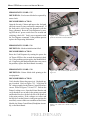
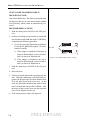
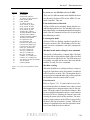
+24 Vdc
+24 Vdc
0 Vdc
0Vdc
0 Vdc
+5 Vdc
Figure 7-25. Location of the voltage test
points on the Printer Control Board.
ERROR/STATUS CODE: 136
DEFINITION: Modem initialization failed.
RECOMMENDED ACTION:
Reset the Cash Dispenser by turning the power the
AC Power OFF for a few seconds then turning it back
On. If the problem persists replace the Modem Module. If replacing the Modem Module does not correct
the problem, replace the Main Board Assembly.
ERROR/STATUS CODE: 138
DEFINITION: Printer failed while printing to the
receipt printer.
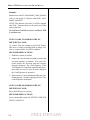
Figure 7-26. The location of the Printer Locking screw.
RECOMMENDED ACTION:
Verify that the Printer has paper in it. Replenish paper as needed. Refer to Figure 7-25. Verify that all
DC voltages applied to the Printer Control Board are
correct. Refer to Figures 7-26 and 7-27. Release the
Printer Locking screw. Open the Printer Bracket and
verify that there are no jams in the printer paper path
and that the blue lever on the left side of the printer is
in the print position. If the voltages are correct and
the blue lever on the Printer is in the print position the
most likely causes of this error condition are the Printer
Module, the Printer Control Board, Backplane Assembly, or the Main Board.
7-26
Figure 7-27. Blue lever shown in the print
position
PRELIMINARY