1
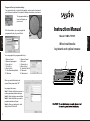
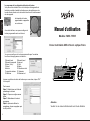
Program of the key function setting
You can double click or right click the applet, and set up the functions of
your Preferred selection for keyboard's hotkeys to enhance your device
The programmable key
layout will display on
your screen.
With this interface, you can program the
programmable key to yourself like s.
Wired multimedia
keyboard and optical mouse
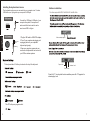
1, Microsoft word
3, Microsoft powerpoint
5, Copy (ctrl+c)
7, Cut (ctrl+x)
9, Undo (ctrl+z)
11, Recall window (alt+tab)
13, Minimize
2, Microsoft excel
4, Note pad
6, Paste (ctrl+v)
8, Redo (ctrl+y)
10, Select all (ctrl+A)
12, Maximize
14, Minimize all
When you select the function for
yourself, then please click "OK"
for program the mouse
Setp 1: Double click the mouse icon, a
mouse properties windows will open
Setp 2: Select configure mouse button
Setp 3: Select the button you want to
properties windows will open
Setp 4: After your setting is ok, click
Apply & then OK to finish
English
English
Model:SMK-75505
You can program the programmable key to
8
Instruction Manual