1
2. Get started
Charger and batteries
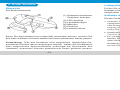
Overview
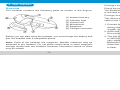
The headset contains the following parts as shown in the fingure:
Check the model number of any charger before using it with this device.
The Bluetooth headset ET-08 is intended for use with the chargers that
is included in the package.
Charge the battery
Before you can start using the headset, you must charge the battery and
pair the headset with a compatible phone.
Note: Parts of the headset are magnetic, Metallic materials may be
attracted to the headset. Do not place credit cards or other magnetic
storage media near the headset, because information stored on them
may be erased.
-3-
This device has an internal, rechargeable battery. It connect the charger
cable to the headset.
1. Connect the charger to a wall outlet. The red indicator light is displayed
during charging. If charging does not start, disconnect the charger, plug
it again, and retry. Charging the battery fully may take up to 2 hours.
2. When the battery is fully charged, the red indicator light turns off.
Disconnect the charger from the wall outlet and the headset.
3. The fully charged battery has power for up to 4 hours of talk-time or up
to 200 hours of standby time. However, the talk and standby times may
vary when used with different mobile phones, products that use a
Bluetooth connection, usage settings, usage styles, and environments.
When the battery is running out of power, the red indicator light starts
to flash.
-4-
ENGLISH
(1) Answer/end key
(2) Indicator light
(3) Volume key
(4) Microphone
(5) Earphone
(6) Charger connector