1
3.
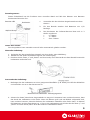
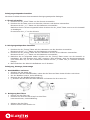
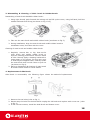
After placed the charging dock station, when the Cleaner is in low battery, it will search the dock
station for charging. However, if the room is too big or full filled with furniture, the Cleaner may
fail to find the charging dock station within short time and thus stop finding. In such case, put
the Robot Vacuum Cleaner at 1.5m in front of the dock station, keep pressing the “L” button, and
meanwhile power on the machine, then it will automatically return to the charging dock station
for charging.
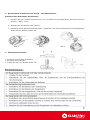
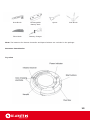
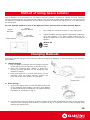
Charging
socket
bonding
sheet
Wall fixing piece
Setting of Auto Cleaning Function
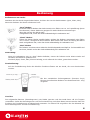
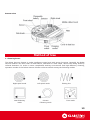
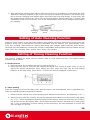
Press the “Auto” button on the left of the charging dock station, the down-right corner of the screen will
display a brush icon, it indicates the function is activated, and the Cleaner will automatically leave
from the charging dock station for cleaning after being fully charged. Again press the “Auto” button,
the brush icon will disappear, it means the function is disenabled, and the Robot Vacuum Cleaner will not
leave from the charging dock station after being fully charged.
Setting of Timing Cleaning Function
This function enables the Robot Vacuum Cleaner start to clean within set time. The specific setting
methods are as follows:
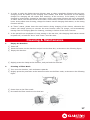
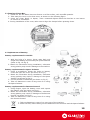
a. Clock Function 1. Press the Clock key to adjust the time of clock as per Fig.1
2. Press the Clock key for one time and respectively adjust hour, minute & week. Press +/- key to
adjust the specific parameters. After setting the time, press the Clock key as clock setting
finished. At the time being, there will be “1” before the time is displayed in the screen.
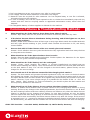
b. Timer Setting Press the Timing key to set the alarm time, and the Cleaner will automatically work in specified time,
under the specific operating methods as follows:
1. Press once the “Timing” key on the charging dock station to set the hour, and adjust by “+”or“-”;
2. Press one more time the “Timing” key on the charging dock station to set the minute, and adjust
by “+”or“-”. After completion of both hour and minute setting, press one more time the “Timing”
key and the screen will display “OFF”, which means the timer function has been off. Further press
the“+” key as completion of timer setting; at the time being, the time displayed on screen will
have the digit “2” in front.
16