1
P0x
P--
29
prog
30
prog
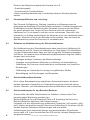
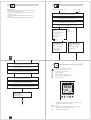
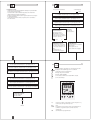
Sequence to follow after setting time and week day while running Menu
mode or adding programs to the pre-set P01 to P03.
Sequence to follow after setting time in the Reset mode.
1
1
Select program ON
14
+
16
1
2
3
4
5
6
7
-
14
Res. Menu OK
18
22
Select pre-set program (+/-).
24
2
1
16
1
2
3
4
5
6
7
+1h
20
18
+
20
-
Res. Menu OK
22
+1h
24
and confirm with OK.
1a
1b
Set hour ON
14
16
1
2
3
4
5
6
7
+
-
14
Res. Menu OK
18
+1h
20
22
24
2
16
18
20
OK: Going through pre-set programs
to modify selection (any program
ON or OFF can be modified by using
''+'' or ''-'' keys and confirming with
OK) or accept it with OK key to go
the next free memory location in
order to add new user defined programs (see pg 30).
22
24
e.g. after selecting P02 you should
also program:
Sa-Su 22:30 ON (prog05)
23:00 OFF (prog06)
1
1
2
18
+
20
-
Res. Menu OK
22
+1h
24
Menu: terminate programming
14
1
2
3
4
5
6
7
Once selected the program desired
there are following options:
16
1
2
3
4
5
6
7
Select hour (+/-) and confirm
with OK.
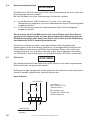
Set minutes ON
14
16
1
2
3
4
5
6
7
1
1
2
18
+
20
-
Res. Menu OK
22
+1h
24
Select minutes (+/-) and confirm
with OK.
GB
P--
P--
31
prog
32
prog
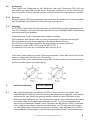
Set hour OFF
Set week day ON
14
16
1
2
3
4
5
6
7
1
1
2
18
+
20
-
Res. Menu OK
22
+1h
24
14
1
2
3
4
5
6
7
16
1
1
2
18
+
20
-
Res. Menu OK
22
+1h
24
Select week day (+/-) and confirm
with OK.
Select hour (+/-) and confirm
with OK.
Possible week blocks and individual days
Set minutes OFF
1
2
3
4
5
6
7
14
1
2
3
4
5
6
7
16
1
1
2
18
+
20
-
Res. Menu OK
22
+1h
24
Select minutes (+/-) and confirm
with OK.
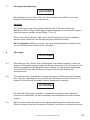
Set Channel
(only for 2 Channel version)
Set week day OFF
14
16
1
2
3
4
5
6
7
18
1
1
20
22
+
-
Res. Menu OK
24
+1h
Select Ch1 or Ch2 (+/-) and confirm
with OK.
GB
14
2
1
2
3
4
5
6
7
16
1c
1a
1b
18
20
+
-
Res. Menu OK
22
+1h
24
Should the OFF command be the
same day of ON command then
select Menu to terminate programming or select OK to go to a new
program ON setting.