1
4
Part Names and Functions
DATECS DPP-350
Magnetic Card Reader (option)
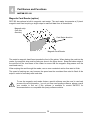
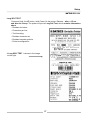
DPP-350 has optional a built-in magnetic card reader. The card reader incorporates a (3)-track
magnetic read head requiring a single swipe to read field data from all three tracks.
Magnetic strip
(face this
direction)
Card Swipe direction
Magnetic Card Reader
The reader’s magnetic head faces towards the front of the printer. When placing the card into the
reader, the magnetic strip must be facing as show in the figure above. Keep the bottom edge of
the card flat on the inner base of the reader to ensure that the magnetic strip passes over the
read head evenly.
When swiping the card through the reader, use an even consistent motion from start to finish.
The speed of swiping can vary however the speed must be consistent from start to finish of the
swipe in order to accurately read card data.
To use the magnetic card reader feature, special software must be used to read and
process the card information. I you do not have card reading software, please consult
your resaller to find out if this software is available or contact DATECS for
recommendations on compatible third party software solution.
14