1
2.2 INTRODUCTION TO YOUR INBOX
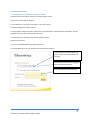
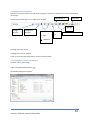
Once you have successfully logged in to your email account, you will see the following screen:
Inbox Toolbar
Search Bar
Navigation
Pane
List of your email messages
2.2.1 The Navigation Pane
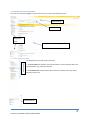
The Navigation Pane is made up of two sections:
First Section
* The first section lists all folders. This includes folders you have created as well as the
standard folders (e.g., Calendar and Tasks).
* The second section contains buttons which allow you to quickly access your Inbox,
Calendar, Contacts, etc
Second Section
University of Northern British Columbia 2011
6