1
2. Access
Email User Guide
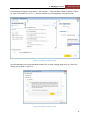
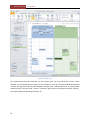
Figure 1: Add a new email account
2.2 Outlook Web Access (OWA)
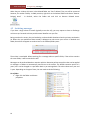
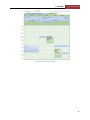
OWA is a good alternative to Outlook when working remotely. It can be accessed by pointing your Web
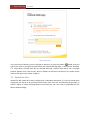
browser to https://webmail.dawsoncollege.qc.ca. The logon screen should be as shown in Figure 2.
OWA can also be accessed from MyDawson, My Dawson Life : Outlook Email. In that case you will not
prompted to login.
On the logon page, there are two security options: public or private computer. The default option,
public, should be used on computers that are used by more than one person. With this option, your
session will time out after 15 minutes inactivity, and your username will not be saved. With the private
option, the session timeout is 8 hours.
The interface comes in two flavours: light, which only has reduced functionality, and premium. The
premium interface is available with the following browsers: Internet Explorer 7 or later, Firefox 3.01 or
later, Safari 3.1, or Chrome. On the Ipad, Safari does not support Premium OWA, however Google
Chrome, in desktop mode, does.
By default, if your browser supports it, the premium interface will be used. This can be changed by
checking the option on the logon screen.
3