1
Bria 3 for Linux User Guide
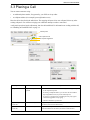
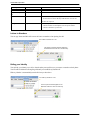
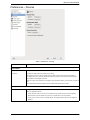
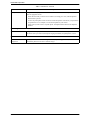
Preferences – Devices
Table 1: Preferences – Devices
Field
Description
Headset Mode
Speaker
Change these fields only if you want to override the devices that Bria automatically selected.
Microphone
In both these fields, select the headset you are using.
The headset is the device that is usually used for audio out (the sound you hear) and audio in
(recording your voice). The only situation in which the headset is not used is when the Speaker
Phone button on the dialpad is pressed.
Therefore, unless you will always be using Bria in speakerphone mode, you must make a selection
here.
Select the headset in both the Speaker device field and Microphone device field.
Speakerphone Mode
Speaker
Change this field only if you want to override the devices that Bria automatically selected.
Make the appropriate choice:
• Select the device that you want to use for audio out (the sound you hear) when the Speaker
Phone button is pressed. Make sure you select a speaker device (not the headset).
• Select None if you do not have a speaker phone. The Speaker Phone button on the dialpad is
disabled.
27