1
6
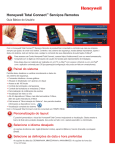
Information Area
» The very top bar is the information area
» This area provides weather and messages. This information is based on the security system’s location.
» Click on the weather to pull up a five-day forecast, or click on the message envelope to read important messages
» These messages are from your security system provider and relate to service calls, new products, upgrades and
special offers
7
Security
Arming and disarming can be done through the “Quick Arm” feature or through the virtual keypad interface.
The virtual keypad provides detailed zone information. You can select from filters on the left such as alarms,
troubles, etc., to view specific zone conditions.
» Zones can be bypassed and troubles cleared
» Can show multiple zone faults
» Works like your security system’s keypad
» Control system partitions
Click to toggle back to “Status” view.
8
Adding, Deleting and Editing Users
From the master users dashboard, you can customize each user through a simple edit, add or delete feature.
You can manage security system user codes and gain access to multiple locations.
2