1
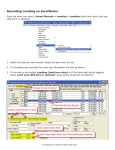
Reconnecting the Bluetooth devices, or connecting for the first time Before connecting to an external Bluetooth device, e.g. race reader, weigh head, drafting crate, it is necessary to establish a link between the Stock Recorder and that device. Typically this only has to be done once, as the Stock Recorder remembers the settings used. To establish this link, please refer to the previous section – Initial Bluetooth Setup. If the Stock Recorder or external device has been turned off the Bluetooth link will have been disconnected. If this is the first time the external device has been used, it will never have been established. To connect or reconnect: 1. Turn on the reader, weigh head or drafting crate. 2. On the main screen of FarmWorks on the Psion select Options 3. Select RF Reader, Weigh Scale or Drafter as appropriate. 4. Select the appropriate device – for readers, the internal antenna is the SDL300I, a race reader the SDL130R, and a stick reader the SDL400S; the weigh scale is typically the JR3000, the drafting crate 3‐Way. 5. Make sure that the BSP (Bluetooth Serial Port) number matches that for the external device as listed on the Bluetooth Manager ‘paired’ screen. If these have been set in the past, the Stock Recorder will have remembered them. If this is the first time of use, set the BSP number to that noted during Initial Bluetooth Setup. 6. Press connect – you should receive the message ‘connection established’. Note: when supplied, the Stock Recorder will by default be set up to use the internal reader, the SDL300I. As this is connected internally, it does not have or need a BSP setting. Remember that should you configure the Stock Recorder to use a different reader, e.g. a race reader, if at a later date you want to use the internal reader you must set it back to do so under the Options>RF readers screen.
24