1
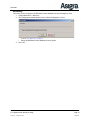
F1 (Context-Sensitive) Help
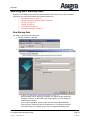
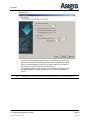
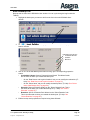
Select Retention
•
Note: On DS-Mobile Client, time-based retention automatically runs after
every backup process.
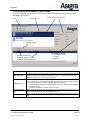
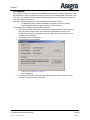
Use this screen to specify a backup set’s retention policy. Retention is “what data you want to
keep”; all other data will be removed from online storage. Note the implications of enforcing a
retention policy: it limits data growth to the specified amount of generations, but it automatically
deletes any data that does not meet the retention policy.
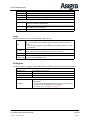
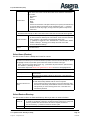
Time-based Online Retention
This is the maximum generations per file.
Keep most recent gener• This is a mandatory default selection. It cannot be turned off.
ations
• Valid values from 1-9999, default is 3
This is optional.
Keep one generation per
• Every time retention is enforced, at least one generation from
day for 1 week
each day of the past week will be kept.
This is optional.
Keep one generation per
• Every time retention is enforced, one generation will be kept for
week for 1 month
the most recent month.
This is optional.
Keep one generation per
• Every time retention is enforced, one generation will be kept for
month for 1 year
each month from the last year.
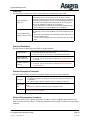
Deletion of Files
Delete if a file was removed from the backup source, and this amount
of time has passed since it was removed.
If files are removed from • Keep generations [...]: By default, this is set to ‘0’ which means
source after [...]
all generations will be deleted. If specified, this number of generations of the file will be kept online (the latest generations are
kept).
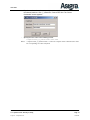
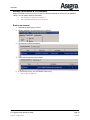
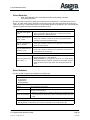
Select Schedule
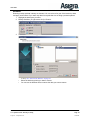
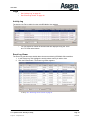
Use this screen to specify the schedule for a backup set.
Scheduling Type
•
•
•
Not Scheduled: If selected, the other sections will not appear. Only on-demand backups can
be performed.
Daily Backups
Monthly Backups
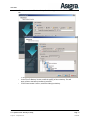
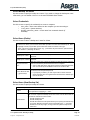
Start & End Time
Start At
You must specify a start time.
Only if connected to
cloud
If selected, the scheduled backup will only run if DS-Mobile Client can
connect to the DS-System.
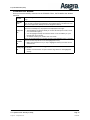
If selected, you must specify a fixed end time for the scheduled backup.
Stop if not finished by • The drop down list allows you to select a schedule window of up to 6
days.
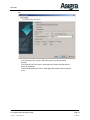
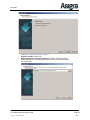
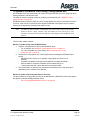
Scheduling Day(s)
•
•
Daily Backup: Checkboxes allow you to select each day of the week you want.
Monthly Backup: A field allows you to select a fixed day of the month (from 1-28).
DS-Mobile Client Installation & User Guide
v11.2 [Revision Date: February 01, 2012]
© Asigra Inc. All Rights Reserved.
Generated on: 2/1/12
Page: 56
Confidential.