1
2.0
2.1
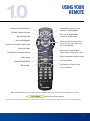
OK
SELECT
NAVIGATING
DIGITAL MENUS
INFO
OK
SELECT
MENU
INFO
EXIT
MENU
GUIDE
FAV
LAST
QUICK ACCESS MENU
EXIT
GUIDE
FAV
LAST
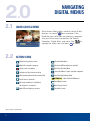
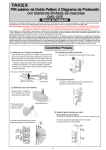
Quick Access Menu offers shortcuts to key Guide
features. Just press
from anywhere in the
Guide (or even while you are watching a program)
and you’ll have access to features like Search,
Favourites, Digital Music and more. Use
to
OK
highlight an action icon and press SELECT
to select.
Yellow Highlig
Yellow High
2.2
ACTION ICONS
Return to the previous screen
Go to the Main Menu
Watch this channel or program
Go to your DVR recordings or schedule*
Set or cancel a recording*
Go to Pay-Per-View Menu
Set locks for title, channel or rating
Search for Movies, Sports and other categories
View upcoming times for the selected title
Go to the Digital Music Guide
Set or cancel a reminder
Go to your favourites or Set/Cancel
this channel as a favourite
Go to Movie Search
Order PPV and other pay services
Go to Kids Search
*Option available only with a DVR.
2
NDEMAND Go to EastLink OnDemand
Go to Sports Search