1
www.otn.ca
OTN Telemedicine Directory
Searching the directory
Once logged into the directory – you can filter your searches by All, Consultant or Site.
To search the directory:
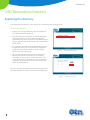
1. Simply type in the specialization in the search field and
press the search button (Figure 4).
2. This will bring up the results that are organized by Name,
LHIN, catchment area as well as details regarding the
specialization of practice. If you find a consultant or site of
interest, click the relevant link and this will provide further
profile details.
3. You will notice, that with the Consultant Profile you have
the option to print, access a referral form or update the
profile if necessary. Click on Back to search results to
return to the main search page.
Figure 4:
Searching by specialization
4. You can also make advanced searches by clicking the
Advanced Search link. This allows you to search for
consultants or sites based on specific information such
as City, Postal Code or catchment area. If you require any
suggestions when making a search - please click on the
Search Tips link (Figure 5).
If you have any question while searching the directory please
call 1-866-454-6861 or email us at telemedicineprofiles@otn.
Figure 5:
3

Advanced search link
Te lemedicine’s Leader