1
14
Cobolt ZoukTM CalypsoTM SambaTM JiveTM FlamencoTM RumbaTM
9. Operation via data port
9.1.
Baud rates and serial port settings
To communicate with the laser, a communication cable needs to be ordered separately. Each Controller is shipped
from the factory with a fixed baud rate (115200), which cannot be changed in the field. The other serial port
parameters are: 8 data bits, 1 stop bit and no parity. Hardware flow control is not supported. Each command to the
Controller must be terminated by a carriage return. All commands are case-sensitive. Leading and trailing white
space is ignored, but command arguments must be delimited by a single space character (ASCII 32).
9.2.
Handshaking
Under no circumstances does the Controller initiate communication; it only transmits characters in response to a
message. Every message to the Controller generates a response, either a numerical value or the acknowledgment
string “OK”.
In the event that the Controller receives a message that it cannot interpret, it responds: “Syntax error: ” followed by
the complete command string (minus the termination character) that caused the error.
Every Controller response is terminated by a carriage return (ASCII 13) and a full stop is used with floating numbers.
9.3.
Control commands
The laser is delivered with the Controller set in autostart mode (see Section 5.1 for autostart sequence description).
For system integration the autostart sequence can be disabled (some commands require autostart disabled). The
controller is factory set for RS-232 communication (-500/-600 model number) or USB communication (-700/800
model number). As long as power is supplied to the Controller the temperature control elements are always
operating to reach set-point values and the laser will be idle waiting for the next command. All arguments are in
lower case and separated by a space (ASCII 32).
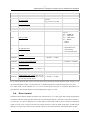
Command
Function
Argument
Returned value
hrs?
Get laser head operating hours
Float
ilk?
Get interlock state
0 = OK, 1 = interlock open
Enable/disable autostart
@cobas
With autostart disabled the laser will not go
through the standard warm-up sequence, see
0 = disable, 1 = enable
Section 5.1.
@cobas?
Get autostart enable state
0 = disabled, 1 = enabled
l?
Get laser ON/OFF state
0 = OFF, 1 = ON
Laser ON
l1
Requires autostart disabled. Use this command
for manual ON (OEM models).
l0
Laser OFF
Use
this
command
for
manual
OFF
(OEM