1
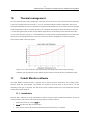
16 Cobolt ZoukTM CalypsoTM SambaTM JiveTM FlamencoTM RumbaTM 10. Thermal management To ensure operation within given specifications and for the warranty to be valid, the Laser Head must be attached to a heat sink providing a thermal resistance of <0.2 K/W. The Cobolt heatsink meet this requirement. This value is the difference between the maximum allowed Laser Head base plate temperature (50ºC) and the maximum specified ambient temperature at the air-heatsink interface (40ºC), divided by the maximum power dissipated from the laser (~50 W for the highest power models at high ambient temperatures). The mounting surface should be flat (within 0.05 mm over mounting surface). It is recommended to use a thermal heat compound between the Laser Head and the heat sink to provide good thermal contact. For assistance in thermal management and system integration, please contact Cobolt’s technical support. Typical curve of heat dissipation with respect to base plate temperature under extreme operating conditions with good thermal contact between the laser head and the temperature controlled base plate 11. Cobolt Monitor software The Cobolt Monitor software provides a graphical way to monitor the laser performance and to change power, operation mode and other settings. The software can connect to the laser either via RS-232 port or via USB, depending on the type of controller. The USB driver must be installed manually and can be downloaded from the Cobolt website (www.cobolt.se). 11.1. Installation Microsoft .NET is required to run the Cobolt Monitor software, and this will be installed automatically if you do not already have the correct version. Follow the following steps to install the software: 1. Extract the archive and run the setup file. 2. Accept the Microsoft .NET framework EULA. 3. Setup will now connect to the internet and download Microsoft .NET if it is required.