1
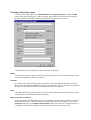
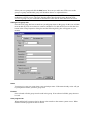
Type
In order to make any kind of connection to the Internet, you must determine how your computer
is connected to the Internet. If you are on an Intranet, you will probably be connected to the
Internet via a proxy server.
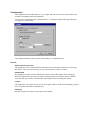
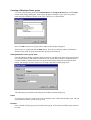
The Access Type will set the type of access (through a proxy or directly) that the connection
will use to communicate with the Internet. The options are the following:
Default. Use Defaults. The connection uses default settings found in the registry to access
the Internet.
Direct Direct to Internet. The connection has a direct connection to the Internet.
Named Proxy Named Proxy. Tells the connection to use the proxy server specified in
the Proxy setting as described below.
Proxy
In short, a proxy server is an intermediary between your computer and the Internet. All
computers on an Intranet that need to connect to the Internet must do so through a proxy server.
Thus the proxy functions as a firewall between the Intranet and the Internet, discarding invalid
end-user and external requests, thereby protecting the Intranet from hostile actions.
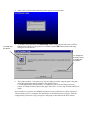
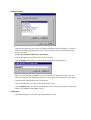
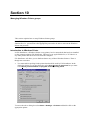
To find the proxy settings on your computer
1. On the Taskbar of your computer, click Start.
2. On the Settings item, click the Control Panel.
3. Double-click the Internet icon.
4. On the Internet Properties dialog box, click Connection.
5. Under Proxy Server, confirm that the Connect Through a Proxy Server check box is
selected.
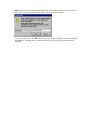
6. If it is selected, click Settings. The name of proxy servers you use for various protocols will
be found in the dialog box. If no proxy is defined, contact your system administrator for
available proxy servers.
7. If it is not selected you will probably be connected to the Internet directly and you should
select Direct in the Type combo box.
RemoteHost
Sets the remote machine to which a connection sends data. You can either provide a host name,
for example, "ftp://ftp.microsoft.com," or an IP address string in dotted format, such as
"100.0.1.1".
RemotePort
Sets the remote port number to connect to. For FTP is the port almost always 21 and this is the
default value.
UserName
Sets the name that will be sent with requests to remote computers. If this property is left blank,
the connection will send "anonymous" as the user name when requests are made.
Password
Sets the password that will be sent with the request to log on to remote computers. If this
property is left blank, the connection will send a blank password or the current user's email
name.