1
IE-SNC-P2520-01
2
Chapter
Getting started
Here you can find informations necessary to put newly purchased equipment to
operation. Read carefully informations about current loop connection.
What is needed for operation
To install the unit you need to the following equipment. Before installation check if it’s
available.
P2520 current loop converter
screwdriver for removing cover
power supply – according specification (commonly DC 24V/1.0A)
RJ45 LAN connection with appropriate cable
free IP address in your network
sensor(s) with current loop output (4-20mA or 0-20mA)
Mounting the device
check if the equipments from previous chapter are available
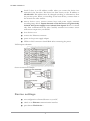
install the latest version of TSensor software. This software will help you find
device on network and to change IP address of the device. Device
configuration is made using web interface. TSensor software can be free
downloaded from the manufacturer’s website. Software can be also supplied
on CD.
contact your network administrator to obtain following informations for the
connection to the network:
IP address:
Gateway:
Netmask:
_____._____._____._____
_____._____._____._____
_____._____._____._____
6