1
IE-SNC-P2520-01
check if there is no IP address conflict when you connect the device into
network for the first time. The device has from factory set the IP address to
192.168.1.213. This address must be changed according to informations from
the previous point. When you installing several new devices, connect them to
the network one after another.
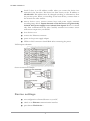
remove device cover, connect current loops and power supply terminals
according image below. Inputs channels on the device are not galvanically
isolated. Also power supply is not isolated from inputs! Device is isolated
only from communication line side. Carefully consider how connect sensor
with current output into your P2520.
close device cover
connect the Ethernet connector
power on the power supply adapter
LEDs on LAN connector should blink after connecting the power
P2520 inputs schematic:
Sensor connection example:
Device settings
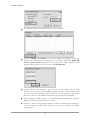
run configuration software TSensor on your PC
switch to an Ethernet communication interface
press button Find device...
7