1
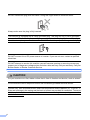
DO NOT carry the machine by holding the scanner cover or the Jam Clear Cover.
If the machine becomes unusually hot, releases smoke, generates any strong smells, or if you
accidentally spill any liquid on it, immediately unplug the machine from the electrical socket. Call
your Brother dealer or Brother Customer Service.
If the machine has been dropped or the casing has been damaged, unplug this machine from
the power socket and call your Brother dealer or Brother Customer Service.
IMPORTANT
• DO NOT put objects on top of the machine.
• If the machine does not operate normally when the operating instructions are followed, adjust
only those controls that are covered by the operating instructions. Incorrect adjustment of other
controls may result in damage and will often require extensive work by a qualified technician
to restore the machine to normal operation.
• Use of controls, adjustments or performance of procedures other than those specified in the
documentation supplied with the machine may result in hazardous radiation exposure.
Note
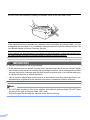
• DO NOT place anything in front of the machine that will block received faxes. DO NOT place
anything in the path of received faxes. (MFC only)
• Wait until pages have exited the machine before picking them up.
6