1
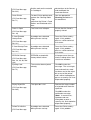
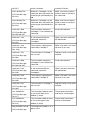
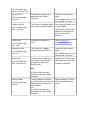
(PC Error Message
No. 232)
find the mark on the material
in Cartridge 2.
obstructions to the Sensor,
and recalibrate the
Laminator Sensor.
Clean Printer
For best Printer performance,
replace the Cleaning Roller
Tape
and clean the Printer’s Feed
Rollers and Printhead at this
time.
See the appropriate
Cleaning procedures in
this document.
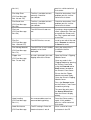
The Cover was left open.
Ensure that the Cover is
properly closed.
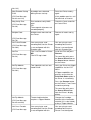
A problem was detected
during Printer start-up.
Reset the Printer and try
again. If this problem
persists, call for technical
assistance.
A problem was detected
during Printer start-up.
Reset the Printer and try
again. If this problem
persists, call for technical
assistance.
EEPROM restored with
factory default values.
If changes were, then go
into the setting values and
reset these numbers.
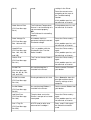
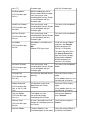
The card has been ejected
already.
Click OK to clear the
message. The user might
want to know that a card
has been sent to the reject
bin, or out of the printer,
and is either incomplete or
posses a security risk if not
disposed of properly.
The reject bin is full.
Remove the large number
of rejected cards from the
reject bin.
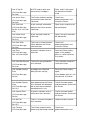
(PC Error Message
No. 71)
Cover is Open
(PC Error Message
No. 46)
E-Card Encoder
Startup Error
(PC Error Message
No. 141)
E-Card Startup Error
(PC Error Message
No. 141)
EEPROM Corrupt
(PC Error Message
Nos. 38, 39, 40, and
144)
Ejecting Card
(PC Error Message
No. 72)
Empty Reject Bin
(PC Error Message
No. 265)
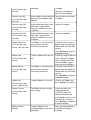
Click OK to clear the
notification message.
(Note: In some cases,
rejected cards are
incomplete or pose a
security risk, and should be
disposed of properly.)
Failed To Initialize
(PC Error Message
A problem was detected
during Printer start-up.
Reset the Printer and try
again. If this problem