1
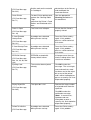
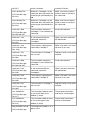
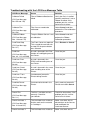
No. 141)
Film Align Error
(PC Error Message
Nos. 26 and 176)
Film Break/Jam
(PC Error Message
No. 158)
Film Low
(PC Error Message
No. 156)
Film Out
persists, call for technical
assistance.
The film is not able to move
correctly. Check for
jams/breaks.
Check for obstruction. If the
problem persists, call for
technical assistance.
The film is not able to move
correctly. Check for
jams/breaks.
Check for obstruction. If the
problem persists, call for
technical assistance.
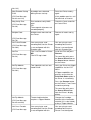
The HDP film will soon run
out.
If printing a large number of
cards, replace the Film now
or monitor the Printer until
the Film is gone and install
a new Film.
The HDP film has run out.
Install a new roll of film and
press Resume to continue
or Cancel to reset.
The HDP Film is not installed
properly or has been
damaged.
Verify the correct film is
installed in the film
Cartridge.
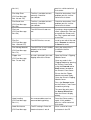
A card is jammed in the card
flipping area of the Printer.
Open the Printer's Flipping
Module Cover.
(PC Error Message
Nos. 156 and 157)
Film: Wrong Material
(PC Error Message
No. 173)
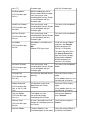
Flipper Jam
(PC Error Message
Nos. 74 and 199)
Clear any cards in the
Flipping Module by opening
the Printers Cover and
using the Forward and/or
Back buttons located on
the Printer’s Front Cover.
Ensure that the Flipper
Module can rotate freely.
Close the Printer's Flipping
Module Cover.
Press the Resume button
on the Printer’s Front Cover
to continue printing.
To cancel the print, press
the Cancel Print button
from the Driver's display
dialog.
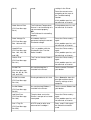
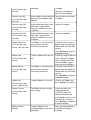
Head Loading
(PC Error Message
No. 111)
Head Resistance
(PC Error Message
An unrecoverable error has
occurred during printing.
Reset the Printer and try
again. If this problem
persists, call for technical
assistance.
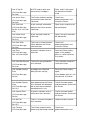
The EE setting in Driver for
head resistance is out of
Enter a value for head
resistance in the EE