1
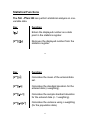
Key
Function
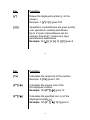
[2nd]
Instructs calculator to perform the second
[2nd] function of the next key that is pressed
(the function in yellow text on the key).
[Å]
Backspace key deletes one entry at a time.
It can be used to clear an entire entry by
repeated delete actions.
4
Speech Output
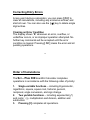
For the calculator to operate in speech mode a headset,
earphone or amplified speaker must be plugged into the
earphone socket on the right side of the calculator and
speech mode selected. . The headset or earphone requires
a 3.5 mm diameter audio jack, should have 32 ohm
impedance, and no more than 100 mWatts power. An
amplified external speaker can also be used – the type used
for portable sound players is ideal. If you are unsure of the
correct device to use please contact Sight enhancement
systems for advice.
5