1
Dear User,
Thank you for purchasing BRIK Digital/Analogue Converter.
Please read this User Manual before operating the machine to ensure its
best performance and your safety.
Instructions:
Connecting Source
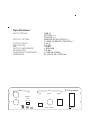
Connect to music sources that have a digital output (eg. CD Player, DVD
Player, Computer, etc.) through USB, Coaxial, or Optical input.
Connecting Amplifier
Connect the Output socket to a line input on an amplifier. According to your
preference, choose 1V or 2V output level.
Connecting Power
Before connecting, check the label to ensure the local power supply is
compliant, and then connect the low voltage plug from the power supply to the
12V In socket and switch the machine on.
Choosing Source
Use the switch on the front panel to choose the music source.
When connecting to a computer, if the sound does not come out, please stop
playing and then restart playing to ensure the computer is sending out the signal
through the digital output.
D/A Converter
Power
USB
Coax
Opt
Source