1
DRAGNOTT Quick start Guide
Created by Vitaliy Jungle
Please note, DRAGNOTT doesn’t have a clock ratio range check. For example, if the mobile
processor has a maximum clock ratio of x11.0 and you are attempting to set a clock ratio of x12.0 then
DRAGNOTT will not inform you about the failed FID transition.
Additionally, before FID transition DRAGNOTT checks the presence of the mobile features of the AMD
processor. If the processor is not mobile DRAGNOTT doesn’t initiate FID transition preventing a “blue
screen of death” appearance.
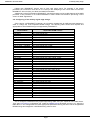
2.5. Configuring of the memory signal edge timings.
Since version 2.0 DRAGNOTT supports a lot of popular chipsets both for AMD and Intel platforms in
order to change the most important DRAM timings. The following table shows what chipsets and
appropriate to them DRAM timings are supported by DRAGNOTT:
Chipset Name
VIA VP3
VIA MVP3
VIA MVP4 – VT8501
VIA ProMedia – VT8601
VIA PLE133 – VT8601A
VIA KLE133 – VT8361
VIA KX133 – VT8371
VIA KT133 – VT8363
VIA KT133A – VT8363A
VIA KT266 – VT8366
VIA KT266A – VT8366A
VIA KM266
VIA KT333 – VT8367
VIA KT400 – VT8368
VIA KT400A – VT8368A
VIA KT600
SiS600
SiS620
SiS630
SiS735
SiS741GX
SiS746
SiS748
AMD761
AMD762
nVidia nForce Series
nVidia nForce2 Series
Intel 440BX/ZX
Intel 810/E/E2
Intel 815/E/EP
Intel 845G/GL/GV
Intel 848P
Intel 852GME
Intel 852PM
Intel 854
Intel 865G/GV
Intel 865P/PE
Intel 875P
Applicable DRAM Timings
tCL, tRAS, tRCD, tRP
tCL, tRAS, tRCD, tRP
tCL, tRAS, tRCD, tRP
tCL, tRAS, tRCD, tRP
tCL, tRAS, tRCD, tRP, VIABL*
tCL, tRAS, tRCD, tRP, VIABL
tCL, tRAS, tRCD, tRP, VIABL
tCL, tRAS, tRCD, tRP, VIABL
tCL, tRAS, tRCD, tRP, VIABL
tCL, tRAS, tRCD, tRP, tWR, tWTR, VIABL
tCL, tRAS, tRCD, tRP, tWR, tWTR, VIABL
tCL, tRAS, tRCD, tRP, tWR, tWTR, VIABL
tCL, tRAS, tRCD, tRP, tWR, tWTR, VIABL
tCL, tRAS, tRCD, tRP, tWR, tWTR, VIABL
tCL, tRAS, tRCD, tRP, tWR, tWTR, VIABL
tCL, tRAS, tRCD, tRP, tWR, tWTR, VIABL
tCL, tRAS, tRCD, tRP
tCL, tRAS, tRCD, tRP
tCL, tRAS, tRCD, tRP, tWR, tRRD
tCL, tRAS, tRCD, tRP, tWR
tCL, tRAS, tRCD, tRP, tWR, tWTR
tCL, tRAS, tRCD, tRP, tWR, tWTR
tCL, tRAS, tRCD, tRP, tRC, tWR, tWTR
tCL, tRAS, tRCD, tRP, tRC, tWR, tWTR
tCL, tRAS, tRCD, tRP, tRC, tWR, tWTR
tCL, tRAS, tRCDR, tRCDW, tRP, tRC, tRFC, tWTR, tRTW
tCL, tRAS, tRCDR, tRCDW, tRP, tRC, tRFC, tWTR, tRTW
tCL, tRCD, tRP
tCL, tRAS, tRCD, tRP
tCL, tRAS, tRCD, tRP, tRC
tCL, tRAS, tRCD, tRP
tCL, tRAS, tRCD, tRP
tCL, tRAS, tRCD, tRP, tRFC, tWR
tCL, tRAS, tRCD, tRP, tRFC, tWR
tCL, tRAS, tRCD, tRP, tRFC, tWR
tCL, tRAS, tRCD, tRP
tCL, tRAS, tRCD, tRP
tCL, tRAS, tRCD, tRP
*VIABL – bank interleave
So, to configure a desired memory signal edge timing make sure your chipset is in the table above.
Then open PrcnmCfg.ini configuration file, locate the DRAMTimings parameter and set 1 to it. Using the
table above, in the configuration file locate appropriate parameters having the same names as applicable
DRAM timings and assigned a valid DRAM timing value to them.
Page 2