1
E-M-HyLabC1-V1
Rotronic AG
Bassersdorf, Switzerland
Document code
Unit
HygroLab C1 bench-top indicator:
User Guide
Instruction Manual
Document Type
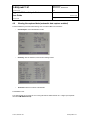
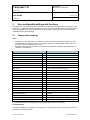
Main Menu
Probe Settings
10 of 28
Page
Document title
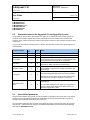
Menu Items
Submenu
Items
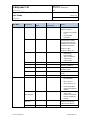
Calc 1… 4
Selections or
Information
Notes
Psychrometric
Parameter. See 2.5
Calculated parameter
Probe 1, 2, 3, 4
User defined calculation
Probe 1, 2, 3, 4
(requires HW4 software)
Probe Actions
(select probe
input first)
Formula 1…4
ON / OFF
Probe Info
Serial Number
Version
Probe Name
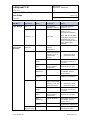
Humi Adjust
Acquired Points
Lists the cal. points
present in the probe
memory (a max. of
10 points are
shown)
Acquire Ref
Probe
Clear all cal. points
Clear the last point
Manual entry:
known reference
environment
Saves value entered
manually as a cal. point
Start
Adjustment
Adjusts the probe
Effect depends on number
of calibration points in
probe memory
Acquired Points
Returns the probe to the
initial factory adjustment
Lists the cal. points
present in the probe
memory (a max. of 2
points are shown)
Additional Options:
o
o
Clear all cal. points
Clear the last point
Saves value measured by
the reference probe as a
cal. point
Acquire Ref
Value
Manual entry:
known reference
environment
Saves value entered
manually as a cal. point
Start
Adjustment
Adjusts the probe
Effect depends on number
of calibration points in
probe memory
Reset to
Factory
© 2011; Rotronic AG
o
o
Acquire Ref
Value
Acquire Ref
Probe
Set as
reference Probe
Additional Options:
Saves value measured by
the reference probe as a
cal. point
Reset to
Factory
Temp Adjust
When ON, this calculation
replaces the psychrometric
parameter both on the
local on the display and on
a PC monitor (HW4
software)
Returns the probe to the
original factory adjustment
Sets the selected probe as
the reference probe
E-M-HyLabC1-V1