1
E-M-HyLabC1-V1
Rotronic AG
Bassersdorf, Switzerland
Document code
Unit
HygroLab C1 bench-top indicator:
User Guide
Document Type
Page
Document title
4.2
Instruction Manual
13 of 28
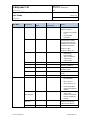
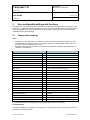
Water activity measurement settings:
Setting
Applies to
Notes
Dwell Time
AwQuick
The HygroLab C1 waits the specified amount of time before processing the
humidity data with the AwQuick algorithm.
Recommended value: 3 or 4 minutes.
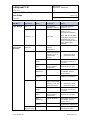
AWQ-Temp
AwQuick
The HygroLab C1 considers temperature to be stable when the rate of
change of the temperature signal is less than the specified value.
Recommended value: 0.01 °C / min
AWE-Temp
AwE
The HygroLab C1 considers temperature to be at equilibrium when the rate
of change of the temperature signal is less than the specified value.
Recommended value: 0.01 °C / min
AWE-Humi
AwE
The HygroLab C1 considers humidity to be at equilibrium when the rate of
change of the humidity signal is less than the specified value.
Recommended value: 0.0001 Aw / min
SaveResult
AwQuick
AwE
When the Aw measurement is ended, the result is saved in the following
data bins:
Probe 1: Bin 1, Probe 2: Bin 2, Probe 3: Bin 3, Probe 4: Bin 4
4.3
Aw probe usage guidelines
1)
HC2-AW probe: check that the red LED on top of the probe is lit. This indicates that the probe is being
powered. If necessary, power the probe by pressing once on the red button located on top of the probe.
When the red LED is not lit, the HC2-AW probe is not powered and the instrument is not receiving a
signal from the probe.
2)
Measuring with less than 4 probes: both the AwQuick and AwE functions run simultaneously for all
HygroLab C1 probe inputs. We strongly recommend to either disconnect or to power down any unused
probe.
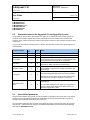
IMPORTANT:
o
o
o
o
The measurement starts simultaneously for all probe inputs (disconnect or power off any
unused probe)
Usually, the measurement ends at a different time for each probe. When using multiple probes, the
HygroLab C1 emits a short beep whenever a probe is done measuring. A long beep indicates that the last
probe is done. When Data Storage is enabled, the end result of each probe end result is stored in
memory (bins 1 to 4)
Each probe can be displayed by using the UP or the DOWN key
Pressing ENTER resets all probe inputs and discards any measurement result that has not been stored.
© 2011; Rotronic AG
E-M-HyLabC1-V1