1
Junos® OS
CLI User Guide
Release
12.1X47-D10
Published: 2014-12-15
Copyright © 2014, Juniper Networks, Inc.
Juniper Networks, Inc.
1194 North Mathilda Avenue
Sunnyvale, California 94089
USA
408-745-2000
www.juniper.net
Juniper Networks, Junos, Steel-Belted Radius, NetScreen, and ScreenOS are registered trademarks of Juniper Networks, Inc. in the United
States and other countries. The Juniper Networks Logo, the Junos logo, and JunosE are trademarks of Juniper Networks, Inc. All other
trademarks, service marks, registered trademarks, or registered service marks are the property of their respective owners.
Juniper Networks assumes no responsibility for any inaccuracies in this document. Juniper Networks reserves the right to change, modify,
transfer, or otherwise revise this publication without notice.
®
Junos OS CLI User Guide
12.1X47-D10
Copyright © 2014, Juniper Networks, Inc.
All rights reserved.
The information in this document is current as of the date on the title page.
YEAR 2000 NOTICE
Juniper Networks hardware and software products are Year 2000 compliant. Junos OS has no known time-related limitations through the
year 2038. However, the NTP application is known to have some difficulty in the year 2036.
END USER LICENSE AGREEMENT
The Juniper Networks product that is the subject of this technical documentation consists of (or is intended for use with) Juniper Networks
software. Use of such software is subject to the terms and conditions of the End User License Agreement (“EULA”) posted at
http://www.juniper.net/support/eula.html. By downloading, installing or using such software, you agree to the terms and conditions of
that EULA.
ii
Copyright © 2014, Juniper Networks, Inc.
Table of Contents
About the Documentation . . . . . . . . . . . . . . . . . . . . . . . . . . . . . . . . . . . . . . . . . . . . xv
Documentation and Release Notes . . . . . . . . . . . . . . . . . . . . . . . . . . . . . . . . . xv
Supported Platforms . . . . . . . . . . . . . . . . . . . . . . . . . . . . . . . . . . . . . . . . . . . . . xv
Using the Examples in This Manual . . . . . . . . . . . . . . . . . . . . . . . . . . . . . . . . . xv
Merging a Full Example . . . . . . . . . . . . . . . . . . . . . . . . . . . . . . . . . . . . . . . xvi
Merging a Snippet . . . . . . . . . . . . . . . . . . . . . . . . . . . . . . . . . . . . . . . . . . . xvi
Documentation Conventions . . . . . . . . . . . . . . . . . . . . . . . . . . . . . . . . . . . . . xvii
Documentation Feedback . . . . . . . . . . . . . . . . . . . . . . . . . . . . . . . . . . . . . . . . xix
Requesting Technical Support . . . . . . . . . . . . . . . . . . . . . . . . . . . . . . . . . . . . . xix
Self-Help Online Tools and Resources . . . . . . . . . . . . . . . . . . . . . . . . . . . xix
Opening a Case with JTAC . . . . . . . . . . . . . . . . . . . . . . . . . . . . . . . . . . . . . xx
Part 1
Overview
Chapter 1
CLI Overview . . . . . . . . . . . . . . . . . . . . . . . . . . . . . . . . . . . . . . . . . . . . . . . . . . . . . . 3
Introducing the Junos OS Command-Line Interface . . . . . . . . . . . . . . . . . . . . . . . . . 3
Key Features of the CLI . . . . . . . . . . . . . . . . . . . . . . . . . . . . . . . . . . . . . . . . . . . . 3
Understanding the Junos OS CLI Modes, Commands, and Statement
Hierarchies . . . . . . . . . . . . . . . . . . . . . . . . . . . . . . . . . . . . . . . . . . . . . . . . . . . . . . 5
Junos OS CLI Command Modes . . . . . . . . . . . . . . . . . . . . . . . . . . . . . . . . . . . . . 5
CLI Command Hierarchy . . . . . . . . . . . . . . . . . . . . . . . . . . . . . . . . . . . . . . . . . . . 6
Configuration Statement Hierarchy . . . . . . . . . . . . . . . . . . . . . . . . . . . . . . . . . . 6
Moving Among Hierarchy Levels . . . . . . . . . . . . . . . . . . . . . . . . . . . . . . . . . . . . 6
Other Tools to Configure and Monitor Devices Running Junos OS . . . . . . . . . . . . . . 7
Commands and Configuration Statements for Junos-FIPS . . . . . . . . . . . . . . . . . . . 8
Chapter 2
CLI Online Help . . . . . . . . . . . . . . . . . . . . . . . . . . . . . . . . . . . . . . . . . . . . . . . . . . . . 9
Getting Online Help from the Junos OS Command-Line Interface . . . . . . . . . . . . . 9
Getting Help About Commands . . . . . . . . . . . . . . . . . . . . . . . . . . . . . . . . . . . . . 9
Getting Help About a String in a Statement or Command . . . . . . . . . . . . . . . 10
Getting Help About Configuration Statements . . . . . . . . . . . . . . . . . . . . . . . . . 11
Getting Help About System Log Messages . . . . . . . . . . . . . . . . . . . . . . . . . . . . 11
Junos OS CLI Online Help Features . . . . . . . . . . . . . . . . . . . . . . . . . . . . . . . . . . . . . . 11
Help for Omitted Statements . . . . . . . . . . . . . . . . . . . . . . . . . . . . . . . . . . . . . . 11
Using CLI Command Completion . . . . . . . . . . . . . . . . . . . . . . . . . . . . . . . . . . . 12
Using Command Completion in Configuration Mode . . . . . . . . . . . . . . . . . . . . 12
Displaying Tips About CLI Commands . . . . . . . . . . . . . . . . . . . . . . . . . . . . . . . 12
Copyright © 2014, Juniper Networks, Inc.
iii
CLI User Guide
Chapter 3
CLI Operational Mode . . . . . . . . . . . . . . . . . . . . . . . . . . . . . . . . . . . . . . . . . . . . . . 15
Overview of Junos OS CLI Operational Mode Commands . . . . . . . . . . . . . . . . . . . 15
CLI Command Categories . . . . . . . . . . . . . . . . . . . . . . . . . . . . . . . . . . . . . . . . . 15
Commonly Used Operational Mode Commands . . . . . . . . . . . . . . . . . . . . . . . 16
Junos OS Operational Mode Commands That Combine Other Commands . . . . . 18
Understanding the Brief, Detail, Extensive, and Terse Options of Junos OS
Operational Commands . . . . . . . . . . . . . . . . . . . . . . . . . . . . . . . . . . . . . . . . . . 19
Controlling the Scope of an Operational Mode Command . . . . . . . . . . . . . . . . . . 20
Operational Mode Commands on a TX Matrix Router or TX Matrix Plus
Router . . . . . . . . . . . . . . . . . . . . . . . . . . . . . . . . . . . . . . . . . . . . . . . . . . . . . 21
Examples of Routing Matrix Command Options . . . . . . . . . . . . . . . . . . . . . . . 21
Using the Pipe ( | ) Symbol to Filter Junos Command Output . . . . . . . . . . . . . . . . 23
Using Regular Expressions with the Pipe ( | ) Symbol to Filter Junos Command
Output . . . . . . . . . . . . . . . . . . . . . . . . . . . . . . . . . . . . . . . . . . . . . . . . . . . . . . . . 24
Pipe ( | ) Filter Functions in the Junos OS command-line interface . . . . . . . . . . . . 25
Comparing Configurations . . . . . . . . . . . . . . . . . . . . . . . . . . . . . . . . . . . . . . . . 25
Counting the Number of Lines of Output . . . . . . . . . . . . . . . . . . . . . . . . . . . . . 27
Displaying Output in XML Tag Format . . . . . . . . . . . . . . . . . . . . . . . . . . . . . . . 27
Displaying the RPC tags for a Command . . . . . . . . . . . . . . . . . . . . . . . . . . . . . 27
Ignoring Output That Does Not Match a Regular Expression . . . . . . . . . . . . . 27
Displaying Output from the First Match of a Regular Expression . . . . . . . . . . 28
Retaining Output After the Last Screen . . . . . . . . . . . . . . . . . . . . . . . . . . . . . . 28
Displaying Output Beginning with the Last Entries . . . . . . . . . . . . . . . . . . . . . 28
Displaying Output That Matches a Regular Expression . . . . . . . . . . . . . . . . . 29
Preventing Output from Being Paginated . . . . . . . . . . . . . . . . . . . . . . . . . . . . 29
Sending Command Output to Other Users . . . . . . . . . . . . . . . . . . . . . . . . . . . 29
Resolving IP Addresses . . . . . . . . . . . . . . . . . . . . . . . . . . . . . . . . . . . . . . . . . . . 30
Saving Output to a File . . . . . . . . . . . . . . . . . . . . . . . . . . . . . . . . . . . . . . . . . . . 30
Trimming Output by Specifying the Starting Column . . . . . . . . . . . . . . . . . . . 30
Chapter 4
CLI Configuration Mode . . . . . . . . . . . . . . . . . . . . . . . . . . . . . . . . . . . . . . . . . . . . 33
Understanding Junos OS CLI Configuration Mode . . . . . . . . . . . . . . . . . . . . . . . . . 33
Configuration Mode Commands . . . . . . . . . . . . . . . . . . . . . . . . . . . . . . . . . . . 34
Configuration Statements and Identifiers . . . . . . . . . . . . . . . . . . . . . . . . . . . . 35
Configuration Statement Hierarchy . . . . . . . . . . . . . . . . . . . . . . . . . . . . . . . . . 37
Modifying the Junos OS Configuration . . . . . . . . . . . . . . . . . . . . . . . . . . . . . . . . . . 39
Commit Operation When Multiple Users Configure the Software . . . . . . . . . . . . . 39
Forms of the configure Command . . . . . . . . . . . . . . . . . . . . . . . . . . . . . . . . . . . . . 40
Additional Details About Specifying Junos Statements and Identifiers . . . . . . . . 42
Specifying Statements . . . . . . . . . . . . . . . . . . . . . . . . . . . . . . . . . . . . . . . . . . . 42
Performing CLI Type-Checking . . . . . . . . . . . . . . . . . . . . . . . . . . . . . . . . . . . . . 44
Chapter 5
CLI Advanced Features . . . . . . . . . . . . . . . . . . . . . . . . . . . . . . . . . . . . . . . . . . . . 47
Using Keyboard Sequences to Move Around and Edit the Junos OS CLI . . . . . . . . 47
Using Wildcard Characters in Interface Names . . . . . . . . . . . . . . . . . . . . . . . . . . . 49
Using Global Replace in a Junos Configuration . . . . . . . . . . . . . . . . . . . . . . . . . . . 49
Chapter 6
CLI Commit Operations . . . . . . . . . . . . . . . . . . . . . . . . . . . . . . . . . . . . . . . . . . . . 51
Junos OS Commit Model for Router or Switch Configuration . . . . . . . . . . . . . . . . . 51
Commit Operation When Multiple Users Configure the Software . . . . . . . . . . . . . 52
iv
Copyright © 2014, Juniper Networks, Inc.
Table of Contents
Junos OS Batch Commits Overview . . . . . . . . . . . . . . . . . . . . . . . . . . . . . . . . . . . . 53
Aggregation and Error Handling . . . . . . . . . . . . . . . . . . . . . . . . . . . . . . . . . . . . 53
Chapter 7
Configuration Groups . . . . . . . . . . . . . . . . . . . . . . . . . . . . . . . . . . . . . . . . . . . . . . 55
Understanding the Junos Configuration Groups . . . . . . . . . . . . . . . . . . . . . . . . . . . 55
Configuration Groups Overview . . . . . . . . . . . . . . . . . . . . . . . . . . . . . . . . . . . . 55
Inheritance Model . . . . . . . . . . . . . . . . . . . . . . . . . . . . . . . . . . . . . . . . . . . . . . . 56
Configuring Configuration Groups . . . . . . . . . . . . . . . . . . . . . . . . . . . . . . . . . . 56
Chapter 8
Configuration Management . . . . . . . . . . . . . . . . . . . . . . . . . . . . . . . . . . . . . . . . 57
Understanding How the Junos Configuration Is Stored . . . . . . . . . . . . . . . . . . . . . 57
Part 2
Configuration
Chapter 9
Getting Started with Junos OS Configuration . . . . . . . . . . . . . . . . . . . . . . . . . 61
Entering and Exiting the Junos OS CLI Configuration Mode . . . . . . . . . . . . . . . . . . 61
Displaying the Current Junos OS Configuration . . . . . . . . . . . . . . . . . . . . . . . . . . . 63
Example: Displaying the Current Junos OS Configuration . . . . . . . . . . . . . . . . . . . 64
Displaying set Commands from the Junos OS Configuration . . . . . . . . . . . . . . . . 65
Example: Displaying set Commands from the Configuration . . . . . . . . . . . . . 66
Example: Displaying Required set Commands at the
Current Hierarchy Level . . . . . . . . . . . . . . . . . . . . . . . . . . . . . . . . . . . . . . . 66
Example: Displaying set Commands with the match Option . . . . . . . . . . . . . 67
Displaying Users Currently Editing the Configuration . . . . . . . . . . . . . . . . . . . . . . . 67
Displaying Additional Information About the Configuration . . . . . . . . . . . . . . . . . 68
Using the configure exclusive Command . . . . . . . . . . . . . . . . . . . . . . . . . . . . . . . . . 71
Updating the configure private Configuration . . . . . . . . . . . . . . . . . . . . . . . . . . . . . 72
Getting Started with the Junos OS Command-Line Interface . . . . . . . . . . . . . . . . 72
Switching Between Junos OS CLI Operational and Configuration Modes . . . . . . . 74
Configuring a User Account on a Device Running Junos OS . . . . . . . . . . . . . . . . . . 76
Example: Configuring a Routing Protocol . . . . . . . . . . . . . . . . . . . . . . . . . . . . . . . . 78
Shortcut . . . . . . . . . . . . . . . . . . . . . . . . . . . . . . . . . . . . . . . . . . . . . . . . . . . . . . . 79
Longer Configuration . . . . . . . . . . . . . . . . . . . . . . . . . . . . . . . . . . . . . . . . . . . . . 79
Making Changes to a Routing Protocol Configuration . . . . . . . . . . . . . . . . . . . 81
Chapter 10
Updating the Junos OS Configuration . . . . . . . . . . . . . . . . . . . . . . . . . . . . . . . . 85
Adding Junos Configuration Statements and Identifiers . . . . . . . . . . . . . . . . . . . . 85
Deleting a Statement from a Junos Configuration . . . . . . . . . . . . . . . . . . . . . . . . . 87
Example: Deleting a Statement from the Junos Configuration . . . . . . . . . . . . . . . 88
Copying a Junos Statement in the Configuration . . . . . . . . . . . . . . . . . . . . . . . . . . 89
Example: Copying a Statement in the Junos Configuration . . . . . . . . . . . . . . . . . . 90
Issuing Relative Junos Configuration Mode Commands . . . . . . . . . . . . . . . . . . . . . 91
Renaming an Identifier in a Junos Configuration . . . . . . . . . . . . . . . . . . . . . . . . . . . 91
Example: Renaming an Identifier in a Junos Configuration . . . . . . . . . . . . . . . . . . . 91
Inserting a New Identifier in a Junos Configuration . . . . . . . . . . . . . . . . . . . . . . . . . 92
Example: Inserting a New Identifier in a Junos Configuration . . . . . . . . . . . . . . . . . 92
Deactivating and Reactivating Statements and Identifiers in a Junos
Configuration . . . . . . . . . . . . . . . . . . . . . . . . . . . . . . . . . . . . . . . . . . . . . . . . . . 94
Examples: Deactivating and Reactivating Statements and Identifiers in a Junos
Configuration . . . . . . . . . . . . . . . . . . . . . . . . . . . . . . . . . . . . . . . . . . . . . . . . . . 95
Copyright © 2014, Juniper Networks, Inc.
v
CLI User Guide
Adding Comments in a Junos Configuration . . . . . . . . . . . . . . . . . . . . . . . . . . . . . . 96
Example: Including Comments in a Junos Configuration . . . . . . . . . . . . . . . . . . . . 97
Using Regular Expressions to Delete Related Items from a Junos
Configuration . . . . . . . . . . . . . . . . . . . . . . . . . . . . . . . . . . . . . . . . . . . . . . . . . . 99
Example: Using the Wildcard Command with the Range Option . . . . . . . . . . . . 100
Chapter 11
Committing a Junos OS Configuration . . . . . . . . . . . . . . . . . . . . . . . . . . . . . . 105
Verifying a Junos Configuration . . . . . . . . . . . . . . . . . . . . . . . . . . . . . . . . . . . . . . . 105
Example: Protecting the Junos OS Configuration from Modification or
Deletion . . . . . . . . . . . . . . . . . . . . . . . . . . . . . . . . . . . . . . . . . . . . . . . . . . . . . . 105
Committing a Junos OS Configuration . . . . . . . . . . . . . . . . . . . . . . . . . . . . . . . . . . 112
Committing a Junos Configuration and Exiting Configuration Mode . . . . . . . . . . . 114
Activating a Junos Configuration but Requiring Confirmation . . . . . . . . . . . . . . . . 115
Scheduling a Junos Commit Operation . . . . . . . . . . . . . . . . . . . . . . . . . . . . . . . . . 116
Monitoring the Junos Commit Process . . . . . . . . . . . . . . . . . . . . . . . . . . . . . . . . . . 117
Adding a Comment to Describe the Committed Configuration . . . . . . . . . . . . . . . 118
Backing Up the Committed Configuration on the Alternate Boot Drive . . . . . . . . 119
Example: Configuring Junos OS Batch Commits . . . . . . . . . . . . . . . . . . . . . . . . . . 120
Junos OS Batch Commits Overview . . . . . . . . . . . . . . . . . . . . . . . . . . . . . . . . 120
Aggregation and Error Handling . . . . . . . . . . . . . . . . . . . . . . . . . . . . . . . . 120
Example: Configuring Batch Commit Server Properties . . . . . . . . . . . . . . . . . 121
Chapter 12
Loading a Junos OS Configuration . . . . . . . . . . . . . . . . . . . . . . . . . . . . . . . . . . 129
Loading a Configuration from a File . . . . . . . . . . . . . . . . . . . . . . . . . . . . . . . . . . . . 129
Examples: Loading a Configuration from a File . . . . . . . . . . . . . . . . . . . . . . . . . . . 131
Chapter 13
Synchronizing the Junos OS Configuration . . . . . . . . . . . . . . . . . . . . . . . . . . . 135
Synchronizing Routing Engines . . . . . . . . . . . . . . . . . . . . . . . . . . . . . . . . . . . . . . . 135
Chapter 14
Creating and Applying Junos OS Configuration Groups . . . . . . . . . . . . . . . . 137
Creating a Junos Configuration Group . . . . . . . . . . . . . . . . . . . . . . . . . . . . . . . . . . 137
Applying a Junos Configuration Group . . . . . . . . . . . . . . . . . . . . . . . . . . . . . . . . . . 139
Example: Configuring and Applying Junos Configuration Groups . . . . . . . . . . . . 140
Example: Creating and Applying Configuration Groups on a TX Matrix Router . . 142
Disabling Inheritance of a Junos OS Configuration Group . . . . . . . . . . . . . . . . . . 143
Using Wildcards with Configuration Groups . . . . . . . . . . . . . . . . . . . . . . . . . . . . . 145
Example: Using Conditions to Apply Configuration Groups . . . . . . . . . . . . . . . . . 148
Using Conditions to Apply Configuration Groups Overview . . . . . . . . . . . . . 148
Example: Configuring Conditions for Applying Configuration Groups . . . . . . 148
Example : Configuring Sets of Statements with Configuration Groups . . . . . . . . . 151
Example: Configuring Interfaces Using Junos OS Configuration Groups . . . . . . . 152
Example: Configuring a Consistent IP Address for the Management Interface . . 154
Example: Configuring Peer Entities . . . . . . . . . . . . . . . . . . . . . . . . . . . . . . . . . . . . 155
Establishing Regional Configurations . . . . . . . . . . . . . . . . . . . . . . . . . . . . . . . . . . . 157
Selecting Wildcard Names . . . . . . . . . . . . . . . . . . . . . . . . . . . . . . . . . . . . . . . . . . . 159
Using Junos OS Defaults Groups . . . . . . . . . . . . . . . . . . . . . . . . . . . . . . . . . . . . . . 160
Example: Referencing the Preset Statement From the Junos defaults Group . . . 161
Example: Viewing Default Statements That Have Been Applied
to the Configuration . . . . . . . . . . . . . . . . . . . . . . . . . . . . . . . . . . . . . . . . . . . . . 162
vi
Copyright © 2014, Juniper Networks, Inc.
Table of Contents
Chapter 15
CLI Online Help . . . . . . . . . . . . . . . . . . . . . . . . . . . . . . . . . . . . . . . . . . . . . . . . . . 163
Examples: Using Command Completion in Configuration Mode . . . . . . . . . . . . . 163
Examples: Using the Junos OS CLI Command Completion . . . . . . . . . . . . . . . . . 165
Displaying the Junos OS CLI Command and Word History . . . . . . . . . . . . . . . . . . 166
Chapter 16
CLI Configuration Mode . . . . . . . . . . . . . . . . . . . . . . . . . . . . . . . . . . . . . . . . . . . 167
Example: Using the configure Command . . . . . . . . . . . . . . . . . . . . . . . . . . . . . . . 167
Chapter 17
Controlling the CLI Environment . . . . . . . . . . . . . . . . . . . . . . . . . . . . . . . . . . . 169
Example: Controlling the CLI Environment . . . . . . . . . . . . . . . . . . . . . . . . . . . . . . 169
Chapter 18
CLI Advanced Features . . . . . . . . . . . . . . . . . . . . . . . . . . . . . . . . . . . . . . . . . . . . 171
Example: Using Global Replace in a Junos Configuration—Using the \n Back
Reference . . . . . . . . . . . . . . . . . . . . . . . . . . . . . . . . . . . . . . . . . . . . . . . . . . . . . 171
Example: Using Global Replace in a Junos Configuration—Replacing an Interface
Name . . . . . . . . . . . . . . . . . . . . . . . . . . . . . . . . . . . . . . . . . . . . . . . . . . . . . . . . 172
Example: Using Global Replace in a Junos Configuration—Using the upto
Option . . . . . . . . . . . . . . . . . . . . . . . . . . . . . . . . . . . . . . . . . . . . . . . . . . . . . . . . 173
Chapter 19
Configuration Statements . . . . . . . . . . . . . . . . . . . . . . . . . . . . . . . . . . . . . . . . . 175
apply-groups . . . . . . . . . . . . . . . . . . . . . . . . . . . . . . . . . . . . . . . . . . . . . . . . . . . . . . 176
apply-groups-except . . . . . . . . . . . . . . . . . . . . . . . . . . . . . . . . . . . . . . . . . . . . . . . . 177
commit-interval (Batch Commits) . . . . . . . . . . . . . . . . . . . . . . . . . . . . . . . . . . . . . 177
groups . . . . . . . . . . . . . . . . . . . . . . . . . . . . . . . . . . . . . . . . . . . . . . . . . . . . . . . . . . . 178
days-to-keep-error-logs (Batch Commits) . . . . . . . . . . . . . . . . . . . . . . . . . . . . . . 180
deactivate . . . . . . . . . . . . . . . . . . . . . . . . . . . . . . . . . . . . . . . . . . . . . . . . . . . . . . . . 181
delete . . . . . . . . . . . . . . . . . . . . . . . . . . . . . . . . . . . . . . . . . . . . . . . . . . . . . . . . . . . 182
edit . . . . . . . . . . . . . . . . . . . . . . . . . . . . . . . . . . . . . . . . . . . . . . . . . . . . . . . . . . . . . 183
exit . . . . . . . . . . . . . . . . . . . . . . . . . . . . . . . . . . . . . . . . . . . . . . . . . . . . . . . . . . . . . . 184
help . . . . . . . . . . . . . . . . . . . . . . . . . . . . . . . . . . . . . . . . . . . . . . . . . . . . . . . . . . . . . 185
insert . . . . . . . . . . . . . . . . . . . . . . . . . . . . . . . . . . . . . . . . . . . . . . . . . . . . . . . . . . . . 186
load . . . . . . . . . . . . . . . . . . . . . . . . . . . . . . . . . . . . . . . . . . . . . . . . . . . . . . . . . . . . . 187
maximum-aggregate-pool (Batch Commits) . . . . . . . . . . . . . . . . . . . . . . . . . . . . 188
maximum-entries (Batch Commits) . . . . . . . . . . . . . . . . . . . . . . . . . . . . . . . . . . . 189
protect . . . . . . . . . . . . . . . . . . . . . . . . . . . . . . . . . . . . . . . . . . . . . . . . . . . . . . . . . . 190
quit . . . . . . . . . . . . . . . . . . . . . . . . . . . . . . . . . . . . . . . . . . . . . . . . . . . . . . . . . . . . . . 191
rename . . . . . . . . . . . . . . . . . . . . . . . . . . . . . . . . . . . . . . . . . . . . . . . . . . . . . . . . . . 192
rename . . . . . . . . . . . . . . . . . . . . . . . . . . . . . . . . . . . . . . . . . . . . . . . . . . . . . . . . . . 193
replace . . . . . . . . . . . . . . . . . . . . . . . . . . . . . . . . . . . . . . . . . . . . . . . . . . . . . . . . . . 194
rollback . . . . . . . . . . . . . . . . . . . . . . . . . . . . . . . . . . . . . . . . . . . . . . . . . . . . . . . . . . 195
run . . . . . . . . . . . . . . . . . . . . . . . . . . . . . . . . . . . . . . . . . . . . . . . . . . . . . . . . . . . . . . 196
save . . . . . . . . . . . . . . . . . . . . . . . . . . . . . . . . . . . . . . . . . . . . . . . . . . . . . . . . . . . . . 197
server (Batch Commits) . . . . . . . . . . . . . . . . . . . . . . . . . . . . . . . . . . . . . . . . . . . . . 198
set . . . . . . . . . . . . . . . . . . . . . . . . . . . . . . . . . . . . . . . . . . . . . . . . . . . . . . . . . . . . . . 199
status . . . . . . . . . . . . . . . . . . . . . . . . . . . . . . . . . . . . . . . . . . . . . . . . . . . . . . . . . . . 200
top . . . . . . . . . . . . . . . . . . . . . . . . . . . . . . . . . . . . . . . . . . . . . . . . . . . . . . . . . . . . . . 201
traceoptions (Batch Commits) . . . . . . . . . . . . . . . . . . . . . . . . . . . . . . . . . . . . . . . 202
unprotect . . . . . . . . . . . . . . . . . . . . . . . . . . . . . . . . . . . . . . . . . . . . . . . . . . . . . . . . 203
up . . . . . . . . . . . . . . . . . . . . . . . . . . . . . . . . . . . . . . . . . . . . . . . . . . . . . . . . . . . . . . 204
update . . . . . . . . . . . . . . . . . . . . . . . . . . . . . . . . . . . . . . . . . . . . . . . . . . . . . . . . . . 205
Copyright © 2014, Juniper Networks, Inc.
vii
CLI User Guide
when . . . . . . . . . . . . . . . . . . . . . . . . . . . . . . . . . . . . . . . . . . . . . . . . . . . . . . . . . . . 206
wildcard delete . . . . . . . . . . . . . . . . . . . . . . . . . . . . . . . . . . . . . . . . . . . . . . . . . . . . 207
Part 3
Administration
Chapter 20
CLI Operational Mode . . . . . . . . . . . . . . . . . . . . . . . . . . . . . . . . . . . . . . . . . . . . . 211
Interface Naming Conventions Used in the Junos OS Operational
Commands . . . . . . . . . . . . . . . . . . . . . . . . . . . . . . . . . . . . . . . . . . . . . . . . . . . . 211
Physical Part of an Interface Name . . . . . . . . . . . . . . . . . . . . . . . . . . . . . . . . . 211
Logical Part of an Interface Name . . . . . . . . . . . . . . . . . . . . . . . . . . . . . . . . . . 212
Channel Identifier Part of an Interface Name . . . . . . . . . . . . . . . . . . . . . . . . . 212
Chapter 21
Routine Monitoring . . . . . . . . . . . . . . . . . . . . . . . . . . . . . . . . . . . . . . . . . . . . . . . 213
Checking the Status of a Device Running Junos OS . . . . . . . . . . . . . . . . . . . . . . . 213
Monitoring Who Uses the Junos OS CLI . . . . . . . . . . . . . . . . . . . . . . . . . . . . . . . . . 215
Viewing Files and Directories on a Device Running Junos OS . . . . . . . . . . . . . . . . 216
Directories on the Router or Switch . . . . . . . . . . . . . . . . . . . . . . . . . . . . . . . . 216
Listing Files and Directories . . . . . . . . . . . . . . . . . . . . . . . . . . . . . . . . . . . . . . . 217
Specifying Filenames and URLs . . . . . . . . . . . . . . . . . . . . . . . . . . . . . . . . . . . 219
Displaying Junos OS Information . . . . . . . . . . . . . . . . . . . . . . . . . . . . . . . . . . . . . 220
Managing Programs and Processes Using Junos OS Operational Mode
Commands . . . . . . . . . . . . . . . . . . . . . . . . . . . . . . . . . . . . . . . . . . . . . . . . . . . 222
Showing Software Processes . . . . . . . . . . . . . . . . . . . . . . . . . . . . . . . . . . . . . 222
Restarting a Junos OS Process . . . . . . . . . . . . . . . . . . . . . . . . . . . . . . . . . . . . 224
Stopping the Junos OS . . . . . . . . . . . . . . . . . . . . . . . . . . . . . . . . . . . . . . . . . . 225
Rebooting the Junos OS . . . . . . . . . . . . . . . . . . . . . . . . . . . . . . . . . . . . . . . . . 226
Using the Junos OS CLI Comment Character # for Operational Mode
Commands . . . . . . . . . . . . . . . . . . . . . . . . . . . . . . . . . . . . . . . . . . . . . . . . . . . 227
Example: Using Comments in Junos OS Operational Mode Commands . . . . . . . 227
Chapter 22
Managing the CLI Environment . . . . . . . . . . . . . . . . . . . . . . . . . . . . . . . . . . . . 229
Controlling the Junos OS CLI Environment . . . . . . . . . . . . . . . . . . . . . . . . . . . . . . 229
Setting the Terminal Type . . . . . . . . . . . . . . . . . . . . . . . . . . . . . . . . . . . . . . . 230
Setting the CLI Prompt . . . . . . . . . . . . . . . . . . . . . . . . . . . . . . . . . . . . . . . . . . 230
Setting the CLI Directory . . . . . . . . . . . . . . . . . . . . . . . . . . . . . . . . . . . . . . . . . 230
Setting the CLI Timestamp . . . . . . . . . . . . . . . . . . . . . . . . . . . . . . . . . . . . . . 230
Setting the Idle Timeout . . . . . . . . . . . . . . . . . . . . . . . . . . . . . . . . . . . . . . . . . 230
Setting the CLI to Prompt After a Software Upgrade . . . . . . . . . . . . . . . . . . 230
Setting Command Completion . . . . . . . . . . . . . . . . . . . . . . . . . . . . . . . . . . . . 231
Displaying CLI Settings . . . . . . . . . . . . . . . . . . . . . . . . . . . . . . . . . . . . . . . . . . 231
Overview of Junos OS CLI Operational Mode Commands . . . . . . . . . . . . . . . . . . 231
CLI Command Categories . . . . . . . . . . . . . . . . . . . . . . . . . . . . . . . . . . . . . . . . 231
Commonly Used Operational Mode Commands . . . . . . . . . . . . . . . . . . . . . 233
Setting the Junos OS CLI Screen Length and Width . . . . . . . . . . . . . . . . . . . . . . . 234
Setting the Screen Length . . . . . . . . . . . . . . . . . . . . . . . . . . . . . . . . . . . . . . . 234
Setting the Screen Width . . . . . . . . . . . . . . . . . . . . . . . . . . . . . . . . . . . . . . . . 234
Understanding the Screen Length and Width Settings . . . . . . . . . . . . . . . . . 235
Chapter 23
CLI Advanced Features . . . . . . . . . . . . . . . . . . . . . . . . . . . . . . . . . . . . . . . . . . . 237
Common Regular Expressions to Use with the replace Command . . . . . . . . . . . 237
viii
Copyright © 2014, Juniper Networks, Inc.
Table of Contents
Chapter 24
Junos OS CLI Environment Commands . . . . . . . . . . . . . . . . . . . . . . . . . . . . . 239
set cli complete-on-space . . . . . . . . . . . . . . . . . . . . . . . . . . . . . . . . . . . . . . . . . . 240
set cli directory . . . . . . . . . . . . . . . . . . . . . . . . . . . . . . . . . . . . . . . . . . . . . . . . . . . . 241
set cli idle-timeout . . . . . . . . . . . . . . . . . . . . . . . . . . . . . . . . . . . . . . . . . . . . . . . . . 242
set cli prompt . . . . . . . . . . . . . . . . . . . . . . . . . . . . . . . . . . . . . . . . . . . . . . . . . . . . . 243
set cli restart-on-upgrade . . . . . . . . . . . . . . . . . . . . . . . . . . . . . . . . . . . . . . . . . . . 244
set cli screen-length . . . . . . . . . . . . . . . . . . . . . . . . . . . . . . . . . . . . . . . . . . . . . . . . 245
set cli screen-width . . . . . . . . . . . . . . . . . . . . . . . . . . . . . . . . . . . . . . . . . . . . . . . . 246
set cli terminal . . . . . . . . . . . . . . . . . . . . . . . . . . . . . . . . . . . . . . . . . . . . . . . . . . . . 247
set cli timestamp . . . . . . . . . . . . . . . . . . . . . . . . . . . . . . . . . . . . . . . . . . . . . . . . . . 248
set date . . . . . . . . . . . . . . . . . . . . . . . . . . . . . . . . . . . . . . . . . . . . . . . . . . . . . . . . . 249
show cli . . . . . . . . . . . . . . . . . . . . . . . . . . . . . . . . . . . . . . . . . . . . . . . . . . . . . . . . . 250
show cli authorization . . . . . . . . . . . . . . . . . . . . . . . . . . . . . . . . . . . . . . . . . . . . . . 252
show cli directory . . . . . . . . . . . . . . . . . . . . . . . . . . . . . . . . . . . . . . . . . . . . . . . . . . 253
show cli history . . . . . . . . . . . . . . . . . . . . . . . . . . . . . . . . . . . . . . . . . . . . . . . . . . . . 254
Chapter 25
Operational Commands . . . . . . . . . . . . . . . . . . . . . . . . . . . . . . . . . . . . . . . . . . 255
| (pipe) . . . . . . . . . . . . . . . . . . . . . . . . . . . . . . . . . . . . . . . . . . . . . . . . . . . . . . . . . . 256
activate . . . . . . . . . . . . . . . . . . . . . . . . . . . . . . . . . . . . . . . . . . . . . . . . . . . . . . . . . . 258
annotate . . . . . . . . . . . . . . . . . . . . . . . . . . . . . . . . . . . . . . . . . . . . . . . . . . . . . . . . . 259
commit . . . . . . . . . . . . . . . . . . . . . . . . . . . . . . . . . . . . . . . . . . . . . . . . . . . . . . . . . . 260
configure . . . . . . . . . . . . . . . . . . . . . . . . . . . . . . . . . . . . . . . . . . . . . . . . . . . . . . . . . 263
copy . . . . . . . . . . . . . . . . . . . . . . . . . . . . . . . . . . . . . . . . . . . . . . . . . . . . . . . . . . . . 265
file . . . . . . . . . . . . . . . . . . . . . . . . . . . . . . . . . . . . . . . . . . . . . . . . . . . . . . . . . . . . . . 266
help . . . . . . . . . . . . . . . . . . . . . . . . . . . . . . . . . . . . . . . . . . . . . . . . . . . . . . . . . . . . . 267
request . . . . . . . . . . . . . . . . . . . . . . . . . . . . . . . . . . . . . . . . . . . . . . . . . . . . . . . . . . 268
restart . . . . . . . . . . . . . . . . . . . . . . . . . . . . . . . . . . . . . . . . . . . . . . . . . . . . . . . . . . . 270
set . . . . . . . . . . . . . . . . . . . . . . . . . . . . . . . . . . . . . . . . . . . . . . . . . . . . . . . . . . . . . . 279
show . . . . . . . . . . . . . . . . . . . . . . . . . . . . . . . . . . . . . . . . . . . . . . . . . . . . . . . . . . . . 280
show configuration . . . . . . . . . . . . . . . . . . . . . . . . . . . . . . . . . . . . . . . . . . . . . . . . . 281
show | display inheritance . . . . . . . . . . . . . . . . . . . . . . . . . . . . . . . . . . . . . . . . . . . 284
show | display omit . . . . . . . . . . . . . . . . . . . . . . . . . . . . . . . . . . . . . . . . . . . . . . . . 285
show | display set . . . . . . . . . . . . . . . . . . . . . . . . . . . . . . . . . . . . . . . . . . . . . . . . . 286
show | display set relative . . . . . . . . . . . . . . . . . . . . . . . . . . . . . . . . . . . . . . . . . . . 287
show groups junos-defaults . . . . . . . . . . . . . . . . . . . . . . . . . . . . . . . . . . . . . . . . . 288
show system commit . . . . . . . . . . . . . . . . . . . . . . . . . . . . . . . . . . . . . . . . . . . . . . 289
Part 4
Troubleshooting
Chapter 26
Troubleshooting Procedures . . . . . . . . . . . . . . . . . . . . . . . . . . . . . . . . . . . . . . 293
Returning to the Most Recently Committed Junos Configuration . . . . . . . . . . . . 293
Returning to a Previously Committed Junos OS Configuration . . . . . . . . . . . . . . 293
Returning to a Configuration Prior to the One Most Recently Committed . . 294
Displaying Previous Configurations . . . . . . . . . . . . . . . . . . . . . . . . . . . . . . . . 294
Comparing Configuration Changes with a Prior Version . . . . . . . . . . . . . . . . 295
Creating and Returning to a Rescue Configuration . . . . . . . . . . . . . . . . . . . . 297
Saving a Configuration to a File . . . . . . . . . . . . . . . . . . . . . . . . . . . . . . . . . . . 298
Creating and Returning to a Rescue Configuration . . . . . . . . . . . . . . . . . . . . . . . . 299
Rolling Back Junos OS Configuration Changes . . . . . . . . . . . . . . . . . . . . . . . . . . 300
Copyright © 2014, Juniper Networks, Inc.
ix
CLI User Guide
Part 5
Index
Index . . . . . . . . . . . . . . . . . . . . . . . . . . . . . . . . . . . . . . . . . . . . . . . . . . . . . . . . 305
x
Copyright © 2014, Juniper Networks, Inc.
List of Figures
Part 1
Overview
Chapter 1
CLI Overview . . . . . . . . . . . . . . . . . . . . . . . . . . . . . . . . . . . . . . . . . . . . . . . . . . . . . . 3
Figure 1: Monitoring and Configuring Routers . . . . . . . . . . . . . . . . . . . . . . . . . . . . . . 3
Figure 2: Committing a Configuration . . . . . . . . . . . . . . . . . . . . . . . . . . . . . . . . . . . . 5
Figure 3: Configuration Statement Hierarchy Example . . . . . . . . . . . . . . . . . . . . . . . 6
Chapter 3
CLI Operational Mode . . . . . . . . . . . . . . . . . . . . . . . . . . . . . . . . . . . . . . . . . . . . . . 15
Figure 4: Commands That Combine Other Commands . . . . . . . . . . . . . . . . . . . . . 18
Figure 5: Command Output Options . . . . . . . . . . . . . . . . . . . . . . . . . . . . . . . . . . . . 19
Chapter 4
CLI Configuration Mode . . . . . . . . . . . . . . . . . . . . . . . . . . . . . . . . . . . . . . . . . . . . 33
Figure 6: Configuration Mode Hierarchy of Statements . . . . . . . . . . . . . . . . . . . . . 37
Part 2
Configuration
Chapter 11
Committing a Junos OS Configuration . . . . . . . . . . . . . . . . . . . . . . . . . . . . . . 105
Figure 7: Confirm a Configuration . . . . . . . . . . . . . . . . . . . . . . . . . . . . . . . . . . . . . . 116
Chapter 12
Loading a Junos OS Configuration . . . . . . . . . . . . . . . . . . . . . . . . . . . . . . . . . . 129
Figure 8: Overriding the Current Configuration . . . . . . . . . . . . . . . . . . . . . . . . . . . . 131
Figure 9: Using the replace Option . . . . . . . . . . . . . . . . . . . . . . . . . . . . . . . . . . . . . 132
Figure 10: Using the merge Option . . . . . . . . . . . . . . . . . . . . . . . . . . . . . . . . . . . . . 132
Figure 11: Using a Patch File . . . . . . . . . . . . . . . . . . . . . . . . . . . . . . . . . . . . . . . . . . . 133
Figure 12: Using the set Option . . . . . . . . . . . . . . . . . . . . . . . . . . . . . . . . . . . . . . . . 133
Chapter 18
CLI Advanced Features . . . . . . . . . . . . . . . . . . . . . . . . . . . . . . . . . . . . . . . . . . . . 171
Figure 13: Replacement by Object . . . . . . . . . . . . . . . . . . . . . . . . . . . . . . . . . . . . . 173
Part 3
Administration
Chapter 21
Routine Monitoring . . . . . . . . . . . . . . . . . . . . . . . . . . . . . . . . . . . . . . . . . . . . . . . 213
Figure 14: Restarting a Process . . . . . . . . . . . . . . . . . . . . . . . . . . . . . . . . . . . . . . . 225
Copyright © 2014, Juniper Networks, Inc.
xi
CLI User Guide
xii
Copyright © 2014, Juniper Networks, Inc.
List of Tables
About the Documentation . . . . . . . . . . . . . . . . . . . . . . . . . . . . . . . . . . . . . . . . . . xv
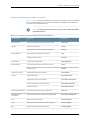
Table 1: Notice Icons . . . . . . . . . . . . . . . . . . . . . . . . . . . . . . . . . . . . . . . . . . . . . . . . xvii
Table 2: Text and Syntax Conventions . . . . . . . . . . . . . . . . . . . . . . . . . . . . . . . . . . xvii
Part 1
Overview
Chapter 1
CLI Overview . . . . . . . . . . . . . . . . . . . . . . . . . . . . . . . . . . . . . . . . . . . . . . . . . . . . . . 3
Table 3: CLI Configuration Mode Navigation Commands . . . . . . . . . . . . . . . . . . . . . 7
Chapter 3
CLI Operational Mode . . . . . . . . . . . . . . . . . . . . . . . . . . . . . . . . . . . . . . . . . . . . . . 15
Table 4: Commonly Used Operational Mode Commands . . . . . . . . . . . . . . . . . . . . 17
Table 5: Common Regular Expression Operators in Operational Mode
Commands . . . . . . . . . . . . . . . . . . . . . . . . . . . . . . . . . . . . . . . . . . . . . . . . . . . . 24
Chapter 4
CLI Configuration Mode . . . . . . . . . . . . . . . . . . . . . . . . . . . . . . . . . . . . . . . . . . . . 33
Table 6: Summary of Configuration Mode Commands . . . . . . . . . . . . . . . . . . . . . 34
Table 7: Configuration Mode Top-Level Statements . . . . . . . . . . . . . . . . . . . . . . . 36
Table 8: Forms of the configure Command . . . . . . . . . . . . . . . . . . . . . . . . . . . . . . . 41
Table 9: CLI Configuration Input Types . . . . . . . . . . . . . . . . . . . . . . . . . . . . . . . . . . 44
Chapter 5
CLI Advanced Features . . . . . . . . . . . . . . . . . . . . . . . . . . . . . . . . . . . . . . . . . . . . 47
Table 10: CLI Keyboard Sequences . . . . . . . . . . . . . . . . . . . . . . . . . . . . . . . . . . . . . 47
Table 11: Wildcard Characters for Specifying Interface Names . . . . . . . . . . . . . . . 49
Part 3
Administration
Chapter 21
Routine Monitoring . . . . . . . . . . . . . . . . . . . . . . . . . . . . . . . . . . . . . . . . . . . . . . . 213
Table 12: Directories on the Router . . . . . . . . . . . . . . . . . . . . . . . . . . . . . . . . . . . . . 216
Table 13: show system process extensive Command Output Fields . . . . . . . . . . 224
Chapter 22
Managing the CLI Environment . . . . . . . . . . . . . . . . . . . . . . . . . . . . . . . . . . . . 229
Table 14: Commonly Used Operational Mode Commands . . . . . . . . . . . . . . . . . 233
Chapter 23
CLI Advanced Features . . . . . . . . . . . . . . . . . . . . . . . . . . . . . . . . . . . . . . . . . . . 237
Table 15: Common Regular Expressions to Use with the replace Command . . . . 237
Table 16: Replacement Examples . . . . . . . . . . . . . . . . . . . . . . . . . . . . . . . . . . . . . 238
Chapter 24
Junos OS CLI Environment Commands . . . . . . . . . . . . . . . . . . . . . . . . . . . . . 239
Table 17: show cli Output Fields . . . . . . . . . . . . . . . . . . . . . . . . . . . . . . . . . . . . . . 250
Chapter 25
Operational Commands . . . . . . . . . . . . . . . . . . . . . . . . . . . . . . . . . . . . . . . . . . 255
Table 18: show system commit Output Fields . . . . . . . . . . . . . . . . . . . . . . . . . . . 289
Copyright © 2014, Juniper Networks, Inc.
xiii
CLI User Guide
xiv
Copyright © 2014, Juniper Networks, Inc.
About the Documentation
•
Documentation and Release Notes on page xv
•
Supported Platforms on page xv
•
Using the Examples in This Manual on page xv
•
Documentation Conventions on page xvii
•
Documentation Feedback on page xix
•
Requesting Technical Support on page xix
Documentation and Release Notes
®
To obtain the most current version of all Juniper Networks technical documentation,
see the product documentation page on the Juniper Networks website at
http://www.juniper.net/techpubs/.
If the information in the latest release notes differs from the information in the
documentation, follow the product Release Notes.
Juniper Networks Books publishes books by Juniper Networks engineers and subject
matter experts. These books go beyond the technical documentation to explore the
nuances of network architecture, deployment, and administration. The current list can
be viewed at http://www.juniper.net/books.
Supported Platforms
For the features described in this document, the following platforms are supported:
•
LN Series
•
SRX Series
Using the Examples in This Manual
If you want to use the examples in this manual, you can use the load merge or the load
merge relative command. These commands cause the software to merge the incoming
configuration into the current candidate configuration. The example does not become
active until you commit the candidate configuration.
If the example configuration contains the top level of the hierarchy (or multiple
hierarchies), the example is a full example. In this case, use the load merge command.
Copyright © 2014, Juniper Networks, Inc.
xv
CLI User Guide
If the example configuration does not start at the top level of the hierarchy, the example
is a snippet. In this case, use the load merge relative command. These procedures are
described in the following sections.
Merging a Full Example
To merge a full example, follow these steps:
1.
From the HTML or PDF version of the manual, copy a configuration example into a
text file, save the file with a name, and copy the file to a directory on your routing
platform.
For example, copy the following configuration to a file and name the file ex-script.conf.
Copy the ex-script.conf file to the /var/tmp directory on your routing platform.
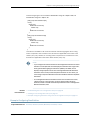
system {
scripts {
commit {
file ex-script.xsl;
}
}
}
interfaces {
fxp0 {
disable;
unit 0 {
family inet {
address 10.0.0.1/24;
}
}
}
}
2. Merge the contents of the file into your routing platform configuration by issuing the
load merge configuration mode command:
[edit]
user@host# load merge /var/tmp/ex-script.conf
load complete
Merging a Snippet
To merge a snippet, follow these steps:
1.
From the HTML or PDF version of the manual, copy a configuration snippet into a text
file, save the file with a name, and copy the file to a directory on your routing platform.
For example, copy the following snippet to a file and name the file
ex-script-snippet.conf. Copy the ex-script-snippet.conf file to the /var/tmp directory
on your routing platform.
commit {
file ex-script-snippet.xsl; }
2. Move to the hierarchy level that is relevant for this snippet by issuing the following
configuration mode command:
xvi
Copyright © 2014, Juniper Networks, Inc.
About the Documentation
[edit]
user@host# edit system scripts
[edit system scripts]
3. Merge the contents of the file into your routing platform configuration by issuing the
load merge relative configuration mode command:
[edit system scripts]
user@host# load merge relative /var/tmp/ex-script-snippet.conf
load complete
For more information about the load command, see the CLI User Guide.
Documentation Conventions
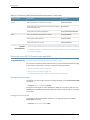
Table 1 on page xvii defines notice icons used in this guide.
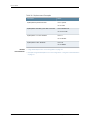
Table 1: Notice Icons
Icon
Meaning
Description
Informational note
Indicates important features or instructions.
Caution
Indicates a situation that might result in loss of data or hardware damage.
Warning
Alerts you to the risk of personal injury or death.
Laser warning
Alerts you to the risk of personal injury from a laser.
Tip
Indicates helpful information.
Best practice
Alerts you to a recommended use or implementation.
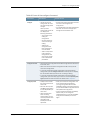
Table 2 on page xvii defines the text and syntax conventions used in this guide.
Table 2: Text and Syntax Conventions
Convention
Description
Examples
Bold text like this
Represents text that you type.
To enter configuration mode, type the
configure command:
user@host> configure
Copyright © 2014, Juniper Networks, Inc.
xvii
CLI User Guide
Table 2: Text and Syntax Conventions (continued)
Convention
Description
Examples
Fixed-width text like this
Represents output that appears on the
terminal screen.
user@host> show chassis alarms
•
Introduces or emphasizes important
new terms.
•
•
Identifies guide names.
A policy term is a named structure
that defines match conditions and
actions.
•
Identifies RFC and Internet draft titles.
•
Junos OS CLI User Guide
•
RFC 1997, BGP Communities Attribute
Italic text like this
Italic text like this
No alarms currently active
Represents variables (options for which
you substitute a value) in commands or
configuration statements.
Configure the machine’s domain name:
Represents names of configuration
statements, commands, files, and
directories; configuration hierarchy levels;
or labels on routing platform
components.
•
To configure a stub area, include the
stub statement at the [edit protocols
ospf area area-id] hierarchy level.
•
The console port is labeled CONSOLE.
< > (angle brackets)
Encloses optional keywords or variables.
stub <default-metric metric>;
| (pipe symbol)
Indicates a choice between the mutually
exclusive keywords or variables on either
side of the symbol. The set of choices is
often enclosed in parentheses for clarity.
broadcast | multicast
# (pound sign)
Indicates a comment specified on the
same line as the configuration statement
to which it applies.
rsvp { # Required for dynamic MPLS only
[ ] (square brackets)
Encloses a variable for which you can
substitute one or more values.
community name members [
community-ids ]
Indention and braces ( { } )
Identifies a level in the configuration
hierarchy.
; (semicolon)
Identifies a leaf statement at a
configuration hierarchy level.
Text like this
[edit]
root@# set system domain-name
domain-name
(string1 | string2 | string3)
[edit]
routing-options {
static {
route default {
nexthop address;
retain;
}
}
}
GUI Conventions
Bold text like this
xviii
Represents graphical user interface (GUI)
items you click or select.
•
In the Logical Interfaces box, select
All Interfaces.
•
To cancel the configuration, click
Cancel.
Copyright © 2014, Juniper Networks, Inc.
About the Documentation
Table 2: Text and Syntax Conventions (continued)
Convention
Description
Examples
> (bold right angle bracket)
Separates levels in a hierarchy of menu
selections.
In the configuration editor hierarchy,
select Protocols>Ospf.
Documentation Feedback
We encourage you to provide feedback, comments, and suggestions so that we can
improve the documentation. You can provide feedback by using either of the following
methods:
•
Online feedback rating system—On any page at the Juniper Networks Technical
Documentation site at http://www.juniper.net/techpubs/index.html, simply click the
stars to rate the content, and use the pop-up form to provide us with information about
your experience. Alternately, you can use the online feedback form at
https://www.juniper.net/cgi-bin/docbugreport/.
•
E-mail—Send your comments to [email protected]. Include the document
or topic name, URL or page number, and software version (if applicable).
Requesting Technical Support
Technical product support is available through the Juniper Networks Technical Assistance
Center (JTAC). If you are a customer with an active J-Care or JNASC support contract,
or are covered under warranty, and need post-sales technical support, you can access
our tools and resources online or open a case with JTAC.
•
JTAC policies—For a complete understanding of our JTAC procedures and policies,
review the JTAC User Guide located at
http://www.juniper.net/us/en/local/pdf/resource-guides/7100059-en.pdf.
•
Product warranties—For product warranty information, visit
http://www.juniper.net/support/warranty/.
•
JTAC hours of operation—The JTAC centers have resources available 24 hours a day,
7 days a week, 365 days a year.
Self-Help Online Tools and Resources
For quick and easy problem resolution, Juniper Networks has designed an online
self-service portal called the Customer Support Center (CSC) that provides you with the
following features:
•
Find CSC offerings: http://www.juniper.net/customers/support/
•
Search for known bugs: http://www2.juniper.net/kb/
•
Find product documentation: http://www.juniper.net/techpubs/
•
Find solutions and answer questions using our Knowledge Base: http://kb.juniper.net/
Copyright © 2014, Juniper Networks, Inc.
xix
CLI User Guide
•
Download the latest versions of software and review release notes:
http://www.juniper.net/customers/csc/software/
•
Search technical bulletins for relevant hardware and software notifications:
http://kb.juniper.net/InfoCenter/
•
Join and participate in the Juniper Networks Community Forum:
http://www.juniper.net/company/communities/
•
Open a case online in the CSC Case Management tool: http://www.juniper.net/cm/
To verify service entitlement by product serial number, use our Serial Number Entitlement
(SNE) Tool: https://tools.juniper.net/SerialNumberEntitlementSearch/
Opening a Case with JTAC
You can open a case with JTAC on the Web or by telephone.
•
Use the Case Management tool in the CSC at http://www.juniper.net/cm/.
•
Call 1-888-314-JTAC (1-888-314-5822 toll-free in the USA, Canada, and Mexico).
For international or direct-dial options in countries without toll-free numbers, see
http://www.juniper.net/support/requesting-support.html.
xx
Copyright © 2014, Juniper Networks, Inc.
PART 1
Overview
•
CLI Overview on page 3
•
CLI Online Help on page 9
•
CLI Operational Mode on page 15
•
CLI Configuration Mode on page 33
•
CLI Advanced Features on page 47
•
CLI Commit Operations on page 51
•
Configuration Groups on page 55
•
Configuration Management on page 57
Copyright © 2014, Juniper Networks, Inc.
1
CLI User Guide
2
Copyright © 2014, Juniper Networks, Inc.
CHAPTER 1
CLI Overview
•
Introducing the Junos OS Command-Line Interface on page 3
•
Understanding the Junos OS CLI Modes, Commands, and Statement
Hierarchies on page 5
•
Other Tools to Configure and Monitor Devices Running Junos OS on page 7
•
Commands and Configuration Statements for Junos-FIPS on page 8
Introducing the Junos OS Command-Line Interface
Supported Platforms
EX Series, LN Series, M Series, MX Series, PTX Series, QFX Series, T Series
The Junos OS command-line interface (CLI) is the software interface you use to access
a device running Junos OS—whether from the console or through a network connection.
The Junos OS CLI is a Juniper Networks-specific command shell that runs on top of a
FreeBSD UNIX-based operating system kernel. By leveraging industry-standard tools
and utilities, the CLI provides a powerful set of commands that you can use to monitor
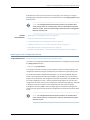
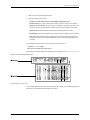
and configure devices running Junos OS (see Figure 1 on page 3). The CLI is a
straightforward command interface. You type commands on a single line, and the
commands are executed when you press Enter.
Figure 1: Monitoring and Configuring Routers
Key Features of the CLI
The Junos OS CLI commands and statements follow a hierarchal organization and have
a regular syntax. The Junos OS CLI provides the following features to simplify CLI use:
Copyright © 2014, Juniper Networks, Inc.
3
CLI User Guide
•
Consistent command names—Commands that provide the same type of function have
the same name, regardless of the portion of the software on which they are operating.
For example, all show commands display software information and statistics, and all
clear commands erase various types of system information.
•
Lists and short descriptions of available commands—Information about available
commands is provided at each level of the CLI command hierarchy. If you type a
question mark (?) at any level, you see a list of the available commands along with a
short description of each command. This means that if you already are familiar with
the Junos OS or with other routing software, you can use many of the CLI commands
without referring to the documentation.
•
Command completion—Command completion for command names (keywords) and
for command options is available at each level of the hierarchy. To complete a
command or option that you have partially typed, press the Tab key or the Spacebar.
If the partially typed letters begin a string that uniquely identifies a command, the
complete command name appears. Otherwise, a beep indicates that you have entered
an ambiguous command, and the possible completions are displayed. Completion
also applies to other strings, such as filenames, interface names, usernames, and
configuration statements.
If you have typed the mandatory arguments for executing a command in the operational
or configuration mode the CLI displays <[Enter]> as one of the choices when you type
a question mark (?). This indicates that you have entered the mandatory arguments
and can execute the command at that level without specifying any further options.
Likewise, the CLI also displays <[Enter]> when you have reached a specific hierarchy
level in the configuration mode and do not have to enter any more mandatory
arguments or statements.
•
Related
Documentation
4
Industry-standard technology—With FreeBSD UNIX as the kernel, a variety of UNIX
utilities are available on the Junos OS CLI. For example, you can:
•
Use regular expression matching to locate and replace values and identifiers in a
configuration, filter command output, or examine log file entries.
•
Use Emacs-based key sequences to move around on a command line and scroll
through the recently executed commands and command output.
•
Store and archive Junos OS device files on a UNIX-based file system.
•
Use standard UNIX conventions to specify filenames and paths.
•
Exit from the CLI environment and create a UNIX C shell or Bourne shell to navigate
the file system, manage router processes, and so on.
•
Understanding the Junos OS CLI Modes, Commands, and Statement Hierarchies on
page 5
•
Getting Started with the Junos OS Command-Line Interface on page 72
•
Other Tools to Configure and Monitor Devices Running Junos OS on page 7
•
Commands and Configuration Statements for Junos-FIPS on page 8
Copyright © 2014, Juniper Networks, Inc.
Chapter 1: CLI Overview
Understanding the Junos OS CLI Modes, Commands, and Statement Hierarchies
Supported Platforms
EX Series, LN Series, M Series, MX Series, PTX Series, QFX Series, T Series
The Junos OS command-line interface (CLI) commands and statements are organized
under two command modes and various hierarchies. The following sections provide you
an overview of the Junos OS CLI command modes and commands and statements
hierarchies:
•
Junos OS CLI Command Modes on page 5
•
CLI Command Hierarchy on page 6
•
Configuration Statement Hierarchy on page 6
•
Moving Among Hierarchy Levels on page 6
Junos OS CLI Command Modes
The Junos OS CLI has two modes:
•
Operational mode—This mode displays the current status of the device. In operational
mode, you enter commands to monitor and troubleshoot the Junos OS, devices, and
network connectivity.
•
Configuration mode—A configuration for a device running on Junos OS is stored as a
hierarchy of statements. In configuration mode, you enter these statements to define
all properties of the Junos OS, including interfaces, general routing information, routing
protocols, user access, and several system and hardware properties.
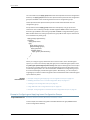
When you enter configuration mode, you are actually viewing and changing a file called
the candidate configuration. The candidate configuration file enables you to make
configuration changes without causing operational changes to the current operating
configuration, called the active configuration. The router or switch does not implement
the changes you added to the candidate configuration file until you commit them, which
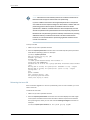
activates the configuration on the router or switch (see Figure 2 on page 5). Candidate
configurations enable you to alter your configuration without causing potential damage
to your current network operations.
Figure 2: Committing a Configuration
Copyright © 2014, Juniper Networks, Inc.
5
CLI User Guide
CLI Command Hierarchy
CLI commands are organized in a hierarchy. Commands that perform a similar function
are grouped together under the same level of the hierarchy. For example, all commands
that display information about the system and the system software are grouped under
the show system command, and all commands that display information about the routing
table are grouped under the show route command.
To execute a command, you enter the full command name, starting at the top level of
the hierarchy. For example, to display a brief view of the routes in the routing table, use
the command show route brief.
Configuration Statement Hierarchy
The configuration statement hierarchy has two types of statements: container statements,
which are statements that contain other statements, and leaf statements, which do not
contain other statements. All of the container and leaf statements together form the
configuration hierarchy.
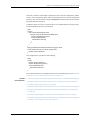
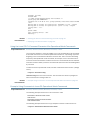
Figure 3 on page 6 illustrates a part of the hierarchy tree. The protocols statement is a
top-level statement at the trunk of the configuration tree. The ospf, area, and interface
statements are all subordinate container statements of a higher statement (they are
branches of the hierarchy tree), and the hello-interval statement is a leaf on the tree.
Figure 3: Configuration Statement Hierarchy Example
Moving Among Hierarchy Levels
You can use the CLI commands in Table 3 on page 7 to navigate the levels of the
configuration statement hierarchy.
6
Copyright © 2014, Juniper Networks, Inc.
Chapter 1: CLI Overview
Table 3: CLI Configuration Mode Navigation Commands
Related
Documentation
Command
Description
edit
hierarchy-level
Moves to an existing configuration statement hierarchy or creates a hierarchy
and moves to that level.
exit
Moves up the hierarchy to the previous level where you were working. This
command is, in effect, the opposite of the edit command. Alternatively, you
can use the quit command. The exit and quit commands are interchangeable.
up
Moves up the hierarchy one level at a time.
top
Moves directly to the top level of the hierarchy.
•
Introducing the Junos OS Command-Line Interface on page 3
•
Getting Started with the Junos OS Command-Line Interface on page 72
Other Tools to Configure and Monitor Devices Running Junos OS
Supported Platforms
EX Series, LN Series, M Series, MX Series, PTX Series, T Series
Apart from the command-line interface, Junos OS also supports the following applications,
scripts, and utilities that enable you to configure and monitor devices running Junos OS:
•
J-Web graphical user interface (GUI)—Allows you to monitor, configure, troubleshoot,
and manage the router on a client by means of a Web browser with Hypertext Transfer
Protocol (HTTP) or HTTP over Secure Sockets Layer (HTTPS) enabled. For more
information, see the J-Web Interface User Guide.
•
Junos XML management protocol—Application programmers can use the Junos XML
management protocol to monitor and configure Juniper Networks routers. Juniper
Networks provides a Perl module with the API to help you more quickly and easily
develop custom Perl scripts for configuring and monitoring routers. For more
information, see the Junos XML Management Protocol Developer Guide.
•
NETCONF Application Programming Interface (API)—Application programmers can
also use the NETCONF XML management protocol to monitor and configure Juniper
Networks routers. For more information, see the NETCONF XML Management Protocol
Developer Guide.
•
Junos OS commit scripts and self-diagnosis features—You can define scripts to enforce
custom configuration rules, use commit script macros to provide simplified aliases for
frequently used configuration statements, and configure diagnostic event policies and
actions associated with each policy. For more information, see the Junos OS
Configuration and Operations Automation Library.
•
Management Information Bases (MIBs)—You can use enterprise-specific and standard
MIBS to retrieve information about the hardware and software components on a Juniper
Copyright © 2014, Juniper Networks, Inc.
7
CLI User Guide
Networks router. For more information about MIBs, see the SNMP MIBs and Traps
Monitoring and Troubleshooting Guide for Security Devices.
Related
Documentation
•
Introducing the Junos OS Command-Line Interface on page 3
•
Getting Started with the Junos OS Command-Line Interface on page 72
•
Commands and Configuration Statements for Junos-FIPS on page 8
Commands and Configuration Statements for Junos-FIPS
Supported Platforms
EX Series, LN Series, M Series, MX Series, T Series
Junos-FIPS enables you to configure a network of Juniper Networks routers in a Federal
Information Processing Standards (FIPS) 140-2 environment.
The Junos-FIPS software environment requires the installation of FIPS software by a
crypto officer. In Junos-FIPS, some Junos OS commands and statements have restrictions
and some additional configuration statements are available. For more information, see
the Secure Configuration Guide for Common Criteria and Junos-FIPS.
Related
Documentation
8
•
Junos Secure Configuration Guide for Common Criteria and Junos-FIPS
Copyright © 2014, Juniper Networks, Inc.
CHAPTER 2
CLI Online Help
•
Getting Online Help from the Junos OS Command-Line Interface on page 9
•
Junos OS CLI Online Help Features on page 11
Getting Online Help from the Junos OS Command-Line Interface
Supported Platforms
EX Series, LN Series, M Series, MX Series, PTX Series, T Series
The Junos OS command-line interface (CLI) has a context-sensitive online help feature
that enables you to access information about commands and statements from the Junos
OS CLI. This topic contains the following sections:
•
Getting Help About Commands on page 9
•
Getting Help About a String in a Statement or Command on page 10
•
Getting Help About Configuration Statements on page 11
•
Getting Help About System Log Messages on page 11
Getting Help About Commands
Information about commands is provided at each level of the CLI command hierarchy.
You can type a question mark to get help about commands:
•
If you type the question mark at the command-line prompt, the CLI lists the available
commands and options. For example, to view a list of top-level operational mode
commands, type a question mark (?) at the command-line prompt.
user@host> ?
Possible completions:
clear
Clear information in the system
configure
Manipulate software configuration information
file
Perform file operations
help
Provide help information
mtrace
Trace mtrace packets from source to receiver.
monitor
Real-time debugging
ping
Ping a remote target
quit
Exit the management session
request
Make system-level requests
restart
Restart a software process
set
Set CLI properties, date, time, craft display text
show
Show information about the system
ssh
Open a secure shell to another host
start
Start a software process
Copyright © 2014, Juniper Networks, Inc.
9
CLI User Guide
telnet
test
traceroute
user@host>
•
Telnet to another host
Diagnostic debugging commands
Trace the route to a remote host
If you type the question mark after entering the complete name of a command or
command option, the CLI lists the available commands and options and then redisplays
the command names and options that you typed.
user@host> clear ?
Possible completions:
arp
Clear address-resolution information
bgp
Clear BGP information
chassis
Clear chassis information
firewall
Clear firewall counters
igmp
Clear IGMP information
interfaces
Clear interface information
ilmi
Clear ILMI statistics information
isis
Clear IS-IS information
ldp
Clear LDP information
log
Clear contents of a log file
mpls
Clear MPLS information
msdp
Clear MSDP information
multicast
Clear Multicast information
ospf
Clear OSPF information
pim
Clear PIM information
rip
Clear RIP information
route
Clear routing table information
rsvp
Clear RSVP information
snmp
Clear SNMP information
system
Clear system status
vrrp
Clear VRRP statistics information
user@host> clear
•
If you type the question mark in the middle of a command name, the CLI lists possible
command completions that match the letters you have entered so far. It then redisplays
the letters that you typed. For example, to list all operational mode commands that
start with the letter c, type the following:
user@host> c?
Possible completions:
clear
Clear information in the system
configure Manipulate software configuration information
user@host> c
•
For introductory information on using the question mark or the help command, you
can also type help and press Enter:
user@host> help
Getting Help About a String in a Statement or Command
You can use the help command to display help about a text string contained in a
statement or command name:
help apropos string
string is a text string about which you want to get help. This string is used to match
statement or command names as well as to match the help strings that are displayed
for the statements or commands.
10
Copyright © 2014, Juniper Networks, Inc.
Chapter 2: CLI Online Help
If the string contains spaces, enclose it in quotation marks (" " ). You can also specify a
regular expression for the string, using standard UNIX-style regular expression syntax.
In configuration mode, this command displays statement names and help text that match
the string specified. In operational mode, this command displays command names and
help text that match the string specified.
Getting Help About Configuration Statements
You can display help based on text contained in a statement name using the help topic
and help reference commands:
help topic word
help reference statement-name
The help topic command displays usage guidelines for the statement based on information
that appears in the Junos OS feature guides. The help reference command displays
summary information about the statement based on the summary descriptions that
appear in the Junos OS feature guides.
Getting Help About System Log Messages
You can display help based on a system log tag using the help syslog command:
help syslog syslog-tag
The help syslog command displays the contents of a system log message.
Related
Documentation
•
Junos OS CLI Online Help Features on page 11
•
Getting Started with the Junos OS Command-Line Interface on page 72
Junos OS CLI Online Help Features
Supported Platforms
EX Series, LN Series, M Series, MX Series, PTX Series, T Series
The Junos OS CLI online help provides the following features for ease of use and error
prevention:
•
Help for Omitted Statements on page 11
•
Using CLI Command Completion on page 12
•
Using Command Completion in Configuration Mode on page 12
•
Displaying Tips About CLI Commands on page 12
Help for Omitted Statements
If you have omitted a required statement at a particular hierarchy level, when you attempt
to move from that hierarchy level or when you issue the show command in configuration
mode, a message indicates which statement is missing. For example:
[edit protocols pim interface so-0/0/0]
user@host# top
Warning: missing mandatory statement: 'mode'
Copyright © 2014, Juniper Networks, Inc.
11
CLI User Guide
[edit]
user@host# show
protocols {
pim {
interface so-0/0/0 {
priority 4;
version 2;
# Warning: missing mandatory statement(s): 'mode'
}
}
}
Using CLI Command Completion
The Junos OS CLI provides you a command completion option that enables Junos OS to
recognize commands and options based on the initial few letters you typed. That is, you
do not always have to remember or type the full command or option name for the CLI
to recognize it.
•
To display all possible command or option completions, type the partial command
followed immediately by a question mark.
•
To complete a command or option that you have partially typed, press Tab or the
Spacebar. If the partially typed letters begin a string that uniquely identifies a command,
the complete command name appears. Otherwise, a prompt indicates that you have
entered an ambiguous command, and the possible completions are displayed.
Command completion also applies to other strings, such as filenames, interface names,
and usernames. To display all possible values, type a partial string followed immediately
by a question mark. To complete a string, press Tab.
Using Command Completion in Configuration Mode
The CLI command completion functions also apply to the commands in configuration
mode and to configuration statements. Specifically, to display all possible commands
or statements, type the partial string followed immediately by a question mark. To
complete a command or statement that you have partially typed, press Tab or the
Spacebar.
Command completion also applies to identifiers, with one slight difference. To display
all possible identifiers, type a partial string followed immediately by a question mark. To
complete an identifier, you must press Tab. This scheme allows you to enter identifiers
with similar names; then press the Spacebar when you are done typing the identifier
name.
Displaying Tips About CLI Commands
To get tips about CLI commands, issue the help tip cli command. Each time you enter
the command, a new tip appears. For example:
user@host> help tip cli
Junos tip:
12
Copyright © 2014, Juniper Networks, Inc.
Chapter 2: CLI Online Help
Use 'request system software validate' to validate the incoming software
against the current configuration without impacting the running system.
user@host> help tip cli
Junos tip:
Use 'commit and-quit' to exit configuration mode after the commit has
succeeded. If the commit fails, you are left in configuration mode.
You can also enter help tip cli number to associate a tip with a number. This enables you
to recall the tip at a later time. For example:
user@host> help tip cli 10
JUNOS tip:
Use '#' in the beginning of a line in command scripts to cause the
rest of the line to be ignored.
user@host> help tip cli
JUNOS tip:
Use the 'apply-groups' statement at any level of the configuration
hierarchy to inherit configuration statements from a configuration group.
user@host>
Related
Documentation
•
Getting Started with the Junos OS Command-Line Interface on page 72
•
Examples: Using the Junos OS CLI Command Completion on page 165
Copyright © 2014, Juniper Networks, Inc.
13
CLI User Guide
14
Copyright © 2014, Juniper Networks, Inc.
CHAPTER 3
CLI Operational Mode
•
Overview of Junos OS CLI Operational Mode Commands on page 15
•
Junos OS Operational Mode Commands That Combine Other Commands on page 18
•
Understanding the Brief, Detail, Extensive, and Terse Options of Junos OS Operational
Commands on page 19
•
Controlling the Scope of an Operational Mode Command on page 20
•
Using the Pipe ( | ) Symbol to Filter Junos Command Output on page 23
•
Using Regular Expressions with the Pipe ( | ) Symbol to Filter Junos Command
Output on page 24
•
Pipe ( | ) Filter Functions in the Junos OS command-line interface on page 25
Overview of Junos OS CLI Operational Mode Commands
Supported Platforms
EX Series, LN Series, M Series, MX Series, PTX Series, QFX Series, T Series
This topic provides an overview of Junos OS CLI operational mode commands and
contains the following sections:
•
CLI Command Categories on page 15
•
Commonly Used Operational Mode Commands on page 16
CLI Command Categories
When you log in to a device running Junos OS and the CLI starts, there are several broad
groups of CLI commands:
•
Commands for controlling the CLI environment—Some set commands in the set
hierarchy configure the CLI display screen. For information about these commands,
see “Understanding the Junos OS CLI Modes, Commands, and Statement Hierarchies”
on page 5.
•
Commands for monitoring and troubleshooting—The following commands display
information and statistics about the software and test network connectivity. Detailed
command descriptions are provided in CLI Explorer.
•
clear—Clear statistics and protocol database information.
•
mtrace—Trace mtrace packets from source to receiver.
Copyright © 2014, Juniper Networks, Inc.
15
CLI User Guide
•
monitor—Perform real-time debugging of various software components, including
the routing protocols and interfaces.
•
ping—Determine the reachability of a remote network host.
•
show—Display the current configuration and information about interfaces, routing
protocols, routing tables, routing policy filters, system alarms, and the chassis.
•
test—Test the configuration and application of policy filters and autonomous system
(AS) path regular expressions.
•
traceroute—Trace the route to a remote network host.
•
Commands for connecting to other network systems—The ssh command opens Secure
Shell connections, and the telnet command opens telnet sessions to other hosts on
the network. For information about these commands, see CLI Explorer.
•
Commands for copying files—The copy command copies files from one location on
the router or switch to another, from the router or switch to a remote system, or from
a remote system to the router or switch. For information about these commands, see
CLI Explorer.
•
Commands for restarting software processes—The commands in the restart hierarchy
restart the various Junos OS processes, including the routing protocol, interface, and
SNMP. For information about these commands, see CLI Explorer.
•
A command—request—for performing system-level operations, including stopping and
rebooting the router or switch and loading Junos OS images. For information about
this command, see CLI Explorer.
•
A command—start—to exit the CLI and start a UNIX shell. For information about this
command, see CLI Explorer.
•
A command—configure—for entering configuration mode, which provides a series of
commands that configure Junos OS, including the routing protocols, interfaces, network
management, and user access. For information about the CLI configuration commands,
see “Understanding Junos OS CLI Configuration Mode” on page 33.
•
A command—quit—to exit the CLI. For information about this command, see CLI Explorer.
Commonly Used Operational Mode Commands
Table 4 on page 17 lists some operational commands you may find useful for monitoring
router or switch operation. For a complete description of operational commands, see
the Junos OS command references.
NOTE: The QFX3500 switch does not support the IS-IS, OSPF, BGP, MPLS,
and RSVP protocols.
16
Copyright © 2014, Juniper Networks, Inc.
Chapter 3: CLI Operational Mode
Table 4: Commonly Used Operational Mode Commands
Items to Check
Description
Command
Software version
Versions of software running on the router or switch
show version
Log files
Contents of the log files
monitor
Log files and their contents and recent user logins
show log
Host reachability and network connectivity
ping
Route to a network system
traceroute
Configuration
Current system configuration
show configuration
Manipulate files
List of files and directories on the router or switch
file list
Contents of a file
file show
Interface information
Detailed information about interfaces
show interfaces
Chassis
Chassis alarm status
show chassis alarms
Information currently on craft display
show chassis craft-interface
Router or switch environment information
show chassis environment
Hardware inventory
show chassis hardware
Routing table information
Information about entries in the routing tables
show route
Forwarding table
information
Information about data in the kernel’s forwarding table
show route forwarding-table
IS-IS
Adjacent routers or switches
show isis adjacency
OSPF
Display standard information about OSPF neighbors
show ospf neighbor
BGP
Display information about BGP neighbors
show bgp neighbor
MPLS
Status of interfaces on which MPLS is running
show mpls interface
Configured LSPs on the router or switch, as well as all ingress,
transit, and egress LSPs
show mpls lsp
Routes that form a label-switched path
show route label-switched-path
Remote systems
Copyright © 2014, Juniper Networks, Inc.
17
CLI User Guide
Table 4: Commonly Used Operational Mode Commands (continued)
Items to Check
Description
Command
RSVP
Status of interfaces on which RSVP is running
show rsvp interface
Currently active RSVP sessions
show rsvp session
RSVP packet and error counters
show rsvp statistics
Related
Documentation
•
Junos OS Operational Mode Commands That Combine Other Commands on page 18
•
Understanding the Brief, Detail, Extensive, and Terse Options of Junos OS Operational
Commands on page 19
Junos OS Operational Mode Commands That Combine Other Commands
Supported Platforms
EX Series, LN Series, M Series, MX Series, PTX Series, QFX Series, T Series
In some cases, some Junos OS operational commands are created from a combination
of other operational commands. These commands can be useful shortcuts for collecting
information about the device, as shown in Figure 4 on page 18.
Figure 4: Commands That Combine Other Commands
Related
Documentation
18
•
Overview of Junos OS CLI Operational Mode Commands on page 15
•
Understanding the Brief, Detail, Extensive, and Terse Options of Junos OS Operational
Commands on page 19
Copyright © 2014, Juniper Networks, Inc.
Chapter 3: CLI Operational Mode
Understanding the Brief, Detail, Extensive, and Terse Options of Junos OS Operational
Commands
Supported Platforms
EX Series, LN Series, M Series, MX Series, PTX Series, QFX Series, T Series
The Junos OS operational mode commands can include brief, detail, extensive, or terse
options. You can use these options to control the amount of information you want to
view.
1.
Use the ? prompt to list options available for the command. For example:
user@host> show interfaces fe-1/1/1 ?
Possible completions:
<[Enter]>
Execute this command
brief
Display brief output
descriptions
Display interface description strings
detail
Display detailed output
extensive
Display extensive output
media
Display media information
snmp-index
SNMP index of interface
statistics
Display statistics and detailed output
terse
Display terse output
|
Pipe through a command
2. Choose the option you wish to use with the command. (See Figure 5 on page 19.)
Figure 5: Command Output Options
Copyright © 2014, Juniper Networks, Inc.
19
CLI User Guide
Related
Documentation
•
Overview of Junos OS CLI Operational Mode Commands on page 15
•
Controlling the Scope of an Operational Mode Command on page 20
Controlling the Scope of an Operational Mode Command
Supported Platforms
EX Series, LN Series, M Series, MX Series, PTX Series, T Series
The Junos OS CLI operational commands include options that you can use to identify
specific components on a device running Junos OS. For example:
1.
Type the show interfaces command to display information about all interfaces on the
router.
user@host> show interfaces
Physical interface: so-0/0/0, Enabled, Physical link is Up
Interface index: 128, SNMP ifIndex: 23
Link-level type: PPP, MTU: 4474, Clocking: Internal, SONET mode, Speed: OC3,
Loopback: None, FCS: 16, Payload scrambler: Enabled
Device flags
: Present Running
Interface flags: Point-To-Point SNMP-Traps Internal: 0x4000
Link flags
: Keepalives
Keepalive settings: Interval 10 seconds, Up-count 1, Down-count 3
Keepalive: Input: 13861 (00:00:05 ago), Output: 13891 (00:00:01 ago)
LCP state: Opened
NCP state: inet: Opened, inet6: Not-configured, iso: Opened, mpls:
Not-configured
CHAP state: Closed
PAP state: Closed
CoS queues
: 4 supported, 4 maximum usable queues
Last flapped
: 2008-06-02 17:16:14 PDT (1d 14:21 ago)
Input rate
: 40 bps (0 pps)
Output rate
: 48 bps (0 pps)
---(more)---
2. To display information about a specific interface, type that interface as a command
option:
user@host> show interfaces fe-0/1/3
Physical interface: fe-0/1/3, Enabled, Physical link is Up
Interface index: 135, SNMP ifIndex: 30
Link-level type: Ethernet, MTU: 1514, Speed: 100mbps, MAC-REWRITE Error:
None,
Loopback: Disabled, Source filtering: Disabled, Flow control: Enabled
Device flags
: Present Running
Interface flags: SNMP-Traps Internal: 0x4000
Link flags
: None
CoS queues
: 4 supported, 4 maximum usable queues
Current address: 00:05:85:8f:c8:22, Hardware address: 00:05:85:8f:c8:22
Last flapped
: 2008-06-02 17:16:15 PDT (1d 14:28 ago)
Input rate
: 0 bps (0 pps)
Output rate
: 0 bps (0 pps)
Active alarms : None
Active defects : None
user@host>
20
Copyright © 2014, Juniper Networks, Inc.
Chapter 3: CLI Operational Mode
Operational Mode Commands on a TX Matrix Router or TX Matrix Plus Router
When you issue operational mode commands on the TX Matrix router, CLI command
options allow you to restrict the command output to show only a component of the
routing matrix rather than the routing matrix as a whole.
These are the options shown in the CLI:
•
scc—The TX Matrix router (or switch-card chassis)
•
sfc—The TX Matrix Plus router (or switch-fabric chassis)
•
lcc number—A specific T640 router (in a routing matrix based on a TX Matrix router)
or a TX Matrix Plus router (in a routing matrix based on a TX Matrix Plus router)
•
all-lcc—All T640 routers (in a routing matrix based on a TX Matrix router) or all T1600
routers (in a routing matrix based on a TX Matrix Plus router)
If you specify none of these options, then the command applies by default to the whole
routing matrix: the TX Matrix router and all connected T640 routers or the TX Matrix Plus
router and all connected T1600 routers.
Examples of Routing Matrix Command Options
The following output samples, using the show version command, demonstrate some
different options for viewing information about the routing matrix.
user@host> show version ?
Possible completions:
<[Enter]>
Execute this command
all-lcc
Show software version on all LCC chassis
brief
Display brief output
detail
Display detailed output
lcc
Show software version on specific LCC (0..3)
scc
Show software version on the SCC
|
Pipe through a command
Sample Output: No Routing Matrix Options Specified
user@host> show version
scc-re0:
-------------------------------------------------------------------------Hostname: scc
Model: TX Matrix
JUNOS Base OS boot [7.0-20040630.0]
JUNOS Base OS Software Suite [7.0-20040629.0]
JUNOS Kernel Software Suite [7.0-20040630.0]
JUNOS Packet Forwarding Engine Support (T-Series) [7.0-20040630.0]
JUNOS Routing Software Suite [7.0-20040630.0]
JUNOS Online Documentation [7.0-20040630.0]
JUNOS Crypto Software Suite [7.0-20040630.0]
lcc0-re0:
-------------------------------------------------------------------------Hostname: lcc0
Model: t640
JUNOS Base OS boot [7.0-20040630.0]
JUNOS Base OS Software Suite [7.0-20040629.0]
JUNOS Kernel Software Suite [7.0-20040630.0]
Copyright © 2014, Juniper Networks, Inc.
21
CLI User Guide
JUNOS Packet Forwarding Engine Support (T-Series) [7.0-20040630.0]
JUNOS Routing Software Suite [7.0-20040630.0]
JUNOS Online Documentation [7.0-20040630.0]
JUNOS Crypto Software Suite [7.0-20040630.0]
JUNOS Support Tools Package [7.0-20040630.0]
lcc1-re0:
-------------------------------------------------------------------------Hostname: lcc1
Model: t640
JUNOS Base OS boot [7.0-20040630.0]
JUNOS Base OS Software Suite [7.0-20040629.0]
JUNOS Kernel Software Suite [7.0-20040630.0]
JUNOS Packet Forwarding Engine Support (T-Series) [7.0-20040630.0]
JUNOS Routing Software Suite [7.0-20040630.0]
JUNOS Online Documentation [7.0-20040630.0]
JUNOS Crypto Software Suite [7.0-20040630.0]
JUNOS Support Tools Package [7.0-20040630.0]
Sample Output: TX Matrix Router Only (scc Option)
user@host> show version scc
Hostname: scc
Model: TX Matrix
JUNOS Base OS boot [7.0-20040630.0]
JUNOS Base OS Software Suite [7.0-20040629.0]
JUNOS Kernel Software Suite [7.0-20040630.0]
JUNOS Packet Forwarding Engine Support (T-Series) [7.0-20040630.0]
JUNOS Routing Software Suite [7.0-20040630.0]
JUNOS Online Documentation [7.0-20040630.0]
JUNOS Crypto Software Suite [7.0-20040630.0]
Sample Output: Specific T640 Router (lcc number Option)
user@host> show version lcc 0
lcc0-re0:
-------------------------------------------------------------------------Hostname: lcc0
Model: t640
JUNOS Base OS boot [7.0-20040630.0]
JUNOS Base OS Software Suite [7.0-20040629.0]
JUNOS Kernel Software Suite [7.0-20040630.0]
JUNOS Packet Forwarding Engine Support (T-Series) [7.0-20040630.0]
JUNOS Routing Software Suite [7.0-20040630.0]
JUNOS Online Documentation [7.0-20040630.0]
JUNOS Crypto Software Suite [7.0-20040630.0]
JUNOS Support Tools Package [7.0-20040630.0]
Sample Output: All T640 Routers
(all-lcc Option)
user@host> show version all-lcc
lcc0-re0:
-------------------------------------------------------------------------Hostname: lcc0
Model: t640
JUNOS Base OS boot [7.0-20040630.0]
JUNOS Base OS Software Suite [7.0-20040629.0]
JUNOS Kernel Software Suite [7.0-20040630.0]
JUNOS Packet Forwarding Engine Support (T-Series) [7.0-20040630.0]
JUNOS Routing Software Suite [7.0-20040630.0]
JUNOS Online Documentation [7.0-20040630.0]
JUNOS Crypto Software Suite [7.0-20040630.0]
22
Copyright © 2014, Juniper Networks, Inc.
Chapter 3: CLI Operational Mode
JUNOS Support Tools Package [7.0-20040630.0]
lcc1-re0:
-------------------------------------------------------------------------Hostname: lcc1
Model: t640
JUNOS Base OS boot [7.0-20040630.0]
JUNOS Base OS Software Suite [7.0-20040629.0]
JUNOS Kernel Software Suite [7.0-20040630.0]
JUNOS Packet Forwarding Engine Support (T-Series) [7.0-20040630.0]
JUNOS Routing Software Suite [7.0-20040630.0]
JUNOS Online Documentation [7.0-20040630.0]
JUNOS Crypto Software Suite [7.0-20040630.0]
JUNOS Support Tools Package [7.0-20040630.0]
Related
Documentation
•
Interface Naming Conventions Used in the Junos OS Operational Commands on page 211
•
Using the Junos OS CLI Comment Character # for Operational Mode Commands on
page 227
Using the Pipe ( | ) Symbol to Filter Junos Command Output
Supported Platforms
EX Series, LN Series, M Series, MX Series, PTX Series, T Series
The Junos OS enables you to filter command output by adding the pipe ( | ) symbol when
you enter a command.
For example:
user@host> show rip neighbor ?
Possible completions:
<[Enter]>
Execute this command
<name>
Name of RIP neighbor
instance
Name of RIP instance
logical-system
Name of logical system, or 'all'
|
Pipe through a command
The following example lists the filters that can be used with the pipe symbol ( | ):
user@host> show rip neighbor | ?
Possible completions:
count
Count occurrences
display
Show additional kinds of information
except
Show only text that does not match a pattern
find
Search for first occurrence of pattern
hold
Hold text without exiting the --More-- prompt
last
Display end of output only
match
Show only text that matches a pattern
no-more
Don't paginate output
request
Make system-level requests
resolve
Resolve IP addresses
save
Save output text to file
trim
Trim specified number of columns from start of line
For the show configuration command only, an additional compare filter is available:
user@host> show configuration | ?
Possible completions:
compare
Compare configuration changes with prior version
...
Copyright © 2014, Juniper Networks, Inc.
23
CLI User Guide
You can enter any of the pipe filters in conjunction. For example:
user@host> command | match regular-expression | save filename
Related
Documentation
•
Pipe ( | ) Filter Functions in the Junos OS command-line interface on page 25
•
Using Regular Expressions with the Pipe ( | ) Symbol to Filter Junos Command Output
on page 24
Using Regular Expressions with the Pipe ( | ) Symbol to Filter Junos Command Output
Supported Platforms
EX Series, LN Series, M Series, MX Series, PTX Series, T Series
The except, find, and match filters used with the pipe symbol employ regular expressions
to filter output. Juniper Networks uses the regular expressions as defined in POSIX 1003.2.
If the regular expressions contain spaces, operators, or wildcard characters, enclose the
expression in quotation marks.
Table 5: Common Regular Expression Operators in Operational Mode
Commands
Operator
Function
|
Indicates that a match can be one of the two terms on either side of
the pipe.
^
Used at the beginning of an expression, denotes where a match
should begin.
$
Used at the end of an expression, denotes that a term must be
matched exactly up to the point of the $ character.
[]
Specifies a range of letters or digits to match. To separate the start
and end of a range, use a hyphen ( - ).
()
Specifies a group of terms to match.
For example, if a command produces the following output:
12
22
321
4
a pipe filter of | match 2 displays the following output:
12
22
321
and a pipe filter of | except 1 displays the following output:
22
4
24
Copyright © 2014, Juniper Networks, Inc.
Chapter 3: CLI Operational Mode
Related
Documentation
•
Using the Pipe ( | ) Symbol to Filter Junos Command Output on page 23
•
Pipe ( | ) Filter Functions in the Junos OS command-line interface on page 25
Pipe ( | ) Filter Functions in the Junos OS command-line interface
Supported Platforms
EX Series, LN Series, M Series, MX Series, PTX Series, T Series
This topic describes the pipe ( | ) filter functions that are supported in the Junos OS
command-line interface (CLI):
•
Comparing Configurations on page 25
•
Counting the Number of Lines of Output on page 27
•
Displaying Output in XML Tag Format on page 27
•
Displaying the RPC tags for a Command on page 27
•
Ignoring Output That Does Not Match a Regular Expression on page 27
•
Displaying Output from the First Match of a Regular Expression on page 28
•
Retaining Output After the Last Screen on page 28
•
Displaying Output Beginning with the Last Entries on page 28
•
Displaying Output That Matches a Regular Expression on page 29
•
Preventing Output from Being Paginated on page 29
•
Sending Command Output to Other Users on page 29
•
Resolving IP Addresses on page 30
•
Saving Output to a File on page 30
•
Trimming Output by Specifying the Starting Column on page 30
Comparing Configurations
The compare filter compares the candidate configuration with either the current
committed configuration or a configuration file and displays the differences between
the two configurations. To compare configurations, enter compare after the pipe ( | )
symbol:
[edit]
user@host# show | compare [filename| rollback n]
filename is the full path to a configuration file.
n is the index into the list of previously committed configurations. The most recently
saved configuration is 0. If you do not specify arguments, the candidate configuration is
compared against the active configuration file (/config/juniper.conf).
The comparison output uses the following conventions:
•
Statements that are only in the candidate configuration are prefixed with a plus sign
(+).
•
Statements that are only in the comparison file are prefixed with a minus sign (–).
Copyright © 2014, Juniper Networks, Inc.
25
CLI User Guide
•
Statements that are unchanged are prefixed with a single blank space ( ).
For example:
user@host> show configuration system | compare rollback 9
[edit system]
+ host-name nutmeg;
+ backup-router 192.168.71.254;
- ports {
console log-out-on-disconnect;
- }
[edit system name-server]
+ 172.17.28.11;
172.17.28.101 { ... }
[edit system name-server]
172.17.28.101 { ... }
+ 172.17.28.100;
+ 172.17.28.10;
[edit system]
- scripts {
commit {
allow-transients;
}
- }
+ services {
+
ftp;
+
rlogin;
+
rsh;
+
telnet;
+ }
Starting with Junos OS Release 8.3, output from the show | compare command has been
enhanced to more accurately reflect configuration changes. This includes more intelligent
handling of order changes in lists. For example, consider names in a group that are
reordered as follows:
groups {
group_xmp;
group_cmp;
group_grp;
}
}
groups {
group_xmp;
group_grp:
group_cmp;
In previous releases, output from the show | compare command looked like the following:
[edit groups]
- group_xmp;
- group_cmp;
- group_grp;
+ group_xmp;
+ group_grp;
+ group_cmp;
Now, output from the show | compare command looks like the following:
[edit groups]
group_xmp {...}
! group_grp {...}
26
Copyright © 2014, Juniper Networks, Inc.
Chapter 3: CLI Operational Mode
Counting the Number of Lines of Output
To count the number of lines in the output from a command, enter count after the pipe
symbol ( | ). For example:
user@host> show configuration | count
Count: 269 lines
Displaying Output in XML Tag Format
To display command output in XML tag format, enter display xml after the pipe symbol
( | ).
The following example displays the show cli directory command output as XML tags:
user@host> show cli directory | display xml
<rpc-reply xmlns:junos="http://xml.juniper.net/junos/7.5I0/junos">
<cli>
<working-directory>/var/home/regress</working-directory>
</cli>
<cli>
<banner></banner>
</cli>
</rpc-reply>
Displaying the RPC tags for a Command
To display the remote procedure call (RPC) XML tags for an operational mode command,
enter display xml rpc after the pipe symbol ( | ).
The following example displays the RPC tags for the show route command:
user@host> show route | display xml rpc
<rpc-reply xmlns:junos="http://xml.juniper.net/junos/10.1I0/junos">
<rpc>
<get-route-information>
</get-route-information>
</rpc>
<cli>
<banner></banner>
</cli>
</rpc-reply>
Ignoring Output That Does Not Match a Regular Expression
To ignore text that matches a regular expression, specify the except command after the
pipe symbol ( | ). If the regular expression contains any spaces, operators, or wildcard
characters, enclose it in quotation marks. For information on common regular expression
operators, see “Using Regular Expressions with the Pipe ( | ) Symbol to Filter Junos
Command Output” on page 24.
The following example displays all users who are logged in to the router, except for the
user root:
user@host> show system users | except root
Copyright © 2014, Juniper Networks, Inc.
27
CLI User Guide
8:28PM
USER
sheep
up 1 day, 13:59, 2 users, load averages: 0.01, 0.01, 0.00
TTY FROM
LOGIN@ IDLE WHAT
p0 baa.juniper.net
7:25PM
- cli
Displaying Output from the First Match of a Regular Expression
To display output starting with the first occurrence of text matching a regular expression,
enter find after the pipe symbol ( | ). If the regular expression contains any spaces,
operators, or wildcard characters, enclose it in quotation marks. For information on
common regular expression operators, see “Using Regular Expressions with the Pipe ( |
) Symbol to Filter Junos Command Output” on page 24.
The following example displays the routes in the routing table starting at IP address
208.197.169.0:
user@host> show route | find 208.197.169.0
208.197.169.0/24
*[Static/5] 1d 13:22:11
> to 192.168.4.254 via so-3/0/0.0
224.0.0.5/32
*[OSPF/10] 1d 13:22:12, metric 1
iso.0: 1 destinations, 1 routes (1 active, 0 holddown, 0 hidden)
+ = Active Route, - = Last Active, * = Both
47.0005.80ff.f800.0000.0108.0001.1921.6800.4015.00/160
*[Direct/0] 1d 13:22:12
> via lo0.0
The following example displays the first CCC entry in the forwarding table:
user@host> show route forwarding-table | find ccc
Routing table: ccc
MPLS:
Interface.Label
Type RtRef Nexthop
default
perm
0
0
user
0
1
user
0
32769
user
0
fe-0/0/0. (CCC)
user
0
10.0.16.2
Type Index NhRef Netif
rjct
3
1
recv
5
2
recv
5
2
ucst
45
1 fe-0/0/0.534
indr
44
2
Push 32768, Push
Retaining Output After the Last Screen
To not return immediately to the CLI prompt after viewing the last screen of output, enter
hold after the pipe symbol ( | ). The following example prevents returning to the CLI
prompt after you have viewed the last screen of output from the show log log-file-1
command:
user@host> show log log-file-1 | hold
This filter is useful when you want to scroll or search through output.
Displaying Output Beginning with the Last Entries
To display text starting from the end of the output, enter last <lines> after the pipe symbol
( | ).
The following example displays the last entries in log-file-1 file:
user@host> show log log-file-1 | last
28
Copyright © 2014, Juniper Networks, Inc.
Chapter 3: CLI Operational Mode
This filter is useful for viewing log files in which the end of the file contains the most recent
entries.
NOTE: When the number of lines requested is less than the number of lines
that the screen length setting permits you to display, Junos returns as many
lines as permitted by the screen length setting. That is, if your screen length
is set to 20 lines and you have requested only the last 10 lines, Junos returns
the last 19 lines instead of the last 10 lines.
Displaying Output That Matches a Regular Expression
To display output that matches a regular expression, enter match regular-expression after
the pipe symbol ( | ). If the regular expression contains any spaces, operators, or wildcard
characters, enclose it in quotation marks. For information on common regular expression
operators, see “Using Regular Expressions with the Pipe ( | ) Symbol to Filter Junos
Command Output” on page 24.
The following example matches all the Asynchronous Transfer Mode (ATM) interfaces
in the configuration:
user@host> show configuration | match atat-2/1/0 {
at-2/1/1 {
at-2/2/0 {
at-5/2/0 {
at-5/3/0 {
Preventing Output from Being Paginated
By default, if output is longer than the length of the terminal screen, you are provided
with a ---(more)--- message to display the remaining output. To display the remaining
output, press the Spacebar.
To prevent the output from being paginated, enter no-more after the pipe symbol ( | ).
The following example displays output from the show configuration command all at once:
user@host> show configuration | no-more
This feature is useful, for example, if you want to copy the entire output and paste it into
an e-mail.
Sending Command Output to Other Users
To display command output on the terminal of a specific user logged in to your router,
or on the terminals of all users logged in to your router, enter request message (all | user
account@terminal) after the pipe symbol ( | ).
If you are troubleshooting your router and, for example, talking with a customer service
representative on the phone, you can use the request message command to send your
representative the command output you are currently viewing on your terminal.
Copyright © 2014, Juniper Networks, Inc.
29
CLI User Guide
The following example sends the output from the show interfaces command you enter
on your terminal to the terminal of the user root@ttyp1:
user@host> show interfaces | request message user root@ttyp1
The user root@ttyp1 sees the following output appear on the terminal screen:
Message from user@host on /dev/ttyp0 at 10:32 PST...
Physical interface: dsc, Enabled, Physical link is Up
Interface index: 5, SNMP ifIndex: 5
Type: Software-Pseudo, MTU: Unlimited...
Resolving IP Addresses
If the output of a command displays an unresolved IP address, you can enter | resolve
after the command to display the name associated with the IP address. The resolve filter
enables the system to perform a reverse DNS lookup of the IP address. If DNS is not
enabled, the lookup fails and no substitution is performed.
To perform a reverse DNS lookup of an unresolved IP address, enter resolve <full-names>
after the pipe symbol ( | ). If you do not specify the full-names option, the name is
truncated to fit whatever field width limitations apply to the IP address.
The following example performs a DNS lookup on any unresolved IP addresses in the
output from the show ospf neighbors command:
user@host> show ospf neighbors | resolve
Saving Output to a File
When command output is lengthy, when you need to store or analyze the output, or when
you need to send the output in an e-mail or by FTP, you can save the output to a file. By
default, the file is placed in your home directory on the router.
To save command output to a file, enter save filename after the pipe symbol ( | ).
The following example saves the output from the request support information command
to a file named my-support-info.txt:
user@host> request support information | save my-support-info.txt
Wrote 1143 lines of output to ‘my-support-info.txt’
user@host>
Trimming Output by Specifying the Starting Column
Output appears on the terminal screen in terms of rows and columns. The first
alphanumeric character starting at the left of the screen is in column 1, the second
character is in column 2, and so on. To display output starting from a specific column
(thus trimming the leftmost portion of the output), enter trim columns after the pipe
symbol ( | ). The trim filter is useful for trimming the date and time from the beginning
of system log messages
The following example displays output from the show system storage command, filtering
out the first 10 columns:
30
Copyright © 2014, Juniper Networks, Inc.
Chapter 3: CLI Operational Mode
user@host> show system storage | trim 11
Related
Documentation
•
Using Regular Expressions with the Pipe ( | ) Symbol to Filter Junos Command Output
on page 24
•
Using the Pipe ( | ) Symbol to Filter Junos Command Output on page 23
Copyright © 2014, Juniper Networks, Inc.
31
CLI User Guide
32
Copyright © 2014, Juniper Networks, Inc.
CHAPTER 4
CLI Configuration Mode
•
Understanding Junos OS CLI Configuration Mode on page 33
•
Modifying the Junos OS Configuration on page 39
•
Commit Operation When Multiple Users Configure the Software on page 39
•
Forms of the configure Command on page 40
•
Additional Details About Specifying Junos Statements and Identifiers on page 42
Understanding Junos OS CLI Configuration Mode
Supported Platforms
EX Series, LN Series, M Series, MX Series, PTX Series, QFX Series, T Series
You can configure all properties of Junos OS, including interfaces, general routing
information, routing protocols, and user access, as well as several system hardware
properties.
As described in “Understanding the Junos OS CLI Modes, Commands, and Statement
Hierarchies” on page 5, a router configuration is stored as a hierarchy of statements. In
configuration mode, you create the specific hierarchy of configuration statements that
you want to use. When you have finished entering the configuration statements, you
commit them, which activates the configuration on the router.
You can create the hierarchy interactively or you can create an ASCII text file that is
loaded onto the router or switch and then committed.
This topic covers:
•
Configuration Mode Commands on page 34
•
Configuration Statements and Identifiers on page 35
•
Configuration Statement Hierarchy on page 37
Copyright © 2014, Juniper Networks, Inc.
33
CLI User Guide
Configuration Mode Commands
Table 6 on page 34 summarizes each CLI configuration mode command. The commands
are organized alphabetically.
Table 6: Summary of Configuration Mode Commands
34
Command
Description
activate
Remove the inactive: tag from a statement, effectively reading the
statement or identifier to the configuration. Statements or identifiers
that have been activated take effect when you next issue the commit
command.
annotate
Add comments to a configuration. You can add comments only at
the current hierarchy level.
commit
Commit the set of changes to the database and cause the changes
to take operational effect.
copy
Make a copy of an existing statement in the configuration.
deactivate
Add the inactive: tag to a statement, effectively commenting out
the statement or identifier from the configuration. Statements or
identifiers marked as inactive do not take effect when you issue the
commit command.
delete
Delete a statement or identifier. All subordinate statements and
identifiers contained within the specified statement path are deleted
with it.
edit
Move inside the specified statement hierarchy. If the statement does
not exist, it is created.
exit
Exit the current level of the statement hierarchy, returning to the
level prior to the last edit command, or exit from configuration mode.
The quit and exit commands are synonyms.
extension
Manage configurations that are contributed by SDK application
packages. Either display or delete user-defined configuration
contributed by the named SDK application package. A configuration
defined in any native Junos OS package is never deleted by the
extension command.
help
Display help about available configuration statements.
insert
Insert an identifier into an existing hierarchy.
load
Load a configuration from an ASCII configuration file or from terminal
input. Your current location in the configuration hierarchy is ignored
when the load operation occurs.
Copyright © 2014, Juniper Networks, Inc.
Chapter 4: CLI Configuration Mode
Table 6: Summary of Configuration Mode Commands (continued)
Command
Description
quit
Exit the current level of the statement hierarchy, returning to the
level prior to the last edit command, or exit from configuration mode.
The quit and exit commands are synonyms.
rename
Rename an existing configuration statement or identifier.
replace
Replace identifiers or values in a configuration.
rollback
Return to a previously committed configuration. The software saves
the last 10 committed configurations, including the rollback number,
date, time, and name of the user who issued the commit configuration
command.
run
Run a top-level CLI command without exiting from configuration
mode.
save
Save the configuration to an ASCII file. The contents of the current
level of the statement hierarchy (and below) are saved, along with
the statement hierarchy containing it. This allows a section of the
configuration to be saved, while fully specifying the statement
hierarchy.
set
Create a statement hierarchy and set identifier values. This is similar
to edit except that your current level in the hierarchy does not
change.
show
Display the current configuration.
status
Display the users currently editing the configuration.
top
Return to the top level of configuration command mode, which is
indicated by the [edit] banner.
up
Move up one level in the statement hierarchy.
update
Update a private database.
wildcard
Delete a statement or identifier. All subordinate statements and
identifiers contained within the specified statement path are deleted
with it. You can use regular expressions to specify a pattern. Based
on this pattern, you search for items that contain these patterns
and delete them.
Configuration Statements and Identifiers
You can configure router or switch properties by including the corresponding statements
in the configuration. Typically, a statement consists of a keyword, which is fixed text, and,
optionally, an identifier. An identifier is an identifying name that you can define, such as
Copyright © 2014, Juniper Networks, Inc.
35
CLI User Guide
the name of an interface or a username, which enables you and the CLI to differentiate
among a collection of statements.
Table 7 on page 36 describes top-level CLI configuration mode statements.
NOTE: The QFX3500 switch does not support the IS-IS, OSPF, BGP, LDP,
MPLS, and RSVP protocols.
Table 7: Configuration Mode Top-Level Statements
36
Statement
Description
access
Configure the Challenge Handshake Authentication Protocol (CHAP).
accounting-options
Configure accounting statistics data collection for interfaces and firewall
filters. .
chassis
Configure properties of the router chassis, including conditions that activate
alarms and SONET/SDH framing and concatenation properties. .
class-of-service
Configure class-of-service parameters. For information about the statements
in this hierarchy, see the Junos OS CoS Library for Security Devices.
firewall
Define filters that select packets based on their contents. .
forwarding-options
Define forwarding options, including traffic sampling options. .
groups
Configure configuration groups. .
interfaces
Configure interface information, such as encapsulation, interfaces, virtual
channel identifiers (VCIs), and data-link connection identifiers (DLCIs). For
information about the statements in this hierarchy, see the Junos OS Interfaces
Library for Security Devices.
policy-options
Define routing policies, which allow you to filter and set properties in incoming
and outgoing routes. .
protocols
Configure routing protocols, including BGP, IS-IS, LDP, MPLS, OSPF, RIP, and
RSVP. For information about the statements in this hierarchy, see the chapters
that discuss how to configure the individual routing protocols in the Junos OS
Routing Protocols Library for Security Devices and the MPLS Feature Guide for
Security Devices.
routing-instances
Configure multiple routing instances. For information about the statements
in this hierarchy, see the Junos OS Routing Protocols Library for Security Devices.
routing-options
Configure protocol-independent routing options, such as static routes,
autonomous system numbers, confederation members, and global tracing
(debugging) operations to log. For information about the statements in this
hierarchy, see the Junos OS Routing Protocols Library for Security Devices.
security
Configure IP Security (IPsec) services. .
Copyright © 2014, Juniper Networks, Inc.
Chapter 4: CLI Configuration Mode
Table 7: Configuration Mode Top-Level Statements (continued)
Statement
Description
snmp
Configure SNMP community strings, interfaces, traps, and notifications. For
information about the statements in this hierarchy, see the SNMP MIBs and
Traps Monitoring and Troubleshooting Guide for Security Devices.
system
Configure systemwide properties, including the hostname, domain name,
Domain Name System (DNS) server, user logins and permissions, mappings
between hostnames and addresses, and software processes. .
For specific information on configuration statements, see CLI Explorer.
Configuration Statement Hierarchy
The Junos OS configuration consists of a hierarchy of statements. There are two types
of statements: container statements, which are statements that contain other statements,
and leaf statements, which do not contain other statements (see Figure 6 on page 37).
All of the container and leaf statements together form the configuration hierarchy.
Figure 6: Configuration Mode Hierarchy of Statements
Each statement at the top level of the configuration hierarchy resides at the trunk (or
root level) of a hierarchy tree. The top-level statements are container statements,
containing other statements that form the tree branches. The leaf statements are the
leaves of the hierarchy tree. An individual hierarchy of statements, which starts at the
trunk of the hierarchy tree, is called a statement path. Figure 6 on page 37 illustrates the
hierarchy tree, showing a statement path for the portion of the protocol configuration
hierarchy that configures the hello interval on an interface in an OSPF area.
The protocols statement is a top-level statement at the trunk of the configuration tree.
The ospf, area, and interface statements are all subordinate container statements of a
higher statement (they are branches of the hierarchy tree); and the hello-interval
statement is a leaf on the tree which in this case contains a data value: the length of the
hello interval, in seconds.
Copyright © 2014, Juniper Networks, Inc.
37
CLI User Guide
The CLI represents the statement path shown in Figure 6 on page 37
as [edit protocols ospf area area-number interface interface-name] and displays the
configuration as follows:
protocols {
ospf {
area 0.0.0.0 {
interface so-0/0/0 {
hello-interval 5;
}
interface so-0/0/1 {
hello-interval 5;
}
}
}
}
The CLI indents each level in the hierarchy to indicate each statement’s relative position
in the hierarchy and generally sets off each level with braces, using an open brace at the
beginning of each hierarchy level and a closing brace at the end. If the statement at a
hierarchy level is empty, the braces are not printed.
Each leaf statement ends with a semicolon. If the hierarchy does not extend as far as a
leaf statement, the last statement in the hierarchy ends with a semicolon.
The configuration hierarchy can also contain “oneliners” at the last level in the hierarchy.
Oneliners remove one level of braces in the syntax and display the container statement,
its identifiers, the child or leaf statement and its attributes all on one line. For example,
in the following sample configuration hierarchy, the line level 1 metric 10 is a oneliner
because the level container statement with identifier 1, its child statement metric, and
its corresponding attribute 10 all appear on a single line in the hierarchy:
[edit protocols]
isis {
interface ge-0/0/0.0 {
level 1 metric 10;
}
}
}
Likewise, in the following example, dynamic-profile dynamic-profile-name aggregate-clients;
is a oneliner because the dynamic-profile statement, its identifier dynamic-profile-name,
and leaf statement aggregate-clients all appear on one line when you run the show
command in the configuration mode:
[edit forwarding-options]
user@host# show
dhcp-relay {
dynamic-profile dynamic-profile-name aggregate-clients;
}
Related
Documentation
38
•
Entering and Exiting the Junos OS CLI Configuration Mode on page 61
Copyright © 2014, Juniper Networks, Inc.
Chapter 4: CLI Configuration Mode
Modifying the Junos OS Configuration
Supported Platforms
EX Series, LN Series, M Series, MX Series, PTX Series, T Series
To configure a device running Junos OS or to modify an existing Junos configuration, you
add statements to the configuration. For each statement hierarchy, you create the
hierarchy starting with a statement at the top level and continuing with statements that
move progressively lower in the hierarchy.
To modify the hierarchy, you use two configuration mode commands:
•
edit—Moves to a particular hierarchy level. If that hierarchy level does not exist, the
edit command creates it. The edit command has the following syntax:
edit <statement-path>
•
set—Creates a configuration statement and sets identifier values. After you issue a set
command, you remain at the same level in the hierarchy. The set command has the
following syntax:
set <statement-path> statement <identifier>
statement-path is the hierarchy to the configuration statement and the statement itself.
If you have already moved to the statement’s hierarchy level, you can omit the
statement path. statement is the configuration statement itself. identifier is a string
that identifies an instance of a statement.
You cannot use the edit command to change the value of identifiers. You must use the
set command.
Related
Documentation
•
Displaying the Current Junos OS Configuration on page 63
•
Adding Junos Configuration Statements and Identifiers on page 85
•
Using the configure exclusive Command on page 71
•
Updating the configure private Configuration on page 72
•
Issuing Relative Junos Configuration Mode Commands on page 91
Commit Operation When Multiple Users Configure the Software
Supported Platforms
EX Series, LN Series, M Series, MX Series, PTX Series, T Series
Up to 32 users can be in configuration mode simultaneously, and they all can be making
changes to the configuration. All changes made by all users are visible to everyone editing
the configuration—the changes become visible as soon as the user presses the Enter key
at the end of a command that changes the configuration, such as set, edit, or delete.
When any of the users editing the configuration issues a commit command, all changes
made by all users are checked and activated.
If you enter configuration mode with the configure private command, each user has a
private candidate configuration to edit somewhat independently of other users. When
Copyright © 2014, Juniper Networks, Inc.
39
CLI User Guide
you commit the configuration, only your own changes get committed. To synchronize
your copy of the configuration after other users have committed changes, you can run
the update command in configuration mode. A commit operation also updates all of the
private candidate configurations. For example, suppose user X and user Y are both in
configure private mode, and user X commits a configuration change. When user Y performs
a subsequent commit operation and then views the new configuration, the new
configuration seen by user Y includes the changes made by user X.
If you enter configuration mode with the configure exclusive command, you lock the
candidate configuration for as long as you remain in configuration mode, allowing you
to make changes without interference from other users. Other users can enter and exit
configuration mode, but they cannot commit the configuration. This is true even if the
other users entered configuration mode before you enter the configure exclusive command.
For example, suppose user X is already in the configure private or configure mode. Then
suppose user Y enters the configure exclusive mode. User X cannot commit any changes
to the configuration, even if those changes were entered before user Y logged in. If user
Y exits configure exclusive mode, user X can then commit the changes made in configure
private or configure mode.
Related
Documentation
•
Committing a Junos OS Configuration on page 112
•
Forms of the configure Command on page 40
•
Displaying Users Currently Editing the Configuration on page 67
Forms of the configure Command
Supported Platforms
EX Series, LN Series, M Series, MX Series, PTX Series, T Series
The Junos OS supports three forms of the configure command: configure, configure
private, and configure exclusive. These forms control how users edit and commit
configurations and can be useful when multiple users configure the software. See
Table 8 on page 41.
40
Copyright © 2014, Juniper Networks, Inc.
Chapter 4: CLI Configuration Mode
Table 8: Forms of the configure Command
Command
Edit Access
Commit Access
configure
•
•
No one can lock the configuration. All users
can commit all changes to the
configuration.
•
If you and another user make changes and
the other user commits changes, your
changes are committed as well.
No one can lock the
configuration. All users
can make configuration
changes.
When you enter
configuration mode, the
CLI displays the
following information:
configure exclusive
configure private
Copyright © 2014, Juniper Networks, Inc.
•
A list of other users
editing the
configuration.
•
Hierarchy levels the
users are viewing or
editing.
•
Whether the
configuration has
been changed, but
not committed.
•
When multiple users
enter conflicting
configurations, the
most recent change
to be entered takes
precedence.
•
One user locks the configuration and makes changes without interference
from other users.
•
Other users can enter and exit configuration mode, but they cannot
commit the configuration.
•
If you enter configuration mode while another user has locked the
configuration (with the configure exclusive command), the CLI displays
the user and the hierarchy level the user is viewing or editing.
•
If you enter configuration mode while another user has locked the
configuration, you can forcibly log out that user with the request system
logout operational mode command. For details, seeCLI Explorer.
•
Multiple users can edit
the configuration at the
same time.
•
Each user has a private
candidate configuration
to edit independently of
other users.
•
When multiple users
enter conflicting
configurations, the first
commit operation takes
precedence over
subsequent commit
operations.
•
When you commit the configuration, the
router verifies that the operational
(running) configuration has not been
modified by another user before accepting
your private candidate configuration as the
new operational configuration.
•
If the configuration has been modified by
another user, you can merge the
modifications into your private candidate
configuration and attempt to commit
again.
41
CLI User Guide
Related
Documentation
•
Committing a Junos OS Configuration on page 112
•
Example: Using the configure Command on page 167
•
Displaying Users Currently Editing the Configuration on page 67
•
Using the configure exclusive Command on page 71
•
Updating the configure private Configuration on page 72
•
Displaying set Commands from the Junos OS Configuration on page 65
Additional Details About Specifying Junos Statements and Identifiers
Supported Platforms
EX Series, LN Series, M Series, MX Series, PTX Series, T Series
This topic provides more detailed information about CLI container and leaf statements
so that you can better understand how you must specify them when creating ASCII
configuration files. It also describes how the CLI performs type checking to verify that
the data you entered is in the correct format.
•
Specifying Statements on page 42
•
Performing CLI Type-Checking on page 44
Specifying Statements
Statements are shown one of two ways, either with braces or without:
•
Statement name and identifier, with one or more lower level statements enclosed in
braces:
statement-name1 identifier-name {
statement-name2;
additional-statements;
}
•
Statement name, identifier, and a single identifier:
statement-name identifier-name1 identifier-name2;
The statement-name is the name of the statement.
The identifier-name is a name or other string that uniquely identifies an instance of a
statement. An identifier is used when a statement can be specified more than once in a
configuration.
When specifying a statement, you must specify either a statement name or an identifier
name, or both, depending on the statement hierarchy.
You specify identifiers in one of the following ways:
•
identifier-name—The identifier-name is a keyword used to uniquely identify a statement
when a statement can be specified more than once in a statement.
•
identifier-name value—The identifier-name is a keyword, and the value is a required
option variable.
42
Copyright © 2014, Juniper Networks, Inc.
Chapter 4: CLI Configuration Mode
•
identifier-name [value1 value2 value3 ...]—The identifier-name is a keyword that accepts
multiple values. The brackets are required when you specify a set of values; however,
they are optional when you specify only one value.
The following examples illustrate how statements and identifiers are specified in the
configuration:
protocol {
# Top-level statement (statement-name).
ospf {
# Statement under "protocol" (statement-name).
area 0.0.0.0 {
# OSPF area "0.0.0.0" (statement-name identifier-name),
interface so-0/0/0 { # which contains an interface named "so-0/0/0."
hello-interval 25; # Identifier and value (identifier-name value).
priority 2;
# Identifier and value (identifier-name value).
disable;
# Flag identifier (identifier-name).
}
interface so-0/0/1;
# Another instance of "interface," named so-0/0/1,
}
# this instance contains no data, so no braces
}
# are displayed.
}
policy-options {
# Top-level statement (statement-name).
term term1 {
# Statement under "policy-options"
# (statement-name value).
from {
# Statement under "term" (statement-name).
route-filter 10.0.0.0/8 orlonger reject;
# One identifier ("route-filter")
with
route-filter 127.0.0.0/8 orlonger reject;
# multiple values.
route-filter 128.0.0.0/16 orlonger reject;
route-filter 149.20.64.0/24 orlonger reject;
route-filter 172.16.0.0/12 orlonger reject;
route-filter 191.255.0.0/16 orlonger reject;
}
then {
# Statement under "term" (statement-name).
next term;
# Identifier (identifier-name).
}
}
}
When you create an ASCII configuration file, you can specify statements and identifiers
in one of the following ways. However, each statement has a preferred style, and the CLI
uses that style when displaying the configuration in response to a configuration mode
show command.
•
Statement followed by identifiers:
statement-name identifier-name [...] identifier-name value [...];
•
Statement followed by identifiers enclosed in braces:
statement-name {
identifier-name;
[...]
identifier-name value;
[...]
}
•
For some repeating identifiers, you can use one set of braces for all the statements:
statement-name {
identifier-name value1;
identifier-name value2;
Copyright © 2014, Juniper Networks, Inc.
43
CLI User Guide
}
Performing CLI Type-Checking
When you specify identifiers and values, the CLI performs type checking to verify that the
data you entered is in the correct format. For example, for a statement in which you must
specify an IP address, the CLI requires you to enter an address in a valid format. If you
have not, an error message indicates what you need to type. Table 9 on page 44 lists the
data types the CLI checks.
Table 9: CLI Configuration Input Types
Data Type
Format
Examples
Physical interface
name (used in the
[edit interfaces]
hierarchy)
type-fpc/pic/port
Correct: so-0/0/1
Full interface name
type-fpc/pic/port<:channel>.logical
Incorrect: so-0
Correct: so-0/0/1.0
Incorrect: so-0/0/1
Full or abbreviated
interface name (used
in places other than
the [edit interfaces]
hierarchy)
type-<fpc</pic/port>><<:
channel>.logical>
Correct: so, so-1, so-1/2/3:4.5
IP address
0xhex-bytesoctet<.octet<.octet.<octet>>>
Correct: 1.2.3.4, 0x01020304, 128.8.1, 128.8
Sample translations:
1.2.3 becomes 1.2.3.0
0x01020304 becomes 1.2.3.4
0x010203 becomes 0.1.2.3
IP address
(destination prefix)
and prefix length
0xhex-bytes</length>octet<octet
<octet.<octet>>></length>
Correct: 10/8, 128.8/16, 1.2.3.4/32, 1.2.3.4
Sample translations:
1.2.3 becomes 1.2.3.0/32
0x01020304 becomes 1.2.3.4/32
0x010203 becomes 0.1.2.3/32
default becomes 0.0.0.0/0
International
Organization for
Standardization (ISO)
address
hex-nibble<hex-nibble ...>
Correct: 47.1234.2345.3456.00, 47123423453456.00,
47.12.34.23.45.34.56.00
Sample translations:
47123456 becomes 47.1234.56
47.12.34.56 becomes 47.1234.56
4712.3456 becomes 47.1234.56
44
Copyright © 2014, Juniper Networks, Inc.
Chapter 4: CLI Configuration Mode
Table 9: CLI Configuration Input Types (continued)
Data Type
Format
Examples
OSPF area identifier
(ID)
0xhex-bytesoctet<.octet<.octet.< octet
>>> decimal-number
Correct: 54, 0.0.0.54, 0x01020304, 1.2.3.4
Sample translations:
54 becomes 0.0.0.54
257 becomes 0.0.1.1
128.8 becomes 128.8.0.0
0x010203 becomes 0.1.2.3
Related
Documentation
•
Entering and Exiting the Junos OS CLI Configuration Mode on page 61
Copyright © 2014, Juniper Networks, Inc.
45
CLI User Guide
46
Copyright © 2014, Juniper Networks, Inc.
CHAPTER 5
CLI Advanced Features
•
Using Keyboard Sequences to Move Around and Edit the Junos OS CLI on page 47
•
Using Wildcard Characters in Interface Names on page 49
•
Using Global Replace in a Junos Configuration on page 49
Using Keyboard Sequences to Move Around and Edit the Junos OS CLI
Supported Platforms
EX Series, LN Series, M Series, MX Series, PTX Series, T Series
You can use keyboard sequences in the Junos OS command-line interface (CLI) to move
around and edit the command line. You can also use keyboard sequences to scroll through
a list of recently executed commands. Table 10 on page 47 lists some of the CLI keyboard
sequences. They are the same as those used in Emacs.
Table 10: CLI Keyboard Sequences
Category
Action
Keyboard Sequence
Move the
Cursor
Move the cursor back one character.
Ctrl+b
Move the cursor back one word.
Esc+b or Alt+b
Move the cursor forward one
character.
Ctrl+f
Move the cursor forward one word.
Esc+f or Alt+f
Move the cursor to the beginning of
the command line.
Ctrl+a
Move the cursor to the end of the
command line.
Ctrl+e
Copyright © 2014, Juniper Networks, Inc.
47
CLI User Guide
Table 10: CLI Keyboard Sequences (continued)
Related
Documentation
48
•
Category
Action
Keyboard Sequence
Delete
Characters
Delete the character before the
cursor.
Ctrl+h, Delete, or Backspace
Delete the character at the cursor.
Ctrl+d
Delete all characters from the cursor
to the end of the command line.
Ctrl+k
Delete all characters on the
command line.
Ctrl+u or Ctrl+x
Delete the word before the cursor.
Ctrl+w, Esc+Backspace, or
Alt+Backspace
Delete the word after the cursor.
Esc+d or Alt+d
Insert Recently
Deleted Text
Insert the most recently deleted text
at the cursor.
Ctrl+y
Redraw the
Screen
Redraw the current line.
Ctrl+l
Display
Previous
Command
Lines
Scroll backward through the list of
recently executed commands.
Ctrl+p
Scroll forward through the list of
recently executed commands.
Ctrl+n
Search the CLI history in reverse order
for lines matching the search string.
Ctrl+r
Search the CLI history by typing some
text at the prompt, followed by the
keyboard sequence. The CLI attempts
to expand the text into the most
recent word in the history for which
the text is a prefix.
Esc+/
Display
Previous
Command
Words
Scroll backward through the list of
recently entered words in a command
line.
Esc+. or Alt+.
Repeat
Keyboard
Sequences
Specify the number of times to
execute a keyboard sequence.
number can be from 1 through 9 and
sequence is the keyboard sequence
that you want to execute.
Esc+number sequence or Alt+number
sequence
Using Wildcard Characters in Interface Names on page 49
Copyright © 2014, Juniper Networks, Inc.
Chapter 5: CLI Advanced Features
•
Using Global Replace in a Junos Configuration on page 49
Using Wildcard Characters in Interface Names
Supported Platforms
EX Series, LN Series, M Series, MX Series, PTX Series, T Series
You can use wildcard characters in the Junos OS operational commands to specify groups
of interface names without having to type each name individually. Table 11 on page 49
lists the available wildcard characters. You must enclose all wildcard characters except
the asterisk (*) in quotation marks (“ ”).
Table 11: Wildcard Characters for Specifying Interface Names
Related
Documentation
Wildcard Character
Description
* (asterisk)
Match any string of characters in that position in the
interface name. For example, so* matches all
SONET/SDH interfaces.
"[character<character...>]"
Match one or more individual characters in that position
in the interface name. For example, so-“[03]”* matches
all SONET/SDH interfaces in slots 0 and 3.
"[!character<character...>]"
Match all characters except the ones included in the
brackets. For example, so-“[!03]”* matches all
SONET/SDH interfaces except those in slots 0 and 3.
"[character1-character2]"
Match a range of characters. For example, so-“[0-3]” *
matches all SONET/SDH interfaces in slots 0, 1, 2, and 3.
"[!character1-character2]"
Match all characters that are not in the specified range
of characters. For example, so-”[!0-3]”* matches all
SONET/SDH interfaces in slots 4, 5, 6, and 7.
•
Using Keyboard Sequences to Move Around and Edit the Junos OS CLI on page 47
•
Using Global Replace in a Junos Configuration on page 49
Using Global Replace in a Junos Configuration
Supported Platforms
EX Series, LN Series, M Series, MX Series, PTX Series, T Series
You can make global changes to variables and identifiers in a Junos configuration by
using the replace configuration mode command. This command replaces a pattern in a
configuration with another pattern. For example, you can use this command to find and
replace all occurrences of an interface name when a PIC is moved to another slot in the
router.
user@host# replacepattern pattern1 with pattern2 <upto n>
pattern pattern1 is a text string or regular expression that defines the identifiers and values
you want to replace in the configuration.
Copyright © 2014, Juniper Networks, Inc.
49
CLI User Guide
pattern2 is a text string or regular expression that replaces the identifiers and values
located with pattern1.
Juniper Networks uses standard UNIX-style regular expression syntax (as defined in
POSIX 1003.2). If the regular expression contains spaces, operators, or wildcard characters,
enclose the expression in quotation marks. Greedy qualifiers (match as much as possible)
are supported. Lazy qualifiers (match as little as possible) are not.
The upto n option specifies the number of objects replaced. The value of n controls the
total number of objects that are replaced in the configuration (not the total number of
times the pattern occurs). Objects at the same hierarchy level (siblings) are replaced
first. Multiple occurrences of a pattern within a given object are considered a single
replacement. For example, if a configuration contains a 010101 text string, the command
replace pattern 01 with pattern 02 upto 2 replaces 010101 with 020202 (instead of 020201).
Replacement of 010101 with 020202 is considered a single replacement (n = 1), not three
separate replacements (n =3).
If you do not specify an upto option, all identifiers and values in the configuration that
match pattern1 are replaced.
The replace command is available in configuration mode at any hierarchy level. All
matches are case-sensitive.
Related
Documentation
50
•
Common Regular Expressions to Use with the replace Command on page 237
•
Example: Using Global Replace in a Junos Configuration—Using the \n Back Reference
on page 171
•
Example: Using Global Replace in a Junos Configuration—Replacing an Interface Name
on page 172
•
Example: Using Global Replace in a Junos Configuration—Using the upto Option on
page 173
•
Using Wildcard Characters in Interface Names on page 49
•
Using Keyboard Sequences to Move Around and Edit the Junos OS CLI on page 47
Copyright © 2014, Juniper Networks, Inc.
CHAPTER 6
CLI Commit Operations
•
Junos OS Commit Model for Router or Switch Configuration on page 51
•
Commit Operation When Multiple Users Configure the Software on page 52
•
Junos OS Batch Commits Overview on page 53
Junos OS Commit Model for Router or Switch Configuration
Supported Platforms
EX Series, LN Series, M Series, MX Series, PTX Series, QFX Series, T Series
The router or switch configuration is saved using a commit model: that is, a candidate
configuration is modified as desired and then committed to the system. Once a
configuration has been committed, the router or switch checks the configuration for
syntax errors, and if no errors are found, the configuration is saved as juniper.conf.gz and
activated. The former active configuration file is saved as the first rollback configuration
file (juniper.conf.1.gz), and all other rollback configuration files are incremented by 1. For
example, juniper.conf.1.gz is incremented to juniper.conf.2.gz, making it the second rollback
configuration file. The router or switch can have a maximum of 49 rollback configurations
(1–49) saved on the system.
On the router or switch, the active configuration file and the first three rollback files
(juniper.conf.gz.1, juniper.conf.gz.2, juniper.conf.gz.3 ) are located in the /config directory.
If the file rescue.conf.gz is saved on the system, this file should also be saved in the /config
directory. The factory default files are located in the /etc/config directory.
There are two mechanisms used to propagate the configurations between Routing
Engines within a router or switch:
•
Synchronization—Propagates a configuration from one Routing Engine to a second
Routing Engine within the same router or switch chassis.
NOTE: The QFX3500 switch has only one Routing Engine.
To synchronize configurations, use the commit synchronize CLI command. If one of the
Routing Engines is locked, the synchronization fails. If synchronization fails because of
a locked configuration file, you can use the commit synchronize force command. This
command overrides the lock and synchronizes the configuration files.
Copyright © 2014, Juniper Networks, Inc.
51
CLI User Guide
•
Distribution—Propagates a configuration across the routing plane on a multichassis
router or switch. Distribution occurs automatically. There is no user command available
to control the distribution process. If a configuration is locked during a distribution of
a configuration, the locked configuration does not receive the distributed configuration
file, so the synchronization fails. You need to clear the lock before the configuration
and resynchronize the routing planes.
NOTE: When you use the commit synchronize force CLI command on a
multichassis platform, the forced synchronization of the configuration files
does not affect the distribution of the configuration file across the routing
plane. If a configuration file is locked on a router or switch remote from the
router or switch where the command was issued, the synchronization fails
on the remote router or switch. You need to clear the lock and reissue the
synchronization command.
Related
Documentation
•
Configuring the Junos OS for the First Time on a Router or Switch with a Single Routing
Engine
Commit Operation When Multiple Users Configure the Software
Supported Platforms
EX Series, LN Series, M Series, MX Series, PTX Series, T Series
Up to 32 users can be in configuration mode simultaneously, and they all can be making
changes to the configuration. All changes made by all users are visible to everyone editing
the configuration—the changes become visible as soon as the user presses the Enter key
at the end of a command that changes the configuration, such as set, edit, or delete.
When any of the users editing the configuration issues a commit command, all changes
made by all users are checked and activated.
If you enter configuration mode with the configure private command, each user has a
private candidate configuration to edit somewhat independently of other users. When
you commit the configuration, only your own changes get committed. To synchronize
your copy of the configuration after other users have committed changes, you can run
the update command in configuration mode. A commit operation also updates all of the
private candidate configurations. For example, suppose user X and user Y are both in
configure private mode, and user X commits a configuration change. When user Y performs
a subsequent commit operation and then views the new configuration, the new
configuration seen by user Y includes the changes made by user X.
If you enter configuration mode with the configure exclusive command, you lock the
candidate configuration for as long as you remain in configuration mode, allowing you
to make changes without interference from other users. Other users can enter and exit
configuration mode, but they cannot commit the configuration. This is true even if the
other users entered configuration mode before you enter the configure exclusive command.
For example, suppose user X is already in the configure private or configure mode. Then
suppose user Y enters the configure exclusive mode. User X cannot commit any changes
52
Copyright © 2014, Juniper Networks, Inc.
Chapter 6: CLI Commit Operations
to the configuration, even if those changes were entered before user Y logged in. If user
Y exits configure exclusive mode, user X can then commit the changes made in configure
private or configure mode.
Related
Documentation
•
Committing a Junos OS Configuration on page 112
•
Forms of the configure Command on page 40
•
Displaying Users Currently Editing the Configuration on page 67
Junos OS Batch Commits Overview
Supported Platforms
LN Series, M Series, MX Series, T Series
Junos OS provides a batch commit feature that aggregates or merges multiple
configuration edits from different CLI sessions or users and adds them to a batch commit
queue. A batch commit server running on the device takes one or more jobs from the
batch commit queue, applies the configuration changes to the shared configuration
database, and then commits the configuration changes in a single commit operation.
Batches are prioritized by the commit server based on priority of the batch specified by
the user or the time when the batch job is added. When one batch commit is complete,
the next set of configuration changes are aggregated and loaded into the batch queue
for the next session of the batch commit operation. Batches are created until there are
no commit entries left in the queue directory.
When compared to the regular commit operation where all commits are independently
committed sequentially, batch commits save time and system resources by committing
multiple small configuration edits in a single commit operation.
Batch commits are performed from the [edit batch] configuration mode. The commit
server properties can be configured at the [edit system commit server] hierarchy level.
Aggregation and Error Handling
When there is a load-time error in one of the aggregated jobs, the commit job that
encounters the error is discarded and the remaining jobs are aggregated and committed.
For example, if there are five commit jobs (commit-1, commit-2, commit-3, commit-4, and
commit-5) being aggregated, and commit-3 encounters an error while loading, commit-3
is discarded and commit-1, commit-2, commit-4, and commit-5 are aggregated and
committed.
If there is an error during the commit operation when two or more jobs are aggregated
and committed, the aggregation is discarded and each of those jobs is committed
individually like a regular commit operation.
For example, if there are five commit jobs (commit-1, commit-2, commit-3, commit-4, and
commit-5) that are aggregated and if there is a commit error caused because of commit-3,
the aggregation is discarded, commit-1, commit-2, commit-3, commit-4, and commit-5
are committed individually, and the CLI reports a commit error for commit-3.
Copyright © 2014, Juniper Networks, Inc.
53
CLI User Guide
54
Copyright © 2014, Juniper Networks, Inc.
CHAPTER 7
Configuration Groups
•
Understanding the Junos Configuration Groups on page 55
Understanding the Junos Configuration Groups
Supported Platforms
EX Series, LN Series, M Series, MX Series, PTX Series, T Series
This topic provides you an overview of the configuration groups feature and the inheritance
model in Junos OS, and contains the following sections:
•
Configuration Groups Overview on page 55
•
Inheritance Model on page 56
•
Configuring Configuration Groups on page 56
Configuration Groups Overview
The configuration groups feature in Junos OS enables you to create a group containing
configuration statements and to direct the inheritance of that group’s statements in the
rest of the configuration. The same group can be applied to different sections of the
configuration, and different sections of one group’s configuration statements can be
inherited in different places in the configuration.
Configuration groups enable you to create smaller, more logically constructed
configuration files, making it easier to configure and maintain Junos OS. For example,
you can group statements that are repeated in many places in the configuration, such
as when configuring interfaces, and thereby limit updates to just the group.
You can also use wildcards in a configuration group to allow configuration data to be
inherited by any object that matches a wildcard expression.
The configuration group mechanism is separate from the grouping mechanisms used
elsewhere in the configuration, such as BGP groups. Configuration groups provide a
generic mechanism that can be used throughout the configuration but that are known
only to Junos OS command-line interface (CLI). The individual software processes that
perform the actions directed by the configuration receive the expanded form of the
configuration; they have no knowledge of configuration groups.
Copyright © 2014, Juniper Networks, Inc.
55
CLI User Guide
Inheritance Model
Configuration groups use true inheritance, which involves a dynamic, ongoing relationship
between the source of the configuration data and the target of that data. Data values
changed in the configuration group are automatically inherited by the target. The target
need not contain the inherited information, although the inherited values can be overridden
in the target without affecting the source from which they were inherited.
This inheritance model allows you to see only the instance-specific information without
seeing the inherited details. A command pipe in configuration mode allows you to display
the inherited data.
Configuring Configuration Groups
For areas of your configuration to inherit configuration statements, you must first put the
statements into a configuration group and then apply that group to the levels in the
configuration hierarchy that require the statements.
To configure configuration groups and inheritance, you can include the groups statement
at the [edit] hierarchy level:
[edit]
groups {
group-name {
configuration-data;
}
}
Include the apply-groups [ group-names ] statement anywhere in the configuration that
the configuration statements contained in a configuration group are needed.
Related
Documentation
56
•
Creating a Junos Configuration Group on page 137
Copyright © 2014, Juniper Networks, Inc.
CHAPTER 8
Configuration Management
•
Understanding How the Junos Configuration Is Stored on page 57
Understanding How the Junos Configuration Is Stored
Supported Platforms
EX Series, LN Series, M Series, MX Series, PTX Series, QFX Series, T Series
When you edit a configuration, you work in a copy of the current configuration to create
a candidate configuration. The changes you make to the candidate configuration are
visible in the CLI immediately, so if multiple users are editing the configuration at the
same time, all users can see all changes.
To have a candidate configuration take effect, you commit the changes. At this point,
the candidate file is checked for proper syntax, activated, and marked as the current,
operational software configuration file. If multiple users are editing the configuration,
when you commit the candidate configuration, all changes made by all the users take
effect.
In addition to saving the current configuration, the CLI saves the current operational
version and the previous 49 versions of committed configurations. The most recently
committed configuration is version 0, which is the current operational version and the
default configuration that the system returns to if you roll back to a previous configuration.
The oldest saved configuration is version 49.
The currently operational Junos OS configuration is stored in the file juniper.conf and the
last three committed configurations are stored in the files juniper.conf.1, juniper.conf.2,
and juniper.conf.3. These four files are located in the directory /config, which is on the
switch’s hard disk. The remaining 46 previous versions of committed configurations, the
files juniper.conf.4 through juniper.conf.49, are stored in the directory /var/db/config on
the hard disk.
Related
Documentation
•
Returning to the Most Recently Committed Junos Configuration on page 293
•
Returning to a Previously Committed Junos OS Configuration on page 293
•
Loading a Configuration from a File on page 129
Copyright © 2014, Juniper Networks, Inc.
57
CLI User Guide
58
Copyright © 2014, Juniper Networks, Inc.
PART 2
Configuration
•
Getting Started with Junos OS Configuration on page 61
•
Updating the Junos OS Configuration on page 85
•
Committing a Junos OS Configuration on page 105
•
Loading a Junos OS Configuration on page 129
•
Synchronizing the Junos OS Configuration on page 135
•
Creating and Applying Junos OS Configuration Groups on page 137
•
CLI Online Help on page 163
•
CLI Configuration Mode on page 167
•
Controlling the CLI Environment on page 169
•
CLI Advanced Features on page 171
•
Configuration Statements on page 175
Copyright © 2014, Juniper Networks, Inc.
59
CLI User Guide
60
Copyright © 2014, Juniper Networks, Inc.
CHAPTER 9
Getting Started with Junos OS
Configuration
•
Entering and Exiting the Junos OS CLI Configuration Mode on page 61
•
Displaying the Current Junos OS Configuration on page 63
•
Example: Displaying the Current Junos OS Configuration on page 64
•
Displaying set Commands from the Junos OS Configuration on page 65
•
Displaying Users Currently Editing the Configuration on page 67
•
Displaying Additional Information About the Configuration on page 68
•
Using the configure exclusive Command on page 71
•
Updating the configure private Configuration on page 72
•
Getting Started with the Junos OS Command-Line Interface on page 72
•
Switching Between Junos OS CLI Operational and Configuration Modes on page 74
•
Configuring a User Account on a Device Running Junos OS on page 76
•
Example: Configuring a Routing Protocol on page 78
Entering and Exiting the Junos OS CLI Configuration Mode
Supported Platforms
EX Series, LN Series, M Series, MX Series, PTX Series, T Series
You configure Junos OS by entering configuration mode and creating a hierarchy of
configuration mode statements.
•
To enter configuration mode, use the configure command.
When you enter configuration mode, the following configuration mode commands are
available:
user@host>configure
entering configuration mode
[edit]
user@host#?
possible completions:
<[Enter]>
activate
annotate
commit
Copyright © 2014, Juniper Networks, Inc.
Execute this command
Remove the inactive tag from a statement
Annotate the statement with a comment
Commit current set of changes
61
CLI User Guide
copy
deactivate
delete
edit
exit
help
insert
load
quit
rename
replace
rollback
run
save
set
show
status
top
up
wildcard
[edit]
user@host>
Copy a statement
Add the inactive tag to a statement
Delete a data element
Edit a sub-element
Exit from this level
Provide help information
Insert a new ordered data element
Load configuration from ASCII file
Quit from this level
Rename a statement
Replace character string in configuration
Roll back to previous committed configuration
Run an operational-mode command
Save configuration to ASCII file
Set a parameter
Show a parameter
Show users currently editing configuration
Exit to top level of configuration
Exit one level of configuration
Wildcard operations
Users must have configure permission to view and use the configure command. When
in configuration mode, a user can view and modify only those statements for which
they have access privileges set. For more information, see the Access Privilege
Administration Guide.
•
If you enter configuration mode and another user is also in configuration mode, a
message shows the user’s name and what part of the configuration the user is viewing
or editing:
user@host> configure
Entering configuration mode
Users currently editing the configuration:
root terminal d0 (pid 4137) on since 2008-04-09 23:03:07 PDT, idle 7w6d 08:22
[edit]
The configuration has been changed but not committed
[edit]
user@host#
Up to 32 users can be in configuration mode simultaneously, and they all can make
changes to the configuration at the same time.
•
To exit configuration mode, use the exit configuration-mode configuration mode
command from any level, or use the exit command from the top level. For example:
[edit protocols ospf area 0.0.0.0 interface so-0/0/0]
user@host# exit configuration-mode
exiting configuration mode
user@host>
[edit]
user@host# exit
exiting configuration mode
user@host>
62
Copyright © 2014, Juniper Networks, Inc.
Chapter 9: Getting Started with Junos OS Configuration
If you try to exit from configuration mode using the exit command and the configuration
contains changes that have not been committed, you see a message and prompt:
[edit]
user@host# exit
The configuration has been changed but not committed
Exit with uncommitted changes? [yes,no] (yes) <Enter>
Exiting configuration mode
user@host>
•
To exit with uncommitted changes without having to respond to a prompt, use the exit
configuration-mode command. This command is useful when you are using scripts to
perform remote configuration.
[edit]
user@host# exit configuration-mode
The configuration has been changed but not committed
Exiting configuration mode
user@host>
Related
Documentation
•
Understanding Junos OS CLI Configuration Mode on page 33
•
Modifying the Junos OS Configuration on page 39
•
Commit Operation When Multiple Users Configure the Software on page 39
•
Displaying the Current Junos OS Configuration on page 63
•
Displaying set Commands from the Junos OS Configuration on page 65
•
Issuing Relative Junos Configuration Mode Commands on page 91
•
Using the configure exclusive Command on page 71
•
Updating the configure private Configuration on page 72
•
Switching Between Junos OS CLI Operational and Configuration Modes on page 74
Displaying the Current Junos OS Configuration
Supported Platforms
EX Series, LN Series, M Series, MX Series, PTX Series, T Series
To display the current configuration for a device running Junos OS, use the show
configuration mode command. This command displays the configuration at the current
hierarchy level or at the specified level.
user@host# show <statement-path>
The configuration statements appear in a fixed order, interfaces appear alphabetically
by type, and then in numerical order by slot number, PIC number, and port number. Note
that when you configure the router, you can enter statements in any order.
You also can use the CLI operational mode show configuration command to display the
last committed current configuration, which is the configuration currently running on the
router:
user@host> show configuration
Copyright © 2014, Juniper Networks, Inc.
63
CLI User Guide
When you show a configuration, a timestamp at the top of the configuration indicates
when the configuration was last changed:
## Last commit: 2006-07-18 11:21:58 PDT by echen
version 8.3
If you have omitted a required statement at a particular hierarchy level, when you issue
the show command in configuration mode, a message indicates which statement is
missing. As long as a mandatory statement is missing, the CLI continues to display this
message each time you issue a show command. For example:
[edit]
user@host# show
protocols {
pim {
interface so-0/0/0 {
priority 4;
version 2;
# Warning: missing mandatory statement(s): 'mode'
}
}
}
Related
Documentation
•
Example: Displaying the Current Junos OS Configuration on page 64
•
Displaying set Commands from the Junos OS Configuration on page 65
Example: Displaying the Current Junos OS Configuration
Supported Platforms
EX Series, LN Series, M Series, MX Series, PTX Series, T Series
The following example shows how you can display the current Junos configuration. To
display the entire configuration:
[edit]
user@host# set protocols ospf area 0.0.0.0 interface so-0/0/0 hello-interval 5
[edit]
user@host# show
protocols {
ospf {
area 0.0.0.0 {
interface so-0/0/0 {
hello-interval 5;
}
}
}
}
Display a particular hierarchy in the configuration:
[edit]
user@host# show protocols ospf area 0.0.0.0
interface so-0/0/0 {
hello-interval 5;
}
64
Copyright © 2014, Juniper Networks, Inc.
Chapter 9: Getting Started with Junos OS Configuration
Move down a level and display the configuration at that level:
[edit]
user@host# edit protocols ospf area 0.0.0.0
[edit protocols ospf area 0.0.0.0]
user@host# show
interface so-0/0/0 {
hello-interval 5;
}
Display all of the last committed configuration:
[edit]
user@host# set protocols ospf area 0.0.0.0 interface so-0/0/0 hello-interval 5
[edit]
user@host# commit
commit complete
[edit]
user@host# quit
exiting configuration mode
user@host> show configuration
## Last commit: 2006-08-10 11:21:58 PDT by user
version 8.3
protocols {
ospf {
area 0.0.0.0 {
interface so-0/0/0 {
hello-interval 5;
}
}
}
}
Related
Documentation
•
Displaying the Current Junos OS Configuration on page 63
Displaying set Commands from the Junos OS Configuration
Supported Platforms
EX Series, LN Series, M Series, MX Series, PTX Series, T Series
In configuration mode, you can display the configuration as a series of configuration mode
commands required to re-create the configuration. This is useful if you are not familiar
with how to use configuration mode commands or if you want to cut, paste, and edit the
displayed configuration.
To display the configuration as a series of configuration mode commands, which are
required to re-create the configuration from the top level of the hierarchy as set
commands, issue the show configuration mode command with the display set option:
user@host# show | display set
Copyright © 2014, Juniper Networks, Inc.
65
CLI User Guide
This topic contains the following examples:
•
Example: Displaying set Commands from the Configuration on page 66
•
Example: Displaying Required set Commands at the Current Hierarchy Level on page 66
•
Example: Displaying set Commands with the match Option on page 67
Example: Displaying set Commands from the Configuration
Display the set commands from the configuration at the [edit interfaces] hierarchy level:
[edit interfaces fe-0/0/0]
user@host# show
unit 0 {
family inet {
address 192.107.1.230/24;
}
family iso;
family mpls;
}
inactive: unit 1 {
family inet {
address 10.0.0.1/8;
}
}
user@host# show | display set
set interfaces fe-0/0/0 unit 0 family inet address 192.107.1.230/24
set interfaces fe-0/0/0 unit 0 family iso
set interfaces fe-0/0/0 unit 0 family mpls
set interfaces fe-0/0/0 unit 1 family inet address 10.0.0.1/8
deactivate interfaces fe-0/0/0 unit 1
To display the configuration as a series of configuration mode commands required to
re-create the configuration from the current hierarchy level, issue the show configuration
mode command with the display set relative option:
user@host# show | display set relative
Example: Displaying Required set Commands at the Current Hierarchy Level
Display the configuration as a series of configuration mode commands required to
re-create the configuration from the current hierarchy level:
[edit interfaces fe-0/0/0]
user@host# show
unit 0 {
family inet {
address 192.107.1.230/24;
}
family iso;
family mpls;
}
inactive: unit 1 {
family inet {
address 10.0.0.1/8;
}
66
Copyright © 2014, Juniper Networks, Inc.
Chapter 9: Getting Started with Junos OS Configuration
}
user@host# show | display set relative
set unit 0 family inet address 192.107.1.230/24
set unit 0 family iso
set unit 0 family mpls
set unit 1 family inet address 10.0.0.1/8
deactivate unit 1
To display the configuration as set commands and search for text matching a regular
expression by filtering output, specify the match option after the pipe ( | ):
user@host# show | display set | match regular-expression
Example: Displaying set Commands with the match Option
Display IP addresses associated with an interface:
xe-2/3/0 {
unit 0 {
family inet {
address 192.107.9.106/30;
}
}
}
so-5/1/0 {
unit 0 {
family inet {
address 192.107.9.15/32 {
destination 192.107.9.192;
}
}
}
}
lo0 {
unit 0 {
family inet {
address 127.0.0.1/32;
}
}
}
user@host# show interfaces | display set | match address
set interfaces xe-2/3/0 unit 0 family inet address 192.168.9.106/30
set interfaces so-5/1/0 unit 0 family inet address 192.168.9.15/32 destination 192.168.9.192
set interfaces lo0 unit 0 family inet address 127.0.0.1/32
Related
Documentation
•
Displaying the Current Junos OS Configuration on page 63
Displaying Users Currently Editing the Configuration
Supported Platforms
EX Series, LN Series, M Series, MX Series, PTX Series, T Series
To display the users currently editing the configuration, use the status configuration mode
command:
user@host# status
Copyright © 2014, Juniper Networks, Inc.
67
CLI User Guide
Users currently editing the configuration:
rchen terminal p0 (pid 55691) on since 2006-03-01 13:17:25 PST
[edit interfaces]
The system displays who is editing the configuration (rchen), where the user is logged in
(terminal p0), the date and time the user logged in (2006-03-01 13:17:25 PST), and what
level of the hierarchy the user is editing ([edit interfaces]).
If you issue the status configuration mode command and a user has scheduled a candidate
configuration to become active for a future time, the system displays who scheduled the
commit (root), where the user is logged in (terminal d0), the date and time the user
logged in (2002-10-31 14:55:15 PST), and that a commit is pending (commit at).
[edit]
user@host# status
Users currently editing the configuration:
root terminal d0 (pid 767) on since 2002-10-31 14:55:15 PST, idle 00:03:09
commit at
For information about how to schedule a commit, see “Scheduling a Junos Commit
Operation” on page 116.
If you issue the status configuration mode command and a user is editing the configuration
in configure exclusive mode, the system displays who is editing the configuration (root),
where the user is logged in (terminal d0), the date and time the user logged in (2002-11-01
13:05:11 PST), and that a user is editing the configuration in configure exclusive mode
(exclusive [edit]).
[edit]
user@host# status
Users currently editing the configuration:
root terminal d0 (pid 2088) on since 2002-11-01 13:05:11 PST
exclusive [edit]
Related
Documentation
•
Forms of the configure Command on page 40
•
Using the configure exclusive Command on page 71
Displaying Additional Information About the Configuration
Supported Platforms
EX Series, LN Series, M Series, MX Series, PTX Series, T Series
In configuration mode only, to display additional information about the configuration,
use the display detail command after the pipe ( | ) in conjunction with a show command.
The additional information includes the help string that explains each configuration
statement and the permission bits required to add and modify the configuration
statement.
user@host# show <hierarchy-level> | display detail
For example:
[edit]
user@host# show | display detail
68
Copyright © 2014, Juniper Networks, Inc.
Chapter 9: Getting Started with Junos OS Configuration
##
## version: Software version information
## require: system
##
version "3.4R1 [tlim]";
system {
##
## host-name: Host name for this router
## match: ^[[:alnum:]._-]+$
## require: system
##
}
host-name router-name;
##
## domain-name: Domain name for this router
## match: ^[[:alnum:]._-]+$
## require: system
##
domain-name isp.net;
##
## backup-router: Address of router to use while booting
##
backup-router 192.168.100.1;
root-authentication {
##
## encrypted-password: Encrypted password string
##
encrypted-password "$1$BYJQE$/ocQof8pmcm7MSGK0"; # SECRET-DATA
}
##
## name-server: DNS name servers
## require: system
##
name-server {
##
## name-server: DNS name server address
##
208.197.1.0;
}
login {
##
## class: User name (login)
## match: ^[[:alnum:]_-]+$
##
class super-user {
##
## permissions: Set of permitted operation categories
##
permissions all;
}
...
##
## services: System services
## require: system
##
services {
Copyright © 2014, Juniper Networks, Inc.
69
CLI User Guide
## services: Service name
##
ftp;
##
## services: Service name
##
telnet;
##
}
syslog {
##
## file-name: File to record logging data
##
file messages {
##
## Facility type
## Level name
##
any notice;
##
## Facility type
## Level name
##
authorization info;
}
}
}
chassis {
alarm {
sonet {
##
## lol: Loss of light
## alias: loss-of-light
##
lol red;
}
}
}
interfaces {
##
## Interface name
##
at-2/1/1 {
atm-options {
##
## vpi: Virtual path index
## range: 0 .. 255
## maximum-vcs: Maximum number of virtual circuits on this VP
##
vpi 0 maximum-vcs 512;
}
##
## unit: Logical unit number
## range: 0 .. 16384
##
unit 0 {
70
Copyright © 2014, Juniper Networks, Inc.
Chapter 9: Getting Started with Junos OS Configuration
##
## vci: ATM point-to-point virtual circuit identifier ([vpi.]vci)
}
##
vci 0.128;
}
}
...
Related
Documentation
•
Displaying set Commands from the Junos OS Configuration on page 65
Using the configure exclusive Command
Supported Platforms
EX Series, LN Series, M Series, MX Series, PTX Series, T Series
If you enter configuration mode with the configure exclusive command, you lock the
candidate global configuration (also known as the shared configuration or shared
configuration database) for as long as you remain in configuration mode, allowing you to
make changes without interference from other users. Other users can enter and exit
configuration mode, but they cannot commit the configuration.
If another user has locked the configuration, and you need to forcibly log the person out,
enter the operational mode command request system logout pid pid_number.
If you enter configuration mode and another user is also in configuration mode and has
locked the configuration, a message identifies the user and the portion of the configuration
that the user is viewing or editing:
user@host> configure
Entering configuration mode
Users currently editing the configuration:
root terminal p3 (pid 1088) on since 2000-10-30 19:47:58 EDT, idle 00:00:44
exclusive [edit interfaces so-3/0/0 unit 0 family inet]
In configure exclusive mode, any uncommitted changes are discarded when you exit:
user@host> configure exclusive
warning: uncommitted changes will be discarded on exit
Entering configuration mode
[edit]
user@host# set system host-name cool
[edit]
user@host# quit
The configuration has been changed but not committed
warning: Auto rollback on exiting 'configure exclusive'
Discard uncommitted changes? [yes,no] (yes)
warning: discarding uncommitted changes
load complete
Exiting configuration mode
Copyright © 2014, Juniper Networks, Inc.
71
CLI User Guide
When you use the yes option to exit configure exclusive mode, Junos OS discards your
uncommitted changes and rolls backs your configuration. The no option allows you to
continue editing or to commit your changes in configure exclusive mode.
When a user exits from configure exclusive mode while another user is in configure private
mode, Junos OS will roll back any uncommitted changes.
Related
Documentation
•
Adding Junos Configuration Statements and Identifiers on page 85
•
Forms of the configure Command on page 40
Updating the configure private Configuration
Supported Platforms
EX Series, LN Series, M Series, MX Series, PTX Series, T Series
When you are in configure private mode, you must work with a copy of the most recently
committed shared configuration. If the global configuration changes, you can issue the
update command to update your private candidate configuration. When you do this, your
private candidate configuration contains a copy of the most recently committed
configuration with your private changes merged in. For example:
[edit]
user@host# update
[edit]
user@host#
NOTE: Merge conflicts can occur when you issue the update command.
You can also issue the rollback command to discard your private candidate configuration
changes and obtain the most recently committed configuration:
[edit]
user@host# rollback
[edit]
user@host#
Related
Documentation
•
Forms of the configure Command on page 40
Getting Started with the Junos OS Command-Line Interface
Supported Platforms
LN Series
As an introduction to the Junos OS command-line interface (CLI), this topic provides
instructions for simple steps you take after installing Junos OS on the device. It shows
you how to start the CLI, view the command hierarchy, and make small configuration
changes. The related topics listed at the end of this topic provide you more detailed
information about using the CLI.
72
Copyright © 2014, Juniper Networks, Inc.
Chapter 9: Getting Started with Junos OS Configuration
NOTE:
•
The instructions and examples in this topic are based on sample M Series
and T Series routers. You can use them as a guideline for entering
commands on your devices running Junos OS.
•
Before you begin, make sure your device hardware is set up and Junos OS
is installed. You must have a direct console connection to the device or
network access using SSH or Telnet. If your device is not set up, follow the
installation instructions provided with the device before proceeding.
To log in to a router and start the CLI:
1.
Log in as root.
The root login account has superuser privileges, with access to all commands and
statements.
2. Start the CLI:
root# cli
root@>
The > command prompt shows you are in operational mode. Later, when you enter
configuration mode, the prompt will change to #.
NOTE: If you are using the root account for the first time on the device,
remember that the device ships with no password required for root, but the
first time you commit a configuration with Junos OS Release 7.6 or later, you
must set a root password. Root access is not allowed over a telnet session.
To enable root access over an SSH connection, you must configure the system
services ssh root-login allow statement.
The CLI includes several ways to get help about commands. This section shows some
examples of how to get help:
1.
Type ? to show the top-level commands available in operational mode.
root@> ?
Possible completions:
clear
Clear information in the system
configure
Manipulate software configuration information
diagnose
Invoke diagnose script
file
Perform file operations
help
Provide help information
monitor
Show real-time debugging information
mtrace
Trace multicast path from source to receiver
ping
Ping remote target
quit
Exit the management session
request
Make system-level requests
restart
Restart software process
set
Set CLI properties, date/time, craft interface message
show
Show system information
ssh
Start secure shell on another host
Copyright © 2014, Juniper Networks, Inc.
73
CLI User Guide
start
telnet
test
traceroute
Start shell
Telnet to another host
Perform diagnostic debugging
Trace route to remote host
2. Type file ? to show all possible completions for the file command.
root@> file ?
Possible completions:
<[Enter]>
archive
checksum
compare
copy
delete
list
rename
show
source-address
|
Execute this command
Archives files from the system
Calculate file checksum
Compare files
Copy files (local or remote)
Delete files from the system
List file information
Rename files
Show file contents
Local address to use in originating the connection
Pipe through a command
3. Type file archive ? to show all possible completions for the file archive command.
root@> file archive ?
Possible completions:
compress
destination
source
Related
Documentation
Compresses the archived file using GNU gzip (.tgz)
Name of created archive (URL, local, remote, or floppy)
Path of directory to archive
•
Getting Online Help from the Junos OS Command-Line Interface on page 9
•
Switching Between Junos OS CLI Operational and Configuration Modes on page 74
•
Checking the Status of a Device Running Junos OS on page 213
•
Configuring a User Account on a Device Running Junos OS on page 76
•
Example: Configuring a Routing Protocol on page 78
•
Examples: Using the Junos OS CLI Command Completion on page 165
Switching Between Junos OS CLI Operational and Configuration Modes
Supported Platforms
EX Series, LN Series, M Series, MX Series, PTX Series, T Series
When you monitor and configure a device running Junos OS, you may need to switch
between operational mode and configuration mode. When you change to configuration
mode, the command prompt also changes. The operational mode prompt is a right angle
bracket (>) and the configuration mode prompt is a pound sign (#).
To switch between operational mode and configuration mode:
74
Copyright © 2014, Juniper Networks, Inc.
Chapter 9: Getting Started with Junos OS Configuration
1.
When you log in to the router and type the cli command, you are automatically in
operational mode:
--- JUNOS 9.2B1.8 built 2008-05-09 23:41:29 UTC
% cli
user@host>
2. To enter configuration mode, type the configure command or the edit command from
the CLI operation mode. For example:
user@host> configure
Entering configuration mode
[edit]
user@host#
The CLI prompt changes from user@host> to user@host# and a banner appears to
indicate the hierarchy level.
3. You can return to operational mode in one of the following ways:
•
To commit the configuration and exit:
[edit]
user@host# commit and-quit
commit complete
Exiting configuration mode
user@host>
•
To exit without committing:
[edit]
user@host# exit
Exiting configuration mode
user@host>
When you exit configuration mode, the CLI prompt changes from user@host# to
user@host> and the banner no longer appears. You can enter or exit configuration
mode as many times as you wish without committing your changes.
4. To display the output of an operational mode command, such as show, while in
configuration mode, issue the run configuration mode command and then specify the
operational mode command:
[edit]
user@host# run operational-mode-command
For example, to display the currently set priority value of the Virtual Router Redundancy
Protocol (VRRP) primary router while you are modifying the VRRP configuration for
a backup router:
[edit interfaces xe-4/2/0 unit 0 family inet vrrp-group 27]
user@host# show
virtual-address [ 192.168.1.15 ];
[edit interfaces xe-4/2/0 unit 0 family inet vrrp-group 27]
user@host# run show vrrp detail
Physical interface: xe-5/2/0, Unit: 0, Address: 192.168.29.10/24
Interface state: up, Group: 10, State: backup
Priority: 190, Advertisement interval: 3, Authentication type: simple
Copyright © 2014, Juniper Networks, Inc.
75
CLI User Guide
Preempt: yes, VIP count: 1, VIP: 192.168.29.55
Dead timer: 8.326, Master priority: 201, Master router: 192.168.29.254
[edit interfaces xe-4/2/0 unit 0 family inet vrrp-group 27]
user@host# set priority ...
Related
Documentation
•
Understanding the Junos OS CLI Modes, Commands, and Statement Hierarchies on
page 5
•
Getting Online Help from the Junos OS Command-Line Interface on page 9
•
Configuring a User Account on a Device Running Junos OS on page 76
Configuring a User Account on a Device Running Junos OS
Supported Platforms
EX Series, LN Series, M Series, MX Series, PTX Series, T Series
This topic describes how to log on to a device running Junos OS using a root account and
configure a new user account. You can configure an account for your own use or create
a test account.
To configure a new user account on the device:
1.
Log in as root and enter configuration mode:
root@host> configure
[edit]
root@host#
The prompt in brackets ([edit]), also known as a banner, shows that you are in
configuration edit mode at the top of the hierarchy.
2. Change to the [edit system login] section of the configuration:
[edit]
root@host# edit system login
[edit system login]
root@host#
The prompt in brackets changes to [edit system login] to show that you are at a new
level in the hierarchy.
3. Now add a new user account:
[edit system login]
root@host# edit user nchen
This example adds an account nchen (for Nathan Chen).
4. Configure a full name for the account. If the name includes spaces, enclose the entire
name in quotation marks (" " ):
[edit system login user nchen]
root@host# set full-name "Nathan Chen"
5. Configure an account class. The account class sets the user access privileges for the
account:
[edit system login user nchen]
76
Copyright © 2014, Juniper Networks, Inc.
Chapter 9: Getting Started with Junos OS Configuration
root@host# set class super-user
6. Configure an authentication method and password for the account:
[edit system login user nchen
root@host# set authentication plain-text-password
New password:
Retype new password:
When the new password prompt appears, enter a clear-text password that the system
can encrypt, and then confirm the new password.
7. Commit the configuration:
[edit system login user nchen]
root@host# commit
commit complete
Configuration changes are not activated until you commit the configuration. If the
commit is successful, a commit complete message appears.
8. Return to the top level of the configuration, and then exit:
[edit system login user nchen]
root@host# top
[edit]
root@host# exit
Exiting configuration mode
Copyright © 2014, Juniper Networks, Inc.
77
CLI User Guide
9. Log out of the device:
root@host> exit
% logout Connection closed.
10. To test your changes, log back in with the user account and password you just
configured:
login: nchen
Password: password
--- Junos 8.3-R1.1 built 2005-12-15 22:42:19 UTC
nchen@host>
When you log in, you should see the new username at the command prompt.
You have successfully used the CLI to view the device status and perform a simple
configuration change. See the related topics listed in this section for more information
about the Junos OS CLI features.
NOTE: For complete information about the commands to issue to configure
your device, including examples, see the Junos OS feature guides.
Related
Documentation
•
Getting Started with the Junos OS Command-Line Interface on page 72
•
Getting Online Help from the Junos OS Command-Line Interface on page 9
•
Displaying the Junos OS CLI Command and Word History on page 166
•
Example: Configuring a Routing Protocol on page 78
Example: Configuring a Routing Protocol
Supported Platforms
EX Series, LN Series, M Series, MX Series, PTX Series, T Series
This topic provides a sample configuration that describes how to configure an OSPF
backbone area that has two SONET interfaces.
The final configuration looks like this:
[edit]
protocols {
ospf {
area 0.0.0.0 {
interface so-0/0/0 {
hello-interval 5;
dead-interval 20;
}
interface so-0/0/1 {
hello-interval 5;
dead-interval 20;
}
}
}
}
78
Copyright © 2014, Juniper Networks, Inc.
Chapter 9: Getting Started with Junos OS Configuration
This topic contains the following examples of configuring a routing protocol:
•
Shortcut on page 79
•
Longer Configuration on page 79
•
Making Changes to a Routing Protocol Configuration on page 81
Shortcut
You can create a shortcut for this entire configuration with the following two commands:
[edit]
user@host# set protocols ospf area 0.0.0.0 interface so-0/0/0 hello-interval 5
dead-interval 20
[edit]
user@host# set protocols ospf area 0.0.0.0 interface so-0/0/1 hello-interval 5
dead-interval 20
Longer Configuration
This section provides a longer example of creating the previous OSPF configuration. In
the process, it illustrates how to use the different features of the CLI.
1.
Enter configuration mode by issuing the configure top-level command:
user@host> configure
entering configuration mode
[edit]
user@host#
Notice that the prompt has changed to a pound sign (#) to indicate configuration
mode.
2. To create the above configuration, you start by editing the protocols ospf statements:
[edit]
user@host# edit protocols ospf
[edit protocols ospf]
user@host#
3. Now add the OSPF area:
[edit protocols ospf]
user@host# edit area 0.0.0.0
[edit protocols ospf area 0.0.0.0]
user@host#
4. Add the first interface:
[edit protocols ospf area 0.0.0.0]
user@host# edit interface so0
[edit protocols ospf area 0.0.0.0 interface so-0/0/0]
user@host#
You now have four nested statements.
5. Set the hello and dead intervals.
[edit protocols ospf area 0.0.0.0 interface so-0/0/0]
user@host#set ?
Copyright © 2014, Juniper Networks, Inc.
79
CLI User Guide
user@host# set hello-interval 5
user@host# set dead-interval 20
user@host#
6. You can see what is configured at the current level with the show command:
[edit protocols ospf area 0.0.0.0 interface so-0/0/0]
user@host# show
hello-interval 5;
dead-interval 20;
[edit protocols ospf area 0.0.0.0 interface so-0/0/0]
user@host#
7. You are finished at this level, so back up a level and take a look at what you have so
far:
[edit protocols ospf area 0.0.0.0 interface so-0/0/0]
user@host# up
[edit protocols ospf area 0.0.0.0]
user@host# show
interface so-0/0/0 {
hello-interval 5;
dead-interval 20;
}
[edit protocols ospf area 0.0.0.0]
user@host#
The interface statement appears because you have moved to the area statement.
8. Add the second interface:
[edit protocols ospf area 0.0.0.0]
user@host# edit interface so-0/0/1
[edit protocols ospf area 0.0.0.0 interface so-0/0/1]
user@host# set hello-interval 5
[edit protocols ospf area 0.0.0.0 interface so-0/0/1]
user@host# set dead-interval 20
[edit protocols ospf area 0.0.0.0 interface so-0/0/1]
user@host# up
[edit protocols ospf area 0.0.0.0]
user@host# show
interface so-0/0/0 {
hello-interval 5;
dead-interval 20;
}
interface so-0/0/1 {
hello-interval 5;
dead-interval 20;
}
[edit protocols ospf area 0.0.0.0]
user@host#
9. Back up to the top level and see what you have:
[edit protocols ospf area 0.0.0.0]
user@host# top
[edit]
user@host# show
protocols {
ospf {
80
Copyright © 2014, Juniper Networks, Inc.
Chapter 9: Getting Started with Junos OS Configuration
area 0.0.0.0 {
interface so-0/0/0 {
hello-interval 5;
dead-interval 20;
}
interface so-0/0/1 {
hello-interval 5;
dead-interval 20;
}
}
}
}
[edit]
user@host#
This configuration now contains the statements you want.
10. Before committing the configuration (and thereby activating it), verify that the
configuration is correct:
[edit]
user@host# commit check
configuration check succeeds
[edit]
user@host#
11. Commit the configuration to activate it on the router:
[edit]
user@host# commit
commit complete
[edit]
user@host#
Making Changes to a Routing Protocol Configuration
Suppose you decide to use different dead and hello intervals on interface so-0/0/1. You
can make changes to the configuration.
1.
Go directly to the appropriate hierarchy level by typing the full hierarchy path to the
statement you want to edit:
[edit]
user@host# edit protocols ospf area 0.0.0.0 interface so-0/0/1
[edit protocols ospf area 0.0.0.0 interface so-0/0/1]
user@host# show
hello-interval 5;
dead-interval 20;
[edit protocols ospf area 0.0.0.0 interface so-0/0/1]
user@host# set hello-interval 7
[edit protocols ospf area 0.0.0.0 interface so-0/0/1]
user@host# set dead-interval 28
[edit protocols ospf area 0.0.0.0 interface so-0/0/1]
user@host# top
[edit]
user@host# show
protocols {
Copyright © 2014, Juniper Networks, Inc.
81
CLI User Guide
ospf {
area 0.0.0.0 {
interface so-0/0/0 {
hello-interval 5;
dead-interval 20;
}
interface so-0/0/1 {
hello-interval 7;
dead-interval 28;
}
}
}
}
[edit]
user@host#
2. If you decide not to run OSPF on the first interface, delete the statement:
[edit]
user@host# edit protocols ospf area 0.0.0.0
[edit protocols ospf area 0.0.0.0]
user@host# delete interface so-0/0/0
[edit protocols ospf area 0.0.0.0]
user@host# top
[edit]
user@host# show
protocols {
ospf {
area 0.0.0.0 {
interface so-0/0/1 {
hello-interval 7;
dead-interval 28;
}
}
}
}
[edit]
user@host#
Everything inside the statement you deleted was deleted with it. You can also eliminate
the entire OSPF configuration by simply entering delete protocols ospf while at the
top level.
3. If you decide to use the default values for the hello and dead intervals on your remaining
interface but you want OSPF to run on that interface, delete the hello and dead interval
timers:
[edit]
user@host# edit protocols ospf area 0.0.0.0 interface so-0/0/1
[edit protocols ospf area 0.0.0.0 interface so-0/0/1]
user@host# delete hello-interval
[edit protocols ospf area 0.0.0.0 interface so-0/0/1]
user@host# delete dead-interval
[edit protocols ospf area 0.0.0.0 interface so-0/0/1]
user@host# top
[edit]
user@host# show
82
Copyright © 2014, Juniper Networks, Inc.
Chapter 9: Getting Started with Junos OS Configuration
protocols {
ospf {
area 0.0.0.0 {
interface so-0/0/1;
}
}
}
[edit]
user@host#
You can set multiple statements at the same time as long as they are all part of the
same hierarchy (the path of statements from the top inward, as well as one or more
statements at the bottom of the hierarchy). This feature can reduce considerably the
number of commands you must enter.
4. To go back to the original hello and dead interval timers on interface so-0/0/1, enter:
[edit]
user@host# edit protocols ospf area 0.0.0.0 interface so-0/0/1
[edit protocols ospf area 0.0.0.0 interface so-0/0/1]
user@host# set hello-interval 5 dead-interval 20
[edit protocols ospf area 0.0.0.0 interface so-0/0/1]
user@host# exit
[edit]
user@host# show
protocols {
ospf {
area 0.0.0.0 {
interface so-0/0/1 {
hello-interval 5;
dead-interval 20;
}
}
}
}
[edit]
user@host#
5. You also can re-create the other interface, as you had it before, with only a single
entry:
[edit]
user@host# set protocols ospf area 0.0.0.0 interface so-0/0/1 hello-interval 5
dead-interval 20
[edit]
user@host# show
protocols {
ospf {
area 0.0.0.0 {
interface so-0/0/0 {
hello-interval 5;
dead-interval 20;
}
interface so-0/0/1 {
hello-interval 5;
dead-interval 20;
}
Copyright © 2014, Juniper Networks, Inc.
83
CLI User Guide
}
}
}
[edit]
user@host#
Related
Documentation
84
•
Getting Started with the Junos OS Command-Line Interface on page 72
•
Displaying the Junos OS CLI Command and Word History on page 166
•
Interface Naming Conventions Used in the Junos OS Operational Commands on page 211
Copyright © 2014, Juniper Networks, Inc.
CHAPTER 10
Updating the Junos OS Configuration
•
Adding Junos Configuration Statements and Identifiers on page 85
•
Deleting a Statement from a Junos Configuration on page 87
•
Example: Deleting a Statement from the Junos Configuration on page 88
•
Copying a Junos Statement in the Configuration on page 89
•
Example: Copying a Statement in the Junos Configuration on page 90
•
Issuing Relative Junos Configuration Mode Commands on page 91
•
Renaming an Identifier in a Junos Configuration on page 91
•
Example: Renaming an Identifier in a Junos Configuration on page 91
•
Inserting a New Identifier in a Junos Configuration on page 92
•
Example: Inserting a New Identifier in a Junos Configuration on page 92
•
Deactivating and Reactivating Statements and Identifiers in a Junos
Configuration on page 94
•
Examples: Deactivating and Reactivating Statements and Identifiers in a Junos
Configuration on page 95
•
Adding Comments in a Junos Configuration on page 96
•
Example: Including Comments in a Junos Configuration on page 97
•
Using Regular Expressions to Delete Related Items from a Junos
Configuration on page 99
•
Example: Using the Wildcard Command with the Range Option on page 100
Adding Junos Configuration Statements and Identifiers
Supported Platforms
EX Series, LN Series, M Series, MX Series, PTX Series, T Series
All properties of a device running Junos OS are configured by including statements in the
configuration. A statement consists of a keyword, which is fixed text, and, optionally, an
identifier. An identifier is an identifying name which you define, such as the name of an
interface or a username, and which allows you and the CLI to discriminate among a
collection of statements.
Copyright © 2014, Juniper Networks, Inc.
85
CLI User Guide
For example, the following list shows the statements available at the top level of
configuration mode:
user@host# set?
Possible completions:
> accounting-options
+ apply-groups
> chassis
> class-of-service
> firewall
> forwarding-options
> groups
> interfaces
> policy-options
> protocols
> routing-instances
> routing-options
> snmp
> system
Accounting data configuration
Groups from which to inherit configuration data
Chassis configuration
Class-of-service configuration
Define a firewall configuration
Configure options to control packet sampling
Configuration groups
Interface configuration
Routing policy option configuration
Routing protocol configuration
Routing instance configuration
Protocol-independent routing option configuration
Simple Network Management Protocol
System parameters
An angle bracket ( > ) before the statement name indicates that it is a container statement
and that you can define other statements at levels below it. If there is no angle bracket
( > ) before the statement name, the statement is a leaf statement; you cannot define
other statements at hierarchy levels below it.
A plus sign (+) before the statement name indicates that it can contain a set of values.
To specify a set, include the values in brackets. For example:
[edit]
user@host# set policy-options community my-as1-transit members [65535:10 65535:11]
In some statements, you can include an identifier. For some identifiers, such as interface
names, you must specify the identifier in a precise format. For example, the interface
name so-0/0/0 refers to a SONET/SDH interface that is on the Flexible PIC Concentrator
(FPC) in slot 0, in the first PIC location, and in the first port on the Physical Interface Card
(PIC). For other identifiers, such as interface descriptive text and policy and firewall term
names, you can specify any name, including special characters, spaces, and tabs.
You must enclose in quotation marks (double quotes) identifiers and any strings that
include a space or tab character or any of the following characters:
()[]{}!@#$%^&|'=?
If you do not type an option for a statement that requires one, a message indicates the
type of information required. In this example, you need to type an area number to complete
the command:
[edit]
user@host# set protocols ospf area<Enter>
^
syntax error, expecting <identifier>
Related
Documentation
86
•
Modifying the Junos OS Configuration on page 39
•
Deleting a Statement from a Junos Configuration on page 87
•
Copying a Junos Statement in the Configuration on page 89
Copyright © 2014, Juniper Networks, Inc.
Chapter 10: Updating the Junos OS Configuration
•
Renaming an Identifier in a Junos Configuration on page 91
•
Using the configure exclusive Command on page 71
•
Additional Details About Specifying Junos Statements and Identifiers on page 42
•
Displaying the Current Junos OS Configuration on page 63
Deleting a Statement from a Junos Configuration
Supported Platforms
EX Series, LN Series, M Series, MX Series, PTX Series, T Series
To delete a statement or identifier from a Junos configuration, use the delete configuration
mode command. Deleting a statement or an identifier effectively "unconfigures" the
functionality associated with that statement or identifier, returning that functionality to
its default condition.
user@host# delete <statement-path> <identifier>
When you delete a statement, the statement and all its subordinate statements and
identifiers are removed from the configuration.
For statements that can have more than one identifier, when you delete one identifier,
only that identifier is deleted. The other identifiers in the statement remain.
To delete the entire hierarchy starting at the current hierarchy level, do not specify a
statement or an identifier in the delete command. When you omit the statement or
identifier, you are prompted to confirm the deletion:
[edit]
user@host# delete
Delete everything under this level? [yes, no] (no)
Possible completions:
no
Don't delete everything under this level
yes
Delete everything under this level
Delete everything under this level? [yes, no] (no)
Copyright © 2014, Juniper Networks, Inc.
87
CLI User Guide
NOTE: You cannot delete multiple statements or identifiers within a hierarchy
using a single delete command. You must delete each statement or identifier
individually using multiple delete commands. For example, consider the
following configuration at the [edit system] hierarchy level:
system {
host-name host-211;
domain-name domain-122;
backup-router 192.168.71.254;
arp;
authentication-order [ radius password tacplus ];
}
To delete the domain-name, host-name, and backup-router from the
configuration, you cannot issue a single delete command:
user@host> delete system hostname host-211 domain-name domain-122 backup-router
192.168.71.254
You can only delete each statement individually:
user@host delete system host-name host-211
user@host delete system domain-name domain-122
user@host delete system backup-router 192.168.71.254
Related
Documentation
•
Example: Deleting a Statement from the Junos Configuration on page 88
•
Adding Junos Configuration Statements and Identifiers on page 85
•
Copying a Junos Statement in the Configuration on page 89
Example: Deleting a Statement from the Junos Configuration
Supported Platforms
EX Series, LN Series, M Series, MX Series, PTX Series, T Series
The following example shows how to delete the ospf statement, effectively unconfiguring
OSPF on the router:
[edit]
user@host# set protocols ospf area 0.0.0.0 interface so-0/0/0 hello-interval 5
[edit]
user@host# show
protocols {
ospf {
area 0.0.0.0 {
interface so-0/0/0 {
hello-interval 5;
}
}
}
}
[edit]
user@host# delete protocols ospf
[edit]
user@host# show
88
Copyright © 2014, Juniper Networks, Inc.
Chapter 10: Updating the Junos OS Configuration
[edit]
user@host#
Delete all statements from the current level down:
[edit]
user@host# edit protocols ospf area 0.0.0.0
[edit protocols ospf area 0.0.0.0]
user@host# set interface so-0/0/0 hello-interval 5
[edit protocols ospf area 0.0.0.0]
user@host# delete
Delete everything under this level? [yes, no] (no) yes
[edit protocols ospf area 0.0.0.0]
user@host# show
[edit]
user@host#
Unconfigure a particular property:
[edit]
user@host# set interfaces so-3/0/0 speed 100mb
[edit]
user@host# show
interfaces {
so-3/0/0 {
speed 100mb;
}
}
[edit]
user@host# delete interfaces so-3/0/0 speed
[edit]
user@host# show
interfaces {
so-3/0/0;
}
•
Example: Using Global Replace in a Junos Configuration—Using the upto Option on
page 173
•
Deleting a Statement from a Junos Configuration on page 87
Copying a Junos Statement in the Configuration
Supported Platforms
EX Series, LN Series, M Series, MX Series, PTX Series, T Series
When you have many similar statements in a Junos configuration, you can add one
statement and then make copies of that statement. Copying a statement duplicates
that statement and the entire hierarchy of statements configured under that statement.
Copying statements is useful when you are configuring many physical or logical interfaces
of the same type.
To make a copy of an existing statement in the configuration, use the configuration mode
copy command:
user@host# copy existing-statement to new-statement
Copyright © 2014, Juniper Networks, Inc.
89
CLI User Guide
Immediately after you have copied a portion of the configuration, the configuration might
not be valid. You must check the validity of the new configuration, and if necessary,
modify either the copied portion or the original portion for the configuration to be valid.
Related
Documentation
•
Example: Copying a Statement in the Junos Configuration on page 90
•
Adding Junos Configuration Statements and Identifiers on page 85
Example: Copying a Statement in the Junos Configuration
Supported Platforms
EX Series, LN Series, M Series, MX Series, PTX Series, T Series
The following example shows how you can create one virtual connection (VC) on an
interface, and then copy its configuration to create a second VC:
[edit interfaces]
user@host# show
at-1/0/0 {
description "PAIX to MAE West"
encapsulation atm-pvc;
unit 61 {
point-to-point;
vci 0.61;
family inet {
address 10.0.1.1/24;
}
}
}
[edit interfaces]
user@host# edit at-1/0/0
[edit interfaces at-1/0/0]
user@host# copy unit 61 to unit 62
[edit interfaces at-1/0/0]
user@host# show
description "PAIX to MAE West"
encapsulation atm-pvc;
unit 61 {
point-to-point;
vci 0.61;
family inet {
address 10.0.1.1/24;
}
}
unit 62 {
point-to-point;
vci 0.61;
family inet {
address 10.0.1.1/24;
}
}
Related
Documentation
90
•
Copying a Junos Statement in the Configuration on page 89
Copyright © 2014, Juniper Networks, Inc.
Chapter 10: Updating the Junos OS Configuration
Issuing Relative Junos Configuration Mode Commands
Supported Platforms
EX Series, LN Series, M Series, MX Series, PTX Series, T Series
The top or up command followed by another configuration command, including edit,
insert, delete, deactivate, annotate, or show enables you to quickly move to the top of the
hierarchy or to a level above the area you are configuring.
To issue configuration mode commands from the top of the hierarchy, use the top
command; then specify a configuration command. For example:
[edit interfaces fxp0 unit 0 family inet]
user@host# top edit system login
[edit system login]
user@host#
To issue configuration mode commands from a location higher up in the hierarchy, use
the up configuration mode command; specify the number of levels you want to move up
the hierarchy and then specify a configuration command. For example:
[edit protocols bgp]
user@host# up 2 activate system
Related
Documentation
•
Displaying the Current Junos OS Configuration on page 63
Renaming an Identifier in a Junos Configuration
Supported Platforms
EX Series, LN Series, M Series, MX Series, PTX Series, T Series
When modifying a Junos configuration, you can rename an identifier that is already in the
configuration. You can do this either by deleting the identifier (using the delete command)
and then adding the renamed identifier (using the set and edit commands), or you can
rename the identifier using the rename configuration mode command:
user@host# rename <statement-path> identifier1 to identifier2
Related
Documentation
•
Adding Junos Configuration Statements and Identifiers on page 85
•
Example: Renaming an Identifier in a Junos Configuration on page 91
•
Inserting a New Identifier in a Junos Configuration on page 92
Example: Renaming an Identifier in a Junos Configuration
Supported Platforms
EX Series, LN Series, M Series, MX Series, PTX Series, T Series
This example shows how you can change the Network Time Protocol (NTP) server
address to 10.0.0.6 using the rename configuration mode command:
[edit]
user@host# rename system network-time server 10.0.0.7 to server 10.0.0.6
Copyright © 2014, Juniper Networks, Inc.
91
CLI User Guide
Related
Documentation
•
Renaming an Identifier in a Junos Configuration on page 91
Inserting a New Identifier in a Junos Configuration
Supported Platforms
EX Series, LN Series, M Series, MX Series, PTX Series, T Series
When configuring a device running Junos OS, you can enter most statements and
identifiers in any order. Regardless of the order in which you enter the configuration
statements, the CLI always displays the configuration in a strict order. However, there
are a few cases where the ordering of the statements matters because the configuration
statements create a sequence that is analyzed in order.
For example, in a routing policy or firewall filter, you define terms that are analyzed
sequentially. Also, when you create a named path in dynamic MPLS, you define an ordered
list of the transit routers in the path, starting with the first transit router and ending with
the last one.
To modify a portion of the configuration in which the statement order matters, use the
insert configuration mode command:
user@host# insert <statement-path> identifier1 (before | after) identifier2
If you do not use the insert command, but instead simply configure the identifier, it is
placed at the end of the list of similar identifiers.
Related
Documentation
•
Renaming an Identifier in a Junos Configuration on page 91
•
Example: Renaming an Identifier in a Junos Configuration on page 91
•
Example: Inserting a New Identifier in a Junos Configuration on page 92
•
Deactivating and Reactivating Statements and Identifiers in a Junos Configuration on
page 94
Example: Inserting a New Identifier in a Junos Configuration
Supported Platforms
EX Series, LN Series, M Series, MX Series, PTX Series, T Series
Insert policy terms in a routing policy configuration. Note that if you do not use the insert
command, but rather just configure another term, the added term is placed at the end
of the existing list of terms. Also note that you must create the term, as shown in this
example, before you can place it with the insert command.
[edit]
user@host# show
policy-options {
policy-statement statics {
term term1 {
from {
route-filter 192.168.0.0/16 orlonger;
route-filter 224.0.0.0/3 orlonger;
}
92
Copyright © 2014, Juniper Networks, Inc.
Chapter 10: Updating the Junos OS Configuration
then reject;
}
term term2 {
from protocol direct;
then reject;
}
term term3 {
from protocol static;
then reject;
}
term term4 {
then accept;
}
}
}
[edit]
user@host# rename policy-options policy-statement statics term term4 to term term6
[edit]
user@host# set policy-options policy-statement statics term term4 from protocol local
[edit]
user@host# set policy-options policy-statement statics term term4 then reject
[edit]
user@host# set policy-options policy-statement statics term term5 from protocol
aggregate
[edit]
user@host# set policy-options policy-statement statics term term5 then reject
[edit]
user@host# insert policy-options policy-statement statics term term4 after term term3
[edit]
user@host# insert policy-options policy-statement statics term term5 after term term4
[edit]
user@host# show policy-options policy-statement statics
term term1 {
from {
route-filter 192.168.0.0/16 orlonger;
route-filter 224.0.0.0/3 orlonger;
}
then reject;
}
term term2 {
from protocol direct;
then reject;
}
term term3 {
from protocol static;
then accept;
}
term term4 {
from protocol local;
then reject;
}
term term5 {
from protocol aggregate;
then reject;
}
term term6 {
Copyright © 2014, Juniper Networks, Inc.
93
CLI User Guide
then accept;
}
Insert a transit router in a dynamic MPLS path:
[edit protocols mpls path ny-sf]
user@host# show
1.1.1.1;
2.2.2.2;
3.3.3.3 loose;
4.4.4.4 strict;
6.6.6.6;
[edit protocols mpls path ny-sf]
user@host# insert 5.5.5.5 before 6.6.6.6
[edit protocols mpls path ny-sf]
user@host# set 5.5.5.5 strict
[edit protocols mpls path ny-sf]
user@host# show
1.1.1.1;
2.2.2.2;
3.3.3.3 loose;
4.4.4.4 strict;
5.5.5.5 strict;
6.6.6.6;
Related
Documentation
•
Inserting a New Identifier in a Junos Configuration on page 92
•
Adding Junos Configuration Statements and Identifiers on page 85
Deactivating and Reactivating Statements and Identifiers in a Junos Configuration
Supported Platforms
EX Series, LN Series, M Series, MX Series, PTX Series, T Series
In a Junos configuration, you can deactivate statements and identifiers so that they do
not take effect when you issue the commit command. Any deactivated statements and
identifiers are marked with the inactive: tag. They remain in the configuration, but are not
activated when you issue a commit command.
To deactivate a statement or identifier, use the deactivate configuration mode command:
user@host# deactivate (statement identifier )
To reactivate a statement or identifier, use the activate configuration mode command:
user@host# activate (statement identifier )
In both commands, the statement and identifier you specify must be at the current
hierarchy level.
94
Copyright © 2014, Juniper Networks, Inc.
Chapter 10: Updating the Junos OS Configuration
NOTE: In Junos OS Release 10.3 and later, you can only deactivate identifiers
or complete one-liner statements. You cannot deactivate just parts of a
one-liner, such as only child or leaf statements. For example, in the following
configuration:
[edit forwarding-options]
dhcp-relay {
dynamic-profile dynamic-profile-name aggregate-clients;
}
You can deactivate the complete one-liner dynamic profile
dynamic-profile-name aggregate-clients. However, you cannot deactivate only
the aggregate-clients statement from the one-liner statement.
In some portions of the configuration hierarchy, you can include a disable statement to
disable functionality. One example is disabling an interface by including the disable
statement at the [edit interface interface-name] hierarchy level. When you deactivate a
statement, that specific object or property is completely ignored and is not applied at all
when you issue a commit command. When you disable a functionality, it is activated
when you issue a commit command but is treated as though it is down or administratively
disabled.
Related
Documentation
•
Examples: Deactivating and Reactivating Statements and Identifiers in a Junos
Configuration on page 95
•
Adding Junos Configuration Statements and Identifiers on page 85
Examples: Deactivating and Reactivating Statements and Identifiers in a Junos
Configuration
Supported Platforms
EX Series, LN Series, M Series, MX Series, PTX Series, T Series
Deactivate an interface in the configuration:
[edit interfaces]
user@host# show
at-5/2/0 {
traceoptions {
traceflag all;
}
atm-options {
vpi 0 maximum-vcs 256;
}
unit 0 {
...
[edit interfaces]
user@host# deactivate at-5/2/0
[edit interfaces]
user@host# show
inactive: at-5/2/0 {
traceoptions {
Copyright © 2014, Juniper Networks, Inc.
95
CLI User Guide
traceflag all;
}
...
}
}
}
Reactivate the interface:
[edit interfaces]
user@host# activate at-5/2/0
[edit interfaces]
user@host# show
at-5/2/0 {
traceoptions {
traceflag all;
}
...
}
Related
Documentation
•
Deactivating and Reactivating Statements and Identifiers in a Junos Configuration on
page 94
Adding Comments in a Junos Configuration
Supported Platforms
EX Series, LN Series, M Series, MX Series, PTX Series, T Series
You can include comments in a Junos configuration to describe any statement in the
configuration. You can add comments interactively in the CLI and by editing the ASCII
configuration file.
When you add comments in configuration mode, they are associated with a statement
at the current level. Each statement can have one single-line comment associated with
it. Before you can associate a comment with a statement, the statement must exist. The
comment is placed on the line preceding the statement.
To add comments to a configuration, use the annotate configuration mode command:
user@host# annotate statement "comment-string"
statement is the configuration statement to which you are attaching the comment; it
must be at the current hierarchy level. If a comment for the specified statement already
exists, it is deleted and replaced with the new comment.
comment-string is the text of the comment. The comment text can be any length, and
you must type it on a single line. If the comment contains spaces, you must enclose it in
quotation marks. In the comment string, you can include the comment delimiters /* */
or #. If you do not specify any, the comment string is enclosed with the /* */ comment
delimiters.
To delete an existing comment, specify an empty comment string:
user@host# annotate statement ""
96
Copyright © 2014, Juniper Networks, Inc.
Chapter 10: Updating the Junos OS Configuration
When you edit the ASCII configuration file and add comments, they can be one or more
lines and must precede the statement they are associated with. If you place the comments
in other places in the file, such as on the same line following a statement or on a separate
line following a statement, they are removed when you use the load command to open
the configuration into the CLI.
When you include comments in the configuration file directly, you can format comments
in the following ways:
•
Start the comment with a /* and end it with a */. The comment text can be on a single
line or can span multiple lines.
•
Start the comment with a # and end it with a new line (carriage return).
If you add comments with the annotate command, you can view the comments within
the configuration by entering the show configuration mode command or the show
configuration operational mode command.
When configuring interfaces, you can add comments about the interface by including
the description statement at the [edit interfaces interface-name] hierarchy level. Any
comments you include appear in the output of the show interfaces commands. .
NOTE: The Junos OS supports annotation up to the last level in the
configuration hierarchy, including oneliners. However, annotation of parts
(the child statements or identifiers within the oneliner) of the oneliner is not
supported. For example, in the following sample configuration hierarchy,
annotation is supported up to the level 1 parent hierarchy, but not supported
for the metric child statement:
[edit protocols]
isis {
interface ge-0/0/0.0 {
level 1 metric 10;
}
}
}
Related
Documentation
•
Adding Junos Configuration Statements and Identifiers on page 85
•
Example: Including Comments in a Junos Configuration on page 97
Example: Including Comments in a Junos Configuration
Supported Platforms
EX Series, LN Series, M Series, MX Series, PTX Series, T Series
To add comments to a Junos configuration:
[edit]
user@host# show
protocols {
ospf {
Copyright © 2014, Juniper Networks, Inc.
97
CLI User Guide
area 0.0.0.0 {
interface so-0/0/0 {
hello-interval 5;
}
}
}
}
[edit]
user@host# edit protocols ospf
[edit protocols ospf]
user@host# set area 0.0.0.0
user@host# annotate area 0.0.0.0 "Backbone area configuration added June 15, 1998"
[edit protocols ospf]
user@host# edit area 0.0.0.0
[edit protocols ospf area 0.0.0.0]
user@host# annotate interface so0 "Interface from router sj1 to router sj2"
[edit protocols ospf area 0.0.0.0]
user@host# top
[edit]
user@host# show
protocols {
ospf {
/* Backbone area configuration added June 15, 1998 */
area 0.0.0.0 {
/* Interface from router sj1 to router sj2 */
interface so-0/0/0 {
hello-interval 5;
}
}
}
}
[edit]
user@host#
The following excerpt from a configuration example illustrates how to enter comments
in a configuration file:
/* This comment goes with routing-options */
routing-options {
/* This comment goes with routing-options traceoptions */
traceoptions {
/* This comment goes with routing-options traceoptions tracefile */
tracefile rpd size 1m files 10;
/* This comment goes with routing-options traceoptions traceflag task */
traceflag task;
/* This comment goes with routing-options traceoptions traceflag general */
traceflag general;
}
autonomous-system 10458; /* This comment is dropped */
}
routing-options {
rib-groups {
ifrg {
import-rib [ inet.0 inet.2 ];
/* A comment here is dropped */
}
98
Copyright © 2014, Juniper Networks, Inc.
Chapter 10: Updating the Junos OS Configuration
dvmrp-rib {
import-rib inet.2;
export-rib inet.2;
/* A comment here is dropped */
}
/* A comment here is dropped */
}
/* A comment here is dropped */
}
Related
Documentation
•
Adding Comments in a Junos Configuration on page 96
Using Regular Expressions to Delete Related Items from a Junos Configuration
Supported Platforms
EX Series, LN Series, M Series, MX Series, PTX Series, T Series
The Junos OS command-line interface (CLI) enables you to delete related configuration
items simultaneously, such as channelized interfaces or static routes, by using a single
command and regular expressions. Deleting a statement or an identifier effectively
“unconfigures” the functionality associated with that statement or identifier, returning
that functionality to its default condition.
You can only delete certain parts of the configuration where you normally put multiple
items, for example, interfaces. However, you cannot delete "groups" of different items;
for example:
user@host# show system services
ftp;
rlogin;
rsh;
ssh {
root-login allow;
}
telnet;
[edit]
user@host# wildcard delete system services *
syntax error.
When you delete a statement, the statement and all its subordinate statements and
identifiers are removed from the configuration.
To delete related configuration items, issue the wildcard configuration mode command
with the delete option and specify the statement path, the items to be summarized with
a regular expression, and the regular expression.
user@host# wildcard delete <statement-path> <identifier> <regular-expression>
NOTE: When you use the wildcard command to delete related configuration
items, the regular expression must be the final statement.
If the Junos OS matches more than eight related items, the CLI displays only
the first eight items.
Copyright © 2014, Juniper Networks, Inc.
99
CLI User Guide
Deleting Interfaces
from the Configuration
Deleting Routes from
the Configuration
Related
Documentation
Delete multiple T1 interfaces in the range from t1-0/0/0:0 through t1-0/0/0:23:
user@host# wildcard delete interfaces t1-0/0/0:.*
matched: t1-0/0/0:0
matched: t1-0/0/0:1
matched: t1-0/0/0:2
Delete 3 objects? [yes,no] (no) no
Delete static routes in the range from 172.0.0.0 to 172.255.0.0:
user@host# wildcard delete routing-options static route 172.*
matched: 172.16.0.0/12
matched: 172.16.14.0/24
matched: 172.16.100.0/24
matched: 172.16.128.0/19
matched: 172.16.160.0/24
matched: 172.17.12.0/23
matched: 172.17.24.0/23
matched: 172.17.28.0/23
...
Delete 13 objects? [yes,no] (no)
•
Disabling Inheritance of a Junos OS Configuration Group on page 143
Example: Using the Wildcard Command with the Range Option
Supported Platforms
EX Series, LN Series, M Series, MX Series, T Series
•
Requirements on page 100
•
Overview on page 100
•
Configuration on page 101
•
Verification on page 103
Requirements
This example uses the following hardware and software components:
•
M Series, MX Series, T Series or EX Series device
•
Junos OS Release 12.1 or later running on the device
Overview
The range option with the wildcard command enables you to specify ranges in activate,
deactivate, delete, protect, set, show, and unprotect commands. You can use ranges to
specify a range of interfaces, logical units, VLANs, and other numbered elements. The
wildcard range option expands the command you entered into multiple commands, each
of which corresponds to one item in the range.
The wildcard range option enables you to configure multiple configuration statements
using a single set command, instead of configuring each of them individually. For example,
100
Copyright © 2014, Juniper Networks, Inc.
Chapter 10: Updating the Junos OS Configuration
to configure 24 Gigabit Ethernet interfaces with different port numbers, you can use a
single wildcard range set command instead of 24 individual set interfaces commands.
Similarly, to deactivate a group of 30 logical interfaces, you can use the wildcard range
deactivate command instead of deactivating each logical interface individually.
You can use wildcard range with the active, deactivate, delete, protect, set, show, and
unprotect configuration commands:
user@host# wildcard range ?
Possible completions:
activate
Remove the inactive tag from a statement
deactivate
Add the inactive tag to a statement
delete
Delete a data element
protect
Protect the statement
set
Set a parameter
show
Show a parameter
unprotect
Unprotect the statement
You can also specify all configuration hierarchy levels and their child configuration
statements in the CLI by using wildcard range with the set option:
Possible completions:
> > access
> > access-profile
> > accounting-options
> > applications
...
Network access configuration
Access profile for this instance
Accounting data configuration
Define applications by protocol characteristics
Configuration
The following examples show how to configure multiple configuration statements in a
single step by using the range option with the wildcard configuration command:
•
Using the Range Option for Configuring a Series of Named Identifiers for a Configuration
Statement on page 101
•
Specifying Multiple Ranges in the Syntax on page 102
•
Specifying a Range and Unique Numbers In the Syntax on page 102
•
Excluding Some Values from a Range on page 103
•
Specifying a Range with a Step Number on page 103
Using the Range Option for Configuring a Series of Named Identifiers for a
Configuration Statement
Step-by-Step
Procedure
You can configure a series of identifiers for a configuration statement, by specifying a
numerical range of values for the identifiers.
•
To configure a series of the same type of interface with different port numbers (0
through 23), specify the range for the port numbers by using the following format:
[edit]
user@host# wildcard range set interfaces ge-0/0/[0-23] unit 0 family vpls
Copyright © 2014, Juniper Networks, Inc.
101
CLI User Guide
Results
Expands to 24 different set commands to configure interfaces with port numbers ranging
from 0 through 23:
[edit]
user@host# set interfaces ge-0/0/0 unit 0 family vpls
user@host# set interfaces ge-0/0/1 unit 0 family vpls
user@host# set interfaces ge-0/0/2 unit 0 family vpls
...
user@host# set interfaces ge-0/0/23 unit 0 family vpls
Specifying Multiple Ranges in the Syntax
Step-by-Step
Procedure
You can have multiple ranges specified in a wildcard range command. Each range must
be separated by a comma. You can also have overlapping ranges.
•
To specify more than one range in the syntax, include the minimum and maximum
values for each range, separated by a comma.
[edit]
user@host# wildcard range protect event-options policy p[1-3,5-7,6-9]
Results
Expands to the following set commands:
[edit]
user@host# set protect event-options policy p1
user@host# set protect event-options policy p2
user@host# set protect event-options policy p3
user@host# set protect event-options policy p5
user@host# set protect event-options policy p6
user@host# set protect event-options policy p7
user@host# set protect event-options policy p8
user@host# set protect event-options policy p9
Specifying a Range and Unique Numbers In the Syntax
Step-by-Step
Procedure
You can also specify a combination of a range and unique numbers in the syntax of the
wildcard range command.
•
To specify a range and unique numbers, separate them with a comma.
[edit]
user@host# wildcard range protect event-options policy p[1-3,5,7,10]
Results
Expands to the following set commands:
[edit]
user@host# set protect event-options policy p1
user@host# set protect event-options policy p2
user@host# set protect event-options policy p3
user@host# set protect event-options policy p5
user@host# set protect event-options policy p7
user@host# set protect event-options policy p10
102
Copyright © 2014, Juniper Networks, Inc.
Chapter 10: Updating the Junos OS Configuration
Excluding Some Values from a Range
Step-by-Step
Procedure
You can exclude certain values from a range by marking the numbers or the range of
numbers to be excluded by using an exclamation mark.
•
To exclude certain values from a range, include the portion to be excluded with ! in
the syntax.
[edit]
user@host# wildcard range protect event-options policy p[1-5,!3-4]
Results
Expands to the following set commands:
[edit]
user@host# set protect event-options policy p1
user@host# set protect event-options policy p2
user@host# set protect event-options policy p5
Specifying a Range with a Step Number
Step-by-Step
Procedure
You can provide a step number for a range to have a constant interval in the range.
•
To provide a step, include the step value in the syntax preceded by a forward slash
(/).
[edit]
user@host# wildcard range protect event-options policy p[1-10/2]
Results
Expands to the following set commands:
[edit]
user@host# set protect event-options policy p1
user@host# set protect event-options policy p3
user@host# set protect event-options policy p5
user@host# set protect event-options policy p7
user@host# set protect event-options policy p9
Verification
Confirm that the configuration is working properly.
•
Checking the Configuration on page 103
Checking the Configuration
Purpose
Check the configuration created using the wildcard range option. The following sample
shows output for the configuration described in “Using the Range Option for Configuring
a Series of Named Identifiers for a Configuration Statement” on page 101.
Copyright © 2014, Juniper Networks, Inc.
103
CLI User Guide
Action
Meaning
Related
Documentation
104
user@host> show configuration interfaces
ge-0/0/0 {
unit 0 {
family vpls;
}
}
ge-0/0/1 {
unit 0 {
family vpls;
}
}
ge-0/0/2 {
unit 0 {
family vpls;
}
}
ge-0/0/3 {
unit 0 {
family vpls;
}
}
...
ge-0/0/23 {
unit 0 {
family vpls;
}
}
The output indicates that 24 Gigabit Ethernet interfaces ranging from ge-0/0/0 through
ge-0/0/23 are created.
•
Using Wildcard Characters in Interface Names on page 49
Copyright © 2014, Juniper Networks, Inc.
CHAPTER 11
Committing a Junos OS Configuration
•
Verifying a Junos Configuration on page 105
•
Example: Protecting the Junos OS Configuration from Modification or
Deletion on page 105
•
Committing a Junos OS Configuration on page 112
•
Committing a Junos Configuration and Exiting Configuration Mode on page 114
•
Activating a Junos Configuration but Requiring Confirmation on page 115
•
Scheduling a Junos Commit Operation on page 116
•
Monitoring the Junos Commit Process on page 117
•
Adding a Comment to Describe the Committed Configuration on page 118
•
Backing Up the Committed Configuration on the Alternate Boot Drive on page 119
•
Example: Configuring Junos OS Batch Commits on page 120
Verifying a Junos Configuration
Supported Platforms
EX Series, LN Series, M Series, MX Series, PTX Series, T Series
To verify that the syntax of a Junos configuration is correct, use the configuration mode
commit check command:
[edit]
user@host# commit check
configuration check succeeds
[edit]
user@host#
If the commit check command finds an error, a message indicates the location of the
error.
Related
Documentation
•
Adding Junos Configuration Statements and Identifiers on page 85
•
Committing a Junos OS Configuration on page 112
Example: Protecting the Junos OS Configuration from Modification or Deletion
Supported Platforms
EX Series, LN Series, M Series, MX Series, T Series
Copyright © 2014, Juniper Networks, Inc.
105
CLI User Guide
This example shows how to use the protect and unprotect commands in the configuration
mode to protect and unprotect the CLI configuration.
•
Requirements on page 106
•
Overview on page 106
•
Protecting a Parent-Level Hierarchy on page 107
•
Protecting a Child Hierarchy on page 107
•
Protecting a Configuration Statement Within a Hierarchy on page 107
•
Protecting a List of Identifiers for a Configuration Statement on page 108
•
Protecting an Individual Member from a Homogenous List on page 108
•
Unprotecting a Configuration on page 109
•
Verification on page 109
Requirements
This example uses the following hardware and software components:
•
A J Series, M Series, MX Series, or T Series device
•
Junos OS 11.2 or later running on all devices
Overview
The Junos OS enables you to protect the device configuration from being modified or
deleted by other users. This can be accomplished by using the protect command in the
configuration mode of the CLI. Likewise, you can also unprotect a protected configuration
by using the unprotect command.
These commands can be used at any level of the configuration hierarchy—a top-level
parent hierarchy or a configuration statement or an identifier within the lowest level of
the hierarchy.
If a configuration hierarchy is protected, users cannot perform the following activities:
106
•
Deleting or modifying a hierarchy or a statement or identifier within the protected
hierarchy
•
Inserting a new configuration statement or an identifier within the protected hierarchy
•
Renaming a statement or identifier within the protected hierarchy
•
Copying a configuration into a protected hierarchy
•
Activating or deactivating statements within a protected hierarchy
•
Annotating a protected hierarchy
Copyright © 2014, Juniper Networks, Inc.
Chapter 11: Committing a Junos OS Configuration
Protecting a Parent-Level Hierarchy
Step-by-Step
Procedure
To protect a configuration at the top level of the hierarchy:
•
Identify the hierarchy that you want to protect and issue the protect command for
the hierarchy at the [edit] hierarchy level.
For example, if you want to protect the entire [edit access] hierarchy level, issue the
following command:
[edit]
user@host# protect access
Results
Protects all elements under the parent hierarchy.
NOTE:
•
If you issue the protect command for a hierarchy that is not used in the
configuration, the Junos OS CLI displays the following error message:
[edit]
user@host# protect access
warning: statement not found
Protecting a Child Hierarchy
Step-by-Step
Procedure
To protect a child hierarchy contained within a parent hierarchy:
•
Navigate to the parent container hierarchy. Use the protect command for the
hierarchy at the parent level.
For example, if you want to protect the [edit system syslog console] hierarchy level,
use the following command at the [edit system syslog] hierarchy level.
[edit system syslog]
user@host# protect console
Results
Protects all elements under the child hierarchy.
Protecting a Configuration Statement Within a Hierarchy
Step-by-Step
Procedure
To protect a configuration statement within a hierarchy level:
•
Navigate to the hierarchy level containing the statement that you want to protect
and issue the protect command for the hierarchy.
For example, if you want to protect the host-name statement under the [edit system]
hierarchy level, issue the following command:
[edit system]
user@host# protect host-name
Copyright © 2014, Juniper Networks, Inc.
107
CLI User Guide
Protecting a List of Identifiers for a Configuration Statement
Step-by-Step
Procedure
Some configuration statements can take multiple values. For example, the address
statement at the [edit system login deny-sources] hierarchy level can take a list of
hostnames, IPv4 addresses, or IPv6 addresses. Suppose you have the following
configuration:
[edit system login]
deny-sources {
address [ 172.17.28.19 172.17.28.20 172.17.28.21 172.17.28.22];
}
NOTE: On SRX240 High Memory devices, when the system login deny-sources
statement is used to restrict the access, it blocks a remote copy between
nodes, which is used to copy the configuration during the commit routine.
Use a firewall filter on the lo0.0 interface to restrict the Routing Engine access,
However, if you choose to use the system login deny-sources statement,
check the private addresses that were automatically on lo0.x and sp-0/0/0.x
and exclude them from the denied list.
•
To protect all the addresses for the address statement, issue the following command
at the [edit] level:
[edit]
user@host# protect system login deny-sources address
Results
All the addresses ([172.17.28.19 172.17.28.20 172.17.28.21 172.17.28.22]) for the address
statement are protected.
Protecting an Individual Member from a Homogenous List
Step-by-Step
Procedure
Suppose you have the following configuration:
[edit groups ]
test1 {
system {
name-server {
10.1.2.1;
10.1.2.2;
10.1.2.3;
10.1.2.4;
}
}
}
•
To protect one or more individual addresses for the name-server statement, issue
the following command at the [edit] level:
[edit]
user@host# protect groups test1 system name-server 10.1.2.1
user@host# protect groups test1 system name-server 10.1.2.4
108
Copyright © 2014, Juniper Networks, Inc.
Chapter 11: Committing a Junos OS Configuration
Results
Addresses 10.1.2.1 and 10.1.2.4 are protected.
Unprotecting a Configuration
Step-by-Step
Procedure
Suppose you have the following configuration at the [edit system] hierarchy level:
protect: system {
host-name bigping;
domain-search 10.1.2.1;
login {
deny-sources {
protect: address [ 172.17.28.19 172.17.28.173 172.17.28.0 174.0.0.0 ];
}
}
}
•
To unprotect the entire [edit system] hierarchy level, issue the following command
at the [edit] level:
[edit]
user@host# unprotect system
Results
The entire system hierarchy level is unprotected.
Verification
Verify That a Hierarchy Is Protected Using the show Command
Purpose
Action
To check that a configuration hierarchy is protected.
In the configuration mode, issue the show command at the [edit] hierarchy level to see
all the configuration hierarchies and configuration statements that are protected.
NOTE: All protected hierarchies or statements are prefixed with a protect:
string.
...
protect: system {
host-name bigping;
domain-search 10.1.2.1;
login {
deny-sources {
protect: address [ 172.17.28.19 172.17.28.173 172.17.28.0 174.0.0.0 ];
}
}
}
...
Copyright © 2014, Juniper Networks, Inc.
109
CLI User Guide
Verify That a Hierarchy Is Protected by Attempting to Modify a Configuration
Purpose
Action
To verify that a configuration is protected by trying to modify the configuration using the
activate, copy, insert, rename, and delete commands.
To verify that a configuration is protected:
1.
Try using the activate, copy, insert, rename, and delete commands for a top-level
hierarchy or a child-level hierarchy or a statement within the hierarchy.
For a protected hierarchy or statement, the Junos OS displays an appropriate warning
that the command has not executed. For example:
protect: system {
host-name a;
inactive: domain-search [ a b ];
}
2. To verify that the hierarchy is protected, try issuing the activate command for the
domain-search statement:
[edit system]
user@host# activate system domain-search
The Junos OS CLI displays an appropriate message:
warning: [system] is protected, 'system domain-search' cannot be activated
Verify Usage of the protect Command
Purpose
Action
To view the protect commands used for protecting a configuration.
1.
Navigate to the required hierarchy.
2. Issue the show | display set relative command.
user@host> show | display set relative
set system host-name bigping
set system domain-search 10.1.2.1
set system login deny-sources address 172.17.28.19
set system login deny-sources address 172.17.28.173
set system login deny-sources address 172.17.28.0
set system login deny-sources address 174.0.0.0
protect system login deny-sources address
protect system
View the Configuration in XML
Purpose
110
To check if the protected hierarchies or statements are also displayed in the XML.
Protected hierarchies, statements, or identifiers are displayed with the protect="protect"
attribute in the XML.
Copyright © 2014, Juniper Networks, Inc.
Chapter 11: Committing a Junos OS Configuration
Action
To view the configuration in XML:
1.
Navigate to the hierarchy you want to view and issue the show command with the
pipe symbol and option | display xml:
[edit system]
user@host# show | display xml
[edit]
user@host# show system | display xml
<rpc-reply xmlns:junos="http://xml.juniper.net/junos/11.2I0/junos">
<configuration junos:changed-seconds="1291279234"
junos:changed-localtime="2010-12-02 00:40:34 PST">
<system protect="protect">
<host-name>bigping</host-name>
<domain-search>10.1.2.1</domain-search>
<login>
<message>
\jnpr
\tUNAUTHORIZED USE OF THIS ROUTER
\tIS STRICTLY PROHIBITED!
</message>
<class>
<name>a</name>
<allow-commands>commit-synchronize</allow-commands>
<deny-commands>commit</deny-commands>
</class>
<deny-sources>
<address protect="protect">172.17.28.19</address>
<address protect="protect">172.17.28.173</address>
<address protect="protect">172.17.28.0</address>
<address protect="protect">174.0.0.0</address>
</deny-sources>
</login>
<syslog>
<archive>
</archive>
</syslog>
</system>
</configuration>
<cli>
<banner>[edit]</banner>
</cli>
</rpc-reply>
Copyright © 2014, Juniper Networks, Inc.
111
CLI User Guide
NOTE: Loading an XML configuration with the unprotect="unprotect" tag
unprotects an already protected hierarchy. For example, suppose you load
the following XML hierarchy:
<protocols unprotect="unprotect">
<ospf>
<area>
<name>0.0.0.0</name>
<interface>
<name>all</name>
</interface>
</area>
</ospf>
</protocols>
The [edit protocols] hierarchy becomes unprotected if it is already protected.
Committing a Junos OS Configuration
Supported Platforms
EX Series, LN Series, M Series, MX Series, PTX Series, T Series
To save Junos OS configuration changes to the configuration database and to activate
the configuration on the router, use the commit configuration mode command. You can
issue the commit command from any hierarchy level:
[edit]
user@host# commit
commit complete
[edit]
user@host#
When you enter the commit command, the configuration is first checked for syntax errors
(commit check). Then, if the syntax is correct, the configuration is activated and becomes
the current, operational router configuration.
You can issue the commit command from any hierarchy level.
A configuration commit can fail for any of the following reasons:
•
The configuration includes incorrect syntax, which causes the commit check to fail.
•
The candidate configuration that you are trying to commit is larger than 700 MB.
•
The configuration is locked by a user who entered the configure exclusive command.
If the configuration contains syntax errors, a message indicates the location of the error,
and the configuration is not activated. The error message has the following format:
[edit edit-path]
‘offending-statement;’
error-message
For example:
112
Copyright © 2014, Juniper Networks, Inc.
Chapter 11: Committing a Junos OS Configuration
[edit firewall filter login-allowed term allowed from]
‘icmp-type [ echo-request echo-reply ];’
keyword ‘echo-reply’ unrecognized
You must correct the error before recommitting the configuration. To return quickly to
the hierarchy level where the error is located, copy the path from the first line of the error
and paste it at the configuration mode prompt at the [edit] hierarchy level.
The uncommitted, candidate configuration file is /var/rundb/juniper.db. It is limited to
700 MB. If the commit fails with a message configuration database size limit exceeded,
view the file size from configuration mode by entering the command run file list /var/rundb
detail. You can simplify the configuration and reduce the file size by creating configuration
groups with wildcards or defining less specific match policies in your firewall filters.
NOTE: CLI commit-time warnings displayed for configuration changes at the
[edit interfaces] hierarchy level are removed and are logged as system log
messages.
This is also applicable to VRRP configuration at the following hierarchy levels:
•
[edit interfaces interface-name unit logical-unit-number family (inet | inet6)
address address]
•
[edit logical-systems logical-system-name interfaces interface-name unit
logical-unit-number family (inet | inet6) address address]
When you commit a configuration, you commit the entire configuration in its current form.
If more than one user is modifying the configuration, committing it saves and activates
the changes of all the users.
Copyright © 2014, Juniper Networks, Inc.
113
CLI User Guide
NOTE:
•
If you are using Junos OS in a Common Criteria environment, system log
messages are created whenever a secret attribute is changed (for example,
password changes or changes to the RADIUS shared secret). These changes
are logged during the following configuration load operations:
load merge
load replace
load override
load update
For more information, see the Secure Configuration Guide for Common
Criteria and Junos-FIPS.
•
We do not recommend performing a commit operation on the backup
Routing Engine when graceful Routing Engine switchover is enabled on the
router.
•
NOTE: If you configure the same IP address for a management
interface or internal interface such as fxp0 and an external
physical interface such as ge-0/0/1, when graceful Routing
Engine switchover (GRES) is enabled, the CLI displays an
appropriate commit error message that identical addresses have
been found on the private and public interfaces. In such cases,
you must assign unique IP addresses for the two interfaces that
have duplicate addresses.
The management Ethernet interface used for the TX Matrix Plus
router, T1600 routers in a routing matrix, and PTX Series Packet
Transport Switches, is em0. Junos OS automatically creates the
router’s management Ethernet interface, em0.
Related
Documentation
•
Committing a Junos Configuration and Exiting Configuration Mode on page 114
•
Activating a Junos Configuration but Requiring Confirmation on page 115
•
Backing Up the Committed Configuration on the Alternate Boot Drive on page 119
•
Forms of the configure Command on page 40
Committing a Junos Configuration and Exiting Configuration Mode
Supported Platforms
EX Series, LN Series, M Series, MX Series, PTX Series, T Series
To save Junos OS configuration changes, activate the configuration on the device and
exit configuration mode, using the commit and-quit configuration mode command. This
command succeeds only if the configuration contains no errors.
[edit]
114
Copyright © 2014, Juniper Networks, Inc.
Chapter 11: Committing a Junos OS Configuration
user@host# commit and-quit
commit complete
exiting configuration mode
user@host>
NOTE: We do not recommend performing a commit operation on the backup
Routing Engine when graceful Routing Engine switchover is enabled on the
router.
Related
Documentation
•
Activating a Junos Configuration but Requiring Confirmation on page 115
Activating a Junos Configuration but Requiring Confirmation
Supported Platforms
EX Series, LN Series, M Series, MX Series, PTX Series, T Series
When you commit the current candidate configuration, you can require an explicit
confirmation for the commit to become permanent. This is useful if you want to verify
that a configuration change works correctly and does not prevent access to the router.
If the change prevents access or causes other errors, the router automatically returns to
the previous configuration and restores access after the rollback confirmation timeout
passes. This feature is called automatic rollback.
To commit the current candidate configuration but require an explicit confirmation for
the commit to become permanent, use the commit confirmed configuration mode
command:
[edit]
user@host# commit confirmed
commit confirmed will be automatically rolled back in 10 minutes unless confirmed
commit complete
#commit confirmed will be rolled back in 10 minutes
[edit]
user@host#
Once you have verified that the change works correctly, you can keep the new
configuration active by entering a commit or commit check command within 10 minutes
of the commit confirmed command. For example:
[edit]
user@host# commit check
commit confirmed will be automatically rolled back in 10 minutes unless confirmed
commit complete
#commit confirmed will be rolled back in 10 minutes
[edit]
user@host#
If the commit is not confirmed within a certain time (10 minutes by default), Junos OS
automatically rolls back to the previous configuration and a broadcast message is sent
to all logged-in users.
Copyright © 2014, Juniper Networks, Inc.
115
CLI User Guide
To show when a rollback is scheduled after a commit confirmed command, enter the
show system commit command. For example:
user@host>show system commit
0 2005-01-05 15:00:37 PST by root via cli commit confirmed, rollback in 3mins
Like the commit command, the commit confirmed command verifies the configuration
syntax and reports any errors. If there are no errors, the configuration is activated and
begins running on the router.
Figure 7 on page 116 illustrates how the commit confirmed command works.
Figure 7: Confirm a Configuration
To change the amount of time before you have to confirm the new configuration, specify
the number of minutes when you issue the command:
[edit]
user@host# commit confirmed minutes
commit complete
[edit]
user@host#
In Junos OS Release 11.4 and later, you can also use the commit confirmed command in
the [edit private] configuration mode.
Related
Documentation
•
Scheduling a Junos Commit Operation on page 116
•
Committing a Junos OS Configuration on page 112
Scheduling a Junos Commit Operation
Supported Platforms
EX Series, LN Series, M Series, MX Series, T Series
You can schedule when you want your candidate configuration to become active. To
save Junos OS configuration changes and activate the configuration on the router at a
future time or upon reboot, use the commit at configuration mode command, specifying
reboot or a future time at the [edit] hierarchy level:
[edit]
user@host # commit at string
Where string is reboot or the future time to activate the configuration changes. You can
specify time in two formats:
116
Copyright © 2014, Juniper Networks, Inc.
Chapter 11: Committing a Junos OS Configuration
•
A time value in the form hh:mm[:ss] hours, minutes, and optionally seconds)—Commit
the configuration at the specified time, which must be in the future but before 11:59:59
PM on the day the commit at configuration mode command is issued. Use 24-hour
time for the hh value; for example, 04:30:00 is 4:30:00 AM, and 20:00 is 8:00 PM. The
time is interpreted with respect to the clock and time zone settings on the router.
•
A date and time value in the form yyyy-mm-dd hh:mm[:ss] (year, month, date, hours,
minutes, and, optionally, seconds)—Commit the configuration at the specified day and
time, which must be after the commit at command is issued. Use 24-hour time for the
hh value. For example, 2003-08-21 12:30:00 is 12:30 PM on August 21, 2003. The time
is interpreted with respect to the clock and time zone settings on the router.
Enclose the string value in quotation marks (" "). For example, commit at "18:00:00". For
date and time, include both values in the same set of quotation marks. For example,
commit at "2005-03-10 14:00:00".
A commit check is performed immediately when you issue the commit at configuration
mode command. If the result of the check is successful, then the current user is logged
out of configuration mode, and the configuration data is left in a read-only state. No other
commit can be performed until the scheduled commit is completed.
NOTE: If Junos OS fails before the configuration changes become active, all
configuration changes are lost.
You cannot enter the commit at configuration command after you issue the
request system reboot command.
You cannot enter the request system reboot command once you schedule a
commit operation for a specific time in the future.
You cannot commit a configuration when a scheduled commit is pending.
For information about how to cancel a scheduled configuration by means of
the clear command, see CLI Explorer.
NOTE: We do not recommend performing a commit operation on the backup
Routing Engine when graceful Routing Engine switchover is enabled on the
router.
Related
Documentation
•
Committing a Junos OS Configuration on page 112
•
Monitoring the Junos Commit Process on page 117
Monitoring the Junos Commit Process
Supported Platforms
EX Series, LN Series, M Series, MX Series, PTX Series, T Series
To monitor the Junos commit process, use the display detail command after the pipe
with the commit command:
Copyright © 2014, Juniper Networks, Inc.
117
CLI User Guide
user@host# commit | display detail
For example:
[edit]
user@host# commit | display detail
2003-09-22 15:39:39 PDT: exporting juniper.conf
2003-09-22 15:39:39 PDT: setup foreign files
2003-09-22 15:39:39 PDT: propagating foreign files
2003-09-22 15:39:39 PDT: complete foreign files
2003-09-22 15:39:40 PDT: copying configuration to juniper.data+
2003-09-22 15:39:40 PDT: dropping unchanged foreign files
2003-09-22 15:39:40 PDT: daemons checking new configuration
2003-09-22 15:39:41 PDT: commit wrapup...
2003-09-22 15:39:42 PDT: activating '/var/etc/ntp.conf'
2003-09-22 15:39:42 PDT: activating '/var/etc/kmd.conf'
2003-09-22 15:39:42 PDT: activating '/var/db/juniper.data'
2003-09-22 15:39:42 PDT: notifying daemons of new configuration
2003-09-22 15:39:42 PDT: signaling 'Firewall daemon', pid 24567, signal 1,
status 0
2003-09-22 15:39:42 PDT: signaling 'Interface daemon', pid 24568, signal 1,
status 0
2003-09-22 15:39:43 PDT: signaling 'Routing protocol daemon', pid 25679,
signal 1, status 0
2003-09-22 15:39:43 PDT: signaling 'MIB2 daemon', pid 24549, signal 1,
status 0
2003-09-22 15:39:43 PDT: signaling 'NTP daemon', pid 37863, signal 1, status 0
2003-09-22 15:39:43 PDT: signaling 'Sonet APS daemon', pid 24551, signal 1,
status 0
2003-09-22 15:39:43 PDT: signaling 'VRRP daemon', pid 24552, signal 1,
status 0
2003-09-22 15:39:43 PDT: signaling 'PFE daemon', pid 2316, signal 1, status 0
2003-09-22 15:39:43 PDT: signaling 'Traffic sampling control daemon', pid 24553
signal 1, status 0
2003-09-22 15:39:43 PDT: signaling 'IPsec Key Management daemon', pid
24556, signal 1, status 0
2003-09-22 15:39:43 PDT: signaling 'Forwarding UDP daemon', pid 2320,
signal 1, status 0
commit complete
Related
Documentation
•
Committing a Junos OS Configuration on page 112
•
Adding a Comment to Describe the Committed Configuration on page 118
Adding a Comment to Describe the Committed Configuration
Supported Platforms
EX Series, LN Series, M Series, MX Series, PTX Series, T Series
You can include a comment that describes changes to the committed configuration. To
do so, include the commit comment statement. The comment can be as long as 512 bytes
and you must type it on a single line.
[edit]
user@host# commit comment comment-string
118
Copyright © 2014, Juniper Networks, Inc.
Chapter 11: Committing a Junos OS Configuration
comment-string is the text of the comment.
NOTE: You cannot include a comment with the commit check command.
To add a comment to the commit command, include the comment statement after the
commit command:
[edit]
user@host# commit comment "add user joe"
commit complete
[edit]
user@host#
To add a comment to the commit confirmed command, include the comment statement
after the commit confirmed command:
[edit]
user@host# commit confirmed comment "add customer to port 27"
commit confirmed will be automatically rolled back in 10 minutes unless confirmed
commit complete
[edit]
user@host#
To view these commit comments, issue the show system commit operational mode
command.
In Junos OS Release 11.4 and later, you can also use the commit confirmed command in
the [edit private] configuration mode.
Related
Documentation
•
Committing a Junos OS Configuration on page 112
•
Backing Up the Committed Configuration on the Alternate Boot Drive on page 119
Backing Up the Committed Configuration on the Alternate Boot Drive
Supported Platforms
EX Series, LN Series, M Series, MX Series, PTX Series, T Series
After you commit the configuration and are satisfied that it is running successfully, you
should issue the request system snapshot command to back up the new software onto
the /altconfig file system. If you do not issue the request system snapshot command, the
configuration on the alternate boot drive will be out of sync with the configuration on the
primary boot drive.
The request system snapshot command backs up the root file system to /altroot, and
/config to /altconfig. The root and /config file systems are on the router’s flash drive, and
the /altroot and /altconfig file systems are on the router’s hard disk (if available).
Copyright © 2014, Juniper Networks, Inc.
119
CLI User Guide
NOTE: To back up the file system on a J Series Services Router, you must
specify a media type (primary compact flash drive, removable compact flash
drive, or USB storage device) for backup. For more information about the
request system snapshot command, see CLI Explorer.
After you issue the request system snapshot command, you cannot return to the previous
version of the software because the running and backup copies of the software are
identical.
Related
Documentation
•
Committing a Junos OS Configuration on page 112
Example: Configuring Junos OS Batch Commits
Supported Platforms
LN Series, M Series, MX Series, T Series
•
Junos OS Batch Commits Overview on page 120
•
Example: Configuring Batch Commit Server Properties on page 121
Junos OS Batch Commits Overview
Supported Platforms
LN Series, M Series, MX Series, T Series
Junos OS provides a batch commit feature that aggregates or merges multiple
configuration edits from different CLI sessions or users and adds them to a batch commit
queue. A batch commit server running on the device takes one or more jobs from the
batch commit queue, applies the configuration changes to the shared configuration
database, and then commits the configuration changes in a single commit operation.
Batches are prioritized by the commit server based on priority of the batch specified by
the user or the time when the batch job is added. When one batch commit is complete,
the next set of configuration changes are aggregated and loaded into the batch queue
for the next session of the batch commit operation. Batches are created until there are
no commit entries left in the queue directory.
When compared to the regular commit operation where all commits are independently
committed sequentially, batch commits save time and system resources by committing
multiple small configuration edits in a single commit operation.
Batch commits are performed from the [edit batch] configuration mode. The commit
server properties can be configured at the [edit system commit server] hierarchy level.
Aggregation and Error Handling
When there is a load-time error in one of the aggregated jobs, the commit job that
encounters the error is discarded and the remaining jobs are aggregated and committed.
For example, if there are five commit jobs (commit-1, commit-2, commit-3, commit-4, and
commit-5) being aggregated, and commit-3 encounters an error while loading, commit-3
120
Copyright © 2014, Juniper Networks, Inc.
Chapter 11: Committing a Junos OS Configuration
is discarded and commit-1, commit-2, commit-4, and commit-5 are aggregated and
committed.
If there is an error during the commit operation when two or more jobs are aggregated
and committed, the aggregation is discarded and each of those jobs is committed
individually like a regular commit operation.
For example, if there are five commit jobs (commit-1, commit-2, commit-3, commit-4, and
commit-5) that are aggregated and if there is a commit error caused because of commit-3,
the aggregation is discarded, commit-1, commit-2, commit-3, commit-4, and commit-5
are committed individually, and the CLI reports a commit error for commit-3.
Example: Configuring Batch Commit Server Properties
Supported Platforms
M Series, MX Series, T Series
This example shows how to configure batch commit server properties to manage batch
commit operations.
•
Requirements on page 121
•
Overview on page 121
•
Configuration on page 121
•
Verification on page 123
Requirements
This example uses the following hardware and software components:
•
MX Series 3D Universal Edge Router
•
Junos OS Release 12.1 or later running on the device
Overview
You can control how the batch commit queue is handled by the commit server by
configuring the server properties at the [edit system commit server] hierarchy level. This
enables you to control how many commit jobs are aggregated or merged into a single
batch commit, the maximum number of jobs that can be added to the queue, days to
keep batch commit error logs, interval between two batch commits, and tracing operations
for batch commit operations.
Configuration
CLI Quick
Configuration
Device R0
To quickly configure this section of the example, copy the following commands, paste
them into a text file, remove any line breaks, change any details necessary to match your
network configuration, and then copy and paste the commands into the CLI at the [edit]
hierarchy level. You can configure the commit server properties from either the regular
[edit] mode or the [edit batch] mode.
set system commit server maximum-aggregate-pool 4
set system commit server maximum-entries 500
set system commit server commit-interval 5
set system commit server days-to-keep-error-logs 30
Copyright © 2014, Juniper Networks, Inc.
121
CLI User Guide
set system commit server traceoptions commitd_nov
set system commit server traceoptions flag all
Configuring the Commit Server Properties
Step-by-Step
Procedure
1.
(Optional) Configure the number of commit transactions to aggregate or merge in
a single commit operation.
The default value for maximum-aggregate-pool is 5.
NOTE: Setting maximum-aggregate-pool to 1 commits each of the jobs
individually.
In this example, the number of commit transactions is set to 4 indicating that four
different commit jobs are aggregated into a single commit before the commit
operation is initiated.
[edit system commit server]
user@R0# set maximum-aggregate-pool 4
2.
(Optional) Configure the maximum number of jobs allowed in a batch.
This limits the number of commits jobs that are added to the queue.
[edit system commit server]
user@R0# set maximum-entries 500
NOTE: If you set maximum-entries to 1, the commit server cannot add
more than one job to the queue, and the CLI displays an appropriate
message when you try to commit more than one job.
3.
(Optional) Configure the time (in seconds) to wait before starting the next batch
commit operation.
[edit system commit server]
user@R0# set commit-interval 5
4.
(Optional) Configure the number of days to keep error logs.
The default value is 30 days.
[edit system commit server]
user@R0# set days-to-keep-error-logs 30
5.
(Optional) Configure tracing operations to log batch commit events.
In this example, the filename for logging batch commit events is commitd_nov, and
all traceoption flags are set.
[edit system commit server]
user@R0# set traceoptions commitd_nov
user@R0# set traceoptions flag all
122
Copyright © 2014, Juniper Networks, Inc.
Chapter 11: Committing a Junos OS Configuration
Results
From configuration mode, confirm your configuration by entering the show system commit
server command. If the output does not display the intended configuration, repeat the
instructions in this example to correct the configuration.
user@R0# show system commit server
maximum-aggregate-pool 4;
maximum-entries 500;
commit-interval 5;
days-to-keep-error-logs 30;
traceoptions {
file commitd_nov;
flag all;
}
Committing the Configuration from Batch Configuration Mode
Step-by-Step
Procedure
To commit the configuration from the [edit batch] mode, do one of the following:
•
Log in to the device and enter commit.
[edit batch]
user@R0# commit
Added to commit queue request-id: 1000
•
To assign a higher priority to a batch commit job, issue the commit command with
the priority option.
[edit batch]
user@R0# commit priority
Added to commit queue request-id: 1001
•
To commit a configuration without aggregating the configuration changes with
other commit jobs in the queue, issue the commit command with the atomic option.
[edit batch]
user@R0# commit atomic
Added to commit queue request-id: 1002
•
To commit a configuration without aggregating the configuration changes with
other commit jobs in the queue, and issuing a higher priority to the commit job, issue
the commit command with the atomic priority option.
[edit batch]
user@R0# commit atomic priority
Added to commit queue request-id: 1003
Verification
Confirm that the configuration is working properly.
•
Checking the Batch Commit Server Status on page 124
•
Checking the Batch Commit Status on page 124
•
Viewing the Patch Files in a Batch Commit Job on page 125
•
Viewing the Trace Files for Batch Commit Operations on page 127
Copyright © 2014, Juniper Networks, Inc.
123
CLI User Guide
Checking the Batch Commit Server Status
Purpose
Action
Check the status of the batch commit server.
user@R0> show system commit server
Commit server status : Not running
By default, the status of the commit server is Not running. The commit server starts
running only when a batch commit job is added to the queue.
When a batch commit job is added to the queue, the status of the commit server changes
to Running.
user@R0> show system commit server
Commit server status : Running
Jobs in process:
1003 1004 1005
Meaning
The Jobs in process field lists the commit IDs of jobs that are in process.
Checking the Batch Commit Status
Purpose
124
Check the commit server queue for the status of the batch commits.
Copyright © 2014, Juniper Networks, Inc.
Chapter 11: Committing a Junos OS Configuration
Action
user@R0> show system commit server queue
Pending commits:
Id: 1005
Last Modified: Tue Nov
1 23:56:43 2011
Completed commits:
Id: 1000
Last Modified: Tue Nov 1 22:46:43 2011
Status: Successfully committed 1000
Id: 1002
Last Modified: Tue Nov 1 22:50:35 2011
Status: Successfully committed 1002
Id: 1004
Last Modified: Tue Nov 1 22:51:48 2011
Status: Successfully committed 1004
Id: 1007
Last Modified: Wed Nov 2 01:08:04 2011
Status: Successfully committed 1007
Id: 1009
Last Modified: Wed Nov 2 01:16:45 2011
Status: Successfully committed 1009
Id: 1010
Last Modified: Wed Nov 2 01:19:25 2011
Status: Successfully committed 1010
Id: 1011
Last Modified: Wed Nov 2 01:28:16 2011
Status: Successfully committed 1011
Error commits:
Id: 1008
Last Modified: Wed Nov 2 01:08:18 2011
Status: Error while commiting 1008
Meaning
Pending commits displays commit jobs that are added to the commit queue but are not
committed yet. Completed commits displays the list of commit jobs that are successful.
Error commits are commits that failed because of an error.
Viewing the Patch Files in a Batch Commit Job
Purpose
Action
View the timestamps, patch files, and the status of each of the commit jobs. Patch files
show the configuration changes that occur in each commit operation that is added to
the batch commit queue.
1.
Issue the show system commit server queue patch command to view the patches for
all commit operations.
user@R0> show system commit server queue patch
Pending commits:
none
Copyright © 2014, Juniper Networks, Inc.
125
CLI User Guide
Completed commits:
Id: 1000
Last Modified: Tue Nov 1 22:46:43 2011
Status: Successfully committed 1000
Patch:
[edit groups]
re1 { ... }
+ GRP-DHCP-POOL-NOACCESS {
+
access {
+
address-assignment {
+
pool <*> {
+
family inet {
+
dhcp-attributes {
+
maximum-lease-time 300;
+
grace-period 300;
+
domain-name verizon.net;
+
name-server {
+
4.4.4.1;
+
4.4.4.2;
+
}
+
}
+
}
+
}
+
}
+
}
+ }
Id: 1002
Last Modified: Tue Nov 1 22:50:35 2011
Status: Successfully committed 1002
Patch:
[edit]
+ snmp {
+
community abc;
+ }
Id: 1010
Last Modified: Wed Nov 2 01:19:25 2011
Status: Successfully committed 1010
Patch:
[edit system syslog]
file test { ... }
+ file j {
+
any any;
+ }
Error commits:
Id: 1008
Last Modified: Wed Nov 2 01:08:18 2011
Status: Error while commiting 1008
Patch:
[edit system]
+ radius-server {
+
10.1.1.1 port 222;
+ }
The output shows the changes in configuration for each commit job ID.
126
Copyright © 2014, Juniper Networks, Inc.
Chapter 11: Committing a Junos OS Configuration
2. To view the patch for a specific commit job ID, issue the show system commit server
queue patch id <id-number> command.
user@R0> show system commit server queue patch id 1000
Completed commits:
Id: 1000
Last Modified: Tue Nov 1 22:46:43 2011
Status: Successfully committed 1000
Patch:
[edit system]
+ radius-server {
+
192.168.69.162 secret teH.bTc/RVbPM;
+
192.168.64.10 secret teH.bTc/RVbPM;
+
192.168.60.52 secret teH.bTc/RVbPM;
+
192.168.60.55 secret teH.bTc/RVbPM;
+
192.168.4.240 secret teH.bTc/RVbPM;
+ }
Meaning
The output shows the patch created for a commit job. The + or - sign indicates the changes
in the configuration for a specific commit job.
Viewing the Trace Files for Batch Commit Operations
Purpose
Action
View the trace files for batch commit operations. You can use the trace files for
troubleshooting purposes.
•
Issue the file show /var/log/<filename> command to view all entries in the log file.
user@R0> file show/var/log/commitd_nov
The output shows commit server event logs and other logs for batch commits.
•
Nov
Nov
...
Nov
...
1 22:46:43 Successfully committed 1000
1 22:46:43 pausing after commit for 0 seconds
Nov
Nov
Nov
Nov
Nov
...
Nov
Nov
Nov
...
1
1
1
1
1
Nov
Nov
...
1 22:47:18 Error while commiting 1001
1 22:47:18 doing rollback
1 22:46:43 Done working on queue
22:47:17
22:47:17
22:47:17
22:47:17
22:47:17
maximum-aggregate-pool = 5
maximum-entries= 0
asynchronous-prompt = no
commit-interval = 0
days-to-keep-error-logs = -1
1 22:47:17 Added to commit queue request-id: 1001
1 22:47:17 Commit server status=running
1 22:47:17 No need to pause
To view log entries only for successful batch commit operations, issue the file show
/var/log/<filename> command with the | match committed pipe option.
user@R0> file show/var/log/commitd_nov | match committed
The output shows batch commit job IDs for successful commit operations.
Copyright © 2014, Juniper Networks, Inc.
127
CLI User Guide
Nov
Nov
Nov
Nov
Nov
Nov
Nov
•
1
1
1
2
2
2
2
22:46:43
22:50:35
22:51:48
01:08:04
01:16:45
01:19:25
01:28:16
Successfully
Successfully
Successfully
Successfully
Successfully
Successfully
Successfully
committed
committed
committed
committed
committed
committed
committed
1000
1002
1004
1007
1009
1010
1011
To view log entries only for failed batch commit operations, issue the file show
/var/log/<filename> command with the | match “Error while” pipe option.
user@R0> file show/var/log/commitd_nov | match “Error while”
The output shows commit job IDs for failed commit operations.
Nov
Nov
Nov
...
•
1 22:47:18 Error while commiting 1001
1 22:51:10 Error while commiting 1003
1 22:52:15 Error while commiting 1005
To view log entries only for commit server events, issue the file show
/var/log/<filename> command with the | match “commit server” pipe option.
user@R0> file show/var/log/commitd_nov | match “commit server”
The output shows commit server event logs.
Nov
Nov
Nov
Nov
Nov
Nov
Nov
Nov
Nov
Nov
Nov
Nov
Nov
Nov
Nov
Nov
Nov
...
128
1
1
1
1
1
1
1
1
1
1
1
1
1
1
1
1
1
22:46:39
22:46:39
22:46:43
22:46:43
22:47:17
22:47:18
22:47:18
22:47:18
22:47:18
22:50:31
22:50:31
22:50:35
22:50:35
22:51:09
22:51:10
22:51:10
22:51:10
Commit server status=running
Commit server jobs=1000
Commit server status=not running
Commit server jobs=
Commit server status=running
Commit server jobs=1001
2 errors reported by commit server
Commit server status=not running
Commit server jobs=
Commit server status=running
Commit server jobs=1002
Commit server status=not running
Commit server jobs=
Commit server status=running
Commit server jobs=1003
2 errors reported by commit server
Commit server status=not running
Copyright © 2014, Juniper Networks, Inc.
CHAPTER 12
Loading a Junos OS Configuration
•
Loading a Configuration from a File on page 129
•
Examples: Loading a Configuration from a File on page 131
Loading a Configuration from a File
Supported Platforms
EX Series, LN Series, M Series, MX Series, PTX Series, QFX Series, T Series
You can create a file, copy the file to the local router, and then load the file into the CLI.
After you have loaded the file, you can commit it to activate the configuration on the
router, or you can edit the configuration interactively using the CLI and commit it at a
later time.
You can also create a configuration while typing at the terminal and then load it. Loading
a configuration from the terminal is generally useful when you are cutting existing portions
of the configuration and pasting them elsewhere in the configuration.
To load an existing configuration file that is located on the router, use the load
configuration mode command:
[edit]
user@host# load (factory-default | merge | override | patch | replace | set | update)
filename <relative>
For information about specifying the filename, see “Specifying Filenames and URLs” on
page 219.
To load a configuration from the terminal, use the following version of the load
configuration mode command. Type ^D to end input.
[edit]
user@host# load (factory-default | merge | override | patch | replace | set | update)
terminal <relative>
To replace an entire configuration, specify the override option at any level of the hierarchy.
An override operation discards the current candidate configuration and loads the
configuration in filename or the one that you type at the terminal. When you use the
override option and commit the configuration, all system processes reparse the
configuration. For an example, see Figure 8 on page 131.
Copyright © 2014, Juniper Networks, Inc.
129
CLI User Guide
To replace portions of a configuration, specify the replace option. For this operation to
work, you must include replace: tags in the file or configuration you type at the terminal.
The software searches for the replace: tags, deletes the existing statements of the same
name, if any, and replaces them with the incoming configuration. If there is no existing
statement of the same name, the replace operation adds to the configuration the
statements marked with the replace: tag. For an example, see Figure 9 on page 132.
To replace only the configuration that has changed, specify the update option at any
level of the hierarchy. An update operation compares the current configuration and the
current candidate configuration, and loads only the changes between these configurations
in filename or the one that you type at the terminal. When you use the update operation
and commit the configuration, Junos OS attempts to notify the smallest set of system
processes that are affected by the configuration change.
To combine the current configuration and the configuration in filename or the one that
you type at the terminal, specify the merge option. A merge operation is useful when you
are adding a new section to an existing configuration. If the existing configuration and
the incoming configuration contain conflicting statements, the statements in the incoming
configuration override those in the existing configuration. For an example, see Figure 10
on page 132.
To change part of the configuration with a patch file and mark only those parts as changed,
specify the patch option. For an example, see Figure 11 on page 133.
To use the merge, replace, set, or update option without specifying the full hierarchy level,
specify the relative option. For example:
[edit system]
user@host# show static-host-mapping
bob sysid 987.654.321ab
[edit system]
user@host# load replace terminal relative
[Type ^D at a new line to end input]
replace: static-host-mapping {
bob sysid 0123.456.789bc;
}
load complete
[edit system]
user@host# show static-host-mapping
bob sysid 0123.456.789bc;
If, in an override or merge operation, you specify a file or type text that contains replace:
tags, the replace: tags are ignored and the override or merge operation is performed.
If you are performing a replace operation and the file you specify or text you type does
not contain any replace: tags, the replace operation is effectively equivalent to a merge
operation. This might be useful if you are running automated scripts and cannot know in
advance whether the scripts need to perform a replace or a merge operation. The scripts
can use the replace operation to cover either case.
To load a configuration that contains the set configuration mode command, specify the
set option. This option executes the configuration instructions line by line as they are
130
Copyright © 2014, Juniper Networks, Inc.
Chapter 12: Loading a Junos OS Configuration
stored in a file or from a terminal. The instructions can contain any configuration mode
command, such as set, edit, exit, and top. For an example, see Figure 12 on page 133.
To copy a configuration file from another network system to the local router, you can
use the SSH and Telnet utilities.
NOTE: If you are using Junos OS in a Common Criteria environment, system
log messages are created whenever a secret attribute is changed (for example,
password changes or changes to the RADIUS shared secret). These changes
are logged during the following configuration load operations:
load
load
load
load
merge
replace
override
update
For more information, see the Secure Configuration Guide for Common Criteria
and Junos-FIPS.
Related
Documentation
•
Examples: Loading a Configuration from a File on page 131
Examples: Loading a Configuration from a File
Supported Platforms
EX Series, LN Series, M Series, MX Series, PTX Series, QFX Series, T Series
Figure 8: Overriding the Current Configuration
Copyright © 2014, Juniper Networks, Inc.
131
CLI User Guide
Figure 9: Using the replace Option
Figure 10: Using the merge Option
132
Copyright © 2014, Juniper Networks, Inc.
Chapter 12: Loading a Junos OS Configuration
Figure 11: Using a Patch File
Figure 12: Using the set Option
Related
Documentation
•
Loading a Configuration from a File on page 129
Copyright © 2014, Juniper Networks, Inc.
133
CLI User Guide
134
Copyright © 2014, Juniper Networks, Inc.
CHAPTER 13
Synchronizing the Junos OS Configuration
•
Synchronizing Routing Engines on page 135
Synchronizing Routing Engines
Supported Platforms
EX Series, LN Series, M Series, MX Series, PTX Series, T Series
If your router has two Routing Engines, you can manually direct one Routing Engine to
synchronize its configuration with the other by issuing the commit synchronize command.
The Routing Engine on which you execute this command (requesting Routing Engine)
copies and loads its candidate configuration to the other (responding Routing Engine).
Both Routing Engines then perform a syntax check on the candidate configuration file
being committed. If no errors are found, the configuration is activated and becomes the
current operational configuration on both Routing Engines.
The commit synchronize command does not work if the responding Routing Engine has
uncommitted configuration changes. However, you can enforce commit synchronization
on the Routing Engines by using the force option. When you issue the commit synchronize
command with the force option from one Routing Engine, the configuration sessions on
the other Routing Engine will be terminated and its configuration synchronized with that
on the Routing Engine from which you issued the command.
NOTE: We recommend that you use the force option only if you are unable
to resolve the issues that caused the commit synchronize command to fail.
For example, if you are logged in to re1 (requesting Routing Engine) and you want re0
(responding Routing Engine) to have the same configuration as re1, issue the commit
synchronize command on re1. re1 copies and loads its candidate configuration to re0.
Both Routing Engines then perform a syntax check on the candidate configuration file
being committed. If no errors are found, re1's candidate configuration is activated and
becomes the current operational configuration on both Routing Engines.
Copyright © 2014, Juniper Networks, Inc.
135
CLI User Guide
NOTE: When you issue the commit synchronize command, you must use the
groups re0 and re1. For information about how to use the apply-groups
statement, see “Applying a Junos Configuration Group” on page 139.
The responding Routing Engine must be running Junos OS Release 5.0 or
later.
To synchronize a Routing Engine's current operational configuration file with the other,
log in to the Routing Engine from which you want to synchronize and issue the commit
synchronize command:
[edit]
user@host# commit synchronize
commit complete
[edit]
user@host#
NOTE: You can also add the commit synchronize statement at the [edit
system] hierarchy level so that a commit command automatically invokes a
commit synchronize command by default. .
To enforce a commit synchronize on the Routing Engines, log in to the Routing Engine
from which you want to synchronize and issue the commit synchronize command with
the force option:
[edit]
user@host# commit synchronize force
re0:
re1:
commit complete
re0:
commit complete
[edit]
user@host#
NOTE:
136
•
If you have nonstop routing enabled on your router, you must enter the
commit synchronize command from the master Routing Engine after you
make any changes to the configuration. If you enter this command on the
backup Routing Engine, the Junos OS displays a warning and commits the
configuration.
•
Starting with Junos OS Release 9.3, accounting of backup Routing Engine
events or operations is not supported on accounting servers such as
TACACS+ or RADIUS. Accounting is only supported for events or operations
on a master Routing Engine.
Copyright © 2014, Juniper Networks, Inc.
CHAPTER 14
Creating and Applying Junos OS
Configuration Groups
•
Creating a Junos Configuration Group on page 137
•
Applying a Junos Configuration Group on page 139
•
Example: Configuring and Applying Junos Configuration Groups on page 140
•
Example: Creating and Applying Configuration Groups on a TX Matrix Router on page 142
•
Disabling Inheritance of a Junos OS Configuration Group on page 143
•
Using Wildcards with Configuration Groups on page 145
•
Example: Using Conditions to Apply Configuration Groups on page 148
•
Example : Configuring Sets of Statements with Configuration Groups on page 151
•
Example: Configuring Interfaces Using Junos OS Configuration Groups on page 152
•
Example: Configuring a Consistent IP Address for the Management Interface on page 154
•
Example: Configuring Peer Entities on page 155
•
Establishing Regional Configurations on page 157
•
Selecting Wildcard Names on page 159
•
Using Junos OS Defaults Groups on page 160
•
Example: Referencing the Preset Statement From the Junos defaults Group on page 161
•
Example: Viewing Default Statements That Have Been Applied
to the Configuration on page 162
Creating a Junos Configuration Group
Supported Platforms
EX Series, LN Series, M Series, MX Series, PTX Series, T Series
To create a configuration group, include the groups statement at the [edit] hierarchy
level:
[edit]
groups {
group-name {
configuration-data;
}
lccn-re0 {
Copyright © 2014, Juniper Networks, Inc.
137
CLI User Guide
configuration-data;
}
lccn-re1 {
configuration-data;
}
}
group-name is the name of a configuration group. You can configure more than one
configuration group by specifying multiple group-name statements. However, you cannot
use the prefix junos- in a group name because it is reserved for use by Junos OS. Similarly,
the configuration group juniper-ais is reserved exclusively for Juniper Advanced Insight
Solutions (AIS)-related configuration. For more information on the juniper-ais configuration
group, see the Juniper Networks Advanced Insight Solutions Guide.
One reason for the naming restriction is a configuration group called junos-defaults. This
preset configuration group is applied to the configuration automatically. You cannot
modify or remove the junos-defaults configuration group. For more information about
the Junos default configuration group, see “Using Junos OS Defaults Groups” on page 160.
On routers that support multiple Routing Engines, you can also specify two special group
names:
•
re0—Configuration statements applied to the Routing Engine in slot 0.
•
re1—Configuration statements applied to the Routing Engine in slot 1.
The configuration specified in group re0 is only applied if the current Routing Engine is in
slot 0; likewise, the configuration specified in group re1 is only applied if the current Routing
Engine is in slot 1. Therefore, both Routing Engines can use the same configuration file,
each using only the configuration statements that apply to it. Each re0 or re1 group
contains at a minimum the configuration for the hostname and the management interface
(fxp0). If each Routing Engine uses a different management interface, the group also
should contain the configuration for the backup router and static routes.
In addition, the TX Matrix router supports group names for the Routing Engines in each
T640 router attached to the routing matrix. Providing special group names for all Routing
Engines in the routing matrix allows you to configure the individual Routing Engines in
each T640 router differently. Parameters that are not configured at the [edit groups]
hierarchy level apply to all Routing Engines in the routing matrix.
configuration-data contains the configuration statements applied elsewhere in the
configuration with the apply-groups statement. To have a configuration inherit the
statements in a configuration group, include the apply-groups statement. For information
about the apply-groups statement, see “Applying a Junos Configuration Group” on page 139.
The group names for Routing Engines on the TX Matrix router have the following formats:
•
lccn-re0—Configuration statements applied to the Routing Engine in slot 0 in a specified
T640 router.
•
lccn-re1—Configuration statements applied to the Routing Engine in slot 1 in a specified
T640 router.
138
Copyright © 2014, Juniper Networks, Inc.
Chapter 14: Creating and Applying Junos OS Configuration Groups
n identifies the T640 router and can be from 0 through 3. For example, to configure
Routing Engine 1 properties for lcc3, you include statements at the [edit groups lcc3–re1]
hierarchy level..
NOTE: The management Ethernet interface used for the TX Matrix Plus
router, T1600 routers in a routing matrix, and PTX Series Packet Transport
Switches, is em0. Junos OS automatically creates the router’s management
Ethernet interface, em0.
Related
Documentation
•
Applying a Junos Configuration Group on page 139
•
Using Junos OS Defaults Groups on page 160
•
Understanding the Junos Configuration Groups on page 55
•
Disabling Inheritance of a Junos OS Configuration Group on page 143
•
Using Wildcards with Configuration Groups on page 145
•
Example : Configuring Sets of Statements with Configuration Groups on page 151
Applying a Junos Configuration Group
Supported Platforms
EX Series, LN Series, M Series, MX Series, PTX Series, T Series
To have a Junos configuration inherit the statements from a configuration group, include
the apply-groups statement:
apply-groups [ group-names ];
If you specify more than one group name, list them in order of inheritance priority. The
configuration data in the first group takes priority over the data in subsequent groups.
For routers that support multiple Routing Engines, you can specify re0 and re1 group
names. The configuration specified in group re0 is only applied if the current Routing
Engine is in slot 0; likewise, the configuration specified in group re1 is only applied if the
current Routing Engine is in slot 1. Therefore, both Routing Engines can use the same
configuration file, each using only the configuration statements that apply to it. Each re0
or re1 group contains at a minimum the configuration for the hostname and the
management interface (fxp0). If each Routing Engine uses a different management
interface, the group also should contain the configuration for the backup router and static
routes.
NOTE: The management Ethernet interface used for the TX Matrix Plus
router, T1600 routers in a routing matrix, and PTX Series Packet Transport
Switches, is em0.
Copyright © 2014, Juniper Networks, Inc.
139
CLI User Guide
You can include only one apply-groups statement at each specific level of the configuration
hierarchy. The apply-groups statement at a specific hierarchy level lists the configuration
groups to be added to the containing statement’s list of configuration groups.
Values specified at the specific hierarchy level override values inherited from the
configuration group.
Groups listed in nested apply-groups statements take priority over groups in outer
statements. In the following example, the BGP neighbor 10.0.0.1 inherits configuration
data from group one first, then from groups two and three. Configuration data in group
one overrides data in any other group. Data from group ten is used only if a statement is
not contained in any other group.
apply-groups [ eight nine ten ];
protocols {
apply-groups seven;
bgp {
apply-groups [ five six ];
group some-bgp-group {
apply-groups four;
neighbor 10.0.0.1 {
apply-groups [ one two three ];
}
}
}
}
When you configure a group defined for the root level—that is, in the default logical
system–you cannot successfully apply that group to a nondefault logical system under
the [edit logical-systems logical-system-name] hierarchy level. Although the router accepts
the commit if you apply the group, the configuration group does not take effect for the
nondefault logical system. You can instead create an additional configuration group at
the root level and apply it within the logical system. Alternatively, you can modify the
original group so that it includes configuration for both the default and nondefault logical
system hierarchy levels.
Related
Documentation
•
Example: Configuring and Applying Junos Configuration Groups on page 140
•
Disabling Inheritance of a Junos OS Configuration Group on page 143
•
Creating a Junos Configuration Group on page 137
•
Using Wildcards with Configuration Groups on page 145
•
Example : Configuring Sets of Statements with Configuration Groups on page 151
Example: Configuring and Applying Junos Configuration Groups
Supported Platforms
EX Series, LN Series, M Series, MX Series, PTX Series, T Series
In this example, the SNMP configuration is divided between the group basic and the
normal configuration hierarchy.
140
Copyright © 2014, Juniper Networks, Inc.
Chapter 14: Creating and Applying Junos OS Configuration Groups
There are a number of advantages to placing the system-specific configuration (SNMP
contact) into a configuration group and thus separating it from the normal configuration
hierarchy—the user can replace (using the load replace command) either section without
discarding data from the other.
In addition, setting a contact for a specific box is now possible because the group data
would be hidden by the router-specific data.
[edit]
groups {
basic { # User-defined group name
snmp { # This group contains some SNMP data
contact "My Engineering Group";
community BasicAccess {
authorization read-only;
}
}
}
}
apply-groups basic; # Enable inheritance from group "basic"
snmp { # Some normal (non-group) configuration
location "West of Nowhere";
}
This configuration is equivalent to the following:
[edit]
snmp {
location "West of Nowhere";
contact "My Engineering Group";
community BasicAccess {
authorization read-only;
}
}
For information about how to disable inheritance of a configuration group, see “Disabling
Inheritance of a Junos OS Configuration Group” on page 143.
Related
Documentation
•
Example: Creating and Applying Configuration Groups on a TX Matrix Router on page 142
•
Example: Configuring Interfaces Using Junos OS Configuration Groups on page 152
•
Example: Configuring Peer Entities on page 155
•
Example: Referencing the Preset Statement From the Junos defaults Group on page 161
•
Example: Viewing Default Statements That Have Been Applied to the Configuration
on page 162
•
Example : Configuring Sets of Statements with Configuration Groups on page 151
•
Example: Configuring a Consistent IP Address for the Management Interface on page 154
•
Creating a Junos Configuration Group on page 137
Copyright © 2014, Juniper Networks, Inc.
141
CLI User Guide
Example: Creating and Applying Configuration Groups on a TX Matrix Router
Supported Platforms
LN Series, T640, TX Matrix
The following example shows how to configure and apply configuration groups on a TX
Matrix Router:
[edit]
groups {
re0 { # Routing Engine 0 on TX Matrix router
system {
host-name hostname;
backup-router ip-address;
}
interfaces {
fxp0 {
unit 0 {
family inet {
address ip-address;
}
}
}
}
}
re1 { # Routing Engine 1 on TX Matrix router
system {
host-name hostname;
backup-router ip-address;
}
interfaces {
fxp0 {
unit 0 {
family inet {
address ip-address;
}
}
}
}
}
lcc0-re0 { # Routing Engine 0 on T640 router numbered 0
system {
host-name hostname;
backup-router ip-address;
}
interfaces {
fxp0 {
unit 0 {
family inet {
address ip-address;
}
}
}
}
}
142
Copyright © 2014, Juniper Networks, Inc.
Chapter 14: Creating and Applying Junos OS Configuration Groups
lcc0-re1 { # Routing Engine 1 on T640 router numbered 0
system {
host-name hostname;
backup-router ip-address;
}
interfaces {
fxp0 {
unit 0 {
family inet {
address ip-address;
}
}
}
}
}
}
apply-groups [ re0 re1 lcc0-re0 lcc0-re1 ];
Related
Documentation
•
Example: Configuring and Applying Junos Configuration Groups on page 140
•
Creating a Junos Configuration Group on page 137
Disabling Inheritance of a Junos OS Configuration Group
Supported Platforms
EX Series, LN Series, M Series, MX Series, PTX Series, T Series
To disable inheritance of a configuration group at any level except the top level of the
hierarchy, include the apply-groups-except statement:
apply-groups-except [ group-names ];
This statement is useful when you use the apply-group statement at a specific hierarchy
level but also want to override the values inherited from the configuration group for a
specific parameter.
Example: Disabling
Inheritance on
Interface so-1/1/0
In the following example, the apply-groups statement is applied globally at the interfaces
level. The apply-groups-except statement is also applied at interface so-1/1/0 so that it
uses the default values for the hold-time and link-mode statements.
[edit]
groups { # "groups" is a top-level statement
global { # User-defined group name
interfaces {
<*> {
hold-time down 640;
link-mode full-duplex;
}
}
}
}
apply-groups global;
interfaces {
so-1/1/0 {
apply-groups-except global; # Disables inheritance from group "global"
# so-1/1/0 uses default value for “hold-time”
Copyright © 2014, Juniper Networks, Inc.
143
CLI User Guide
# and "link-mode"
}
}
For information about applying a configuration group, see “Applying a Junos Configuration
Group” on page 139.
Configuration groups can add some confusion regarding the actual values used by the
router, because configuration data can be inherited from configuration groups. To view
the actual values used by the router, use the display inheritance command after the pipe
( | ) in a show command. This command displays the inherited statements at the level
at which they are inherited and the group from which they have been inherited.
[edit]
user@host# show | display inheritance
snmp {
location "West of Nowhere";
##
## 'My Engineering Group' was inherited from group 'basic'
##
contact "My Engineering Group";
##
## 'BasicAccess' was inherited from group 'basic'
##
community BasicAccess {
##
## 'read-only' was inherited from group 'basic'
##
authorization read-only;
}
}
To display the expanded configuration (the configuration, including the inherited
statements) without the ## lines, use the except command after the pipe in a show
command:
[edit]
user@host# show | display inheritance | except ##
snmp {
location "West of Nowhere";
contact "My Engineering Group";
community BasicAccess {
authorization read-only;
}
}
144
Copyright © 2014, Juniper Networks, Inc.
Chapter 14: Creating and Applying Junos OS Configuration Groups
NOTE: Using the display inheritance | except ## option removes all the lines
with ##. Therefore, you might also not be able to view information about
passwords and other important data where ## is used. To view the complete
configuration details with all the information without just the comments
marked with ##, use the no-comments option with the display inheritance
command:
[edit]
user@host# show | display inheritance no-comments
snmp {
location "West of Nowhere";
contact "My Engineering Group";
community BasicAccess {
authorization read-only;
}
}
Related
Documentation
•
Applying a Junos Configuration Group on page 139
•
Understanding the Junos Configuration Groups on page 55
Using Wildcards with Configuration Groups
Supported Platforms
EX Series, LN Series, M Series, MX Series, PTX Series, T Series
You can use wildcards to identify names and allow one statement to provide data for a
variety of statements. For example, grouping the configuration of the sonet-options
statement over all SONET/SDH interfaces or the dead interval for OSPF over all
Asynchronous Transfer Mode (ATM) interfaces simplifies configuration files and eases
their maintenance.
Using wildcards in normal configuration data is done in a style that is consistent with
that used with traditional UNIX shell wildcards. In this style, you can use the following
metacharacters:
•
Asterisk ( * )—Matches any string of characters.
•
Question mark ( ? )—Matches any single character.
•
Open bracket ( [ )—Introduces a character class.
•
Close bracket ( ] )—Indicates the end of a character class. If the close bracket is missing,
the open bracket matches a [ rather than introduce a character class.
•
A character class matches any of the characters between the square brackets. Within
a configuration group, an interface name that includes a character class must be
enclosed in quotation marks.
•
Hyphen ( - )—Specifies a range of characters.
•
Exclamation point ( ! )—The character class can be complemented by making an
exclamation point the first character of the character class. To include a close bracket
Copyright © 2014, Juniper Networks, Inc.
145
CLI User Guide
(]) in a character class, make it the first character listed (after the !, if any). To include
a minus sign, make it the first or last character listed.
Wildcarding in configuration groups follows the same rules, but any term using a wildcard
pattern must be enclosed in angle brackets <pattern> to differentiate it from other
wildcarding in the configuration file.
[edit]
groups {
sonet-default {
interfaces {
<so-*> {
sonet-options {
payload-scrambler;
rfc-2615;
}
}
}
}
}
Wildcard expressions match (and provide configuration data for) existing statements in
the configuration that match their expression only. In the previous example, the expression
<so-*> passes its sonet-options statement to any interface that matches the expression
so-*.
The following example shows how to specify a range of interfaces:
[edit]
groups {
gigabit-ethernet-interfaces {
interfaces {
"<ge-1/2/[5-8]>" {
description "These interfaces reserved for Customer ABC";
}
}
}
}
Angle brackets allow you to pass normal wildcarding through without modification. In
any matching within the configuration, whether it is done with or without wildcards, the
first item encountered in the configuration that matches is used. In the following example,
data from the wildcarded BGP groups is inherited in the order in which the groups are
listed. The preference value from <*a*> overrides the preference in <*b*>, just as the p
value from <*c*> overrides the one from <*d*>. Data values from any of these groups
override the data values from abcd.
[edit]
user@host# show
groups {
one {
protocols {
bgp {
group <*a*> {
preference 1;
146
Copyright © 2014, Juniper Networks, Inc.
Chapter 14: Creating and Applying Junos OS Configuration Groups
}
group <*b*> {
preference 2;
}
group <*c*> {
out-delay 3;
}
group <*d*> {
out-delay 4;
}
group abcd {
preference 10;
hold-time 10;
out-delay 10;
}
}
}
}
}
protocols {
bgp {
group abcd {
apply-groups one;
}
}
}
[edit]
user@host# show | display inheritance
protocols {
bgp {
group abcd {
##
## ’1’ was inherited from group ’one’
##
preference 1;
##
## ’10’ was inherited from group ’one’
##
hold-time 10;
##
## ’3’ was inherited from group ’one’
##
out-delay 3;
}
}
}
Related
Documentation
•
Selecting Wildcard Names on page 159
•
Applying a Junos Configuration Group on page 139
•
Creating a Junos Configuration Group on page 137
•
Understanding the Junos Configuration Groups on page 55
Copyright © 2014, Juniper Networks, Inc.
147
CLI User Guide
Example: Using Conditions to Apply Configuration Groups
Supported Platforms
LN Series, M Series, MX Series, T Series
•
Using Conditions to Apply Configuration Groups Overview on page 148
•
Example: Configuring Conditions for Applying Configuration Groups on page 148
Using Conditions to Apply Configuration Groups Overview
Supported Platforms
M Series, MX Series, T Series
You can use the when statement at the [edit groups group-name] hierarchy level to define
conditions under which a configuration group should be applied.
You can configure a group to be applied based on the type of chassis, model, or
routing-engine, virtual chassis member, cluster node, and start and optional end time of
day or date.
For example, you could use the when statement to create a generic configuration group
for each type of node and then apply the configuration based on certain node properties,
such as chassis or model.
Example: Configuring Conditions for Applying Configuration Groups
Supported Platforms
M Series, MX Series, QFX Series, T Series
This example shows how to configure conditions under which a specified configuration
group is to be applied.
•
Requirements on page 148
•
Overview on page 148
•
Configuration on page 149
Requirements
No special configuration beyond device initialization is required before you configure this
example.
Overview
You can configure your group configuration data at the [edit groups group-name] hierarchy
level, then use the when statement to have the group applied based on conditions
including: type of chassis, model, or routing-engine, virtual chassis member, cluster node,
and start and optional end time of day or date.
If you specify multiple conditions in a single configuration group, all conditions must be
met before the configuration group is applied.
You can specify the start time or the time duration for the configuration group to be
applied. If only the start time is specified, the configuration group is applied at the specified
time and it remains in effect until the time is changed. If the end time is specified, then
148
Copyright © 2014, Juniper Networks, Inc.
Chapter 14: Creating and Applying Junos OS Configuration Groups
on each day, the applied configuration group is started and stopped at the specified
times.
This example sets conditions in a configuration group, test1, such that this group is applied
only when all of the following conditions are met: the router is a model MX240 router
with chassis type LCC0, with a Routing Engine operating as RE0, is member0 of the virtual
chassis on node0, and the configuration group will only be in effect from 9:00 a.m. until
5:00 p.m. each day. The configuration data has not yet been added to the test1 group in
this example.
Configuration
CLI Quick
Configuration
To quickly configure this example, copy the following commands, paste them into a text
file, remove any line breaks, change any details necessary to match your network
configuration, and then copy and paste the commands into the CLI at the [edit] hierarchy
level.
set groups test1 when model mx240
set groups test1 when chassis lcc0
set groups test1 when routing-engine re0
set groups test1 when member member0
set groups test1 when node node0
set groups test1 when time 9 to 5
Step-by-Step
Procedure
The following example requires you to navigate various levels in the configuration
hierarchy. For information about navigating the CLI, see Using the CLI Editor in Configuration
Mode in the CLI User Guide.
To configure conditions for configuration group test1:
1.
Set the condition that identifies the model MX240 router.
[edit groups test1 when]
user@host# set model mx240
2.
Set the condition that identifies the chassis type as LCC0.
[edit groups test1 when]
user@host# set chassis lcc0
3.
Set the condition that identifies the Routing Engine operating as RE0.
[edit groups test1 when]
user@host# set routing-engine re0
4.
Set the condition that identifies the virtual chassis member0.
[edit groups test1 when]
user@host# set member member0
5.
Set the condition that identifies the cluster node0.
[edit groups test1 when]
user@host# set node node0
6.
Set the condition that applies the group only between the hours of 9:00 a.m. and
5:00 p.m. daily.
Copyright © 2014, Juniper Networks, Inc.
149
CLI User Guide
[edit groups test1 when]
user@host# set time 9 to 5
NOTE: The syntax for specifying the time is: time <start-time> [to
<end-time>] using the time format yyyy-mm-dd.hh:mm, hh:mm, or hh.
7.
Results
Commit the configuration.
From configuration mode, confirm your configuration by entering the show groups
command. If the output does not display the intended configuration, repeat the
instructions in this example to correct the configuration.
user@host# show groups test1
when {
time 9 to 5;
chassis lcc0;
model mx240;
routing-engine re0;
member member0;
node node0;
}
Verification
Confirm that the configuration is working properly.
•
Checking Group Inheritance with Conditional Data on page 150
Checking Group Inheritance with Conditional Data
Purpose
Action
Verify that conditional data from a configuration group is inherited when applied.
The show | display inheritance operational command can be issued with the when data
to display the conditional inheritance. Using this example, you could issue one of these
commands to determine that the conditional data was inherited:
user@host> show | display inheritance when model mx240
user@host> show | display inheritance when chassis lcc0
user@host> show | display inheritance when routing-engine re0
user@host> show | display inheritance when member member0
user@host> show | display inheritance when node node0
user@host> show | display inheritance when time 9 to 5
Related
Documentation
150
•
Understanding the Junos Configuration Groups on page 55
•
Creating a Junos Configuration Group on page 137
•
Applying a Junos Configuration Group on page 139
Copyright © 2014, Juniper Networks, Inc.
Chapter 14: Creating and Applying Junos OS Configuration Groups
Example : Configuring Sets of Statements with Configuration Groups
Supported Platforms
EX Series, LN Series, M Series, MX Series, PTX Series, T Series
When sets of statements exist in configuration groups, all values are inherited. For
example:
[edit]
user@host# show
groups {
basic {
snmp {
interface so-1/1/1.0;
}
}
}
apply-groups basic;
snmp {
interface so-0/0/0.0;
}
[edit]
user@host# show | display inheritance
snmp {
##
## ’so-1/1/1.0’ was inherited from group ’basic’
##
interface [ so-0/0/0.0 so-1/1/1.0 ];
}
For sets that are not displayed within brackets, all values are also inherited. For example:
[edit]
user@host# show
groups {
worldwide {
system {
name-server {
10.0.0.100;
10.0.0.200;
}
}
}
}
apply-groups worldwide;
system {
name-server {
10.0.0.1;
10.0.0.2;
}
}
[edit]
user@host# show | display inheritance
system {
name-server {
##
Copyright © 2014, Juniper Networks, Inc.
151
CLI User Guide
## ’10.0.0.100’ was inherited from group ’worldwide’
##
10.0.0.100;
##
## ’10.0.0.200’ was inherited from group ’worldwide’
##
10.0.0.200;
10.0.0.1;
10.0.0.2;
}
}
Related
Documentation
•
Understanding the Junos Configuration Groups on page 55
•
Creating a Junos Configuration Group on page 137
•
Applying a Junos Configuration Group on page 139
Example: Configuring Interfaces Using Junos OS Configuration Groups
Supported Platforms
EX Series, LN Series, M Series, MX Series, PTX Series, T Series
You can use configuration groups to separate the common interface media parameters
from the interface-specific addressing information. The following example places
configuration data for ATM interfaces into a group called atm-options:
[edit]
user@host# show
groups {
atm-options {
interfaces {
<at-*> {
atm-options {
vpi 0 maximum-vcs 1024;
}
unit <*> {
encapsulation atm-snap;
point-to-point;
family iso;
}
}
}
}
}
apply-groups atm-options;
interfaces {
at-0/0/0 {
unit 100 {
vci 0.100;
family inet {
address 10.0.0.100/30;
}
}
unit 200 {
vci 0.200;
152
Copyright © 2014, Juniper Networks, Inc.
Chapter 14: Creating and Applying Junos OS Configuration Groups
family inet {
address 10.0.0.200/30;
}
}
}
}
[edit]
user@host# show | display inheritance
interfaces {
at-0/0/0 {
##
## "atm-options" was inherited from group "atm-options"
##
atm-options {
##
## "1024" was inherited from group "atm-options"
##
vpi 0 maximum-vcs 1024;
}
unit 100 {
##
## "atm-snap" was inherited from group "atm-options"
##
encapsulation atm-snap;
##
## "point-to-point" was inherited from group "atm-options"
##
point-to-point;
vci 0.100;
family inet {
address 10.0.0.100/30;
}
##
## "iso" was inherited from group "atm-options"
##
family iso;
}
unit 200 {
##
## "atm-snap" was inherited from group "atm-options"
##
encapsulation atm-snap;
##
## "point-to-point" was inherited from group "atm-options"
##
point-to-point;
vci 0.200;
family inet {
address 10.0.0.200/30;
}
##
## "iso" was inherited from group "atm-options"
##
family iso;
}
}
Copyright © 2014, Juniper Networks, Inc.
153
CLI User Guide
}
[edit]
user@host# show | display inheritance | except ##
interfaces {
at-0/0/0 {
atm-options {
vpi 0 maximum-vcs 1024;
}
unit 100 {
encapsulation atm-snap;
point-to-point;
vci 0.100;
family inet {
address 10.0.0.100/30;
}
family iso;
}
unit 200 {
encapsulation atm-snap;
point-to-point;
vci 0.200;
family inet {
address 10.0.0.200/30;
}
family iso;
}
}
}
Related
Documentation
•
Understanding the Junos Configuration Groups on page 55
•
Creating a Junos Configuration Group on page 137
•
Interface Naming Conventions Used in the Junos OS Operational Commands on page 211
•
Example: Configuring a Consistent IP Address for the Management Interface on page 154
Example: Configuring a Consistent IP Address for the Management Interface
Supported Platforms
EX Series, LN Series, M Series, MX Series, PTX Series, T Series
On routers with multiple Routing Engines, each Routing Engine is configured with a
separate IP address for the management interface (fxp0). To access the master Routing
Engine, you must know which Routing Engine is active and use the appropriate IP address.
Optionally, for consistent access to the master Routing Engine, you can configure an
additional IP address and use this address for the management interface regardless of
which Routing Engine is active. This additional IP address is active only on the
management interface for the master Routing Engine. During switchover, the address
moves to the new master Routing Engine.
In the following example, address 10.17.40.131 is configured for both Routing Engines and
includes a master-only statement. With this configuration, the 10.17.40.131 address is
active only on the master Routing Engine. The address remains consistent regardless of
154
Copyright © 2014, Juniper Networks, Inc.
Chapter 14: Creating and Applying Junos OS Configuration Groups
which Routing Engine is active. Address 10.17.40.132 is assigned to fxp0 on re0, and
10.17.40.133 is assigned to fxp0 on re1.
[edit groups re0 interfaces fxp0]
unit 0 {
family inet {
address 10.17.40.131/25 {
master-only;
}
address 10.17.40.132/25;
}
}
[edit groups re1 interfaces fxp0]
unit 0 {
family inet {
address 10.17.40.131/25 {
master-only;
}
address 10.17.40.133/25;
}
}
This feature is available on all routers that include dual Routing Engines. On a routing
matrix composed of the TX Matrix router, this feature is applicable to the switch-card
chassis (SCC) only. Likewise, on a routing matrix composed of a TX Matrix Plus router,
this feature is applicable to the switch-fabric chassis (SFC) only.
NOTE:
Related
Documentation
•
If you configure the same IP address for a management interface or internal
interface such as fxp0 and an external physical interface such as ge-0/0/1,
when graceful Routing Engine switchover (GRES) is enabled, the CLI
displays an appropriate commit error message that identical addresses
have been found on the private and public interfaces. In such cases, you
must assign unique IP addresses for the two interfaces that have duplicate
addresses.
•
The management Ethernet interface used for the TX Matrix Plus router,
T1600 routers in a routing matrix, and PTX Series Packet Transport
Switches, is em0. Junos OS automatically creates the router’s management
Ethernet interface, em0.
•
Understanding the Junos Configuration Groups on page 55
•
Creating a Junos Configuration Group on page 137
•
Example: Configuring Interfaces Using Junos OS Configuration Groups on page 152
Example: Configuring Peer Entities
Supported Platforms
EX Series, LN Series, M Series, MX Series, PTX Series, T Series
Copyright © 2014, Juniper Networks, Inc.
155
CLI User Guide
In this example, we create a group some-isp that contains configuration data relating to
another Internet service provider (ISP). We can then insert apply-group statements at
any point to allow any location in the configuration hierarchy to inherit this data.
[edit]
user@host# show
groups {
some-isp {
interfaces {
<xe-*> {
gigether-options {
flow-control;
}
}
}
protocols {
bgp {
group <*> {
neighbor <*> {
remove-private;
}
}
}
pim {
interface <*> {
version 1;
}
}
}
}
}
interfaces {
xe-0/0/0 {
apply-groups some-isp;
unit 0 {
family inet {
address 10.0.0.1/24;
}
}
}
}
protocols {
bgp {
group main {
neighbor 10.254.0.1 {
apply-groups some-isp;
}
}
}
pim {
interface xe-0/0/0.0 {
apply-groups some-isp;
}
}
}
156
Copyright © 2014, Juniper Networks, Inc.
Chapter 14: Creating and Applying Junos OS Configuration Groups
[edit]
user@host# show | display inheritance
interfaces {
xe-0/0/0 {
##
## "gigether-options" was inherited from group "some-isp"
##
gigether-options {
##
## "flow-control" was inherited from group "some-isp"
##
flow-control;
}
unit 0 {
family inet {
address 10.0.0.1/24;
}
}
}
}
protocols {
bgp {
group main {
neighbor 10.254.0.1 {
##
## "remove-private" was inherited from group "some-isp"
##
remove-private;
}
}
}
pim {
interface xe-0/0/0.0 {
##
## "1" was inherited from group "some-isp"
##
version 1;
}
}
}
Related
Documentation
•
Understanding the Junos Configuration Groups on page 55
•
Creating a Junos Configuration Group on page 137
•
Establishing Regional Configurations on page 157
Establishing Regional Configurations
Supported Platforms
EX Series, LN Series, M Series, MX Series, PTX Series, T Series
In this example, one group is populated with configuration data that is standard
throughout the company, while another group contains regional deviations from this
standard:
Copyright © 2014, Juniper Networks, Inc.
157
CLI User Guide
[edit]
user@host# show
groups {
standard {
interfaces {
<t3-*> {
t3-options {
compatibility-mode larscom subrate 10;
idle-cycle-flag ones;
}
}
}
}
northwest {
interfaces {
<t3-*> {
t3-options {
long-buildout;
compatibility-mode kentrox;
}
}
}
}
}
apply-groups standard;
interfaces {
t3-0/0/0 {
apply-groups northwest;
}
}
[edit]
user@host# show | display inheritance
interfaces {
t3-0/0/0 {
##
## "t3-options" was inherited from group "northwest"
##
t3-options {
##
## "long-buildout" was inherited from group "northwest"
##
long-buildout;
##
## "kentrox" was inherited from group "northwest"
##
compatibility-mode kentrox;
##
## "ones" was inherited from group "standard"
##
idle-cycle-flag ones;
}
}
}
158
Copyright © 2014, Juniper Networks, Inc.
Chapter 14: Creating and Applying Junos OS Configuration Groups
Related
Documentation
•
Understanding the Junos Configuration Groups on page 55
•
Example: Configuring Peer Entities on page 155
Selecting Wildcard Names
Supported Platforms
EX Series, LN Series, M Series, MX Series, PTX Series, T Series
You can combine wildcarding and thoughtful use of names in statements to tailor
statement values:
[edit]
user@host# show
groups {
mpls-conf {
protocols {
mpls {
label-switched-path <*-major> {
retry-timer 5;
bandwidth 155m;
optimize-timer 60;
}
label-switched-path <*-minor> {
retry-timer 15;
bandwidth 64k;
optimize-timer 120;
}
}
}
}
}
apply-groups mpls-conf;
protocols {
mpls {
label-switched-path metro-major {
to 10.0.0.10;
}
label-switched-path remote-minor {
to 10.0.0.20;
}
}
}
[edit]
user@host# show | display inheritance
protocols {
mpls {
label-switched-path metro-major {
to 10.0.0.10;
##
## "5" was inherited from group "mpls-conf"
##
retry-timer 5;
## "155m" was inherited from group "mpls-conf"
##
Copyright © 2014, Juniper Networks, Inc.
159
CLI User Guide
bandwidth 155m;
##
## "60" was inherited from group "mpls-conf"
##
optimize-timer 60;
}
label-switched-path remote-minor {
to 10.0.0.20;
##
## "15" was inherited from group "mpls-conf"
##
retry-timer 15;
##
## "64k" was inherited from group "mpls-conf"
##
bandwidth 64k;
##
## "120" was inherited from group "mpls-conf"
##
optimize-timer 120;
}
}
}
Related
Documentation
•
Using Wildcards with Configuration Groups on page 145
Using Junos OS Defaults Groups
Supported Platforms
EX Series, LN Series, M Series, MX Series, PTX Series, T Series
Junos OS provides a hidden and immutable configuration group called junos-defaults
that is automatically applied to the configuration of your router. The junos-defaults group
contains preconfigured statements that contain predefined values for common
applications. Some of the statements must be referenced to take effect, such as
definitions for applications (for example, FTP or telnet settings). Other statements are
applied automatically, such as terminal settings.
NOTE: Many identifiers included in the junos-defaults configuration group
begin with the name junos-. Because identifiers beginning with the name
junos- are reserved for use by Juniper Networks, you cannot define any
configuration objects using this name.
You cannot include junos-defaults as a configuration group name in an
apply-groups statement.
To view the full set of available preset statements from the Junos defaults group, issue
the show groups junos-defaults configuration mode command at the top level of the
configuration. The following example displays a partial list of Junos defaults groups:
user@host# show groups junos-defaults
# Make vt100 the default for the console port
160
Copyright © 2014, Juniper Networks, Inc.
Chapter 14: Creating and Applying Junos OS Configuration Groups
system {
ports {
console type vt100;
}
}
applications {
# File Transfer Protocol
application junos-ftp {
application-protocol ftp;
protocol tcp;
destination-port 21;
}
# Trivial File Transfer Protocol
application junos-tftp {
application-protocol tftp;
protocol udp;
destination-port 69;
}
# RPC port mapper on TCP
application junos-rpc-portmap-tcp {
application-protocol rpc-portmap;
protocol tcp;
destination-port 111;
}
# RPC port mapper on UDP
}
To reference statements available from the junos-defaults group, include the selected
junos- default-name statement at the applicable hierarchy level.
Related
Documentation
•
Creating a Junos Configuration Group on page 137
•
Example: Referencing the Preset Statement From the Junos defaults Group on page 161
•
Example: Viewing Default Statements That Have Been Applied to the Configuration
on page 162
Example: Referencing the Preset Statement From the Junos defaults Group
Supported Platforms
EX Series, LN Series, M Series, MX Series, PTX Series, T Series
The following example is a preset statement from the Junos defaults group that is
available for FTP in a stateful firewall:
[edit]
groups {
junos-defaults {
applications {
application junos-ftp {# Use FTP default configuration
application-protocol ftp;
protocol tcp;
destination-port 21;
}
}
}
Copyright © 2014, Juniper Networks, Inc.
161
CLI User Guide
To reference a preset Junos default statement from the Junos defaults group, include
the junos-default-name statement at the applicable hierarchy level. For example, to
reference the Junos default statement for FTP in a stateful firewall, include the junos-ftp
statement at the [edit services stateful-firewall rule my-rule term my-term from
applications] hierarchy level:
[edit]
services {
stateful-firewall {
rule my-rule {
term my-term {
from {
applications junos-ftp; #Reference predefined statement, junos-ftp
}
}
}
}
}
Related
Documentation
•
Example: Viewing Default Statements That Have Been Applied to the Configuration
on page 162
•
Using Junos OS Defaults Groups on page 160
•
Understanding the Junos Configuration Groups on page 55
•
Creating a Junos Configuration Group on page 137
Example: Viewing Default Statements That Have Been Applied to the Configuration
Supported Platforms
EX Series, LN Series, M Series, MX Series, PTX Series, T Series
To view the Junos defaults that have been applied to the configuration, issue the show
| display inheritance defaults command. For example, to view the inherited Junos defaults
at the [edit system ports] hierarchy level:
user@host# show system ports | display inheritance defaults
## ## 'console' was inherited from group 'junos-defaults'
## 'vt100' was inherited from group 'junos-defaults'
## console type vt100;
If you choose not to use existing Junos default statements, you can create your own
configuration groups manually.
To view the complete configuration information without the comments marked with ##,
use the no-comments option with the display inheritance command.
Related
Documentation
162
•
Creating a Junos Configuration Group on page 137
•
Configuring Configuration Groups on page 56
Copyright © 2014, Juniper Networks, Inc.
CHAPTER 15
CLI Online Help
•
Examples: Using Command Completion in Configuration Mode on page 163
•
Examples: Using the Junos OS CLI Command Completion on page 165
•
Displaying the Junos OS CLI Command and Word History on page 166
Examples: Using Command Completion in Configuration Mode
Supported Platforms
EX Series, LN Series, M Series, MX Series, PTX Series, T Series
List the configuration mode commands:
[edit]
user@host# ?
<[Enter]>
activate
annotate
commit
copy
deactivate
delete
edit
exit
extension
help
insert
load
quit
rename
replace
rollback
run
save
set
show
status
top
up
wildcard
[edit]user@host#
Execute this command
Remove the inactive tag from a statement
Annotate the statement with a comment
Commit current set of changes
Copy a statement
Add the inactive tag to a statement
Delete a data element
Edit a sub-element
Exit from this level
Extension operations
Provide help information
Insert a new ordered data element
Load configuration from ASCII file
Quit from this level
Rename a statement
Replace character string in configuration
Roll back to previous committed configuration
Run an operational-mode command
Save configuration to ASCII file
Set a parameter
Show a parameter
Show users currently editing configuration
Exit to top level of configuration
Exit one level of configuration
Wildcard operations
List all the statements available at a particular hierarchy level:
[edit]
user@host# edit ?
Copyright © 2014, Juniper Networks, Inc.
163
CLI User Guide
Possible completions:
> accounting-options
> chassis
> class-of-service
> firewall
> forwarding-options
> groups
> interfaces
> policy-options
> protocols
> routing-instances
> routing-options
> snmp
> system
Accounting data configuration
Chassis configuration
Class-of-service configuration
Define a firewall configuration
Configure options to control packet sampling
Configuration groups
Interface configuration
Routing policy option configuration
Routing protocol configuration
Routing instance configuration
Protocol-independent routing option configuration
Simple Network Management Protocol
System parameters
user@host# edit protocols ?
Possible completions:
<[Enter]>
Execute this command
> bgp
BGP options
> connections
Circuit cross-connect configuration
> dvmrp
DVMRP options
> igmp
IGMP options
> isis
IS-IS options
> ldp
LDP options
> mpls
Multiprotocol Label Switching options
> msdp
MSDP options
> ospf
OSPF configuration
> pim
PIM options
> rip
RIP options
> router-discovery ICMP router discovery options
> rsvp
RSVP options
> sapSession
Advertisement Protocol options
> vrrp
VRRP options
|
Pipe through a command
[edit]
user@host# edit protocols
List all commands that start with a particular letter or string:
user@host# edit routing-options a?
Possible completions:
> aggregate
Coalesced routes
> autonomous-system
Autonomous system number
[edit]
user@host# edit routing-options a
List all configured Asynchronous Transfer Mode (ATM) interfaces:
[edit]
user@host# edit interfaces at?
<interface_name>
Interface name
at-0/2/0
Interface name
at-0/2/1
Interface name
[edit]
user@host# edit interfaces at
Display a list of all configured policy statements:
[edit]
user@host# show policy-options policy-statement ?
Possible completions:
<policy_name>
164
Name to identify a policy filter
Copyright © 2014, Juniper Networks, Inc.
Chapter 15: CLI Online Help
[edit]
user@host# show policy-options policy-statement
Related
Documentation
•
Examples: Using the Junos OS CLI Command Completion on page 165
•
Displaying the Junos OS CLI Command and Word History on page 166
Examples: Using the Junos OS CLI Command Completion
Supported Platforms
EX Series, LN Series, M Series, MX Series, PTX Series, T Series
The following examples show how you can use the command completion feature in
Junos OS. Issue the show interfaces command:
user@host> sh<Space>ow i<Space>
'i' is ambiguous.
Possible completions:
igmp
Show information about IGMP
interface
Show interface information
isis
Show information about IS-IS
user@host> show in<Space>terfaces
Physical interface: at-0/1/0, Enabled, Physical link is Up
Interface index: 11, SNMP ifIndex: 65
Link-level type: ATM-PVC, MTU: 4482, Clocking: Internal, SONET mode
Speed: OC12, Loopback: None, Payload scrambler: Enabled
Device flags: Present Running
Link flags: 0x01
...
user@host>
Display a list of all log files whose names start with the string “messages,” and then
display the contents of one of the files:
user@myhost> show log mes?
Possible completions:
<filename>Log file to display
messagesSize: 1417052, Last changed: Mar 3 00:33
messages.0.gzSize: 145575, Last changed: Mar 3 00:00
messages.1.gzSize: 134253, Last changed: Mar 2 23:00
messages.10.gzSize: 137022, Last changed: Mar 2 14:00
messages.2.grSize: 137112, Last changed: Mar 2 22:00
messages.3.gzSize: 121633, Last changed: Mar 2 21:00
messages.4.gzSize: 135715, Last changed: Mar 2 20:00
messages.5.gzSize: 137504, Last changed: Mar 2 19:00
messages.6.gzSize: 134591, Last changed: Mar 2 18:00
messages.7.gzSize: 132670, Last changed: Mar 2 17:00
messages.8.gzSize: 136596, Last changed: Mar 2 16:00
messages.9.gzSize: 136210, Last changed: Mar 2 15:00
user@myhost> show log mes<Tab>sages.4<Tab>.gz<Enter>
Jan 15 21:00:00 myhost newsyslog[1381]: logfile turned over
...
Related
Documentation
•
Displaying the Junos OS CLI Command and Word History on page 166
Copyright © 2014, Juniper Networks, Inc.
165
CLI User Guide
Displaying the Junos OS CLI Command and Word History
Supported Platforms
EX Series, LN Series, M Series, MX Series, PTX Series, T Series
To display a list of recent commands that you issued, use the show cli history command:
user@host> show cli history 3
01:01:44 -- show bgp next-hop-database
01:01:51 -- show cli history
01:02:51 -- show cli history 3
You can press Esc+. (period) or Alt+. (period) to insert the last word of the previous
command. Repeat Esc+. or Alt+. to scroll backwards through the list of recently entered
words. For example:
user@host> show interfaces terse fe-0/0/0
Interface
Admin
Link
Proto
fe-0/0/0
up
up
fe-0/0/0.0
up
up
inet
Local
Remote
192.168.220.1/30
user@host> <Esc>
user@host> fe-0/0/0
If you scroll completely to the beginning of the list, pressing Esc+. or Alt+. again restarts
scrolling from the last word entered.
Related
Documentation
166
•
Junos OS CLI Online Help Features on page 11
Copyright © 2014, Juniper Networks, Inc.
CHAPTER 16
CLI Configuration Mode
•
Example: Using the configure Command on page 167
Example: Using the configure Command
Supported Platforms
EX Series, LN Series, M Series, MX Series, PTX Series, T Series
If, when you enter configuration mode, another user is also in configuration mode, a
message shows who the user is and what part of the configuration that user is viewing
or editing:
user@host> configure
Entering configuration mode
Current configuration users:
root terminal p3 (pid 1088) on since 1999-05-13 01:03:27 EDT
[edit interfaces so-3/0/0 unit 0 family inet]
The configuration has been changed but not committed
[edit]
user@host#
If, when you enter configuration mode, the configuration contains changes that have not
been committed, a message appears:
user@host> configure
Entering configuration mode
The configuration has been changed but not committed
[edit]
user@host#
Related
Documentation
•
Forms of the configure Command on page 40
Copyright © 2014, Juniper Networks, Inc.
167
CLI User Guide
168
Copyright © 2014, Juniper Networks, Inc.
CHAPTER 17
Controlling the CLI Environment
•
Example: Controlling the CLI Environment on page 169
Example: Controlling the CLI Environment
Supported Platforms
EX Series, LN Series, M Series, MX Series, PTX Series, T Series
The following example shows you how to change the default CLI environment:
user@host> set cli screen-length 66
Screen length set to 66
user@host> set cli screen-width 40
Screen width set to 40
user@host> set cli prompt "router1-san-jose > "
router1-san-jose > show cli
CLI complete-on-space set to on
CLI idle-timeout disabled
CLI restart-on-upgrade set to on
CLI screen length set to 66
CLI screen width set to 40
CLI terminal is 'xterm'
router1-san-jose >
Related
Documentation
•
Setting the Junos OS CLI Screen Length and Width on page 234
•
Controlling the Junos OS CLI Environment on page 229
Copyright © 2014, Juniper Networks, Inc.
169
CLI User Guide
170
Copyright © 2014, Juniper Networks, Inc.
CHAPTER 18
CLI Advanced Features
•
Example: Using Global Replace in a Junos Configuration—Using the \n Back
Reference on page 171
•
Example: Using Global Replace in a Junos Configuration—Replacing an Interface
Name on page 172
•
Example: Using Global Replace in a Junos Configuration—Using the upto
Option on page 173
Example: Using Global Replace in a Junos Configuration—Using the \n Back Reference
Supported Platforms
EX Series, LN Series, M Series, MX Series, PTX Series, T Series
The following example shows how you can use the \n back reference to replace a pattern:
[edit]
user@host# show interfaces
xe-0/0/0 {
unit 0;
}
fe-3/0/1 {
vlan-tagging;
unit 0 {
description "inet6 configuration. IP: 2000::c0a8::1bf5";
vlan-id 100;
family inet {
address 17.10.1.1/24;
}
family inet6 {
address 2000::c0a8:1bf5/3;
}
}
}
[edit]
user@host# replace pattern "(.*):1bf5" with "\11bf5"
[edit]
user@host# show interfaces
xe-0/0/0 {
unit 0;
}
fe-3/0/1 {
vlan-tagging;
Copyright © 2014, Juniper Networks, Inc.
171
CLI User Guide
unit 0 {
description "inet6 configuration. IP: 2000::c0a8:1bf5";
vlan-id 100;
family inet {
address 17.10.1.1/24;
}
family inet6 {
address 2000::c0a8:1bf5/3;
}
}
}
The pattern 2000::c0a8::1bf5 is replaced with 2000::c0a8:1bf5.
Related
Documentation
•
Example: Using Global Replace in a Junos Configuration—Replacing an Interface Name
on page 172
•
Using Global Replace in a Junos Configuration on page 49
Example: Using Global Replace in a Junos Configuration—Replacing an Interface Name
Supported Platforms
EX Series, LN Series, M Series, MX Series, PTX Series, T Series
The following example shows how you can replace an interface name in a configuration:
[edit]
user@host# show
protocols {
ospf {
area 0.0.0.0 {
interface so-0/0/0 {
hello-interval 5;
}
}
}
}
[edit]
user@host# replace so-0/0/0 with so-1/1/0
[edit]
user@host# show
protocols {
ospf {
area 0.0.0.0 {
interface so-1/1/0 {
hello-interval 5;
}
}
}
}
Related
Documentation
172
•
Example: Using Global Replace in a Junos Configuration—Using the upto Option on
page 173
•
Using Global Replace in a Junos Configuration on page 49
Copyright © 2014, Juniper Networks, Inc.
Chapter 18: CLI Advanced Features
Example: Using Global Replace in a Junos Configuration—Using the upto Option
Supported Platforms
LN Series
Consider the hierarchy shown in Figure 13 on page 173. The text string 010101 appears in
three places: the description sections of ge-0/0/0, ge-0/0/0.0, and fe-0/0/1. These three
instances are three objects. The following example shows how you can use the upto
option to perform replacements in a JUNOS configuration:
Figure 13: Replacement by Object
An upto 2 option in the replace command converts 01 to 02 for two object instances. The
objects under the main interfaces ge-0/0/0 and fe-0/0/1 will be replaced first (since
these are siblings in the hierarchy level). Because of the upto 2 restriction, the replace
command replaces patterns in the first and second instance in the hierarchy (siblings),
but not the third instance (child of the first instance).
user@host# show interfaces
ge-0/0/0 {
description "mkt 010101"; #First instance in the hierarchy
unit 0 {
description "mkt 010101"; #Third instance in the hierarchy (child of the first
instance)
}
}
Copyright © 2014, Juniper Networks, Inc.
173
CLI User Guide
fe-0/0/1 {
description "mkt 010101"; #second instance in the hierarchy (sibling of the first
instance)
unit 0 {
family inet {
address 200.200.20.2/24;
}
}
}
[edit]
user@host# replace pattern 01 with 02 upto 2
[edit]
user@host# commit
commit complete
[edit]
user@host# show interfaces
ge-0/0/0 {
description "mkt 020202"; #First instance in the hierarchy
unit 0 {
description "mkt 010101"; #Third instance in the hierarchy (child of the first
instance)
}
}
fe-0/0/1 {
description "mkt 020202"; #second instance in the hierarchy (sibling of the first
instance)
unit 0 {
family inet {
address 200.200.20.2/24;
}
}
}
Related
Documentation
174
•
Using Global Replace in a Junos Configuration on page 49
Copyright © 2014, Juniper Networks, Inc.
CHAPTER 19
Configuration Statements
•
apply-groups on page 176
•
apply-groups-except on page 177
•
commit-interval (Batch Commits) on page 177
•
groups on page 178
•
days-to-keep-error-logs (Batch Commits) on page 180
•
deactivate
•
delete
•
edit
•
exit
•
help
•
insert
•
load
•
maximum-aggregate-pool (Batch Commits) on page 188
•
maximum-entries (Batch Commits) on page 189
•
protect
•
quit
•
rename
•
rename
•
replace
•
rollback
•
run
•
save
•
server (Batch Commits) on page 198
•
set
•
status
•
top
•
traceoptions (Batch Commits) on page 202
•
unprotect
Copyright © 2014, Juniper Networks, Inc.
175
CLI User Guide
•
up
•
update
•
when on page 206
•
wildcard delete
apply-groups
Supported Platforms
Syntax
Hierarchy Level
Release Information
Description
EX Series, LN Series, M Series, MX Series, PTX Series, QFX Series, T Series
apply-groups [ group-names ];
All hierarchy levels
Statement introduced before Junos OS Release 7.4.
Apply a configuration group to a specific hierarchy level in a configuration, to have a
configuration inherit the statements in the configuration group.
You can specify more than one group name. You must list them in order of inheritance
priority. The configuration data in the first group takes priority over the data in subsequent
groups.
Options
Required Privilege
Level
Related
Documentation
176
group-names—One or more names specified in the groups statement.
configure—To enter configuration mode, but other required privilege levels depend on
where the statement is located in the configuration hierarchy.
•
Applying a Junos Configuration Group on page 139
•
groups on page 178
Copyright © 2014, Juniper Networks, Inc.
Chapter 19: Configuration Statements
apply-groups-except
Supported Platforms
Syntax
Hierarchy Level
Release Information
Description
Options
Required Privilege
Level
Related
Documentation
EX Series, LN Series, M Series, MX Series, PTX Series, QFX Series, T Series
apply-groups-except [ group-names ];
All hierarchy levels except the top level
Statement introduced before Junos OS Release 7.4.
Disable inheritance of a configuration group.
group-names—One or more names specified in the groups statement.
configure—To enter configuration mode, but other required privilege levels depend on
where the statement is located in the configuration hierarchy.
•
groups on page 178
•
Disabling Inheritance of a Junos OS Configuration Group on page 143
commit-interval (Batch Commits)
Supported Platforms
Syntax
Hierarchy Level
Release Information
LN Series, M Series, MX Series, SRX Series
commit-interval number-of-seconds-between-commits;
[edit system commit server]
Statement introduced in Junos OS Release 12.1.
Description
For Junos OS batch commits, specify the time interval (in seconds) between two commit
operations.
Options
number-of-seconds-between-commits—Time interval (in seconds) between two commit
operations.
Range: 1 through 30 seconds.
Default: 5 seconds.
Required Privilege
Level
Related
Documentation
system—To view this statement in the configuration.
system-control—To add this statement to the configuration.
•
Example: Configuring Junos OS Batch Commits on page 120
Copyright © 2014, Juniper Networks, Inc.
177
CLI User Guide
groups
Supported Platforms
Syntax
Hierarchy Level
Release Information
Description
Options
EX Series, LN Series, M Series, MX Series, PTX Series, T Series
groups {
group-name {
configuration-data;
when {
chassis chassis-id;
member member-id;
model model-id;
node node-id;
routing-engine routing-engine-id;
time <start-time> [to <end-time>];
}
conditional-data;
}
lccn-re0 {
configuration-data;
}
lccn-re1 {
configuration-data;
}
}
[edit]
Statement introduced before Junos OS Release 7.4.
Create a configuration group.
—
group-name——Name of the configuration group. To configure multiple groups, specify
more than one group-name.
configuration-data—The configuration statements that are to be applied elsewhere
in the configuration with the apply-groups statement, to have the target
configuration inherit the statements in the group.
when conditional-data—Option introduced in Junos 11.3. The conditional statements
that are to be applied when this configuration group is applied.
On routers that support multiple Routing Engines, you can also specify two special
group names:
re0—Configuration statements that are to be applied to the Routing Engine in slot 0.
re1—Configuration statements that are to be applied to the Routing Engine in slot 1.
The configuration specified in group re0 is applied only if the current Routing Engine
is in slot 0; likewise, the configuration specified in group re1 is applied only if the
current Routing Engine is in slot 1. Therefore, both Routing Engines can use the same
configuration file, each using only the configuration statements that apply to it. Each
178
Copyright © 2014, Juniper Networks, Inc.
Chapter 19: Configuration Statements
re0 or re1 group contains at a minimum the configuration for the hostname and the
management interface (fxp0). If each Routing Engine uses a different management
interface, the group also should contain the configuration for the backup router and
static routes.
(Routing matrix only) The TX Matrix router supports group names for the Routing
Engines in each connected T640 router in the following formats:
NOTE: The management Ethernet interface used for the TX Matrix Plus
router, T1600 routers in a routing matrix, and PTX Series Packet Transport
Switches, is em0. Junos OS automatically creates the router’s
management Ethernet interface, em0.
•
lccn-re0—Configuration statements applied to the Routing Engine in slot 0 of the
specified T640 router that is connected to a TX Matrix router.
•
lccn-re1—Configuration statements applied to the specified to the Routing Engine
in slot 1 of the specified T640 router that is connected to a TX Matrix router.
n identifies the T640 router and can be from 0 through 3.
The remaining statements are explained separately.
Required Privilege
Level
Related
Documentation
configure—To enter configuration mode.
•
Creating a Junos Configuration Group on page 137
•
apply-groups on page 176
•
apply-groups-except on page 177
Copyright © 2014, Juniper Networks, Inc.
179
CLI User Guide
days-to-keep-error-logs (Batch Commits)
Supported Platforms
Syntax
Hierarchy Level
Release Information
Description
Options
LN Series, M Series, MX Series, SRX Series
days-to-keep-error-logs days-to-keep-error-log-entries;
[edit system commit server]
Statement introduced in Junos OS Release 12.1.
For Junos OS batch commits, specify the number of days to keep the error logs.
days-to-keep-error-log-entries—Number of days to keep the error logs.
Range: 1 through 366 days
Default: 1 day
Required Privilege
Level
Related
Documentation
180
system—To view this statement in the configuration.
system-control—To add this statement to the configuration.
•
Example: Configuring Junos OS Batch Commits on page 120
Copyright © 2014, Juniper Networks, Inc.
Chapter 19: Configuration Statements
deactivate
Supported Platforms
Syntax
Release Information
Description
Options
EX Series, LN Series, M Series, MX Series, PTX Series, T Series
deactivate (statement | identifier)
Command introduced before Junos OS Release 7.4.
Add the inactive: tag to a statement, effectively commenting out the statement or
identifier from the configuration. Statements or identifiers marked as inactive do not take
effect when you issue the commit command.
identifier—Identifier to which you are adding the inactive: tag. It must be an identifier at
the current hierarchy level.
statement—Statement to which you are adding the inactive: tag. It must be a statement
at the current hierarchy level.
Required Privilege
Level
Related
Documentation
configure—To enter configuration mode, but other required privilege levels depend on
where the statement is located in the configuration hierarchy.
•
activate on page 258
•
delete on page 182
•
Deactivating and Reactivating Statements and Identifiers in a Junos Configuration on
page 94.
Copyright © 2014, Juniper Networks, Inc.
181
CLI User Guide
delete
Supported Platforms
Syntax
Release Information
Description
EX Series, LN Series, M Series, MX Series, PTX Series, T Series
delete <statement-path> <identifier>
Command introduced before Junos OS Release 7.4.
Delete a statement or identifier. All subordinate statements and identifiers contained
within the specified statement path are deleted with it.
Deleting a statement or an identifier effectively “unconfigures” or disables the functionality
associated with that statement or identifier.
If you do not specify statement-path or identifier, the entire hierarchy, starting at the current
hierarchy level, is removed.
Options
statement-path—(Optional) Path to an existing statement or identifier. Include this if the
statement or identifier to be deleted is not at the current hierarchy level.
identifier—(Optional) Name of the statement or identifier to delete.
Required Privilege
Level
Related
Documentation
182
configure—To enter configuration mode, but other required privilege levels depend on
where the statement is located in the configuration hierarchy.
•
deactivate on page 181
•
Deleting a Statement from a Junos Configuration on page 87
Copyright © 2014, Juniper Networks, Inc.
Chapter 19: Configuration Statements
edit
Supported Platforms
Syntax
Release Information
Description
EX Series, LN Series, M Series, MX Series, PTX Series, T Series
edit statement-path
Command introduced before Junos OS Release 7.4.
Move inside the specified statement hierarchy. If the statement does not exist, it is created.
You cannot use the edit command to change the value of identifiers. You must use the
set command.
Options
Required Privilege
Level
Related
Documentation
statement-path—Path to the statement.
configure—To enter configuration mode, but other required privilege levels depend on
where the statement is located in the configuration hierarchy.
•
•
set on page 199
Displaying the Current Junos OS Configuration on page 63
Copyright © 2014, Juniper Networks, Inc.
183
CLI User Guide
exit
Supported Platforms
Syntax
Release Information
Description
Options
EX Series, LN Series, M Series, MX Series, PTX Series, T Series
exit <configuration-mode>
Command introduced before Junos OS Release 7.4.
Exit the current level of the statement hierarchy, returning to the level prior to the last
edit command, or exit from configuration mode. The quit and exit commands are
synonyms.
none—Return to the previous edit level. If you are at the top of the statement hierarchy,
exit configuration mode.
configuration-mode—(Optional) Exit from configuration mode.
Required Privilege
Level
Related
Documentation
184
configure—To enter configuration mode, but other required privilege levels depend on
where the statement is located in the configuration hierarchy.
•
top on page 201
•
up on page 204
•
Displaying the Current Junos OS Configuration on page 63
Copyright © 2014, Juniper Networks, Inc.
Chapter 19: Configuration Statements
help
Supported Platforms
Syntax
Release Information
Description
Options
EX Series, LN Series, M Series, MX Series, PTX Series, T Series
help <(apropos string | reference <statement-name> | syslog <syslog-tag> |
tip cli number | topic <word>)>
Command introduced before Junos OS Release 7.4.
Display help about available configuration statements or general information about
getting help.
apropos string—(Optional) Display statement names and help text that matches the
string specified. If the string contains spaces, enclose it in quotation marks (" "). You can
also specify a regular expression for the string, using standard UNIX-style regular
expression syntax.
reference <statement-name>—(Optional) Display summary information for the statement.
This information is based on summary descriptions that appear in the Junos feature
guides.
syslog <syslog-tag>—(Optional) Display information about system log messages.
tip cli number—(Optional) Display a tip about using the CLI. Specify the number of the
tip you want to view.
topic <word>—(Optional) Display usage guidelines for a topic or configuration statement.
This information is based on subjects that appear in the Junos feature guides.
Entering the help command without an option provides introductory information about
how to use the help command.
Required Privilege
Level
Related
Documentation
configure—To enter configuration mode.
•
Getting Online Help from the Junos OS Command-Line Interface on page 9
Copyright © 2014, Juniper Networks, Inc.
185
CLI User Guide
insert
Supported Platforms
EX Series, LN Series, M Series, MX Series, PTX Series, T Series
Syntax
insert <statement-path> identifier1 (before | after) identifier2
Release Information
Description
Options
Command introduced before Junos OS Release 7.4.
Insert an identifier in to an existing hierarchy.
after—Place identifier1 after identifier2.
before—Place identifier1 before identifier2.
identifier1—Existing identifier.
identifier2—New identifier to insert.
statement-path—(Optional) Path to the existing identifier.
Required Privilege
Level
Related
Documentation
186
configure—To enter configuration mode, but other required privilege levels depend on
where the statement is located in the configuration hierarchy.
•
Inserting a New Identifier in a Junos Configuration on page 92
Copyright © 2014, Juniper Networks, Inc.
Chapter 19: Configuration Statements
load
Supported Platforms
Syntax
QFX Series
Release Information
Description
Options
EX Series, LN Series, M Series, MX Series, PTX Series, QFX Series, SRX Series, T Series
load (factory-default | merge | override | patch | replace | set | update)
load (filename | terminal) <relative>
load (dhcp-snooping filename)
Command introduced before Junos OS Release 7.4.
Command introduced in Junos OS Release 11.1 for the QFX Series.
Load a configuration from an ASCII configuration file, from terminal input, or from the
factory default. Your current location in the configuration hierarchy is ignored when the
load operation occurs.
dhcp-snooping—(QFX Series switches) Loads DHCP snooping entries.
factory-default—Loads the factory configuration. The factory configuration contains the
manufacturer’s suggested configuration settings. The factory configuration is the router
or switch’s first configuration and is loaded when the router or switch is first installed
and powered on.
On J Series Services Routers, pressing and holding down the Config button on the router
for 15 seconds causes the factory configuration to be loaded and committed. However,
this operation deletes all other configurations on the router; using the load factory-default
command does not.
filename—Name of the file to load. For information about specifying the filename, see
“Specifying Filenames and URLs” on page 219.
merge—Combine the configuration that is currently shown in the CLI with the configuration.
override—Discard the entire configuration that is currently shown in the CLI and load the
entire configuration. Marks every object as changed.
patch—Change part of the configuration and mark only those parts as changed.
replace—Look for a replace tag in filename, delete the existing statement of the same
name, and replace it with the configuration.
set—Merge a set of commands with an existing configuration. This option executes the
configuration instructions line by line as they are stored in a file or from a terminal. The
instructions can contain any configuration mode command, such as set, edit, exit, and
top.
relative—(Optional) Use the merge or replace option without specifying the full hierarchy
level.
terminal—Use the text you type at the terminal as input to the configuration. Type Ctrl+d
to end terminal input.
Copyright © 2014, Juniper Networks, Inc.
187
CLI User Guide
update—Discard the entire configuration that is currently shown in the CLI, and load the
entire configuration. Marks changed objects only.
NOTE: If you are using Junos OS in a Common Criteria environment, system
log messages are created whenever a secret attribute is changed (for example,
password changes or changes to the RADIUS shared secret). These changes
are logged during the following configuration load operations:
load
load
load
load
merge
replace
override
update
For more information, see the Secure Configuration Guide for Common Criteria
and Junos-FIPS .
Required Privilege
Level
Related
Documentation
configure—To enter configuration mode, but other required privilege levels depend on
where the statement is located in the configuration hierarchy.
•
Loading a Configuration from a File on page 129
maximum-aggregate-pool (Batch Commits)
Supported Platforms
Syntax
Hierarchy Level
Release Information
Description
Options
LN Series, M Series, MX Series, SRX Series, T Series
maximum-aggregate-pool maximum-number-of-commits-to-aggregate;
[edit system commit server]
Statement introduced in Junos OS Release 12.1.
For Junos OS batch commits, specify the maximum number of individual commit
operations that are aggregated or merged into a single commit operation.
maximum-number-of-commits-to-aggregate—Maximum number of individual commit
operations that are aggregated or merged into a single commit operation.
Range: 1 through 4294967295
Default: 5
Required Privilege
Level
Related
Documentation
188
system—To view this statement in the configuration.
system-control—To add this statement to the configuration.
•
Example: Configuring Junos OS Batch Commits on page 120
Copyright © 2014, Juniper Networks, Inc.
Chapter 19: Configuration Statements
maximum-entries (Batch Commits)
Supported Platforms
Syntax
Hierarchy Level
Release Information
Description
Options
LN Series, M Series, MX Series, SRX Series, T Series
maximum-entries number-of-entries;
[edit system commit server]
Statement introduced in Junos OS Release 12.1.
For Junos OS batch commits, specify the maximum number of commit jobs that are
included in the commit queue.
number-of-entries—Maximum number of commit jobs that are included in the commit
queue.
Required Privilege
Level
Related
Documentation
system—To view this statement in the configuration.
system-control—To add this statement to the configuration.
•
Example: Configuring Junos OS Batch Commits on page 120
Copyright © 2014, Juniper Networks, Inc.
189
CLI User Guide
protect
Supported Platforms
Syntax
Release Information
Description
Options
Required Privilege
Level
Related
Documentation
190
EX Series, LN Series, M Series, MX Series, T Series
protect (hierarchy | statement | identifier)
Command introduced in Junos OS Release 11.2.
Protect a hierarchy, statement, or identifier from modification or deletion.
none
configure—To enter configuration mode, but other required privilege levels depend on
where the statement is located in the configuration hierarchy.
•
Example: Protecting the Junos OS Configuration from Modification or Deletion on
page 105
Copyright © 2014, Juniper Networks, Inc.
Chapter 19: Configuration Statements
quit
Supported Platforms
Syntax
Release Information
Description
Options
EX Series, LN Series, M Series, MX Series, PTX Series, T Series
quit <configuration-mode>
Command introduced before Junos OS Release 7.4.
Exit the current level of the statement hierarchy, returning to the level prior to the last
edit command, or exit from configuration mode. The quit and exit commands are
synonyms.
none—Return to the previous edit level. If you are at the top of the statement hierarchy,
exit configuration mode.
configuration-mode—(Optional) Exit from configuration mode.
Required Privilege
Level
Related
Documentation
configure—To enter configuration mode, but other required privilege levels depend on
where the statement is located in the configuration hierarchy.
•
top on page 201
•
up on page 204
•
Displaying the Current Junos OS Configuration on page 63
Copyright © 2014, Juniper Networks, Inc.
191
CLI User Guide
rename
Supported Platforms
Syntax
Release Information
Description
Options
EX Series, LN Series, M Series, MX Series, PTX Series, T Series
rename <statement-path> identifier1 to identifier2
Command introduced before Junos OS Release 7.4.
Rename an existing configuration statement or identifier.
identifier1—Existing identifier to rename.
identifier2—New name of identifier.
statement-path—(Optional) Path to an existing statement or identifier.
NOTE: For example, to rename interface ge-0/0/0.0 to ge-0/0/10.0 at the
following hierarchy level:
logical-systems {
logical-system-abc {
(...)
protocols {
ospf {
area 0.0.0.0 {
interface ge-0/1/0.0;
Issue the following command:
rename logical-systems logical-system-abc protocols ospf area 0.0.0.0 interface
ge-0/1/0.0.0 to interface ge-0/1/10.0
Required Privilege
Level
Related
Documentation
192
configure—To enter configuration mode, but other required privilege levels depend on
where the statement is located in the configuration hierarchy.
•
Renaming an Identifier in a Junos Configuration on page 91
Copyright © 2014, Juniper Networks, Inc.
Chapter 19: Configuration Statements
rename
Supported Platforms
Syntax
Release Information
Description
Options
EX Series, LN Series, M Series, MX Series, PTX Series, T Series
rename <statement-path> identifier1 to identifier2
Command introduced before Junos OS Release 7.4.
Rename an existing configuration statement or identifier.
identifier1—Existing identifier to rename.
identifier2—New name of identifier.
statement-path—(Optional) Path to an existing statement or identifier.
NOTE: For example, to rename interface ge-0/0/0.0 to ge-0/0/10.0 at the
following hierarchy level:
logical-systems {
logical-system-abc {
(...)
protocols {
ospf {
area 0.0.0.0 {
interface ge-0/1/0.0;
Issue the following command:
rename logical-systems logical-system-abc protocols ospf area 0.0.0.0 interface
ge-0/1/0.0.0 to interface ge-0/1/10.0
Required Privilege
Level
Related
Documentation
configure—To enter configuration mode, but other required privilege levels depend on
where the statement is located in the configuration hierarchy.
•
Renaming an Identifier in a Junos Configuration on page 91
Copyright © 2014, Juniper Networks, Inc.
193
CLI User Guide
replace
Supported Platforms
Syntax
EX Series, LN Series, M Series, MX Series, PTX Series, T Series
replace pattern pattern1 with pattern2 <upto n>
Release Information
Command introduced in Junos OS Release 7.6.
Description
Replace identifiers or values in a configuration.
Options
pattern1—Text string or regular expression that defines the identifiers or values you want
to match.
pattern2—Text string or regular expression that replaces the identifiers and values located
with pattern1.
Juniper Networks uses standard UNIX-style regular expression syntax (as defined in
POSIX 1003.2). If the regular expression contains spaces, operators, or wildcard characters,
enclose the expression in quotation marks. Greedy qualifiers (match as much as possible)
are supported. Lazy qualifiers (match as little as possible) are not.
upto n—Number of objects replaced. The value of n controls the total number of objects
that are replaced in the configuration (not the total number of times the pattern occurs).
Objects at the same hierarchy level (siblings) are replaced first. Multiple occurrences of
a pattern within a given object are considered a single replacement. If you do not specify
an upto option, all identifiers and values in the configuration that match pattern1 are
replaced.
Required Privilege
Level
Related
Documentation
194
configure—To enter configuration mode, but other required privilege levels depend on
where the statement is located in the configuration hierarchy.
•
Using Global Replace in a Junos Configuration on page 49
Copyright © 2014, Juniper Networks, Inc.
Chapter 19: Configuration Statements
rollback
Supported Platforms
Syntax
Release Information
Description
EX Series, LN Series, M Series, MX Series, QFX Series, T Series
rollback <number | rescue>
Command introduced before Junos OS Release 7.4.
Command introduced in Junos OS Release 11.1 for the QFX Series.
Return to a previously committed configuration. The software saves the last 50 committed
configurations, including the rollback number, date, time, and name of the user who
issued the commit configuration command.
The currently operational Junos OS configuration is stored in the file juniper.conf, and the
last three committed configurations are stored in the files juniper.conf.1, juniper.conf.2,
and juniper.conf.3. These four files are located in the directory /config, which is on the
router’s flash drive. The remaining 46 previous committed configurations, the files
juniper.conf.4 through juniper.conf.49, are stored in the directory /var/db/config, which
is on the router’s hard disk.
During rollback, the configuration you specify is loaded from the associated file. Only
objects in the rollback configuration that differ from the previously loaded configuration
are marked as changed (equivalent to load update).
Options
none (Optional)—Return to the most recently saved configuration.
number—(Optional) Configuration to return to. The range of values is from 0 through 49.
The most recently saved configuration is number 0, and the oldest saved configuration
is number 49. The default is 0.
rescue—(Optional) Return to the rescue configuration.
Required Privilege
Level
Related
Documentation
rollback—To roll back to configurations other than the one most recently committed.
•
Returning to a Previously Committed Junos OS Configuration on page 293
•
Creating and Returning to a Rescue Configuration on page 297
Copyright © 2014, Juniper Networks, Inc.
195
CLI User Guide
run
Supported Platforms
Syntax
Release Information
Description
Options
Required Privilege
Level
Related
Documentation
196
EX Series, LN Series, M Series, MX Series, PTX Series, T Series
run command
Command introduced before Junos OS Release 7.4.
Run a top-level CLI command without exiting from configuration mode.
command—CLI top-level command.
configure—To enter configuration mode.
•
Understanding Junos OS CLI Configuration Mode on page 33
Copyright © 2014, Juniper Networks, Inc.
Chapter 19: Configuration Statements
save
Supported Platforms
Syntax
QFX Series
Release Information
Description
EX Series, LN Series, M Series, MX Series, PTX Series, QFX Series, T Series
save filename
save (dhcp-snooping filename)
Command introduced before Junos OS Release 7.4.
Command introduced in Junos OS Release 11.1 for the QFX Series.
Save the configuration to an ASCII file. The contents of the current level of the statement
hierarchy (and below) are saved, along with the statement hierarchy containing it. This
allows a section of the configuration to be saved, while fully specifying the statement
hierarchy.
When saving a file to a remote system, the software uses the scp/ssh protocol.
Options
filename—Name of the saved file. You can specify a filename in one of the following ways:
•
filename—File in the user’s home directory (the current directory) on the local flash
drive.
•
path/filename—File on the local flash drive.
•
/var/filename or /var/path/filename—File on the local hard disk.
•
a:filename or a:path/filename—File on the local drive. The default path is / (the root-level
directory). The removable media can be in MS-DOS or UNIX (UFS) format.
•
hostname:/path/filename, hostname:filename, hostname:path/filename, or scp://
hostname/path/filename—File on an scp/ssh client. This form is not available in the
worldwide version of Junos OS. The default path is the user’s home directory on the
remote system. You can also specify hostname as username@hostname.
•
ftp://hostname/path/filename—File on an FTP server. You can also specify hostname
as username @hostname or username:password @hostname. The default path is the
user’s home directory. To specify an absolute path, the path must start with the string
%2F; for example, ftp://hostname/%2Fpath/filename. To have the system prompt you
for the password, specify prompt in place of the password. If a password is required,
and you do not specify the password or prompt, an error message is displayed:
user@host> file copy ftp://[email protected]//filename
file copy ftp.hostname.net: Not logged in.
user@host> file copy ftp://username:[email protected]//filename
Password for [email protected]:
•
http://hostname/path/filename—File on a Hypertext Transfer Protocol (HTTP) server.
You can also specify hostname as username@hostname or
username:password@hostname. If a password is required and you omit it, you are
prompted for it.
•
re0:/path/filename or re1:/path/filename—File on a local Routing Engine.
Copyright © 2014, Juniper Networks, Inc.
197
CLI User Guide
Required Privilege
Level
Related
Documentation
configure—To enter configuration mode.
•
Deactivating and Reactivating Statements and Identifiers in a Junos Configuration on
page 94
server (Batch Commits)
Supported Platforms
Syntax
Hierarchy Level
Release Information
Description
LN Series, M Series, MX Series, T Series
server {
commit-interval <number-of-seconds-between-commits>;
days-to-keep-error-logs <days-to-keep-error-log-entries>;
maximum-aggregate-pool <maximum-number-of-commits-to-aggregate>;
maximum-entries <number-of-entries>;
traceoptions {
file filename;
files number;
flag (all | batch | commit-server | configuration);
size maximum-file-size;
(world-readable | no-world-readable);
}
}
[edit system commit]
Statement introduced in Junos OS Release 12.1.
For Junos OS batch commits, configure the batch commit server properties.
The remaining statements are explained separately.
Required Privilege
Level
Related
Documentation
198
system—To view this statement in the configuration.
system-control—To add this statement to the configuration.
•
Example: Configuring Junos OS Batch Commits on page 120
Copyright © 2014, Juniper Networks, Inc.
Chapter 19: Configuration Statements
set
Supported Platforms
Syntax
Release Information
Description
Options
EX Series, LN Series, M Series, MX Series, PTX Series, T Series
set <statement-path> identifier
Command introduced before Junos OS Release 7.4.
Create a statement hierarchy and set identifier values. This is similar to edit except that
your current level in the hierarchy does not change.
identifier—Name of the statement or identifier to set.
statement-path—(Optional) Path to an existing statement hierarchy level. If that hierarchy
level does not exist, it is created.
Required Privilege
Level
Related
Documentation
configure—To enter configuration mode, but other required privilege levels depend on
where the statement is located in the configuration hierarchy.
•
edit on page 183
•
Displaying the Current Junos OS Configuration on page 63
Copyright © 2014, Juniper Networks, Inc.
199
CLI User Guide
status
Supported Platforms
Syntax
Release Information
Description
Required Privilege
Level
200
EX Series, LN Series, M Series, MX Series, PTX Series, T Series
status
Command introduced before Junos OS Release 7.4.
Display the users currently editing the configuration.
configure—To enter configuration mode.
•
“Displaying Users Currently Editing the Configuration” on page 67.
Copyright © 2014, Juniper Networks, Inc.
Chapter 19: Configuration Statements
top
Supported Platforms
Syntax
Release Information
EX Series, LN Series, M Series, MX Series, PTX Series, T Series
top <configuration-command>
Command introduced before Junos OS Release 7.4.
Description
Return to the top level of configuration command mode, which is indicated by the [edit]
banner.
Options
configuration-command—(Optional) Issue configuration mode commands from the top
of the hierarchy.
Required Privilege
Level
Related
Documentation
configure—To enter configuration mode.
•
Displaying the Current Junos OS Configuration on page 63
•
exit on page 184
•
up on page 204
Copyright © 2014, Juniper Networks, Inc.
201
CLI User Guide
traceoptions (Batch Commits)
Supported Platforms
Syntax
Hierarchy Level
Release Information
Description
Options
LN Series, M Series, MX Series
traceoptions {
file filename;
files number;
flag (all | batch | commit-server | configuration);
size maximum-file-size;
(world-readable | no-world-readable);
}
[edit system commit server]
Statement introduced in Junos OS Release 12.1.
For Junos OS batch commits, configure tracing operations.
file name—Name of the file to receive the output of the tracing operation.
NOTE: If you configure traceoptions and do not explicitly specify a
filename for logging the events, the batch commit events are logged in
the commitd file (var/log/commitd) by default.
files number—Maximum number of trace files.
flag flag—Tracing operation to perform. To specify more than one tracing operation,
include multiple flag statements. You can include the following flags:
•
all—All tracing operations flags.
•
batch—Tracing operations for batch events.
•
commit-server—Tracing operations for commit server events.
•
configuration—Tracing operations for the reading of configuration.
size—Maximum size of each trace file, in kilobytes (KB), megabytes (MB), or gigabytes
(GB).
world-readable | no-world-readable—readable—Grant all users permission to read archived
log files, or restrict the permission only to the root user and users who have the Junos
OS maintenance permission.
Required Privilege
Level
Related
Documentation
202
system—To view this statement in the configuration.
system-control—To add this statement to the configuration.
•
Example: Configuring Junos OS Batch Commits on page 120
Copyright © 2014, Juniper Networks, Inc.
Chapter 19: Configuration Statements
unprotect
Supported Platforms
Syntax
Release Information
Description
Options
Required Privilege
Level
Related
Documentation
EX Series, LN Series, M Series, MX Series, T Series
unprotect (hierarchy | statement | identifier)
Command introduced in Junos OS Release 11.2.
Unprotect a protected hierarchy, configuration statement, or an identifier.
none
configure—To enter configuration mode, but other required privilege levels depend on
where the statement is located in the configuration hierarchy.
•
top on page 201
•
up on page 204
•
Displaying the Current Junos OS Configuration on page 63
Copyright © 2014, Juniper Networks, Inc.
203
CLI User Guide
up
Supported Platforms
Syntax
Release Information
Description
Options
EX Series, LN Series, M Series, MX Series, PTX Series, T Series
up <number> <configuration-command>
Command introduced before Junos OS Release 7.4.
Move up one level in the statement hierarchy.
none—Move up one level in the configuration hierarchy.
configuration-command—(Optional) Issue configuration mode commands from a location
higher in the hierarchy.
number—(Optional) Move up the specified number of levels in the configuration hierarchy.
Required Privilege
Level
Related
Documentation
204
configure—To enter configuration mode.
•
Displaying the Current Junos OS Configuration on page 63
•
exit on page 184
•
top on page 201
Copyright © 2014, Juniper Networks, Inc.
Chapter 19: Configuration Statements
update
Supported Platforms
Syntax
Release Information
Description
EX Series, LN Series, M Series, MX Series, PTX Series, T Series
update
Command introduced in Junos OS Release 7.5.
Update private candidate configuration with a copy of the most recently committed
configuration, including your private changes.
NOTE: The update command is available only when you are in configure
private mode.
Required Privilege
Level
Related
Documentation
configure—To enter configuration mode.
•
Updating the configure private Configuration on page 72.
Copyright © 2014, Juniper Networks, Inc.
205
CLI User Guide
when
Supported Platforms
Syntax
Hierarchy Level
Release Information
EX Series, LN Series, M Series, MX Series, T Series
when {
chassis chassis-id;
member member-id;
model model-id;
node node-id;
routing-engine routing-engine-id;
time <start-time> [to <end-time>];
}
[edit groups group-name]
Statement introduced in Junos OS Release 11.3.
Description
Define conditions under which the configuration group should be applied. Conditions
include the type of chassis, model, or Routing Engine, virtual chassis member, cluster
node, and start and optional end time of day. If you specify multiple conditions in a single
configuration group, all conditions must be met before the configuration group is applied.
Options
chassis chassis-id—Specify the chassis type of the router. Valid types include SCC0, SCC1,
LCC0, LCC1 ... LCC3.
member member-id—Specify the name of the member of the virtual chassis.
model model-id—Specify the model name of the router, such as m7i or tx100.
node node-id—Specify the cluster node.
routing-engine routing-engine-id—Specify the type of Routing Engine, re0 or re1.
time <start-time> [to <end-time>]—Specify the start time or time duration for this
configuration group to be applied. If only the start time is specified, the configuration
group is applied at the specified time and remains in effect until the time is changed.
If the end time is specified, then on each day, the applied configuration group is
started and stopped at the specified times. The syntax for specifying the time is:
time <start-time> [to <end-time>] using the time format yyyy-mm-dd.hh:mm, hh:mm,
or hh.
Required Privilege
Level
Related
Documentation
206
configure—To enter configuration mode.
•
Creating a Junos Configuration Group on page 137
•
apply-groups on page 176
•
apply-groups-except on page 177
•
groups on page 178
Copyright © 2014, Juniper Networks, Inc.
Chapter 19: Configuration Statements
wildcard delete
Supported Platforms
Syntax
Release Information
Description
EX Series, LN Series, M Series, MX Series, PTX Series, T Series
wildcard delete <statement-path> <identifier> <regular-expression>
Command introduced before Junos OS Release 7.4.
Delete a statement or identifier. All subordinate statements and identifiers contained
within the specified statement path are deleted with it.
Deleting a statement or an identifier effectively “unconfigures” or disables the functionality
associated with that statement or identifier.
If you do not specify statement-path or identifier, the entire hierarchy starting at the current
hierarchy level is removed.
Options
identifier—(Optional) Name of the statement or identifier to delete.
regular-expression—(Optional) The pattern based on which you want to delete multiple
items. When you use the wildcard command to delete related configuration items, the
regular-expression must be the final statement.
statement-path—(Optional) Path to an existing statement or identifier. Include this if the
statement or identifier to be deleted is not at the current hierarchy level.
Required Privilege
Level
Related
Documentation
configure—To enter configuration mode. Other required privilege levels depend on where
the statement is located in the configuration hierarchy.
•
Example: Using Global Replace in a Junos Configuration—Using the upto Option on
page 173.
Copyright © 2014, Juniper Networks, Inc.
207
CLI User Guide
208
Copyright © 2014, Juniper Networks, Inc.
PART 3
Administration
•
CLI Operational Mode on page 211
•
Routine Monitoring on page 213
•
Managing the CLI Environment on page 229
•
CLI Advanced Features on page 237
•
Junos OS CLI Environment Commands on page 239
•
Operational Commands on page 255
Copyright © 2014, Juniper Networks, Inc.
209
CLI User Guide
210
Copyright © 2014, Juniper Networks, Inc.
CHAPTER 20
CLI Operational Mode
•
Interface Naming Conventions Used in the Junos OS Operational Commands on page 211
Interface Naming Conventions Used in the Junos OS Operational Commands
Supported Platforms
EX Series, LN Series, M Series, MX Series, PTX Series, T Series
This topic explains the interface naming conventions used in the Junos OS operational
commands, and contains the following sections:
•
Physical Part of an Interface Name on page 211
•
Logical Part of an Interface Name on page 212
•
Channel Identifier Part of an Interface Name on page 212
Physical Part of an Interface Name
The M Series Multiservices Edge Routers and the T Series Core Routers use one convention
for interface naming, whereas the J Series Services Routers and the SRX Series Services
Gateways use another.
•
M Series and T Series interface names—On the M Series and T Series routers, when
you display information about an interface, you specify the interface type, the slot in
which the Flexible PIC Concentrator (FPC) is installed, the slot on the FPC in which the
PIC is located, and the configured port number.
In the physical part of the interface name, a hyphen (-) separates the media type from
the FPC number, and a slash (/) separates the FPC, PIC, and port numbers:
type-fpc/pic/port
NOTE: Exceptions to the type-fpc/pic/port physical description include the
aggregated Ethernet and aggregated SONET/SDH interfaces, which use the
syntax aenumber and asnumber, respectively.
•
J Series and SRX interface names—On J Series and SRX devices, the unique name of
each network interface has the following format to identify the physical device that
corresponds to a single physical network connector:
type-slot/pim-or-ioc/port
Copyright © 2014, Juniper Networks, Inc.
211
CLI User Guide
For more information about J Series and SRX interface naming conventions, see the Junos
OS Interfaces Library for Security Devices.
Logical Part of an Interface Name
The logical unit part of the interface name corresponds to the logical unit number, which
can be a number from 0 through 16,384. In the virtual part of the name, a period (.)
separates the port and logical unit numbers:
•
M Series and T Series routers:
type-fpc/pic/port.logical
•
J Series and SRX devices:
type-slot/pim-or-ioc/port:channel.unit
Channel Identifier Part of an Interface Name
The channel identifier part of the interface name is required only on channelized interfaces.
For channelized interfaces, channel 0 identifies the first channelized interface. For
channelized intelligent queuing (IQ) interfaces, channel 1 identifies the first channelized
interface.
NOTE: Depending on the type of channelized interface, up to three levels of
channelization can be specified. For more information, see the Junos OS
Interfaces Library for Security Devices.
A colon (:) separates the physical and virtual parts of the interface name:
•
M Series and T Series routers:
type-fpc/pic/port:channel
type-fpc//pic/port:channel:channel
type-fpc/pic/port:channel:channel:channel
•
J Series and SRX devices:
type-slot/pim-or-ioc/port:channel
type-slot/pim-or-ioc/port:channel:channel
type-slot/pim-or-ioc/port:channel:channel:channel
Related
Documentation
212
•
Example: Configuring Interfaces Using Junos OS Configuration Groups on page 152
Copyright © 2014, Juniper Networks, Inc.
CHAPTER 21
Routine Monitoring
•
Checking the Status of a Device Running Junos OS on page 213
•
Monitoring Who Uses the Junos OS CLI on page 215
•
Viewing Files and Directories on a Device Running Junos OS on page 216
•
Displaying Junos OS Information on page 220
•
Managing Programs and Processes Using Junos OS Operational Mode
Commands on page 222
•
Using the Junos OS CLI Comment Character # for Operational Mode
Commands on page 227
•
Example: Using Comments in Junos OS Operational Mode Commands on page 227
Checking the Status of a Device Running Junos OS
Supported Platforms
EX Series, LN Series, M Series, MX Series, PTX Series, T Series
You can use show commands to check the status of the device and monitor the activities
on the device.
To help you become familiar with show commands:
•
Type show ? to display the list of show commands you can use to monitor the router:
root@> show ?
Possible completions:
accounting
aps
arp
as-path
bfd
bgp
chassis
class-of-service
cli
configuration
connections
dvmrp
info
dynamic-tunnels
esis
firewall
helper
Copyright © 2014, Juniper Networks, Inc.
Show
Show
Show
Show
Show
Show
Show
Show
Show
Show
Show
Show
accounting profiles and records
Automatic Protection Switching information
system Address Resolution Protocol table entries
table of known autonomous system paths
Bidirectional Forwarding Detection information
Border Gateway Protocol information
chassis information
class-of-service (CoS) information
command-line interface settings
current configuration
circuit cross-connect connections
Distance Vector Multicast Routing Protocol
Show
Show
Show
Show
dynamic tunnel information information
end system-to-intermediate system information
firewall information
port-forwarding helper information
213
CLI User Guide
host
igmp
ike
ilmi
interfaces
ipsec
ipv6
isis
l2circuit
l2vpn
lacp
ldp
link-management
llc2
log
mld
mpls
msdp
multicast
ntp
ospf
ospf3
passive-monitoring
pfe
pgm
pim
policer
policy
ppp
rip
ripng
route
rsvp
sap
security
services
snmp
system
task
ted
version
vpls
vrrp
•
Show
Show
Show
Show
Show
Show
Show
Show
Show
Show
Show
Show
Show
Show
Show
Show
Show
Show
Show
Show
Show
Show
Show
Show
Show
Show
Show
Show
Show
Show
Show
Show
Show
Show
Show
Show
Show
Show
Show
Show
Show
Show
Show
hostname information from domain name server
Internet Group Management Protocol information
Internet Key Exchange information
interim local management interface information
interface information
IP Security information
IP version 6 information
Intermediate System-to-Intermediate System info
Layer 2 circuit information
Layer 2 VPN information
Link Aggregation Control Protocol information
Label Distribution Protocol information
link management information
LLC2 protocol related information
contents of log file
multicast listener discovery information
Multiprotocol Label Switching information
Multicast Source Discovery Protocol information
multicast information
Network Time Protocol information
Open Shortest Path First information
Open Shortest Path First version 3 information
information about passive monitoring
Packet Forwarding Engine information
Pragmatic Generalized Multicast information
Protocol Independent Multicast information
interface policer counters and information
policy information
PPP process information
Routing Information Protocol information
Routing Information Protocol for IPv6 info
routing table information
Resource Reservation Protocol information
Session Announcement Protocol information
security information
services information
Simple Network Management Protocol information
system information
routing protocol per-task information
Traffic Engineering Database information
software process revision levels
VPLS information
Virtual Router Redundancy Protocol information
Use the show chassis routing-engine command to view the Routing Engine status:
root@> show chassis routing-engine
Routing Engine status:
Slot 0:
Current state
Election priority
Temperature
31
CPU temperature
32
DRAM
768
Memory utilization
84
CPU utilization:
User
0
Background
0
Kernel
1
Interrupt
0
Idle
99
Model
214
Master
Master (default)
degrees C / 87 degrees F
degrees C / 89 degrees F
MB
percent
percent
percent
percent
percent
percent
RE-2.0
Copyright © 2014, Juniper Networks, Inc.
Chapter 21: Routine Monitoring
Serial ID
Start time
Uptime
Load averages:
•
b10000078c10d701
2005-12-28 13:52:00 PST
12 days, 3 hours, 44 minutes, 19 seconds
1 minute
5 minute 15 minute
0.02
0.01
0.00
Use the show system storage command to view available storage on the device:
root@> show system storage
Filesystem
Size
Used
/dev/ad0s1a
865M
127M
devfs
1.0K
1.0K
devfs
1.0K
1.0K
/dev/md0
30M
30M
/dev/md1
158M
158M
/packages/mnt/jkernel-9.3B1.5
/dev/md2
16M
16M
/packages/mnt/jpfe-M7i-9.3B1.5
/dev/md3
3.8M
3.8M
/packages/mnt/jdocs-9.3B1.5
/dev/md4
44M
44M
/packages/mnt/jroute-9.3B1.5
/dev/md5
12M
12M
/packages/mnt/jcrypto-9.3B1.5
/dev/md6
25M
25M
/packages/mnt/jpfe-common-9.3B1.5
/dev/md7
1.5G
196K
/dev/md8
1.5G
910K
/dev/ad0s1e
96M
38K
procfs
4.0K
4.0K
/dev/ad1s1f
17G
2.6G
Related
Documentation
Avail
669M
0B
0B
0B
0B
Capacity
16%
100%
100%
100%
100%
0B
100%
0B
100%
0B
100%
0B
100%
0B
100%
1.4G
1.4G
88M
0B
13G
0%
0%
0%
100%
17%
Mounted on
/
/dev
/dev/
/packages/mnt/jbase
/tmp
/mfs
/config
/proc
/var
•
Displaying the Junos OS CLI Command and Word History on page 166
•
Managing Programs and Processes Using Junos OS Operational Mode Commands on
page 222
•
Viewing Files and Directories on a Device Running Junos OS on page 216
Monitoring Who Uses the Junos OS CLI
Supported Platforms
LN Series
Depending upon how you configure Junos OS, multiple users can log in to the router, use
the CLI, and configure or modify the software configuration.
If, when you enter configuration mode, another user is also in configuration mode, a
notification message is displayed that indicates who the user is and what portion of the
configuration the person is viewing or editing:
user@host> configure
Entering configuration mode
Users currently editing the configuration:
root terminal d0 (pid 4137) on since 2008-04-09 23:03:07 PDT, idle 7w6d 08:22
[edit]
The configuration has been changed but not committed
Copyright © 2014, Juniper Networks, Inc.
215
CLI User Guide
[edit]
user@host#
Related
Documentation
•
Entering and Exiting the Junos OS CLI Configuration Mode on page 61
•
Controlling the Junos OS CLI Environment on page 229
Viewing Files and Directories on a Device Running Junos OS
Supported Platforms
EX Series, LN Series, M Series, MX Series, QFX Series, T Series
Junos OS stores information in files on the device, including configuration files, log files,
and router software files. This topic shows some examples of operational commands
that you can use to view files and directories on a device running Junos OS.
Sections include:
•
Directories on the Router or Switch on page 216
•
Listing Files and Directories on page 217
•
Specifying Filenames and URLs on page 219
Directories on the Router or Switch
Table 12 on page 216 lists some standard directories on a device running Junos OS.
Table 12: Directories on the Router
216
DIrectory
Description
/config
This directory is located on the device’s router’s internal flash drive. It
contains the active configuration (juniper.conf) and rollback files 1, 2,
and 3.
/var/db/config
This directory is located on the router’sdevice’s hard drive and contains
rollback files 4 through 49.
/var/tmp
This directory is located on thedevice’s hard drive. It holds core files
from the various processes on the Routing Engines. Core files are
generated when a particular process crashes and are used by Juniper
Networks engineers to diagnose the reason for failure.
/var/log
This directory is located on the device’s hard drive. It contains files
generated by both the device’s logging function as well as the
traceoptions command.
/var/home
This directory is located on the device’s hard drive. It contains a
subdirectory for each configured user on the device. These individual
user directories are the default file location for many Junos OS
commands.
/altroot
This directory is located on the device’s hard drive and contains a copy
of the root file structure from the internal flash drive. This directory is
used in certain disaster recovery modes where the internal flash drive
is not operational.
Copyright © 2014, Juniper Networks, Inc.
Chapter 21: Routine Monitoring
Table 12: Directories on the Router (continued)
DIrectory
Description
/altconfig
This directory is located on the device’s hard drive and contains a copy
of the /config file structure from the internal flash drive. This directory
is also used in certain disaster recovery modes when the internal flash
drive is not operational.
Listing Files and Directories
You can view the device’s directory structure as well as individual files by issuing the file
command in operational mode.
1.
To get help about the file command, type the following:
user@host> file ?
Possible completions:
<[Enter]>
archive
checksum
compare
copy
delete
list
rename
show
source-address
|
user@host> file
Execute this command
Archives files from the system
Calculate file checksum
Compare files
Copy files (local or remote)
Delete files from the system
List file information
Rename files
Show file contents
Local address to use in originating the connection
Pipe through a command
Help shows that the file command includes several options for manipulating files.
2. Use the list option to see the directory structure of the device. For example, to show
the files located in your home directory on the device:
user@host> file list
.ssh/
common
The default directory for the file list command is the home directory of the user logged
in to the device. In fact, the user’s home directory is the default directory for most of
Junos OS commands requiring a filename.
3. To view the contents of other file directories, specify the directory location. For
example:
user@host> file list /config
juniper.conf
juniper.conf.1.gz
juniper.conf.2.gz
juniper.conf.3.gz
4. You can also use the device’s context-sensitive help system to locate a directory. For
example:
user@host> file list /?
Possible completions:
<[Enter]>
Copyright © 2014, Juniper Networks, Inc.
Execute this command
217
CLI User Guide
<path>
Path to list
/COPYRIGHT
Size: 6355, Last changed: Feb 13 2005
/altconfig/
Last changed: Aug 07 2007
/altroot/
Last changed: Aug 07 2007
/bin/
Last changed: Apr 09 22:31:35
/boot/
Last changed: Apr 09 23:28:39
/config/
Last changed: Apr 16 22:35:35
/data/
Last changed: Aug 07 2007
/dev/
Last changed: Apr 09 22:36:21
/etc/
Last changed: Apr 11 03:14:22
/kernel
Size: 27823246, Last changed: Aug 07 2007
/mfs/
Last changed: Apr 09 22:36:49
/mnt/
Last changed: Jan 11 2007
/modules/
Last changed: Apr 09 22:33:54
/opt/
Last changed: Apr 09 22:31:00
/packages/
Last changed: Apr 09 22:34:38
/proc/
Last changed: May 07 20:25:46
/rdm.taf
Size: 498, Last changed: Apr 09 22:37:31
/root/
Last changed: Apr 10 02:19:45
/sbin/
Last changed: Apr 09 22:33:55
/staging/
Last changed: Apr 09 23:28:41
/tmp/
Last changed: Apr 11 03:14:49
/usr/
Last changed: Apr 09 22:31:34
/var/
Last changed: Apr 09 22:37:30
user@host> file list /var/?
<[Enter]>
Execute this command
<path>
Path to list
/var/account/
Last changed: Jul 09 2007
/var/at/
Last changed: Jul 09 2007
/var/backups/
Last changed: Jul 09 2007
/var/bin/
Last changed: Jul 09 2007
/var/crash/
Last changed: Apr 09 22:31:08
/var/cron/
Last changed: Jul 09 2007
/var/db/
Last changed: May 07 20:28:40
/var/empty/
Last changed: Jul 09 2007
/var/etc/
Last changed: Apr 16 22:35:36
/var/heimdal/
Last changed: Jul 10 2007
/var/home/
Last changed: Apr 09 22:59:18
/var/jail/
Last changed: Oct 31 2007
/var/log/
Last changed: Apr 17 02:00:10
/var/mail/
Last changed: Jul 09 2007
/var/msgs/
Last changed: Jul 09 2007
/var/named/
Last changed: Jul 10 2007
/var/packages/
Last changed: Jan 18 02:38:59
/var/pdb/
Last changed: Oct 31 2007
/var/preserve/
Last changed: Jul 09 2007
/var/run/
Last changed: Apr 17 02:00:01
/var/rundb/
Last changed: Apr 17 00:46:00
/var/rwho/
Last changed: Jul 09 2007
/var/sdb/
Last changed: Apr 09 22:37:31
/var/spool/
Last changed: Jul 09 2007
/var/sw/
Last changed: Jul 09 2007
/var/tmp/
Last changed: Apr 09 23:28:41
/var/transfer/
Last changed: Jul 09 2007
/var/yp/
Last changed: Jul 09 2007
user@host> file list /var/
5. You can also display the contents of a file. For example:
user@host>file show /var/log/inventory
Jul 9 23:17:46 CHASSISD release 8.4I0 built by builder on 2007-06-12 07:58:27
UTC
218
Copyright © 2014, Juniper Networks, Inc.
Chapter 21: Routine Monitoring
Jul 9 23:18:05
UTC
Jul 9 23:18:06
9000016755
Jul 9 23:18:15
9001018324
Jul 9 23:19:03
Jul 9 23:19:03
Jul 9 23:19:03
...
CHASSISD release 8.4I0 built by builder on 2007-06-12 07:58:27
Routing Engine 0 - part number 740-003239, serial number
Routing Engine 1 - part number 740-003239, serial number
SSB 0 - part number 710-001951, serial number AZ8025
SSRAM bank 0 - part number 710-001385, serial number 243071
SSRAM bank 1 - part number 710-001385, serial number 410608
Specifying Filenames and URLs
In some CLI commands and configuration statements—including file copy, file archive,
load, save, set system login user username authentication load-key-file, and request system
software add—you can include a filename. On a routing matrix, you can include chassis
information as part of the filename (for example, lcc0, lcc0-re0, or lcc0-re1).
You can specify a filename or URL in one of the following ways:
•
filename—File in the user’s current directory on the local flash drive. You can use
wildcards to specify multiple source files or a single destination file. Wildcards are not
supported in Hypertext Transfer Protocol (HTTP) or FTP.
NOTE: Wildcards are supported only by the file (compare | copy | delete |
list | rename | show) commands. When you issue the file show command
with a wildcard, it must resolve to one filename.
•
path/filename—File on the local flash disk.
•
/var/filename or /var/path/filename—File on the local hard disk. You can also specify
a file on a local Routing Engine for a specific T640 router on a routing matrix:
user@host> file delete lcc0-re0:/var/tmp/junk
•
a:filename or a:path/filename—File on the local drive. The default path is / (the root-level
directory). The removable media can be in MS-DOS or UNIX (UFS) format.
•
hostname:/path/filename, hostname:filename, hostname:path/filename, or
scp://hostname/path/filename—File on an scp/ssh client. This form is not available in
the worldwide version of Junos OS. The default path is the user’s home directory on
the remote system. You can also specify hostname as username@hostname.
•
ftp://hostname/path/filename—File on an FTP server. You can also specify hostname
as username@hostname or username:password@hostname. The default path is the
user’s home directory. To specify an absolute path, the path must start with %2F; for
example, ftp://hostname/%2Fpath/filename. To have the system prompt you for the
password, specify prompt in place of the password. If a password is required, and you
do not specify the password or prompt, an error message is displayed:
user@host> file copy ftp://[email protected]//filename
file copy ftp.hostname.net: Not logged in.
user@host> file copy ftp://username:[email protected]//filename
Password for [email protected]:
Copyright © 2014, Juniper Networks, Inc.
219
CLI User Guide
•
http://hostname/path/filename—File on an HTTP server. You can also specify hostname
as username@hostname or username:password@hostname. If a password is required
and you omit it, you are prompted for it.
•
re0:/path/filename or re1:/path/filename—File on a local Routing Engine. You can also
specify a file on a local Routing Engine for a specific T640 router on a routing matrix:
user@host> show log lcc0-re1:chassisd
Related
Documentation
•
Displaying Junos OS Information on page 220
Displaying Junos OS Information
Supported Platforms
EX Series, LN Series, M Series, MX Series, PTX Series, T Series
You can display Junos OS version information and other status to determine if the version
of Junos OS that you are running supports particular features or hardware.
To display Junos OS information:
1.
Make sure you are in operational mode.
2. To display brief information and status for the kernel and Packet Forwarding Engine,
enter the show version brief command. This command shows version information for
Junos OS packages installed on the router. For example:
user@host> show version brief
Hostname: host
Model: m7i
JUNOS Base OS boot [9.1R1.8]
JUNOS Base OS Software Suite [9.1R1.8]
JUNOS Kernel Software Suite [9.1R1.8]
JUNOS Crypto Software Suite [9.1R1.8]
JUNOS Packet Forwarding Engine Support (M/T Common) [9.1R1.8]
JUNOS Packet Forwarding Engine Support (M7i/M10i) [9.1R1.8]
JUNOS Online Documentation [9.1R1.8]
JUNOS Routing Software Suite [9.1R1.8]
user@host>
If the Junos Crypto Software Suite is listed, the router has Canada and USA encrypted
Junos OS. If the Junos Crypto Software Suite is not listed, the router is running worldwide
nonencrypted Junos OS.
3. To display detailed version information, enter the show version detail command. This
command display shows the hostname and version information for Junos OS packages
installed on your router. It also includes the version information for each software
process. For example:
user@host> show version detail
Hostname: host
Model: m20
JUNOS Base OS boot [8.4R1.13]
JUNOS Base OS Software Suite [8.4R1.13]
JUNOS Kernel Software Suite [8.4R1.13]
JUNOS Crypto Software Suite [8.4R1.13]
220
Copyright © 2014, Juniper Networks, Inc.
Chapter 21: Routine Monitoring
JUNOS Packet Forwarding Engine Support (M/T Common) [8.4R1.13]
JUNOS Packet Forwarding Engine Support (M20/M40) [8.4R1.13]
JUNOS Online Documentation [8.4R1.13]
JUNOS Routing Software Suite [8.4R1.13]
KERNEL 8.4R1.13 #0 built by builder on 2007-08-08 00:33:41 UTC
MGD release 8.4R1.13 built by builder on 2007-08-08 00:34:00 UTC
CLI release 8.4R1.13 built by builder on 2007-08-08 00:34:47 UTC
RPD release 8.4R1.13 built by builder on 2007-08-08 00:45:21 UTC
CHASSISD release 8.4R1.13 built by builder on 2007-08-08 00:36:59 UTC
DFWD release 8.4R1.13 built by builder on 2007-08-08 00:39:32 UTC
DCD release 8.4R1.13 built by builder on 2007-08-08 00:34:24 UTC
SNMPD release 8.4R1.13 built by builder on 2007-08-08 00:42:24 UTC
MIB2D release 8.4R1.13 built by builder on 2007-08-08 00:46:47 UTC
APSD release 8.4R1.13 built by builder on 2007-08-08 00:36:39 UTC
VRRPD release 8.4R1.13 built by builder on 2007-08-08 00:45:44 UTC
ALARMD release 8.4R1.13 built by builder on 2007-08-08 00:34:30 UTC
PFED release 8.4R1.13 built by builder on 2007-08-08 00:41:54 UTC
CRAFTD release 8.4R1.13 built by builder on 2007-08-08 00:39:03 UTC
SAMPLED release 8.4R1.13 built by builder on 2007-08-08 00:36:05 UTC
ILMID release 8.4R1.13 built by builder on 2007-08-08 00:36:51 UTC
RMOPD release 8.4R1.13 built by builder on 2007-08-08 00:42:04 UTC
COSD release 8.4R1.13 built by builder on 2007-08-08 00:38:39 UTC
FSAD release 8.4R1.13 built by builder on 2007-08-08 00:43:01 UTC
IRSD release 8.4R1.13 built by builder on 2007-08-08 00:35:37 UTC
FUD release 8.4R1.13 built by builder on 2007-08-08 00:44:36 UTC
RTSPD release 8.4R1.13 built by builder on 2007-08-08 00:29:14 UTC
SMARTD release 8.4R1.13 built by builder on 2007-08-08 00:13:32 UTC
KSYNCD release 8.4R1.13 built by builder on 2007-08-08 00:33:17 UTC
SPD release 8.4R1.13 built by builder on 2007-08-08 00:43:50 UTC
L2TPD release 8.4R1.13 built by builder on 2007-08-08 00:43:12 UTC
HTTPD release 8.4R1.13 built by builder on 2007-08-08 00:36:27 UTC
PPPOED release 8.4R1.13 built by builder on 2007-08-08 00:36:04 UTC
RDD release 8.4R1.13 built by builder on 2007-08-08 00:33:49 UTC
PPPD release 8.4R1.13 built by builder on 2007-08-08 00:45:13 UTC
DFCD release 8.4R1.13 built by builder on 2007-08-08 00:39:11 UTC
LACPD release 8.4R1.13 built by builder on 2007-08-08 00:35:41 UTC
USBD release 8.4R1.13 built by builder on 2007-08-08 00:30:01 UTC
LFMD release 8.4R1.13 built by builder on 2007-08-08 00:35:52 UTC
CFMD release 8.4R1.13 built by builder on 2007-08-08 00:34:45 UTC
JDHCPD release 8.4R1.13 built by builder on 2007-08-08 00:35:40 UTC
PGCPD release 8.4R1.13 built by builder on 2007-08-08 00:46:31 UTC
SSD release 8.4R1.13 built by builder on 2007-08-08 00:36:17 UTC
MSPD release 8.4R1.13 built by builder on 2007-08-08 00:33:42 UTC
KMD release 8.4R1.13 built by builder on 2007-08-08 00:44:02 UTC
PPMD release 8.4R1.13 built by builder on 2007-08-08 00:36:03 UTC
LMPD release 8.4R1.13 built by builder on 2007-08-08 00:33:49 UTC
LRMUXD release 8.4R1.13 built by builder on 2007-08-08 00:33:55 UTC
PGMD release 8.4R1.13 built by builder on 2007-08-08 00:36:01 UTC
BFDD release 8.4R1.13 built by builder on 2007-08-08 00:44:22 UTC
SDXD release 8.4R1.13 built by builder on 2007-08-08 00:36:18 UTC
AUDITD release 8.4R1.13 built by builder on 2007-08-08 00:34:40 UTC
L2ALD release 8.4R1.13 built by builder on 2007-08-08 00:40:05 UTC
EVENTD release 8.4R1.13 built by builder on 2007-08-08 00:39:55 UTC
L2CPD release 8.4R1.13 built by builder on 2007-08-08 00:41:04 UTC
MPLSOAMD release 8.4R1.13 built by builder on 2007-08-08 00:45:11 UTC
jroute-dd release 8.4R1.13 built by builder on 2007-08-08 00:31:01 UTC
jkernel-dd release 8.4R1.13 built by builder on 2007-08-08 00:30:30 UTC
jcrypto-dd release 8.4R1.13 built by builder on 2007-08-08 00:30:12 UTC
jdocs-dd release 8.4R1.13 built by builder on 2007-08-08 00:02:52 UTC
user@host>
Copyright © 2014, Juniper Networks, Inc.
221
CLI User Guide
Related
Documentation
•
Managing Programs and Processes Using Junos OS Operational Mode Commands on
page 222
Managing Programs and Processes Using Junos OS Operational Mode Commands
Supported Platforms
EX Series, LN Series, M Series, MX Series, PTX Series, T Series
This topic shows some examples of Junos operational commands that you can use to
manage programs and processes on a device running Junos OS.
Sections include:
•
Showing Software Processes on page 222
•
Restarting a Junos OS Process on page 224
•
Stopping the Junos OS on page 225
•
Rebooting the Junos OS on page 226
Showing Software Processes
To verify system operation or to begin diagnosing an error condition, you may need to
display information about software processes running on the device.
To show software processes:
1.
Make sure you are in operational mode.
2. Type the show system processes extensive command. This command shows the CPU
utilization on the device and lists the processes in order of CPU utilization. For example:
user@host> show system processes extensive
last pid: 28689; load averages: 0.01,
73 processes: 1 running, 72 sleeping
0.00,
0.00
up 56+06:16:13
04:52:04
Mem: 101M Active, 101M Inact, 98M Wired, 159M Cache, 69M Buf, 286M Free
Swap: 1536M Total, 1536M Free
PID
3365
3508
3525
5532
3366
3529
3375
3506
4957
6
3521
3526
3543
USERNAME
root
root
root
root
root
root
root
root
root
root
root
root
root
3512 root
3537 root
222
PRI NICE SIZE
2
0 21408K
2
0 3352K
2
0 3904K
2
0 11660K
2
0 2080K
2
0 2040K
2
0 2900K
2
0 5176K
2
0 1284K
18
0
0K
2
0 2312K
2
0 5192K
2
0
0K
2
2
0
0
3472K
0K
RES STATE
TIME
WCPU
CPU COMMAND
4464K select 511:23 0.00% 0.00% chassisd
1168K select 32:45 0.00% 0.00% l2ald
1620K select 13:40 0.00% 0.00% dcd
2856K kqread 10:36 0.00% 0.00% rpd
828K select
8:33 0.00% 0.00% alarmd
428K select
7:32 0.00% 0.00% irsd
1600K select
6:01 0.00% 0.00% ppmd
2568K select
5:38 0.00% 0.00% mib2d
624K select
5:16 0.00% 0.00% ntpd
0K syncer
4:49 0.00% 0.00% syncer
928K select
2:14 0.00% 0.00% lfmd
1988K select
2:04 0.00% 0.00% snmpd
0K peer_s
1:46 0.00% 0.00% peer proxy
1044K select
0K peer_s
1:44 0.00% 0.00% rmopd
1:30 0.00% 0.00% peer proxy
Copyright © 2014, Juniper Networks, Inc.
Chapter 21: Routine Monitoring
3527
3380
4136
3280
3528
7
3371
root
root
root
root
root
root
root
13 root
3376 root
5 root
3368 root
3362 root
3381 root
3524 root
3343 root
---(more)---
2
2
2
2
2
-2
2
-18
2
-18
2
2
2
2
10
0 3100K
0 3208K
0 11252K
0 2248K
0 2708K
0
0K
0 1024K
0
0
0
0K
1228K
0K
0 15648K
0 1020K
0 2124K
0 6276K
0 1156K
1176K
1052K
3668K
1420K
672K
0K
216K
select
select
select
select
select
vlruwt
sbwait
0K psleep
672K select
0K psleep
9428K
204K
808K
1492K
404K
select
select
select
select
nanslp
1:14
1:11
0:54
0:28
0:28
0:26
0:25
0:24
0.00%
0.00%
0.00%
0.00%
0.00%
0.00%
0.00%
0.00%
0.00%
0.00%
0.00%
0.00%
0.00%
0.00%
0.00%
pfed
bfdd
cli
eventd
dfwd
vnlru
tnp.sntpd
0.00% vmuncacheda
0:22
0:17
0.00%
0.00%
0.00% smartd
0.00% bufdaemon
0:17
0:15
0:15
0:14
0:14
0.00%
0.00%
0.00%
0.00%
0.00%
0.00%
0.00%
0.00%
0.00%
0.00%
mgd
watchdog
lacpd
kmd
cron
Table 13 on page 224 lists and describes the output fields included in this example. The
fields are listed in alphabetical order.
Copyright © 2014, Juniper Networks, Inc.
223
CLI User Guide
Table 13: show system process extensive Command Output Fields
Field
Description
COMMAND
Command that is running.
CPU
Raw (unweighted) CPU usage. The value of this field is used to sort the
processes in the output.
last pid
Last process identifier assigned to the process.
load averages
Three load averages, followed by the current time.
Mem
Information about physical and virtual memory allocation.
NICE
UNIX “nice” value. The nice value allows a process to change its final
scheduling priority.
PID
Process identifier.
PRI
Current kernel scheduling priority of the process. A lower number indicates a
higher priority.
processes
Number of existing processes and the number of processes in each state
(sleeping, running, starting, zombies, and stopped).
RES
Current amount of resident memory, in KB.
SIZE
Total size of the process (text, data, and stack), in KB.
STATE
Current state of the process (sleep, wait, run, idle, zombi, or stop).
Swap
Information about physical and virtual memory allocation.
USERNAME
Owner of the process.
WCPU
Weighted CPU usage.
Restarting a Junos OS Process
To correct an error condition, you might need to restart a software process running on
the device. You can use the restart command to force a restart of a software process.
CAUTION: Do not restart a software process unless specifically asked to do
so by your Juniper Networks customer support representative. Restarting a
software process during normal operation of a device could cause interruption
of packet forwarding and loss of data.
To restart a software process:
224
Copyright © 2014, Juniper Networks, Inc.
Chapter 21: Routine Monitoring
1.
Make sure you are in operational mode.
2. Type the following command:
user@host> restart process-name < (immediately | gracefully | soft) >
•
process-name is the name of the process that you want to restart. For example,
routing or class-of-service. You can use the command completion feature of Junos
OS to see a list of software processes that you can restart using this command.
•
gracefully restarts the software process after performing clean-up tasks.
•
immediately restarts the software process without performing any clean-up tasks.
•
soft rereads and reactivates the configuration without completely restarting the
software processes. For example, BGP peers stay up and the routing table stays
constant.
The following example shows how to restart the routing process:
user@host> restart routing
Routing protocol daemon started, pid 751
When a process restarts, the process identifer (PID) is updated. (See Figure 14 on page 225.)
Figure 14: Restarting a Process
Stopping the Junos OS
To avoid damage to the file system and to prevent loss of data, you must always gracefully
shut down Junos OS before powering off the device.
Copyright © 2014, Juniper Networks, Inc.
225
CLI User Guide
NOTE: SRX Series Services Gateway devices for the branch and EX Series
Ethernet Switches support resilient dual-root partitioning.
If you are unable to shut down a device gracefully because of unexpected
circumstances such as a power outage or a device failure, resilient dual-root
partitioning prevents file corruption and enables a device to remain
operational. In addition, it enables a device to boot transparently from the
second root partition if the system fails to boot from the primary root partition.
Resilient dual-root partitioning serves as a backup mechanism for providing
additional resiliency to a device when there is an abnormal shutdown.
However, it is not an alternative to performing a graceful shutdown under
normal circumstances.
To stop Junos OS:
1.
Make sure you are in operational mode.
2. Enter the request system halt command. This command stops all system processes
and halts the operating system. For example:
user@host> request system halt
Halt the system? [yes,no] (no) yes
shutdown: [pid 3110]
Shutdown NOW!
*** FINAL System shutdown message from root@host ***
System going down IMMEDIATELY
user@host> Dec 17 17:28:40 init: syslogd (PID 2514) exited with status=0 Normal
Exit
Waiting (max 60 seconds) for system process `bufdaemon' to stop...stopped
Waiting (max 60 seconds) for system process `syncer' to stop...stopped
syncing disks... 4
done
Uptime: 3h31m41s
ata0: resetting devices.. done
The operating system has halted.
Please press any key to reboot.
Rebooting the Junos OS
After a software upgrade or to recover (occasionally) from an error condition, you must
reboot Junos OS.
To reboot the Junos OS:
1.
Make sure you are in operational mode.
2. Enter the request system reboot command. This command displays the final stages
of the system shutdown and executes the reboot. Reboot requests are recorded to
the system log files, which you can view with the show log messages command. For
example:
user@host>request system rebootReboot the system? [yes,no] (no)yes
226
Copyright © 2014, Juniper Networks, Inc.
Chapter 21: Routine Monitoring
shutdown: [pid 845]
Shutdown NOW!
*** FINAL System shutdown message from root@host ***
System going down IMMEDIATELY
user@host> Dec 17 17:34:20 init: syslogd (PID 409) exited with status=0 Normal
Exit
Waiting (max 60 seconds) for system process `bufdaemon' to stop...stopped
Waiting (max 60 seconds) for system process `syncer' to stop...stopped
syncing disks... 10 6
done
Uptime: 2m45s
ata0: resetting devices.. done
Rebooting...
Related
Documentation
•
Checking the Status of a Device Running Junos OS on page 213
•
Displaying Junos OS Information on page 220
Using the Junos OS CLI Comment Character # for Operational Mode Commands
Supported Platforms
EX Series, LN Series, M Series, MX Series, PTX Series, T Series
The comment character in Junos OS enables you to copy operational mode commands
that include comments from a file and paste them into the CLI. A pound sign (#) at the
beginning of the command-line indicates a comment line. This is useful for describing
frequently used operational mode commands; for example, a user’s work instructions
on how to monitor the network. To add a comment to a command file, the first character
of the line must be #. When you start a command with #, the rest of the line is disregarded
by Junos OS.
To add comments in operational mode, start with a # and end with a new line (carriage
return):
user@host> # comment-string
comment-string is the text of the comment. The comment text can be any length, but
each comment line must begin with a #.
Related
Documentation
•
Example: Using Comments in Junos OS Operational Mode Commands on page 227
Example: Using Comments in Junos OS Operational Mode Commands
Supported Platforms
EX Series, LN Series, M Series, MX Series, PTX Series, T Series
The following example shows how to use comments in a file:
#Command 1: Show the router version
show version
#Command 2: Show all router interfaces
show interfaces terse
The following example shows how to copy and paste contents of a file into the CLI:
user@host> #Command 1: Show the router version
Copyright © 2014, Juniper Networks, Inc.
227
CLI User Guide
user@host> show version
Hostname: myhost
Model: m5
Junos Base OS boot [6.4-20040511.0]
Junos Base OS Software Suite [6.4-20040511.0]
Junos Kernel Software Suite [6.4-20040511.0]
Junos Packet Forwarding Engine Support (M5/M10) [6.4-20040511.0] Junos Routing
Software Suite [6.4-20040511.0] Junos Online Documentation [6.4-20040511.0] Junos
Crypto Software Suite [6.4-20040511.0]
user@host> # Command 2: Show all router interfaces
user@host> show interfaces terse
Interface Admin Link Proto Local Remote
fe-0/0/0 up up
fe-0/0/1 up down
fe-0/0/2 up down
mo-0/1/0 up
mo-0/1/0.16383 up up inet 10.0.0.1 --> 10.0.0.17
so-0/2/0 up up
so-0/2/1 up up
dsc up up
fxp0 up up
fxp0.0 up up inet 192.168.70.62/21
fxp1 up up
fxp1.0 up up tnp 4
gre up up
ipip up up
lo0 up up
lo0.0 up up inet 127.0.0.1 --> 0/0
lo0.16385 up up inet
Related
Documentation
228
•
Using the Junos OS CLI Comment Character # for Operational Mode Commands on
page 227
Copyright © 2014, Juniper Networks, Inc.
CHAPTER 22
Managing the CLI Environment
•
Controlling the Junos OS CLI Environment on page 229
•
Overview of Junos OS CLI Operational Mode Commands on page 231
•
Setting the Junos OS CLI Screen Length and Width on page 234
Controlling the Junos OS CLI Environment
Supported Platforms
EX Series, LN Series, M Series, MX Series, PTX Series, T Series
In operational mode, you can control the Junos OS command-line interface (CLI)
environment. For example, you can specify the number of lines that are displayed on the
screen or your terminal type. The following output lists the options that you can use to
control the CLI environment:
user@host>set cli ?
Possible completions:
complete-on-space
directory
idle-timeout
logical-system
prompt
restart-on-upgrade
screen-length
screen-width
terminal
timestamp
Set
Set
Set
Set
Set
Set
whether typing space completes current word
working directory
maximum idle time before login session ends
default logical system
CLI command prompt string
whether CLI prompts to restart after software upgrade
Set number of lines on screen
Set number of characters on a line
Set terminal type
Timestamp CLI output
NOTE: When you use SSH to log in to the router or log in from the console
when its terminal type is already configured , your terminal type, screen length,
and screen width are already set.
This chapter discusses the following topics:
•
Setting the Terminal Type on page 230
•
Setting the CLI Prompt on page 230
•
Setting the CLI Directory on page 230
•
Setting the CLI Timestamp on page 230
Copyright © 2014, Juniper Networks, Inc.
229
CLI User Guide
•
Setting the Idle Timeout on page 230
•
Setting the CLI to Prompt After a Software Upgrade on page 230
•
Setting Command Completion on page 231
•
Displaying CLI Settings on page 231
Setting the Terminal Type
To set the terminal type, use the set cli terminal command:
user@host> set cli terminal terminal-type
The terminal type can be one of the following: ansi, vt100, small-xterm, or xterm.
Setting the CLI Prompt
The default CLI prompt is user@host>. To change this prompt, use the set cli prompt
command. If the prompt string contains spaces, enclose the string in quotation marks ("
" ).
user@host> set cli prompt string
Setting the CLI Directory
To the set the current working directory, use the set cli directory command:
user@host> set cli directory directory
directory is the pathname of working directory.
Setting the CLI Timestamp
By default, CLI output does not include a timestamp. To include a timestamp in CLI
output, use the set cli timestamp command:
user@host> set cli timestamp [format time-date-format | disable]
If you do not specify a timestamp format, the default format is Mmm dd hh:mm:ss (for
example, Feb 08 17:20:49). Enclose the format in single quotation marks ( ‘).
Setting the Idle Timeout
By default, an individual CLI session never times out after extended times, unless the
idle-timeout statement has been included in the user’s login class configuration. To set
the maximum time an individual session can be idle before the user is logged off the
router, use the set cli idle-timeout command:
user@host> set cli idle-timeout timeout
timeout can be 0 through 100,000 minutes. Setting timeout to 0 disables the timeout.
Setting the CLI to Prompt After a Software Upgrade
By default, the CLI prompts you to restart after a software upgrade. To disable the prompt
for an individual session, use the set cli restart-on-upgrade off command:
user@host>set cli restart-on-upgrade off
230
Copyright © 2014, Juniper Networks, Inc.
Chapter 22: Managing the CLI Environment
To reenable the prompt, use the set cli restart-on-upgrade on command:
user@host> set cli restart-on-upgrade on
Setting Command Completion
By default, you can press Tab or the Spacebar to have the CLI complete a command.
To have the CLI allow only a tab to complete a command, use the set cli
complete-on-space off command:
user@host> set cli complete-on-space off
Disabling complete-on-space
user@host>
To reenable the use of both spaces and tabs for command completion, use the set cli
complete-on-space on command:
user@host> set cli complete-on-space on
Enabling complete-on-space
user@host>
Displaying CLI Settings
To display the current CLI settings, use the show cli command:
user@host> show cli
CLI screen length set to 24
CLI screen width set to 80
CLI complete-on-space set to on
Related
Documentation
•
Example: Controlling the CLI Environment on page 169
Overview of Junos OS CLI Operational Mode Commands
Supported Platforms
EX Series, LN Series, M Series, MX Series, PTX Series, QFX Series, T Series
This topic provides an overview of Junos OS CLI operational mode commands and
contains the following sections:
•
CLI Command Categories on page 231
•
Commonly Used Operational Mode Commands on page 233
CLI Command Categories
When you log in to a device running Junos OS and the CLI starts, there are several broad
groups of CLI commands:
Copyright © 2014, Juniper Networks, Inc.
231
CLI User Guide
•
Commands for controlling the CLI environment—Some set commands in the set
hierarchy configure the CLI display screen. For information about these commands,
see “Understanding the Junos OS CLI Modes, Commands, and Statement Hierarchies”
on page 5.
•
Commands for monitoring and troubleshooting—The following commands display
information and statistics about the software and test network connectivity. Detailed
command descriptions are provided in CLI Explorer.
•
clear—Clear statistics and protocol database information.
•
mtrace—Trace mtrace packets from source to receiver.
•
monitor—Perform real-time debugging of various software components, including
the routing protocols and interfaces.
•
ping—Determine the reachability of a remote network host.
•
show—Display the current configuration and information about interfaces, routing
protocols, routing tables, routing policy filters, system alarms, and the chassis.
•
test—Test the configuration and application of policy filters and autonomous system
(AS) path regular expressions.
•
232
traceroute—Trace the route to a remote network host.
•
Commands for connecting to other network systems—The ssh command opens Secure
Shell connections, and the telnet command opens telnet sessions to other hosts on
the network. For information about these commands, see CLI Explorer.
•
Commands for copying files—The copy command copies files from one location on
the router or switch to another, from the router or switch to a remote system, or from
a remote system to the router or switch. For information about these commands, see
CLI Explorer.
•
Commands for restarting software processes—The commands in the restart hierarchy
restart the various Junos OS processes, including the routing protocol, interface, and
SNMP. For information about these commands, see CLI Explorer.
•
A command—request—for performing system-level operations, including stopping and
rebooting the router or switch and loading Junos OS images. For information about
this command, see CLI Explorer.
•
A command—start—to exit the CLI and start a UNIX shell. For information about this
command, see CLI Explorer.
•
A command—configure—for entering configuration mode, which provides a series of
commands that configure Junos OS, including the routing protocols, interfaces, network
management, and user access. For information about the CLI configuration commands,
see “Understanding Junos OS CLI Configuration Mode” on page 33.
•
A command—quit—to exit the CLI. For information about this command, see CLI Explorer.
Copyright © 2014, Juniper Networks, Inc.
Chapter 22: Managing the CLI Environment
Commonly Used Operational Mode Commands
Table 4 on page 17 lists some operational commands you may find useful for monitoring
router or switch operation. For a complete description of operational commands, see
the Junos OS command references.
NOTE: The QFX3500 switch does not support the IS-IS, OSPF, BGP, MPLS,
and RSVP protocols.
Table 14: Commonly Used Operational Mode Commands
Items to Check
Description
Command
Software version
Versions of software running on the router or switch
show version
Log files
Contents of the log files
monitor
Log files and their contents and recent user logins
show log
Host reachability and network connectivity
ping
Route to a network system
traceroute
Configuration
Current system configuration
show configuration
Manipulate files
List of files and directories on the router or switch
file list
Contents of a file
file show
Interface information
Detailed information about interfaces
show interfaces
Chassis
Chassis alarm status
show chassis alarms
Information currently on craft display
show chassis craft-interface
Router or switch environment information
show chassis environment
Hardware inventory
show chassis hardware
Routing table information
Information about entries in the routing tables
show route
Forwarding table
information
Information about data in the kernel’s forwarding table
show route forwarding-table
IS-IS
Adjacent routers or switches
show isis adjacency
OSPF
Display standard information about OSPF neighbors
show ospf neighbor
BGP
Display information about BGP neighbors
show bgp neighbor
Remote systems
Copyright © 2014, Juniper Networks, Inc.
233
CLI User Guide
Table 14: Commonly Used Operational Mode Commands (continued)
Items to Check
Description
Command
MPLS
Status of interfaces on which MPLS is running
show mpls interface
Configured LSPs on the router or switch, as well as all ingress,
transit, and egress LSPs
show mpls lsp
Routes that form a label-switched path
show route label-switched-path
Status of interfaces on which RSVP is running
show rsvp interface
Currently active RSVP sessions
show rsvp session
RSVP packet and error counters
show rsvp statistics
RSVP
Related
Documentation
•
Junos OS Operational Mode Commands That Combine Other Commands on page 18
•
Understanding the Brief, Detail, Extensive, and Terse Options of Junos OS Operational
Commands on page 19
Setting the Junos OS CLI Screen Length and Width
Supported Platforms
EX Series, LN Series, M Series, MX Series, PTX Series, T Series
You can set the Junos OS command-line interface (CLI) screen length and width according
to your specific requirements. This topic contains the following sections:
•
Setting the Screen Length on page 234
•
Setting the Screen Width on page 234
•
Understanding the Screen Length and Width Settings on page 235
Setting the Screen Length
The default CLI screen length is 24 lines. To change the length, use the set cli screen-length
command:
user@host> set cli screen-length length
Setting the screen length to 0 lines disables the display of output one screen at a time.
Disabling this UNIX more-type interface can be useful when you are issuing CLI commands
from scripts.
Setting the Screen Width
The default CLI screen width is 80 characters. To change the width, use the set cli
screen-width command:
user@host> set cli screen-width width
234
Copyright © 2014, Juniper Networks, Inc.
Chapter 22: Managing the CLI Environment
Understanding the Screen Length and Width Settings
The cli screen-length and cli screen-width settings in combination with each other and
the size of the telnet or console window determine the extent of output displayed before
each –more– prompt appears.
The following examples explain how the cli screen-length and cli screen-width values
determine the appearance of the output:
•
When the CLI screen width is set to the default value (80 characters) and the cli scree
length to 10 lines, the --more-- prompt appears on the tenth line of the output.
•
When the CLI screen width is set to 20 characters and the CLI screen length is set to
6 lines in a telnet or console window that is wide enough to contain 40 characters, the
--more-- prompt appears on the fourth line of the output. Here each one of the first
two lines has more than 20 characters and is counted as two lines. The third line
contains the fifth line of output, and the fourth line contains the --more-- prompt, which
has to appear in the sixth line as per the setting.
NOTE: If you have inadvertently set the CLI screen width to a lower value
that does not allow you to see the commands that you are typing, reset the
CLI screen width with a higher value by entering the set cli screen-width
command.
TIP: If you are not able to see the command that you are entering, type the
command in a text editor and copy it at the command prompt.
Related
Documentation
•
Example: Controlling the CLI Environment on page 169
•
Controlling the Junos OS CLI Environment on page 229
Copyright © 2014, Juniper Networks, Inc.
235
CLI User Guide
236
Copyright © 2014, Juniper Networks, Inc.
CHAPTER 23
CLI Advanced Features
Common Regular Expressions to Use with the replace Command on page 237
•
Common Regular Expressions to Use with the replace Command
Supported Platforms
EX Series, LN Series, M Series, MX Series, PTX Series, T Series
Table 15: Common Regular Expressions to Use with the replace Command
Operator
Function
|
Indicates that a match can be one of the two terms on either side of
the pipe.
^
Used at the beginning of an expression, denotes where a match
should begin.
$
Used at the end of an expression, denotes that a term must be
matched exactly up to the point of the $ character.
[]
Specifies a range of letters or digits to match. To separate the start
and end of a range, use a hyphen ( - ).
()
Specifies a group of terms to match. Stored as numbered variables.
Use for back references as \1 \2 .... \9.
*
0 or more terms.
+
One or more terms.
.
Any character except for a space (" ").
\
A backslash escapes special characters to suppress their special
meaning. For example, \. matches . (period symbol).
\n
Back reference. Matches the nth group.
&
Back reference. Matches the entire match.
Table 16 on page 238 lists some replacement examples.
Copyright © 2014, Juniper Networks, Inc.
237
CLI User Guide
Table 16: Replacement Examples
Command
Result
replace pattern myrouter with router1
Match: myrouter
Result: router1
replace pattern " 192\.168\.(.*)/24" with " 10.2.\1/28"
Match: 192.168.3.4/24
Result: 10.2.3.4/28
replace pattern " 1.\1" with " abc&def"
Match: 1.1
Result: abc1.1def
replace pattern 1.1 with " abc\&def"
Match: 1#1
Result: abc&def
Related
Documentation
238
•
Using Global Replace in a Junos Configuration on page 49
•
Example: Using Global Replace in a Junos Configuration—Using the \n Back Reference
on page 171
Copyright © 2014, Juniper Networks, Inc.
CHAPTER 24
Junos OS CLI Environment Commands
•
set cli complete-on-space
•
set cli directory
•
set cli idle-timeout
•
set cli prompt
•
set cli restart-on-upgrade
•
set cli screen-length
•
set cli screen-width
•
set cli terminal
•
set cli timestamp
•
set date
•
show cli
•
show cli authorization
•
show cli directory
•
show cli history
Copyright © 2014, Juniper Networks, Inc.
239
CLI User Guide
set cli complete-on-space
Supported Platforms
Syntax
Release Information
Description
Options
EX Series, LN Series, M Series, MX Series, PTX Series, T Series
set cli complete-on-space (off | on)
Command introduced before Junos OS Release 7.4.
Command introduced in Junos OS Release 9.0 for EX Series switches.
Set the command-line interface (CLI) to complete a partial command entry when you
type a space or a tab. This is the default behavior of the CLI.
off—Turn off command completion.
on—Allow either a space or a tab to be used for command completion.
Required Privilege
Level
Related
Documentation
List of Sample Output
Output Fields
view
•
show cli on page 250
set cli complete-on-space on page 240
When you enter this command, you are provided feedback on the status of your request.
Sample Output
set cli complete-on-space
In the following example, pressing the Spacebar changes the partial command entry
from com to complete-on-space. The example shows how adding the keyword off at the
end of the command disables command completion.
user@host> set cli com<Space>
user@host>set cli complete-on-space off
Disabling complete-on-space
240
Copyright © 2014, Juniper Networks, Inc.
Chapter 24: Junos OS CLI Environment Commands
set cli directory
Supported Platforms
Syntax
Release Information
Description
Options
Required Privilege
Level
List of Sample Output
Output Fields
EX Series, LN Series, M Series, MX Series, PTX Series, T Series
set cli directory directory
Command introduced before Junos OS Release 7.4.
Command introduced in Junos OS Release 9.0 for EX Series switches.
Set the current working directory.
directory—Pathname of the working directory.
view
set cli directory on page 241
When you enter this command, you are provided feedback on the status of your request.
Sample Output
set cli directory
user@host> set cli directory /var/home/regress
Current directory: /var/home/regress
Copyright © 2014, Juniper Networks, Inc.
241
CLI User Guide
set cli idle-timeout
Supported Platforms
Syntax
Release Information
EX Series, LN Series, M Series, MX Series, PTX Series, T Series
set cli idle-timeout
<minutes>
Command introduced before Junos OS Release 7.4.
Command introduced in Junos OS Release 9.0 for EX Series switches.
Description
Set the maximum time that an individual session can be idle before the user is logged
off the router or switch.
Options
minutes—(Optional) Maximum idle time. The range of values, in minutes, is 0 through
100,000. If you do not issue this command, and the user’s login class does not specify
this value, the user is never forced off the system after extended idle times. Setting
the value to 0 disables the timeout.
Required Privilege
Level
List of Sample Output
Output Fields
view
set cli idle-timeout on page 242
When you enter this command, you are provided feedback on the status of your request.
Sample Output
set cli idle-timeout
user@host> set cli idle-timeout 60
Idle timeout set to 60 minutes
242
Copyright © 2014, Juniper Networks, Inc.
Chapter 24: Junos OS CLI Environment Commands
set cli prompt
Supported Platforms
Syntax
EX Series, LN Series, M Series, MX Series, PTX Series, T Series
set cli prompt string
Release Information
Command introduced before Junos OS Release 7.4.
Description
Set the prompt so that it is displayed within the CLI.
user@host> set cli prompt
lab1-router>
Options
string—CLI prompt string. To include spaces in the prompt, enclose the string in quotation
marks. By default, the string is username@hostname.
Required Privilege
Level
Related
Documentation
view
•
Setting the CLI Prompt on page 230
Copyright © 2014, Juniper Networks, Inc.
243
CLI User Guide
set cli restart-on-upgrade
Supported Platforms
Syntax
Release Information
Description
EX Series, LN Series, M Series, MX Series, PTX Series, T Series
set cli restart-on-upgrade string (off | on)
Command introduced before Junos OS Release 7.4.
For an individual session, set the CLI to prompt you to restart the router after upgrading
the software.
user@host> set cli restart-on-upgrade on
Enabling restart-on-upgrade
Options
off—Disables the prompt.
on—Enables the prompt.
Required Privilege
Level
Related
Documentation
244
view
•
Setting the CLI to Prompt After a Software Upgrade on page 230
Copyright © 2014, Juniper Networks, Inc.
Chapter 24: Junos OS CLI Environment Commands
set cli screen-length
Supported Platforms
Syntax
Release Information
Description
EX Series, LN Series, M Series, MX Series, T Series
set cli screen-length length
Command introduced before Junos OS Release 7.4.
Set terminal screen length.
user@host> set cli screen-length 75
Screen length set to 75
Options
length—Number of lines of text that the terminal screen displays. The range of values, in
number of lines, is 24 through 100,000. The default is 24.
The point at which the ---(more)--- prompt appears on the screen is a function of this
setting and the settings for the set cli screen-width and set cli terminal commands.
Required Privilege
Level
Related
Documentation
view
•
Setting the Screen Length on page 234
•
Understanding the Screen Length and Width Settings on page 235
•
set cli screen-width on page 246
•
set cli terminal on page 247
•
show cli
Copyright © 2014, Juniper Networks, Inc.
245
CLI User Guide
set cli screen-width
Supported Platforms
Syntax
Release Information
Description
EX Series, LN Series, M Series, MX Series, PTX Series, T Series
set cli screen-width width
Command introduced before Junos OS Release 7.4.
Set the terminal screen width.
user@host> set cli screen-width
Screen width set to 132
Options
width—Number of characters in a line. The range of values is 0 through 1024. The default
is 80.
The point at which the ---(more)--- prompt appears on the screen is a function of this
setting and the settings for the set cli screen-length and set cli terminal commands.
Required Privilege
Level
Related
Documentation
view
•
Setting the Screen Width on page 234
•
set cli screen-length on page 245
•
set cli terminal on page 247
•
246
show cli
Copyright © 2014, Juniper Networks, Inc.
Chapter 24: Junos OS CLI Environment Commands
set cli terminal
Supported Platforms
Syntax
Release Information
Description
EX Series, LN Series, M Series, MX Series, PTX Series, T Series
set cli terminal terminal-type
Command introduced before Junos OS Release 7.4.
Set the terminal type.
user@host> set cli terminal xterm
Options
Required Privilege
Level
Related
Documentation
terminal-type—Type of terminal that is connected to the Ethernet management port:
•
ansi—ANSI-compatible terminal (80 characters by 24 lines)
•
small-xterm—Small xterm window (80 characters by 24 lines)
•
vt100—VT100-compatible terminal (80 characters by 24 lines)
•
xterm—Large xterm window (80 characters by 65 lines)
view
•
Setting the Terminal Type on page 230
Copyright © 2014, Juniper Networks, Inc.
247
CLI User Guide
set cli timestamp
Supported Platforms
Syntax
Release Information
Description
EX Series, LN Series, M Series, MX Series, PTX Series, T Series
set cli timestamp (format timestamp-format | disable)
Command introduced before Junos OS Release 7.4.
Set a timestamp for CLI output.
user@host> set cli timestamp format '%m-%d-%T'
'04-21-17:39:13'
CLI timestamp set to: '%m-%d-%T'
Options
format timestamp-format—Set the data and time format for the timestamp. The
timestamp format you specify can include the following placeholders in any order:
•
%m—Two-digit month
•
%d—Two-digit date
•
%T—Six-digit hour, minute, and seconds
Enclose the format in single quotation marks ( ‘ ). Do not use spaces. Use a hyphen ( - )
or similar character to separate placeholders.
disable—Remove the timestamp from the CLI.
Required Privilege
Level
Related
Documentation
248
view
•
Setting the CLI Timestamp on page 230
Copyright © 2014, Juniper Networks, Inc.
Chapter 24: Junos OS CLI Environment Commands
set date
Supported Platforms
Syntax
Release Information
Description
EX Series, LN Series, M Series, MX Series, PTX Series, T Series
set date (date-time | ntp <ntp-server> <source-address source-address>)
Command introduced before Junos OS Release 7.4.
Set the date and time.
user@host> set date ntp
21 Apr 17:22:02 ntpdate[3867]: step time server 172.17.27.46 offset 8.759252 sec
Options
•
•
date-time—Specify date and time in one of the following formats:
•
YYYYMMDDHHMM.SS
•
“month DD, YYYY HH:MM(am | pm)”
ntp—Configure the router to synchronize the current date and time setting with a
Network Time Protocol (NTP) server.
•
ntp-server—(Optional) Specify the IP address of one or more NTP servers.
•
source-address source-address—(Optional) Specify the source address that is used by
the router to contact the remote NTP server.
Required Privilege
Level
view
Copyright © 2014, Juniper Networks, Inc.
249
CLI User Guide
show cli
Supported Platforms
List of Syntax
Syntax
EX Series, M Series, MX Series, PTX Series, QFX Series, T Series
Syntax on page 250
Syntax (QFX Series) on page 250
show cli
Syntax (QFX Series)
show cli
<authorization>
<directory>
<history count>
Release Information
Command introduced before Junos OS Release 7.4.
Command introduced in Junos OS Release 9.0 for EX Series switches.
Command introduced in Junos OS Release 11.1 for the QFX Series.
Description
Display configured CLI settings.
Options
This command has no options.
Required Privilege
Level
List of Sample Output
Output Fields
view
show cli on page 251
Table 17 on page 250 lists the output fields for the show cli command. Output fields are
listed in the approximate order in which they appear.
Table 17: show cli Output Fields
Field Name
Field Description
CLI complete-on-space
Capability to complete a partial command entry when you type a space or a tab: on or off.
CLI idle-timeout
Maximum time that an individual session can be idle before the user is logged out from the router or
switch. When this feature is enabled, the number of minutes is displayed. Otherwise, the state is
disabled.
CLI restart-on-upgrade
CLI is set to prompt you to restart the router or switch after upgrading the software: on or off.
CLI screen-length
Number of lines of text that the terminal screen displays.
CLI screen-width
Number of characters in a line on the terminal screen.
CLI terminal
Terminal type.
CLI is operating in
Mode: enhanced.
CLI timestamp
Date and time format for the timestamp. If the timestamp is not set, the state is disabled.
250
Copyright © 2014, Juniper Networks, Inc.
Chapter 24: Junos OS CLI Environment Commands
Table 17: show cli Output Fields (continued)
Field Name
Field Description
CLI working directory
Pathname of the working directory.
Sample Output
show cli
user@host> show cli
CLI complete-on-space set to on
CLI idle-timeout disabled
CLI restart-on-upgrade set to on
CLI screen-length set to 47
CLI screen-width set to 132
CLI terminal is 'vt100'
CLI is operating in enhanced mode
CLI timestamp disabled
CLI working directory is '/var/home/regress'
Copyright © 2014, Juniper Networks, Inc.
251
CLI User Guide
show cli authorization
Supported Platforms
Syntax
Release Information
Description
EX Series, LN Series, M Series, MX Series, PTX Series, SRX Series, T Series
show cli authorization
Command introduced before Junos OS Release 7.4.
Display the permissions for the current user.
user@host> show cli authorization
Current user: 'root' login: ‘boojum’ class '(root)'
Permissions:
Permissions:
admin
-- Can view user accounts
admin-control-- Can modify user accounts
clear
-- Can clear learned network info
configure
-- Can enter configuration mode
control
-- Can modify any config
edit
-- Can edit full files
field
-- Can use field debug commands
floppy
-- Can read and write the floppy
interface
-- Can view interface configuration
interface-control-- Can modify interface configuration
network
-- Can access the network
reset
-- Can reset/restart interfaces and daemons
routing
-- Can view routing configuration
routing-control-- Can modify routing configuration
shell
-- Can start a local shell
snmp
-- Can view SNMP configuration
snmp-control-- Can modify SNMP configuration
system
-- Can view system configuration
system-control-- Can modify system configuration
trace
-- Can view trace file settings
trace-control-- Can modify trace file settings
view
-- Can view current values and statistics
maintenance -- Can become the super-user
firewall
-- Can view firewall configuration
firewall-control-- Can modify firewall configuration
secret
-- Can view secret statements
secret-control-- Can modify secret statements
rollback
-- Can rollback to previous configurations
security
-- Can view security configuration
security-control-- Can modify security configuration
access
-- Can view access configuration
access-control-- Can modify access configuration
view-configuration-- Can view all configuration (not including secrets)
flow-tap
-- Can view flow-tap configuration
flow-tap-control-- Can modify flow-tap configuration
idp-profiler-operation-- Can Profiler data
pgcp-session-mirroring-- Can view pgcp session mirroring configuration
pgcp-session-mirroring-control-- Can modify pgcp session mirroring
configuration
storage
-- Can view fibre channel storage protocol configuration
storage-control-- Can modify fibre channel storage protocol configuration
all-control -- Can modify any configuration
Required Privilege
Level
252
view
Copyright © 2014, Juniper Networks, Inc.
Chapter 24: Junos OS CLI Environment Commands
show cli directory
Supported Platforms
Syntax
Release Information
Description
EX Series, LN Series, M Series, MX Series, PTX Series, T Series
show cli directory
Command introduced before Junos OS Release 7.4.
Display the current working directory.
user@host> show cli directory
Current directory: /var/home/regress
Required Privilege
Level
view
Copyright © 2014, Juniper Networks, Inc.
253
CLI User Guide
show cli history
Supported Platforms
Syntax
Release Information
Description
EX Series, LN Series, M Series, MX Series, PTX Series, T Series
show cli history <count>
Command introduced before Junos OS Release 7.4.
Display a list of previous CLI commands.
user@host>
11:14:14
11:22:10
11:27:12
Options
show cli history
-- show arp
-- show cli authorization
-- show cli history
none—Display all previous CLI commands.
count—(Optional) Maximum number of commands to display.
Required Privilege
Level
Related
Documentation
254
view
•
Displaying the Junos OS CLI Command and Word History on page 166
Copyright © 2014, Juniper Networks, Inc.
CHAPTER 25
Operational Commands
•
| (pipe)
•
activate
•
annotate
•
commit
•
configure
•
copy
•
file
•
help
•
request
•
restart
•
set
•
show
•
show configuration
•
show | display inheritance
•
show | display omit
•
show | display set
•
show | display set relative
•
show groups junos-defaults
•
show system commit
Copyright © 2014, Juniper Networks, Inc.
255
CLI User Guide
| (pipe)
Supported Platforms
Syntax
Release Information
Description
Options
EX Series, LN Series, M Series, MX Series, PTX Series, T Series
| (compare | count | display (changed | commit-scripts | detail | display set | inheritance |
omit | xml) | except pattern | find pattern | hold | last lines | match pattern| no-more |
request message (all | account@terminal) resolve <full-names> | save filename | trim
columns )
Command introduced before Junos OS Release 7.4.
display commit-scripts option added in Junos OS Release 7.4.
Filter the output of an operational mode or a configuration mode command.
compare (filename | rollback n )—(Configuration mode only, and only with the show
command) Compare configuration changes with another configuration file.
count—Display the number of lines in the output.
display—Display additional information about the configuration contents.
•
changed—Tag changes with junos:changed attribute (XML only).
•
commit-scripts—(Configuration mode only) Display all statements that are in a
configuration, including statements that were generated by transient changes. For
more information, see the Junos OS Configuration and Operations Automation Library.
•
detail—(Configuration mode only) Display configuration data detail.
•
inheritance <brief | default | no-comments |groups | terse>—(Configuration mode only)
Display inherited configuration data and source group.
•
omit—(Configuration mode only) Display configuration statements omitted by the
apply-flags omit configuration statement.
•
set—Display the configuration as a series of configuration mode commands required
to re-create the configuration.
•
xml—(Operational mode only) Display the command output as Junos XML protocol
(Extensible Markup Language [XML]) tags.
except pattern—Ignore text matching a regular expression when searching the output. If
the regular expression contains spaces, operators, or wildcard characters, enclose it in
quotation marks.
find pattern—Display the output starting at the first occurrence of text matching a regular
expression. If the regular expression contains spaces, operators, or wildcard characters,
enclose it in quotation marks (" ").
last lines—Display the last number of lines you want to view from the end of the
configuration. However, when the number of lines requested is less than the number of
lines that the screen length setting permits you to display, Junos returns as many lines
256
Copyright © 2014, Juniper Networks, Inc.
Chapter 25: Operational Commands
as permitted by the screen length setting. For more information on using the last lines
option, see “Displaying Output Beginning with the Last Entries” on page 28.
hold—Hold text without exiting the --More-- prompt.
match pattern—Search for text matching a regular expression. If the regular expression
contains spaces, operators, or wildcard characters, enclose it in quotation marks.
no-more—Display output all at once rather than one screen at a time.
resolve—Convert IP addresses into Domain Name System (DNS) names. Truncates to
fit original size unless full-names is specified. To prevent the names from being truncated,
use the full-names option.
request message (all | account@terminal)—Display command output on the terminal of
a specific user logged in to your router, or on the terminals of all users logged in to your
router.
save filename—Save the output to a file or URL. For information about specifying the
filename, see “Specifying Filenames and URLs” on page 219.
trim columns—Trim specified number of columns from the start line.
Required Privilege
Level
Related
Documentation
view
•
Displaying the Current Junos OS Configuration on page 63.
•
Using the Pipe ( | ) Symbol to Filter Junos Command Output on page 23
•
Using Regular Expressions with the Pipe ( | ) Symbol to Filter Junos Command Output
on page 24
•
Pipe ( | ) Filter Functions in the Junos OS command-line interface on page 25
Copyright © 2014, Juniper Networks, Inc.
257
CLI User Guide
activate
Supported Platforms
Syntax
Release Information
EX Series, LN Series, M Series, MX Series, PTX Series, T Series
activate (statement | identifier)
Command introduced before Junos OS Release 7.4.
Description
Remove the inactive: tag from a statement, effectively adding the statement or identifier
back to the configuration. Statements or identifiers that have been activated take effect
when you next issue the commit command.
Options
identifier—Identifier from which you are removing the inactive tag. It must be an identifier
at the current hierarchy level.
statement—Statement from which you are removing the inactive tag. It must be a
statement at the current hierarchy level.
Required Privilege
Level
Related
Documentation
258
configure—To enter configuration mode, but other required privilege levels depend on
where the statement is located in the configuration hierarchy.
•
deactivate on page 181
•
Deactivating and Reactivating Statements and Identifiers in a Junos Configuration on
page 94
Copyright © 2014, Juniper Networks, Inc.
Chapter 25: Operational Commands
annotate
Supported Platforms
Syntax
Release Information
Description
EX Series, LN Series, M Series, MX Series, PTX Series, T Series
annotate statement "comment-string"
Command introduced before Junos OS Release 7.4.
Add comments to a configuration. You can add comments only at the current hierarchy
level.
Any comments you add appear only when you view the configuration by entering the
show command in configuration mode or the show configuration command in operational
mode.
NOTE: The Junos OS supports annotation up to the last level in the
configuration hierarchy, including onliners. However, annotation of parts
(child statements or identifiers within a oneliner) of the onliner is not
supported. For example, in the following sample configuration hierarchy,
annotation is supported up to the onliner level 1 , but not supported for the
metric child statement and its attribute 10:
[edit protocols]
isis {
interface ge-0/0/0.0 {
level 1 metric 10;
}
}
}
Options
comment-string—Text of the comment. You must enclose it in quotation marks. In the
comment string, you can include the comment delimiters /* */ or #. If you do not specify
any, the comment string is enclosed with the /* */ comment delimiters. If a comment
for the specified statement already exists, it is deleted and replaced with the new
comment.
statement—Statement to which you are attaching the comment.
Required Privilege
Level
Related
Documentation
configure—To enter configuration mode, but other required privilege levels depend on
where the statement is located in the configuration hierarchy.
•
Adding Comments in a Junos Configuration on page 96
Copyright © 2014, Juniper Networks, Inc.
259
CLI User Guide
commit
Supported Platforms
Syntax
Release Information
Description
Options
EX Series, LN Series, M Series, MX Series, PTX Series, T Series
commit <<at <"string">> <and-quit> <check> <comment <"comment-string">>
<confirmed> <display detail> <minutes> <synchronize<force>>
Command introduced before Junos OS Release 7.4.
Commit the set of changes to the database and cause the changes to take operational
effect.
at <"string">—(Optional) Save software configuration changes and activate the
configuration at a future time, or upon reboot.
string is reboot or the future time to activate the configuration changes. Enclose the string
value (including reboot) in quotation marks (“ ”). You can specify time in two formats:
•
A time value in the form hh:mm[:ss] (hours, minutes, and optionally seconds)— Commit
the configuration at the specified time, which must be in the future but before 11:59:59
PM on the day the commit at configuration command is issued. Use 24-hour time for
the hh value; for example, 04:30:00 is 4:30:00 AM, and 20:00 is 8:00 PM. The time is
interpreted with respect to the clock and time zone settings on the router.
•
A date and time value in the form yyyy-mm-dd hh:mm[:ss] (year, month, date, hours,
minutes, and, optionally, seconds)—Commit the configuration at the specified day and
time, which must be after the commit at command is issued. Use 24-hour time for the
hh value. For example, 2003-08-21 12:30:00 is 12:30 PM on August 21, 2003. The time
is interpreted with respect to the clock and time zone settings on the router.
For example, commit at “18:00:00". For date and time, include both values in the same
set of quotation marks. For example, commit at "2005-03-10 14:00:00".
A commit check is performed when you issue the commit at configuration mode command.
If the result of the check is successful, then the current user is logged out of configuration
mode, and the configuration data is left in a read-only state. No other commit can be
performed until the scheduled commit is completed.
NOTE: If Junos OS fails before the configuration changes become active, all
configuration changes are lost.
You cannot enter the commit at configuration command when there is a
pending reboot.
You cannot enter the request system reboot command once you schedule a
commit operation for a specific time in the future.
You cannot commit a configuration when a scheduled commit is pending.
For information about how to use the clear command to cancel a scheduled
configuration, see CLI Explorer.
260
Copyright © 2014, Juniper Networks, Inc.
Chapter 25: Operational Commands
and-quit—(Optional) Commit the configuration and, if the configuration contains no
errors and the commit succeeds, exit from configuration mode.
check—(Optional) Verify the syntax of the configuration, but do not activate it.
comment <"comment-string">—(Optional) Add a comment that describes the committed
configuration. The comment can be as long as 512 bytes and must be typed on a single
line. You cannot include a comment with the commit check command. Enclose
comment-string in quotation marks (" "). For example, commit comment "Includes changes
recommended by SW Lab".
confirmed <minutes>—(Optional) Require that the commit be confirmed within the
specified amount of time. To confirm a commit, enter either a commit or commit check
command. If the commit is not confirmed within the time limit, the configuration rolls
back automatically to the precommit configuration and a broadcast message is sent to
all logged-in users. To show when a rollback is scheduled, enter the show system commit
command. The allowed range is 1 through 65,535 minutes, and the default is 10 minutes.
In Junos OS Release 11.4 and later, you can also use the commit confirmed command in
the [edit private] configuration mode.
display detail—(Optional) Monitors the commit process.
NOTE: In Junos OS Release 10.4 and later, if the number of commit details
or messages exceeds a page when used with the | display detail pipe option,
the more pagination option on the screen is no longer available. Instead, the
messages roll up on the screen by default, just like using the commit command
with the | no more pipe option.
synchronize <force>—(Optional) If your router has two Routing Engines, you can manually
direct one Routing Engine to synchronize its configuration with the other by issuing the
commit synchronize command. The Routing Engine on which you execute this command
(request Routing Engine) copies and loads its candidate configuration to the other
(responding Routing Engine). Both Routing Engines then perform a syntax check on the
candidate configuration file being committed. If no errors are found, the configuration is
activated and becomes the current operational configuration on both Routing Engines.
The commit synchronize command does not work if the responding Routing Engine has
uncommitted configuration changes. However, you can enforce commit synchronization
on the Routing Engines by using the force option. When you issue the commit synchronize
command with the force option from one Routing Engine, the configuration sessions on
the other Routing Engine is terminated and its configuration synchronized with that on
the Routing Engine from which you issued the command.
Copyright © 2014, Juniper Networks, Inc.
261
CLI User Guide
NOTE: When you issue the commit synchronize command, you must use the
apply-groups re0 and re1 commands. For information about how to use groups,
see “Disabling Inheritance of a Junos OS Configuration Group” on page 143.
The responding Routing Engine must use Junos OS Release 5.0 or later.
Required Privilege
Level
configure—To enter configuration mode.
NOTE: If you are using Junos OS in a Common Criteria environment, system
log messages are created whenever a secret attribute is changed (for example,
password changes or changes to the RADIUS shared secret). These changes
are logged during the following configuration load operations:
load
load
load
load
merge
replace
override
update
For more information, see the Secure Configuration Guide for Common Criteria
and Junos-FIPS
Related
Documentation
262
•
Verifying a Junos Configuration on page 105, Committing a Junos OS Configuration on
page 112
•
Scheduling a Junos Commit Operation on page 116
•
Deactivating and Reactivating Statements and Identifiers in a Junos Configuration on
page 94
•
Monitoring the Junos Commit Process on page 117
•
Adding a Comment to Describe the Committed Configuration on page 118
Copyright © 2014, Juniper Networks, Inc.
Chapter 25: Operational Commands
configure
Supported Platforms
Syntax
Release Information
Description
Options
EX Series, LN Series, M Series, MX Series, PTX Series, T Series
configure
<dynamic>
<exclusive>
<private>
Command introduced before Junos OS Release 7.4.
Command introduced in Junos OS Release 9.0 for EX Series switches.
Enter configuration mode. When this command is entered without any optional keywords,
everyone can make configuration changes and commit all changes made to the
configuration.
none—Enter configuration mode.
dynamic—(Optional) Configure routing policies and certain routing policy objects in a
dynamic database that is not subject to the same verification required in the standard
configuration database. As a result, the time it takes to commit changes to the
dynamic database is much shorter than for the standard configuration database.
You can then reference these policies and policy objects in routing policies you
configure in the standard database.
exclusive—(Optional) Lock the candidate configuration for as long as you remain in
configuration mode, allowing you to make changes without interference from other
users. Other users can enter and exit configuration mode, but they cannot change
the configuration.
private—(Optional) Allow multiple users to edit different parts of the configuration at
the same time and to commit only their own changes, or to roll back without
interfering with one another's changes. You cannot commit changes in configure
private mode when another user is in configure exclusive mode.
Required Privilege
Level
Related
Documentation
List of Sample Output
Output Fields
configure
•
show configuration on page 281
configure on page 263
When you enter this command, you are placed in configuration mode and the system
prompt changes from hostname> to hostname#.
Sample Output
configure
user@host> configure
Copyright © 2014, Juniper Networks, Inc.
263
CLI User Guide
Entering configuration mode
[edit]
user@host#
264
Copyright © 2014, Juniper Networks, Inc.
Chapter 25: Operational Commands
copy
Supported Platforms
Syntax
Release Information
Description
Options
EX Series, LN Series, M Series, MX Series, PTX Series, T Series
copy existing-statement to new-statement
Command introduced before Junos OS Release 7.4.
Make a copy of an existing statement in the configuration.
existing-statement—Statement to copy.
new-statement—Copy of the statement.
Required Privilege
Level
Related
Documentation
configure—To enter configuration mode, but other required privilege levels depend on
where the statement is located in the configuration hierarchy.
•
Copying a Junos Statement in the Configuration on page 89
Copyright © 2014, Juniper Networks, Inc.
265
CLI User Guide
file
Supported Platforms
Syntax
Release Information
EX Series, LN Series, M Series, MX Series, PTX Series, QFX Series, T Series
file <archive |checksum |compare | copy | delete | list | rename | show | source address
|archive>
Command introduced before Junos OS Release 7.4.
Command introduced in Junos OS Release 11.1 for the QFX Series.
Description
Archive files from the device, copy files to and from the router or switch, calculate the
file checksum, compare files, delete a file from the device, list files on the device, rename
a file, show file contents, or show the local address to initiate a connection.
Options
archive (Optional) —Archive, and optionally compress, one or multiple local system files
as a single file, locally or at a remote location.
checksum (Optional) —Calculate the Message Digest 5 (MD5) checksum of a file.
compare (Optional) —Compare two local files and describe the differences between
them in default, context, or unified output styles.
copy (Optional) —Copy files from one place to another on the local switch or between
the local switch and a remote system.
delete (Optional) —Delete a file on the local switch.
list (Optional) —Display a list of files on the local switch.
rename (Optional) —Rename a file on the local switch.
show (Optional) —Display the contents of a file.
source address (Optional) —Specify the source address of the local file.
Required Privilege
Level
Related
Documentation
266
maintenance
•
Viewing Files and Directories on a Device Running Junos OS on page 216
Copyright © 2014, Juniper Networks, Inc.
Chapter 25: Operational Commands
help
Supported Platforms
Syntax
Release Information
Description
Options
EX Series, LN Series, M Series, MX Series, PTX Series, T Series
help < (apropos string | reference <statement-name> | syslog <syslog-tag> | tip cli number
| topic <word>)>
Command introduced before Junos OS Release 7.4.
apropos option added in Junos OS Release 8.0.
Display help about available operational commands, configuration statements, or general
information about getting help. Entering the help command without an option provides
introductory information about how to use the help and ? commands.
apropos string—(Optional) Display command names and help text that matches the
string specified. If the string contains spaces, enclose it in quotation marks (" " ). You
can also specify a regular expression for the string, using standard UNIX-style regular
expression syntax.
reference <statement-name>—(Optional) Display summary information for a configuration
statement. This information is based on summary descriptions that appear in the Junos
feature guides.
syslog <syslog-tag>—(Optional) Display information about system log messages.
tip cli number—(Optional) Display a tip about using the CLI. Specify the number of the
tip you want to view.
topic <word>—(Optional) Display usage guidelines for a topic or configuration statement.
This information is based on subjects that appear in the Junos feature guides.
Required Privilege
Level
Related
Documentation
None
•
Getting Online Help from the Junos OS Command-Line Interface on page 9
Copyright © 2014, Juniper Networks, Inc.
267
CLI User Guide
request
Supported Platforms
Syntax
Release Information
Description
EX Series, LN Series, M Series, MX Series, PTX Series, T Series
request <chassis | ipsec switch | message | mpls | routing-engine | security | services | system
| flow-collector | support information>
Command introduced before Junos OS Release 7.4.
Stop or reboot router components, switch between primary and backup components,
display messages, and display system information.
CAUTION: Halt the backup Routing Engine before you remove it or shut off
the power to the router; otherwise, you might need to reinstall the Junos OS.
NOTE: If your router contains two Routing Engines and you want to shut the
power off to the router or remove a Routing Engine, you must first halt the
backup Routing Engine (if it has been upgraded) and then the master Routing
Engine. To halt a Routing Engine, enter the request system halt command.
You can also halt both Routing Engines at the same time by issuing the request
system halt both-routing-engines command.
If you want to reboot a router that has two Routing Engines, reboot the backup
Routing Engine (if you have upgraded it) and then the master Routing Engine.
NOTE: If you reboot the TX Matrix router, all the T640 master Routing Engines
connected to the TX Matrix router reboot. If you halt both Routing Engines
on a TX Matrix router, all the T640 Routing Engines connected to the TX
Matrix router are also halted. Likewise, if you reboot the TX Matrix Plus router,
all the T1600 master Routing Engines connected to the TX Matrix Plus router
reboot. If you halt both Routing Engines on a TX Matrix Plus router, all the
T1600 Routing Engines connected to the TX Matrix Plus router are also halted.
NOTE: If you insert a Flexible PIC Concentrator (FPC) into your router, you
may need to issue the request chassis fpc command (or press the online
button) to bring the FPC online. This applies to FPCs in M20, M40, M40e,
M160, M320, and T Series routers. For command usage, see the request chassis
fpc command description in CLI Explorer.
268
Copyright © 2014, Juniper Networks, Inc.
Chapter 25: Operational Commands
Additional Information
Required Privilege
Level
Related
Documentation
Most request commands are described in CLI Explorer.
maintenance
•
Overview of Junos OS CLI Operational Mode Commands on page 15
Copyright © 2014, Juniper Networks, Inc.
269
CLI User Guide
restart
Supported Platforms
List of Syntax
270
EX Series, LN Series, M Series, MX Series, PTX Series, QFX Series, T Series
Syntax on page 270
Syntax (EX Series Switches) on page 270
Syntax (TX Matrix Routers) on page 270
Syntax (TX Matrix Plus Routers) on page 271
Syntax (MX Series Routers) on page 271
Syntax (QFX Series) on page 271
Syntax
restart
<adaptive-services |ancpd-service | application-identification |audit-process |
auto-configuration |captive-portal-content-delivery |ce-l2tp-service |chassis-control |
class-of-service |clksyncd-service |database-replication|datapath-trace-service
|dhcp-service | diameter-service | disk-monitoring | dynamic-flow-capture |
ecc-error-logging | ethernet-connectivity-fault-management
|ethernet-link-fault-management |event-processing | firewall
|general-authentication-service | gracefully | iccp-service |idp-policy | immediately
|interface-control | ipsec-key-management | kernel-replication | l2-learning | l2cpd-service
| l2tp-service | l2tp-universal-edge | lacp | license-service |link-management
|local-policy-decision-function |mac-validation |mib-process | mobile-ip | mountd-service
|mpls-traceroute |mspd | multicast-snooping |named-service | nfsd-service |
packet-triggered-subscribers |peer-selection-service |pgcp-service | pgm |
pic-services-logging | pki-service |ppp | ppp-service |pppoe |
protected-system-domain-service | redundancy-interface-process | remote-operations |
root-system-domain-service | routing <logical-system logical-system-name> | sampling
| sbc-configuration-process | sdk-service |service-deployment | services | services pgcp
gateway gateway-name | snmp |soft |static-subscribers |statistics-service|
subscriber-management | subscriber-management-helper | tunnel-oamd |usb-control|
vrrp |web-management>
<gracefully | immediately | soft>
Syntax (EX Series
Switches)
restart
<autoinstallation | chassis-control | class-of-service | database-replication | dhcp |
dhcp-service | diameter-service | dot1x-protocol | ethernet-link-fault-management |
ethernet-switching | event-processing | firewall | general-authentication-service |
interface-control | kernel-replication | l2-learning | lacp | license-service | link-management
| lldpd-service | mib-process | mountd-service | multicast-snooping | pgm |
redundancy-interface-process | remote-operations | routing | secure-neighbor-discovery
| service-deployment | sflow-service | snmp | vrrp | web-management>
<gracefully | immediately | soft>
Syntax (TX Matrix
Routers)
restart
<adaptive-services | audit-process | chassis-control | class-of-service | dhcp-service |
diameter-service | disk-monitoring | dynamic-flow-capture | ecc-error-logging |
event-processing | firewall | interface-control | ipsec-key-management | kernel-replication
| l2-learning | l2tp-service | lacp | link-management | mib-process |pgm | pic-services-logging
| ppp | pppoe | redundancy-interface-process | remote-operations | routing <logical-system
logical-system-name> | sampling | service-deployment | snmp| statistics-service>
<all-chassis | all-lcc | lcc number | scc>
<gracefully | immediately | soft>
Copyright © 2014, Juniper Networks, Inc.
Chapter 25: Operational Commands
Syntax (TX Matrix Plus
Routers)
restart
<adaptive-services | audit-process | chassis-control | class-of-service | dhcp-service |
diameter-service | disk-monitoring | dynamic-flow-capture | ecc-error-logging |
event-processing | firewall | interface-control | ipsec-key-management | kernel-replication
| l2-learning | l2tp-service | lacp | link-management | mib-process | pgm |
pic-services-logging | ppp | pppoe | redundancy-interface-process | remote-operations |
routing <logical-system logical-system-name> | sampling | service-deployment | snmp|
statistics-service>
<all-chassis | all-lcc | all-sfc | lcc number | sfc number>
<gracefully | immediately | soft>
Syntax (MX Series
Routers)
restart
<adaptive-services | ancpd-service |application-identification|audit-process |
auto-configuration |captive-portal-content-delivery |ce-l2tp-service |chassis-control |
class-of-service |clksyncd-service |database-replication| datapath-trace-service
|dhcp-service | diameter-service | disk-monitoring | dynamic-flow-capture |
ecc-error-logging | ethernet-connectivity-fault-management
|ethernet-link-fault-management |event-processing | firewall |
general-authentication-service | gracefully |iccp-service |idp-policy |immediately
|interface-control | ipsec-key-management | kernel-replication | l2-learning |l2cpd-service
|l2tp-service | l2tp-universal-edge | lacp | license-service |link-management
|local-policy-decision-function |mac-validation |mib-process | mobile-ip |mountd-service
|mpls-traceroute |mspd | multicast-snooping |named-service | nfsd-service |
packet-triggered-subscribers |peer-selection-service | pgcp-service | pgm |
pic-services-logging | pki-service |ppp | ppp-service |pppoe |
protected-system-domain-service | redundancy-interface-process | remote-operations
|root-system-domain-service | routing |routing <logical-system logical-system-name> |
sampling | sbc-configuration-process | sdk-service |service-deployment |services | services
pgcp gateway gateway-name |snmp |soft |static-subscribers |statistics-service|
subscriber-management | subscriber-management-helper | tunnel-oamd | usb-control|
vrrp |web-management>
<all-members>
<gracefully | immediately | soft>
<local>
<member member-id>
Syntax (QFX Series)
restart
<adaptive-services | audit-process | chassis-control | class-of-service | dialer-services |
diameter-service | dlsw | ethernet-connectivity | event-processing | fibre-channel | firewall
| general-authentication-service | igmp-host-services | interface-control |
ipsec-key-management | isdn-signaling | l2ald | l2-learning | l2tp-service | mib-process |
named-service | network-access-service | nstrace-process | pgm | ppp | pppoe |
redundancy-interface-process | remote-operations |logical-system-name> | routing |
sampling |secure-neighbor-discovery | service-deployment | snmp | usb-control |
web-management>
<gracefully | immediately | soft>
Release Information
Command introduced before Junos OS Release 7.4.
Command introduced in Junos OS Release 9.0 for EX Series switches.
Command introduced in Junos OS Release 11.1 for the QFX Series.
Options added:
•
dynamic-flow-capture in Junos OS Release 7.4.
•
event-processing in Junos OS Release 7.5.
Copyright © 2014, Juniper Networks, Inc.
271
CLI User Guide
Description
•
ppp in Junos OS Release 7.5.
•
l2ald in Junos OS Release 8.0.
•
link-management in Release 8.0.
•
pgcp-service in Junos OS Release 8.4.
•
sbc-configuration-process in Junos OS Release 9.5.
•
services pgcp gateway in Junos OS Release 9.6.
•
sfc and all-sfc for the TX Matrix Router in Junos OS Release 9.6.
Restart a Junos OS process.
CAUTION: Never restart a software process unless instructed to do so by a
customer support engineer. A restart might cause the router or switch to drop
calls and interrupt transmission, resulting in possible loss of data.
Options
none—Same as gracefully.
adaptive-services—(Optional) Restart the configuration management process that
manages the configuration for stateful firewall, Network Address Translation (NAT),
intrusion detection services (IDS), and IP Security (IPsec) services on the Adaptive
Services PIC.
all-chassis—(TX Matrix and TX Matrix Plus routers only) (Optional) Restart the software
process on all chassis.
all-lcc—(TX Matrix and TX Matrix Plus routers only) (Optional) For a TX Matrix router,
restart the software process on all T640 routers connected to the TX Matrix router.
For a TX Matrix Plus router, restart the software process on all T1600 routers
connected to the TX Matrix Plus router.
all-members—(MX Series routers only) (Optional) Restart the software process for all
members of the Virtual Chassis configuration.
all-sfc—(TX Matrix Plus routers only) (Optional) For a TX Matrix Plus router, restart the
software processes for the TX Matrix Plus router (or switch-fabric chassis).
ancpd-service—(Optional) Restart the Access Node Control Protocol (ANCP) process,
which works with a special Internet Group Management Protocol (IGMP) session to
collect outgoing interface mapping events in a scalable manner.
application-identification—(Optional) Restart the process that identifies an application
using intrusion detection and prevention (IDP) to allow or deny traffic based on
applications running on standard or nonstandard ports.
272
Copyright © 2014, Juniper Networks, Inc.
Chapter 25: Operational Commands
audit-process—(Optional) Restart the RADIUS accounting process that gathers statistical
data that can be used for general network monitoring, analyzing and tracking usage
patterns, for billing a user based upon the amount of time or type of services accessed.
auto-configuration—(Optional) Restart the Interface Auto-Configuration process.
autoinstallation—(EX Series switches only) (Optional) Restart the autoinstallation
process.
captive-portal-content-delivery—(Optional) Restart the HTTP redirect service by specifying
the location to which a subscriber's initial Web browser session is redirected, enabling
initial provisioning and service selection for the subscriber.
ce-l2tp-service—(M10, M10i, M7i, and MX Series routers only) (Optional) Restart the
Universal Edge Layer 2 Tunneling Protocol (L2TP) process, which establishes L2TP
tunnels and Point-to-Point Protocol (PPP) sessions through L2TP tunnels.
chassis-control—(Optional) Restart the chassis management process.
class-of-service—(Optional) Restart the class-of-service (CoS) process, which controls
the router's or switch’s CoS configuration.
clksyncd-service—(Optional) Restart the external clock synchronization process, which
uses synchronous Ethernet (SyncE).
database-replication—(EX Series switches and MX Series routers) (Optional) Restart
the database replication process.
datapath-trace-service—(Optional) Restart the packet path tracing process.
dhcp—( EX Series switches only) (Optional) Restart the software process for a Dynamic
Host Configuration Protocol (DHCP) server. A DHCP server allocates network IP
addresses and delivers configuration settings to client hosts without user intervention.
dhcp-service— (Optional) Restart the Dynamic Host Configuration Protocol process.
dialer-services—(EX Series switches only) (Optional) Restart the ISDN dial-out process.
diameter-service—(Optional) Restart the diameter process.
disk-monitoring—(Optional) Restart disk monitoring, which checks the health of the hard
disk drive on the Routing Engine.
dot1x-protocol—(EX Series switches only) (Optional) Restart the port-based network
access control process.
dynamic-flow-capture—(Optional) Restart the dynamic flow capture (DFC) process,
which controls DFC configurations on Monitoring Services III PICs.
ecc-error-logging—(Optional) Restart the error checking and correction (ECC) process,
which logs ECC parity errors in memory on the Routing Engine.
ethernet-connectivity-fault-management—(Optional) Restart the process that provides
IEEE 802.1ag Operation, Administration, and Management (OAM) connectivity fault
Copyright © 2014, Juniper Networks, Inc.
273
CLI User Guide
management (CFM) database information for CFM maintenance association end
points (MEPs) in a CFM session.
ethernet-link-fault-management—(EX Series switches and MX Series routers only)
(Optional) Restart the process that provides the OAM link fault management (LFM)
information for Ethernet interfaces.
ethernet-switching—(EX Series switches only) (Optional) Restart the Ethernet switching
process.
event-processing—(Optional) Restart the event process (eventd).
fibre-channel—(QFX Series only) (Optional) Restart the Fibre Channel process.
firewall—(Optional) Restart the firewall management process, which manages the
firewall configuration and enables accepting or rejecting packets that are transiting
an interface on a router or switch.
general-authentication-service—(EX Series switches and MX Series routers) (Optional)
Restart the general authentication process.
gracefully—(Optional) Restart the software process.
iccp-service—(Optional) Restart the Inter-Chassis Communication Protocol (ICCP)
process.
idp-policy—(Optional) Restart the intrusion detection and prevention (IDP) protocol
process.
immediately—(Optional) Immediately restart the software process.
interface-control—(Optional) Restart the interface process, which controls the router's
or switch’s physical interface devices and logical interfaces.
ipsec-key-management—(Optional) Restart the IPsec key management process.
isdn-signaling—( QFX Series only) (Optional) Restart the ISDN signaling process, which
initiates ISDN connections.
kernel-replication—(Optional) Restart the kernel replication process, which replicates
the state of the backup Routing Engine when graceful Routing Engine switchover
(GRES) is configured.
l2-learning—(Optional) Restart the Layer 2 address flooding and learning process.
l2cpd-service—(Optional) Restart the Layer 2 Control Protocol process, which enables
features such as Layer 2 protocol tunneling and nonstop bridging.
l2tp-service— (M10, M10i, M7i, and MX Series routers only) (Optional) Restart the Layer 2
Tunneling Protocol (L2TP) process, which sets up client services for establishing
Point-to-Point Protocol (PPP) tunnels across a network and negotiating Multilink
PPP if it is implemented.
274
Copyright © 2014, Juniper Networks, Inc.
Chapter 25: Operational Commands
l2tp-universal-edge—(MX Series routers) (Optional) Restart the L2TP process, which
establishes L2TP tunnels and PPPsessions through L2TP tunnels.
lacp—(Optional) Restart the Link Aggregation Control Protocol (LACP) process. LACP
provides a standardized means for exchanging information between partner systems
on a link to allow their link aggregation control instances to reach agreement on the
identity of the LAG to which the link belongs, and then to move the link to that LAG,
and to enable the transmission and reception processes for the link to function in
an orderly manner.
lcc number—(TX Matrix and TX Matrix Plus routers only) (Optional) For a TX Matrix router,
restart the software process for a specific T640 router that is connected to the TX
Matrix router. For a TX Matrix Plus router, restart the software process for a specific
T1600 router that is connected to the TX Matrix Plus router. Replace number with a
value from 0 through 3.
license-service—(EX Series switches) (Optional) Restart the feature license management
process.
link-management— (TX Matrix and TX Matrix Plus routers and EX Series switches only)
(Optional) Restart the Link Management Protocol (LMP) process, which establishes
and maintains LMP control channels.
lldpd-service—(EX Series switches only) (Optional) Restart the Link Layer Discovery
Protocol (LLDP) process.
local—(MX Series routers only) (Optional) Restart the software process for the local
Virtual Chassis member.
local-policy-decision-function— (Optional) Restart the process for the Local Policy
Decision Function, which regulates collection of statistics related to applications
and application groups and tracking of information about dynamic subscribers and
static interfaces.
mac-validation— (Optional) Restart the Media Access Control (MAC) validation process,
which configures MAC address validation for subscriber interfaces created on demux
interfaces in dynamic profiles on MX Series routers.
member member-id—(MX Series routers only) (Optional) Restart the software process
for a specific member of the Virtual Chassis configuration. Replace member-id with
a value of 0 or 1.
mib-process—(Optional) Restart the Management Information Base (MIB) version II
process, which provides the router's MIB II agent.
mobile-ip—(Optional) Restart the Mobile IP process, which configures Junos OS Mobile
IP features.
mountd-service—(EX Series switches and MX Series router) (Optional) Restart the service
for NFS mount requests.
mpls-traceroute—(Optional) Restart the MPLS Periodic Traceroute process.
Copyright © 2014, Juniper Networks, Inc.
275
CLI User Guide
mspd—(Optional) Restart the Multiservice process.
multicast-snooping—(EX Series switches and MX Series routers) (Optional) Restart the
multicast snooping process, which makes Layer 2 devices, such as VLAN switches,
aware of Layer 3 information, such as the media access control (MAC) addresses
of members of a multicast group.
named-service—(Optional) Restart the DNS Server process, which is used by a router or
a switch to resolve hostnames into addresses.
network-access-service—( QFX Series only) (Optional) Restart the network access
process, which provides the router's Challenge Handshake Authentication Protocol
(CHAP) authentication service.
nfsd-service—(Optional) Restart the Remote NFS Server process, which provides remote
file access for applications that need NFS-based transport.
packet-triggered-subscribers—(Optional) Restart the packet-triggered subscribers and
policy control (PTSP) process, which allows the application of policies to dynamic
subscribers that are controlled by a subscriber termination device.
peer-selection-service—(Optional) Restart the Peer Selection Service process.
pgcp-service—(Optional) Restart the pgcpd service process running on the Routing
Engine. This option does not restart pgcpd processes running on mobile station PICs.
To restart pgcpd processes running on mobile station PICs, use the services pgcp
gateway option.
pgm—(Optional) Restart the process that implements the Pragmatic General Multicast
(PGM) protocol for assisting in the reliable delivery of multicast packets.
pic-services-logging—(Optional) Restart the logging process for some PICs. With this
process, also known as fsad (the file system access daemon), PICs send special
logging information to the Routing Engine for archiving on the hard disk.
pki-service—(Optional) Restart the PKI Service process.
ppp—(Optional) Restart the Point-to-Point Protocol (PPP) process, which is the
encapsulation protocol process for transporting IP traffic across point-to-point links.
ppp-service—(Optional) Restart the Universal edge PPP process, which is the
encapsulation protocol process for transporting IP traffic across universal edge
routers.
pppoe—(Optional) Restart the Point-to-Point Protocol over Ethernet (PPPoE) process,
which combines PPP that typically runs over broadband connections with the
Ethernet link-layer protocol that allows users to connect to a network of hosts over
a bridge or access concentrator.
protected-system-domain-service—(Optional) Restart the Protected System Domain
(PSD) process.
redundancy-interface-process—(Optional) Restart the ASP redundancy process.
276
Copyright © 2014, Juniper Networks, Inc.
Chapter 25: Operational Commands
remote-operations—(Optional) Restart the remote operations process, which provides
the ping and traceroute MIBs.
root-system-domain-service—(Optional) Restart the Root System Domain (RSD) service.
routing—(QFX Series, EX Series switches, and MX Series routers only) (Optional) Restart
the routing protocol process.
routing <logical-system logical-system-name>—(Optional) Restart the routing protocol
process, which controls the routing protocols that run on the router or switch and
maintains the routing tables. Optionally, restart the routing protocol process for the
specified logical system only.
sampling—(Optional) Restart the sampling process, which performs packet sampling
based on particular input interfaces and various fields in the packet header.
sbc-configuration-process—(Optional) Restart the session border controller (SBC) process
of the border signaling gateway (BSG).
scc—(TX Matrix routers only) (Optional) Restart the software process on the TX Matrix
router (or switch-card chassis).
sdk-service—(Optional) Restart the SDK Service process, which runs on the Routing
Engine and is responsible for communications between the SDK application and
Junos OS. Although the SDK Service process is present on the router, it is turned off
by default.
secure-neighbor-discovery—(QFX Series, EX Series switches, and MX Series routers only)
(Optional) Restart the secure Neighbor Discovery Protocol (NDP) process, which
provides support for protecting NDP messages.
sfc number—(TX Matrix Plus routers only) (Optional) Restart the software process on
the TX Matrix Plus router (or switch-fabric chassis). Replace number with 0.
service-deployment—(Optional) Restart the service deployment process, which enables
Junos OS to work with the Session and Resource Control (SRC) software.
services—(Optional) Restart a service.
services pgcp gateway gateway-name—(Optional) Restart the pgcpd process for a specific
border gateway function (BGF) running on an MS-PIC. This option does not restart
the pgcpd process running on the Routing Engine. To restart the pgcpd process on
the Routing Engine, use the pgcp-service option.
sflow-service—(EX Series switches only) (Optional) Restart the flow sampling (sFlow
technology) process.
snmp—(Optional) Restart the SNMP process, which enables the monitoring of network
devices from a central location and provides the router's or switch’s SNMP master
agent.
Copyright © 2014, Juniper Networks, Inc.
277
CLI User Guide
soft—(Optional) Reread and reactivate the configuration without completely restarting
the software processes. For example, BGP peers stay up and the routing table stays
constant. Omitting this option results in a graceful restart of the software process.
static-subscribers—(Optional) Restart the Static subscribers process, which associates
subscribers with statically configured interfaces and provides dynamic service
activation and activation for these subscribers.
statistics-service—(Optional) Restart the process that manages the Packet Forwarding
Engine statistics.
subscriber-management—(Optional) Restart the Subscriber Management process.
subscriber-management-helper—(Optional) Restart the Subscriber Management Helper
process.
tunnel-oamd—(Optional) Restart the Tunnel OAM process, which enables the Operations,
Administration, and Maintenance of Layer 2 tunneled networks. Layer 2 protocol
tunneling (L2PT) allows service providers to send Layer 2 protocol data units (PDUs)
across the provider’s cloud and deliver them to Juniper Networks EX Series Ethernet
Switches that are not part of the local broadcast domain.
usb-control—( MX Series routers) (Optional) Restart the USB control process.
vrrp—(EX Series switches and MX Series routers) (Optional) Restart the Virtual Router
Redundancy Protocol (VRRP) process, which enables hosts on a LAN to make use
of redundant routing platforms on that LAN without requiring more than the static
configuration of a single default route on the hosts.
web-management—( QFX Series, EX Series switches, and MX Series routers) (Optional)
Restart the Web management process.
Required Privilege
Level
Related
Documentation
List of Sample Output
Output Fields
reset
•
Overview of Junos OS CLI Operational Mode Commands on page 15
restart interfaces on page 278
When you enter this command, you are provided feedback on the status of your request.
Sample Output
restart interfaces
user@host> restart interfaces
interfaces process terminated
interfaces process restarted
278
Copyright © 2014, Juniper Networks, Inc.
Chapter 25: Operational Commands
set
Supported Platforms
Syntax
Release Information
Description
Options
EX Series, LN Series, M Series, MX Series, PTX Series, T Series
set <statement-path> identifier
Command introduced before Junos OS Release 7.4.
Create a statement hierarchy and set identifier values. This is similar to edit except that
your current level in the hierarchy does not change.
identifier—Name of the statement or identifier to set.
statement-path—(Optional) Path to an existing statement hierarchy level. If that hierarchy
level does not exist, it is created.
Required Privilege
Level
Related
Documentation
configure—To enter configuration mode, but other required privilege levels depend on
where the statement is located in the configuration hierarchy.
•
edit on page 183
•
Displaying the Current Junos OS Configuration on page 63
Copyright © 2014, Juniper Networks, Inc.
279
CLI User Guide
show
Supported Platforms
Syntax
Release Information
Description
Options
EX Series, LN Series, M Series, MX Series, PTX Series, T Series
show <statement-path> <identifier>
Command introduced before Junos OS Release 7.4.
Display the current configuration.
none—Display the entire configuration at the current hierarchy level.
identifier—(Optional) Display the configuration for the specified identifier.
statement-path—(Optional) Display the configuration for the specified statement hierarchy
path.
Required Privilege
Level
Related
Documentation
280
configure—To enter configuration mode, but other required privilege levels depend on
where the statement is located in the configuration hierarchy.
•
show | display inheritance on page 284
•
show | display omit on page 285
•
show | display set on page 286
•
show | display set relative on page 287
•
show groups junos-defaults on page 288
•
Displaying the Current Junos OS Configuration on page 63
Copyright © 2014, Juniper Networks, Inc.
Chapter 25: Operational Commands
show configuration
Supported Platforms
Syntax
Release Information
Description
Options
EX Series, LN Series, M Series, MX Series, SRX Series, T Series
show configuration
<statement-path>
Command introduced before Junos OS Release 7.4.
Command introduced in Junos OS Release 9.0 for EX Series switches.
Display the configuration that currently is running on the router or switch, which is the
last committed configuration.
none—Display the entire configuration.
statement-path—(Optional) Display one of the following hierarchies in a configuration.
(Each statement-path option has additional suboptions not described here. See the
appropriate feature guide or EX Series switch documentation for more information.)
•
access—Network access configuration.
•
access-profile—Access profile configuration.
•
accounting-options—Accounting data configuration.
•
applications—Applications defined by protocol characteristics.
•
apply-groups—Groups from which configuration data is inherited.
•
chassis—Chassis configuration.
•
chassis network-services—Current running mode.
•
class-of-service—Class-of-service configuration.
•
diameter—Diameter base protocol layer configuration.
•
ethernet-switching-options—(EX Series switch only) Ethernet switching
configuration.
•
event-options—Event processing configuration.
•
firewall—Firewall configuration.
•
forwarding-options—Options that control packet sampling.
•
groups—Configuration groups.
•
interfaces—Interface configuration.
•
jsrc—JSRC partition configuration.
•
jsrc-partition—JSRC partition configuration.
•
logical-systems—Logical system configuration.
•
poe—(EX Series switch only) Power over Ethernet configuration.
•
policy-options—Routing policy option configuration.
Copyright © 2014, Juniper Networks, Inc.
281
CLI User Guide
Additional Information
Required Privilege
Level
Related
Documentation
List of Sample Output
Output Fields
•
protocols—Routing protocol configuration.
•
routing-instances—Routing instance configuration.
•
routing-options—Protocol-independent routing option configuration.
•
security—Security configuration.
•
services—Service PIC applications configuration.
•
snmp—Simple Network Management Protocol configuration.
•
system—System parameters configuration.
•
virtual-chassis—(EX Series switch only) Virtual Chassis configuration.
•
vlans—(EX Series switch only) VLAN configuration.
The portions of the configuration that you can view depend on the user class that you
belong to and the corresponding permissions. If you do not have permission to view a
portion of the configuration, the text ACCESS-DENIED is substituted for that portion of
the configuration. If you do not have permission to view authentication keys and passwords
in the configuration, because the secret permission bit is not set for your user account,
the text SECRET-DATA is substituted for that portion of the configuration. If an identifier
in the configuration contains a space, the identifier is displayed in quotation marks.
view
•
Displaying the Current Junos OS Configuration on page 63
•
Overview of Junos OS CLI Operational Mode Commands on page 15
show configuration on page 282
show configuration policy-options on page 283
This command displays information about the current running configuration.
Sample Output
show configuration
user@host> show configuration
## Last commit: 2006-10-31 14:13:00 PST by alant version "8.2I0 [builder]"; ##
last changed: 2006-10-31 14:05:53 PST
system {
host-name nestor;
domain-name east.net;
backup-router 192.1.1.254;
time-zone America/Los_Angeles;
default-address-selection;
name-server {
192.154.169.254;
192.154.169.249;
192.154.169.176;
}
services {
282
Copyright © 2014, Juniper Networks, Inc.
Chapter 25: Operational Commands
telnet;
}
tacplus-server {
1.2.3.4 {
secret /* SECRET-DATA */;
...
}
}
}
interfaces {
...
}
protocols {
isis {
export "direct routes";
}
}
policy-options {
policy-statement "direct routes" {
from protocol direct;
then accept;
}
}
show configuration policy-options
user@host> show configuration policy-options
policy-options {
policy-statement "direct routes" {
from protocol direct;
then accept;
}
}
Copyright © 2014, Juniper Networks, Inc.
283
CLI User Guide
show | display inheritance
Supported Platforms
Syntax
Release Information
Description
EX Series, LN Series, M Series, MX Series, PTX Series, T Series
show | display inheritance <brief | defaults | no-comments | terse>
Command introduced before Junos OS Release 7.4.
Show the inherited configuration data and information about the source group from
which the configuration has been inherited. Show interface ranges configuration data in
expanded format and information about the source interface-range from which the
configuration has been expanded
user@host# show system ports | display inheritance defaults
## 'console' was inherited from group 'junos-defaults'
## 'vt100' was inherited from group 'junos-defaults'
## console type vt100;
user@host# show system login class readonly | display inheritance
## 'interface' was inherited from group global'
## 'network' was inherited from group global'
## 'routing' was inherited from group global'
## 'system' was inherited from group global'
## 'trace' was inherited from group global'
## 'view' was inherited from group global'
##
permissions [ interface network routing system trace view ];
user@host# show system login class readonly | display inheritance no-comments
permissions [ interface network routing system trace view ];
Options
•
brief—Display brief output for the command.
•
defaults—Display the Junos OS defaults that have been applied to the configuration.
•
no-comments—Display configuration information without inline comments marked
with ##.
•
Required Privilege
Level
Related
Documentation
284
terse—Display terse output with inheritance details as inline comment.
view
•
Using Junos OS Defaults Groups on page 160
Copyright © 2014, Juniper Networks, Inc.
Chapter 25: Operational Commands
show | display omit
Supported Platforms
Syntax
Release Information
Description
EX Series, LN Series, M Series, MX Series, PTX Series, T Series
show | display omit
Command introduced in Junos OS Release 8.2.
Display configuration statements (including those marked as hidden by the apply-flags
omit configuration statement).
user@host# show | display omit
system {
apply-flags omit;
login {
message lengthy-login-message;
}
}
Required Privilege
Level
Related
Documentation
view
•
show on page 280
Copyright © 2014, Juniper Networks, Inc.
285
CLI User Guide
show | display set
Supported Platforms
Syntax
Release Information
Description
EX Series, LN Series, M Series, MX Series, PTX Series, T Series
show | display set
Command introduced before Junos OS Release 7.4.
Display the configuration as a series of configuration mode commands required to
re-create the configuration from the top level of the hierarchy as set commands
user@host# show | display set
set interfaces fe-0/0/0 unit 0 family inet address 192.168.1.230/24
set interfaces fe-0/0/0 unit 0 family iso
set interfaces fe-0/0/0 unit 0 family mpls
set interfaces fe-0/0/0 unit 1 family inet address 10.0.0.1/8
deactivate interfaces fe-0/0/0 unit 1
Required Privilege
Level
Related
Documentation
286
view
•
show on page 280
•
Displaying set Commands from the Junos OS Configuration on page 65
Copyright © 2014, Juniper Networks, Inc.
Chapter 25: Operational Commands
show | display set relative
Supported Platforms
Syntax
Release Information
Description
EX Series, LN Series, M Series, MX Series, PTX Series, T Series
show | display set relative
Command introduced before Junos OS Release 7.4.
Display the configuration as a series of configuration mode commands required to
re-create the configuration from the current hierarchy level.
[edit interfaces fe-0/0/0]
user@host# show
unit 0 {
family inet {
address 192.107.1.230/24;
}
family iso;
family mpls;
}
inactive: unit 1 {
family inet {
address 10.0.0.1/8;
}
}
user@host# show | display set relative
set unit 0 family inet address 192.107.1.230/24
set unit 0 family iso
set unit 0 family mpls
set unit 1 family inet address 10.0.0.1/8
deactivate unit 1
Required Privilege
Level
Related
Documentation
view
•
Displaying set Commands from the Junos OS Configuration on page 65
Copyright © 2014, Juniper Networks, Inc.
287
CLI User Guide
show groups junos-defaults
Supported Platforms
Syntax
Release Information
Description
EX Series, LN Series, M Series, MX Series, PTX Series, T Series
show groups junos-defaults
Command introduced before Junos OS Release 7.4.
Display the full set of available preset statements from the Junos OS defaults group.
user@host# show groups junos-defaults
groups {
junos-defaults {
applications {
# File Transfer Protocol
application junos-ftp {
application-protocol ftp;
protocol tcp;
destination-port 21;
}
# Trivial File Transfer Protocol
application junos-tftp {
application-protocol tftp;
protocol udp;
destination-port 69;
}
# RPC port mapper on TCP
application junos-rpc-portmap-tcp {
application-protocol rpc-portmap;
protocol tcp;
destination-port 111;
}
# RPC port mapper on UDP
}
}
}
Required Privilege
Level
Related
Documentation
288
view
•
Using Junos OS Defaults Groups on page 160
•
Junos OS UTM Library for Security Devices
Copyright © 2014, Juniper Networks, Inc.
Chapter 25: Operational Commands
show system commit
Supported Platforms
EX Series, M Series, MX Series, PTX Series, QFX Series, T Series
Syntax
show system commit
Release Information
Command introduced before Junos OS Release 7.4.
Command introduced in Junos OS Release 9.0 for EX Series switches.
Command introduced in Junos OS Release 11.1 for the QFX Series.
Description
Display the pending commit operation (if any) and the commit history.
Options
This command has no options.
Required Privilege
Level
view
Related
Documentation
•
List of Sample Output
clear system commit
show system commit on page 290
show system commit (At a Particular Time) on page 290
show system commit (At the Next Reboot) on page 290
show system commit (Rollback Pending) on page 290
show system commit (QFX Series) on page 290
Output Fields
Table 18 on page 289 describes the output fields for the show system commit command.
Output fields are listed in the approximate order in which they appear.
Table 18: show system commit Output Fields
Field Name
Field Description
Commit history
Displays the last 50 commit operations listed, most recent to first. The identifier rescue designates a
configuration created for recovery using the request system configuration rescue save command.
Timestamp
Date and time of the commit operation.
Username
User who executed the commit operation.
Commit method
Method used to execute the commit operation:
•
cli—CLI interactive user performed the commit operation.
•
Junos XML protocol—Junos XML protocol client performed the commit operation.
•
synchronize—The commit synchronize command was performed on the other Routing Engine.
•
snmp—An SNMP set request caused the commit operation.
•
button—A button on the router or switch was pressed to commit a rescue configuration for recovery.
•
autoinstall—A configuration obtained through autoinstallation was committed.
•
other—A method other than those identified was used to perform the commit operation.
Copyright © 2014, Juniper Networks, Inc.
289
CLI User Guide
Sample Output
show system commit
user@host> show system commit
0
2003-07-28 19:14:04 PDT by root via other
1
2003-07-25 22:01:36 PDT by regress via cli
2
2003-07-25 22:01:32 PDT by regress via cli
3
2003-07-25 21:30:13 PDT by root via button
4
2003-07-25 13:46:48 PDT by regress via cli
5
2003-07-25 05:33:21 PDT by root via autoinstall
...
rescue 2002-05-10 15:32:03 PDT by root via other
show system commit (At a Particular Time)
user@host> show system commit
commit requested by root via cli at Tue May
7 15:59:00 2002
show system commit (At the Next Reboot)
user@host> show system commit
commit requested by root via cli at reboot
show system commit (Rollback Pending)
user@host> show system commit
0 2005-01-05 15:00:37 PST by root via cli commit confirmed, rollback in 3mins
show system commit (QFX Series)
user@switch> show system commit
0
2011-11-25 19:17:49 PST by root via cli
290
Copyright © 2014, Juniper Networks, Inc.
PART 4
Troubleshooting
•
Troubleshooting Procedures on page 293
Copyright © 2014, Juniper Networks, Inc.
291
CLI User Guide
292
Copyright © 2014, Juniper Networks, Inc.
CHAPTER 26
Troubleshooting Procedures
•
Returning to the Most Recently Committed Junos Configuration on page 293
•
Returning to a Previously Committed Junos OS Configuration on page 293
•
Creating and Returning to a Rescue Configuration on page 299
•
Rolling Back Junos OS Configuration Changes on page 300
Returning to the Most Recently Committed Junos Configuration
Supported Platforms
EX Series, LN Series, M Series, MX Series, PTX Series, QFX Series, T Series
To return to the most recently committed configuration and load it into configuration
mode without activating it, use the rollback configuration mode command:
[edit]
user@host# rollback
load complete
To activate the configuration to which you rolled back, use the commit command:
[edit]
user@host# rollback
load complete
[edit]
user@host# commit
Related
Documentation
•
Rolling Back Junos OS Configuration Changes on page 300
•
Returning to a Previously Committed Junos OS Configuration on page 293
•
Understanding How the Junos Configuration Is Stored on page 57
Returning to a Previously Committed Junos OS Configuration
Supported Platforms
EX Series, LN Series, M Series, MX Series, PTX Series, QFX Series, T Series
This topic explains how you can return to a configuration prior to the most recently
committed one, and contains the following sections:
•
Returning to a Configuration Prior to the One Most Recently Committed on page 294
•
Displaying Previous Configurations on page 294
Copyright © 2014, Juniper Networks, Inc.
293
CLI User Guide
•
Comparing Configuration Changes with a Prior Version on page 295
•
Creating and Returning to a Rescue Configuration on page 297
•
Saving a Configuration to a File on page 298
Returning to a Configuration Prior to the One Most Recently Committed
Supported Platforms
To return to a configuration prior to the most recently committed one, include the
configuration number, 0 through 49, in the rollback command. The most recently saved
configuration is number 0 (which is the default configuration to which the system returns),
and the oldest saved configuration is number 49.
[edit]
user@host# rollback number
load complete
Displaying Previous Configurations
Supported Platforms
QFX Series
To display previous configurations, including the rollback number, date, time, the name
of the user who committed changes, and the method of commit, use the rollback ?
command.
[edit]
user@host# rollback ?
Possible completions:
<[Enter]> Execute this command
<number> Numeric argument
0
2005-02-27 12:52:10 PST by abc via cli
1
2005-02-26 14:47:42 PST by def via cli
2
2005-02-14 21:55:45 PST by ghi via cli
3
2005-02-10 16:11:30 PST by jkl via cli
4
2005-02-10 16:02:35 PST by mno via cli
5
2005-03-16 15:10:41 PST by pqr via cli
6
2005-03-16 14:54:21 PST by stu via cli
7
2005-03-16 14:51:38 PST by vwx via cli
8
2005-03-16 14:43:29 PST by yzz via cli
9
2005-03-16 14:15:37 PST by abc via cli
10
2005-03-16 14:13:57 PST by def via cli
11
2005-03-16 12:57:19 PST by root via other
12
2005-03-16 10:45:23 PST by root via other
13
2005-03-16 10:08:13 PST by root via other
14
2005-03-16 01:20:56 PST by root via other
15
2005-03-16 00:40:37 PST by ghi via cli
16
2005-03-16 00:39:29 PST by jkl via cli
17
2005-03-16 00:32:36 PST by mno via cli
18
2005-03-16 00:31:17 PST by pqr via cli
19
2005-03-15 19:59:00 PST by stu via cli
20
2005-03-15 19:53:39 PST by vwx via cli
21
2005-03-15 18:07:19 PST by yzz via cli
22
2005-03-15 17:59:03 PST by abc via cli
23
2005-03-15 15:05:14 PST by def via cli
294
Copyright © 2014, Juniper Networks, Inc.
Chapter 26: Troubleshooting Procedures
24
2005-03-15 15:04:51 PST by ghi via cli
25
2005-03-15 15:03:42 PST by jkl via cli
26
2005-03-15 15:01:52 PST by mno via cli
27
2005-03-15 14:58:34 PST by pqr via cli
28
2005-03-15 13:09:37 PST by root via other
29
2005-03-12 11:01:20 PST by stu via cli
30
2005-03-12 10:57:35 PST by vwx via cli
31
2005-03-11 10:25:07 PST by yzz via cli
32
2005-03-10 23:40:58 PST by abc via cli
33
2005-03-10 23:40:38 PST by def via cli
34
2005-03-10 23:14:27 PST by ghi via cli
35
2005-03-10 23:10:16 PST by jkl via cli
36
2005-03-10 23:01:51 PST by mno via cli
37
2005-03-10 22:49:57 PST by pqr via cli
38
2005-03-10 22:24:07 PST by stu via cli
39
2005-03-10 22:20:14 PST by vwx via cli
40
2005-03-10 22:16:56 PST by yzz via cli
41
2005-03-10 22:16:41 PST by abc via cli
42
2005-03-10 20:44:00 PST by def via cli
43
2005-03-10 20:43:29 PST by ghi via cli
44
2005-03-10 20:39:14 PST by jkl via cli
45
2005-03-10 20:31:30 PST by root via other
46
2005-03-10 18:57:01 PST by mno via cli
47
2005-03-10 18:56:18 PST by pqr via cli
48
2005-03-10 18:47:49 PST by stu via cli
49
2005-03-10 18:47:34 PST by vw via cli
|Pipe through a command
[edit]
Comparing Configuration Changes with a Prior Version
Supported Platforms
EX Series, M Series, MX Series, PTX Series, QFX Series, T Series
In configuration mode only, when you have made changes to the configuration and want
to compare the candidate configuration with a prior version, you can use the compare
command to display the configuration. The compare command compares the candidate
configuration with either the current committed configuration or a configuration file and
displays the differences between the two configurations. To compare configurations,
specify the compare command after the pipe:
[edit]
user@host# show | compare (filename| rollback n)
filename is the full path to a configuration file. The file must be in the proper format: a
hierarchy of statements.
n is the index into the list of previously committed configurations. The most recently
saved configuration is number 0, and the oldest saved configuration is number 49. If you
do not specify arguments, the candidate configuration is compared against the active
configuration file (/config/juniper.conf).
The comparison output uses the following conventions:
•
Statements that are only in the candidate configuration are prefixed with a plus sign
(+).
Copyright © 2014, Juniper Networks, Inc.
295
CLI User Guide
•
Statements that are only in the comparison file are prefixed with a minus sign (-).
•
Statements that are unchanged are prefixed with a single blank space ( ).
The following example shows various changes, then a comparison of the candidate
configuration with the active configuration, showing only the changes made at the [edit
protocols bgp] hierarchy level:
[edit]
user@host# edit protocols bgp
[edit protocols bgp]
user@host# show
group my-group {
type internal;
hold-time 60;
advertise-inactive;
allow 1.1.1.1/32;
}
group fred {
type external;
peer-as 33333;
allow 2.2.2.2/32;
}
group test-peers {
type external;
allow 3.3.3.3/32;
}
[edit protocols bgp]
user@host# set group my-group hold-time 90
[edit protocols bgp]
user@host# delete group my-group advertise-inactive
[edit protocols bgp]
user@host# set group fred advertise-inactive
[edit protocols bgp]
user@host# delete group test-peers
[edit protocols bgp]
user@host# show | compare
[edit protocols bgp group my-group]
-hold-time 60;
+hold-time 90;
-advertise-inactive;
[edit protocols bgp group fred]
+advertise-inactive;
[edit protocols bgp]
-group test-peers {
-type external;
-allow 3.3.3.3/32;
}
[edit protocols bgp]
user@host# show
group my-group {
type internal;
hold-time 90;
allow 1.1.1.1/32;
}
group fred {
296
Copyright © 2014, Juniper Networks, Inc.
Chapter 26: Troubleshooting Procedures
type external;
advertise-inactive;
peer-as 3333;
allow 2.2.2.2/32;
}
Creating and Returning to a Rescue Configuration
Supported Platforms
EX Series, M Series, MX Series, PTX Series, QFX Series, SRX Series, T Series
A rescue configuration allows you to define a known working configuration or a
configuration with a known state that you can roll back to at any time. This alleviates
the necessity of having to remember the rollback number with the rollback command.
You use the rescue configuration when you need to roll back to a known configuration
or as a last resort if your router or switch configuration and the backup configuration files
become damaged beyond repair.
To save the most recently committed configuration as the rescue configuration so that
you can return to it at any time, issue the request system configuration rescue save
command:
user@host> request system configuration rescue save
To return to the rescue configuration, use the rollback rescue configuration mode
command:
[edit]
user@host# rollback rescue
load complete
NOTE: If the rescue configuration does not exist, or if the rescue configuration
is not a complete, viable configuration, the rollback command fails, an error
message appears, and the current configuration remains active.
To activate the rescue configuration that you have loaded, use the commit command:
[edit]
user@host# rollback rescue
load complete
[edit]
user@host# commit
To delete an existing rescue configuration, issue the request system configuration rescue
delete command:
user@host> request system configuration rescue delete
user@host>
For more information about the request system configuration rescue delete and request
system configuration rescue save commands, see CLI Explorer.
Copyright © 2014, Juniper Networks, Inc.
297
CLI User Guide
Saving a Configuration to a File
Supported Platforms
EX Series, M Series, MX Series, PTX Series, QFX Series, T Series
Save the Junos OS configuration to a file so that you can edit it with a text editor of your
choice. You can save your current configuration to an ASCII file, which saves the
configuration in its current form, including any uncommitted changes. If more than one
user is modifying the configuration, all changes made by all users are saved.
To save software configuration changes to an ASCII file, use the save configuration mode
command:
[edit]
user@host# save filename
[edit]
user@host#
The contents of the current level of the statement hierarchy (and below) are saved, along
with the statement hierarchy containing it. This allows a section of the configuration to
be saved, while fully specifying the statement hierarchy.
By default, the configuration is saved to a file in your home directory, which is on the flash
drive.
When you issue this command from anywhere in the hierarchy (except the top level), a
replace tag is automatically included at the beginning of the file. You can use the replace
tag to control how a configuration is loaded from a file.
user@host> file show /var/home/user/myconf
replace:
protocols {
bgp {
disable;
group int {
type internal;
}
}
isis {
disable;
interface all {
level 1 disable;
}
interface fxp0.0 {
disable;
}
}
ospf {
traffic-engineering;
reference-bandwidth 4g;
...
}
}
298
Copyright © 2014, Juniper Networks, Inc.
Chapter 26: Troubleshooting Procedures
Related
Documentation
•
Returning to the Most Recently Committed Junos Configuration on page 293
•
Loading a Configuration from a File on page 129
•
Specifying Filenames and URLs on page 219
Creating and Returning to a Rescue Configuration
Supported Platforms
EX Series, M Series, MX Series, PTX Series, QFX Series, SRX Series, T Series
A rescue configuration allows you to define a known working configuration or a
configuration with a known state that you can roll back to at any time. This alleviates
the necessity of having to remember the rollback number with the rollback command.
You use the rescue configuration when you need to roll back to a known configuration
or as a last resort if your router or switch configuration and the backup configuration files
become damaged beyond repair.
To save the most recently committed configuration as the rescue configuration so that
you can return to it at any time, issue the request system configuration rescue save
command:
user@host> request system configuration rescue save
To return to the rescue configuration, use the rollback rescue configuration mode
command:
[edit]
user@host# rollback rescue
load complete
NOTE: If the rescue configuration does not exist, or if the rescue configuration
is not a complete, viable configuration, the rollback command fails, an error
message appears, and the current configuration remains active.
To activate the rescue configuration that you have loaded, use the commit command:
[edit]
user@host# rollback rescue
load complete
[edit]
user@host# commit
To delete an existing rescue configuration, issue the request system configuration rescue
delete command:
user@host> request system configuration rescue delete
user@host>
For more information about the request system configuration rescue delete and request
system configuration rescue save commands, see CLI Explorer.
Related
Documentation
•
Comparing Configuration Changes with a Prior Version on page 295
Copyright © 2014, Juniper Networks, Inc.
299
CLI User Guide
•
Saving a Configuration to a File on page 298
Rolling Back Junos OS Configuration Changes
Supported Platforms
EX Series, LN Series, M Series, MX Series, PTX Series, QFX Series, T Series
This topic shows how to use the rollback command to return to the most recently
committed Junos OS configuration. The rollback command is useful if you make
configuration changes and then decide not to keep the changes.
The following procedure shows how to configure an SNMP health monitor on a device
running Junos OS and then return to the most recently committed configuration that
does not include the health monitor. When configured, the SNMP health monitor provides
the network management system (NMS) with predefined monitoring for file system
usage, CPU usage, and memory usage on the device.
1.
Enter configuration mode:
user@host> configure
entering configuration mode
[edit]
user@host#
2. Show the current configuration (if any) for SNMP:
[edit]
user@host# show snmp
No snmp statements appear because SNMP has not been configured on the device.
3. Configure the health monitor:
[edit]
user@host# set snmp health-monitor
4. Show the new configuration:
[edit]
user@host# show snmp
health-monitor;
The health-monitor statement indicates that SNMP health monitoring is configured
on the device.
5. Enter the rollback configuration mode command to return to the most recently
committed configuration:
[edit]
user@host# rollback
load complete
6. Show the configuration again to make sure your change is no longer present:
[edit]
user@host# show snmp
No snmp configuration statements appear. The health monitor is no longer configured.
300
Copyright © 2014, Juniper Networks, Inc.
Chapter 26: Troubleshooting Procedures
7. Enter the commit command to activate the configuration to which you rolled back:
[edit]
user@host# commit
8. Exit configuration mode:
[edit]
user@host# exit
Exiting configuration mode
You can also use the rollback command to return to earlier configurations.
Related
Documentation
•
Returning to the Most Recently Committed Junos Configuration on page 293
Copyright © 2014, Juniper Networks, Inc.
301
CLI User Guide
302
Copyright © 2014, Juniper Networks, Inc.
PART 5
Index
•
Index on page 305
Copyright © 2014, Juniper Networks, Inc.
303
CLI User Guide
304
Copyright © 2014, Juniper Networks, Inc.
Index
annotate command.....................................................34, 259
usage guidelines............................................................96
apply-groups statement.....................................................176
usage guidelines...........................................................139
apply-groups-except statement......................................177
authorization See permissions
B
Symbols
!
in interface names.........................................................49
" ", configuration group wildcards..................................145
#, comments in configuration statements.........xviii, 96
( ), in syntax descriptions..................................................xviii
*
in interface names.........................................................49
regular expression operator.....................................237
wildcard character.......................................................145
+
in statement lists...........................................................86
regular expression operator.....................................237
. (period)
regular expression operator.....................................237
/* */, comment delimiters...................................................96
< >, in syntax descriptions.................................................xviii
?
regular expression operator......................................145
wildcard............................................................................145
[ ], in configuration statements.......................................xviii
\
in interface names.........................................................49
wildcard characters.....................................................145
{ }, in configuration statements......................................xviii
specifying statements..................................................42
| (pipe)......................................................................................256
command output........................................................256
in syntax descriptions.......................................xviii, 256
| (pipe), in syntax descriptions..............................xviii, 256
A
access privilege levels
entering configuration mode......................................61
activate command..............................................................258
usage guidelines.............................................................34
activate statements and identifiers................................94
active configuration..................................................................5
addresses
machine name................................................................76
Copyright © 2014, Juniper Networks, Inc.
batch commit
usage guidelines............................................53, 120, 121
braces, in configuration statements..............................xviii
brackets
angle, in syntax descriptions...................................xviii
square, in configuration statements.....................xviii
C
candidate configuration..........................................................5
CLI
command completion..............................................240
command history.........................................................166
displaying...............................................................254
comparing configuration versions........................295
configuration mode
description...............................................................33
navigation commands, table...............................7
current working directory
displaying...............................................................253
setting......................................................................241
date
setting.....................................................................249
editing command line...................................................47
idle timeout, setting....................................................242
keyboard sequences.....................................................47
permissions, displaying.............................................252
prompt strings..............................................................230
prompt, setting.............................................................243
restart, after software upgrade..............................244
screen length, setting.................................................245
screen width, setting..................................................246
settings, displaying.....................................................250
terminal type, setting.................................................247
timestamp.....................................................................230
timestamp, setting.....................................................248
type checking..................................................................44
users, monitoring..........................................................215
word history....................................................................166
working directory.........................................................230
command history
operational mode........................................................166
305
CLI User Guide
command output
configuration details....................................................68
configuration, comparing files...................................25
end of, displaying from................................................28
filtering
comparing configuration versions................295
number of lines, counting............................................27
pagination, preventing.................................................29
regular expressions
first match, displaying from..............................28
matching output, displaying.............................29
nonmatching output, ignoring..........................27
retaining.............................................................................28
RPC, displaying................................................................27
saving to a file.................................................................30
sending to users..............................................................29
XML format, displaying.................................................27
command shell..........................................................................3
commands
completion................................................................12, 231
configure..........................................................................231
filenames, specifying..................................................219
help about...........................................................................9
history...............................................................................166
options................................................................................19
URLs, specifying............................................................219
comments
adding to configuration file........................................96
comments, in configuration statements.....................xviii
commit and-quit command
usage guidelines............................................................114
commit at command
usage guidelines............................................................116
commit command..............................................................260
usage guidelines.....................................................34, 112
commit comment command
usage guidelines............................................................118
commit confirmed command
usage guidelines............................................................115
commit operations, pending
displaying.......................................................................289
commit scripts............................................................................7
commit statement...............................................................198
commit synchronize command.....................................260
commit | display detail command
usage guidelines.............................................................117
commit-interval statement................................................177
306
committing configuration
and exiting configuration mode...............................114
basic....................................................................................112
confirmation required..................................................115
logging message about...............................................118
monitoring........................................................................117
scheduling for later.......................................................116
synchronizing on Routing Engines.........................135
compare command............................................................256
usage guidelines..........................................................295
compare filter...........................................................................25
completing partial command entry..............................240
configuration
activating........................................................................293
adding comments.........................................................96
candidate.............................................................................5
committing.......................................................................112
and exiting configuration mode......................114
confirmation required.........................................115
logging message about......................................118
monitoring process...............................................117
scheduling for later..............................................116
synchronizing on Routing Engines.................135
comparing with previous..........................................295
deleting
statements...............................................................87
displaying
current configuration..........................................281
details........................................................................68
edit command, using....................................................39
global replacement.......................................................49
groups configuration groups See configuration
groups
locking..................................................................................71
merging current and new..........................................130
modifying..........................................................................39
previous, displaying....................................................294
protecting........................................................................105
replacing..........................................................................129
saving to file..................................................................298
storage of previous........................................................57
unprotecting...................................................................105
configuration files
filename, specifying.....................................................219
saving to files................................................................298
URL, specifying..............................................................219
configuration groups
applying............................................................................139
creating.............................................................................137
Copyright © 2014, Juniper Networks, Inc.
Index
inheritance model.........................................................56
inherited values.............................................................143
interface parameters..........................................152, 154
nested groups................................................................140
overview.............................................................................55
peer entities....................................................................155
re0, re1 groups................................................................137
regional configurations...............................................157
sets of statements........................................................151
wildcards................................................................145, 159
configuration mode, CLI...............................................86, 112
command completion...................................................12
commands
activate.....................................................................34
annotate...................................................................34
commit......................................................................34
copy............................................................................34
deactivate................................................................34
delete.........................................................................34
edit..............................................................................34
exit..............................................................................34
extension..................................................................34
help.............................................................................34
insert..........................................................................34
load.............................................................................34
paste..........................................................................35
quit..............................................................................35
rollback...........................................................35, 300
run...............................................................................35
save.............................................................................35
set................................................................................35
show...........................................................................35
status.........................................................................35
top...............................................................................35
up.................................................................................35
update.......................................................................35
configuration hierarchy, description........................37
description........................................................................33
entering...............................................................................61
example ............................................................................78
exiting.................................................................................62
global replacement.......................................................49
identifier, description....................................................36
locking..................................................................................71
statement
container...................................................................37
description...............................................................36
leaf...............................................................................37
switching to operational mode.................................74
Copyright © 2014, Juniper Networks, Inc.
top level statements, interpreting...........................36
users editing configuration
displaying..................................................................67
multiple simultaneous users.....................39, 52
configuration mode, entering..........................................263
configuration statements
adding comments about............................................96
deleting..............................................................................87
help about...........................................................................11
inheriting from groups.................................................151
overviews..........................................................................85
structure and components.........................................42
configure command............................................................263
names and addresses..................................................76
usage guidelines..............................................16, 61, 232
configure exclusive command
usage guidelines..............................................................71
container hierarchy See hierarchy
conventions
text and syntax..............................................................xvii
copy command.....................................................................265
usage guidelines.............................................16, 34, 232
count command...................................................................256
count filter..................................................................................27
curly braces, in configuration statements...................xviii
current working directory
displaying........................................................................253
setting...............................................................................241
cursor, moving..........................................................................47
customer support...................................................................xix
contacting JTAC..............................................................xix
D
data types, CLI.........................................................................44
date
setting from CLI............................................................249
days-to-keep-error-logs statement..............................180
deactivate command...........................................................181
usage guidelines.............................................................34
deactivate statements and identifiers
usage guidelines.............................................................94
default configuration group..............................................160
delete command...................................................................182
usage guidelines......................................................34, 87
directories
working, displaying......................................................253
disable statement
usage guidelines.............................................................95
307
CLI User Guide
display detail command
usage guidelines............................................................68
display inheritance command
usage guidelines...........................................................143
display set command
usage guidelines.............................................................65
display xml filter.......................................................................27
documentation
comments on..................................................................xix
E
edit command........................................................................183
usage guidelines.............................................................34
editing command line............................................................47
Emacs keyboard sequences...............................................47
environment settings, CLI
command completion................................................231
displaying.........................................................................231
example configuration...............................................169
idle timeout...................................................................230
prompt string................................................................230
screen dimensions............................................229, 234
software upgrade, restarting after........................230
terminal type.................................................................230
timestamp.....................................................................230
working directory.........................................................230
except command.................................................................256
except filter................................................................................27
exit command........................................................................184
from configuration mode............................................75
usage guidelines.....................................................34, 62
exit configuration-mode command..............................184
usage guidelines.............................................................62
extension command
usage guidelines.............................................................34
F
file command........................................................................266
usage guidelines...........................................16, 216, 232
filenames, specifying in commands..............................219
files
listing..................................................................................217
saving command output to.......................................30
saving configurations to files..................................298
viewing..............................................................................216
find command.......................................................................256
find filter.....................................................................................28
font conventions....................................................................xvii
FreeBSD UNIX kernel...............................................................4
308
G
groups statement..................................................................178
usage guidelines............................................................137
when................................................................................206
H
help apropos command
usage guidelines..............................................................10
help command.............................................................185, 267
usage guidelines......................................................10, 34
help reference command
usage guidelines..............................................................10
help tip cli command
usage guidelines..............................................................12
history, CLI commands
displaying........................................................................254
operational mode........................................................166
hold command......................................................................256
hold filter....................................................................................28
I
identifiers
inserting in sequential lists.........................................92
renaming............................................................................91
specifying..........................................................................42
idle timeout
user, setting....................................................................242
values, CLI sessions....................................................230
ignore filter.................................................................................27
inheritance model, configuration groups......................56
inherited values, configuration groups..........................143
insert command....................................................................186
usage guidelines......................................................34, 92
interface
configuration example.................................................78
interface names
conventions......................................................................211
interfaces
media parameters...............................................152, 154
issuing relative configuration commands......................91
J
J-Web graphical user interface (GUI).................................7
juniper-ais configuration group
usage guidelines...........................................................138
Junos XML management protocol......................................7
junos-defaults configuration group..............................288
displaying....................................................160, 284, 288
Junos-FIPS software environment.....................................8
Copyright © 2014, Juniper Networks, Inc.
Index
K
keyboard sequences
editing command line...................................................47
L
last command.......................................................................256
last filter......................................................................................28
load command.......................................................................187
usage guidelines.............................................................34
load merge command
usage guidelines...........................................................130
load override command
usage guidelines...........................................................129
load set command
usage guidelines............................................................131
locking configuration...............................................................71
logical interfaces
unit numbers..................................................................212
M
manuals
comments on..................................................................xix
match command..................................................................256
match filter................................................................................29
maximum-aggegate-pool statement..........................188
maximum-entries statement...........................................189
N
names
wildcard ..........................................................................159
naming conventions, interface..........................................211
nested configuration groups.............................................140
no-more command....................................................256, 257
no-more filter...........................................................................29
O
operational mode, CLI
command history.........................................................166
switching to configuration mode..............................74
users, monitoring..........................................................215
word history....................................................................166
P
parentheses, in syntax descriptions..............................xviii
partial command entry, completing.............................240
paste command
usage guidelines.............................................................35
peer entities.............................................................................155
permissions, CLI, displaying..............................................252
Copyright © 2014, Juniper Networks, Inc.
pipe ( | )
command output, filtering...............................25, 256
processes
managing........................................................................222
restarting.........................................................................270
programs
managing........................................................................222
prompt
setting to display in CLI.............................................243
to restart.........................................................................244
prompt strings
CLI.....................................................................................230
protect command................................................................190
usage guidelines...........................................................105
protecting configuration
usage guidelines...........................................................105
Q
quit command.........................................................16, 191, 232
usage guidelines.............................................................35
R
re0 configuration group.......................................................137
re1 configuration group........................................................137
redrawing screen....................................................................48
regional configurations........................................................157
regular expressions
first match, displaying from.......................................28
matching output, displaying......................................29
nonmatching output, ignoring...................................27
relative option.........................................................................130
rename command.......................................................192, 193
usage guidelines..............................................................91
renaming identifiers................................................................91
replace command................................................................194
usage guidelines.............................................................49
replace option........................................................................130
request command...............................................................268
usage guidelines....................................................16, 232
request message filter..........................................................29
request system configuration rescue delete
command..................................................................297, 299
request system configuration rescue save
command..................................................................297, 299
request system halt command.......................................226
request system logout pid pid_number
command...............................................................................71
request system reboot command.................................226
resolve command................................................................256
309
CLI User Guide
restart command..................................................................270
usage guidelines....................................................16, 232
restart routing command..................................................225
restarting
after software upgrade...................................230, 244
software processes.....................................................270
rollback command.....................................................195, 300
usage guidelines.............................................................35
Routing Engines
synchronizing configuration......................................135
RPC
displaying command output in.................................27
run command.........................................................................196
usage guidelines.............................................................35
S
save command.............................................................197, 256
usage guidelines...................................................35, 298
screen
dimensions...........................................................229, 234
redrawing..........................................................................48
screen length, setting..........................................................245
screen width, setting...........................................................246
set cli complete-on-space command.........................240
usage guidelines............................................................231
set cli directory command.................................................241
usage guidelines..........................................................230
set cli idle-timeout command.........................................242
usage guidelines..........................................................230
set cli prompt command...................................................243
usage guidelines..........................................................230
set cli restart-on-upgrade command..........................244
usage guidelines..........................................................230
set cli screen-length command......................................245
usage guidelines.................................................229, 234
set cli screen-width command.......................................246
set cli terminal command.................................................247
usage guidelines..........................................................230
set cli timestamp command...........................................248
usage guidelines..........................................................230
set command...........................................................................39
configuration mode...........................................199, 279
usage guidelines.............................................................35
set date command..............................................................249
set option...................................................................................131
show cli authorization command...................................252
show cli command..............................................................250
usage guidelines............................................................231
show cli directory command............................................253
310
show cli history command................................................254
usage guidelines...........................................................166
show command
configuration mode....................................................280
usage guidelines.............................................................35
show configuration command.........................................281
show groups junos-defaults command......................288
usage guidelines...........................................................160
show system commit command...................................289
show system processes extensive command...........222
output, table..................................................................224
show system statistics command................................289
show version command
Junos OS.........................................................................220
show | display inheritance command..........................284
show | display inheritance defaults command
usage guidelines...........................................................160
show | display omit command.......................................285
show | display set command..........................................286
usage guidelines.............................................................65
show | display set relative.................................................287
show | display set relative command...........................287
usage guidelines............................................................66
software upgrade
restarting after..............................................................244
ssh command
usage guidelines....................................................16, 232
status command.................................................................200
usage guidelines......................................................35, 67
storing previous configurations..........................................57
strings
help about.........................................................................10
support, technical See technical support
symbol........................................................................................29
syntax conventions...............................................................xvii
T
technical support
contacting JTAC..............................................................xix
telnet command
usage guidelines....................................................16, 232
terminal screen
length, setting...............................................................245
width, setting................................................................246
terminal type..........................................................................230
setting...............................................................................247
timeout, user, setting..........................................................242
timestamp, CLI output, setting.......................................248
Copyright © 2014, Juniper Networks, Inc.
Index
top command.........................................................................201
usage guidelines.......................................................35, 91
traceoptions statement.....................................................202
trim command......................................................................256
TX Matrix router
configuration groups....................................................137
configuration groups example.................................142
type checking, CLI...................................................................44
X
XML format
displaying command output in.................................27
U
UNIX operating system.......................................................3, 4
UNIX shell.....................................................................................4
unprotect command...........................................................203
usage guidelines...........................................................105
unprotecting configuration
usage guidelines...........................................................105
up command.........................................................................204
usage guidelines.......................................................35, 91
update command................................................................205
usage guidelines......................................................35, 72
updating configure private configuration.......................72
upgrade, restarting after....................................................230
upgrading software.............................................................230
prompt to restart after..............................................244
URLs, specifying in commands........................................219
user accounts
configuration example.................................................76
user timeout, setting...........................................................242
users
CLI permissions, displaying......................................252
editing configuration
displaying..................................................................67
multiple simultaneous users.....................39, 52
of CLI, monitoring.........................................................215
W
wildcard characters..............................................................145
wildcard command..............................................................207
wildcard delete command
usage guidelines............................................................99
wildcard names.....................................................................159
wildcard range command
usage guidelines...........................................................100
word history
operational mode........................................................166
working directory
current, setting...............................................................241
displaying........................................................................253
Copyright © 2014, Juniper Networks, Inc.
311
CLI User Guide
312
Copyright © 2014, Juniper Networks, Inc.