1
User’s Manual
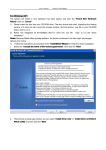
b. Press
Wireless USB Adapter
to next then press “Start PIN”.
c. After a successful connection it creates a Profile.
2
Type PIN below mode
a. Select “Type below mode ” in the PIN Entry Method.And write router ’s PIN Code in the “Pin
Code”.You can view router ’s PIN Code in the instructions of the router or the label on the back of the
router.
b. You can press “WPS Profile” to view WPS Profile.No change is reconmend
22