1
User’s Manual
Wireless USB Adapter
For Windows XP :
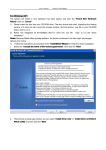
Found New Hardware
The system will detect a new hardware has been added, and start the “Found
Cancle
Wizard
Wizard”.Click on “Cancle
Cancle” .
1) Please insert the disc into your CD-ROM drive. The disc should auto start ,displaying the flowing
window ,if it does not start ,open the browser window ,find the autorun .exe file in your CD-ROM
folder, click to run it.
2) Ralink has integrated all the150Mbps 802.11n drive into one file . Click to run the “Drive
Installation ”.
Notes: Because Ralink often updates software, the drivers contained in the disc might be changed
without prior notice.
InstallShield Wizaed
1) Follow the instructions and prompts of the “InstallShield
Wizaed” to finish the driver installation:
Next
a. Select the “II accept the terms of the license agreements
agreements”, then click the “Next
Next”.
b.
Install driver only
Install driver and Ralink
There shows a setup type window, you can select “Install
only” or “Install
Next
WALN utility
utility” and then click the “Next
Next”.
3