1
Powerline User Interface
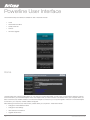
The Powerline Utility user interface is divided into tabs. These tabs include:
• Home
• Private Network Name
• Quality of Service
• Devices
• Firmware Upgrade
Home
Home provides a list of all the possible tasks you can perform in the Powerline Utility. To start a task, you first need to select the network
card connected to your Powerline Adapter. This is most helpful when you have more than one network card in your computer. When you
select a network card, the MAC Address of the Powerline Adapter connected to your computer appears. If there is no Powerline Adapter
connected to your computer, no MAC address will appear.
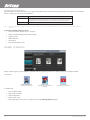
After selecting the network card, there are four possible tasks you can perform. These tasks include:
• Change the Private Network Name
• Change the QoS settings
• View devices in the network
• Upgrade the firmware
200Mbps Powerline Adapters User Guide
14
YML204
www.netcomm.com.au