1
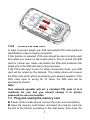
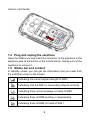
1.2.2 Unlock the SIM card In order to prevent illegal use, SIM card adopts PIN code (personal identification code) encryption protection. If this function is selected, PIN code should be input correctly each time when you power on the mobile phone, thus to unlock the SIM card for normal use. Users can disarm the SIM card protection but illegal use of the SIM card cannot be prevented. If the PIN code input is error for three consecutive times, your SIM card will be locked by the network. The mobile phone will enquire the PUK code which will be provided by your network operator. If the PUK code input is wrong for 10 times, the SIM card will be permanently barred. Note: Your network operator will set a standard PIN code (4 to 8 numbers) for you and you should change it to private password as soon as possible. 1.3 Plug and unplug the memory card Power off the mobile phone, remove the rear cover and battery. Open the memory card holder, and insert the memory card into the slot at the bottom according to the chat below, then close the 7