1
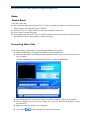
7. The progress of the conversion will be displayed is the Status field.
8. Copy the converted file to the player.
For more detailed instructions on this program, Press the “F” key to launch the help file.
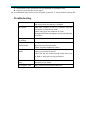
Troubleshooting
No Power
Make sure you have switched the player on.
And ensure that the battery is charged
No Sound
Make sure volume is not on 0 position and the
connection to earphone is valid.
Please make sure the earphone is clean.
Damaged MP3 files may appear to play but generate
no sound.
Strange characters
on display
Make sure you have chosen the correct language.
FM
has
performance
Change location to ensure good reception.
Earphone must be connected.
Switch off power appliance nearby
Cannot
Music
bad
Download
Check USB cable, and make sure the player is
properly connected to the PC.
Check files are the correct format. Music files must
be WMA or MP3 with no copy protection.
Video files will not
play
Ensure that video files have been converted prior to
download to the player.
For support visit
http://laserco.com.au/downloads.htm