1
Operation
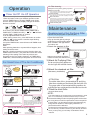
Emergency operation and test operation
Base Operation
Emergency Operation:
Pi
Use this operation only when the remote controller
is defective or lost.
When the emergency operation switch is
pressed,the" Pi "sound is heard once, which
means the start of this operation.
In this operation, the system automatically selects
the operation modes,cooling or fan or heat,
according to the room. temperature.
Remote controller
Room
Operation Designated Timer
temperature mode
temperature mode
Air flow
ABOVE 23OC
COOLING
26OC
NO
AUTOMATIC
BELOW 23OC
HEAT
23OC
NO
AUTOMATIC
(cooling only)
Room temperature
O
BELOW 23 C
Operation Designated Timer
Air flow
mode temperature mode
O
FAN
AUTOMATIC
NO
26 C
It is not possible to operate in dry mode.
1. Unit start
Press ON/OFF on the remote controller, unit starts.
2.Select operation mode
Press MODE button. For each press, operation mode
changes as follows:
Remote controller:
AUTO
COOL
DRY
FAN
HEAT
3.Select temp.setting
Press TEMP+ / TEMP- button
time the button is pressed, temp.setting
increase 1oC,if kept depressed, it will increase
rapidly
TEMP- Every time the button is pressed, temp.setting
decrease 1oC,if kept depressed, it will decrease
rapidly
Select a desired temperature.
TEMP+ Every
4.Fan speed selection
Press FAN SPEED button. For each press, fan speed
changes as follows:
Remote controller:
LOW
MED
AUTO
HI
Air conditioner is running under displayed fan speed.
When FAN is set to AUTO, the air conditioner
automatically adjusts the fan speed according to room
temperature.
Operation Remote Display
Controller Board
Mode
AUTO
COOL
DRY
Note
Under the mode of auto operation, air conditioner will
automatically select Cool or Heat operation according
to room temperature. When FAN is set to AUTO, the
air conditioner automatically adjusts the fan speed
according to room temperature.
In DRY mode, when room temperature becomes
lower than temp.setting+2 oC,unit will run intermittently
at LOW speed regardless of FAN setting.
HEAT
FAN
In FAN operation mode, the unit will not operate in
COOL or HEAT mode but only in FAN mode ,AUTO is
not available in FAN mode.And temp.setting is disabled.
In FAN mode,SLEEP operation is not available.
Test operation:
Test operation switch is the same as emergency switch.
Use this switch in the test operation when the room
o
temperature is below 16 C, do not use it in the
normal operation.
Pi Pi
Continue to press the test operation
switch for more than 5 seconds . After
you hear the "Pi" sound twice, release
your finger from the switch: the cooling
operation starts with the air flow speed "Hi".
Air Flow Direction Adjustment
1.Status display of air flow
Vertical flap
Pos.1
Pos.2
Pos.3
Pos.4
Pos.5
(Auto swing)
2.Left and right air flow adjustment(manual)
Move the vertical blade by a knob on air conditioner
to adjust left and right direction referring to Fig.
Remote controller can memorize each operation status. When starting it
next time,just press ON/OFF button and unit will run in previous status.
Cautions:
When adjusting the flap by hand,turn off the unit.
When humidity is high,condensate water might occur
at air outlet if all vertical louvers are adjusted to left or
right.
It is advisable not to keep horizontal flap at downward
position for a long time in COOLor DRY mode ,
otherwise, condensate water might occur.
Note:
When restart after remote turning off, the remote
controller will automatically memorize the previous
set swing position.
2