1
Industrial Touch Panel
PV Installation manual
Installation
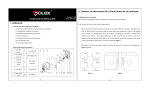
Before setup HMI, please cut a hole according to the cutout dimension.
Please see below pictures for your installation reference.
PV037-LSK
159.5mmx88.5mm
PV037V-LSK
88.5mmx159.5mm
PV057-LST
PV057-BST
PV057-TST
174.5mmx132.5mm
How to install the HMI?
Put the HMI to the cut hole and sew the lock screws at the four assembling holes
on the HMI with average strength form the rear side. Please do not sew too tight
and without equational strength or it will damage the touch panel.
PanelVisa
A-5