1
12. ADVANCED FUNCTIONS
12.8 Fonts management
It is possible to store new font in addition to default fonts stored on Flash Disk. Fonts may be stored both on Flash
Disk and on the Memory Card.
The use of the Memory Card allows to handle more fonts (however, the max number of manageable fonts is limited
by the RAM memory reserved for fonts management).
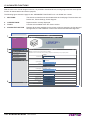
Embedded Web Server
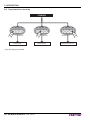
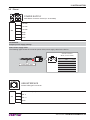
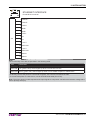
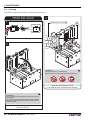
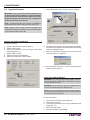
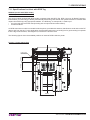
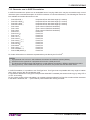
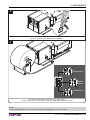
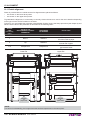
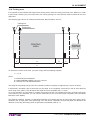
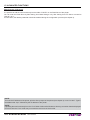
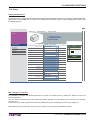
To add a new font to the printer enter the “FONT SETTINGS” page of the “PRINTER SUPPORT” section of the embedded Web Server (see the following figure).
DEVICE INFO
│
PRINTER SETTINGS
│
PRINTER SUPPORT
Web Site
< PRINTER >
R>
TE
RIN
<P
Ticket Printer
PRINTER SUPPORT
Font Settings
Download Driver
Warning : Use these function only when the printer is in standby!
All functions below, if used while the printer is executing a print job from communication port, may corrupt the printout.
Advanced Function
Picture Settings
Font Settings
Add New Font
Sfoglia...
Font to Add
Font Destination
Firmware Upgrade
Send Font
Add New Font
File System Free Space
Flash Drive
Memory Card
Free 1.02 Mb
Disk Not Found
Font Test
Font Description
Vera.ttf
ESC/POS - 11 cpi
Flash Disk
Font Test
Print Embedded Font Charmap
Exec Font Test
Delete Existing Font
Font Description
Delete Font
Vera.ttf
Flash Disk
Delete Selected Font
User manual
KPM302-KPM303 141